
Rubber Duck Antenna Selection & Ordering Guide
Dec 07,2025
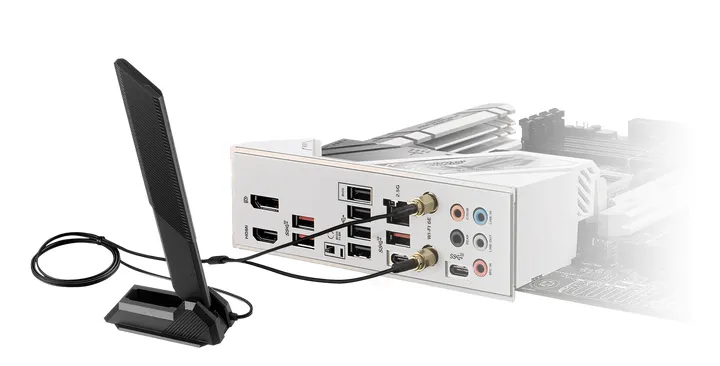
This opening visual establishes an intuitive understanding of the rubber duck antenna and introduces the core theme that even this common part can severely disrupt an RF chain if chosen incorrectly.
When engineers talk about compact Wi-Fi or IoT builds, the rubber duck antenna is often the first image that comes to mind — that stubby black whip you see on routers, handheld sensors, or gateway nodes. You’ll find it standing on Wi-Fi routers, IoT gateways, handheld scanners, or even custom telemetry boards scattered across any modern lab bench. It’s small, durable, and oddly familiar — the sort of part that just works until you pick the wrong one.
It’s also the unsung hero of 2.4 GHz reliability — cheap, rugged, and forgiving enough to survive endless design revisions. But if you’ve ever ordered one with the wrong connector, or chosen a gain that doesn’t match your layout, you already know how fast a “simple” part can derail an RF chain. Many teams learn that lesson the hard way — a quick test that suddenly shows a 10 dB drop because of a reversed polarity or poorly matched whip.
This guide walks you through how to choose and order a rubber ducky antenna that truly fits your device: the right form factor, connector, and gain for your mechanical design and RF budget — all while staying compliant and avoiding those frustrating back-and-forth emails before production.
Which rubber-duck antenna form fits your device?
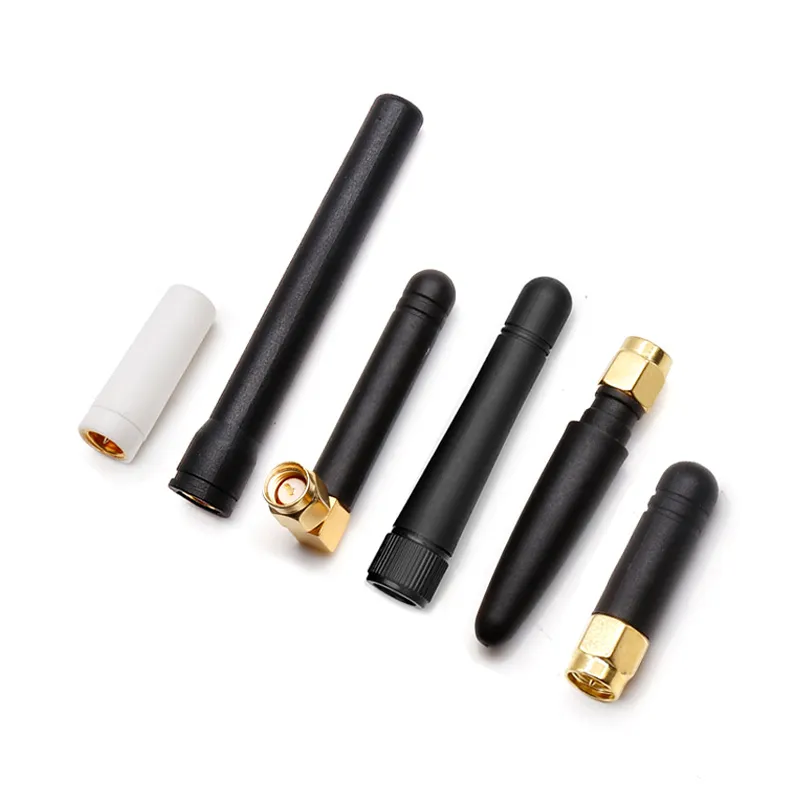
This diagram visually supports the “not one-size-fits-all” argument, helping engineers pre-select antenna forms based on device type, mechanical load, and coverage needs.
There isn’t a one-size-fits-all antenna, even within the “rubber duck” family. The form factor affects not only appearance but mechanical load, detuning risk, and polarization.
If your device is a handheld sensor or controller, a short whip (30–50 mm) keeps the center of gravity stable and avoids catching on sleeves. For routers and gateways, the standard length (80–120 mm) offers balanced gain while maintaining omnidirectional coverage in small offices or IoT hubs. For industrial or telemetry use, long whips (150–200 mm) with 6 dBi gain can stretch range — but remember, they flatten the elevation pattern, which might leave “dead cones” above or below the antenna plane.
Match handheld/router/IoT enclosures to whip length (short/standard/long)
Compact plastic enclosures typically detune slightly when the antenna is mounted too close to the ground plane or metallic shield. In tight spaces, a shorter 2 dBi whip reduces that effect. Conversely, in router housings where the antenna is elevated from PCB ground, you can safely use a 3 dBi or 6 dBi whip without major VSWR penalties.
Always prototype with the final housing — it’s surprising how a few millimeters of distance can shift return loss from 1.3:1 to 2:1.
Straight vs right-angle bodies and strain-relief on tight panels
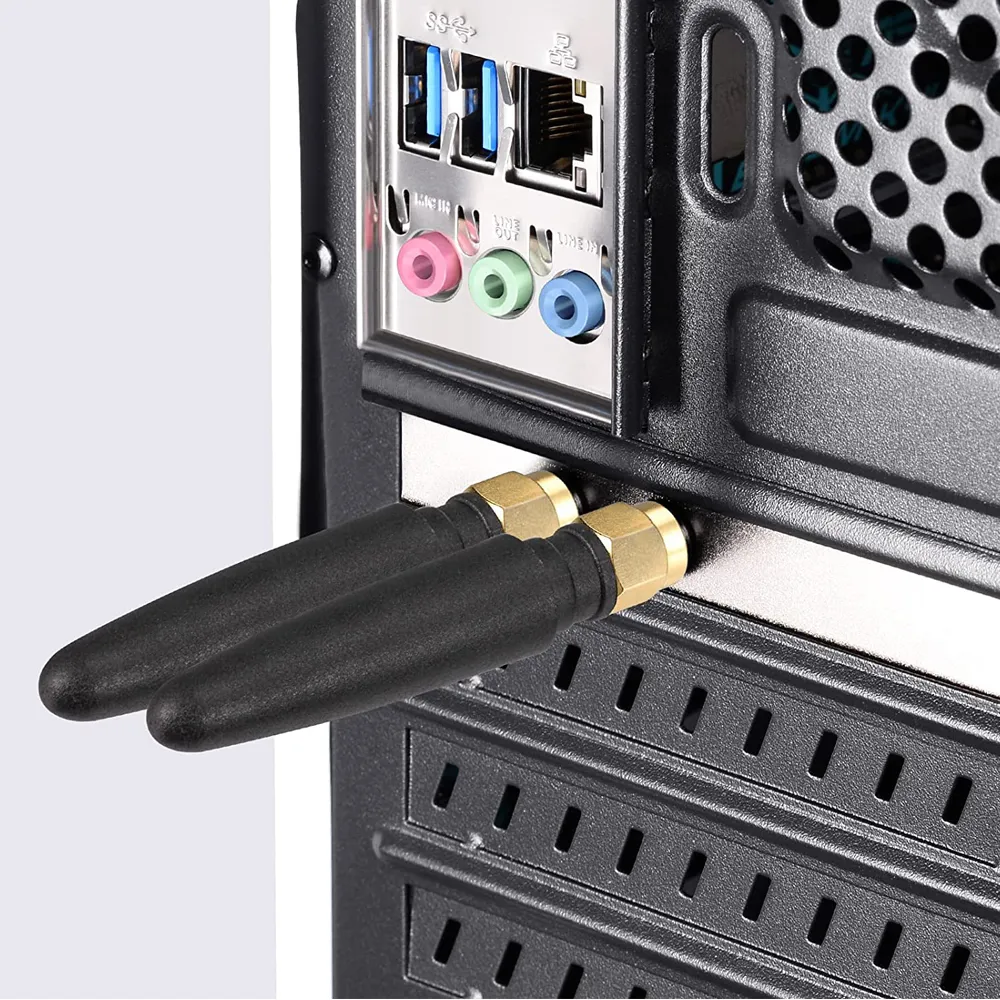
This diagram focuses on the impact of the antenna’s physical form on mounting reliability, serving as a key reference for choosing between straight or right-angle types during industrial design.
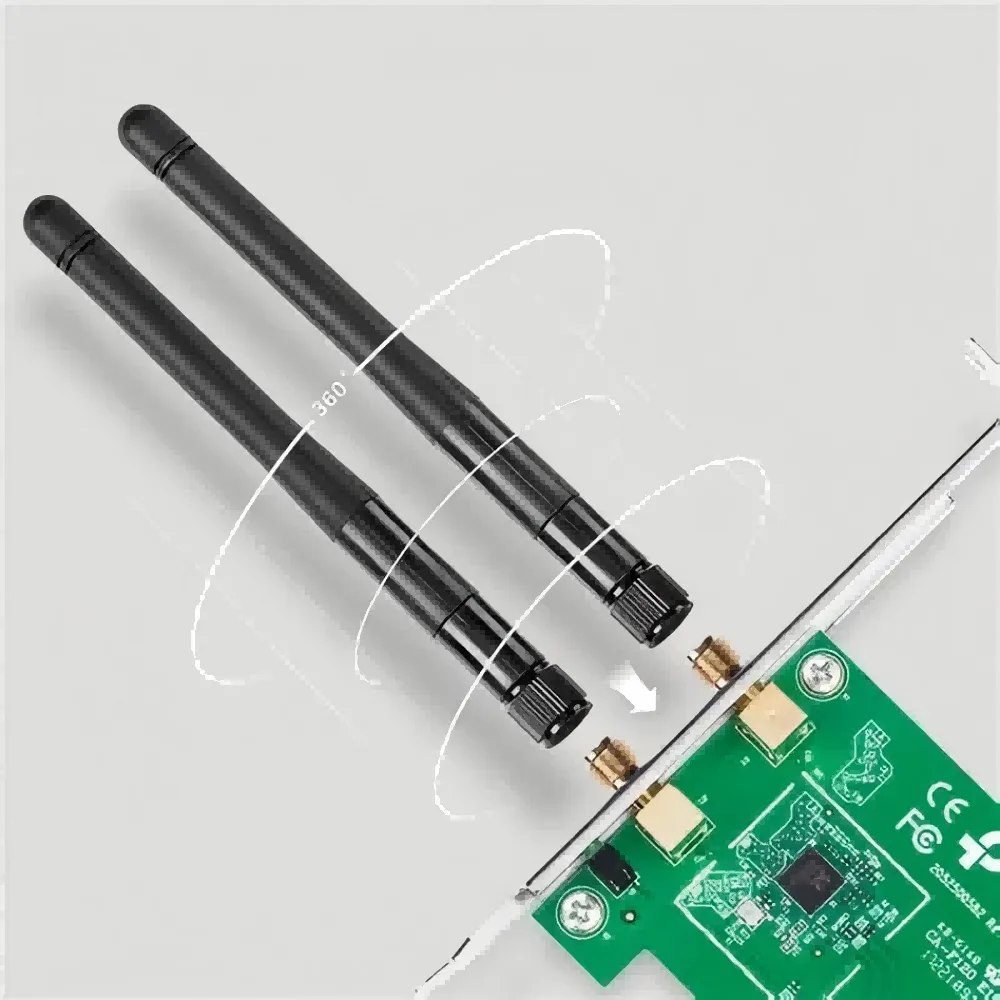
This product image relates to the document‘s discussion on “straight vs right-angle bodies” and mounting flexibility. The rotatable design addresses the need for fine-tuning antenna directionality at a fixed mounting point, serving as a practical variant between fixed straight and right-angle types, especially beneficial for field debugging and space-constrained applications.
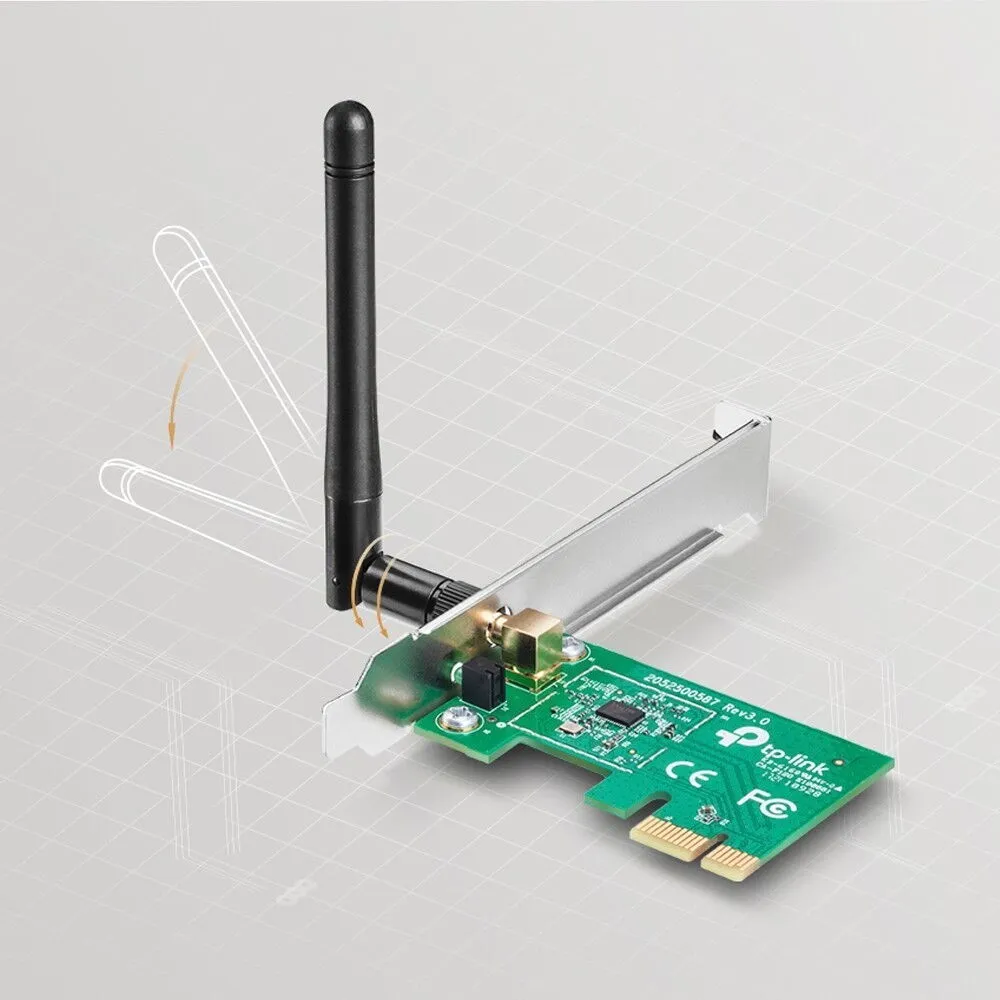
This image visually demonstrates a physical form innovation derived to meet the needs of handheld or mobile applications. The foldable feature directly addresses the document‘s considerations for “center of gravity stability” and “avoiding catching on sleeves,” embodying product design optimization for specific use cases like field inspections or mobile handheld terminals.
For panel-mounted routers or boxes installed against walls, right-angle rubber duck antennas prevent cable strain and keep the whip parallel to the surface. Straight versions are better suited to free-standing units or vertical orientations.
If you’re using bulkhead feedthroughs, confirm the antenna’s thread length matches the panel thickness; thin metal panels (< 1 mm) often require a washer or locknut to ensure RF ground continuity.
How do you pick SMA vs RP-SMA without ordering mistakes?
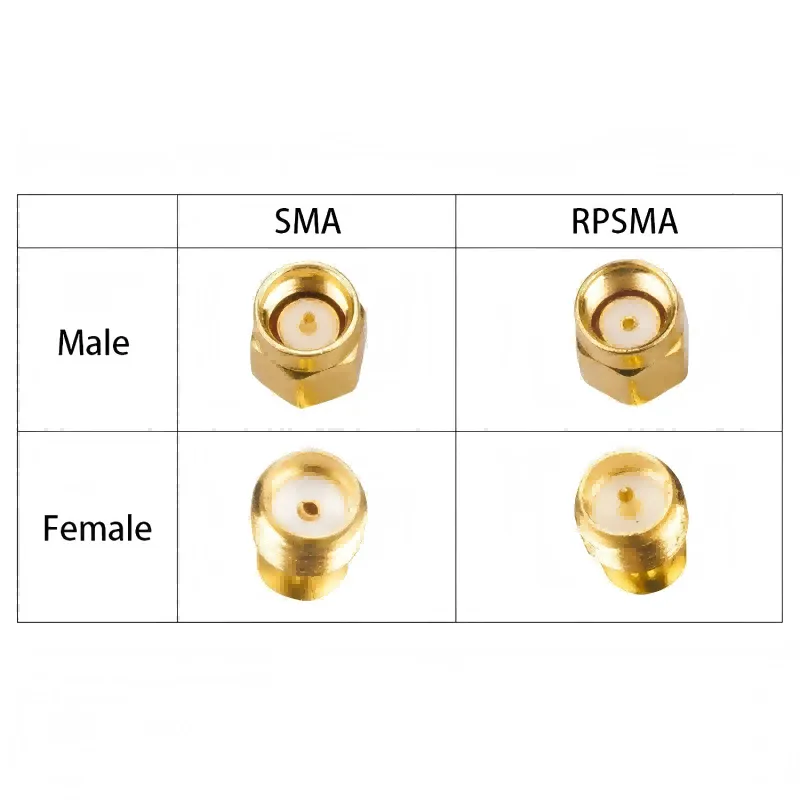
This diagram directly addresses the “most common — and expensive — mistake” noted in the document, providing a visual “5-second ID” method, making it an essential error-prevention tool for procurement and engineering staff.
The most common — and expensive — mistake is mixing SMA and RP-SMA connectors. They look nearly identical at a glance, but the gender reversal of the center pin determines whether your antenna connects or leaves you with an open port.
At TEJTE, nearly 40% of first-time returns on Wi-Fi antennas come from connector mismatches rather than electrical faults.
5-second pin/socket ID: male/female, inner pin vs inner hole
Here’s the fast way to tell:
- SMA Male to has an inner pin and outer threads.
- SMA Female to has an inner hole and outer hex nut (often panel-mount).
- RP-SMA Male to has an inner hole (reversed polarity!) with outer threads.
- RP-SMA Female to has an inner pin with an outer hex nut.
So when you see a “male with a hole,” you’re looking at an RP-SMA male. That single detail can save you days of reordering.
Color coding and label tips for mixed labs and field kits
In multi-team labs, mark RP-SMA antennas with colored heat-shrink or paint dots to avoid confusion. A quick label like “RP-SMA / 6 dBi / 2.4 GHz” printed on a small tag saves technicians from re-testing or cross-threading connectors.
If you maintain field kits, store SMA and RP-SMA parts in separate bins or small resealable bags labeled by gender and gain. It sounds trivial but dramatically cuts mix-ups on field maintenance jobs.
What gain do you really need — 2 dBi, 3 dBi, or 6 dBi for indoor coverage?
“Longer ≈ higher gain” trade-offs: flattened elevation & nulls
A 2 dBi antenna radiates nearly spherical coverage — perfect for handhelds and small rooms. A 3 dBi whip stretches that into a donut shape, slightly improving reach along walls. Once you jump to 6 dBi, the beam flattens further, which can cause vertical nulls directly above and below the antenna.
If your gateway sits on a ceiling or high shelf, that means devices directly underneath may see weaker RSSI. So match gain to geometry, not just “more is better.”
Apartment mesh vs warehouse aisles vs handheld telemetry
Will cable type and length quietly kill your 2.4 GHz link budget?
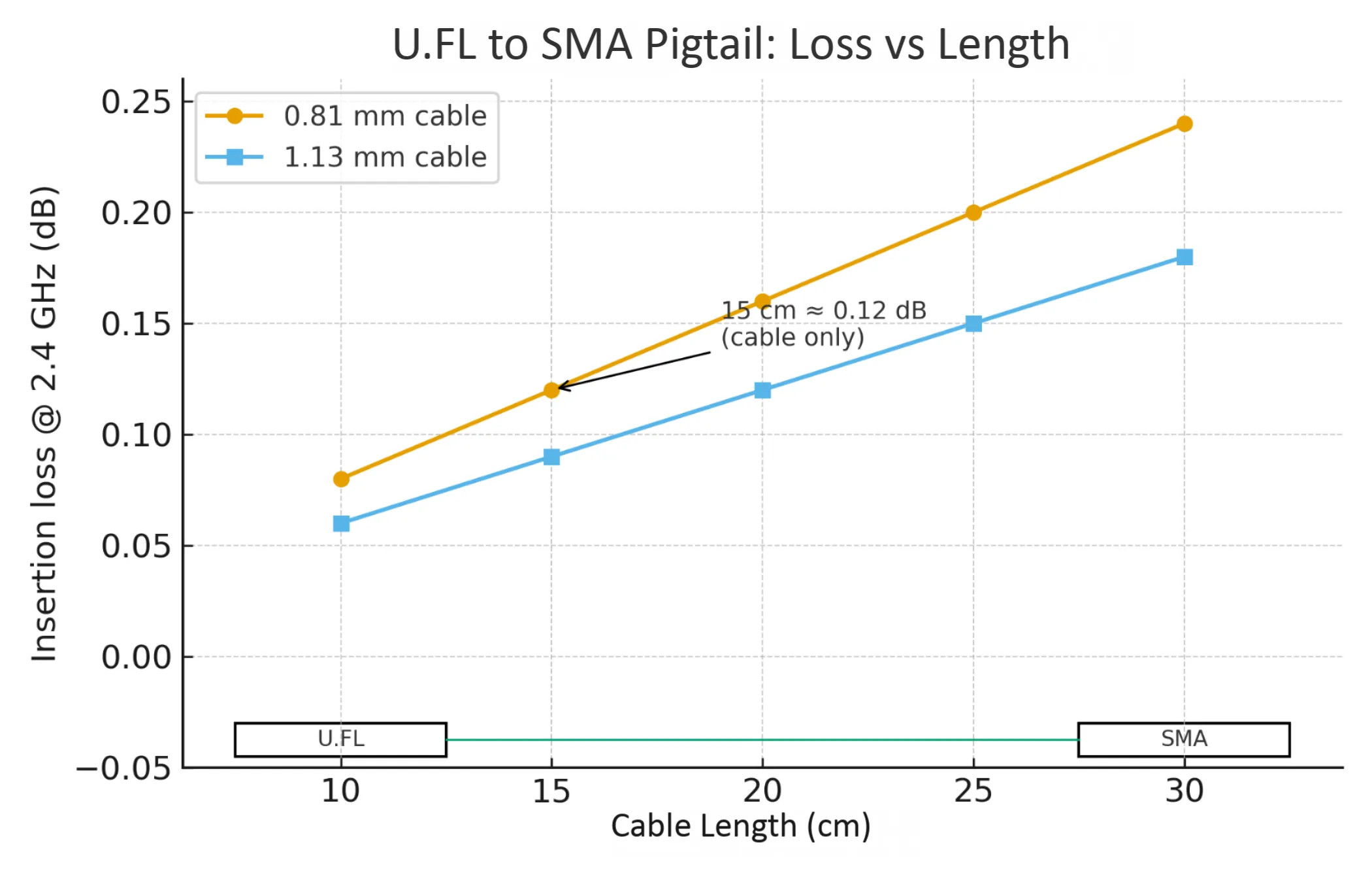
This diagram quantifies the “quiet” impact of cable loss on the link budget, emphasizing the importance of controlling pigtail length and selecting thicker cables in compact designs.
U.FL to SMA micro-coax loss vs length (0.81 / 1.13 mm)
If your board uses a U.FL (IPX) connector to feed the external antenna, remember:
- 0.81 mm cable loses roughly 0.008 dB/cm @ 2.4 GHz
- 1.13 mm cable loses about 0.006 dB/cm @ 2.4 GHz
That means a 15 cm 0.81 mm jumper costs nearly 1.2 dB before the signal even hits your rubber duck. Add a connector pair (≈ 0.15 dB) and you’ve lost almost 10% of your power.
For deeper insight, see our guide on U.FL to SMA micro-coax loss.
Connector-pair penalties and return-loss around 2.4 GHz
Each connector pair — SMA to pigtail, pigtail to antenna — adds insertion loss and potential mismatch. Typical return loss at 2.4 GHz hovers around –15 dB (VSWR ≈ 1.4:1) for quality assemblies, but poorly tightened connectors or low-grade cables can degrade it to –10 dB or worse.
Keep connector pairs minimal and torque SMA nuts correctly (typically 0.45–0.56 N·m). If you’re chaining multiple adapters for test setups, expect measurable ripple on the S21 trace.
Should you stay with rubber-duck or move to an outdoor omni?
There’s a point where a “rubber duck” stops being enough — especially when humidity, sunlight, or lightning enter the picture.
A rubber duck antenna shines indoors, in labs, or inside plastic enclosures. But if your installation faces UV or rain, you’re better off with an outdoor omnidirectional Wi-Fi antenna, rated IP65 or above.
IP/UV, mast-mount torque, lightning and ground blocks
Outdoor omni units feature UV-stabilized housings, O-rings, and grounded N-type connectors that handle more torque (1.0–1.5 N·m). Many include drain holes to prevent condensation buildup. If your site uses mast-mount clamps, torque them to spec and add a ground block at the entry point to protect downstream radios.
TEJTE’s omni lines use the same SMA interface options, so you can reuse your internal coax chain.
When a directional patch/Yagi beats an omni despite SV wins
Don’t overlook directionals. If your IoT deployment covers long corridors or line-of-sight links, a patch or Yagi antenna may outperform even a high-gain rubber duck. They concentrate EIRP where it matters.
Still, keep a rubber duck nearby for quick on-site diagnostics — it’s the RF engineer’s equivalent of a screwdriver: not perfect for everything, but always handy.
Where should you place and orient the antenna for reliable Wi-Fi/IoT?
Human-body detune, chassis coupling, and tilt for elevation nulls
The human body absorbs and detunes 2.4 GHz energy. Hold a handheld node tightly, and you’ll see RSSI drop by 3–5 dB. That’s not a manufacturing defect — it’s physics. To mitigate this, mount antennas away from metal or large ground planes, and if it’s handheld, use shorter 2 dBi whips that suffer less detune.
In wall-mounted IoT hubs, a slight tilt (10–15°) often reduces the vertical null caused by 6 dBi whips. The same trick helps on gateways placed near ceilings. A few degrees off-axis can stabilize coverage on multiple floors.
Fast on-site A/B tests: cable to connector to antenna swap order
Before finalizing your rubber duck antenna selection, run quick A/B swaps on-site:
- Replace the cable (shorter, thicker coax).
- Swap connectors (tighten or reseat).
- Replace the antenna (2 dBi to 3 dBi to 6 dBi).
This order isolates losses logically. You’ll instantly see whether your problem lies in transmission, mechanical fit, or radiation pattern. These steps also appear in our 2.4 GHz Antenna for IoT field checklist.
Can you validate performance quickly before freezing the BOM?
RSSI/throughput smoke tests and MCS spread snapshots
Use a laptop or gateway in throughput test mode (e.g., iperf3) to run RSSI and throughput sweeps while cycling antennas. Focus on the MCS index spread — if the antenna maintains higher MCS levels (7–9) over distance, its pattern is stable and multipath is minimal.
Even informal “smoke tests” tell a lot: a 1 dB RSSI improvement translates to roughly 12% more range in typical indoor spaces. That’s a massive gain for IoT sensors with small budgets.
Coexistence checks near APs, gateways and noisy 2.4 GHz ISM devices
Always test near real interference: microwaves, Bluetooth hubs, other APs. Rubber duck antennas with narrower beamwidth (6 dBi) tend to reject side noise better than short 2 dBi ones. For dense IoT clusters, this small directivity actually stabilizes links.
If your project includes both 2.4 GHz and sub-GHz radios (e.g., 433 MHz or LoRa), maintain at least 50 mm spacing between antennas to prevent near-field coupling.
Order like a pro: what exact attributes must be on the PO?
Connector/thread, gender, gain, length, color, angle, temp, compliance
Here’s the list you can copy directly into your order spec:
- Connector type: SMA / RP-SMA
- Gender: male/female (pin/hole)
- Gain: 2 dBi / 3 dBi / 6 dBi
- Whip length: short / standard / long
- Orientation: straight / right-angle
- Color: black or white
- Mount: panel / bulkhead / direct screw-on
- Cable tail (if any): 0.81 mm or 1.13 mm, length in cm
- Operating temperature range
- Compliance: RoHS / REACH
- Torque spec (e.g., 0.45–0.56 N·m)
A neat trick: include TEJTE SKU and note “RMA-ready labeling” to guarantee each antenna ships with its compliance mark and torque torque-tested connector.
Labeling, torque spec, lead time/MOQ, RMA-ready part marks
2.4 GHz Rubber-Duck Link-Budget Mini-Calculator

Positioned in the latter part of the guide, this summary image serves as a visual catalog, materializing the textual descriptions into physical products after all key technical parameters and selection points have been introduced. It helps engineers and procurement staff quickly grasp the diversity of products available from TEJTE, echoing the earlier “Ordering Matrix” or SKU list, and acts as a bridge connecting technical selection with final procurement decisions.
| Parameter Type | Symbol / Input Type | Example Value | Formula / Note |
|---|---|---|---|
| TX power | tx_power_dBm | 18 dBm | Typical Wi-Fi module output |
| Antenna gain | gain_dBi | 3 dBi | 2 / 3 / 6 dBi rubber duck |
| Cable type | cable_type | 1.13 mm | Loss ≈ 0.006 dB/cm @ 2.4 GHz |
| Cable length | cable_length_cm | 20 cm | - |
| Connector pairs | connector_pairs | 2 | ~ 0.15 dB each |
| Receiver sensitivity | receiver_sensitivity_dBm | -92 dBm | @ MCS 7 |
| Path loss | path_loss_dB | 90 dB | Typical indoor link |
Formulas
cable_loss = loss_per_cm(type) × cable_length_cm
conn_loss = connector_pairs × 0.15
EIRP_dBm = tx_power_dBm − cable_loss − conn_loss + gain_dBi
link_margin_dB = EIRP_dBm − path_loss_dB − receiver_sensitivity_dBm
Example Result
EIRP = 18 − (0.006 × 20) − 0.3 + 3 = 20.9 dBm
Link Margin = 20.9 − 90 − (−92) = 22.9 dB
A link margin above 10 dB means your setup is solid; around 6 dB is usable but sensitive to connector looseness or cable routing. If you fall below that, shorten the cable, cut one adapter pair, or move to a higher-gain rubber duck antenna.
Pro tip: Many teams forget to include connector losses in their test logs — yet two extra adapters can quietly consume a full decibel. Always note them in your spreadsheet before signing off the design.
Once your link margin ≥ 6 dB, record that exact configuration — connector type, gain, cable length — directly into the Ordering Matrix below. Doing so ensures the same electrical and mechanical setup appears in your final purchase order (PO) or ERP entry, preventing mismatched shipments later on.
You can cross-reference detailed loss behavior in our RG316 vs RG174 micro-coax comparison.
What’s new for rubber-duck antennas in 2024–2025 and why it matters?
Wi-Fi 7 coexistence while 2.4 GHz remains for low-power IoT
Next-generation access points now ship with tri-band omni platforms, meaning a single mechanical frame can host 2.4 GHz, 5 GHz, and 6 GHz elements. For engineers, this means your rubber duck antennas can share mounts or ground interfaces with new higher-band counterparts, simplifying enclosure design.
TEJTE’s own SMA-series whips adopt low-PIM brass inserts and UV-stabilized housings, proven to maintain < 0.4 dB loss drift after 1 000 h of UV exposure — a small but real differentiator for outdoor routers or gateways.
Enterprise / IIoT tri-band omni platforms and accessory standardization
In industrial networks, the 2025 trend is standardized accessory torque and unified O-ring dimensions. This ensures antennas, feedthroughs, and SMA extension cables can be interchanged without retuning VSWR. The result: shorter qualification cycles and fewer SKU variants.
If your team manages multiple sites, adopting standardized rubber duck antenna part numbers streamlines both logistics and RF certification paperwork.
FAQ — Rubber-Duck Antenna Questions, Answered
How do I tell SMA from RP-SMA on a rubber-duck antenna in under 5 seconds?
Look directly at the center contact — that’s where the truth hides.
- Pin = SMA Male
- Hole = SMA Female
If you spot a “pin on a female” or a “hole on a male,” it’s RP-SMA (reversed polarity). This visual trick works faster than checking datasheets in the field.
For a clear photo comparison, see the connector chart in SMA Extension Cable: Length & Loss.
Does a 6 dBi rubber-duck always improve indoor coverage compared with 2–3 dBi?
Not necessarily. Higher gain flattens the pattern.
A 6 dBi whip is excellent for warehouse aisles or long corridors, but directly beneath it you may find weak spots. For apartment or office routers, a 3 dBi antenna usually balances reach and uniform coverage better.
Think of it like a flashlight beam — too focused, and you miss what’s right in front of you.
What’s a safe maximum length for a U.FL to SMA pigtail at 2.4 GHz for handhelds?
Keep it short. Under 20 cm for 1.13 mm coax or 15 cm for 0.81 mm is the rule of thumb.
Each extra centimeter quietly steals 0.006–0.008 dB. It doesn’t sound like much until you chain three adapters and wonder why the range just shrank by ten percent.
For quick checks, revisit the Link-Budget Mini-Calculator in this guide or read our U.FL to SMA Pigtail Guide for measured examples.
When should I switch from a rubber-duck to an outdoor omni for corridor coverage?
Once your install faces sunlight, rain, or long hallways, move up to an outdoor omnidirectional antenna (IP65+).
Its sealed housing, N-type base, and torque-rated mount handle harsh environments far better. Rubber ducks shine indoors; omnis rule outdoors.
You can compare mechanical specs in our Omnidirectional Antenna Selection & Ordering Guide.
Why does the antenna work worse when I hold the device? (body detuning)
At 2.4 GHz, the human body behaves like a large lossy dielectric.
Your hand shifts the tuning point and kills up to 5 dB of efficiency. The fix is simple: use shorter whips, give the antenna breathing space from the chassis, or add a small isolation sleeve.
In handheld IoT testers, many engineers compare rubber-duck and chip antennas side-by-side just to see which one “forgives” the hand grip more.
Do I need a torque wrench for SMA on panel feedthroughs, and what values are typical?
Absolutely. Finger-tight isn’t enough for RF. Proper torque prevents micro-gaps that show up as ripple in a VSWR plot.
Use 0.45–0.56 N·m for SMA and about 1.0 N·m for N-type.
Over-torque it, and you’ll strip threads or deform the PTFE center.
TEJTE ships each antenna bag with torque specs printed right on the label — part of our “RMA-ready” assurance for field replacements.
Where can I order certified rubber-duck antennas for IoT and Wi-Fi use?
You can source both SMA and RP-SMA rubber-duck antennas directly from TEJTE — each SKU listed in this guide (for example, TJA-SMA-02S or TJA-RSF-06R) comes fully tested, with RoHS / REACH compliance, torque verification, and traceable batch codes.
For international orders, TEJTE provides short lead times and consistent mechanical fit — exactly what purchasing teams need when standardizing multiple IoT models.
Tip: Always include the TEJTE SKU in your PO notes; it saves hours when re-ordering or matching replacements later.
Expert Tips Before You Finalize Your BOM
1. Prototype the full chain, not just the antenna.
Always test with the actual coax and connector pair you’ll deploy. Half of measured mismatch issues arise from intermediate adapters, not the whip itself.
2. Avoid over-specifying gain.
Unless you’re covering long aisles, 3 dBi gives near-ideal omnidirectional reach. 6 dBi can reduce multipath tolerance indoors.
3. Standardize your SKUs.
For enterprise fleets, pick one SMA and one RP-SMA variant per gain class. This avoids lab confusion and simplifies global sourcing.
4. Use short pigtails wherever possible.
At 2.4 GHz, every 10 cm of 0.81 mm coax adds roughly 0.8 dB loss. That’s noticeable.
5. Confirm compliance marks early.
Include RoHS/REACH requirements in the PO. Customs and audit teams love those lines spelled out.
Takeaway — Building a Reliable 2.4 GHz Chain
In the 2025 landscape of Wi-Fi 7 routers, industrial gateways, and connected sensors, the humble rubber duck antenna still earns its place. It’s the quiet workhorse of 2.4 GHz networks — no firmware, no drivers, just physics done right. When matched carefully, it delivers dependable range, stable VSWR, and clean radiation patterns that stay within spec even after thousands of power cycles.
You don’t need to overspend or over-engineer it. Focus instead on the small, real-world details: correct connector gender, torque accuracy, and keeping coax runs as short as possible. Those habits save more projects than any software patch ever will.
For deeper fine-tuning, compare indoor whips with outdoor units in our Omnidirectional Wi-Fi Coverage Guide or study signal-chain losses in RG316 vs RG174. Together, they form a complete reference for engineers who design, test, and deploy IoT and Wi-Fi systems every day.
Pro tip: Keep one calibrated rubber duck in your lab as a “known good” reference antenna. It’s a simple trick that catches many hidden connector or cable issues before they reach the field.
At TEJTE, our engineers design, test, and supply RF antennas and connectors optimized for real-world conditions — from compact handheld IoT nodes to enterprise Wi-Fi networks. Each piece is torque-verified, compliance-certified, and ready to move your prototype into production with confidence.
In short, get the physics right, respect the small numbers, and your rubber duck antenna will quietly keep every packet flying exactly where it needs to go — reliably, efficiently, and without surprises.
Bonfon Office Building, Longgang District, Shenzhen City, Guangdong Province, China

A China-based OEM/ODM RF communications supplier
Table of Contents
Owning your OEM/ODM/Private Label for Electronic Devices andComponents is now easier than ever.