
Omnidirectional Antenna Selection & Ordering Guide

Dec 06,2025

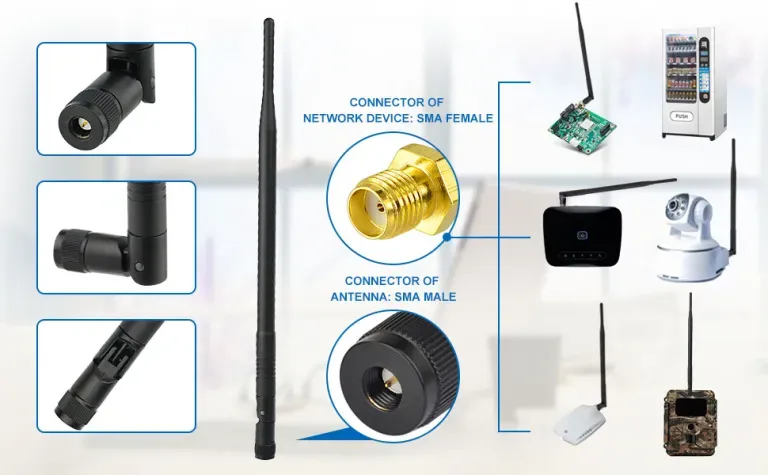
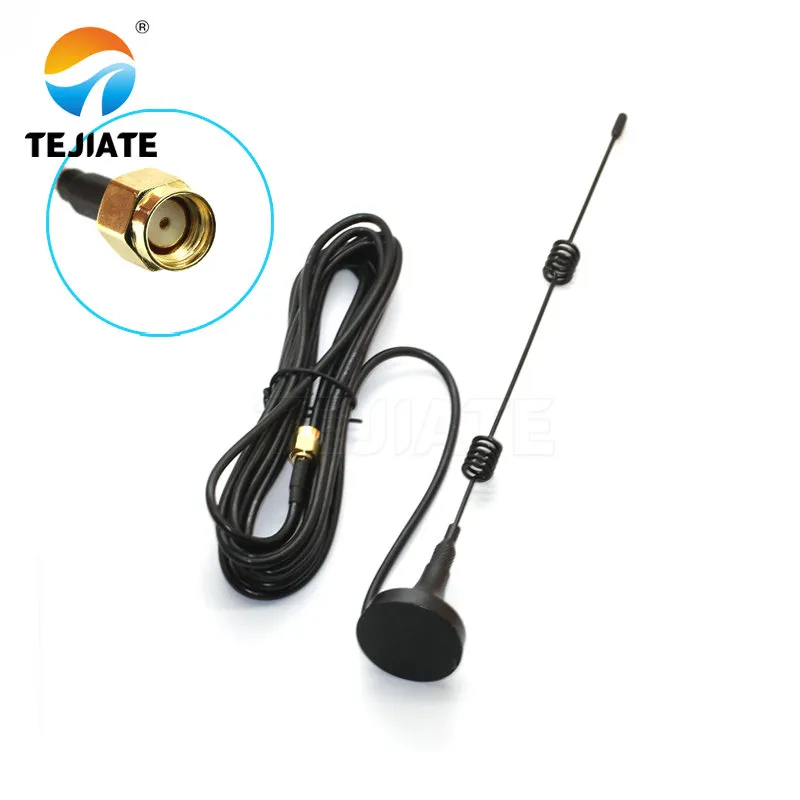
Illustration of omnidirectional antenna selection, showing antenna-to-device connection

This diagram is used to emphasize the importance of physical interface matching during the initial selection of omnidirectional antennas, preventing signal loss or compatibility issues due to connector mismatches.
Omnidirectional Antenna Selection & Connection Diagram

In every Wi-Fi or IoT deployment, the humble omnidirectional antenna quietly defines whether your signal holds steady or drops off after a few meters. It’s what allows your 2.4 GHz nodes to talk seamlessly across walls, plastic housings, or rooftops. But selecting one isn’t about choosing “2 dBi or 5 dBi.” It’s a series of small but critical engineering calls — antenna form, connector, gain, cable type, and how all these fit your housing and PCB.

When done right, your prototype performs as simulated. When wrong, you burn days debugging what turns out to be a reversed connector or 1 dB too much cable loss.

Which omnidirectional antenna form fits your device?

The first decision is physical: external rubber-duck or internal embedded? External omnis — the classic screw-on type — use SMA or RP-SMA ports and are common in routers, gateways, and outdoor IoT hubs. Internal ones, such as FPC, PCB, or ceramic antennas, hide under plastic shells for compact designs. Each form has trade-offs in efficiency, detuning risk, and mechanical durability.

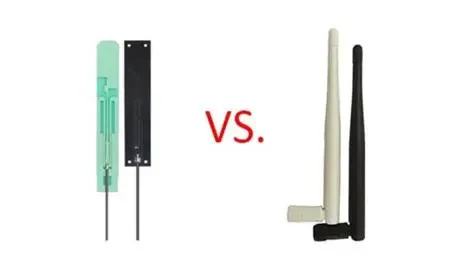
Compare rubber-duck (external) vs internal options (FPC/PCB/ceramic)

Comparison chart between rubber-duck antennas and internal antennas (FPC/PCB/ceramic)

This chart assists engineers in selecting the most suitable antenna form based on enclosure material, space constraints, and application scenarios.
Comparison chart between rubber-duck antennas and internal antennas (FPC/PCB/ceramic)

External “rubber-duck” antennas deliver solid 360° azimuth coverage and are easy to replace or reposition. At 2.4 GHz, a 2–3 dBi ducky performs almost ideally in open air. Internal antennas like FPC or ceramic save space but depend heavily on enclosure clearance and material.

In our lab builds, once metal frames or coated plastics are involved, the external version usually wins for consistency. (You’ll find similar reasoning in the 2.4 GHz antenna selection guide that deals with confined IoT nodes.)

Form Type Typical Gain Mounting Ideal Use
Rubber-duck (external) 2–6 dBi SMA / RP-SMA port Routers, outdoor CPE
FPC adhesive (internal) 1–3 dBi Inside plastic case IoT sensors
PCB trace 0–2 dBi On main board Compact modules
Ceramic chip 0–1.5 dBi Solder-mounted Wearables

Map enclosure materials (ABS/PC/metal) to omni choices

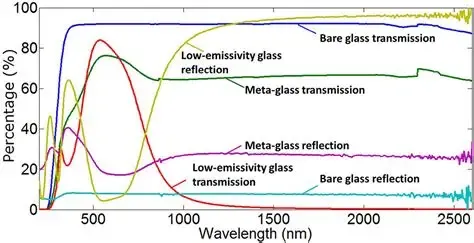
Wavelength chart showing RF transmission and reflection for different materials

This diagram explains how enclosure materials affect antenna performance, aiding designers in considering RF material properties during antenna placement.
RF Material Transparency Impact Diagram

Material transparency to RF changes everything.

  • ABS / PC plastics: almost invisible to 2.4 GHz waves — great for internal omnis.
  • Metal shells: act like a cage; use a bulkhead SMA to exit the housing instead.
  • Carbon-filled or painted plastics: often detune FPCs; spacing and adhesive backing help.

When working with metal boxes, the best compromise is a rubber-duck omni mounted through a bulkhead SMA port. It keeps shielding intact but lets RF radiate freely.

How do you pick the right connector — SMA or RP-SMA without mistakes?

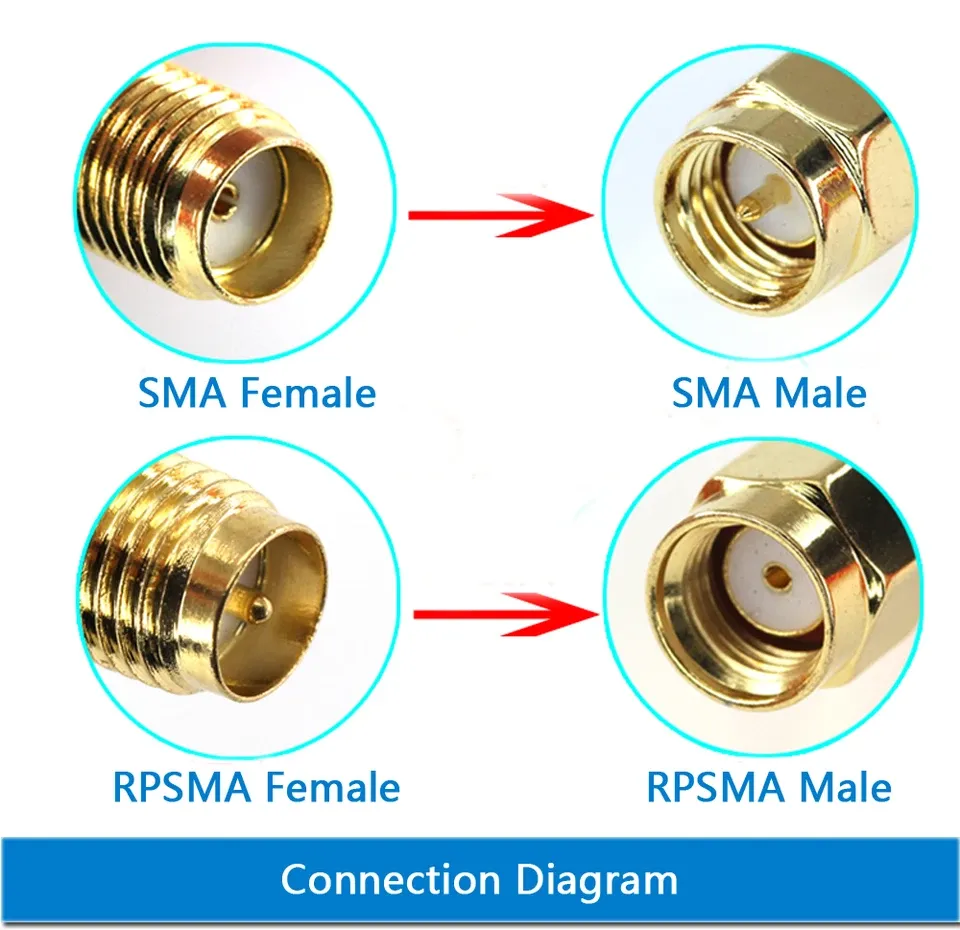
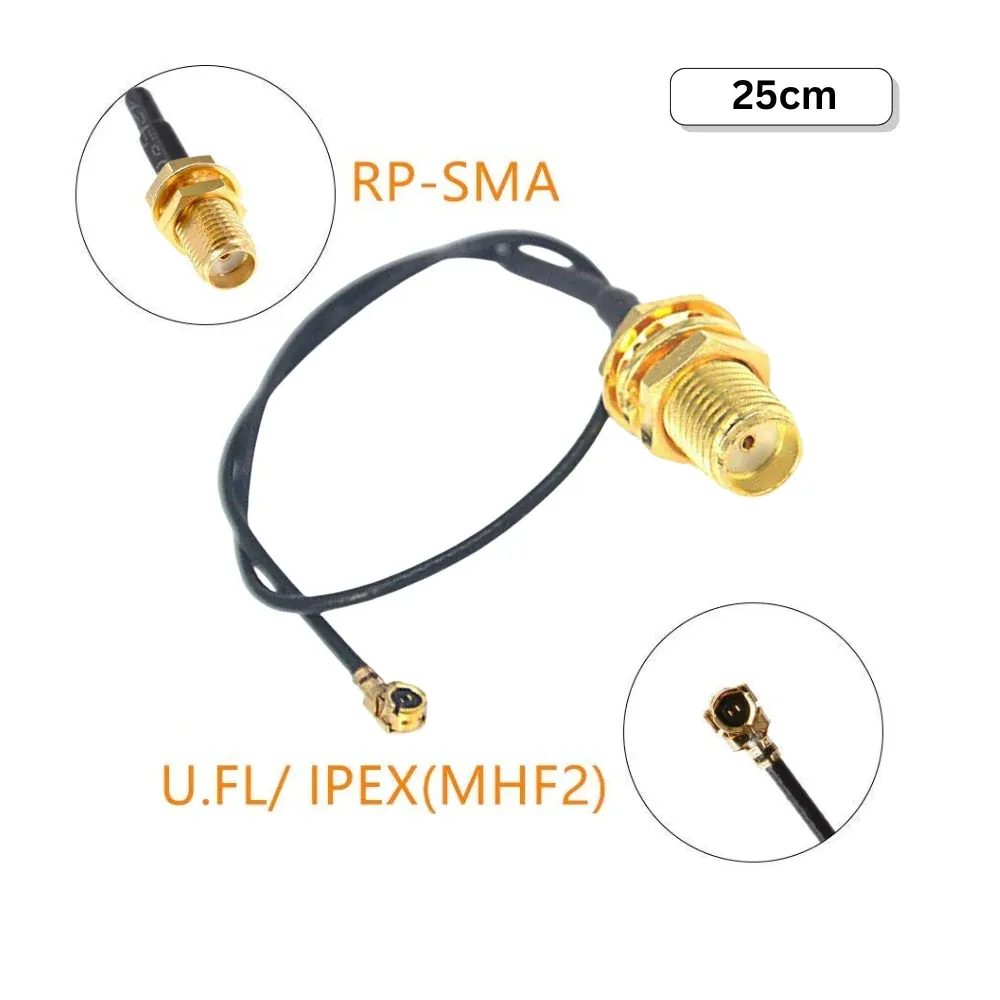
SMA male-to-female and RP-SMA extension cable options

The photo explains common SMA extension cable configurations: male-to-female for general use, male-to-male for specific setups, and RP-SMA for WiFi routers.
sma-male-female-rp-extension
Connector confusion is the number-one cause of shipment returns. Both SMA and RP-SMA look nearly identical until you peer inside: the gender swap happens at the center pin, not the threads. Many engineers mis-read datasheets and end up ordering the opposite gender.

5-second pin/socket ID and common ordering traps

Quick field rule:

  • SMA-male to pin inside
  • RP-SMA-male to hole inside

If your module port shows a pin, it’s RP-SMA-female, so you need an RP-SMA-male antenna. We’ve seen multiple teams lose a week waiting for replacements simply because of this. When in doubt, pull up a photo-based reference like the SMA vs RP-SMA quick ID guide before submitting your PO.

Datasheets can also mislabel “plug/jack.” Always double-check the drawing or physically verify before mass ordering — procurement staff often rely on textual names alone.

Straight vs right-angle; bulkhead and bendable joints

Connector orientation isn’t just cosmetic. Straight types give the best match and lowest return loss but require headroom. Right-angle or bendable joints make sense in compact routers or gateways with limited clearance.

If your design must exit a metal wall, go for bulkhead SMA/RP-SMA versions; they seal better and allow proper torque tightening. Each variant influences strain relief, so specify it explicitly — type, angle, nut set, and torque spec — right next to gain and length in your BOM.

What gain do you really need — 2 dBi, 3 dBi, or 6 dBi for omni patterns?

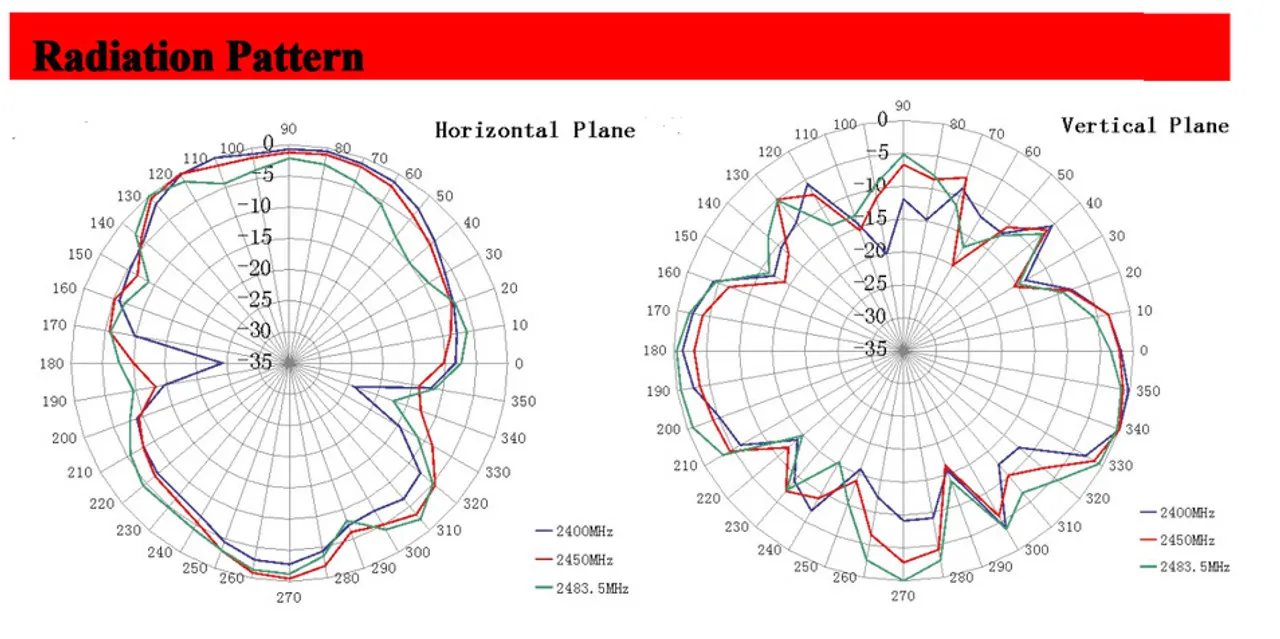
Radiation pattern comparison of omnidirectional antennas with different gain levels

This diagram helps engineers understand that higher gain is not always better and that trade-offs should be made based on actual coverage needs (e.g., multi-floor environments).
Omnidirectional Antenna Gain vs Radiation Pattern Diagram
Engineers often chase “high-gain omni antennas” assuming more is better, but in 2.4 GHz networks, that’s not always true. A 2 dBi omni radiates a round, doughnut-shaped field that fills a room evenly. A 6 dBi model compresses that shape into a flatter “pancake,” trading vertical reach for horizontal distance.

“Longer ≈ higher gain” trade-offs; pattern flattening & nulls

As antenna length increases, vertical lobes shrink. That’s why ceiling-mounted APs with long sticks sometimes show dead zones right beneath them. “Omni” refers to azimuth coverage only — not elevation. If your IoT nodes live on different floors, stick to 2–3 dBi.

Engineers designing mixed setups often compare elevation slices to verify null depth; the results align with what’s explained in the omnidirectional Wi-Fi antenna datasheets across vendors.

Indoor mesh vs outdoor CPE vs handheld IoT

Different use cases favor different gains:

  • Indoor mesh routers: 2–3 dBi ensures vertical consistency.
  • Outdoor corridor or CPE links: 5–6 dBi extends line-of-sight.
  • Handheld IoT sensors: 1–2 dBi keeps efficiency without long protrusions.

Match the gain to geometry, not appearance — a visually “strong” antenna that’s too tall can sabotage multi-level coverage.

Will cable type and length quietly kill your omni link budget?

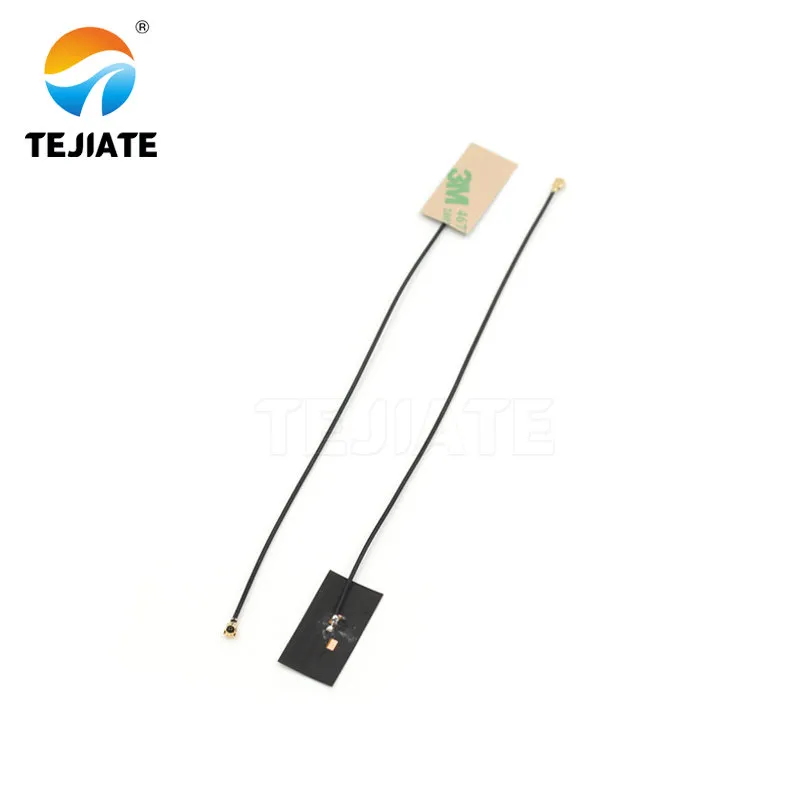
Diagram of a U.FL to SMA pigtail cable

This diagram illustrates the role of pigtail cables in the RF link and the insertion loss they may introduce, emphasizing the importance of cable selection and length control.
U.FL to SMA Pigtail Cable Structure Diagram

The pigtail cable between your RF board and antenna connector often steals more signal than users realize. Short U.FL to SMA pigtails, usually built from 0.81 mm or 1.13 mm micro-coax, can lose 0.6–0.8 dB per 100 mm @ 2.4 GHz. Two connector pairs add another 0.3 dB.

That’s why many engineers now verify with a quick link-budget calculation before locking their cable length — a habit borrowed from our U.FL to SMA pigtail guide, which details typical attenuation curves for micro-coax.

Even half a dB of unexpected loss can ruin certification margin, so keep cables as short as mechanical limits allow.

Omni Link Budget Mini-Calculator

Inputs:

tx_power_dBm, gain_dBi, cable_type ∈ {0.81, 1.13}, cable_length_cm, connector_pairs, freq = 2.4 GHz, path_loss_dB, receiver_sensitivity_dBm

Typical constants:

loss_per_cm_0.81 ≈ 0.008 dB/cm @ 2.4 GHz

loss_per_cm_1.13 ≈ 0.006 dB/cm @ 2.4 GHz

connector_loss ≈ 0.15 dB per pair

Formulas:

cable_loss = loss_per_cm(type) × cable_length_cm

conn_loss = connector_pairs × 0.15

EIRP_dBm = tx_power_dBm − cable_loss − conn_loss + gain_dBi

link_margin_dB = EIRP_dBm − path_loss_dB − receiver_sensitivity_dBm

Outputs: EIRP_dBm and link_margin_dB

Rule of thumb: If link_margin < 6 dB, shorten the pigtail, reduce connector count, or move to a lower-loss cable such as RG316 (see our RG316 vs RG174 comparison for attenuation data).

Where should you place an internal omni antenna in tight enclosures?

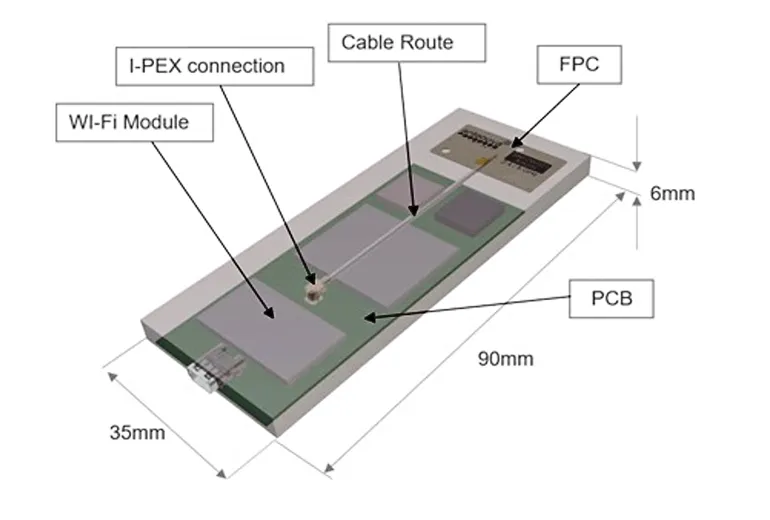
Layout diagram of internal antenna placement within a compact enclosure

This diagram assists engineers in optimizing internal antenna placement to avoid performance degradation or detuning due to poor layout.
Internal Omnidirectional Antenna Placement & Routing Diagram
When you switch from a rubber-duck to an internal omni, placement becomes the hidden battleground. Even the best FPC or ceramic antenna fails if it’s glued next to ground planes or metal brackets. Positioning can change VSWR from 1.5:1 to over 3:1 instantly.

FPC keep-out, adhesive, ground clearance, detuning by metal

For FPC antennas, always respect the “keep-out” area marked in the datasheet — usually 5–10 mm from metal parts or ground fills. Many IoT engineers skip this when squeezing boards into housings, then wonder why range halves.

Mount the antenna with its adhesive side on the inner wall of a non-metallic enclosure, facing outward. Avoid folding or bending; even a gentle curve can shift resonance by 100 MHz.

If your enclosure uses a metal frame, create a small RF window or plastic slot. Internal antennas can still perform well if you maintain at least 3–5 mm spacing from conductive surfaces and run a short, low-loss pigtail to the main PCB. We often reference this technique when tuning small sensors — it aligns with practices shown in the SMA extension cable length and loss guide, which covers micro-coax routing best practices.

PCB/ceramic do’s & don’ts; quick A/B placement tests

For PCB traces, run a controlled impedance feed line (50 Ω) and ensure the antenna region sits clear of copper on all layers. Ceramics work best when soldered near an edge with air exposure.

A simple A/B test — flipping orientation or moving 5 mm away from a battery — often reveals a measurable 3–5 dB difference in RSSI. Keep a few prototype shells handy for tuning before finalizing mold design.

Do you actually need an outdoor omni instead of a rubber-duck?

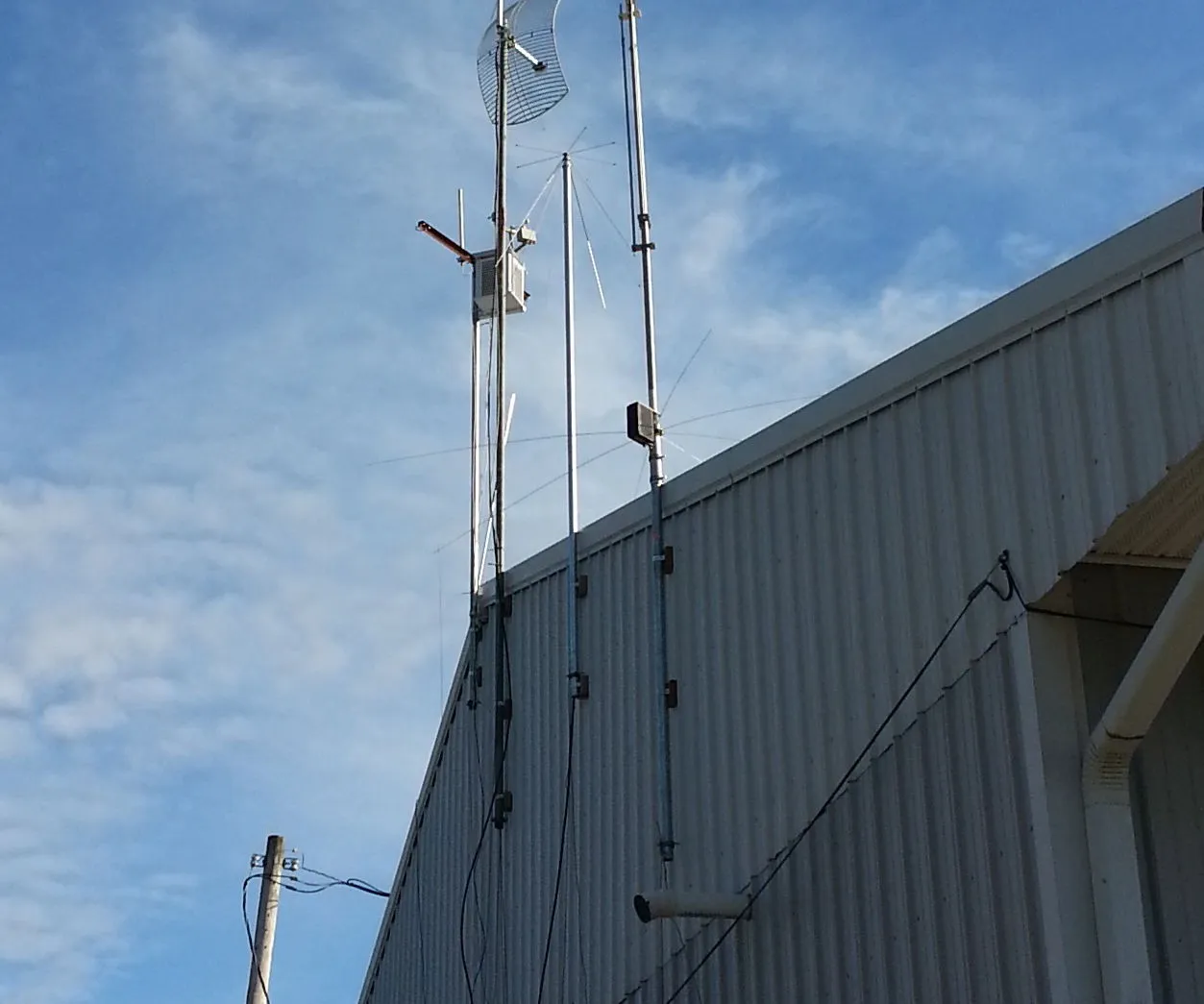
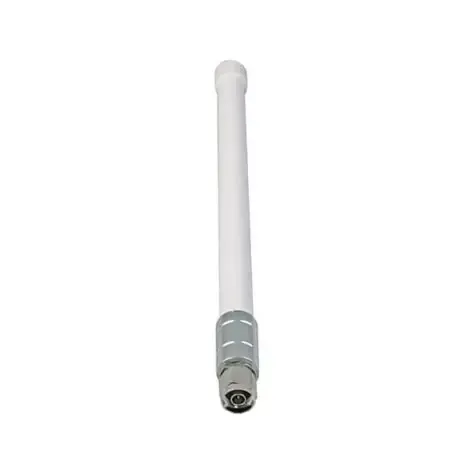
Outdoor omnidirectional antenna mounting diagram (mast mount vs device mount)

This diagram guides the correct installation of outdoor antennas, including engineering details such as waterproofing, UV resistance, and torque control.
Outdoor Omnidirectional Antenna Mounting Comparison
Not every application justifies a weatherproof omni, but once you step outdoors, that rubber-duck on a router quickly deteriorates under UV and rain. Outdoor omnis use fiberglass radomes, stainless hardware, and sealed bulkhead mounts for long-term reliability.

Mast-mount vs device-mount; IP rating, UV, and torque notes

If your antenna must sit on a pole or mast, check for IP65/IP67 ratings and UV-stabilized materials. Mounting torque matters: over-tightening SMA bulkheads can crack seals, while under-tightening causes water ingress.

A typical outdoor omni has 3–6 dBi gain and includes a short low-loss RG316 or RG58 tail. Keep it vertical; even small tilts can skew the radiation lobe. Engineers working on smart city or IIoT projects often prefer factory-sealed cable exits to avoid field assembly.

When directional beats omni (patch/Yagi) despite spec wins

Sometimes “omni” isn’t the best answer. In long corridors or outdoor point-to-point links, a directional patch or Yagi antenna can outperform any high-gain omni simply by focusing energy.

We’ve tested setups where replacing a 6 dBi omni with a 9 dBi patch doubled throughput — because most power went where it was needed. If your coverage area is linear or constrained, consider switching types; TEJTE’s RF antenna type comparisons discuss when this transition makes sense without overcomplicating BOMs.

Can you validate the omni choice with a fast field checklist?

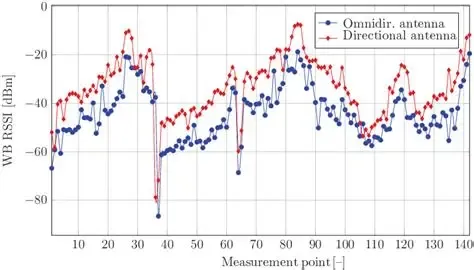
Diagram of Wi-Fi RSSI and throughput field test setup, showing device rotation and signal strength relationship

This diagram serves as a practical guide for engineers conducting quick field validation. It highlights the use of simple device rotation and RSSI monitoring to reveal nulls (blind spots) in the antenna’s vertical radiation pattern and introduces the practical technique of tilting the antenna to optimize coverage. The diagram also implies the “cable-first” troubleshooting logic.
Wi-Fi Signal Field Validation Test Diagram
Before finalizing production or shipment, a quick validation test can reveal hidden mismatches. Many field engineers use a simple RSSI and throughput test to confirm the link margin is real — not theoretical.

RSSI/Throughput smoke tests; axis tilt for elevation nulls

Place your device at typical operating height and rotate it 360°. Watch RSSI drop when the antenna passes through its elevation null — that’s the blind zone directly above or below the main lobe.

If you’re integrating multiple omnis in one product, tilt one by 15–20° to smooth total coverage. Measure throughput under both line-of-sight (LOS) and obstructed conditions; anything below −70 dBm at expected range likely means excess cable loss or connector mismatch.

Cable-first fault isolation (swap order: cable to connector to antenna)

When diagnosing weak signals, start from the cable. Swap pigtails first — micro-coax wear or crimp cracks cause intermittent opens. Then check the connector pair for play or corrosion. Only replace the antenna last.

This “reverse chain” debugging approach saves time and follows the same hierarchy used in our RF coaxial cable guide: begin with the highest-loss segment, then move outward toward radiating elements.

Order like a pro: what exact SKU attributes must be on the PO?

Example image of a TEJTE brand antenna product, showing its appearance, connector, and labeling information

This is not a specification table, but a specific product photo or rendering. Its purpose is to connect all the previously discussed abstract technical parameters (such as SMA male, straight/right-angle form, cable exit) with a concrete, branded physical product. It helps engineers and procurement staff visually understand “which physical attributes need to be confirmed when ordering” and may show an example of product labeling used for after-sales tracking (RMA).
Antenna Product Physical Example and Labeling Diagram
Even after perfect testing, the final hurdle is paperwork. Incomplete purchase orders often delay shipments or trigger incorrect substitutions. Professional buyers and engineers list every variable that affects form, fit, and function.

Connector gender/thread, gain, length/color, bend option, temp, RoHS/REACH

A complete omni antenna SKU entry typically includes:

  • Connector type & gender: SMA-male, RP-SMA-female, or IPEX/U.FL
  • Gain rating: 2, 3, or 6 dBi
  • Physical form: straight / right-angle / flexible
  • Cable type & length: 0.81 or 1.13 mm micro-coax, 10–50 cm
  • Color & material: black ABS, white fiberglass
  • Mounting: bulkhead, adhesive, or mast clamp
  • Compliance: RoHS, REACH, CE marking if required

When we process omni antenna orders, missing just one of these fields — like cable length — often halts the chain because connectors are pre-crimped per spec. Double-check with the Omni Ordering Matrix below before sending the PO.

Antenna Type Connector Gain (dBi) Color Cable (Type / Length cm) Length/Form Mounting IP/UV Temp Range Compliance TEJTE SKU Notes
Rubber-duck (external) SMA / RP-SMA 2 / 3 / 6 Black Straight / Right-angle Device-mount - -40 ~ +85 °C RoHS/REACH TA-OM-RD-SMA DDefault Wi-Fi antenna
Internal FPC IPEX / U.FL 1-3 Yellow film 0.81 / 10–20 45×7 mm Adhesive - -20 ~ +70 °C RoHS TA-OM-FPC-081 Compact IoT module
Outdoor fiberglass N / RP-SMA 3-6 White RG316 / 30 20-50 cm Mast mount IP67 / UV -40 ~ +85 °C RoHS/REACH TA-OM-FG-RG316 Weatherproof version
PCB trace Solder pad 0-2 Green Board-integrated PCB mount - -20 ~ +70 °C RoHS TA-OM-PCB-INT Development boards
Before finalizing, confirm lead time, MOQ, and whether torque specs or labeling are needed for RMA tracking. Even for small batches, consistent labeling prevents confusion when returning mixed SMA/RP-SMA stock.

What’s new for omni antennas in 2024–2025 and why it matters?

Structural diagram of a Wi-Fi tri-band (2.4/5/6 GHz) omnidirectional antenna

This diagram reflects antenna technology trends for 2024-2025, emphasizing the importance of multi-band integration and backward compatibility.
Wi-Fi Tri-Band Omnidirectional Antenna Diagram
Even as Wi-Fi 6E and 7 expand into 5 and 6 GHz, 2.4 GHz omni antennas aren’t going anywhere. The low-frequency band still dominates IoT, industrial telemetry, and low-power mesh links. The 2024–2025 generation of omni products focuses on three real shifts: multi-band coexistence, higher mechanical reliability, and greener compliance.

Wi-Fi 7 keeps 2.4 GHz coexistence; multi-link (MLO) still relies on omni coverage

Wi-Fi 7’s Multi-Link Operation (MLO) lets devices transmit simultaneously on 2.4, 5, and 6 GHz. Yet one of those links always depends on omnidirectional coverage to maintain control channels and backward compatibility. That’s why most enterprise routers still include at least one dual-band or tri-band omni whip even in next-gen platforms.

In our lab comparisons, MLO nodes that kept a dedicated 2.4 GHz omni link showed 30 – 40 % lower retry rates in mixed environments than those relying solely on directional 5 GHz beams. So even if your product claims “Wi-Fi 7-ready,” an efficient 2.4 GHz omni remains essential.

Enterprise/IIoT tri-band omni platforms & compliance reminders

Enterprise and IIoT tri-band omnidirectional antenna platform diagram

This diagram reflects the design considerations for industrial-grade antennas in terms of standardization, multi-band compatibility, and compliance.

Enterprise/IIoT Tri-Band Omnidirectional Antenna Platform Diagram

Industrial Wi-Fi and IIoT deployments are also standardizing on tri-band omnidirectional antennas, simplifying inventory. Instead of separate 2.4 / 5 / 6 GHz parts, vendors integrate multi-resonant designs with 3 – 6 dBi gain across all bands.
That integration increases compliance complexity. Always verify EN 55032, RoHS 3, and REACH documentation when sourcing from multiple suppliers. TEJTE’s supply chain maintains both certificates by default — a small but crucial advantage when exporting to North America or the EU.

FAQ — omnidirectional antenna questions, answered

Does a higher-gain omni always improve indoor coverage?

Not necessarily. A 6 dBi high-gain omni antenna projects a flatter pattern that may miss devices above or below its plane. In most indoor networks, a 2 – 3 dBi model produces smoother vertical coverage and fewer dead zones between floors. More gain helps only when horizontal reach truly matters — like in warehouse aisles or long hallways.

How do I tell SMA from RP-SMA in under five seconds?

Look inside the male connector. If you see a pin, that’s SMA-male; if it’s a hole, that’s RP-SMA-male. It’s a small detail that prevents huge headaches. Matching the wrong pair means no electrical contact at all. The SMA vs RP-SMA Quick ID article illustrates this with close-up photos and return-loss graphs near 2.4 GHz.

What’s a safe maximum length for a U.FL to SMA pigtail at 2.4 GHz?

Keep it under 200 – 300 mm if possible. At those lengths, 0.81 mm micro-coax loses roughly 0.6 – 0.8 dB per 100 mm, connectors included. Longer cables or extra joints quickly consume your link margin. For compact IoT boards, consider a single U.FL-to-antenna feed or low-loss routing discussed in the U.FL to SMA pigtail guide.

When should I choose an outdoor omni over a rubber-duck?

Use an outdoor omni antenna whenever the unit faces weather exposure — rooftops, utility poles, or street cabinets. These antennas feature IP65/IP67 sealing, UV-stable fiberglass, and stainless brackets.

A “rubber-duck” antenna on a router might look similar but will degrade under sunlight within months. The 2.4 GHz antenna selection guide details common indoor vs outdoor breakpoints for Wi-Fi IoT deployments.

Why does my omni show weak spots directly above or below the antenna?

Because “omnidirectional” only refers to horizontal (azimuth) radiation. Every vertical omni pattern has nulls along its axis — exactly above and below the antenna. Tilting the antenna by 10 – 15 degrees usually fills those gaps and evens out throughput. It’s a simple trick many field technicians use before swapping hardware unnecessarily.

Can metal enclosures work with internal omnis?

Yes, but only with planning. Use a plastic window or cutout so RF can escape, keep 3 – 5 mm spacing from conductive walls, and test multiple orientations. Many teams run quick A/B trials with the same enclosure, rotating the FPC position; results often differ by more than 5 dB. The lesson: prototype placement early before committing to tooling.

Will Wi-Fi 7 make 2.4 GHz omnis obsolete?

No — not even close. Wi-Fi 7 still depends on 2.4 GHz for low-power IoT and control channels. The coexistence of 2.4, 5, and 6 GHz is now permanent, and omnidirectional coverage remains essential for backward compatibility and energy efficiency. Future “tri-band omni” designs will simply integrate all three frequencies in one compact form.

Final takeaway

Omnidirectional antennas might look simple, but every decision — from connector type and gain to cable length and mounting — shifts your RF chain’s real-world performance. Treat them as part of the link, not an accessory.

When you’re ready to specify or order, use the calculator and ordering matrix above, verify each PO attribute, and cross-check it with your mechanical drawings.

That’s how teams avoid re-orders, stay compliant, and get the signal they actually designed for — not the one luck delivers.

Bonfon Office Building, Longgang District, Shenzhen City, Guangdong Province, China

customer service