
Outdoor Omni Antenna Guide: IP67 Rating & Mounting Tips
Dec 15,2025

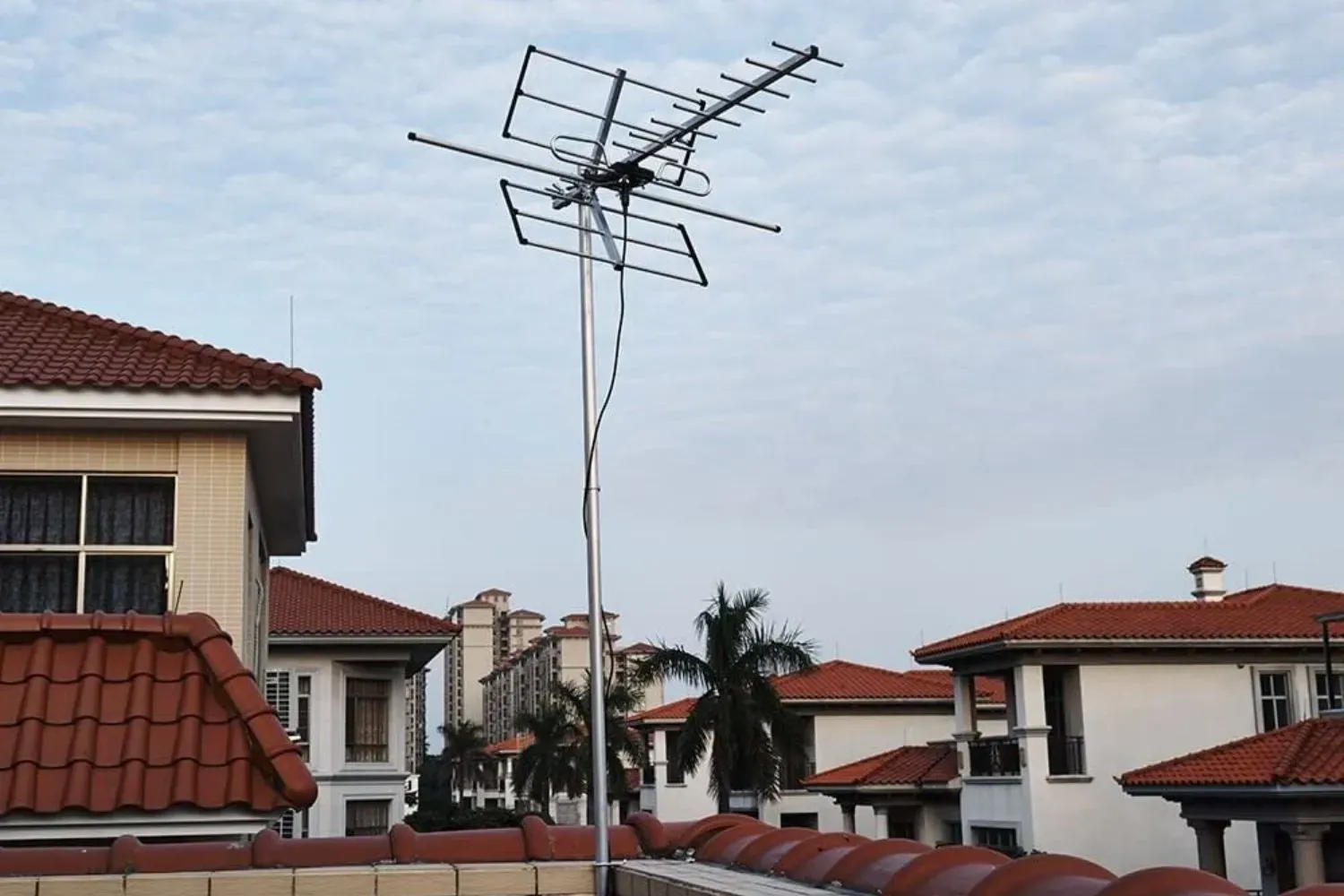
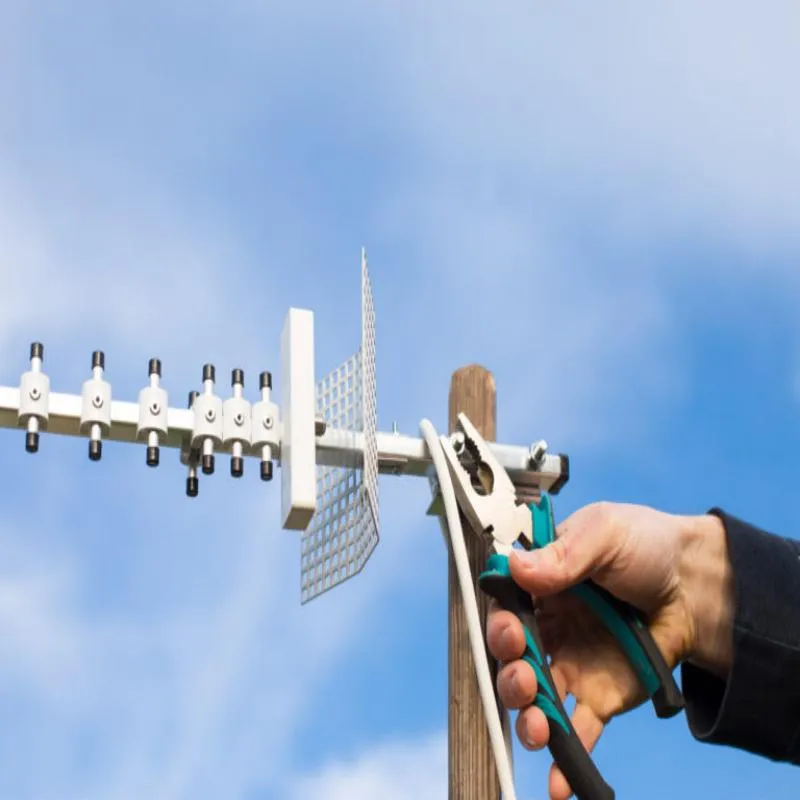
Serving as the article's opening cover image, this picture sets the tone for the core theme of “selecting an outdoor antenna that lasts in real conditions.” By depicting antenna deployments across various typical outdoor sites, it visually introduces the key issues to be discussed in detail later—environmental compatibility, durability (IP/UV ratings), and signal budgeting—emphasizing that the selection process must go beyond mere datasheet parameters.
Outdoor omnidirectional antennas rarely get credit for the steady links they enable. They quietly sit on rooftops, masts, and gateways, making sure your network stays reachable through rain and heat. Selecting one isn’t as simple as picking a gain number from a datasheet — you’re really matching environment, durability, and signal budget for years of exposure.
This field-proven guide helps you choose and install an outdoor omni antenna that lasts in real conditions. We’ll talk through gain classes, IP and UV ratings, feeder loss checks, mounting rules, and purchase fields so engineers and buyers see the same specs.
If you’re new to omnidirectional coverage patterns, read TEJTE’s Omni Antenna Guide: Coverage, Gain & Installation Explained first — it lays out the radiation basics this article builds on.
Which outdoor omni antenna class fits your site and spectrum?
Gain bands and real-world use cases
| Gain (dBi) | Coverage Shape | Where It Shines |
|---|---|---|
| ≈3 dBi | Broad donut, gentle vertical spread | IoT gateways, short campus links |
| ≈6 dBi | Moderate beam, balanced reach | Warehouse or corridor Wi-Fi |
| 9 – 12 dBi | Tight horizontal beam | Backhaul or long street coverage |
Low-gain models fill uneven terrain better; high-gain ones push farther but flatten the vertical pattern, creating nulls just above the antenna. When in doubt, plot expected heights of your clients and keep some headroom.
The coverage diagrams in TEJTE’s Ground Clearance Antenna Layout & 2.4 GHz Rules show how metal near the base can distort these lobes — a useful reference before mounting on a balcony or beam.
Connector bases and mounting kits
Connector choice decides both loss and weather risk.
- N-female is the go-to for outdoor radios and enterprise APs; its bulkhead seal mates nicely with low-loss feeders and lightning arrestors.
- SMA or RP-SMA fits compact IoT devices where space beats durability.
- TNC or flanged versions appear in industrial enclosures needing extra torque.
Mounting hardware matters just as much. Check the bracket kit against your mast diameter (typically 1.25 – 2.5 in). Longer antennas above 500 mm benefit from dual U-bolts or offset arms to spread stress evenly.
For clamp torque values and wind-load figures, see TEJTE’s Mast Mount Antenna Brackets & Torque Guide. A few minutes of calculation can save hours of re-alignment after the first storm.
How do you verify IP ratings and UV stability for multi-year exposure?
Reading IP codes and spotting weak points
- IP65 means it survives dust and gentle water jets — fine under awnings.
- IP66 endures heavy rain and pressure wash angles; useful for open masts.
- IP67 adds short immersion tolerance, a must for roof edges and flood-prone sites.
Inspect for O-rings around the radome joint, proper cable glands, and a vent plug for pressure balance. These details decide whether the antenna breathes without leaking.
Budget models often skip the vent; they may fog inside after the first freeze-thaw cycle. A five-minute check beats a return RMA. If you want to see a cutaway comparison, the component photos in TEJTE’s Rubber Duck Antenna Selection & Ordering Guide reveal how manufacturers seal different antenna bases.
UV resistance, salt-fog hours, and temperature range
Sunlight is merciless on cheap plastics. A quality UV-stabilized ASA or PC radome stays white and tough after years of exposure. Look for:
- Salt-fog testing ≥ 480 h (ASTM B117) for coastal or marina sites.
- Operating window −40 °C to +85 °C to handle winter and desert heat.
- Light-gray or white surfaces to minimize thermal stress and pressure buildup.
When a datasheet mentions both UV and salt resistance, it usually comes from a vendor that has tested beyond paper claims. Otherwise, expect micro-cracks and moisture intrusion within a year.
What gain should you pick — 3 dBi vs 6 dBi vs high-gain for corridors?

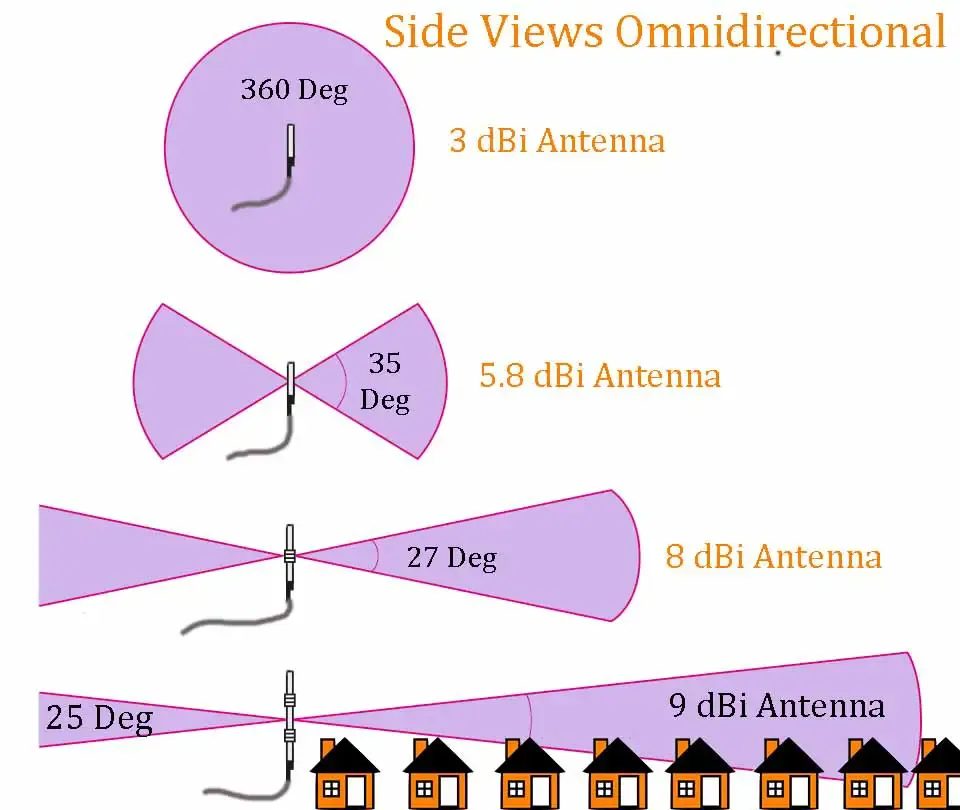
Located in the core chapter “What gain should you pick?”, this image is the central visual tool for understanding the trade-off between gain and coverage shape. It concretizes the metaphor of “gain being like tuning a flashlight beam,” visually demonstrating the difference between the broad, forgiving coverage of low-gain antennas and the “razor thin” vertical lobes of high-gain ones (which can create “dead donuts”). This graph directly supports the discussion on “elevation nulls” and “coverage donuts,” aiding engineers in selecting appropriate gain based on client height and building structure.
Elevation nulls and coverage donuts
A 3 dBi omni radiates a round, forgiving field that reaches up and down floors—great for courtyards or uneven rooftops.
Once you step up to 6 dBi, the beam flattens, trading vertical reach for horizontal distance.
Past 9 dBi, the vertical slice becomes razor thin. In long hallways that’s perfect; over multi-level structures it creates “dead donuts” where signal fades just above client height.
To visualize these lobes, TEJTE’s Omni Antenna Coverage Basics includes real radiation plots. You’ll quickly see why bigger gain isn’t always better.
Multi-AP planning across 2.4 / 5 / 6 GHz
Modern Wi-Fi 7 and private networks mix all three bands.
At 2.4 GHz, only three non-overlapping channels exist, so high-gain omnis can worsen co-channel interference.
At 5 GHz and 6 GHz, spectrum is wider but obstacles absorb faster, so moderate gain often balances things best.
A quick field trick: stand one floor below the antenna, check the RSSI on a handheld device; if it drops sharply, the elevation lobe’s too flat. Angle or lower the mount by a few degrees.
Will feeder type and length silently erase your EIRP?
Feeder loss and connector math

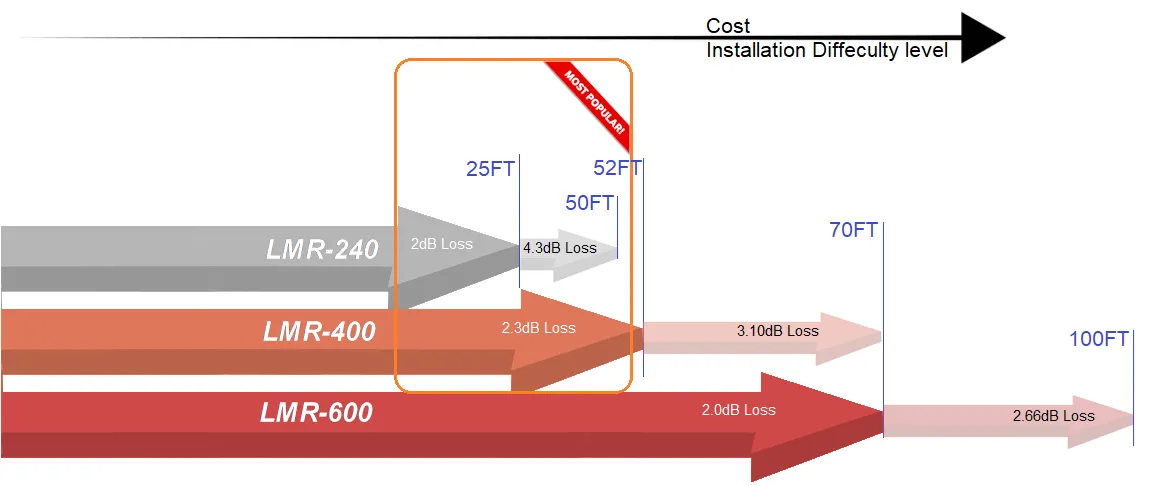
In the chapter “Will feeder type and length silently erase your EIRP?”, this image serves as a decision-aid for feeder selection. It goes beyond mere loss data, visually comparing three dimensions: loss, cost, and installation difficulty, helping engineers and installers make balanced decisions in real projects. For instance, it might show that LMR-400 has lower loss over long distances, but LMR-240 offers better cost-effectiveness and installation ease for short runs. This chart emphasizes that the feeder is a critical component requiring comprehensive trade-offs in system design.
| Feeder Type | Typical Loss @ 2.4 GHz | Best Use |
|---|---|---|
| LMR-240 | ≈ 0.26 dB / m | Short rooftop runs (< 10 m) |
| LMR-400 | ≈ 0.14 dB / m | Mid-length feeds (10-25 m) |
| 0.81 mm pigtail | ≈ 0.80 dB / m | Internal jumpers only |
| 1.13 mm pigtail | ≈ 0.60 dB / m | Short IoT whips |
Each connector pair adds roughly 0.15 dB. Four joints mean 0.6 dB gone—about 13 % power loss.
Mini Link-Budget Formula
Feeder_Loss = loss_per_m × length
Conn_Loss = 0.15 × connector_pairs
EIRP_dBm = Tx_Power − (Feeder_Loss + Conn_Loss) + Ant_Gain
Link_Margin = EIRP_dBm − Path_Loss − Rx_Sensitivity
If Link Margin < 6 dB, shorten the line or upgrade cable. A small change in loss often beats chasing a “stronger” antenna.
For a practical example, TEJTE’s RF Coaxial Cable Guide lists real attenuation numbers you can plug directly into the equation.
Waterproof every junction
Outdoor connectors are magnets for moisture. Always:
- Add drip loops before entry points.
- Use cold-shrink boots or self-amalgamating tape under heat-shrink.
- Inspect after heavy rain.
A single unsealed joint can short an entire feed in weeks.
Where should you place the omni to avoid metal detuning and shadowing?
Clearances from structures

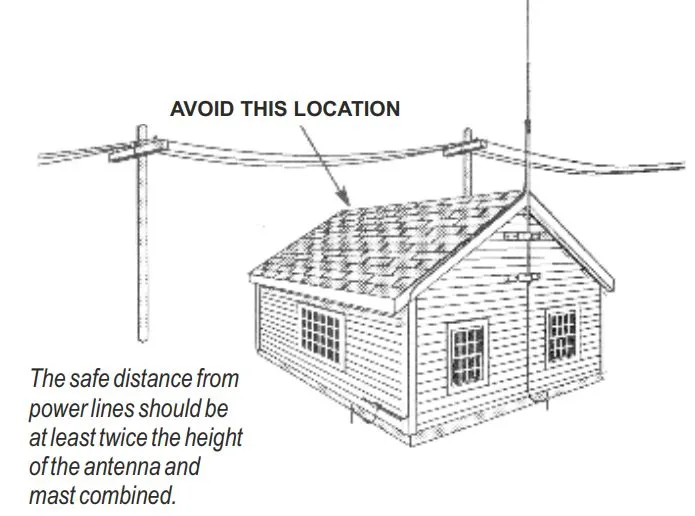
This image is the core instructional graphic for the chapter “Where should you place the omni to avoid metal detuning and shadowing?”. Through a clear “AVOID THIS” vs. “correct” contrast, it translates the abstract spacing rules from the text (e.g., “keep at least ½ λ”, “avoid mounting below HVAC ducts”) into an intuitive, memorable visual guide. The annotation regarding safe distance from power lines is particularly important, introducing considerations for personal and equipment safety, and highlighting crucial yet often overlooked safety codes in professional installations.
Metal nearby changes current flow in the radiator.
Keep at least ½ λ (≈ 6 in @ 2.4 GHz) from parapets or handrails.
Avoid mounting below HVAC ducts—they act like reflectors, redirecting energy upward.
When possible, position antennas 1–2 m above other fixtures for clean 360° coverage.
Separation from other antennas
Too-close omnis couple energy and distort each pattern.
Maintain ≥ 1 λ lateral spacing between separate transmitters.
If space is tight, offset height or polarization (vertical vs horizontal).
More spacing rules and clearance visuals appear in TEJTE’s Ground Clearance Antenna Layout & 2.4 GHz Rules.
Do you need surge protection and mast bonding on this site?
Arrestor placement and grounding path

Located in the safety-critical chapter “Do you need surge protection and mast bonding on this site?”, this image provides the standard answer to the problem that “a bad arrestor placement defeats the point.” It clarifies the physical relationship and electrical connection requirements between the arrestor, ground block, and cable entry point, emphasizing the principle that “the discharge current must find ground faster than the radio does.” This diagram is an essential installation reference for ensuring the survival of outdoor communication sites during lightning strikes or induced surges.
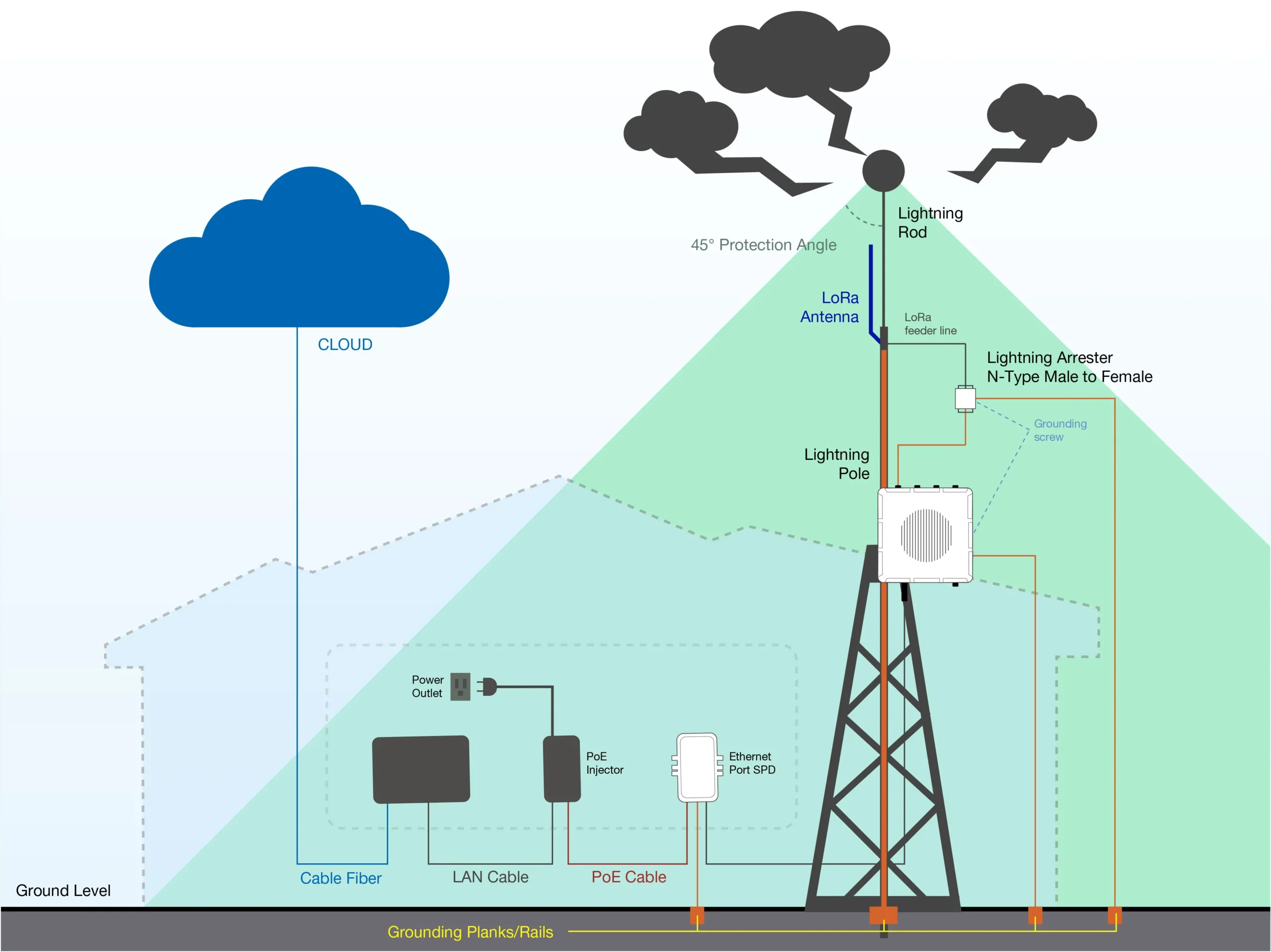
- Mount the surge arrestor on the feed line just before it enters the enclosure.
- Tie it to the ground block within 30 cm (1 ft).
- Keep a drip loop above it so water runs away from the connector.
- Place the junction below the roof ridge, never on top of it.
A bad arrestor placement defeats the point; the discharge current must find ground faster than the radio does.
Bonding conductors and paint removal
Use #6 AWG (16 mm²) copper or larger for mast bonding.
Scrape paint under clamps to expose metal; oxidation equals resistance.
Add jumpers across swivel joints or brackets that don’t make direct contact.
For additional examples of outdoor surge wiring, the diagrams inside TEJTE’s RF Connector Selection Guide show grounding paths tested in actual deployments.
Can you validate the install quickly before signing off?
Tilt / azimuth A-B and quick heatmaps
After mounting, note the antenna’s azimuth and tilt angles. Small changes—two or three degrees—can shift signal nulls dramatically.
Run a walk test or a drive-by heatmap using a laptop or handheld analyzer. Compare RSSI along key paths to ensure it follows the simulated pattern.
If you need a template for documentation, TEJTE’s Wi-Fi Antenna Guide: 433 MHz, 4G, 5G, GSM & SMA Types includes a concise checklist format that works for on-site validation.
Cable-first fault isolation
When coverage looks wrong, start with the feeder:
- Check continuity with a handheld meter.
- Inspect connectors for water traces.
- Substitute a known-good cable before suspecting the antenna.
In our field logs, over 70 % of “antenna failures” were actually cable faults. Always verify the easy stuff first.
How should you order so the PO is buildable and weather-safe?
Poorly written purchase orders cause half of all mismatched installs.
Here’s the concise set of data fields every outdoor omni antenna order should include.
| Field | What to Specify | Example |
|---|---|---|
| Gain | 3 / 6 / high dBi | 6 dBi |
| Connector Base | N-female / SMA / RP-SMA | N-female |
| Bracket Kit | Mast diameter & mount type | 40 mm U-bolt |
| IP / UV Rating | IP66 / IP67 + UV material spec | IP67 ASA radome |
| Feeder Type & Length | LMR-240 / LMR-400 + meters | LMR-400 / 15 m |
| Lightning Kit | Arrestor model + bonding hardware | N-type gas-tube kit |
| Labels / Compliance | RoHS / REACH / Torque data | Yes |
| Lead Time / MOQ | From vendor | 10 days / 5 pcs |
A clear PO means no guessing during field assembly.
For reference, TEJTE’s RF Cable and Connector Hub outlines matching feeders and connectors, helping purchasers align specs before release.
Outdoor Omni Link-Budget & Feeder-Loss Mini-Calculator
Inputs
tx_power_dBm
antenna_gain_dBi (3 / 6 / high)
feeder_type ∈ {LMR-240, LMR-400, 0.81, 1.13}
feeder_length_m
connector_pairs
rx_sensitivity_dBm
freq_GHz ∈ {2.4, 5, 6}
path_loss_dB
Constants
loss_per_m = {0.26, 0.14, 0.80, 0.60}
conn_loss = 0.15 × pairs
EIRP = tx_power − (loss_per_m × length + conn_loss) + gain
link_margin = EIRP − path_loss − rx_sensitivity
Rule of thumb:
If link_margin < 6 dB, shorten the feeder, cut one connector pair, or upgrade to a thicker coax.
(These same parameters appear in TEJTE’s Coaxial Cable to HDMI Adapter Guide, which explains loss budgeting between RF and media interfaces.)
Wind-Load & Clamp-Torque Quick Estimator

As a practical engineering tool at the end of the article, this image elevates “wind-load and clamp-torque” from guesswork to quantifiable calculation. It guides engineers to systematically consider variables such as wind speed, antenna area, and lever arm length, and derives through formulas the specific torque value required to prevent antenna displacement during storms. Not only does the chart provide the calculation method, but its output logic (e.g., if torque is insufficient, add clamps or shorten the overhang) also directly offers engineering improvement directions, serving as a summary of the key steps for reliable mechanical design.

Inputs
V (m/s) = design wind speed
A (m²) = projected area
Cd = 1.2 – 1.6
lever_arm (m)
μ = friction coefficient mast / liner
mast_diameter (mm)
#clamps
Equations
q = 0.613 × V²
F = q × A × Cd
M = F × lever_arm
Σ(T_clamp × μ / r_mast) ≥ M
Output gives the per-clamp torque required to hold position under wind load.
If it’s not enough, add clamps, increase liner friction, or shorten the overhang.
What changed in 2024–2025 for outdoor omni rollouts?
Tri-band APs and private networks
With tri-band Wi-Fi 6E and early Wi-Fi 7 gear in play, antennas covering 2.4 / 5 / 6 GHz are now the baseline. Integrators favor models with equalized VSWR across bands instead of narrow peaks.
Private 5G and CBRS systems also adopt outdoor omni antennas for quick deployments. Expect to see shared mounts combining 5G and Wi-Fi feeds on the same mast.
Standardized mast kits
Vendors are aligning on universal U-bolt and saddle dimensions to cut field confusion. Installers can now swap brands without drilling new holes — a small but welcome change that lowers maintenance costs.
For continuing coverage of evolving RF hardware, follow TEJTE’s Antenna Technology Blog Hub.
FAQ — Outdoor Omni Antenna
Q: How much gain is practical before elevation nulls cause dead zones?
Around 6 dBi offers the best compromise. Above 9 dBi you’ll need precise mounting height and tilt.
Q: Which IP rating truly survives five-year rooftop exposure?
Go with IP66 or IP67, and insist on proof of gland sealing plus UV-stabilized housing.
Q: How long can I run LMR-240 vs LMR-400 before losses cancel a 6 dBi gain?
LMR-240 is fine to about 10–12 m; LMR-400 stays efficient to 25 m. Beyond that, heavier cable or relocation is cheaper than amplifier power.
Q: Where should the lightning arrestor sit relative to the ground block?
Right above it, with a drip loop between cable and entry. Bond both using short, direct conductors.
Q: What quick checks prove the installation is healthy before sign-off?
Compare RSSI vs throughput snapshots, confirm stable noise floor, and verify mast torque after 24 h exposure.
Bonfon Office Building, Longgang District, Shenzhen City, Guangdong Province, China
A China-based OEM/ODM RF communications supplier
Table of Contents
Owning your OEM/ODM/Private Label for Electronic Devices andComponents is now easier than ever.
