
SMA Adapter Cable Guide: Types, Length & Right Angles
Sep 13,2025
Introduction

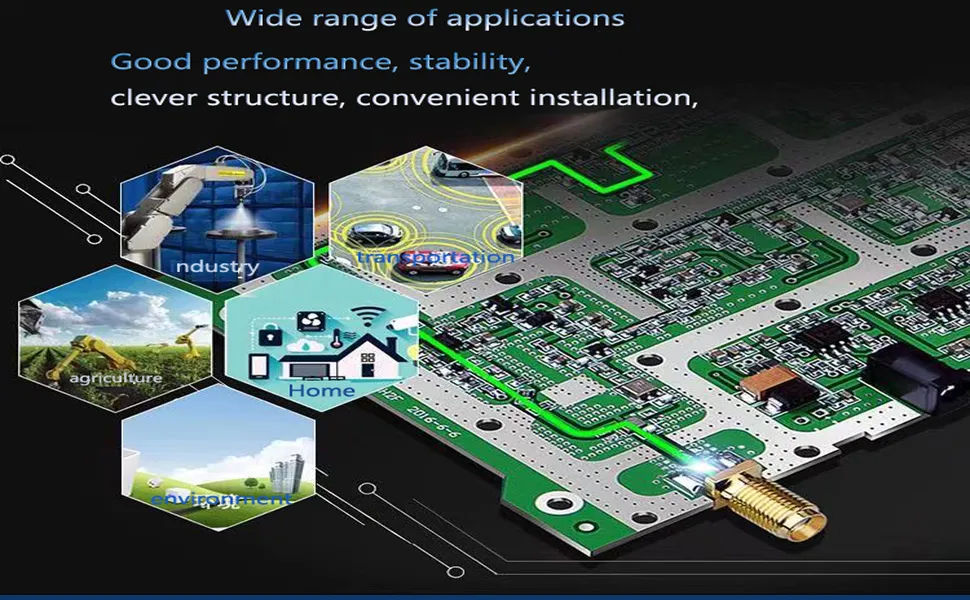
This image showcases several typical application scenarios of SMA adapter cables (pigtails): 1) Panel feedthroughs - pulling an SMA port through a shielded housing without compromising enclosure integrity; 2) Tight-space routing - using ultra-thin coaxial cables (like RF0.81 or RF1.13) for routing on compact IoT boards; 3) Test jumpers - paired with SMA female-to-female adapters for temporary lab setups; 4) Stress relief - protecting delicate U.FL or MMCX connectors from vibration and accidental pulls. The image visually demonstrates the advantages of SMA adapter cables over rigid adapters in terms of flexibility, routing ease, and stress control.
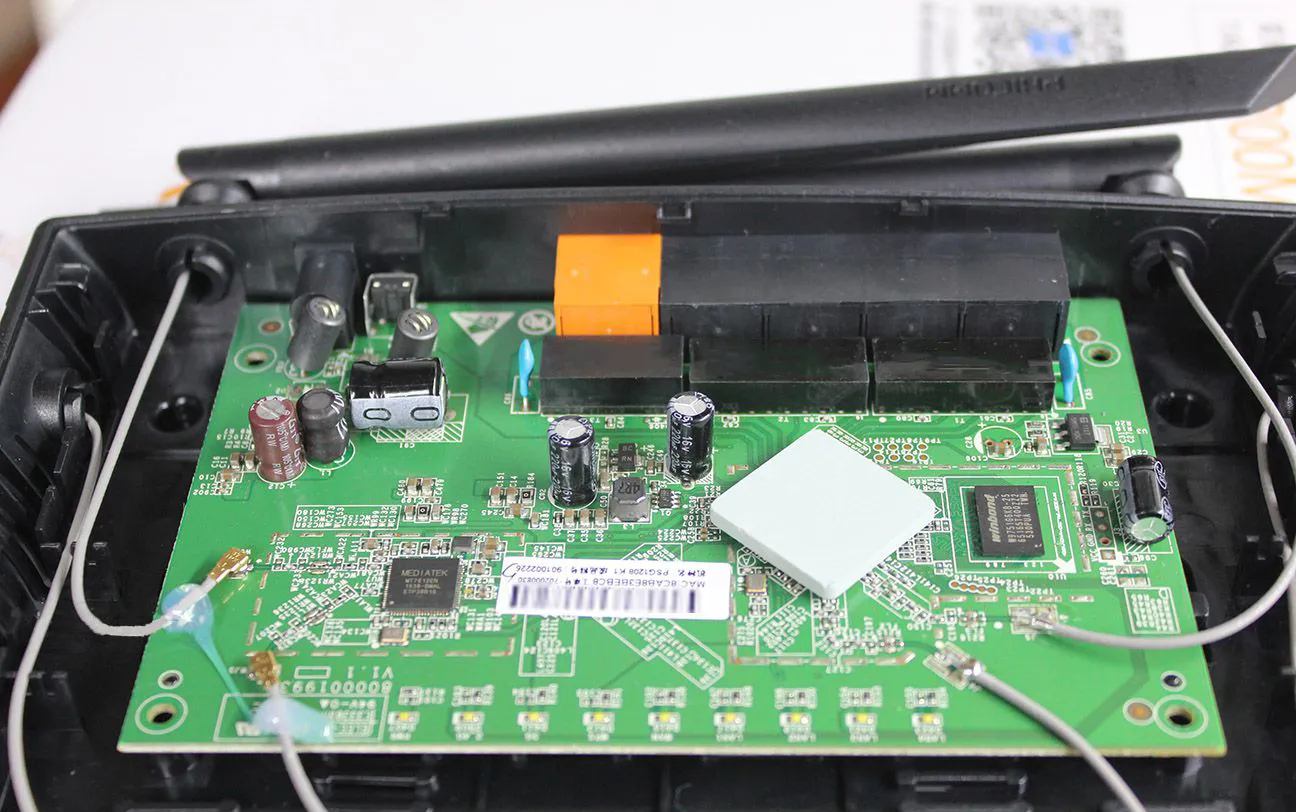
In RF design, small details can decide whether a system performs flawlessly or struggles with interference. One of the most overlooked points is the short link between a device and its antenna. Instead of relying on rigid adapters, many engineers choose an SMA adapter cable (pigtail). It’s flexible, easy to route inside an enclosure, and helps keep insertion loss under control.
When selecting a pigtail, focus on three essentials: the cable type—whether that’s RF0.81, RF1.13, RG178, or RG316—the length, and the connector style (straight, right-angle, bulkhead, or panel mount). A shorter jumper usually means lower loss, and the fewer adapters you add in series, the less chance of mismatch.

This image likely illustrates an application scenario (e.g., outdoor equipment or industrial environment), accompanying the text emphasizing that when selecting an SMA adapter cable, mechanical strength, weather resistance, and long-term reliability are as crucial as electrical performance (loss), and a balance must be struck.
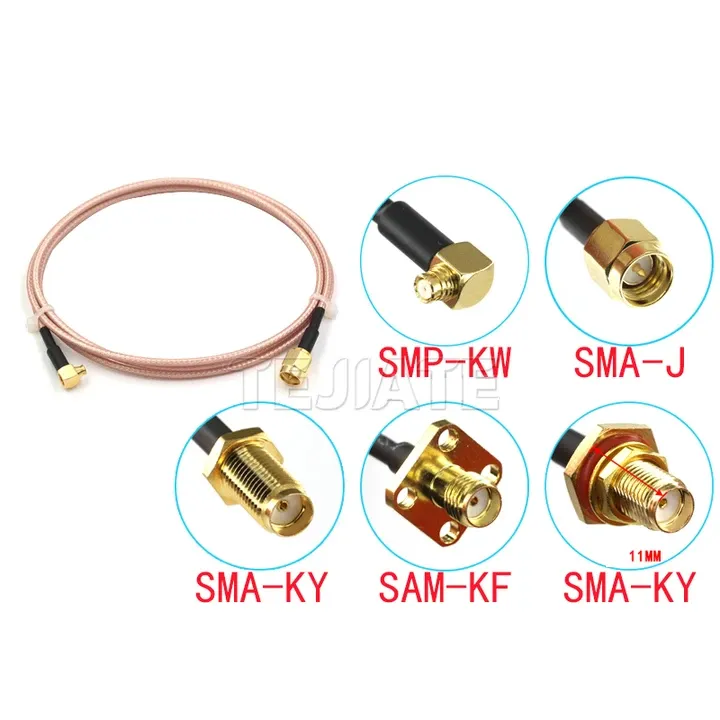
1) What Is an SMA Adapter Cable?

This image displays SMA connectors with different designations (e.g., SMP-KW, SMA-J, SMA-KY, SAM-KF – likely representing various combinations like straight, right-angle, male, female), used to illustrate the diversity of SMA adapter cables and introduce their common applications (panel feedthroughs, tight-space routing, test jumpers, stress relief).
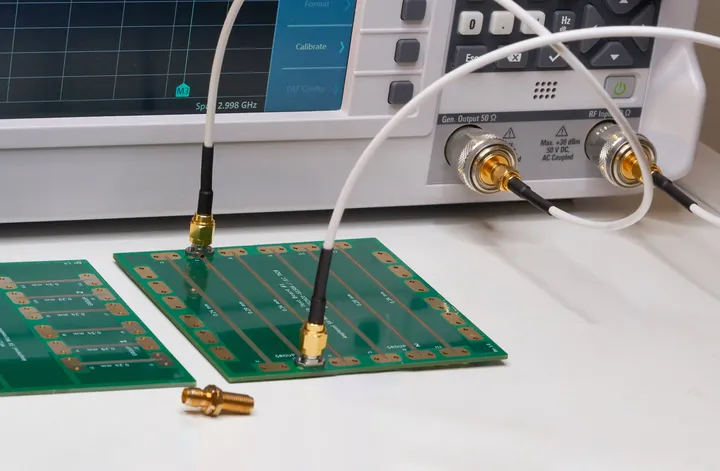
Common Applications
- Panel feedthroughs: pulling an SMA port through a shielded housing without compromising enclosure integrity.
- Tight-space routing: slim coax such as RF0.81 (OD 0.81 mm, ≤3.1 dB/m @1 GHz; ≤7.8 dB/m @5 GHz) or RF1.13 (OD 1.13 mm, ≤2.32 dB/m @1 GHz; ≤5.7 dB/m @6 GHz) is often chosen for compact IoT boards.
- Test jumpers: frequently paired with sma female to female adapters for temporary lab setups.
- Stress relief: protecting delicate U.FL or MMCX connectors from vibration and accidental pulls.

This image likely shows slender RF0.81/RF1.13 cables side-by-side with relatively sturdier RG178/RG316 cables, accompanying the text to highlight their pros and cons (size/flexibility vs loss/shielding/temperature rating) in different application scenarios (compact IoT boards vs outdoor/test benches).
For harsher conditions, thicker coax is a safer bet. RG178 (OD 1.8 mm, ~0.9 dB/m at 1 GHz, rated -55 °C to +200 °C) provides both durability and shielding. RG316 (OD 2.5 mm, ~0.93 dB/m @1 GHz, ~2.34 dB/m @6 GHz, bend radius 15 mm) is widely used in test benches and outdoor installations thanks to its balance of low loss and high heat resistance.
A small tip: don’t assume the thinnest cable is always the best just because it’s easier to route. In real projects, I’ve seen teams replace RF0.81 with RG316 after discovering that a longer run at 5.8 GHz lost nearly half the signal strength. Sometimes giving up a little flexibility buys you a lot more stability.
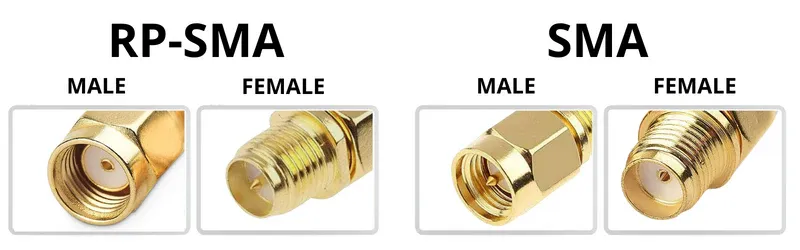
2) Identify SMA vs RP-SMA & Genders

This image uses a diagram format to clearly label SMA Male (center pin), SMA Female (center socket), RP-SMA Male (center socket), and RP-SMA Female (center pin), aiming to help users avoid the common and costly mistake of mismating due to confusion between SMA and RP-SMA.
One of the most common mistakes buyers make is confusing SMA with RP-SMA. From the outside, both look nearly identical—the same thread size, the same overall form. The real difference lies in the center contact.
- SMA Male → external threads with a center pin.
- SMA Female → internal threads with a center socket.
- RP-SMA Male → external threads but with a center socket.
- RP-SMA Female → internal threads but with a center pin.
Typical Pairings You’ll See

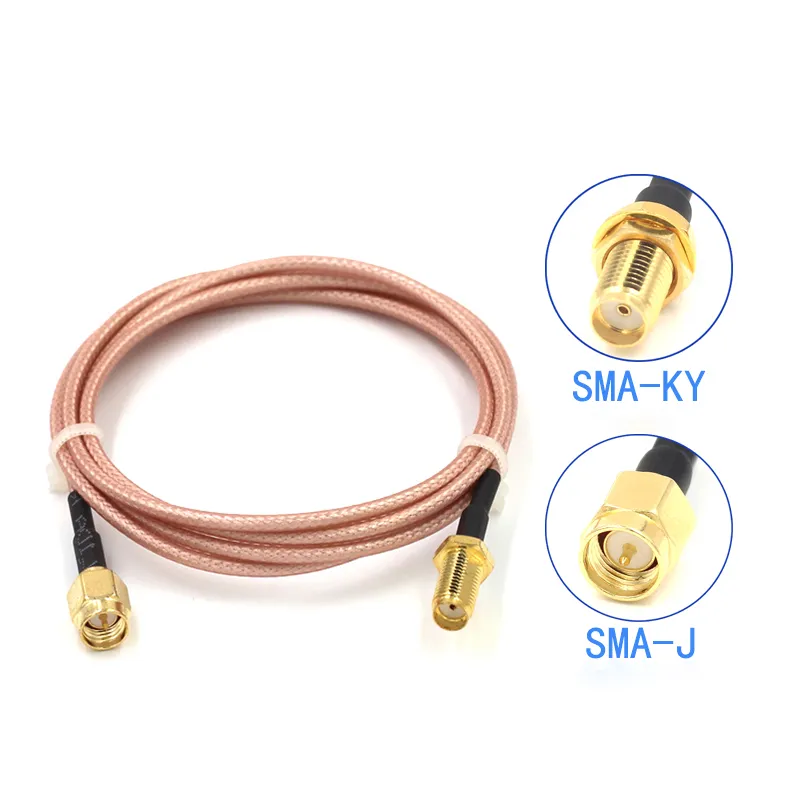
This image shows an adapter cable with an SMA male connector on one end and an SMA female connector on the other, representing the first of the typical pairings listed in the document, used for extending distances or connecting devices.
- sma male to sma female adapter cable — the most standard extension.

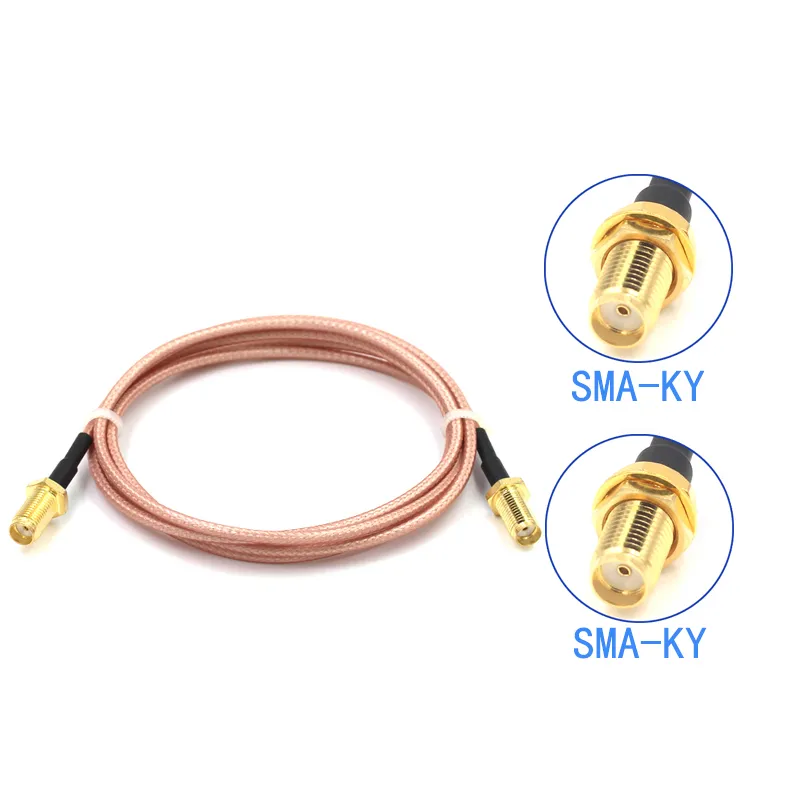
This image shows an adapter cable with SMA female connectors on both ends, used to connect two SMA male devices or cables, typically functioning as a coupler.
- sma female to sma female adapter — often used as an inline coupler.

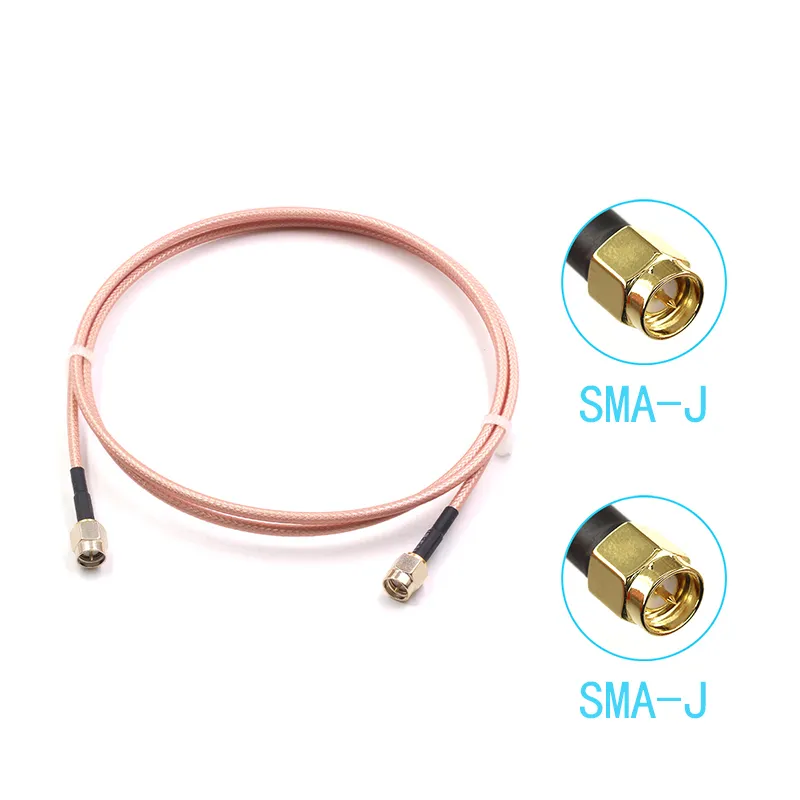
This image shows an adapter cable with SMA male connectors on both ends, commonly used to connect two SMA female bulkhead connectors or ports.
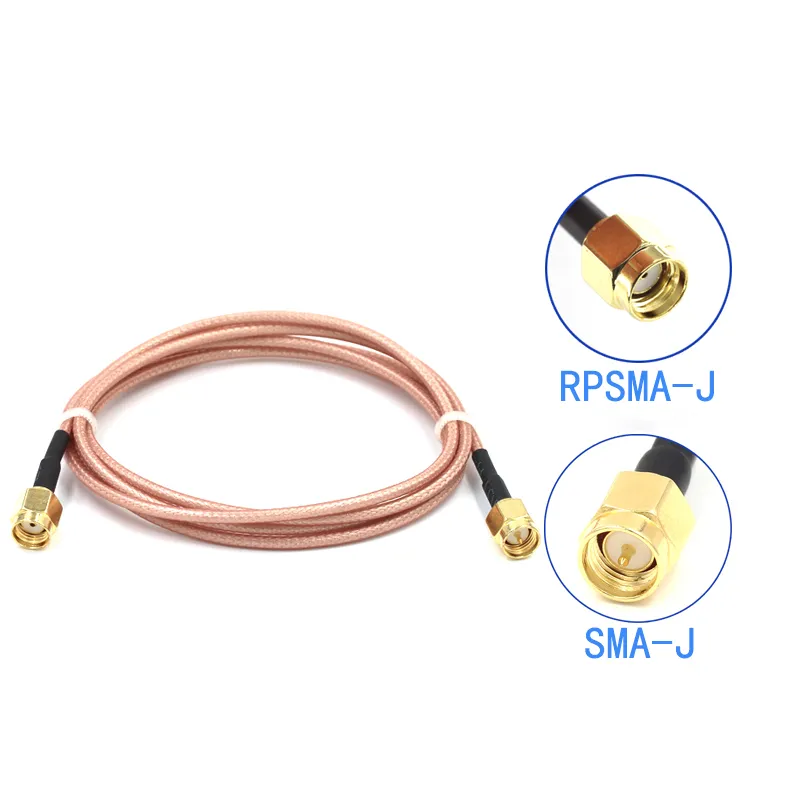
- sma male to sma male adapter — bridging two bulkhead connectors.

This image shows a mixed-polarity pigtail, with one end being an RP-SMA connector (inferred from context to be male) and the other end being a standard SMA connector (inferred from context to be male), used to solve the common problem of polarity mismatch between device and antenna ends.
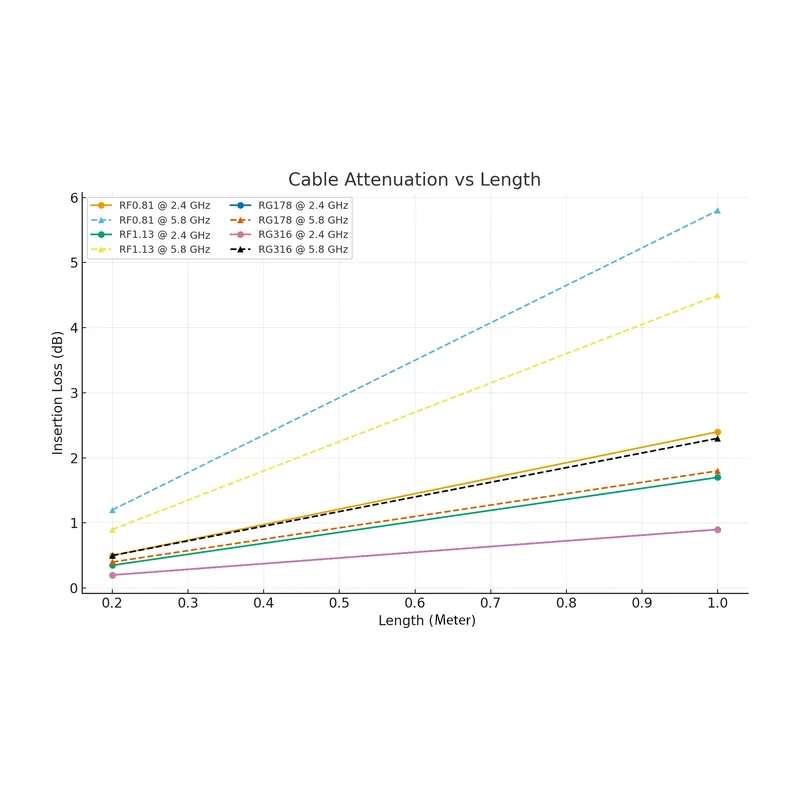
- RP-SMA to SMA pigtails — necessary when linking consumer Wi-Fi devices to industrial antennas.
Ordering the wrong one is frustratingly common. It’s not just a rookie mistake; even experienced engineers can slip when moving quickly between projects. A quick rule of thumb: check the center contact before you click “buy.” If your router has an rp-sma female jack, the correct choice is an rp-sma male to sma adapter cable.
From field experience: if you’re ever unsure, keep a small sample kit of connectors on hand. It saves time compared to waiting weeks for a mismatched part to be returned or replaced. For broader context on where SMA stands compared with other connectors, TEJTE’s SMA vs BNC vs N-Type guide provides a useful comparison.
3) Cable Types & Specs: 0.81 / 1.13 / RG178 / RG316
Not all coaxial cables are created equal. When choosing an sma adapter cable, the cable itself is just as important as the connector. Diameter, attenuation, bend radius, and even temperature rating all play into performance and reliability.
Here’s a quick comparison of the most common types used in pigtails:
| Cable Type | Outer Diameter | Attenuation @1 GHz | Attenuation @5-6 GHz | Temperature Range | Bend Radius | Notes |
|---|---|---|---|---|---|---|
| RF0.81 | 0.81 mm | ≤3.1 dB/m | ≤7.8 dB/m | - | Very small | Ultra-slim and flexible, best for compact IoT boards |
| RF1.13 | 1.13 mm | ≤2.32 dB/m | ≤5.7 dB/m | - | Small | Balanced choice, common in Wi-Fi and GPS modules |
| RG178 | 1.8 mm | ~0.9 dB/m | ~1.5 dB/m | -55 °C to +200 °C | ~6 mm | Shielded, durable, suited for outdoor or high-temp use |
| RG316 | 2.5 mm | ~0.93 dB/m | ~2.34 dB/m | -65 °C to +165 °C | ~15 mm | Low-loss, heat-resistant, a staple in labs and test setups |
Slim coax like RF0.81 or RF1.13 shines when you need to route signals through cramped spaces, but you’ll pay for that flexibility with higher loss. On the other hand, RG178 and RG316 offer stronger shielding, wider temperature tolerance, and lower attenuation, making them a better fit for outdoor or industrial use.
A quick field note: engineers often start with RF1.13 for IoT modules, only to switch to RG316 once they scale deployments outdoors. It may take up more room inside the housing, but in return you get cables that survive heat, cold, and rough handling without signal drop.
4) Length & Loss Planning
When it comes to an sma adapter cable, length isn’t just a convenience factor—it directly affects RF performance. Every centimeter adds attenuation, and at higher frequencies the effect becomes more noticeable. Engineers sometimes underestimate this, only to see unexpected drops in Wi-Fi or FPV range.
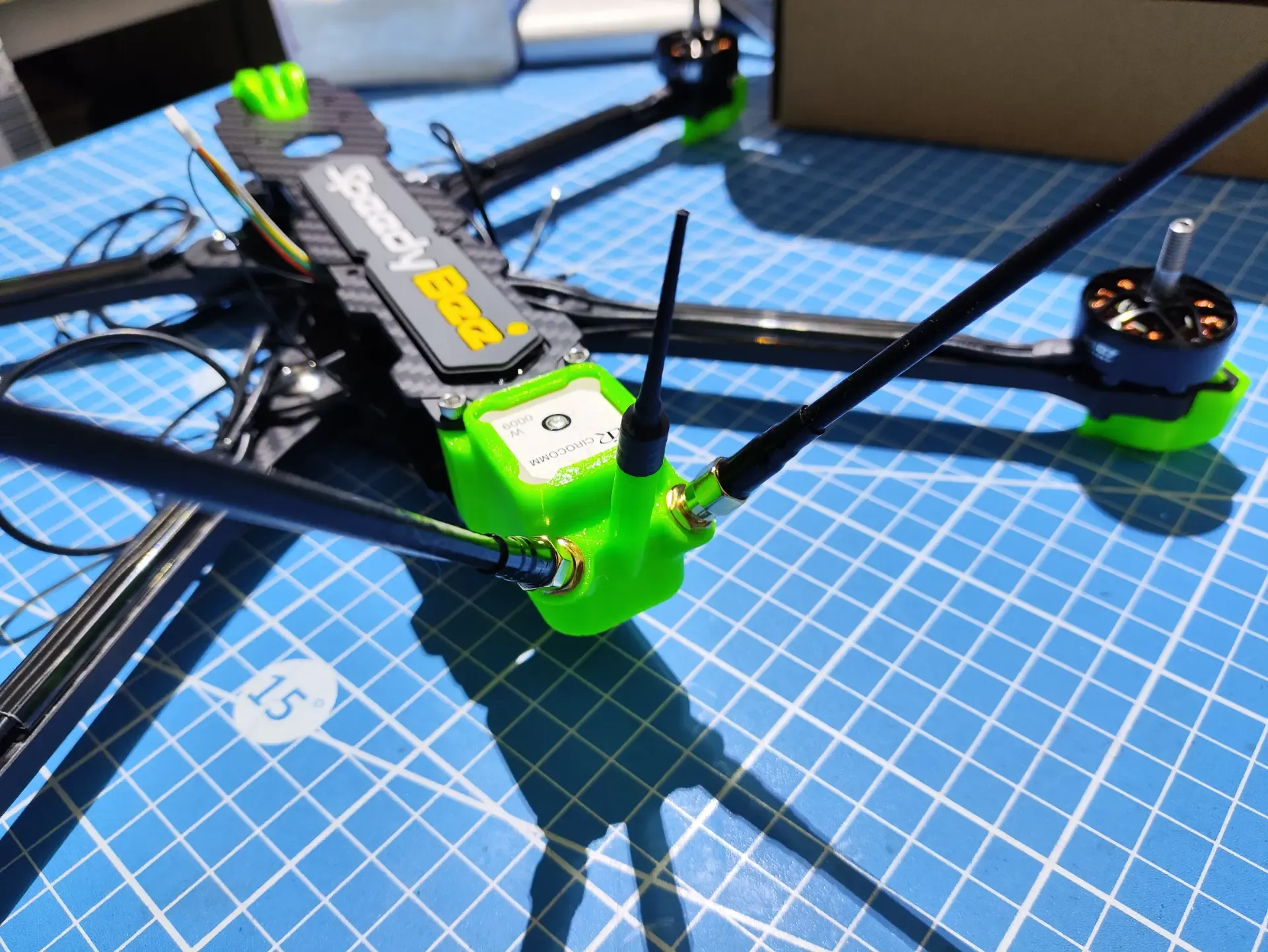
Here’s a simplified look at how length impacts loss at 2.4 GHz and 5.8 GHz:
| Cable Type | Length | Loss @2.4 GHz | Loss @5.8 GHz |
|---|---|---|---|
| RF0.81 | 20 cm | ~0.5 dB | ~1.2 dB |
| RF0.81 | 1 m | ~2.4 dB | ~5.8 dB |
| RF1.13 | 20 cm | ~0.35 dB | ~0.9 dB |
| RF1.13 | 1 m | ~1.7 dB | ~4.5 dB |
| RG178 | 20 cm | ~0.2 dB | ~0.4 dB |
| RG178 | 1 m | ~0.9 dB | ~1.8 dB |
| RG316 | 20 cm | ~0.2 dB | ~0.5 dB |
| RG316 | 1 m | ~0.9 dB | ~2.3 dB |
From the table, you can see why installers prefer short jumpers whenever possible. A 20 cm RG316 cable barely introduces 0.5 dB at 5.8 GHz, while the same length in RF0.81 nearly doubles that loss.
In practice, you usually face two options:
- Short jumper + bulkhead port — keeps loss minimal but adds one more connector in the chain.
- Longer direct run — avoids junctions but accumulates attenuation.

This line chart graphically complements the tabular data in the text, visually demonstrating the trend of increasing insertion loss with increasing cable length (meters) for cables like RF0.81, RF1.13, RG178, RG316 at 2.4 GHz and 5.6 GHz frequencies, emphasizing the significant impact of length and frequency on signal attenuation.
Both approaches work; the smarter choice depends on the housing design. For weatherproof enclosures, option one often wins because a sma bulkhead gives a clean and sealed panel exit.
A tip from field installations: if you’re working above 5 GHz, avoid runs longer than 30 cm with RF0.81 or RF1.13. The signal loss becomes noticeable, especially in FPV drones or 5.8 GHz Wi-Fi links.
5) Right-Angle Options: Straight vs Bent Designs
Not every device enclosure allows a straight cable exit. In compact housings or angled boards, a sma right angle adapter or a molded right-angle pigtail can make routing both easier and safer.
Right-angle solutions come in 90°, 45°, and even 135° configurations. They’re extremely practical when a straight connector would press against a wall or PCB. The trade-off? Each joint adds a bit of insertion loss—typically around 0.1–0.2 dB. It may sound small, but for sensitive RF systems or higher frequencies, that extra loss can matter.
To reduce both mismatch and mechanical strain, many engineers prefer cables with factory-molded right-angle ends instead of stacking a straight pigtail with a separate elbow. For bulkhead mounting, sma right angle bulkhead connectors offer a clean panel exit while redirecting the cable neatly inside.
A practical example: in FPV drone builds, pilots often use an rp-sma right angle adapter to keep the antenna clear of props and reduce stress on the transmitter. In contrast, lab test benches usually stick with straight connectors, since they provide the most stable and predictable signal path.

This image illustrates a specific application example (most likely an FPV drone video transmission system or a compact router) where a right-angle SMA adapter or pigtail is used to avoid antenna interference with other components (like props) and to reduce mechanical stress on the device-side connector.

6) Mixed-Port Pigtails (U.FL / MMCX / TS9 → SMA)
Not all devices use standard SMA ports directly. Many wireless boards, GPS receivers, and LTE modules are designed with miniature connectors such as U.FL, IPEX, MMCX, or TS9. To connect these to external antennas, you need a mixed-port pigtail, which bridges these tiny connectors to the more commonly used SMA interface.
The most common of these is the ufl to sma adapter, which typically uses coax like RF0.81 or RF1.13. These cables are slim, making them perfect for routing inside compact wireless modules, and then carrying the signal to an SMA bulkhead on the device enclosure.
Other combinations include:
- MMCX to SMA — often seen in GPS or SDR applications.
- MCX to SMA — used in video systems or older RF boards.
- TS9 to SMA — popular in 4G/5G USB modems, hotspots, and portable routers.
In most cases, a cable pigtail provides superior performance compared to a rigid metal adapter, especially when vibration or tight spaces are involved. While solid adapters are simple, they transfer mechanical stress directly to the PCB, which could cause damage over time. Cables, on the other hand, absorb this strain, ensuring a longer lifespan for your device.
Tip from the field: in mobile IoT devices, engineers often switch from MMCX-to-SMA adapters to a right-angle SMA pigtail to reduce the stress placed on the U.FL port. The right angle helps keep the antenna in the optimal position while reducing mechanical strain on the board.
7) Panel-Mount (Bulkhead/Flange) & Assembly Tips
Practical Tips for Panel-Mount Assembly:
- Thread Length: SMA bulkheads often come in different thread lengths, such as 8 mm, 11 mm, or 13 mm. Choose the one that matches your panel thickness to ensure a secure fit. For example, a 11 mm thread length is ideal for panels that are 2–3 mm thick.
- Sealing: For outdoor or weatherproof applications, look for bulkhead connectors with O-ring seals. These seals prevent moisture ingress, which is crucial for industrial IoT devices or vehicle-mounted antennas. If your application involves exposed environments, this simple addition can save you from expensive maintenance later on.
- Torque: It’s easy to overtighten connectors, which can deform the dielectric and affect signal integrity. Make sure to follow standard torque values for SMA fittings (typically 4–6 inch-pounds). Using a torque wrench helps maintain the proper pressure without damaging the connector.
When there’s limited space inside the housing, SMA right angle bulkhead connectors are often the best choice. They allow a flush fit and help redirect the cable neatly within the enclosure.
Pro tip: If you’re working with a compact enclosure, use right-angle bulkhead connectors. They help save space and prevent excessive bending of cables inside the device. I’ve seen it first-hand—using the wrong bulkhead style can make installation frustrating and lead to signal issues.
For more detailed installation advice, TEJTE’s SMA Bulkhead Connector Guide covers everything from flange types to sealing practices.
8) Buying Checklist
Choosing the right SMA adapter cable doesn’t have to be complicated. To help streamline your decision-making, here’s a one-page checklist to follow before placing an order:
- Interface & Polarity:
- SMA or RP-SMA: Choose based on the connector type of your device.
- Male or Female: Make sure the gender of your connectors matches the ports on your device and antenna.
Tip: If unsure, check the center pin or socket visually—it’s the easiest way to confirm the correct polarity.
- Cable Type:
- RF0.81 or RF1.13 for slim and flexible routing in tight spaces.
- RG178 or RG316 for low-loss, more durable options that are better for outdoor or lab environments.
Tip: For IoT applications, RF0.81 is perfect for compact boards, but if you need to move it around outdoors, RG316 is more reliable over time.
- Length:
- Keep it as short as possible: Signal loss increases with length, especially at higher frequencies like 5.8 GHz.
Tip: For Wi-Fi and FPV systems, try to keep the total length under 30 cm to avoid excessive loss.
- Orientation:
- Straight vs Right-Angle: Choose a right-angle adapter if space is tight or if you want to reduce mechanical strain.
Tip: Use right-angle SMA bulkhead connectors for cleaner, more efficient routing inside enclosures.
- Mounting:
- Decide if you need a panel-mount connector for bulkhead or flange mounting. These are best for securing the port through a wall or panel.
Tip: If your setup is going outdoors or into rugged environments, IP67-rated connectors with O-rings ensure long-term durability.
- Ends:
- Single-ended: From board to panel.
- Double-ended: For connecting two devices.
Tip: If you’re testing different setups, consider purchasing a few extra single-ended cables as spares. You’ll save time in the long run.
- Quantity:
- Plan for spares: If you’re building multiple devices or setting up a test system, ordering extra cables helps prevent downtime.
Tip: Ordering in bulk often reduces unit cost, and it’s helpful to keep extra cables on hand for prototypes or quick adjustments.
By following this checklist, you avoid mismatched connectors and unnecessary signal loss. If you’re still unsure, TEJTE’s RF Coaxial Cable Guide and SMA Adapter Guide are great resources for narrowing down your options.
9) FAQs
Q1: What is an SMA adapter cable / pigtail?
An SMA adapter cable (or pigtail) is a short coaxial jumper with SMA terminations on one or both ends. Unlike rigid adapters, pigtails add flexibility, help absorb mechanical strain, and minimize RF signal loss. These cables are often used to connect devices to external antennas or panel-mounted connectors. For more detailed specifications, check TEJTE’s SMA Adapter Guide.
Q2: Do right angle SMA adapters affect signal?
Yes, slightly. Right-angle SMA adapters introduce about 0.1–0.2 dB of insertion loss. While this might not seem much, it can affect high-frequency applications, especially where low loss is critical. To minimize this, use a molded right-angle cable end rather than stacking a straight cable with a separate metal elbow. If you’re working with higher frequencies (like 5.8 GHz), opt for shorter cables and avoid unnecessary bends.
Q3: Do SMA and RP-SMA adapters affect signal?
SMA and RP-SMA connectors both have 50 Ω impedance, so they won’t impact signal performance directly. However, the mechanical mismatch between SMA and RP-SMA can cause problems. RP-SMA has a reversed pin/socket arrangement, so they won’t fit together unless correctly paired. Always check the center pin/socket orientation to avoid confusion. For more on this, see TEJTE’s SMA vs RP-SMA Guide.
Q4: How long can an SMA adapter cable be at 5.8 GHz?
At 5.8 GHz, the attenuation increases with cable length. RF0.81 cables lose 8 dB per meter, while RG316 loses only 2.3 dB/m. In practice, try to keep the total cable length under 30 cm for best performance. Longer runs with thin cables like RF0.81 can cause significant signal loss, especially at higher frequencies.
Q5: When should I choose U.FL → SMA instead of a metal adapter?
If you’re working with compact, high-frequency modules (like Wi-Fi, LTE, or GPS), a U.FL to SMA adapter cable is a better choice than a rigid metal adapter. The cable absorbs strain and vibration, preventing damage to the delicate U.FL connectors on the PCB. Rigid adapters, on the other hand, put stress directly on the board, which can cause premature failure. For more information on U.FL connectors, check out TEJTE’s U.FL to SMA Cable Guide.
Conclusion
Choosing the right SMA adapter cable might seem straightforward, but each decision—whether it’s the cable type, length, or connector form—affects the long-term performance and reliability of your system. Here’s a quick recap of how to make the best choice:
- Define the connector interface: SMA or RP-SMA, male or female.
- Choose the cable type: RF0.81 or RF1.13 for compact applications, RG178 or RG316 for durability and low-loss.
- Keep the length short, especially at higher frequencies like 5.8 GHz.
- Decide on orientation: straight vs right-angle SMA adapters.
- Match panel requirements with the right sma bulkhead or panel mount connector.
- Opt for pigtails when dealing with U.FL or MMCX connectors to protect your board’s delicate pins.
By minimizing the number of adapters, keeping your cables short, and selecting the right coax, you ensure that your device maintains proper 50 Ω impedance, minimizes VSWR, and avoids mechanical stress that could cause failure.
For engineers or buyers seeking further advice, TEJTE’s RF Coaxial Cable Guide and SMA Bulkhead Connector Guide offer more in-depth insights on how to choose the right components.
Bonfon Office Building, Longgang District, Shenzhen City, Guangdong Province, China
A China-based OEM/ODM RF communications supplier
Table of Contents
Owning your OEM/ODM/Private Label for Electronic Devices andComponents is now easier than ever.
