
WiFi Antenna Extension Cable: Range & Loss Tips
Dec 23,2025

This figure is located below the title on the first page, serving as an introductory visual for the entire guide. It is likely a conceptual or scene image that vividly expresses that extending an antenna cable is not just a simple physical connection but involves complex engineering decisions related to signal attenuation and link budget changes. The figure might show a user attempting to reposition a router antenna via an extension cable, with a contrasting scenario of unexpected changes in coverage, or use chart elements to暗示 the relationship between length and loss. Its purpose is to immediately highlight the theme, helping readers understand how poorly chosen extension cables can silently harm network performance, thereby emphasizing the selection principles and calculation methods detailed later.
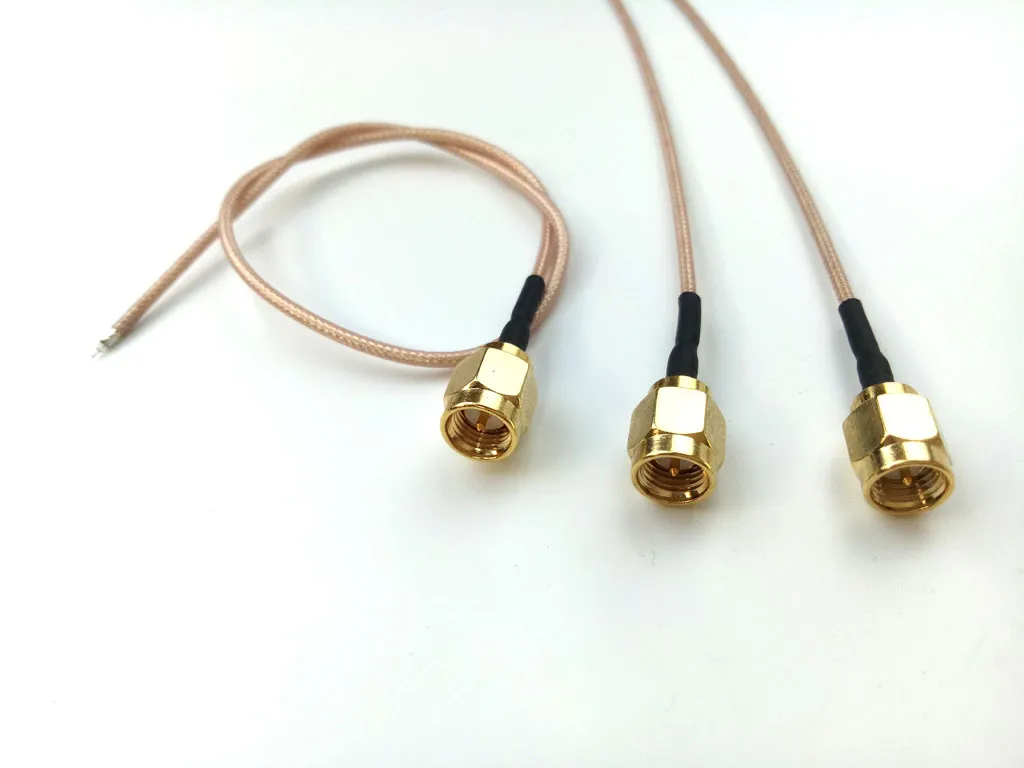
When you extend a Wi-Fi antenna, you’re not just stretching a wire — you’re shifting the physics that control signal strength, loss, and reliability. Many installers discover this the hard way: a router that used to cover two rooms suddenly can’t hold a connection across one wall.
This guide breaks down, in practical engineering terms, how to choose and match a Wi-Fi antenna extension cable that fits your real-world setup — from routers to IoT gateways — without killing performance.
How Long Should a WiFi Antenna Extension Cable Be Without Killing Range?

This figure appears immediately after the question “How Long Should a Wi-Fi Antenna Extension Cable Be Without Killing Range?”. It is a structured recommendation table or infographic that combines theoretical length advice with practical application scenarios. The table rows likely represent different cable lengths (e.g., 0.1m, 0.3m, 0.5m, 1.0m, 2.0m), and columns may include “Typical Scenario”, “2.4 GHz Use”, “5 GHz Use”, and “Comment”. For example, 0.3m might correspond to “Small case or router relocation” with the comment “Great default pick”. This figure aims to provide users with a quick reference framework to intuitively select an appropriate cable length range based on their specific installation environment (e.g., compact enclosure, through-panel, ceiling mount) and the Wi-Fi band used, avoiding performance or installation issues due to excessive or insufficient length.
The golden rule: keep it as short as functionally possible. Every extra centimeter introduces attenuation. But “too short” can also mean “too constrained,” especially when you’re routing through cases, ceilings, or cabinets.
For 2.4 GHz and 5 GHz Wi-Fi, attenuation increases as frequency rises. A 1 m run that seems harmless at 2.4 GHz can eat twice the margin at 5 GHz.
Let’s anchor this in practical experience:
| Length (m) | Typical Scenario | 2.4 GHz Use | 5 GHz Use | Comment |
|---|---|---|---|---|
| 0.1 m | Tight enclosure patch | Excellent | Excellent | Lowest loss |
| 0.3 m | Small case or router relocation | Excellent | Very good | Great default pick |
| 0.5 m | Through-panel or IoT gateway | Good | Good | Minimal flexibility trade-off |
| 1.0 m | Ceiling mount or AP relocation | Acceptable | Moderate | Begin watching signal margin |
| 2.0 m | Wall-mount or pole-feed | Fair | Noticeable loss | Use low-loss RG316/LMR-100 |
At TEJTE, engineers often use 0.3 m or 0.5 m wifi antenna extension cables when routing from an internal board to an external SMA port — long enough to clear mechanical obstacles, short enough to stay efficient.
You can read more about overall coax cable attenuation and material selection in our related article RG Cable Guide — it lays out how RG178, RG316, and LMR-type cables behave across Wi-Fi frequencies.
2.4 GHz vs 5 GHz Scenarios: Choosing “Enough Length” for Each Environment
Real environments matter more than datasheets:
- Home routers: 0.3 – 0.5 m usually suffices for repositioning near a wall or vent.
- Access points (APs): 1 – 2 m allows flexible mounting, but choose thicker coax (like RG316 or LMR-100A).
- IoT gateways: Typically under 0.3 m. Keeping the cable short ensures lower impedance variation.
Keep in mind that attenuation compounds with connector count — each male-to-female pair adds roughly 0.2 dB. That’s small, but not negligible when budgets are tight.
A quick mental test:
If your RSSI drops >3 dB after extension, that’s not your router “getting old” — it’s physics taxing your link budget.
Short-First Strategy: Why 0.3–0.5 m Wins Most Builds
The temptation to “future-proof” with 2 m of spare cable often backfires. Extra loops raise VSWR, and tight coils act like unintended inductors. In many cases, the signal degradation shows up as random disconnects — particularly on 5 GHz channels where wavelengths are smaller.
In TEJTE’s in-house validation, short runs (≤0.5 m RG178) consistently kept total system loss under 5 dB at 5 GHz — well within the margin for consumer and industrial Wi-Fi 6 devices.
If you’re planning to run longer than 1 m, consider upgrading to LMR-100A or RG316, both offered on TEJTE’s RF Cable Collection. They handle tighter bends and lower α(dB/m).
SMA or RP-SMA — How to Match Male/Female Ends Correctly

This image is a crucial visual guide to help users avoid connection errors, pin damage, or performance degradation (VSWR > 1.3) caused by confusing SMA and RP-SMA polarity.
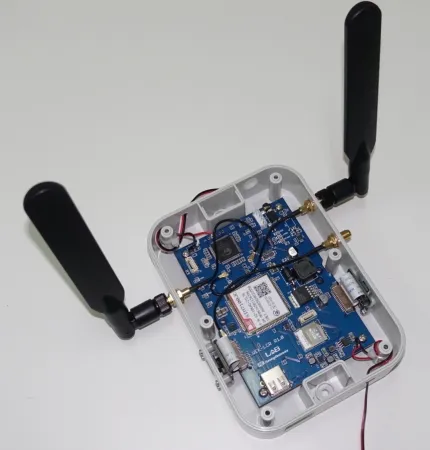
You can’t talk about extension cables without confronting the SMA vs RP-SMA confusion. Every technician has ordered the wrong end at least once — especially when datasheets use inconsistent drawings.
Here’s the fast, reliable visual check:
| Connector Type | Thread | Center Contact | Common Device Use |
|---|---|---|---|
| SMA Male | Outer thread | Pin | IoT gateways, modems |
| SMA Female | Inner thread | Receptacle | Cable extensions, antennas |
| RP-SMA Male | Outer thread | Receptacle | Consumer routers, Wi-Fi cards |
| RP-SMA Female | Inner thread | Pin | Standard home Wi-Fi antennas |
One quick trick:
If you see a pin on the external thread — it’s SMA. If you see a hole — it’s RP-SMA.
Device-End vs Antenna-End Logic
Most Wi-Fi routers (especially consumer ones) use RP-SMA Female jacks on the chassis, while their detachable antennas carry RP-SMA Male connectors.
By contrast, industrial modules or LTE routers often reverse this: the device exposes an SMA Female, expecting a SMA Male antenna or cable.
To avoid returns, note this simple pairing logic:
- Same connector type (SMA to SMA or RP-SMA to RP-SMA) = safe to extend.
- Cross-type (SMA to RP-SMA) = needs an adapter; expect +0.3 dB loss and possible mismatch.
If you ever find a device marked ambiguously, remove the antenna and inspect the center conductor — the thread tells half the story, the pin decides the rest.
SMA Extension Cable vs RP-SMA Extension Cable — When Each Applies
- Use a sma extension cable when your system uses standard SMA connectors — typical for cellular, GNSS, or industrial Wi-Fi.
- Use an rp-sma extension cable for consumer or office routers where reverse-polarity prevents unauthorized antenna gain upgrades (per FCC compliance).
These details are not cosmetic — using mismatched connectors can violate emission regulations if antenna gain no longer matches the certified configuration.
(For a deeper dive into connector gender and certification implications, see RP-SMA Connector Guide: Avoid Mismatch & Returns.)
Quick Visual Quadrant: “Thread × Pin/Hole”
Think of the SMA/RP-SMA family as four quadrants of thread × center type:
- Outer thread + Pin → SMA Male
- Inner thread + Receptacle → SMA Female
- Outer thread + Receptacle → RP-SMA Male
- Inner thread + Pin → RP-SMA Female
Knowing this, you can identify connectors at a glance — no calipers required.
Why Mismatch Matters in Real Power Budgets
Electrical mismatch isn’t just about fitting — it’s about reflection and VSWR.
At 5 GHz, even a small discontinuity can cause a 0.3–0.5 dB standing-wave loss. Combine that with two adapters and a 1 m RG178 line, and you’re easily 5–6 dB down. That’s roughly one-third of your radiated power gone before it leaves the chassis.
In RF engineering, 5 dB loss = nearly halving range in open environments.
If you’re unsure, order cables pre-terminated and tested. TEJTE’s SMA and RP-SMA assemblies are continuity-tested and labeled for direction — a small detail that saves big headaches in production.
How Much Loss Will the Extension Add to My Link Budget?
Every antenna cable eats a bit of signal. The trick is knowing how much you can spare before your link margin collapses.
Most engineers underestimate this because datasheets list attenuation in dB per meter, but real installations also include connector and adapter penalties.
A good Wi-Fi link typically needs about 20 dB of fade margin to stay reliable. Subtract 4 dB from a long, thin cable, toss in a couple of adapters, and you can easily burn a quarter of that margin.
RG178 Typical α(dB/m) at 2.4 / 5 GHz and the 10× Bend-Radius Rule
Among compact coax options, RG178 is common in router and IoT builds because of its flexibility and compact outer diameter (≈ 1.8 mm).
Here’s what testing across multiple vendors shows:
| Frequency (GHz) | Typical Attenuation α (dB/m) | Recommended Max Length for 5 dB Loss | Minimum Bend Radius |
|---|---|---|---|
| 2.4 | 3.5 – 4.2 | ≈ 1.2 m | ≥ 18 mm |
| 5.0 | 4.5 – 5.5 | ≈ 0.9 m | ≥ 18 mm |
| 6.0 (Wi-Fi 7) | 5.8 – 6.3 | ≈ 0.8 m | ≥ 18 mm |
Once you bend sharper than 10 × OD, micro-fractures can form in the braid. That tiny impedance ripple often shows up as a reflection spike around 4–6 GHz.
For thicker runs, cables like RG316 (≈ 2.5 mm OD) or LMR-100A (≈ 2.7 mm OD) offer lower α — around 2.0 – 2.5 dB/m at 5 GHz — and tolerate longer extensions without signal collapse.
See TEJTE’s detailed comparison in the Coax Cable Guide for attenuation charts and dielectric types.
Per-Connector Penalty and Reflection Risk
Every extra mating pair costs about 0.2 dB, sometimes more if connectors are cheap or overtightened. A mis-aligned pin can also skew return loss (VSWR > 1.5).
Reflection loss isn’t linear — it grows fast near 5 GHz. For mission-critical links, you want a total reflection coefficient below -14 dB (≈ VSWR 1.5).
If your build uses multiple jumpers, consider one continuous cable or use factory-terminated assemblies from TEJTE SMA Extension Cables. Pre-crimped ends minimize return-loss ripple and save debug hours.
Loss Estimator
You can estimate link loss quickly with this simplified formula:
Loss (dB) ≈ α(f) × L + 0.2 × n
| Meaning | Example | Input |
|---|---|---|
| Frequency (GHz) | 2.4 or 5.0 | f |
| Cable length (m) | 1.0 | L |
| of connector pairs | 2 | n |
| Yes adds ≈ 0.3 dB | Y | Adapter |
Example:
At 5 GHz using 1 m of RG178 (α = 5 dB/m) with two connectors,
Loss = 5 × 1 + 0.2 × 2 = 5.4 dB.
Add an adapter → 5.7 dB total.
That’s roughly -5.7 dB from TX power — equivalent to cutting your transmit strength from 100 mW to ≈ 27 mW.
Once you know your real EIRP, you can decide whether to shorten, switch to lower-loss cable, or boost antenna gain.
Router / mini-PCIe / M.2 Short Lead — What’s the Safe Extension Plan?
Small embedded boards complicate antenna routing. You’ll find miniature U.FL connectors feeding tiny SMA pigtails, usually under 10 cm long.
Replacing those with longer cables seems harmless — until your throughput halves.
Wi-Fi Antenna Cable / SMA Antenna Cable / SMA Male-to-Female Cable Choices
When extending short internal leads, follow this checklist:
- Match Impedance (50 Ω) — never mix with 75 Ω TV coax.
- Check Gender Before Order — SMA Female on board → SMA Male on extension.
- Pick Length Under 0.5 m — beyond that, losses grow exponentially.
- Crimped > Soldered for repeatability.
- Label Both Ends if building multi-antenna MIMO setups.
In TEJTE’s IoT production runs, the standard configuration is a 0.3 m SMA male-to-female extension with pre-fitted bulkhead for the case wall. It balances mechanical reach and electrical cleanliness.
If you’re unsure, browse TEJTE’s ready-made Wi-Fi Antenna Cables — they cover lengths from 0.1 m to 2 m using RG178 or RG316.
Strain Relief, Routing and EMI Hygiene
Longer cables introduce more motion and vibration risk. Without relief, SMA connectors can slowly twist loose.
Tips from field deployments:
- Add a nylon clamp or zip tie within 30 mm of the connector.
- Route away from DC buck regulators and switching MOSFETs.
- Avoid tight bundles with high-current lines — they inject noise.
- Use soft curves (≥ 3 cm radius) around corners.
Good mechanical discipline translates into stable RF performance.
Do I Need a SMA Bulkhead for Panel Feed-Through — and How to Size the Thread?

This figure appears in response to “Do I Need a SMA Bulkhead for Panel Feed-Through — and How to Size the Thread?”. It is an engineering schematic or cross-sectional view focusing on the scenario of an SMA bulkhead connector assembled on a device panel. The figure clearly shows how the connector passes through a round hole in the panel, with an O-ring and washer on the outside, secured by a nut on the inside. The key point is that the figure might use dimension lines to demonstrate how to measure the “total stack height” of “Panel Thickness + Washer + O-ring + Dust Cap Lip” to determine the thread length needed to ensure secure installation and effective sealing. This figure visualizes the calculation process described in the text, helping users understand that choosing a bulkhead with insufficient thread length will lead to insecure installation or waterproofing failure, enabling correct decision-making during selection.
Whenever your cable exits a metal enclosure, a bulkhead connector provides clean anchoring and EMI containment.
Without it, the SMA nut bites directly into paint or aluminum, creating poor shield continuity and loosening over time.
Panel Thickness + Gasket + Cap Stack Height
To choose the right bulkhead, measure the full stack from inside to outside:
- Panel thickness (e.g., 1.5 mm aluminum)
- Add washer + O-ring (≈ 1 mm)
- Add dust cap lip (≈ 0.5 mm)
A 6 mm thread length bulkhead fits most thin enclosures, while an 11 mm type covers thicker plates or double gaskets.
TEJTE lists both variants in its SMA Bulkhead Connector Series.
If you’re unsure, our earlier article SMA Connector Panel Mounting & ID in Practice illustrates how thread length interacts with panel geometry.
Torque, Re-Torque and Leak Checks
An under-torqued SMA nut loosens with vibration; over-torque cracks the PTFE dielectric.
For RG178/316 cables, tighten to about 0.45 – 0.56 N·m (4–5 in-lb). Use a small torque wrench for repeatability.
After installation:
- Verify no metal burrs touch the center pin.
- Check gasket compression for outdoor units.
- Inspect drain holes if the enclosure sits upright — trapped moisture ruins SMA threads fast.
In coastal deployments, a thin layer of silicone grease on threads extends life beyond two years.
Bulkhead Mount and Waterproofing in Outdoor Use

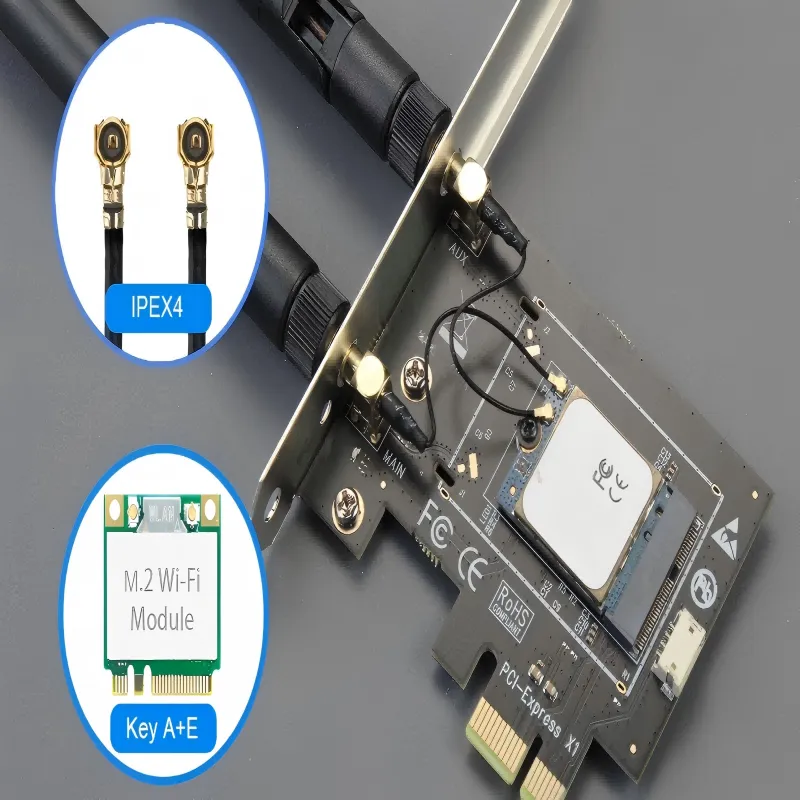
This figure appears in the context of discussing “Router / mini-PCIe / M.2 Short Lead — What’s the Safe Extension Plan?” and the role of bulkhead connectors in grounding and EMI suppression. It is a product close-up image that clearly shows a typical M.2 Wi-Fi module and highlights the IPEX4 (or U.FL) micro antenna connector on it. The figure might use an arrow or circle to annotate this extremely small and fragile connector. The purpose of this figure is to allow readers to visually recognize that in many modern compact devices (e.g., mini-PCs, router motherboards), the antenna signal is routed out through this type of micro-connector. This provides a visual foundation for the subsequent discussion on how to safely externalize this connection (via a short jumper to an SMA bulkhead on the panel), while also emphasizing the need for extra care when handling such connectors (limited mating cycles, strain relief required).

Bulkheads aren’t only for mechanical strength. They act as a ground bridge between the cable shield and the chassis. That return path reduces EMI and prevents RF leakage.
When you skip the bulkhead and simply route a pigtail through a hole, the floating shield can raise noise floor by 1 – 2 dB.
For outdoor Wi-Fi or LoRa gateways, choose IP67-rated bulkhead extensions. TEJTE offers rubber-booted options with compression seals tested under rain simulation (ISO 60529).
Can I Attach an RP-SMA Antenna to an SMA Jack with an Adapter?
Short answer: Yes — but you probably shouldn’t.
Adapters exist for mechanical compatibility, not for RF purity.
Physical vs RF Performance vs Compliance (EIRP)
While a small adapter might connect RP-SMA to SMA, it introduces:
- Extra 0.3 – 0.5 dB loss.
- Added discontinuity that alters return loss.
- Potential FCC compliance risk if antenna gain exceeds the original certification.
Regulators require reverse-polarity to discourage unauthorized high-gain swaps. By bypassing that mechanism, you could unknowingly increase EIRP beyond the 2.4 GHz Part 15 limit (≈ 36 dBm for point-to-point links).
If you must bridge once for testing, keep it temporary and note the added loss in your link budget.
When to Replace vs When to Adapt
- Temporary Lab Test: Adapter is fine — document the offset.
- Field Deployment: Replace one side with matching connector.
- High-Power Transmitters (> 1 W): Never adapt; heat builds at the mismatch interface.
For durable solutions, use properly terminated SMA or RP-SMA cables sourced to spec. TEJTE’s production line offers custom male/female pairings with continuity and VSWR test certs on request.
What Belongs on My Purchase Order to Avoid Returns?
In RF hardware, “almost right” means “doesn’t work.” A single mis-labeled connector can turn an entire batch into scrap.
Before placing any order for wifi antenna extension cables, make sure every detail is written down — not assumed.
Below is a proven field checklist you can paste directly into your next PO or supplier form. Filling each line saves hours of re-packing and frustration.
| Parameter | What to Specify | Example |
|---|---|---|
| Connector Type | SMA / RP-SMA | RP-SMA |
| Gender | Pin / Receptacle | Female (pin) |
| Ends | M-F / M-M / F-F | M-F |
| Mount Type | Bulkhead / Flange / None | Bulkhead |
| Waterproof | Y/N | Y |
| Cable Type | RG178 / RG316 / LMR-100 | RG316 |
| Length | 0.1-2 m | 0.5 m |
| Quantity | Number of units | 20 pcs |
| Panel Thickness / Hole Size | mm / inch | 1.5 mm / 6 mm |
| Application Scenario | Router / AP / IoT / PC | Outdoor IoT gateway |
Once complete, attach it to your purchase email or ERP entry. At TEJTE, our customers often paste this directly into Alibaba or WooCommerce order notes; it eliminates nearly all connector-type disputes.
For printable templates and real-world examples, see RF Cable Guide: Order Like a Pro — it includes sample PO formats used in production.
Typical Ordering Pitfalls
- Assuming thread = gender. Always confirm the center contact type.
- Mixing impedances. 75 Ω TV coax (RG59/RG6) will not mate correctly with 50 Ω Wi-Fi gear.
- Under-specifying panel stack. A bulkhead that’s 2 mm short can’t compress its O-ring.
- Buying from photos only. Many vendor images mirror the connector orientation.
If you can, snap a quick picture of your device port with a ruler. Visual confirmation prevents expensive confusion.
Do Wi-Fi 7 and 6 GHz Rules Change My Extension Choices?
Yes — but not in the way most people expect.
While regulations evolve, the physics stay stubbornly constant: higher frequency = more loss per meter. The new 6 GHz Wi-Fi 7 spectrum simply magnifies the importance of cable quality and connector integrity.
The 6 GHz Expansion and Why It Shrinks Your Margin
The FCC’s 2024–2025 ruling opened the entire 5.925–7.125 GHz band for Very Low Power (VLP) devices.
That’s excellent news for portable routers and IoT gateways — except that attenuation climbs roughly 1 dB per meter higher than at 5 GHz.
So a 1 m wifi antenna extension cable that cost you 5 dB before now costs ≈ 6 dB.
It doesn’t sound like much, but in a 20 dB budget, that’s 5 % of your total link margin gone.
For modern Wi-Fi 7 designs, engineers are switching from RG178 to:
- RG316 Low-Loss, with ~2.5 dB/m at 6 GHz, or
- LMR-100A, ~2.0 dB/m with double shielding.
Both are available pre-assembled from TEJTE RF Cable Products, each tested for VSWR ≤ 1.3 up to 6 GHz.
AFC Deployments and the Need for Precise Loss Data
Enterprise Wi-Fi 7 access points increasingly use Automated Frequency Coordination (AFC) systems to control allowed transmit power.
In those databases, total cable loss must be declared accurately — an optimistic guess can cause a power-limit rejection.
During pilot programs with leading OEMs, TEJTE provided insertion-loss certificates for each cable length, enabling customers to upload verified attenuation values to their AFC portal.
Documented loss isn’t bureaucracy — it’s the difference between a functional license and a rejected one.
Adoption Speed and Design Expectations
Wi-Fi 7 hardware is hitting shelves faster than installers can re-train.
Expect these trends:
- Shorter cables everywhere. Under 0.5 m is becoming the norm inside enclosures.
- Factory-terminated assemblies. Fewer field-crimped ends mean fewer impedance surprises.
- Integrated strain reliefs. New bulkheads include molded boots to handle tighter bend radii.
If you’re designing enclosures today, leave just enough clearance for 0.3–0.5 m extensions. Anything longer should use a thicker LMR-grade coax.
For a broader view of antenna evolution across bands, check Wi-Fi Antenna Guide: 433 MHz, 4G, 5G, GSM & SMA Types.
When to Shorten, When to Upgrade
Choosing between shortening and upgrading is about efficiency, not perfection.
If your link still holds a > 15 dB margin after extension, shortening may not be worth the effort.
But when you see RSSI dropping below -65 dBm or throughput fluctuating under load, it’s time to act.
Shorten if:
- Extension > 1 m and loss > 5 dB.
- You’re using RG178 at 5 GHz or higher.
- Connectors > 2 pairs in series.
Upgrade if:
- You need flexible outdoor routing.
- Temperature swings exceed ±40 °C.
- The enclosure requires IP67 bulkheads.
Upgrading to a better coax usually saves more dB per dollar than adding an amplifier later.
Closing Summary
A wifi antenna extension cable might look like a small accessory, yet it determines whether your network performs flawlessly or falls apart quietly.
Length, connector, and build quality define signal integrity long before firmware ever matters.
By keeping runs short, using verified 50-ohm coax, and documenting losses, you’ll protect every decibel your transmitter generates.
And when your next project demands custom routing or outdoor sealing, you’ll already know what questions to ask — and what to write on the PO.
Smart cables don’t just extend antennas; they extend reliability.
At TEJTE, that’s our daily craft — turning drawings into RF hardware that simply works.
Bonfon Office Building, Longgang District, Shenzhen City, Guangdong Province, China
A China-based OEM/ODM RF communications supplier
Table of Contents
Owning your OEM/ODM/Private Label for Electronic Devices andComponents is now easier than ever.
