
What Is a WiFi Antenna? Types, Specs & Field-Tested Tips
Aug 29,2025
Introduction

This image introduces the range of WiFi antenna designs, from compact 433 MHz units for IoT, to rugged outdoor 4G/5G towers, and SMA-mounted router antennas.
Ever noticed how your WiFi signal feels strong in the living room but collapses the moment you step into the garage? That frustration is almost always tied to the antenna, not the router itself. Weak coverage, unstable links, or IoT devices that keep dropping off the network—these are all symptoms of a poor antenna match.
A WiFi antenna is the unsung hero in any wireless setup. It’s the part that decides how far your signal reaches, how stable it stays when walls or interference get in the way, and whether multiple devices can stay online without constant lag. In practice, picking the wrong one can feel like buying a sports car and then putting on bicycle tires—it simply won’t perform the way you expect.
From low-frequency 433 MHz antennas used in sensors, to rugged 4G and 5G antennas on outdoor towers, to compact SMA antennas screwed onto routers, every style exists for a reason. By the time you finish this guide, you’ll know how to separate marketing fluff from the specs that actually matter, and you’ll have a simple checklist for choosing the right fit for your project or site.
What Is WiFi Antenna?
At the simplest level, a WiFi antenna turns electrical signals from your device into radio waves, and does the reverse when it’s receiving. Without it, your access point is just a box of circuits with no way to talk to the outside world. Most WiFi antennas operate in the 2.4 GHz and 5 GHz ISM bands, and newer gear adds support for 6 GHz under WiFi 6E.
Engineers describe antennas using a handful of key parameters:
- Gain, measured in dBi, which reflects how focused the energy is.
- Radiation pattern, whether the signal spreads in all directions (omnidirectional) or concentrates in one (directional).
- Impedance, typically 50 ohms, which has to match the radio circuitry.
- Connector type, like SMA or RP-SMA, which defines how you attach it to cables or boards.
In the field, we’ve seen that materials matter too. Brass with nickel plating works fine indoors, but outdoor deployments often require stainless steel or weather-sealed housings to survive rain and heat. And in the U.S., every antenna must comply with FCC Part 15 rules for unlicensed spectrum; in Europe, CE marking is the baseline.
Quick Facts (Table)
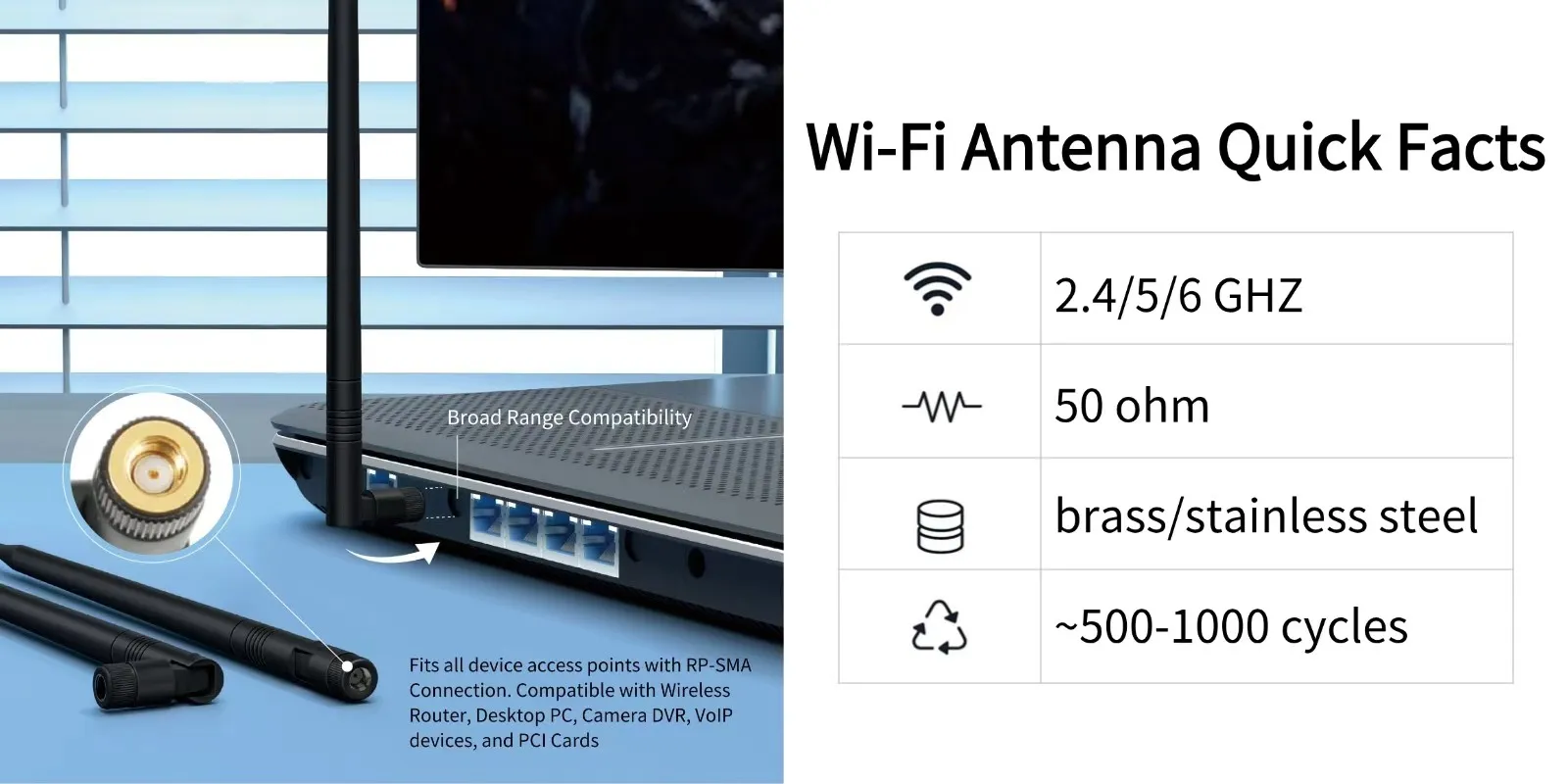
The image explains how antenna specs—gain (dBi), omni vs. directional patterns, 50 Ω impedance, and SMA/RP-SMA connectors—define performance.
| Item | Snapshot | Note |
|---|---|---|
| Category | RF component / accessory | Used in routers, APs, IoT nodes |
| Standard / Impedance | 50 Ω, FCC/CE compliant | Must align with region |
| Frequency Range | 2.4 GHz / 5 GHz / 6 GHz (Wi-Fi 6E) 433 MHz, 4G, 5G, GSM also common in hybrids |
433 MHz, 4G, 5G, GSM also common in hybrids |
| Materials | Brass, copper, stainless steel | Outdoor units require weatherproofing |
| Lifecycle | ~500–1000 connect/disconnect cycles (SMA, RP-SMA) | Depends on connector type (SMA, RP-SMA) |
Key Features & Benefits of WiFi Antennas
This infographic provides a quick reference: WiFi bands (2.4/5/6 GHz), hybrid use of 433 MHz/4G/5G, standard 50 Ω impedance, and 500–1000 cycles lifecycle.
1. Gain and coverage
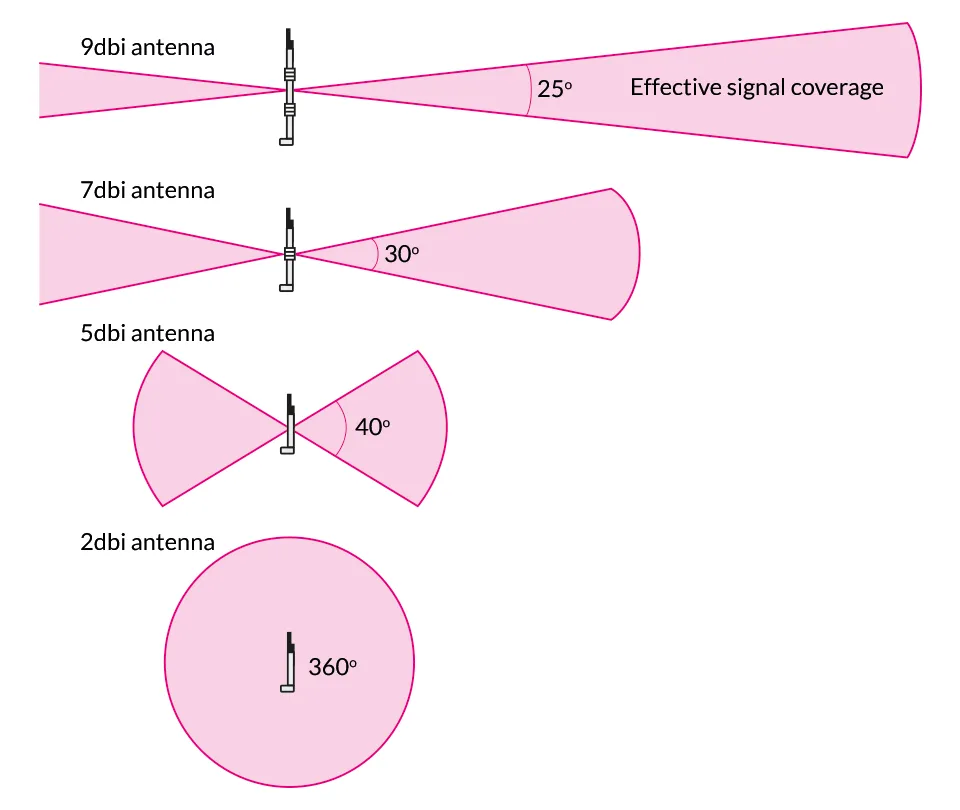
Higher gain doesn’t mean “better” in every case. A 9 dBi antenna may push signal farther down a hallway, but it can leave dead spots above and below floors. Lower-gain units around 2–3 dBi provide a wider “bubble,” which is why most routers ship with them by default.
2. Frequency compatibility
Antenna design dictates which band it can handle. A 433 MHz antenna works well for low-power IoT sensors, while dual-band WiFi antennas juggle 2.4 and 5 GHz traffic for everyday use. Add in 4G or 5G antennas and you’re looking at cellular-grade reliability—great for backup links.
3. Connector types
The connector is more than just the plug. A loose SMA antenna joint can cost several dB of loss. In tower work, we always retighten SMA couplings after the first thermal cycle—heat and cold will loosen them faster than you think.
4. Durability and weatherproofing
For outdoor setups, the material and sealing matter as much as the gain. Stainless steel and IP-rated housings resist corrosion, while cheap plastic shells tend to crack within a season. Teams that cut corners here usually end up re-climbing towers mid-winter to replace cracked units.
5. Multi-band and hybrid use
Modern designs often combine WiFi with GSM, 4G, or 5G capability. That hybrid approach saves mounting space and reduces cabling, especially on IoT gateways or remote cameras.
A quick snapshot
| Feature | Why it matters | Typical value / range* |
|---|---|---|
| Gain | Dictates coverage shape (wide bubble vs narrow beam) | 2–12 dBi |
| Frequency band | Ensures compatibility with Wi-Fi / IoT / cellular | 433 MHz, 2.4 GHz, 5 GHz, 6 GHz, LTE/5G |
| Impedance | Matches radio circuitry to minimize reflection loss | 50 Ω |
| Connector | Secure, low-loss link to device or cable | SMA, RP-SMA, N-Type |
| Weather rating | Prevents moisture damage outdoors | IP65 or higher (field gear) |
Types of WiFi Antennas
The image shows how low-gain antennas (2–3 dBi) create broad coverage, while high-gain (9 dBi+) extend range but form narrow beams.
At a glance, WiFi antennas fall into a few main families. The trick isn’t memorizing them all, but knowing which type fits your scenario.
Omnidirectional antennas
These are the classic “rubber duck” rods you see on most routers. They radiate in a 360° horizontal plane, making them perfect for blanket coverage in apartments, offices, or warehouses. The downside is reach—signal spreads evenly, but not far.
Directional antennas
Think panels, yagis, or parabolic dishes. Instead of spreading energy in all directions, they focus it into a beam. That beam can travel hundreds of feet outdoors, or punch through clutter indoors. The trade-off? You must aim them precisely—misalignment means a dead link.
Patch / panel antennas
These sit somewhere in between: flat, wide coverage in one direction, often mounted on walls or ceilings. They’re common in enterprise WiFi systems where you want to cover a floor plan without wasting energy behind the antenna.
Specialized variants
Some designs overlap with other networks. A 433 MHz antenna handles IoT devices like smart meters, while 4G/5G antennas extend broadband outdoors. A GSM antenna may live on the same enclosure as WiFi for hybrid gateways. In practice, these combos save space and cabling in tight deployments.
Side-by-side comparison

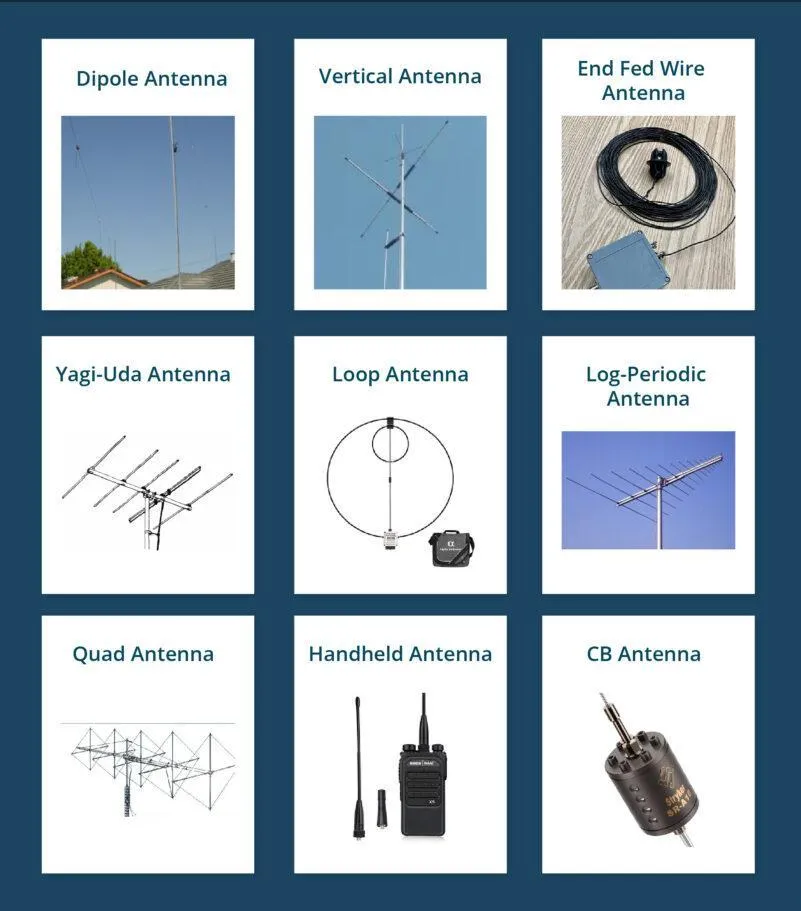
This comparison graphic introduces antenna families: omni rods for general coverage, directional yagis/dishes for links, panels for enterprise, and hybrids combining WiFi with 4G/5G.
| Type | Best for | Pros | Trade-offs |
|---|---|---|---|
| Omnidirectional | Homes, small offices, warehouses | Easy setup, covers multiple devices | Limited range, weaker through walls |
| Directional (Yagi / Dish) | Long-range outdoor links, point-to-point bridges | High gain, focused beam, strong penetration | Needs alignment, narrow coverage |
| Patch / Panel | Enterprise floors, ceiling mounts | Broad area coverage in one direction | Doesn’t cover 360°, installation angle matters |
| Hybrid (433 MHz / 4G / 5G / GSM + Wi-Fi) | IoT gateways, industrial routers, outdoor units | Multi-band in one device, saves space | More costly, design complexity |
When to choose what
- If you’re setting up WiFi in a small apartment or office, an omnidirectional unit does the job—cheap, simple, and effective.
- For a warehouse or outdoor yard, patch or panel antennas help steer coverage where people actually work.
- Running a point-to-point link across buildings? Go with a directional yagi or dish. We’ve seen teams cut fiber costs by linking two rooftops with properly aligned 5 GHz dishes.
- And if you’re dealing with IoT or cellular backup, hybrid antennas (WiFi + 4G/5G or GSM) save you from mounting a forest of rods on your enclosure.
Specs & Sizing
Numbers clarify choices—here’s a clean snapshot. Antennas are more than plastic shells; their specs tell you how they’ll behave in the field. If you’re skimming, focus on these figures before making a purchase.
- Impedance: Almost all WiFi gear expects 50 Ω. A mismatch here means wasted power and reflection losses.
- Frequency range: WiFi is mostly 2.4 GHz and 5 GHz, with 6 GHz added for WiFi 6E. But hybrid designs extend to 433 MHz, 4G, 5G, or GSM.
- Gain: Low gain (2–3 dBi) = wide coverage; higher gain (8–12 dBi) = longer reach but narrower beam.
- Connector type: SMA, RP-SMA, N-type are most common. For outdoor gear, torque and sealing matter as much as the connector itself.
- Weatherproofing: IP65 or higher keeps moisture out in outdoor deployments.
Specs table

The image highlights how WiFi antenna specifications define performance, showing gain range, supported frequency bands, impedance standard, and connector compatibility for different devices.
| Parameter | Typical | Range / Note |
|---|---|---|
| Impedance | 50 Ω | industry standard for Wi-Fi radios |
| Frequency bands | 2.4 / 5 / 6 GHz | Hybrid designs also cover 433 MHz, GSM, 4G, 5G |
| Gain | 2–12 dBi | low = broad bubble, high = long beam |
| Connector types | SMA / RP-SMA / N-Type | chosen by device or cable interface |
| Weather rating | IP65+ | for outdoor use, prevents corrosion |
| Lifespan | ~500–1 000 mating cycles | depends on connector quality and handling |
Use Cases & Industries

This image explains the role of WiFi antennas in transmitting and receiving wireless signals, comparing omnidirectional coverage (360°) to focused directional beams for long-range communication.
WiFi antennas appear everywhere, from consumer routers to military comms. The trick is seeing how different designs solve different problems:
- Home & office networks
Dead zones in multi-floor houses or large offices can often be fixed by swapping stock antennas with higher-gain omnidirectionals. We’ve seen small businesses boost coverage 30% with a simple antenna upgrade—no new router needed.
- IoT and smart devices
Many IoT modules rely on compact 433 MHz antennas for low-power links, or SMA antennas for quick swaps. In field deployments, engineers often carry spares because fragile connectors get loose after repeated handling.
- Telecom & industrial sites
Outdoor 4G and 5G antennas provide cellular backup or primary broadband for remote facilities. They’re often combined with WiFi for hybrid connectivity. A field note: on rooftop sites, we re-torque N-type connectors after a week of hot–cold cycles to prevent early loosening.
- Transportation & logistics
Fleet vehicles and shipping hubs use GSM and WiFi antennas to track assets. The payoff is fewer lost shipments and real-time telemetry.
How to Choose a WiFi Antenna
Choosing antennas can feel overwhelming, but it comes down to a few clear steps. Here’s a practical checklist:
Step 1. Define your goal
Is it range, coverage uniformity, or interference resistance? For instance, do you need to cover a single floor, link two rooftops, or connect a warehouse of sensors?
Step 2. Narrow down type
Use the comparison table above: omnidirectional for blanket coverage, directional for links, hybrid if you need GSM/4G/5G alongside WiFi.
Step 3. Confirm thresholds
Check the hard specs that matter:
- Low PIM if deploying near cellular gear.
- Connector torque (e.g., SMA = hand-tight, N-type = 20–30 lbf·in with wrench).
- Weatherproofing: IP65 minimum for outdoor.
Step 4. Check compatibility
Verify impedance (50 Ω), frequency bands, and connector match with your device. A mismatch means poor performance or no connection.
Step 5. Factor cost and maintenance
When budgets are tight, this single choice saves rework: invest in connectors with proper sealing. Teams that buy cheap often pay twice after water ingress destroys the link.
Installation / Handling

This image illustrates best practices for WiFi antenna installation: vertical orientation for routers, weather-sealed mounts outdoors, and proper clearance from walls or metal objects to improve coverage.
Installing a WiFi antenna looks simple—screw it on and you’re done. But in practice, a few small steps make the difference between a stable link and hours of debugging.
Basic steps for proper handling:
- Check connector type – Make sure your antenna matches the device port (SMA vs. RP-SMA). Forcing the wrong type bends pins.
- Align carefully – Insert straight, don’t angle. Cross-threading weakens the joint.
- Tighten to spec – SMA connectors are usually finger-tight. N-type connectors require a torque wrench (20–30 lbf·in in U.S. spec).
- Weatherproof if outdoors – Apply sealing tape or boots for antennas exposed to rain.
- Route cables smartly – Avoid sharp bends, keep away from AC power lines to reduce noise.
- Test signal strength – Run a speed or RSSI check after install to confirm performance.
- Document placement – Note antenna direction, height, and cable path. This saves time when troubleshooting later.
Safety reminder: For rooftop or tower installs, never overreach. It’s better to spend an extra 10 minutes with proper harnessing than risk an accident.
Maintenance & Common Mistakes
Even the best WiFi antenna setup degrades if neglected. A light maintenance cycle keeps performance stable.
Maintenance best practices:
- Visual inspection – Check connectors monthly for corrosion or looseness.
- Re-torque connectors – In outdoor gear, revisit after the first week of hot–cold cycles.
- Clean surfaces – Wipe dust and grime, especially around SMA threads.
- Replace damaged boots – Cracked weather seals invite moisture.
- Log results – Keep a short maintenance record; it helps spot recurring issues.
Common mistakes to avoid:
- Using the wrong connector → SMA vs. RP-SMA mismatch = no signal. Always confirm pin/socket type.
- Over-tightening → Leads to stripped threads or cracked housings. Stick to torque guidelines.
- Ignoring impedance → Using 75 Ω TV cables with 50 Ω WiFi antennas causes loss and reflections.
- Skipping weatherproofing → One rainstorm can kill an outdoor link. Use sealing tape from day one.
- Overestimating gain → Chasing “bigger numbers” isn’t always better. High-gain directional units leave dead spots if misaligned.
Field note: We’ve seen rooftop installs fail within a month because contractors skipped sealing connectors. A $2 roll of tape could have saved a $200 service call.
FAQs
Q1: What does a WiFi antenna actually do?
It converts electrical signals from your router or device into radio waves, and back again. Without it, WiFi has no way to leave the box.
Q2: WiFi antenna vs. 433 MHz / 4G / 5G / GSM antennas—what’s the difference?
WiFi antennas are tuned for 2.4, 5, and 6 GHz bands. By contrast, 433 MHz antennas serve IoT devices, while 4G, 5G, and GSM antennas cover cellular networks. Some hybrid antennas combine both in one unit.
Q3: Is every WiFi antenna rated for outdoor use?
No. Indoor antennas often lack weatherproofing. For outdoor installs, look for IP65+ housings and corrosion-resistant metals.
Q4: What torque should I use for antenna connectors?
- SMA: finger-tight (about 5–7 lbf·in).
- N-type: 20–30 lbf·in using a torque wrench.
Always follow vendor recommendations when available.
Q5: Can I replace my router’s stock antenna with a higher-gain one?
Yes, provided your router has detachable connectors (often RP-SMA). Just remember: higher gain = narrower beam, so don’t expect uniform coverage in multi-story homes.
Q6: How do WiFi antennas work?
A WiFi antenna works by converting electrical signals into radio waves, and turning received waves back into electrical form so your devices can stay connected wirelessly.
Behind this simple function are key design choices. Gain and radiation pattern decide whether coverage forms a wide bubble (low-gain) or a narrow, longer beam (high-gain or directional). Since WiFi operates on 2.4 GHz, 5 GHz, and 6 GHz, antennas are tuned for those exact bands—other designs like 433 MHz or 4G/5G antennas won’t work properly for WiFi.
In short, the antenna shapes how signals leave and return to your device, making it a critical factor in range and stability.
TEJTE WiFi Antenna Solutions
At tejte.com, we focus on performance-grade RF antennas designed to survive real-world environments. From small office networks to industrial IoT systems, our catalog covers the essentials:
- Dual-band 2.4/5 GHz antennas with SMA/RP-SMA connectors for routers, APs, and repeaters
- Industrial-grade 433 MHz, 4G, 5G, and GSM antennas for outdoor, cellular, and telemetry applications
- Flexible antenna + cable kits tailored for embedded systems, IoT modules, and custom builds
Conclusion
Whether you’re fine-tuning a home router or rolling out wireless backhaul across rooftops, the antenna you choose dictates your network’s range, stability, and speed.
It’s not about chasing the “highest-gain” spec sheet. It’s about making the right match:
- Frequency & gain aligned with your coverage needs
- Radiation pattern (omnidirectional vs. directional) that fits your layout
- Connector compatibility—SMA or RP-SMA, matched properly
- Verified specs like VSWR, IP rating, and torque thresholds
We’ve seen real-world cases where simply swapping mismatched antennas doubled usable range—without changing firmware or boosting transmit power.
Bottom line: the antenna is the “last inch” of your wireless chain, and often the weakest link. Get it right, and the rest of your network simply works.
Bonfon Office Building, Longgang District, Shenzhen City, Guangdong Province, China

A China-based OEM/ODM RF communications supplier
Table of Contents
Owning your OEM/ODM/Private Label for Electronic Devices andComponents is now easier than ever.