
What is MCX Connector? Definition, Uses, and Comparisons
Aug 26,2025
Introduction
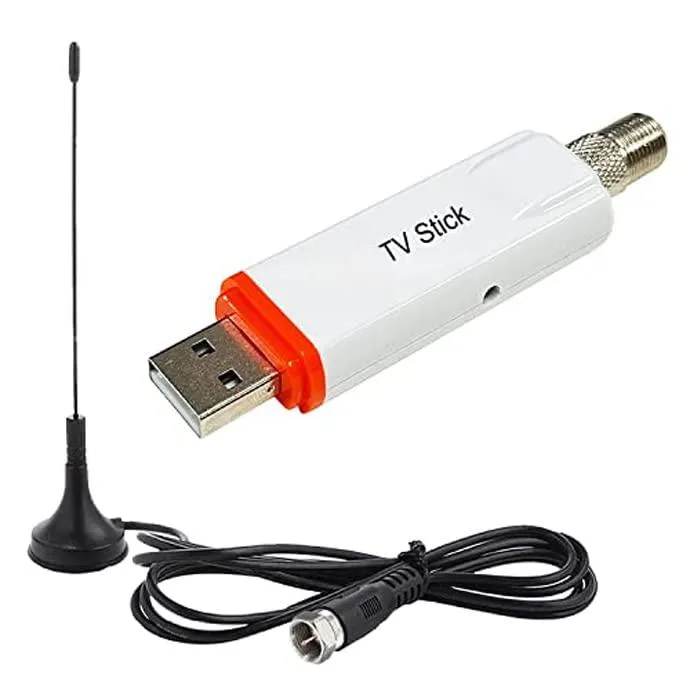
This image highlights the presence of MCX connectors in everyday electronics such as GPS receivers and DVB-T tuner sticks, reflecting their role in consumer RF applications.
Ever noticed the tiny round plug on a GPS receiver or a USB TV tuner stick? That little snap-on port is called an MCX connector. It doesn’t look like much at first—just another coaxial plug—but its compact size and quick-lock design make it surprisingly useful in gear where every millimeter counts.
So, what is a MCX connector? The term comes from Micro Coaxial Connector, a standard that first showed up in the 1980s when engineers were desperate for something smaller than the chunky SMA and SMB connectors. Instead of threads or bulky couplings, MCX relies on a push-and-click snap-on system. No tools, no twisting—just press, and you’re connected.
That simplicity explains its popularity. Today, you’ll see MCX ports in GPS antennas, DVB-T tuner dongles, SDR radios, and even lab equipment. They handle frequencies up to about 6 GHz and are available in both 50-ohm and 75-ohm versions. For most mid-frequency consumer and test applications, it’s a solid mix of speed, reliability, and size efficiency.
In this guide, we’ll walk through everything you need to know: the definition of the MCX connector, its features and types, how it stacks up against alternatives like MMCX or SMA, and what to check before you buy.
What is MCX Connector?
The diagram illustrates how MCX connectors use a quick snap-on mechanism while SMA relies on threaded sleeves, explaining their differences in speed and durability.
The MCX connector, short for Micro Coaxial Connector, is a miniature RF interface that first appeared in the 1980s. It was developed as electronics demanded smaller footprints without sacrificing too much in signal quality.
At its core, an MCX is designed to connect coaxial cables to devices quickly. Unlike threaded types such as SMA, it relies on a snap-on coupling system—you push it in, it locks with a click, and you’re done. This feature makes it faster to use and better suited for compact consumer devices.
Key Technical Details
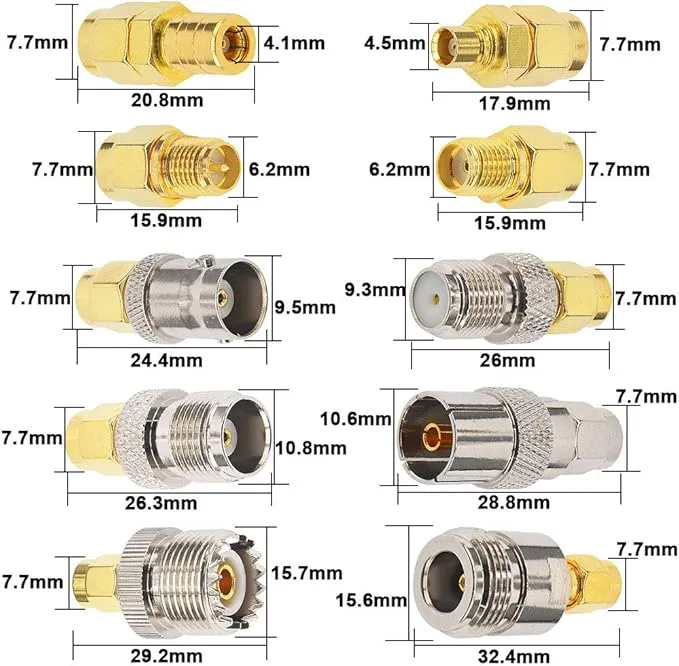
The image provides technical data for MCX connectors, with dimensions around 3.6 mm, helping engineers understand compatibility with SMB and SMA connectors.
- Outer diameter: roughly 3.6 mm (30% smaller than SMB connectors)
- Coupling: snap-on, tool-free connection
- Frequency range: DC to 6 GHz
- Impedance options: available in 50 Ω (for RF/data applications) and 75 Ω (for broadcast/video systems)
- Durability: rated for about 500 mating cycles
So when people ask, “What is a MCX connector?”, the most direct answer is: it’s a miniature snap-on RF connector widely used in GPS modules, DVB-T tuners, and other wireless systems.
The design strikes a balance—large enough to handle mid-frequency RF signals reliably, yet small enough to fit into space-constrained consumer electronics. That’s exactly why you’ll find MCX connectors in places where SMA would be too bulky and MMCX too fragile.
MCX Connector Design & Features
The MCX connector was created as a lighter, more compact alternative to the bulkier SMB series. At only 3.6 mm in diameter, it takes up about 30% less space than SMB, yet it still holds up well for signals up to 6 GHz. That’s why you’ll see it chosen again and again in gadgets where every bit of space counts.
One thing that sets MCX apart is the snap-on coupling. Instead of twisting a threaded sleeve like you would with an SMA, you just push it in until it clicks. That makes swapping cables incredibly quick—something you’ll appreciate in a test bench where connectors are handled all day, or in consumer gear where antennas may be changed often.
Another detail worth noting is impedance. MCX connectors come in 50 Ω and 75 Ω versions. The 50-ohm type is used in GPS, RF modules, and wireless systems, while the 75-ohm model is popular in video and broadcast gear (for example, DVB-T tuners). Using the wrong one won’t stop the connection, but it can cause signal reflections and unnecessary loss.
Other design highlights include:
- Small footprint – makes them ideal for circuit boards and USB sticks.
- Durable enough – rated for about 500 connect/disconnect cycles.
- Low VSWR – meaning less wasted energy and a cleaner signal path.
Put simply, the MCX connector blends small size, quick handling, and reliable mid-frequency performance. That combination explains why it’s lasted decades in both consumer gadgets and professional instruments.
MCX Connector Types

The image illustrates the gender distinction of MCX connectors—male with central pin often on cables, and female with recessed socket integrated into devices.
Like most RF connectors, the MCX family comes in a few different forms. Each version is designed for a slightly different purpose—cables, PCBs, or device ports. Picking the right one saves time and avoids costly mistakes.
MCX Male Connector
The male version has a central pin and an outer snap-on housing. You’ll often see it on cable ends or adapters, where it plugs into a female jack on a device. Because it carries the pin, it’s generally thought of as the “active” side.
MCX Female Connector
The female type has a recessed socket that receives the male pin. These are built into GPS receivers, TV tuners, SDR radios, and PCB-mounted modules. So if someone mentions “an MCX port on my GPS,” they’re talking about the female jack.
Cable-Mount MCX
Designed to terminate coaxial cables, these connectors let you build custom antenna leads or extension cables. You’ll find crimp versions in production lines for speed, while hobbyists or lab techs often prefer solder types for their stronger hold.
PCB-Mount MCX
This version is soldered straight onto a printed circuit board. It gives designers a low-profile option for compact devices like USB tuner sticks, IoT modules, or RF add-on cards. Its small footprint is a big advantage where board space is scarce.
So when people ask about “MCX connector types”, they’re usually referring to male vs. female and cable-mount vs. PCB-mount. Get that distinction right, and you’ll avoid most of the headaches that come with ordering the wrong parts.
Applications of MCX Connectors
The MCX connector isn’t just a “mini SMB.” Over the years, it has found a comfortable niche in a variety of devices—especially where designers need something small, quick to use, and reliable up to a few gigahertz. You’ll see it in everything from car dashboards to hobbyist radio kits.
Where You’ll Find It Most

The image shows how MCX connectors are used in GPS receivers to link external antennas, boosting reception in vehicles or handheld navigation gear
- GPS Receivers & Navigation Gear
Pop open a car GPS unit and you’ll usually spot an MCX female port waiting for an external antenna. Hikers who rely on handheld GPS units use it too, since an MCX-to-SMA adapter makes it easy to attach a high-gain antenna for better reception in remote areas.
- DVB-T / Digital TV Tuners
Those tiny USB TV sticks that let you watch over-the-air broadcasts? Many ship with an MCX jack. Since most household antennas don’t use MCX, people often keep a little MCX-to-F or MCX-to-SMA adapter in the drawer to make it work.
- Software-Defined Radios (SDRs)
Entry-level SDR kits, popular with amateur radio enthusiasts, rely on MCX because it’s compact and easy to swap. When you’re testing antennas across different frequency bands, being able to “snap on, snap off” without fumbling with threads is a real time-saver.
- IoT and Telemetry Modules
Some IoT boards squeeze in an MCX connector to balance space savings with signal stability. It’s larger than U.FL, but far sturdier—useful in devices that get handled more often.
- Lab & Measurement Equipment
Certain oscilloscopes, analyzers, and data acquisition cards integrate MCX connectors. For engineers, this offers a compact yet robust input without the bulk of SMA or BNC.
Example Device Usage
| Device Type | Connector Version | Example Use |
|---|---|---|
| GPS Module | MCX Female | Automotive GPS antenna port |
| TV Tuner Stick | MCX Female | USB DVB-T receiver dongle |
| RF Communication | MCX Male | SDR adapter / radio front-end |
| Lab Equipment | MCX Female | Data acquisition & measurement |
In practice, the MCX connector acts as a bridge between compact electronics and larger RF systems. You’ll often need an adapter to connect it to SMA or BNC, which is why the MCX ecosystem is closely tied to conversion accessories.
MCX vs Other RF Connectors
When choosing an RF connector, engineers often weigh size, frequency range, durability, and ease of use. The MCX connector sits in the middle ground: smaller than SMB, sturdier than MMCX, and faster to use than SMA. Let’s break it down.
MCX Connector vs MMCX Connector
At first glance, MCX and MMCX look similar, but their size sets them apart. The MCX connector measures ~3.6 mm, while MMCX is only ~2.4 mm. That 1.2 mm difference might sound tiny, but it’s critical in RF design. MMCX is favored for ultra-compact modules like IoT boards or earphones, but its latch system is more fragile. MCX, by contrast, offers a sturdier snap-on feel, making it a better choice for consumer electronics like GPS or TV tuners.
MCX Connector vs SMB Connector
The SMB connector predates MCX and is about 30% larger. Both use a snap-on design, but SMB is bulkier and typically found in telecom or rugged industrial equipment. MCX provides a lighter, space-saving option while still covering frequencies up to 6 GHz, compared to SMB’s ~4 GHz.
SMA Connector vs MCX Connector
The SMA connector is threaded, which makes it more secure but also slower to use. SMA supports frequencies up to 18 GHz, making it the gold standard in labs, WiFi devices, and high-frequency RF testing. By comparison, MCX maxes out at 6 GHz—plenty for GPS or DVB-T, but not suitable for mmWave. That said, MCX wins when speed and convenience matter more than ultra-high-frequency performance.
Quick Comparison Table
| Feature | MCX | MMCX | SMB | SMA |
|---|---|---|---|---|
| Size (OD) | 3.6 mm | 2.4 mm | 4.0 mm | 6.35 mm |
| Coupling | Snap-on | Snap-on | Snap-on | Threaded |
| Frequency | DC-6 GHz | DC-6 GHz | DC-4 GHz | DC-18 GHz |
| Durability | ~500 cycles | ~500 cycles | ~500 cycles | 500-1000 cycles |
| Typical Use | GPS, DVB, SDR | IoT, audio, wearables | Telecom, MIL | Wi-Fi, lab testing |
In short, when people search “MCX vs MMCX” or “SMA vs MCX”, the answer usually boils down to: MCX is faster and smaller but less powerful, while SMA handles higher frequencies with better stability.
MCX Adapters & Conversions
One challenge with the MCX connector is that it isn’t as widespread as SMA or BNC. Most antennas and lab instruments stick with those larger, more established formats. As a result, adapters are almost always needed when working with MCX-equipped devices.
Common MCX Adapters
- MCX to SMA Connector

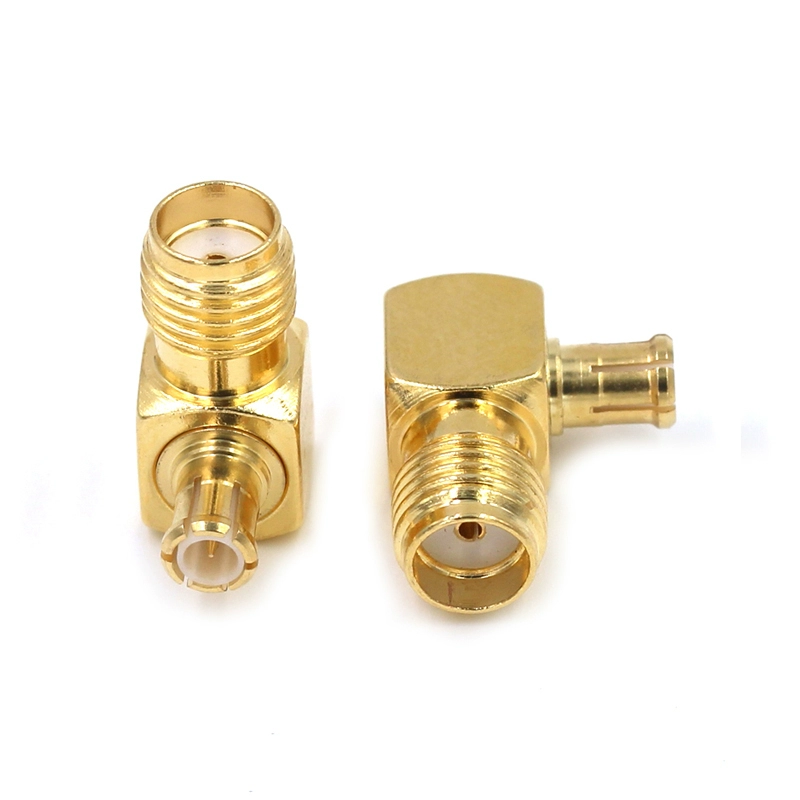
This image illustrates how SMA-to-MCX adapters are applied when a device with an SMA port needs to connect to equipment or antennas using MCX connectors.
Probably the most common conversion. Many GPS receivers and DVB-T dongles use an MCX female jack, but the majority of aftermarket antennas are SMA. An MCX to SMA adapter cable solves the mismatch instantly, letting you attach a standard SMA antenna without modifying the device.
- MCX to RF Connector
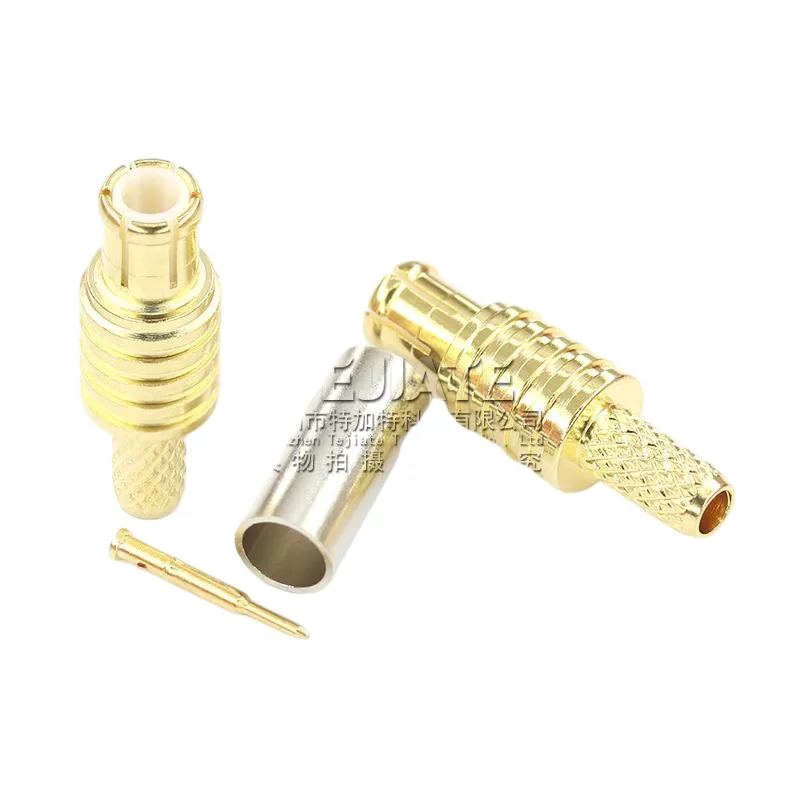
The image highlights MCX connectors as available in multiple product forms—cable-mounted, PCB-mounted, and adapter versions—covering a wide range of consumer and professional RF needs.
This category covers general coaxial system connections—whether you’re integrating MCX into a test rig, RF distribution system, or communication setup. It ensures that MCX devices can connect seamlessly with broader RF networks.
- MCX to BNC Adapter

The image illustrates how MCX-to-BNC adapters are used in labs and CCTV setups, allowing compact devices with MCX ports to connect seamlessly with BNC-based instruments.
In laboratory environments, BNC remains the go-to connector for oscilloscopes and signal analyzers. If your test card or module uses MCX, a quick MCX-to-BNC adapter lets you plug it directly into lab gear without hassle.
Why These Adapters Matter
Without these adapters, many MCX devices would feel like “islands”—compact but incompatible with the rest of the RF ecosystem. The adapters extend usability, ensuring that a USB TV tuner or SDR with an MCX port can still connect to widely available antennas and test equipment.
For engineers and hobbyists alike, keeping a small set of MCX adapters in the toolkit is almost mandatory. They’re inexpensive, and having the right one on hand can save you hours of frustration during setup or troubleshooting.
Buying Guide: How to Choose an MCX Connector
Not all MCX connectors are created equal. While they may look similar on the outside, small differences in impedance, build quality, and connector type can make or break your project. Before clicking “buy,” it’s worth slowing down and checking a few essentials.
Key Factors to Consider
- Impedance (50 Ω vs 75 Ω)
This is the first thing to confirm. A 50-ohm MCX connector is designed for RF communications, GPS antennas, and data modules. The 75-ohm version is intended for broadcast and video signals, like DVB-T tuners. Mixing them up can lead to poor signal quality and reflections.
- Connector Gender (Male vs Female)
It sounds simple, but ordering the wrong gender is one of the most common mistakes. Remember: MCX male = central pin, cable side; MCX female = recessed socket, device side.
- Frequency Range
MCX is reliable up to about 6 GHz. If your application goes beyond that—say WiFi at higher bands or mmWave testing—you’ll want an SMA or even smaller precision connectors instead.
- Durability and Environment
Standard MCX connectors last around 500 mating cycles. If your setup involves frequent connects/disconnects or outdoor use, choose ruggedized or weather-sealed variants. For GPS antennas mounted on vehicles, a waterproof MCX connector is a must.
- Build Quality
Cheap knock-offs may save a few dollars but often suffer from poor plating, loose tolerances, and higher insertion loss. A well-machined MCX connector ensures lower VSWR and more consistent performance.
Pro Tip
If you’re unsure whether you need a 50-ohm or 75-ohm MCX connector, check your device specs. As a rule of thumb: RF modules = 50 Ω, TV/digital video gear = 75 Ω.
By following these guidelines, you’ll avoid the all-too-common scenario of ordering a connector that looks right but fails in practice.
Common Mistakes to Avoid
On paper, the MCX connector looks simple. In practice, people trip up on the details more often than you’d expect. Here are a few of the common slip-ups I’ve seen:
- Mixing up MCX with MMCX
They sound alike and even look similar, but they’re not interchangeable. MCX is about 3.6 mm, while MMCX is only 2.4 mm. That 1.2 mm might not sound like much, but try plugging them together—you’ll quickly realize it’s a no-go.
- Ordering the wrong gender
This one happens all the time. Quick reminder:
- MCX male = central pin (usually cable or adapter side)
- MCX female = recessed socket (often built into the device)
Mix these up, and you’re left with parts that refuse to mate.
- Overlooking impedance
An easy mistake, especially for beginners. The 50-ohm version is for GPS, SDRs, and RF gear, while the 75-ohm version is for TV tuners and video. Wrong match = reflections and fuzzy performance.
- Expecting it to handle everything
MCX is fine up to 6 GHz, but don’t expect miracles. For WiFi 6E or 5G mmWave, you’ll need SMA, 2.92 mm (K), or another precision connector.
- Going for bargain-bin connectors
Cheap ones may click in place but feel loose, wobble, or lose plating fast. A good MCX should snap firmly and stay put.
FAQ: MCX Connectors
Q1. What exactly is an MCX connector?
It’s a miniature RF connector (about 3.6 mm in diameter) that uses a snap-on coupling instead of threads. You’ll commonly see it on GPS receivers, TV tuner dongles, SDR radios, and certain lab cards.
Q2. What does MCX stand for?
The full form is Micro Coaxial Connector.
Q3. How is MCX different from MMCX?
Size is the main difference. MCX is ~3.6 mm, while MMCX is only ~2.4 mm. They look similar but don’t fit together. In general, MCX shows up in GPS and DVB devices, while MMCX is more common in IoT boards and earphones.
Q4. SMA vs MCX — which is better?
Neither is strictly “better,” it depends on the job. SMA connectors are threaded, more rugged, and work up to 18 GHz, so they’re ideal for WiFi, 5G, or lab testing. MCX connectors snap on quickly and are easier to handle but max out around 6 GHz.
Q5. What about MCX vs SMB?
Think of SMB as the older, bigger cousin (~4.0 mm). MCX is about 30% smaller, lighter, and chosen when space is limited.
Q6. Can I hook up an MCX port to an SMA antenna?
Yes, but you’ll need an MCX-to-SMA adapter or cable. This is a very common setup for GPS modules and SDR kits.
Q7. Is MCX suitable for high-frequency or mmWave?
No. MCX is reliable up to about 6 GHz. For mmWave or very high-frequency testing, you’ll need connectors like SMA, 2.92 mm (K), or 2.4 mm.
Q8. How many times can you plug/unplug an MCX before it wears out?
Most are rated for around 500 mating cycles. After that, the snap-on fit may loosen, and performance can drop.
Conclusion
The MCX connector might not be the superstar of the RF world, but it plays an important supporting role. Its 3.6 mm snap-on design offers just the right balance of convenience, space savings, and mid-frequency reliability. That’s why it continues to show up in GPS receivers, DVB-T sticks, SDR radios, and compact test gear even decades after its introduction.
If you’re thinking about using MCX in your project—or just buying a cable or adapter—keep a few rules in mind:
- Match the impedance (50 Ω for RF/data, 75 Ω for video/broadcast).
- Double-check the gender before ordering.
- Stay within the 6 GHz frequency ceiling.
- Don’t cut corners on build quality if you care about performance.
Engineers like MCX because it’s quick, small, and reliable enough for most consumer and mid-range RF tasks. But if your application involves higher frequencies or needs rock-solid mechanical stability, SMA or precision connectors are often the better pick.
The bottom line? Knowing what an MCX connector is—and how it compares with alternatives—saves you both time and frustration. With the right adapters, it slots neatly into larger RF setups without drama.
Explore More RF Guides
Want to dig deeper into related connectors? Check out these detailed guides:
- MMCX Connector Guide – ultra-compact connector for IoT and audio.
- SMA Connector Guide – the go-to threaded connector for WiFi and lab use.
- RF Connector Selection Guide – compare different connector families side by side.
Bonfon Office Building, Longgang District, Shenzhen City, Guangdong Province, China

A China-based OEM/ODM RF communications supplier
Table of Contents
Owning your OEM/ODM/Private Label for Electronic Devices andComponents is now easier than ever.