
U.FL to SMA Adapter Cable Guide: Types, Length & Loss
Sep 03,2025
Introduction
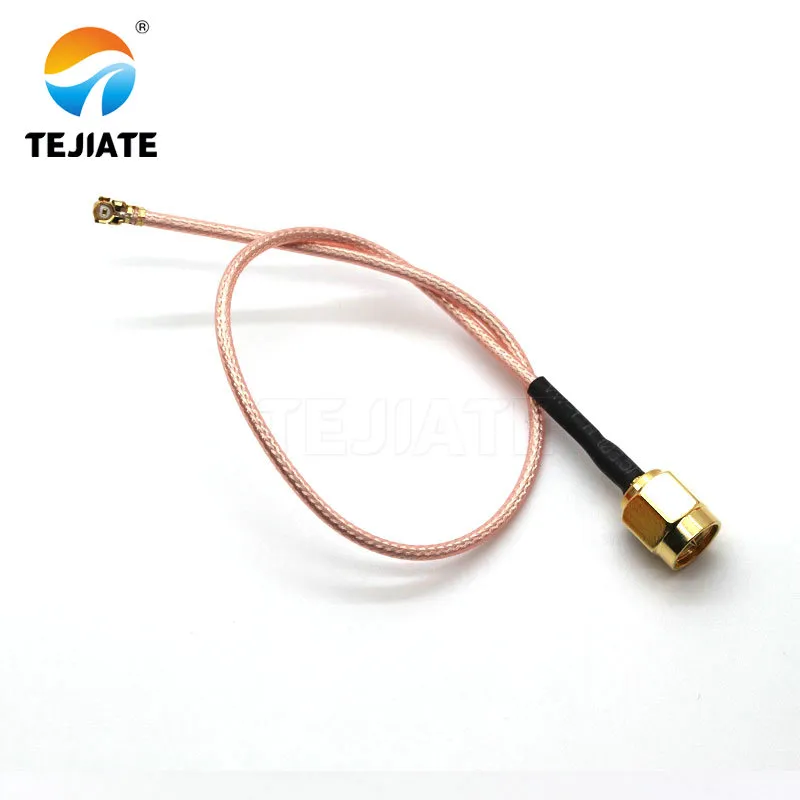
This image illustrates the practical application of a U.FL to SMA adapter cable, commonly used in Wi-Fi, Bluetooth, LoRa, and cellular modules to extend the antenna port to a more accessible and robust SMA interface.
If you work with wireless modules—whether it’s Wi-Fi, Bluetooth, LoRa, or 4G/5G—you’ve probably run into a problem: the module’s antenna port is tiny, fragile, and buried on the PCB. That’s where a U.FL to SMA adapter cable (often called a pigtail) comes in.
Instead of stacking multiple SMA adapters or using bulky converters, these cables create a clean bridge: a U.FL (or IPEX) connector on one end snaps to your module, while an SMA connector on the other brings the signal out to a panel or chassis. This design means you can screw in a reliable SMA antenna without stressing the delicate board connector.
Here’s the real takeaway: choosing the right pigtail isn’t just about picking any “ufl connector to sma.” Performance hinges on details—generation compatibility (MHF1 vs. MHF4), cable diameter (0.81, 1.13, RG178, RG316), length planning, and whether you need bulkhead sealing for outdoor use. In other words, get it wrong and you risk mismatched connectors, excessive loss, or mechanical failures. Get it right, and your system stays robust.
1) What Is a U.FL / IPEX → SMA Adapter Cable?
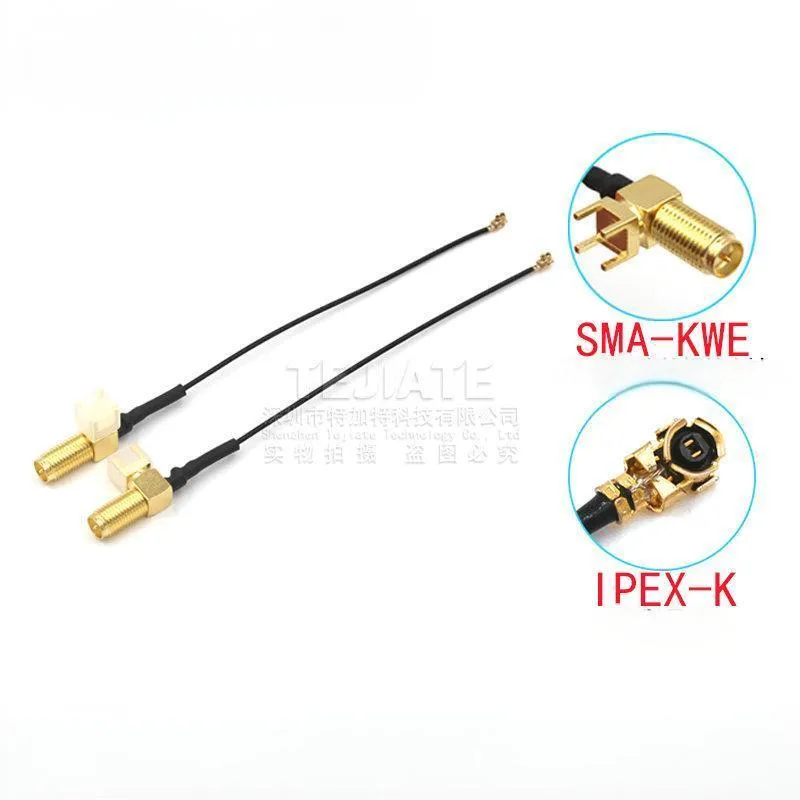
At its simplest, a U.FL to SMA adapter is a short coaxial pigtail with different connectors on each end. On the PCB side, the U.FL (also called IPEX or MHF) is a micro coax connector that snaps onto the RF pad of your wireless module. On the chassis side, the SMA gives you a rugged, threaded port where you can mount an external antenna.
Unlike a pure metal SMA to UFL adapter or gender changer, this cable has real transmission line properties—it carries the RF signal while physically separating the fragile board from the outside world. That’s why it’s sometimes called a “stress-relief cable.”
Common applications
- Embedded Wi-Fi and Bluetooth modules – bringing signals out from IoT boards.
- LoRa gateways – extending the module port to an external SMA antenna.
- 4G/5G routers or hotspots – routing small PCB connectors to chassis-mounted SMA bulkheads.
- Wearables and compact devices – where board space is limited but you still need RF performance.
It’s worth stressing: this is not the same as a digital converter. A u.fl to sma cable doesn’t translate HDMI, USB, or Ethernet—it only adapts mechanical form while preserving RF characteristics. If you’ve ever confused “adapter cable” with “protocol converter,” here’s your correction.
2) IPEX Generations & Compatibility (MHF1 vs. “4th-Gen”)
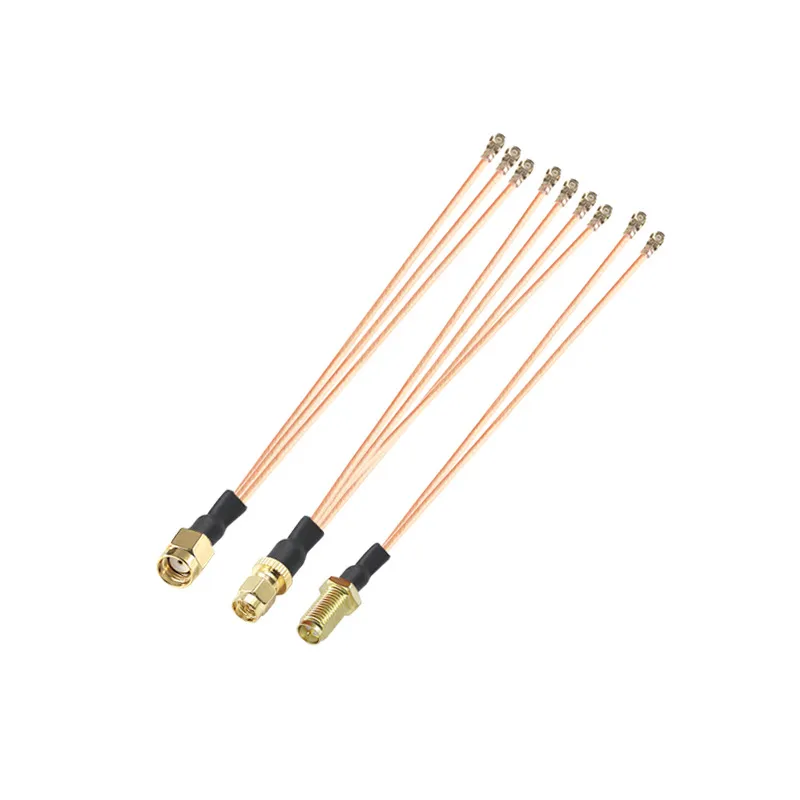
This image helps users identify whether their module uses the older U.FL/MHF1 or the newer MHF4 connector, critical for selecting the correct adapter cable.
Naming and versions
- U.FL / MHF1 – the original Hirose-style micro coax, still common on Wi-Fi and early cellular modules.
- MHF4 (“4th-gen IPEX”) – a smaller footprint, widely used in modern LTE/5G and GPS modules.
- Other generations (MHF2, MHF3, MHF5) – less common, but sometimes found in specialized devices.
Visually, the differences are subtle. MHF4 is noticeably smaller and has a tighter snap compared to MHF1. Forcing the wrong connector doesn’t just fail—it risks tearing the delicate RF pad from the module.
How to confirm your module’s type
- Check the silkscreen or datasheet – many manufacturers explicitly mark “MHF4” or “U.FL.” Official references such as the Hirose U.FL series datasheets are especially reliable.
- Measure the mating height – U.FL/MHF1 is taller, while MHF4 sits flatter.
- Look at reference designs – many IoT dev kits and router boards specify the connector type in their documentation.
Risks of mismatching
Field troubleshooting tips
- If the cable won’t snap in with light pressure, stop immediately—don’t force it.
- Always cross-check with the module datasheet rather than assuming “all U.FL are the same.”
- Keep spare sma ufl adapters of the correct generation in your toolkit to avoid downtime.
In practice, once you’ve confirmed the generation, the rest of the decision—cable type, length, and whether you need a sma bulkhead—becomes much easier. Think of this as laying the foundation before building the rest of your RF link.
3) Cable Types & Specs
Common coax choices for U.FL pigtails
- 0.81 mm micro coax – the slimmest option. Extremely flexible but also the most lossy. Works when space is tight, but only for very short runs.
- 1.13 mm micro coax – the industry’s “default” choice. Thin, reasonably flexible, but still lossy above 2.4 GHz when used over longer distances.
- RG178 – with ~1.8 mm outer diameter, PTFE dielectric, and silver-plated conductor. A stronger, more heat-tolerant option with better loss figures than 1.13 mm.
- RG316 – thicker at ~2.5 mm OD. Known for low loss, high durability, and reliability under repeated bending. Favored in test labs and industrial hardware.
When comparing these cables, raw data makes the decision clearer.
| Cable Type | Outer Diameter | Attenuation @ 2.4 GHz (dB/m) | Attenuation @ 5.8 GHz (dB/m) | Flexibility | Notes |
|---|---|---|---|---|---|
| 0.81 mm | ~0.81 mm | ~2.8–3.0 | ~5.5–6.0 | Very high | Ultra-thin, short runs only |
| 1.13 mm | ~1.13 mm | ~2.2–2.5 | ~4.5–5.0 | High | Common starter option |
| RG178 | ~1.8 mm | ~1.5–1.7 | ~3.5–3.8 | Medium | More robust, PTFE insulation |
| RG316 | ~2.5 mm | ~1.1–1.3 | ~2.8–3.2 | Lower | Best for low loss & long life |
4) Length Choices & Loss Planning
Typical lengths in practice
- 10 cm & 15 cm – most efficient; short enough to keep loss negligible.
- 20 cm & 30 cm – a balanced option; useful when routing inside small IoT housings.
- 50 cm & 1 m – only for cases where the module is far from the panel; loss becomes significant at higher frequencies.
A side-by-side view makes the trade-offs easier to see:
| Cable Type | Length | Loss @ 2.4 GHz | Loss @ 5.8 GHz | Recommended Use |
|---|---|---|---|---|
| 1.13 mm | 10 cm | ~0.2 dB | ~0.5 dB | Great for dev kits, minimal loss |
| 1.13 mm | 30 cm | ~0.7 dB | ~1.5 dB | OK for IoT boards and routers |
| 1.13 mm | 50 cm | ~1.2 dB | ~2.5 dB | Marginal for 5.8 GHz use |
| RG178 | 30 cm | ~0.45 dB | ~1.1 dB | Balanced everyday option |
| RG316 | 30 cm | ~0.35 dB | ~0.9 dB | Ideal for performance setups |
| RG316 | 1 m | ~1.1-1.3 dB | ~2.8-3.2 dB | Usable in industrial layouts |
The difference is obvious: a u.fl to sma 10 cm pigtail with 1.13 mm coax keeps losses near zero, but a 50 cm run at 5.8 GHz wastes power quickly. That’s why many engineers prefer a short internal pigtail plus an external sma antenna cable, rather than forcing one long, thin run.
Planning cable length is like plumbing—longer pipes reduce water pressure. With RF, every dB of loss matters.
5) SMA Bulkhead & Panel-Mount
Bulkhead thread lengths
| Bulkhead Thread Length | Suitable Panel Thickness | Common Use Cases |
|---|---|---|
| 8 mm | ≤ 2 mm | Thin metal router housings |
| 11 mm | 2 – 3 mm | Plastic cases, light enclosures |
| 13 mm | 3 – 5 mm | Standard ABS housings |
| 17 mm | 5 – 8 mm | Outdoor boxes, telecom gear |
| 21 mm + | ≥ 8 mm | Heavy-duty cabinets |
Sealing & materials
- O-ring gaskets – add weatherproofing, crucial for outdoor Wi-Fi or 4G gateways.
- Nickel-plated brass – common indoor standard.
- Gold-plated SMA – improves corrosion resistance and lowers RF contact loss.
- Stainless steel – heavy-duty choice for harsh, industrial environments.
Straight vs right-angle mounts
- Straight bulkhead SMA – simplest and most common.
- Right-angle bulkhead SMA – useful where space is limited or you want a low profile.
Many sma panel mount connectors are also available in RP-SMA versions. If your device uses a Wi-Fi style sma antenna, double-check whether you need standard SMA or RP-SMA before ordering.
6) When to Choose RP-SMA

This image illustrates best practices for WiFi antenna installation: vertical orientation for routers, weather-sealed mounts outdoors, and proper clearance from walls or metal objects to improve coverage.
How to tell SMA vs RP-SMA apart

The chart shows why SMA and RP‑SMA are not interchangeable, aligning with the text’s guidance on choosing the correct connector for radios and antennas.
- Standard SMA male – has a center pin.
- RP-SMA male – looks the same from the outside, but inside there’s a hollow socket.
- Standard SMA female – has a center receptacle (no pin).
- RP-SMA female – contains a center pin.
This tiny reversal—pin vs. socket—is the only difference, yet it creates full incompatibility.
Where RP-SMA shows up
- Wi-Fi routers and access points – RP-SMA is practically universal.
- Wireless cards and PCIe adapters – most PC Wi-Fi cards use RP-SMA bulkheads.
- Smart home hubs and consumer IoT devices – many follow the Wi-Fi ecosystem’s convention.
As noted by the Wi-Fi Alliance, RP-SMA connectors have become deeply rooted in wireless networking standards, meaning you’ll encounter them far more often than standard SMA in consumer gear.
Adapter caution
You might consider fixing mismatches with a rp-sma to sma adapter. While it works electrically, every added adapter introduces a small insertion loss (typically 0.2–0.3 dB) and potential mechanical stress. If you’re serious about performance, it’s better to buy a U.FL to RP-SMA pigtail rather than chaining adapters.
The key takeaway: if your project involves Wi-Fi hardware, always confirm whether you need SMA or RP-SMA before ordering. It’s one of the most common mistakes field engineers and hobbyists make—and one of the easiest to avoid.
7) Reliability Tips
Installation & handling
- Don’t over-torque SMA nuts – hand-tighten, then a gentle wrench turn if necessary. Too much torque damages threads.
- Use the O-ring correctly – if present, it should be compressed evenly, not squashed.
- Mind the bend radius – thin coax (0.81, 1.13) should not be bent sharper than ~5 mm radius. RG178 and RG316 allow larger bends, but still avoid kinks.
Strain relief
Mating cycles
Minimize cascades
Every extra sma adapter or extension cable increases loss and reflection risk. The best practice is always short, direct, one-piece cabling. This is why pigtails exist: they replace multiple metal adapters with a clean run of coax.
Think of reliability like insurance. Spending a little effort on correct installation today saves you hours of troubleshooting later.
8) Buying Checklist
With so many options—different U.FL generations, cable types, lengths, and bulkhead variations—it’s easy to get overwhelmed. Here’s a structured checklist to simplify your purchase decision:
- Confirm module interface
- Check if your board uses U.FL (MHF1) or IPEX MHF4. Mixing them will not work.
- Pick the cable type
- 0.81 or 1.13 mm for ultra-compact designs.
- RG178 or RG316 for better loss performance and durability.
- Decide the length
- 10/15 cm for short hops.
- 20/30 cm for typical enclosures.
- 50 cm/1 m only if unavoidable.
- Choose the SMA side
- Standard SMA vs. RP-SMA.
- Straight vs. right-angle.
- Select bulkhead thread length
- 8 mm for thin metal.
- 11–13 mm for plastic panels.
- 17 mm+ for thick housings.
- Check sealing requirements
- O-ring if outdoors.
- Stainless steel for harsh environments.
- Confirm quantity
- Order spares. U.FL connectors don’t like repeated cycles, so having backups is smart.
Following this flow prevents 90% of mistakes that newcomers make. It’s tempting to grab the cheapest listing labeled “u.fl to sma male,” but without checking generation, length, and bulkhead fit, you’ll often end up with unusable parts.
9) FAQs
Q1: What is a U.FL to SMA adapter cable (pigtail)?
It’s a short coaxial cable with a U.FL connector on one side and an SMA connector on the other. It protects the fragile PCB-mounted U.FL port while giving you a rugged, threaded SMA interface to mount a sma antenna. Unlike a metal-only sma to ufl adapter, a cable version also provides strain relief.
Q2: Is 1.13 mm cable enough for 5.8 GHz?
For very short runs—like a u.fl to sma 10 cm or 15 cm cable—it’s fine. But once you stretch it to 30 cm or 50 cm, the loss becomes significant, especially at 5.8 GHz. For longer runs, switch to RG178 or RG316 for better performance.
Q3: Can I mix U.FL (MHF1) with “4th-gen” IPEX?
No. The dimensions are different, and forcing them risks breaking the connector pad on your module. Always check the datasheet to confirm whether it’s U.FL/MHF1 or MHF4. This small step saves costly mistakes.
Q4: Do SMA and RP-SMA adapters affect signal?
Yes. Each rp-sma to sma adapter or coupler adds a small insertion loss (around 0.2–0.3 dB). That might not sound like much, but if your link budget is already tight, it can push you below the threshold for reliable communication. The smarter move is to buy the right U.FL to RP-SMA cable from the start.
Q5: How do I choose bulkhead thread length for my panel?
Measure the wall thickness of your enclosure. Thin housings (≤2 mm) pair with 8 mm bulkheads, plastic boxes often need 11–13 mm, and outdoor cabinets may require 17 mm or more. If in doubt, go slightly longer and use washers.
Q6: Where can I learn more about RF adapter basics?
For deeper background on coaxial connectors, adapters, and RF best practices, a reliable starting point is Microwaves101, which offers practical guides trusted by RF engineers worldwide.
Conclusion
The bottom line is simple: a u.fl to sma cable may look like just another piece of wire, but the details make all the difference. Start by confirming your module’s connector generation—U.FL/MHF1 vs. MHF4—so you don’t risk mismatching. Then pick the coax type: ultra-thin (0.81 or 1.13 mm) if space is tight, or sturdier RG178/RG316 if performance matters more.
Length is another key factor. Keep it short—10 cm or 15 cm is ideal. If your module sits deep inside an enclosure, a sma bulkhead panel mount with an O-ring seal is a far better solution than running a long, lossy cable.
For Wi-Fi and router applications, don’t forget the RP-SMA ecosystem. Always check whether your antenna is SMA or RP-SMA before buying, since mixing them is one of the most common mistakes.
Finally, treat these pigtails with care. The U.FL side isn’t designed for endless re-plugging, so consider them semi-permanent connections. Add strain relief, respect bend radius limits, and avoid stacking too many sma adapters.
If you want ready-to-use, reliable options, check out our U.FL to SMA adapter cables at TEJTE. We offer multiple lengths, cable types, and bulkhead options to fit both indoor IoT devices and outdoor enclosures.
With the right pigtail in place, your RF link will be mechanically sound, electrically efficient, and easy to maintain—whether you’re building a DIY IoT project or deploying industrial-grade wireless systems.
Bonfon Office Building, Longgang District, Shenzhen City, Guangdong Province, China

A China-based OEM/ODM RF communications supplier
Table of Contents
Owning your OEM/ODM/Private Label for Electronic Devices andComponents is now easier than ever.