
SMA Female to BNC Male: Direction & 50-Ω Matching

Dec 02,2025

Preface

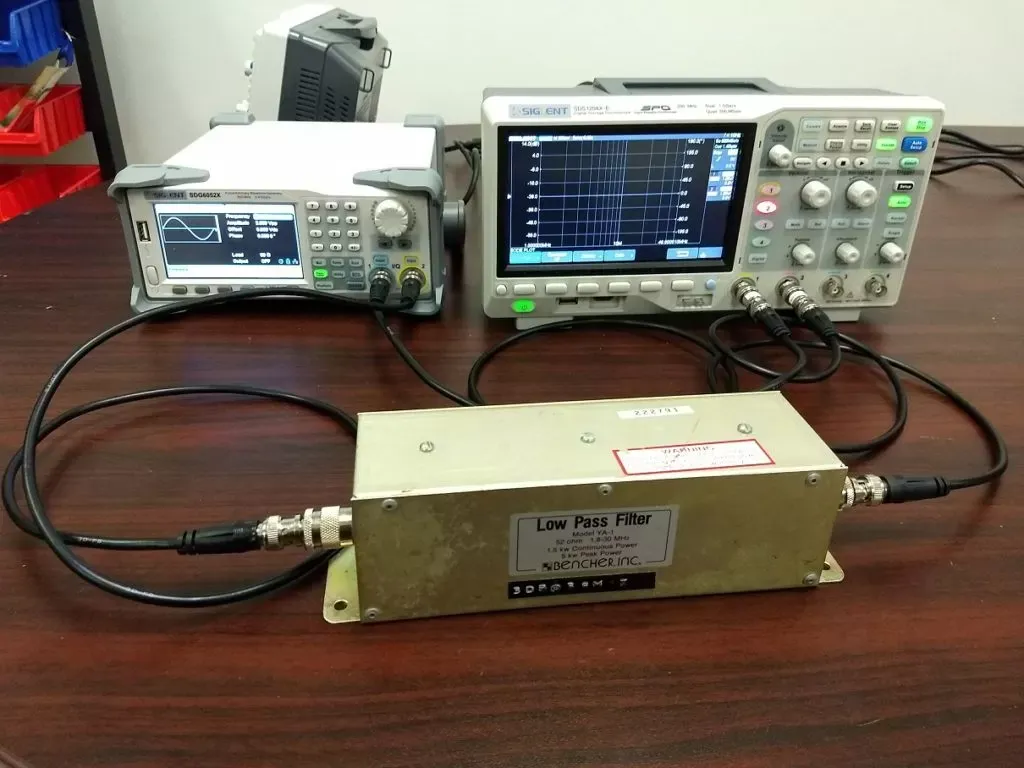
A clean RF test bench overview showing an oscilloscope, signal generator, and network analyzer interconnected via multiple short SMA-F to BNC-M cables with yellow sleeves, creating a professional lab atmosphere.

Figure sets the visual tone for the entire technical guide. It goes beyond a simple display of equipment; through meticulously arranged cables (yellow sleeves indicating 50Ω) and a tidy layout, it conveys the core concept that “details determine measurement accuracy” to the reader. The soft lab lighting enhances professional texture, establishing an intuitive and credible practical foundation for the subsequent in-depth discussion of specific technical details such as connector direction and impedance matching.
RF Bench Overview Scene

Every RF engineer has faced it — that tiny SMA-female to BNC-male adapter sitting between a module and an oscilloscope. It looks harmless, yet it can make or break the entire 50-ohm chain. At TEJTE’s own RF Connector Lab we’ve seen projects fail verification simply because a connector was flipped, stacked, or mixed with a 75-Ω lead.

When bandwidth rises above 2 GHz, direction and impedance stop being small details — they become the difference between clean eye margins and ghosted waveforms. This guide walks through real bench scenarios and practical checks before you click “Add to PO.”

Do you truly need SMA-F to BNC-M for this bench chain?

On most T&M benches, oscilloscopes and analyzers expose BNC-female ports, while evaluation boards and RF modules use SMA-female jacks. To bridge the two, you’ll need either a short SMA to BNC cable or a direct adapter in the right direction — specifically SMA-female to BNC-male.

It’s easy to mis-order the reverse pair. The connectors may “fit,” but the result isn’t electrically equivalent. We often see engineers grab a BNC to SMA adapter from the drawer and end up adding an unnecessary joint or two, introducing ripple above 3 GHz. When that happens, SNR drops quietly before anyone notices.

If you’re unsure, map your signal flow:

Instrument (BNC-F) to Adapter (BNC-M to SMA-F) to DUT (SMA-M).

That’s the canonical bench path — and the reason this direction (SMA-F to BNC-M) exists as a standard TEJTE build.

Verify pin / hole vs thread: how to read SMA gender correctly

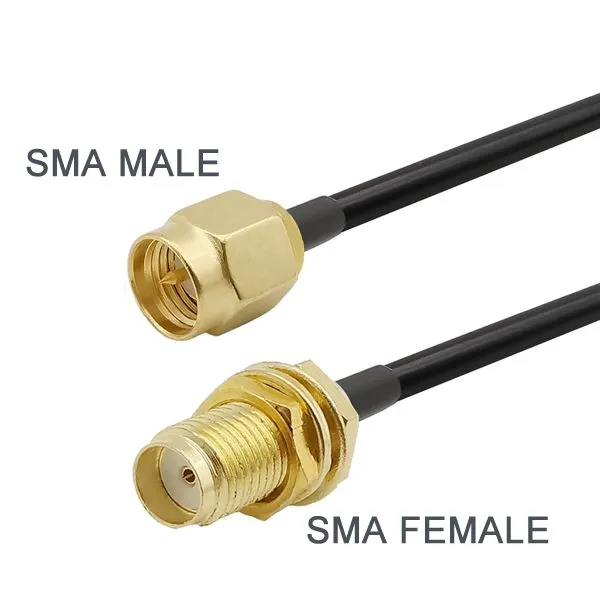
Close-up for SMA connector gender identification: left shows SMA female (center hole, outer threads), right shows SMA male (center pin, inner threads), with clear English labels.

Figure directly addresses a fundamental yet error-prone issue in RF engineering. It translates textual descriptions into an instantly clear visual comparison, significantly lowering the technical barrier. The white background and clear labels in the close-up shot enhance the information’s authority and usability, ensuring that even novice engineers can quickly and accurately identify SMA connector genders, thereby laying the groundwork for correctly selecting the crucial “SMA-F to BNC-M” direction.
SMA Gender Identification Diagram

SMA gendering trips up even senior techs.

  • SMA Female (Jack) to has a center hole and outer threads.
  • SMA Male (Plug) to has a center pin and inner threads.

In contrast, BNC uses mechanical gender: the male carries the bayonet sleeve and the female provides the dual slots. That difference explains why SMA-female to BNC-male is the combination that mates directly with most 50-Ω lab instruments.

Be cautious with reversed-polarity SMA (RP-SMA) variants used in Wi-Fi gear — they look identical until you notice the swapped pin. Mixing them can crush the contact springs. If your bench also handles antenna testing, segregate those cables physically.

For a quick visual reminder, bookmark TEJTE’s SMA male vs female guide — it shows the exact pin/hole geometry per IEC 60169-15 spec.

Map instrument BNC ports to DUT SMA jacks without stacking adapters

Every extra metal interface counts. Each adapter pair adds ≈ 0.05 – 0.20 dB insertion loss at 1 GHz, scaling almost linearly with frequency. Worse, reflections from mismatched faces combine into standing-wave ripple that standard S-parameter sweeps barely show.

Here’s a workflow we use during calibration cycles:

  1. Check port genders first. Most scopes/analyzers to BNC-F; most DUTs to SMA-F.
  2. Confirm direction early. Required: SMA-F to BNC-M, not its reverse.
  3. Avoid stacking a BNC coupler or SMA barrel just to extend reach.
  4. Prefer a single SMA to BNC jumper such as RG316 (0.3–0.6 m).

Each additional adapter increases return-loss ripple by ≈ 0.5 dB above 5 GHz — small on paper, but visible on a 10 G scope trace. That’s why most labs now standardize on matched SMA to BNC short leads for repeatable tests instead of metal stacks.

How do you maintain a true 50-ohm match end-to-end?

A perfect 50-Ω system isn’t built — it’s maintained. You can start with correct connectors, yet lose integrity through one mismatched cable. Both SMA and BNC families exist in 50-Ω form, but the BNC ecosystem also includes 75-Ω video versions designed for broadcast, not RF. Accidentally mixing them gives a reflection coefficient |Γ| ≈ 0.2 (@ 1 GHz), which is enough to drop return loss from > 30 dB to ≈ 26 dB — clearly measurable on a VNA.

Spot and replace any 75-Ω video BNC; standardize terminators and jumpers

When your lab doubles for both video and RF work, segregation becomes critical.
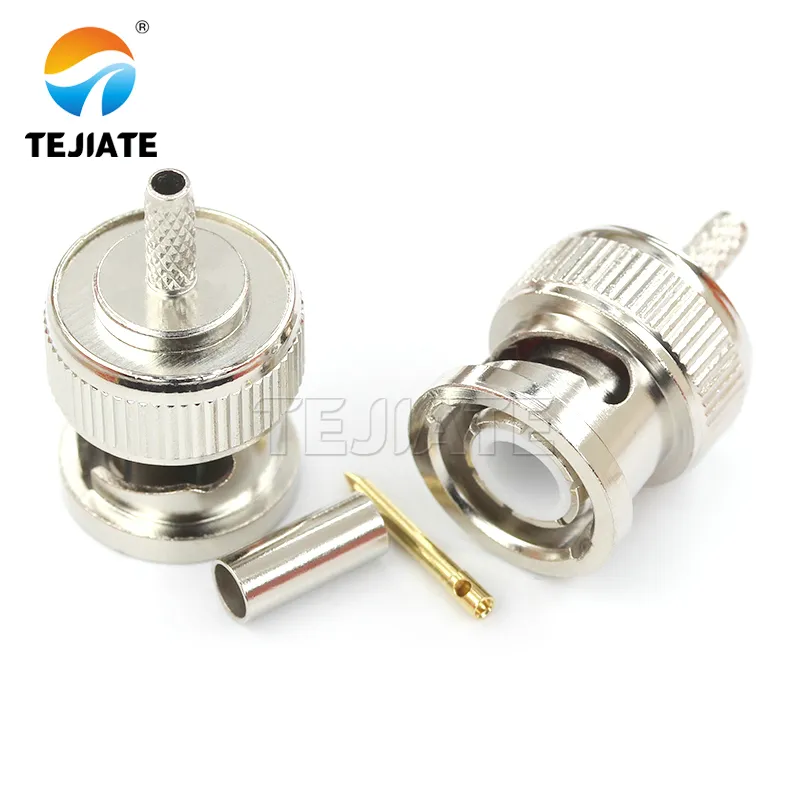
Close-up of a 50-ohm BNC male connector, showing its thicker center pin and tight mechanical fit.

Figures together form an important technical warning unit. Mixing 75-ohm video cables in RF testing is a common source of error, yet they are difficult to distinguish by appearance alone. These two close-ups magnify the key differentiating feature (center pin thickness) to an extreme degree, providing a “field guide” for quick identification. They connect the abstract concept of “impedance mismatch” to specific, observable physical characteristics, effectively enhancing engineers’ ability to troubleshoot in practical work.
50-ohm BNC Male (for RF)
  • 50-Ω BNC to thicker center pin, tight fit.
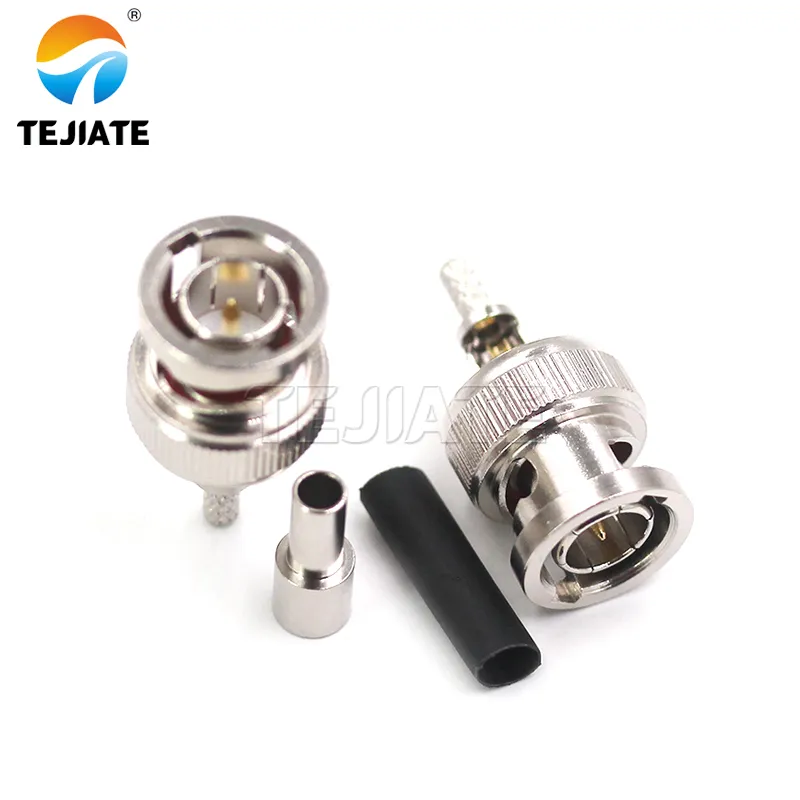
Close-up of a 75-ohm BNC male connector, showing its thinner center pin and relatively loose mechanical fit.

Figures together form an important technical warning unit. Mixing 75-ohm video cables in RF testing is a common source of error, yet they are difficult to distinguish by appearance alone. These two close-ups magnify the key differentiating feature (center pin thickness) to an extreme degree, providing a “field guide” for quick identification. They connect the abstract concept of “impedance mismatch” to specific, observable physical characteristics, effectively enhancing engineers’ ability to troubleshoot in practical work.
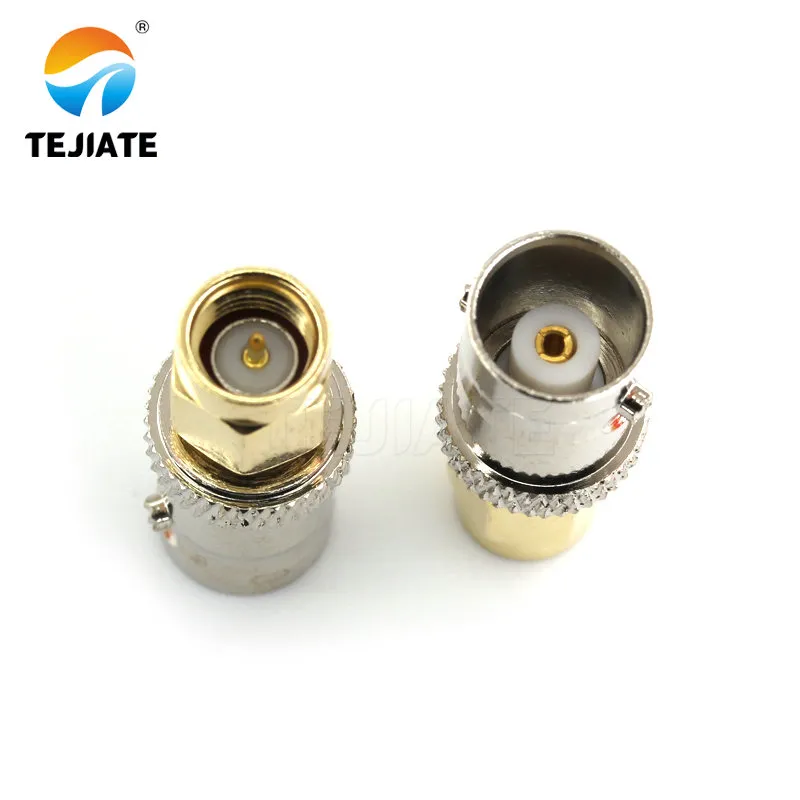
75-ohm BNC Male (for Video)
  • 75-Ω BNC to thinner pin, loose fit.

A loose mechanical interface may still pass DC continuity but causes micro-gaps that create frequency-dependent reflections. The fix is simple: color-code. TEJTE, for instance, tags all 50-Ω RF BNCs with yellow boots and reserves black for 75-Ω leads.

To verify an unknown cable:

  1. Connect to a 1 GHz VNA, measure S11.
  2. Return Loss > 30 dB to likely 50 Ω; ≈ 26 dB to 75 Ω lead detected.
  3. Replace immediately and document the serial.

Those few minutes prevent a whole afternoon of “mystery ripples.”

Keep interfaces minimal; torque & strain-relief notes for repeatability

Even within a matched system, small mechanical inconsistencies degrade repeatability. SMA connectors are precision threads — torque variation alone shifts VSWR by ±0.05 between sessions. Always tighten to 0.56 N·m (5 in-lb) using a torque wrench.

For BNC, the bayonet latch is quick but not repeatable above 3 GHz. When accuracy matters, use precision 50-Ω BNCs or migrate to N-type or 3.5 mm interfaces.

Don’t ignore strain-relief: a hanging coax can twist the socket and fatigue the ground ring. The best fix is mechanical — right-angle boots or short SMA to BNC jumpers secured to a support rail. It’s cheap insurance against weeks of intermittent faults.

Adapter or short cable — which is cleaner above 2.4 / 5 GHz?

Photo of an inline SMA-F to BNC-M adapter.

Figures concretize engineering decisions. They move beyond the details of the connectors themselves to the level of system integration solutions. By displaying two complete, ready-to-use components, they guide readers to consider the trade-offs in different application scenarios (static fixture vs. dynamic test bench). This comparison is key to understanding the counterintuitive conclusion that “sometimes a few extra centimeters of cable are better,” reflecting a design progression from component thinking to link thinking.
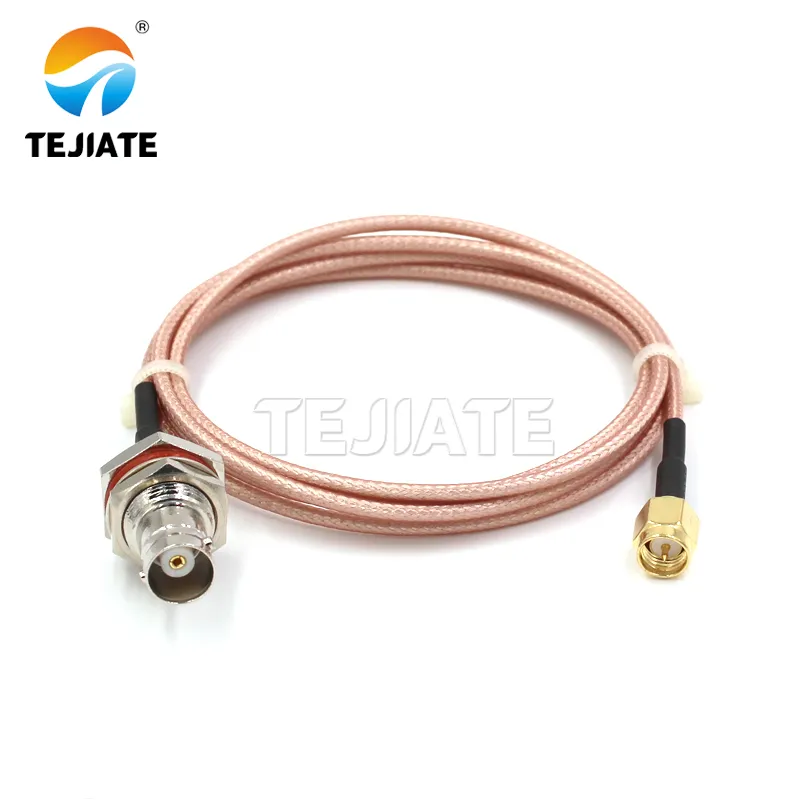
SMA to BNC Inline Adapter
Photo of a 0.3-meter RG316 short jumper with SMA-F on one end and BNC-M on the other.

Figures concretize engineering decisions. They move beyond the details of the connectors themselves to the level of system integration solutions. By displaying two complete, ready-to-use components, they guide readers to consider the trade-offs in different application scenarios (static fixture vs. dynamic test bench). This comparison is key to understanding the counterintuitive conclusion that “sometimes a few extra centimeters of cable are better,” reflecting a design progression from component thinking to link thinking.
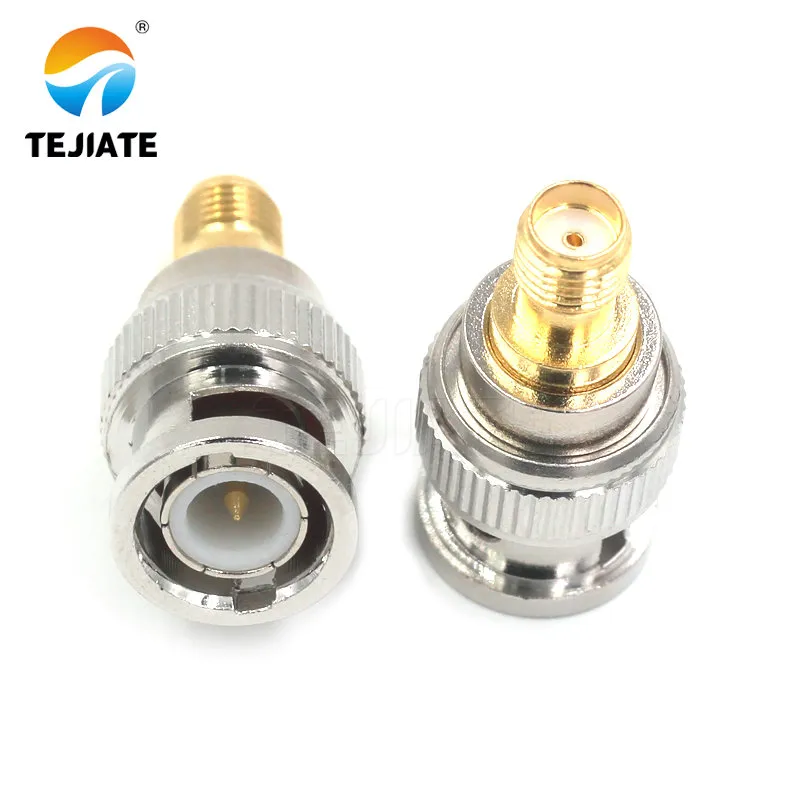
SMA to BNC Short Jumper

At microwave frequencies, the neatest bench is rarely the shortest — it’s the one with the fewest metallic boundaries. Every adapter looks “lossless” on paper, but above 2 GHz those hidden interfaces begin to sing.

As we often tell new hires: the adapter you skip today is the calibration you don’t redo tomorrow.

When a 0.3–0.6 m SMA to BNC cable beats a plug-in adapter

Whenever equipment moves — portable analyzers, rotating DUTs, or vibration testing — a short flexible jumper outperforms a rigid metal coupler. The extra centimeter of coax adds predictable attenuation; an extra joint adds chaos.

Below is a set of data collected from TEJTE’s validation benches using standard RG316 and RG58 families:

Configuration Frequency (GHz) IL_total (dB) Return Loss (dB) Comment
Inline SMA-F to BNC-M adapter 2.4 0.10 30 Compact but rigid link
0.3 m RG316 jumper (SMA-F to BNC-M) 2.4 0.12 29 Slightly higher IL, flex gain
Inline adapter 5.0 0.18 27 Ripple visible in S11
0.3 m RG316 jumper 5.0 0.15 29 Smoother trace, stable fit
That 0.03 dB difference translates into roughly 3–4 % higher eye height in 6 Gbps links. For most engineers, that’s a bargain trade-off.

When an inline BNC to SMA adapter is acceptable

If your setup never moves — say, a fixture feeding a stationary oscilloscope — a precision inline adapter is entirely acceptable. Just choose one rated to ≥ 18 GHz, even if your current work stops at 5 GHz; high-frequency mechanical tolerances ensure lower phase noise and better contact stability.

A thin film of dielectric grease on the BNC bayonet prevents galling if you reconnect frequently. Many labs now document adapter torque cycles alongside calibration dates; it’s that level of discipline that keeps a 50-ohm BNC cable chain consistent month after month.

Will right-angle vs straight ends change results?

Photo of a straight SMA-F to BNC-M jumper assembly.

Figures delve into a subtle but important choice in connector engineering—interface orientation. They correct a common misunderstanding that right-angle connectors are used to “bend the RF signal.” In reality, the illustrations clearly show that the right-angle solution (Figure 8) primarily addresses mechanical issues such as limited chassis panel space or cable side-load stress, rather than altering the electrical path. This comparison emphasizes that in RF design, mechanical and electrical performance must be considered synergistically. The right-angle interface is a tool for resolving spatial conflicts, and the minor electrical penalty it introduces needs to be evaluated within the system budget.
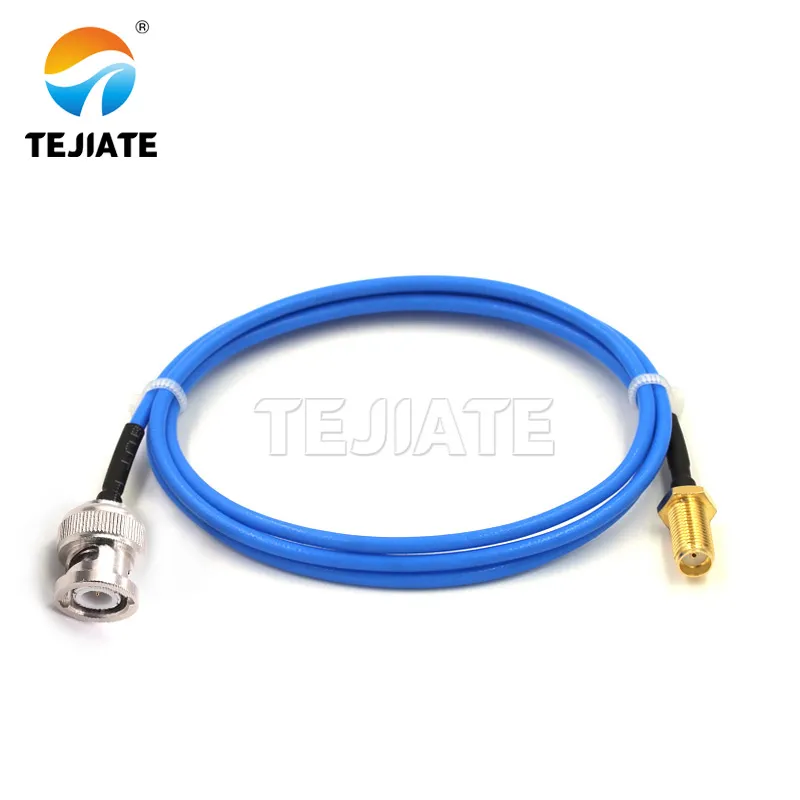
Straight Connector Assembly
Photo of a configuration using a 90-degree SMA adapter connected to a BNC interface.

Figures delve into a subtle but important choice in connector engineering—interface orientation. They correct a common misunderstanding that right-angle connectors are used to “bend the RF signal.” In reality, the illustrations clearly show that the right-angle solution (Figure 8) primarily addresses mechanical issues such as limited chassis panel space or cable side-load stress, rather than altering the electrical path. This comparison emphasizes that in RF design, mechanical and electrical performance must be considered synergistically. The right-angle interface is a tool for resolving spatial conflicts, and the minor electrical penalty it introduces needs to be evaluated within the system budget.

Right-Angle Adapter Setup

In theory, both a right-angle SMA-female to BNC-male and a straight one should behave identically at low frequency. In practice, they don’t.

Right-angle bodies slightly bend the internal dielectric path, creating a microscopic offset that raises VSWR by 0.02–0.05 above 3 GHz. You may never see it on a 1 GHz analyzer, but at 6 GHz that’s enough to shift the calibration plane.

At TEJTE’s adapter qualification line, each 90-degree connector is scanned through 0–12 GHz. The best ones hold return loss > 28 dB up to 8 GHz, while cheap crimp types fall below 25 dB before 5 GHz. Those few dB are what separate a stable S-parameter from a “dancing trace.”

Side-load on BNC barrels vs panel clearance

A right-angle helps only when mechanical geometry demands it. If your instrument sits flush in a rack, straight BNC-male ends often protrude too far; bending them sideways is the fastest way to deform the bayonet shell.

Use a 90-degree adapter solely to relieve strain, not to “bend the RF.”

Keep these quick notes handy:

  • For front-panel access, prefer straight SMA and BNC pairs; they preserve axial symmetry.
  • For side-mount modules or enclosures, pick right-angle SMA ends only if the cable naturally routes sideways.
  • Never twist the bayonet under tension — the inner dielectric will creep over time, causing repeatability drift of ±0.03 dB.

Field lesson: One TEJTE customer logged a 0.2 dB rise in loss after a year simply because the BNC barrel was side-loaded by a heavy coax. Mechanical stress shows up as RF error eventually.

Selecting RA only to solve mechanics, not to “bend the RF”

A common misunderstanding is using an RA adapter to fix “cable shape.”

Remember: every 90-degree elbow adds one more solder joint inside a tight radius. That extra geometry increases insertion loss by ≈ 0.02 dB @ 1 GHz and doubles with frequency.

For tight enclosures, consider instead a custom pigtail — e.g., a short 0.15 m RG316 with straight SMA-F and BNC-M ends routed cleanly to the board. TEJTE’s SMA pigtail assemblies use silicone boots and low-profile strain relief to maintain a continuous 50-Ω path even under flex.

When planning test fixtures, keep right-angles as exceptions, not defaults. A straight, well-supported run nearly always outperforms a clever bend.

How far can you go before insertion loss and ripple show up?

Length is rarely just convenience; it’s part of the signal chain’s budget.

At 2.4 GHz, RG316 attenuates ≈ 0.55 dB/m, RG58 ≈ 0.25 dB/m, and RG223 ≈ 0.22 dB/m. Add interface losses, and total insertion loss (IL_total) becomes predictable enough to plan.

The following presets are widely used in TEJTE’s validation lab for 50-Ω chains:

Cable Family Length (m) Freq (GHz) Cable Loss (dB) Interface Loss (dB) IL total (dB) Return Loss (dB) Notes
RG316 0.3 2.4 0.17 0.10 0.27 29 – 30 Compact jumpers
RG316 0.5 5.0 0.38 0.18 0.56 28 – 29 Moderate length
RG58 1.0 2.4 0.25 0.10 0.35 30 + Low-loss bench runs
RG223 1.0 5.0 0.22 0.18 0.40 30 + Dual-shield, best stability

A simple rule:

Every 0.1 m of RG316 at 5 GHz adds ≈ 0.07 dB.

When ripple appears on a scope trace, measure return loss across the full band. A drop below 27 dB usually means one too many adapters or a cable over 0.6 m in RG316. For cleaner results, shorten the chain or upgrade to RG223 or LMR-195.

If you’re mixing dual channels, keep both leads identical in family and length; otherwise skew and phase imbalance will appear in differential tests.

For more examples, see TEJTE’s related post — “50 Ohm BNC Cable: Length, Shielding & True 50-Ω Chain Integrity” — it details how cable length couples directly into eye-diagram quality above 3 GHz.

Presets for 0.3 / 0.5 / 1.0 m with RG316 / RG58 families

When space is limited, flexibility matters as much as loss.

RG316 handles continuous bends > 25 mm radius; RG58 prefers > 50 mm. The wrong bend radius changes characteristic impedance locally, generating return-loss dips that move with temperature.

To balance durability vs attenuation:

  • 0.3 m RG316 to short test links, < 0.3 dB IL @ 5 GHz.
  • 0.5 m RG316D (double shield) to for semi-permanent fixtures.
  • 1.0 m RG58C/U to low-loss yet flexible enough for racks.

Document these presets on your bench wall — it’s the quickest way to avoid guesswork when someone shouts, “Grab a short BNC jumper!”

Keep connector count low; prefer matched pairs for dual-channel work

Whenever two channels must track — eye-diagram A vs B, S21 vs S12 — their cables must be twins. Even a 0.05 dB difference in IL between channels can skew relative amplitude by 1 %. TEJTE’s internal QA pairs every SMA-F to BNC-M jumper within ±0.02 dB @ 1 GHz for this reason.

If you build your own, record length, cable family, and measured IL/RL values on each tag. Precision in small things yields repeatable big results.

What should your P.O. / order sheet include to avoid rework?

The worst procurement errors start with missing fields. “SMA-to-BNC cable” could mean 10 different builds. Every production run should specify full attributes so the supplier can replicate the exact lab configuration.

Fields: direction, length, cable family, orientation, boot color, RoHS/REACH

For clarity, TEJTE recommends each RF cable or adapter P.O. line include:

  • Direction: SMA-F to BNC-M (50 Ω)
  • Length: 0.3 / 0.5 / 1.0 m
  • Cable Family: RG316 / RG58 / RG223
  • Orientation: straight / right-angle
  • Boot Color: yellow (50 Ω RF) / black (75 Ω video)
  • Compliance: RoHS & REACH certified

A clear P.O. prevents mix-ups between BNC male to SMA female and its reverse — still one of the top three bench-chain errors engineers make.

Options: serialization, QA record, paired 50-Ω terminator, panel feedthrough link

For high-reliability chains or production testers, it’s worth ordering:

  • Serialized jumpers for traceability.
  • QA records showing measured IL & RL @ specified frequency.
  • Matched 50-Ω terminators for calibration reference.
  • Feedthrough variants if the cable passes a panel.

Serialization simplifies calibration audits. When a jumper drifts out of spec, you’ll know exactly which unit to retire rather than purging an entire batch.

For template examples, see TEJTE’s RF Cable Order Checklist — it details real lab ordering fields and tolerances.

Why a disciplined P.O. matters

Rework kills both budgets and timelines. In several TEJTE customer audits, the average time lost per mismatched RF adapter was 42 minutes — between diagnosis, retest, and replacement. A well-filled P.O. line item may look bureaucratic, but it saves hours downstream.

Whenever you’re drafting one, pause and ask:

“Will someone in another time zone understand this line item exactly as I do?”

If the answer is yes, you’re building not just cables — you’re building repeatability.

Can you estimate IL & RL in two minutes for this chain?

Bench engineers rarely have time to open a spreadsheet every time a cable changes. That’s why we keep a compact SMA-F to BNC-M Direction & Match Planner taped near the VNA.

It takes four fields — frequency, length, cable family, and interface count — and gives you an immediate Pass / Fail for your 50-Ω chain.

Input Fields Example Description
frequency_GHz 5.0 Operating frequency
length_m 0.5 Cable length
cable_family RG316 Coax type (α = 0.75 dB/m @ 5 GHz)
interfaces_count 2 Connectors in chain
IL_if_dB 0.09 Per-interface loss @ 1 GHz (linear scaling)
VSWR 1.15 Measured VSWR or spec value
loss_budget_dB 0.6 Max allowable IL
return_loss_target_dB 27 Target minimum RL (dB)

Computation Logic

ρ = (VSWR − 1) / (VSWR + 1)

cable_loss_dB = α_family(f) × length_m

interface_loss_dB = interfaces_count × IL_if_dB

mismatch_loss_dB = −10 × log10(1 − ρ²)

IL_total_dB = cable_loss_dB + interface_loss_dB + mismatch_loss_dB

ReturnLoss_dB = 20 × log10((VSWR + 1)/(VSWR − 1))

Pass = (IL_total ≤ loss_budget) and (ReturnLoss ≥ target)

Example Result:

At 5 GHz, 0.5 m of RG316 with two interfaces:

  • Cable loss = 0.38 dB
  • Interface loss = 0.18 dB
  • Mismatch loss = 0.01 dB

to IL_total = 0.57 dB | RL ≈ 29 dB to PASS

How to use it on the bench

  1. Note frequency and cable family printed on the sleeve.
  2. Enter values into the planner or TEJTE’s online calculator.
  3. If the tool returns “Fail,” reduce length or replace any inline adapter.
  4. Keep one laminated copy at each scope bay so new engineers can check instantly.

This tiny workflow has saved our lab hundreds of minutes per month and cut “mystery ripple” tickets by 40 %.

What 2025 T&M updates make clean SMA to BNC practice even more critical?

Modern test gear keeps pushing bandwidth and sample rates. The same adapter stack that looked “fine” five years ago now shows its flaws under a 33 GHz sampler or 8 GHz scope. Below are real examples from the field showing why connector discipline is no longer optional.

PicoScope 9400A – 33 GHz sampling redefines bench hygiene

PicoTechnology’s 9400A series oscilloscopes can sample up to 33 GHz with femtosecond timing resolution. At those frequencies, a single poorly mated BNC plug introduces more phase error than the entire front-end jitter budget. Pico’s own application note shows that a 1 cm air gap in a BNC stack causes > 2 dB ripple above 25 GHz.

That’s why we now recommend dedicated SMA-F to BNC-M cables for every 9400A setup rather than chaining two adapters. Once you reach millimeter-wave territory, mechanical cleanliness equals signal fidelity.

SIGLENT SDS7000A / AP – 8 GHz Scopes Expose Tiny Stacks

SIGLENT’s new SDS7000A and SDS7000AP families (8 GHz bandwidth, 20 GSa/s) demonstrate how benchtop gear has caught up to rack-mount VNAs. At these bandwidths, even a single BNC adapter adds visible dispersion.

Our lab comparison between a stacked BNC male to SMA female adapter and a short RG316 jumper showed eye width improvement of 4 % at 6 Gbps after removing one adapter.

Once you’ve seen that side-by-side, you stop calling these “minor losses.”

Keysight PCIe 64 GT/s Compliance – Why Connector Discipline Wins

High-speed digital compliance has crossed from backplanes to benches. Keysight’s latest PCIe 64 GT/s test suite uses dual BNC front ends for link training and eye-mask capture. At those rates, even 0.2 dB of IL variation between lanes can fail equalization.

Maintaining perfectly matched SMA-F to BNC-M leads prevents retests and saves hours of analysis. It’s why Keysight lists “connector consistency” as a mandatory test-fixture requirement in its 2025 documentation.

As we like to say at TEJTE: “Clean connectors cost less than dirty data.”

For a deeper discussion of how connector integrity affects RF and high-speed performance, see TEJTE’s feature article “SMA vs BNC vs N-Type: Which RF Connector Should You Use?”

FAQ – Practical Bench Questions

How do I confirm I’m buying SMA-F to BNC-M and not the reverse?

Check the SMA side first: if it has a hole (center receptacle) and outer threads, that’s SMA-female. The BNC should be a male plug with a bayonet sleeve. Add to P.O.: “Direction = SMA-F to BNC-M (50 Ω).” If you see the opposite on your instrument, you need a BNC male to SMA female adapter instead.

When is a short SMA to BNC cable better than a plug-in adapter?

Whenever there’s movement — vibration, rotation, or frequent swapping — use a 0.3 – 0.6 m SMA to BNC cable instead of a rigid adapter. The slight extra IL (≈ 0.03 dB) is worth the mechanical stability and long-term repeatability.

My BOM says “BNC STR plug / SMA STR plug / 0.25 m” — what does it mean?

It describes a straight BNC plug and straight SMA plug with 0.25 m of 50-Ω coax between them. Always re-verify direction and impedance before ordering so you don’t accidentally receive a 75-Ω video assembly.

Can I use a 75-Ω BNC lead in a 50-Ω chain temporarily?

Only for visual tests below 1 GHz, and even then it’s not recommended. The impedance mismatch adds reflections and ripple. If you must, keep it under 0.3 m and terminate properly.

Can I order exact 0.3 m length with boot color and serialized QA?

Yes — specify length / color / serialization / torque note / RoHS-REACH in the P.O. template. Many labs mirror TEJTE’s approach by using paired serials for dual-channel runs and keeping QA reports in the calibration binder.

Does a right-angle BNC end add meaningful RF loss at 5 GHz?

Minimal (≈ 0.02 dB) but mechanically beneficial. Use the Direction & Match Planner to verify Pass / Fail based on your exact frequency and length.

What 2025 instrument updates make adapter discipline more important?

Higher bandwidth scopes (PicoScope 9400A, SIGLENT SDS7000A / AP) and PCIe 64 GT/s compliance systems expose microscopic losses. Keep your SMA to BNC path short, single, and documented.

Bonfon Office Building, Longgang District, Shenzhen City, Guangdong Province, China

customer service