
SMA Connector Identification, Bulkhead & Extension Guide
Dec 31,2025
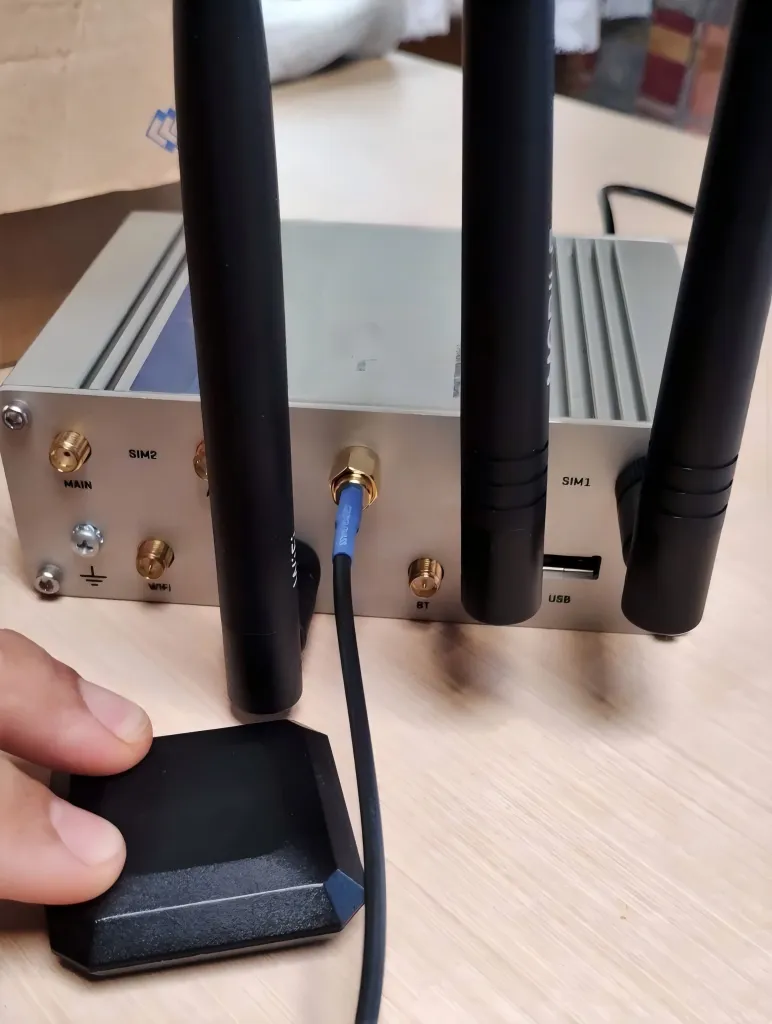
Located at the beginning of the article, this figure serves as a concrete, real-world entry point, aiming to bring readers from abstract concepts into actual hardware environments, emphasizing that connector identification is the first step in solving field performance issues.
An SMA connector almost never looks like the cause of a weak wireless link. It’s small, passive, inexpensive, and usually added late in the build. Yet in real Wi-Fi and IoT systems, many performance problems trace back to the connector layer—specifically, misidentifying SMA vs RP-SMA, choosing the wrong bulkhead thread length, or extending the antenna path without accounting for loss and reflections.
This guide focuses on what actually matters in practice. No catalog definitions. No theory-heavy detours. Just field-tested ways to identify ports in seconds, size an SMA bulkhead correctly, and extend antenna cables without quietly degrading 5 GHz and 6 GHz links.
If you want a broader picture of coax loss behavior before diving in, it helps to start with TEJTE’s hub article on coax loss fundamentals and cable selection. What follows builds directly on that foundation.
Is my port SMA or RP-SMA—how do I tell in 10 seconds?
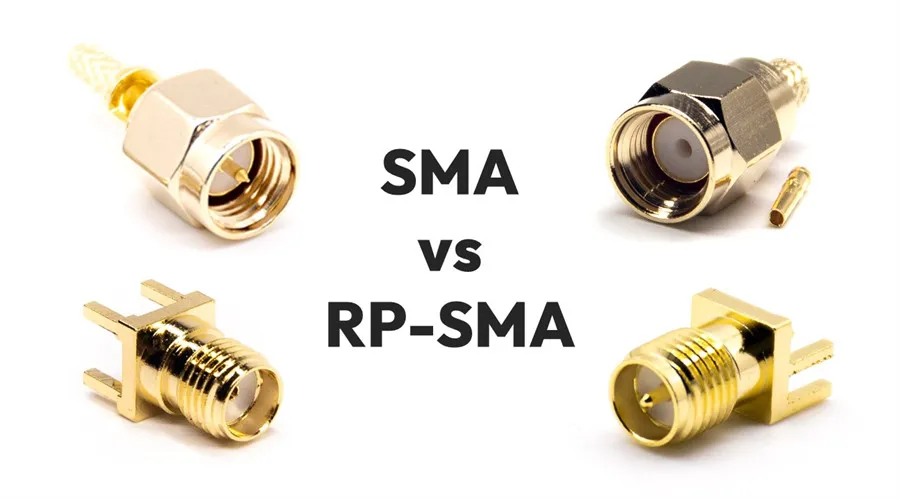
Located in the highly practical section “What connector standard prevents order mistakes?”, this image aims to solve the most common connector confusion encountered by engineers and purchasers. The chart reveals the core difference between SMA and RP-SMA—the reversed polarity of the center conductor—in the most intuitive way, transforming textual descriptions into a visually recognizable rule. It serves as a direct tool to prevent wrong purchases and project delays.
Most SMA-related mistakes happen before a cable is ever plugged in. The connector “fits,” threads engage smoothly, and nothing looks obviously wrong. Only later does range feel inconsistent, or higher MCS rates refuse to hold.
The root cause is simple: SMA and RP-SMA share the same threads but reverse the center contact.
The thread × pin/hole four-quadrant rule (device vs antenna)
Forget “male” and “female” for a moment. Those words confuse more than they help. Instead, look at two physical features only:
- Where are the threads—inside or outside?
- Is the center contact a pin or a socket?
That combination tells you everything:
| Threads | Center contact | Connector type |
|---|---|---|
| External | Pin | SMA male |
| External | Socket | RP-SMA male |
| Internal | Socket | SMA female |
| Internal | Pin | RP-SMA female |
This rule works every time, regardless of what the label says—or doesn’t say.
A small but important detail: RP (“reverse polarity”) does not reverse the threads. Only the center contact is swapped. That’s why mismatched connectors often screw together cleanly while performing poorly.
No teardown needed: router labels and antenna-end cues

This figure, in conjunction with the section “No teardown needed: router labels and antenna-end cues,” reinforces the theoretical “four-quadrant rule” with actual hardware photos, demonstrating the typical configuration of consumer devices in the U.S. market.
In the U.S. market, Wi-Fi routers, access points, and mesh nodes overwhelmingly use RP-SMA female antenna ports. This convention dates back to regulatory efforts to discourage users from attaching unauthorized high-gain antennas.
So if you’re working with a consumer router or AP and the antenna port shows:
- Internal threads + visible pin → almost certainly RP-SMA female
- An antenna with internal threads + pin → RP-SMA male, the correct mate
Where people get caught is assuming that “SMA is SMA.” It isn’t. An SMA male antenna will often thread onto an RP-SMA female jack, but the center contacts won’t mate correctly. The link may still pass RF, just inefficiently and unpredictably.
For deeper context on why these conventions exist, the background section in SMA connector documentation is worth a look, but the physical ID rule above is all you need day-to-day.
How do I match male/female ends without mistakes?
Typical real-world pairing logic
In most systems:
- Device ports are female
- Antennas and extension cables are male
That pattern holds whether you’re dealing with SMA or RP-SMA. The mistake is mixing the two standards while keeping the same gender assumption.
A very common (and costly) error looks like this:
- Device: RP-SMA female
- Extension cable ordered: SMA male-to-female
Everything threads together. Nothing rattles. But electrically, the center contacts barely touch. At 2.4 GHz you might get away with it. At 5 GHz, the penalty becomes obvious.
SMA vs RP-SMA: similar outside, opposite inside
From the outside, SMA and RP-SMA are almost indistinguishable. That similarity is exactly why they cause trouble. The difference lives where you can’t see it at a glance—the center conductor geometry.
In practice, a mismatched pair often behaves like this:
- Extra insertion loss (typically a few dB)
- Worse return loss due to poor contact geometry
- Sensitivity to vibration or cable movement
Engineers sometimes chase these symptoms by swapping antennas or changing firmware, when the real fix is simply correcting the connector type.
If your system already uses RP-SMA throughout, keeping it consistent is usually safer than adapting back and forth. There’s a detailed discussion of that trade-off in TEJTE’s RP-SMA connector identification and matching guide, which pairs well with this section.
Do I need a panel feed-through—and how do I size an SMA bulkhead correctly?
An SMA bulkhead connector looks trivial: a threaded barrel, a nut, maybe a washer or O-ring. Many engineers assume that as long as the connector “sticks through the panel,” it’s fine.
That assumption causes loose mounts, poor grounding, and failed IP seals.
Stack height matters more than nominal thread length
A bulkhead connector doesn’t clamp just the panel. In reality, it clamps a stack:
- Panel thickness
- One or more washers
- A gasket or O-ring (after compression)
- The nut’s effective engagement height
- A small allowance for assembly tolerance
Ignoring any one of these leads to under- or over-engagement. Too short, and the nut barely holds. Too long, and sealing features don’t compress correctly.
SMA bulkhead thread length calculator
Use the following inputs:
- t_panel: panel thickness (mm)
- t_washer: total washer thickness (mm)
- t_gasket: compressed O-ring thickness (mm)
- h_nut: effective nut engagement height (mm)
- a_allow: assembly allowance (0.5–1 mm)
Formula
L_required = t_panel + t_washer + t_gasket + h_nut + a_allow
Output
- Minimum recommended thread length
- Whether a standard bulkhead is sufficient
- Whether a longer thread or a 2-/4-hole flange mount is the safer option
From experience, if your calculated value lands close to the maximum thread length of a standard SMA bulkhead, it’s usually better to switch to a flange mount rather than force the fit. Mechanical stability matters more than saving a few millimeters of space.
How long can I extend before 5 / 6 GHz range drops?
Extending an antenna cable always looks harmless. The connector fits, the signal still shows up, and initial throughput tests may even pass. Problems tend to surface later—usually when higher data rates or marginal coverage areas are involved.
At 5 GHz and 6 GHz, the margin for error is much smaller than many engineers expect.
When SMA / RP-SMA / Wi-Fi antenna extension cables make sense
Extension cables are justified in a few common scenarios:
- Relocating an antenna away from shielding or obstructions
- Moving an antenna to the outside of a metal enclosure
- Adjusting antenna placement during validation or field testing
For short internal adjustments (inside a chassis), lengths under 0.3 m rarely cause trouble if quality cable is used. External extensions are where discipline matters.
As a rule of thumb:
- ≤1 m: usually safe with low-loss coax and minimal adapters
- 1–2 m: workable, but losses must be budgeted
- >2 m: performance risk increases quickly, especially at 5/6 GHz
This isn’t just about cable attenuation. It’s about what gets added along the way.
Connector and adapter penalties—why chains fail quietly
Each additional SMA mating interface introduces:
- Insertion loss (often ~0.1–0.2 dB per connection)
- Small impedance discontinuities
- Potential reflections if tolerances stack up
One adapter doesn’t look dangerous. Three in series often are.
A common mistake is chaining parts like this:
Device port → adapter → extension cable → adapter → antenna
Electrically, that’s several transitions—not one. At lower frequencies, the system may tolerate it. At 5 GHz and above, these discontinuities compound. The result is often reduced SNR rather than an obvious failure.
If you’re planning longer runs, it helps to review overall routing and loss behavior together with TEJTE’s Wi-Fi antenna cable length and routing guide, which covers placement and path discipline in more detail.
What should I use inside the chassis: an SMA antenna cable or a male-to-female jumper?
Bend radius and strain relief: the slow-failure problem

This figure is the core illustration for the “Stack height matters more than nominal thread length” section, visualizing the complex mechanical considerations described in the text, helping engineers avoid issues like loose connections or seal failure due to overlooked installation details.
For small-diameter coax such as RG178 or RG316, a conservative rule works well:
Minimum bend radius ≥ 10× the cable outer diameter
Violating this doesn’t usually cause immediate failure. Instead, it introduces gradual impedance changes as the dielectric deforms or the braid shifts. Over time, VSWR drifts, and performance becomes inconsistent.
Equally important is strain relief:
- Avoid bending directly at the connector exit
- Use clips or ties to offload stress
- Prevent the cable from “floating” where vibration is present
Many long-term issues traced back to antenna cables aren’t electrical in origin—they’re mechanical.
Routing near metal edges and EMI considerations
Inside metal enclosures, routing discipline matters:
- Keep coax 5–10 mm away from sharp metal edges
- Avoid running parallel to noisy digital harnesses when possible
- Don’t force coax into corners where it becomes an unintended radiator
A well-matched antenna cable can still perform poorly if its routing turns it into part of the EMI problem. Good grounding and spacing habits reduce that risk.
For most internal runs, a single male-to-female SMA jumper is preferable to stacking adapters. Fewer interfaces mean fewer unknowns.
Can I adapt an RP-SMA antenna to an SMA jack—what’s the real cost?
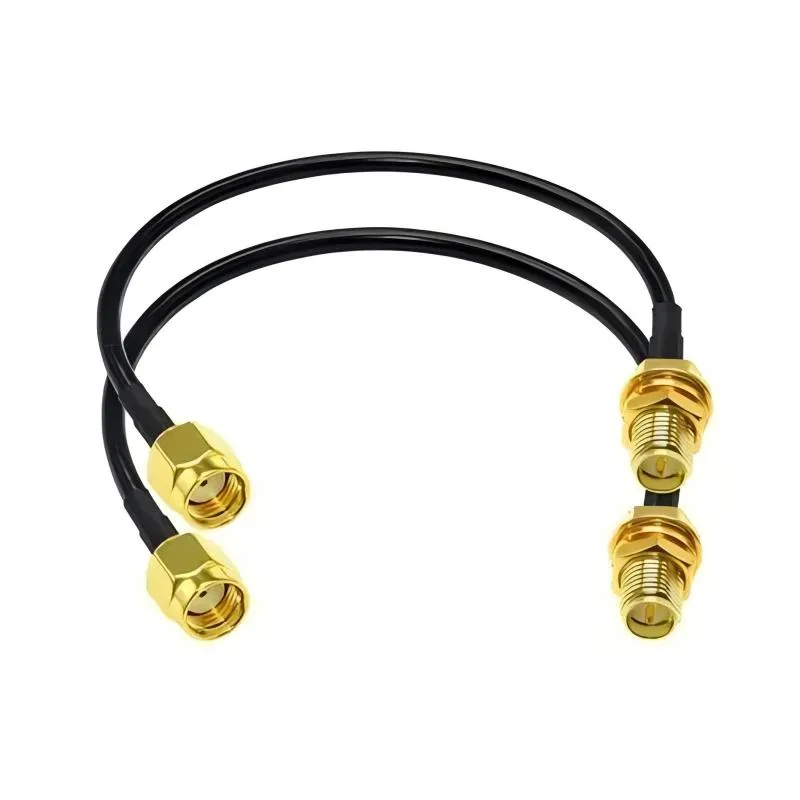
Located at the beginning of the section discussing adapter pros and cons, this figure serves as a visual “question,” summarizing the common misconception of equating mechanical compatibility with electrical compatibility, and guiding readers to consider its hidden costs.
This question comes up constantly, especially when inventory doesn’t match the port on hand.
The short answer: yes, physically.
The longer answer: not always wisely.
Physical compatibility vs RF performance vs compliance
An adapter solves one problem while creating others:
- Additional insertion loss
- Increased reflection risk
- Potential regulatory issues
In the U.S., certified wireless devices are tested with specific antenna configurations. Adding adapters changes the RF path. In some cases, it also changes EIRP, even if output power settings stay the same.
That doesn’t mean adapters are forbidden. It means they should be used deliberately, not casually.
Prefer these alternatives when possible
From an engineering standpoint, these options are usually safer:
- Use the correct connector type end-to-end
- Replace the antenna with the proper SMA or RP-SMA variant
- Shorten the RF path and eliminate intermediate adapters
One adapter may seem trivial. Several often aren’t.
If you frequently deal with RP-SMA systems, the dedicated walkthrough in RP-SMA connector identification and extension practices is a useful complement to this section.
What needs to be on the PO to avoid returns and rework?
Most RF cable returns aren’t caused by bad parts.
They’re caused by vague orders.
Someone writes “SMA cable, 30 cm,” assumes the rest is obvious, and only realizes the problem after the box is opened. At that point, the cable may be perfectly built—just not what the system needs.
The fix isn’t more emails. It’s forcing clarity up front.
SMA wiring ordering checklist (engineering-use)
This checklist is intentionally repetitive. That’s a feature, not a flaw.
- Connector standard: SMA / RP-SMA
- Center contact: Pin / Socket
- Ends: M–F / M–M / F–F
- Cable type: RG178 / RG316 / other (specify)
- Cable length: exact length (e.g., 0.3 m, not “short”)
- Mount style: Bulkhead / Flange / None
- Required thread length: calculated minimum (mm)
- Sealing parts: O-ring / waterproof cap / none
- Quantity
- Panel thickness & hole size (if panel-mounted)
Engineers sometimes ask why both connector type and center contact are listed.
Because SMA and RP-SMA mistakes still happen when one of those fields is missing.
Copy-ready PO note
Short notes work better than long descriptions. This format has proven reliable:
*“RP-SMA female bulkhead connector (external thread, center pin).
Minimum thread length ≥ L_required mm based on panel stack.
Cable: RG178, RP-SMA male to RP-SMA female, 0.3 m.
Include nut, washer, and O-ring.”*
Nothing here relies on interpretation. Anyone reading it—supplier or inspector—knows exactly what’s expected.
If you’re standardizing RF orders across projects, aligning this checklist with your broader coax strategy helps. The overview in coax loss and cable selection fundamentals is a useful reference when setting internal rules.
Practical questions that come up in real builds
How can I tell SMA from RP-SMA on a router without opening the enclosure?
Look at the antenna jack.
If it has internal threads and a visible center pin, it’s almost always RP-SMA female. That’s the standard configuration for most U.S.-market Wi-Fi routers and access points.
The key detail is the center contact, not the threads alone.
What thread length do I actually need for an SMA bulkhead on a 2 mm aluminum panel?
There’s no shortcut. Add up the real stack: panel thickness, washer(s), compressed gasket, nut engagement, plus a small allowance. If that number is close to the maximum available thread length, switching to a flange mount is usually the safer call.
Trying to “make it work” often leads to loose connectors or poor sealing later.
Inside a chassis, is a male-to-female jumper better than chaining adapters?
Almost always, yes.
One continuous jumper introduces fewer impedance steps than multiple adapters stacked together. At higher frequencies, that difference shows up as cleaner matching and more stable performance.
How long can a 5 GHz or 6 GHz extension be before performance drops?
There isn’t a hard cutoff, but experience says this:
- Under 1 m: usually fine with good cable and minimal connectors
- Beyond that: losses and reflections start eating into margin quickly
What matters isn’t just the cable length—it’s how many transitions you add along the way.
Can I adapt an RP-SMA antenna to an SMA jack and still meet compliance?
Sometimes. Sometimes not.
Adapters change the RF path, and in certified systems that can affect EIRP. If the original approval assumed a direct antenna connection, adding adapters introduces uncertainty. Direct matching is always the lowest-risk option.
What bend radius is safe for RG178 in tight enclosures?
A conservative rule is at least 10× the cable’s outer diameter.
Tighter bends may work at first, but they tend to cause slow degradation as the coax structure is stressed over time.
Do indoor installations really need waterproof caps?
In dry, controlled environments, often no.
In spaces with humidity, condensation, or temperature cycling, sealing parts are inexpensive insurance against corrosion and intermittent issues months down the line.
Why SMA details quietly decide whether a system feels “solid”
An SMA connector isn’t exciting. When everything is right, no one notices it at all. That’s exactly the point.
Problems show up when small assumptions stack up:
- assuming SMA and RP-SMA are interchangeable
- assuming any bulkhead thread length will do
- assuming an extra adapter won’t matter
At low frequencies, systems sometimes tolerate those shortcuts.
At 5 GHz and above, they rarely do.
Treat connectors, bulkheads, and antenna cables as part of the RF design—not as accessories added at the end. That mindset alone prevents a surprising number of late-stage issues.
If your work regularly involves reverse-polarity ports, the focused guide on RP-SMA connector identification and extension practices pairs naturally with this article and covers the remaining edge cases seen in Wi-Fi and IoT hardware.
Bonfon Office Building, Longgang District, Shenzhen City, Guangdong Province, China

A China-based OEM/ODM RF communications supplier
Table of Contents
Owning your OEM/ODM/Private Label for Electronic Devices andComponents is now easier than ever.