
RP-SMA vs SMA: Fast ID, Match & Ordering Guide
Dec 25,2025
Is My Port SMA or RP-SMA—How Do I Tell Fast?
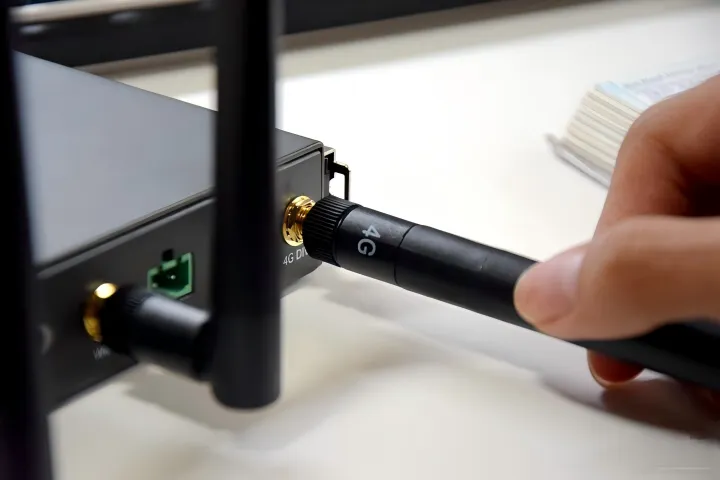
Serving as the introductory graphic for the guide, this figure presents the common problem of confusing SMA and RP-SMA connectors due to their similar appearance. It highlights that the core difference lies in the design of the “center pin,” leading into the specific identification methods that follow.
If you’ve ever tried to connect a Wi-Fi antenna and found it just won’t screw in quite right, you’ve met the SMA vs RP-SMA puzzle. These two connector types look almost identical at a glance, but one detail changes everything — the center pin. That tiny difference decides whether your radio link works or drops dead on arrival.
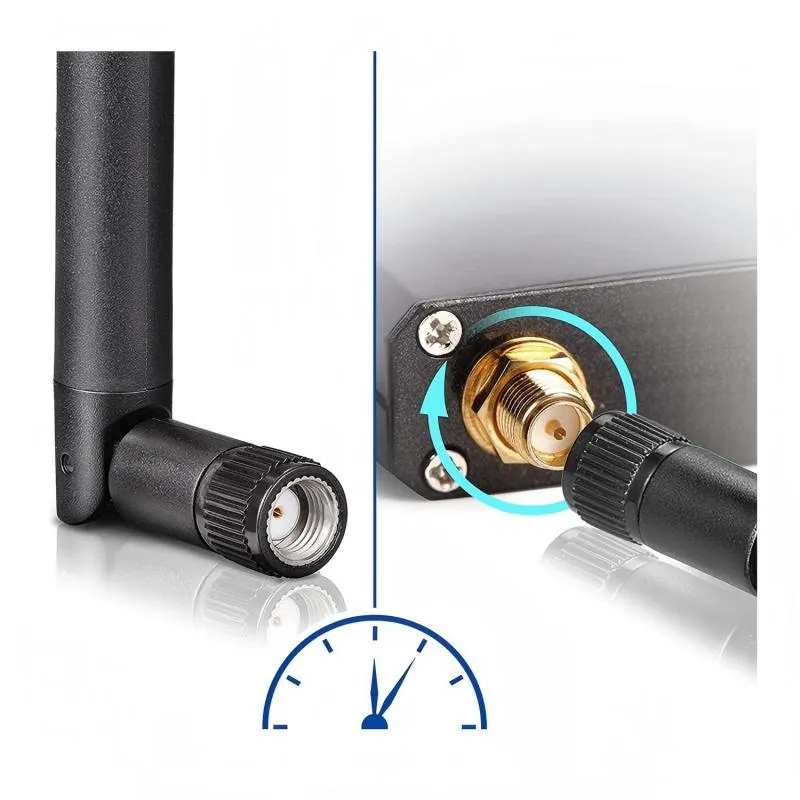
SMA connectors are the original standard used in RF applications. A male SMA has an external thread with a center pin, while a female SMA has an internal thread and a center socket. The RP-SMA (Reverse Polarity SMA) flips that gender logic: the RP-SMA male has an external thread but a center socket, and the RP-SMA female has an internal thread but a center pin.

This figure is a key visual reference for connector identification. Through side-by-side comparison, it intuitively reveals the most fundamental physical difference between RP-SMA and SMA connectors: one has a center socket, the other a center pin. Combined with the textual check steps below, it provides a practical method for identification within 10 seconds.
For a 10-second check, look straight at the connector.
- External thread + pin = SMA-Male
- External thread + hole = RP-SMA-Male
- Internal thread + hole = SMA-Female
- Internal thread + pin = RP-SMA-Female
That’s all you need — no gauge, no microscope, just your eyes. Engineers at TEJTE use this rule daily when matching router ports, IoT gateways, and test gear.
Common device vs antenna pairings:
This figure is one of the visual examples of the “common device vs. antenna pairings” mentioned in the document. It likely illustrates a typical configuration, such as the correct connection between a home router (RP-SMA female port) and its original antenna (RP-SMA male), helping users understand the correct matching logic.
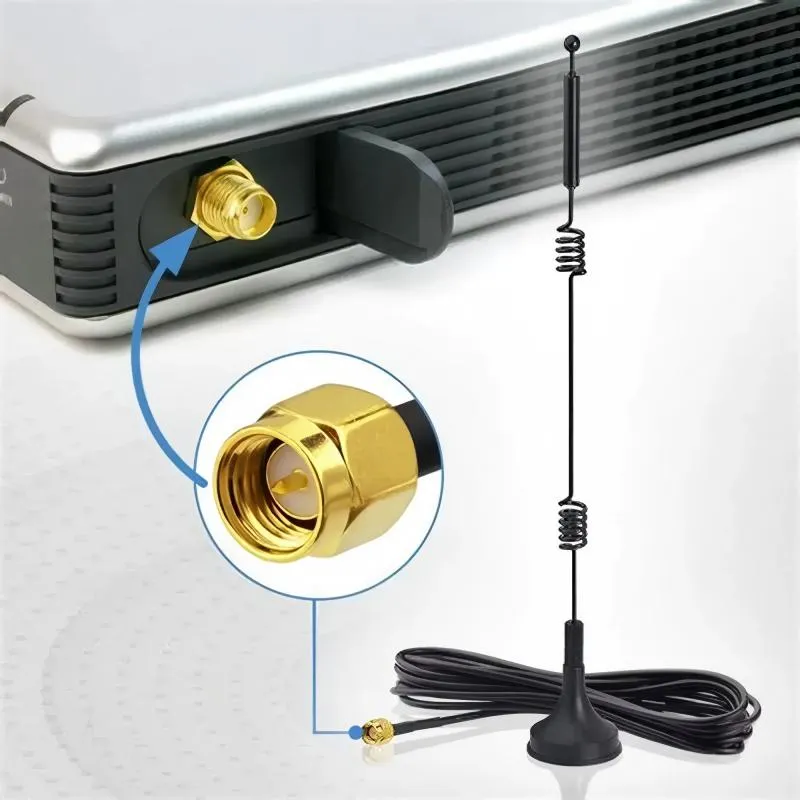
This figure is another visual example of “common device vs. antenna pairings.” It likely depicts a scenario different from Figure 3, such as the connection between an industrial IoT gateway (SMA female port) and an external antenna (SMA male), further illustrating the differences in connector standards across device types (consumer vs. industrial).
Routers and consumer Wi-Fi gear often use RP-SMA female jacks on the device (the ones with internal threads and a pin) paired with RP-SMA male antennas (external thread + hole). Industrial IoT equipment, however, typically uses standard SMA connectors, since they maintain tighter electrical performance and are used in LTE, GPS, and 5G modules.
If you want to dive deeper into connector fundamentals, see the reference on SMA connector basics for background.
Why Can It Screw On but Still Be “Incompatible” Electrically?
Here’s a common trap: you manage to screw the parts together, everything feels solid — but the signal just vanishes. The reason? Mechanical fit doesn’t guarantee electrical compatibility.
An SMA plug might physically mate with an RP-SMA jack, but the center conductors won’t touch. That leaves the signal floating open, reflecting power back into the transmitter. The result is poor VSWR, degraded link margin, or even RF damage over time.
Adapters That “Fit” but Add Mismatch, Loss, or Compliance Risk
Thread × pin / hole quick ID (device vs antenna)
It’s tempting to grab a cheap adapter when you find mismatched ends. While an SMA-to-RP-SMA adapter can bridge the connection, every extra joint adds insertion loss — typically 0.15–0.3 dB per interface at 5 GHz — and more importantly, extra return loss. Those reflections build up across multiple adapters, eroding your effective EIRP.
In regulated bands (like Wi-Fi and LTE), even small losses or gains can push your device out of spec. That’s why many manufacturers explicitly warn against using unapproved adapters that bypass intentional RF restrictions.
Can an RP-SMA Antenna Work on an SMA Connector?
Physically, sometimes yes — electrically, not reliably. An RP-SMA antenna connected to an SMA jack usually results in an open circuit, because one side lacks a mating pin. Even if it “feels” tight, the RF path remains broken. Over time, repeated mismatched connections can deform the inner contact surfaces, leading to intermittent failures.
A good practice: before you buy or swap antennas, double-check both connector types and genders. If you’re unsure, TEJTE’s engineers recommend labeling cables or adding a color sleeve at the factory. It saves countless returns later.
If you’re interested in how signal loss behaves through cables and adapters, check TEJTE’s RG Cable Guide — it shows how each connector adds loss to your link budget.
How Do I Match Male/Female Ends Without Mistakes?
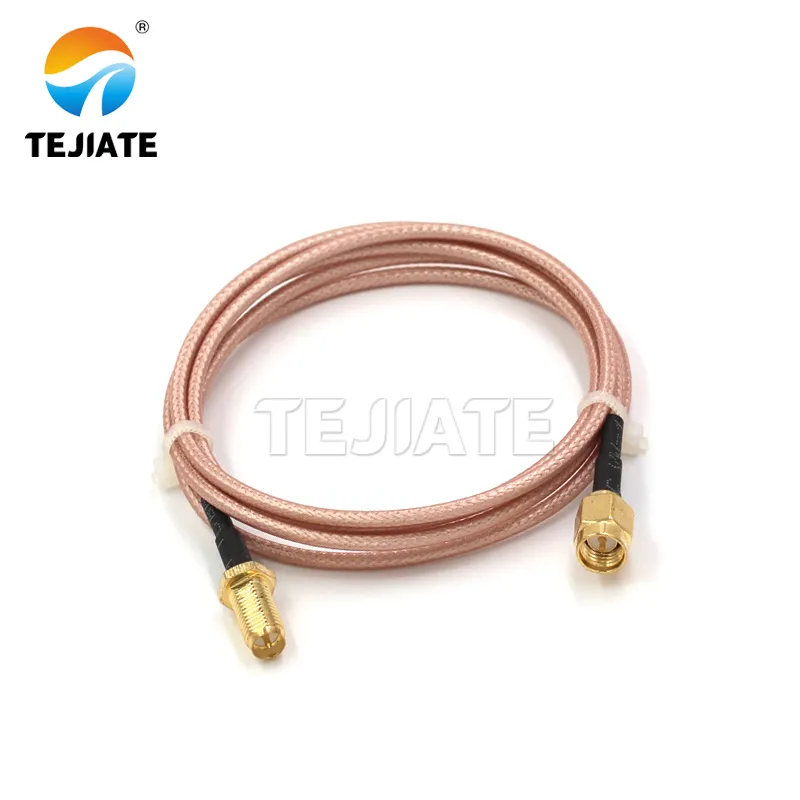
This figure aims to address the next challenge after identifying the connector type—correctly pairing the male/female ends. It likely guides the user, in the form of a flowchart or matrix, to select the correct cable end (male or female) based on the device port type (e.g., router RP-SMA female, industrial equipment SMA female). It also distinguishes between standard antenna extensions (male-to-female) and test jumpers (male-to-male), aiming to prevent assembly errors and production rework.
When to Use Male-to-Female vs Male-to-Male
Male-to-female extensions are the standard for antenna leads because they maintain signal direction and prevent mechanical strain on device jacks. Male-to-male cables are typically used for test adapters or between two bulkhead jacks, where both ports are female.
Using a male-to-male cable on live equipment can be risky — you might short the center pins or damage the sockets. TEJTE’s lab recommends verifying continuity with a simple multimeter before connecting to a transmitter port.
When SMA Male to Female Cable / SMA Antenna Cable Is Safer
For Wi-Fi or IoT systems where the antenna mounts remotely, a SMA male-to-female cable (also called an SMA antenna extension) is usually the safer bet. It lets you position the antenna for better radiation without stressing the onboard connector. The same applies to RP-SMA versions for routers — just ensure you stay within your loss budget for 5 GHz signals.
If you’re working on enclosures or IP-rated panels, the next step is deciding whether to use a bulkhead feed-through. We’ll cover that after exploring how cable length affects loss.
How Long Can I Extend Before 5 GHz Range Drops?
Adding cable length between your radio and antenna feels harmless—until you test throughput. Every meter of coax eats a slice of power, and at 5 GHz, that slice gets noticeably larger. The higher the frequency, the higher the attenuation per meter.
At TEJTE, engineers often follow a simple rule: keep total coax loss under 2 dB if you want performance close to the datasheet spec. For most setups, that means a maximum of 0.5 m to 1 m for thin cables such as RG316 or RG178, and up to 2 m if you’re using low-loss LMR-240 or RG58.
Shorter is nearly always better. Beyond 1 m on 5 GHz Wi-Fi, you’ll see 5–10 % throughput loss in real environments due to insertion loss and mismatch compounding. Once your link budget drops past 3 dB, antennas no longer compensate by simply “adding gain.”
When to Pick SMA / RP-SMA / Wi-Fi Antenna Extension Cable
| Scenario | Recommended Cable | Notes |
|---|---|---|
| Router / AP with RP-SMA jacks | RP-SMA male-to-female | Standard for Wi-Fi routers, preserves polarity |
| IoT gateway / industrial modem | SMA male-to-female | Use for LTE, GNSS, or 5 GHz radios |
| Lab testing / temporary setup | SMA male-to-male jumper | Only for bench use—avoid in production |
| Outdoor antenna mount | Bulkhead SMA female to male | Enables panel seal, use silicone O-ring |
Loss Estimator
Engineers rarely calculate loss from scratch; they use quick formulas.
Here’s a practical estimator that works within ±10 % for most 5 GHz installations:
Loss(dB)≈α(f)⋅L+0.2⋅n
Where:
- α(f) = cable attenuation (dB/m) at frequency f (GHz)
- L = cable length in meters
- n = number of connectors or joints
Typical α(f) values @ 5 GHz:
- RG178 ≈ 1.6 dB/m
- RG316 ≈ 1.1 dB/m
- LMR-240 ≈ 0.25 dB/m
Example: A 1 m RG316 extension with two connectors gives
Loss ≈ 1.1 × 1 + 0.2 × 2 = 1.5 dB.
That’s already ≈ 30 % power drop—enough to trim range by 5–10 %.
If you’d like a deeper look at how attenuation compounds across different RG types, check TEJTE’s RG Cable Guide.
Do I Need a Bulkhead for Panel Feed-Through—and How to Size It?
SMA Bulkhead vs 2/4-Hole Flange
- Single-nut bulkhead: Simple to mount on thin metal or plastic panels (1–2 mm). Ideal for small IoT boxes or lab gear.
- 2-hole flange: Adds anti-rotation strength—use when vibration is present or torque > 0.5 N·m.
- 4-hole flange: Preferred for heavy outdoor antennas or industrial enclosures. Offers even gasket compression and ground continuity.
If you plan to mount outdoors, choose an IP67 bulkhead kit that includes O-ring, lock washer, and nut. TEJTE’s SMA Bulkhead Panel Drilling & IP67 Sealing Guide details torque specs and sealing tests.
Stack Height = Panel + Washer + Gasket + Cap
Measure the total “stack” from panel surface to nut face:
Stack Height (mm)=t_panel+t_washer+t_gasket+t_cap
Select a connector whose thread length ≥ stack height + 1 mm margin.
Typical example: 1.5 mm aluminum panel + 0.5 mm washer + 1 mm gasket + 1 mm cap → 4 mm total. Pick a 5–6 mm threaded bulkhead to ensure tightening and seal.
For background on radiation and antenna behavior, see Antenna (radio) on Wikipedia.
What Should Be on My PO So I Never Mismatch Again?
Ordering the wrong connector pair is a silent budget killer.
A single reversed gender can halt an entire production line or cause a 10-day return cycle.
That’s why every TEJTE engineer keeps a connector ID matrix and decision checklist before finalizing a PO (purchase order). Below is a condensed version of that process.
SMA / RP-SMA ID Matrix + Decision Tree
| Outer Thread | Center | Connector Type | Typical Device Port | Matching Antenna End | Recommended Cable End |
|---|---|---|---|---|---|
| External | Pin | SMA-Male | IoT gateway, LTE modem | SMA-Female | SMA Female |
| Internal | Hole | SMA-Female | Test instrument, radio front end | SMA-Male | SMA Male |
| External | Hole | RP-SMA-Male | Router, access point | RP-SMA-Female | RP-SMA Female |
| Internal | Pin | RP-SMA-Female | Wi-Fi router port | RP-SMA-Male antenna | RP-SMA Male |
Use this table before any procurement run.
It reduces field returns by nearly 90 % for TEJTE’s OEM customers.
Do Wi-Fi 7 / 6 GHz Rollouts Change Connector Choices?
Outdoor / Enterprise Notes: Sealing, Grounding, Compliance
Wi-Fi 7 introduces 6 GHz (5.925–7.125 GHz) operation with stricter power-spectral-density and AFC (Automated Frequency Coordination) requirements.
Outdoor units must maintain consistent grounding and IP-sealing or risk EIRP drift from micro-arcing at high field strength.
That’s why enterprise enclosures increasingly adopt SMA bulkheads with integrated gaskets rather than plastic RP-SMA jacks.
They also add short pigtails inside the case to isolate mechanical torque from the radio board.
Good grounding practice: use star-washers or serrated flanges to bite through paint layers, keeping shield continuity below 0.03 Ω.
It’s a tiny detail that prevents big headaches when certifying under FCC Part 15 Sub-E.
Higher-Band Reality: Shorter Extensions, Fewer Adapters
At 6–7 GHz, every additional connector adds ≈ 0.25 dB loss.
Cables like RG178 or RG316 start approaching 2 dB/m, meaning a 1 m extension can reduce SNR by 2 – 3 dB — enough to cut range 15 %.
Designers now favor direct-mount antennas or 0.3 m low-loss pigtails to stay within link-budget targets.
So while RP-SMA remains common for routers, SMA connectors dominate high-frequency industrial and 6 GHz Wi-Fi 7 gear where calibration accuracy matters.
For a refresher on how radiation efficiency ties to connector quality, check Antenna (radio).
FAQs — Real-World Questions Engineers Actually Ask
1. What’s the quickest way to tell if a router port is RP-SMA or SMA?
Forget calipers or datasheets — just look straight into the connector.
If the router jack has an internal thread and a pin, that’s RP-SMA female.
If there’s a hole instead of a pin, it’s the regular SMA type.
Most home routers ship with RP-SMA ports so users can’t attach high-gain antennas too easily — a small regulatory trick, not a technical one.
2. Can I attach an RP-SMA antenna to an SMA bulkhead using an adapter?
You can physically make it fit, and it’ll probably pass a continuity test, but you’ll lose a bit of efficiency — usually around 0.3 dB per extra joint.
That might sound tiny, yet at 5 GHz, those half-decibel hits add up fast.
Adapters are fine for a quick demo or test rig, just don’t bake them into production gear if you care about FCC margin.
3. Does adding a 0.5 m extension hurt 5 GHz throughput compared with 0.3 m?
Yes, slightly. Expect a few percent drop — maybe 5 % to 8 % — depending on cable grade.
RG316, for example, loses roughly 1 dB/m, so those extra 20 cm already nibble away at your link budget.
If range matters more than neat cable routing, keep it short and use a low-loss coax instead.
4. How long should the thread be for a 1.5 mm aluminum panel with a gasket?
Stack the pieces in your head: panel (1.5 mm) + washer (0.5 mm) + gasket (1 mm) + tightening margin (~1 mm).
That totals about 4 mm, so a 5–6 mm threaded bulkhead seats perfectly and still compresses the O-ring for IP sealing.
Shorter threads often bottom out before the gasket seals, letting moisture sneak in.
5. Are male-to-female cables more lossy than male-to-male jumpers?
A touch, yes — every coupling pair adds contact resistance and a small mismatch bump.
In lab tests, the difference is around 0.1 dB at 2.4 GHz and 0.2 dB at 5 GHz.
It’s rarely fatal, but if you’re chasing tight signal budgets, keep interfaces to the bare minimum.
6. Is RG178 flexible enough for tight lids or handheld devices?
Absolutely, though it’s easy to over-bend.
Stay above a 15 mm bend radius, roughly ten times its outer diameter.
Any tighter and the shield braid starts to separate, which quietly raises return loss even before the cable looks damaged.
7. Will Wi-Fi 7 and 6 GHz hardware move away from RP-SMA entirely?
It’s heading that way.
Consumer routers will likely keep RP-SMA for a while — it keeps compliance simple — but professional or outdoor gear already favors standard SMA for lower loss and better calibration repeatability.
Once devices push past 6 GHz, even tiny connector variance matters, so the industry trend is clear.
In Short
These aren’t theoretical answers; they’re what installers, testers, and RF techs run into every week.
A five-second visual check and the right bulkhead thread spec can save hours of debugging later.
When uncertain, always trace your connector type, cable loss, and polarity before power-up — it’s the cheapest insurance an engineer can buy.
Internal Link Summary
- Hub → This Article: RG Cable Guide — “Coax Loss & Selection Overview”
- This Article → Brothers:
- SMA Bulkhead Panel Drilling & IP67 Sealing in Practice (“Feed-through and Sealing Tips”)
- Wi-Fi Antenna Extension Cable Guide (“Extension Length and Loss Guide”)
- External Industry References:
- Wikipedia – SMA Connector (“SMA Connector Basics”)
- Wikipedia – Antenna (Radio) (“Radiation and Gain Concepts”)
Final Word
The real takeaway from every rp-sma vs sma comparison is that what looks identical on the bench can behave completely differently at 6 GHz.
Spend 30 seconds verifying thread and pin orientation before you buy, and you’ll save days of debugging later.
When in doubt, use TEJTE’s ID Matrix or Decision Tree to lock the correct pair.
Because in RF design, the smallest mismatch often makes the biggest difference
Bonfon Office Building, Longgang District, Shenzhen City, Guangdong Province, China

A China-based OEM/ODM RF communications supplier
Table of Contents
Owning your OEM/ODM/Private Label for Electronic Devices andComponents is now easier than ever.