
Outdoor Omni Antenna Selection & Ordering Guide
Dec 08,2025
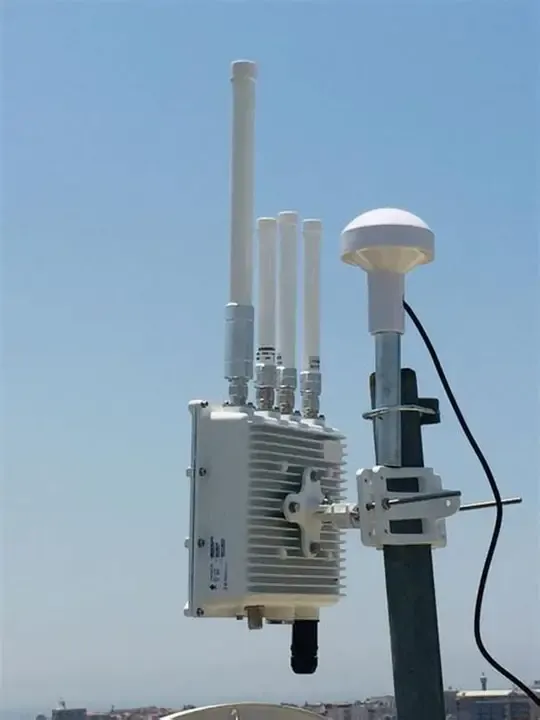
This figure aims to establish an intuitive understanding of the operating environment for outdoor omni antennas, emphasizing that their core difference from indoor antennas lies in withstanding harsh natural conditions. It sets the visual foundation for subsequent discussions on antenna class, IP rating, installation specifications, etc.
Choosing the right outdoor omni antenna defines whether your Wi-Fi or IoT deployment thrives or struggles against wind, rain, and cable loss. This guide walks engineers and buyers through the complete process — from class selection and weatherproof validation to cable management, placement, and final purchase order (PO) requirements.
Which outdoor omni antenna class matches your site plan?
Choosing the right outdoor omni antenna isn’t just about gain. It’s about how your deployment looks from above — coverage rings, building heights, and where people or IoT devices actually are. In most outdoor Wi-Fi or sensor networks, engineers start by sketching a “height vs. radius” map: how far should a 3 dBi, 6 dBi, or 9 dBi antenna reach given its mounting elevation?
For campus Wi-Fi, a mid-gain (around 6 dBi) pole-mounted omni usually offers the best balance between vertical beamwidth and horizontal reach. It can cover courtyards and walkways without producing “dead zones” directly beneath. Small cells or municipal access points, on the other hand, often rely on higher gain units (8–9 dBi) placed at 6–10 m above ground to stretch corridor coverage. Meanwhile, IoT gateways serving sensors or meters favor shorter, low-gain whips (2–3 dBi) that fill nearby spaces evenly and tolerate device movement.
Once the coverage rings are mapped, matching antenna class to mounting style becomes straightforward.
Map small cell, campus Wi-Fi, and IoT gateways to height & coverage rings
Decide N-female pole-mount vs device-mount (short whip on enclosure)
How do you verify IP/UV readiness for year-round exposure?
Decode IP ratings (IP65 / 66 / 67) and gasket / O-ring notes
The Ingress Protection (IP) code defines resistance to dust and water.
- IP65: fully dust-tight and protected against low-pressure water jets — good for walls or under eaves.
- IP66: withstands strong water jets — ideal for poles exposed to rain or wash-downs.
- IP67: survives temporary immersion (1 m for 30 min) — a must for rooftop or mast-top mounting.
However, the number alone isn’t the whole story. Look for designs with silicone O-rings between the N-female base and radome, and avoid units that depend solely on thread sealing. Antennas without visible O-rings may pass factory tests yet fail after months of thermal cycling, allowing moisture to wick into the feed point. When connecting coax lines, always hand-tighten until the gasket slightly compresses; overtightening can deform the dielectric and shift VSWR.
UV-stable radome materials and salt-fog / temperature ranges
Most outdoor omnis use ABS, ASA, or fiberglass radomes. ASA resists UV degradation far better than standard ABS, while fiberglass handles salt-fog and sub-zero weather. For coastal or marine environments, fiberglass radomes with gel-coat finishes are essential; they avoid micro-cracking under UV and resist corrosion from sea spray.
Temperature range also matters. A spec of –40 °C to +80 °C covers almost all climates in the continental U.S. If your system operates in desert or high-altitude regions, verify +90 °C capability and confirm that internal adhesives remain stable above 70 °C. Never assume an “IP67” product automatically implies UV protection — many low-cost units pass immersion tests but fade, chalk, or leak after months in sunlight.
Typical Electrical Specs — Verify Before You Buy
| Parameter | 3 dBi Model | 6 dBi Model | 8 dBi Model | Remarks |
|---|---|---|---|---|
| Frequency Range | 2.4-2.5 GHz / 5.15-5.85 GHz | Same | Same | Dual-band standard for Wi-Fi 6/7 APs |
| VSWR | ≤ 1.5 : 1 | ≤ 1.5 : 1 | ≤ 1.8 : 1 | Check return-loss curve for wideband models |
| Impedance | 50 Ω | 50 Ω | 50 Ω | Match with feeder and lightning arrestor |
| Polarization | Vertical | Vertical | Vertical | Common for omnidirectional coverage |
| Connector | N-Female | N-Female | N-Female | Detachable feed simplifies cable routing |
| Length | ≈ 200 mm | ≈ 400 mm | ≈ 600 mm | Visual height difference affects tilt |
| Operating Temperature | -40 °C ~ +80 °C | -40 °C ~ +80 °C | -40 °C ~ +80 °C | Verify adhesive stability above 70 °C |
| Radome Material | ASA/ABS | ASA/Fiberglass | Fiberglass | UV resistance improves long-term color and seal |
While these values look simple, they tell a real story.
For instance, a VSWR tighter than 1.5 : 1 ensures efficient power transfer — crucial when your radio already runs near its thermal limit. If you’re deploying near the sea or under direct sun, lean toward fiberglass units even if they’re slightly heavier. One veteran installer joked that “the lighter the plastic, the sooner it chalks.” He’s not wrong: ASA and fiberglass survive five summers where ABS yellows after one.
Don’t just copy values from an online listing. Ask the vendor for return-loss plots and temperature test reports if the site is critical. It’s an extra email, but it separates the projects that last a season from those that last a decade.
Elevation nulls vs corridor coverage: when higher gain hurts
Imagine the radiation pattern as a doughnut sliced thinner with each extra dB of gain. A 3 dBi antenna offers a broad lobe that easily covers users near the base. At 6 dBi, the vertical angle tightens — signals travel farther horizontally but weaken directly below. Jump to 9 dBi, and you may leave a dead zone just a few meters under the pole. For Wi-Fi deployments on rooftops above walkways, the null directly underneath can cause roaming drops.
Rule of thumb:
- 3 dBi — balanced for short-range IoT or access boxes < 3 m high.
- 6 dBi — best all-around choice for campus or parking-lot coverage.
- > 8 dBi — use only when you have clear sight lines and few nearby users.
Always check the manufacturer’s elevation plot instead of trusting a single gain number.
Multi-AP cell planning: overlap, CCI/ACI, and channel reuse
When deploying multiple APs, the omni’s gain affects not only range but also cell overlap and co-channel interference (CCI). Excessive overlap leads to CCI, while gaps cause roaming loss. The key is to maintain roughly 10–15 % coverage overlap between adjacent cells at –67 dBm RSSI. If you increase antenna gain, you must either reduce transmit power or increase spacing.
Modern Wi-Fi 6/6E/7 gear offers automatic transmit-power control, but fixed outdoor setups rarely adapt dynamically. Before finalizing the BOM, simulate coverage with basic site tools or drive tests. Proper channel reuse planning — alternating 1/6/11 or 36/40/44 bands — reduces interference far more than a “high-gain upgrade.” Remember: it’s easier to boost link margin with low-loss feeder cables than to fight multipath from too much gain.
Will mast mounting and torque specs survive wind & vibration?
The moment an outdoor omni antenna moves even a few degrees off its intended azimuth, your coverage map changes. Wind, vibration, and loose clamps are the usual culprits. A stable mount is more about torque than brute strength — and every manufacturer’s data sheet hides that in small print.
A good mast-mount omni will include a U-bolt or saddle clamp rated for at least 40–60 N·m of tightening torque. That’s enough to hold steady on a Ø 38–50 mm mast without crushing the fiberglass base. Some newer mast kits feature anti-rotation tabs that bite into the pole; others rely on serrated washers. If your site faces frequent gusts or rooftop turbulence, use both: torque + anti-slip.
Avoid cheap zinc-plated brackets in coastal zones; they corrode fast and lose grip. Stainless 304 or 316 hardware is the norm for professional outdoor Wi-Fi. For lighter assemblies (under 0.5 kg), nylon-lined locknuts prevent loosening from vibration. TEJTE’s own pole-mount kits follow the same practice used in its SMA Extension Cable: Length & Loss guide — torque values are stated per clamp, not per pair, so you tighten evenly on both sides.
Grounding, surge protectors, and lightning arrestors on feed lines
Any mast above roof level should be bonded to a ground bar or down-conductor. Even a “DC-grounded” omni still benefits from an inline lightning arrestor, ideally placed where the coax enters the building. The chain looks like this:
Antenna to Lightning Arrestor to Ground Block to Feeder Cable to Equipment
Install arrestors rated for the same frequency band and impedance (50 Ω). Keep the lead length from arrestor to ground < 0.5 m to minimize inductance. Remember, lightning energy travels outside the cable’s shield; a short, heavy gauge ground strap saves radios more often than expensive protectors do.
How do you keep cable loss under control from mast-top to IDF?
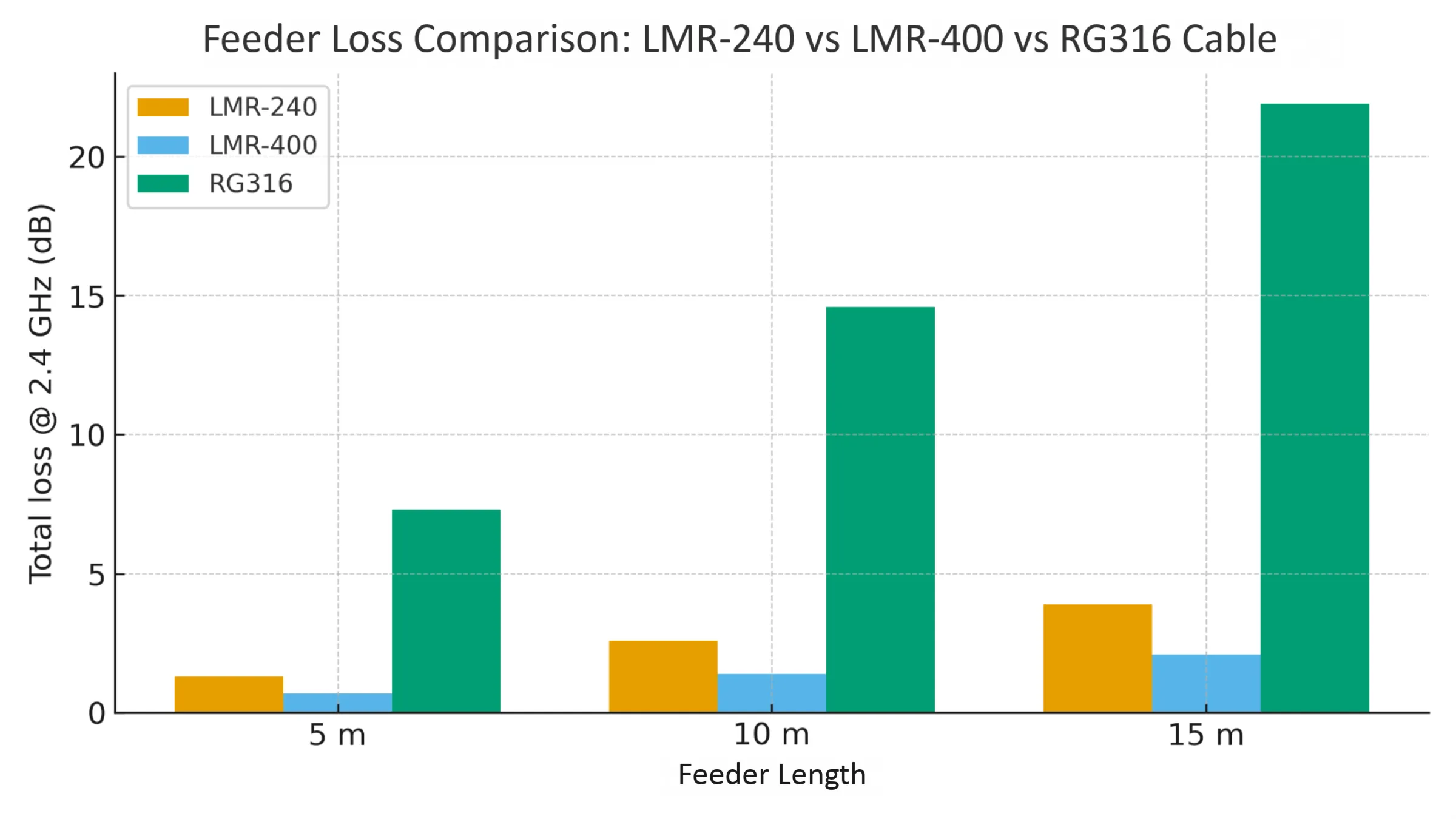
Located in the core section discussing “cable loss,” this chart is a key tool for quantifying the point that “loss is the silent killer of link margin.” It helps engineers make informed cable selection decisions balancing flexibility, cost, and performance based on actual transmission distances (e.g., from mast-top to IDF).
Loss is the silent killer of link margin. Every meter of coax between radio and antenna eats dB that no amount of transmit power can recover. In outdoor omni setups, that usually means choosing the right feeder and minimizing connector pairs.
Choose feeder vs pigtail: LMR-240 / 400 vs U.FL to SMA jumpers
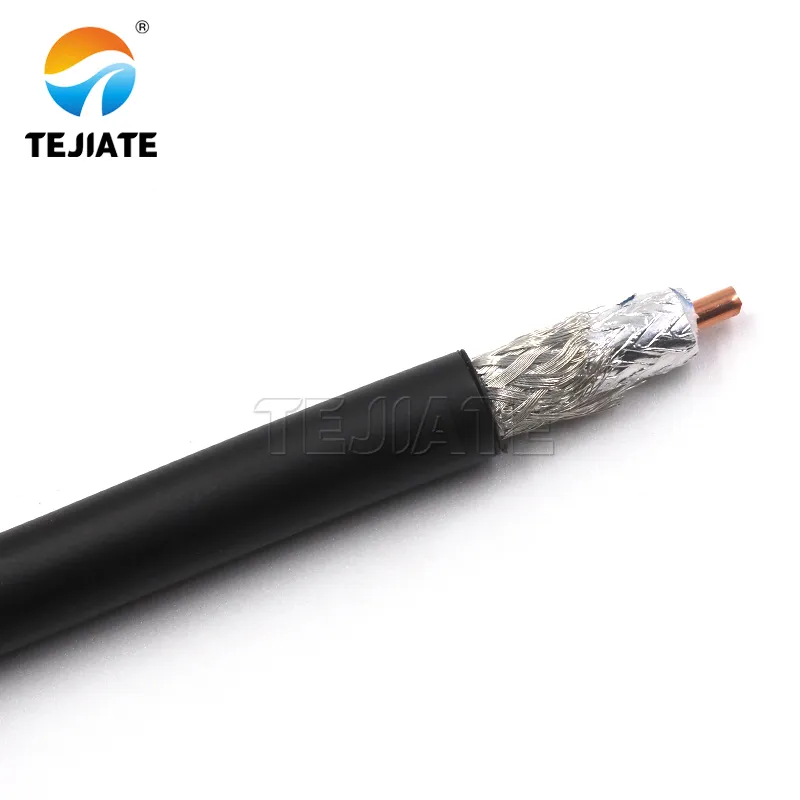
This product image materializes the abstract “LMR-400” line from Figure 2. It gives engineers an intuitive sense of the cable‘s actual size, ruggedness, and connector interface, aiding in planning wiring space and selecting waterproof connectors.
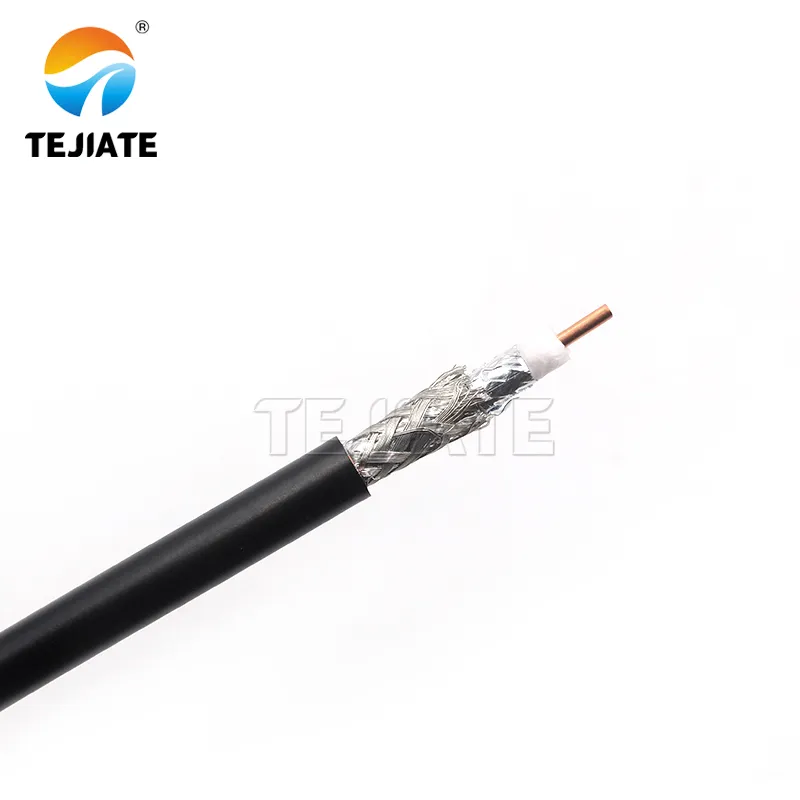
As a counterpart to LMR-400, this image presents another common outdoor cable option. It helps engineers understand why LMR-240 is a better balance between loss and flexibility for feeder runs under 5 meters (as mentioned in the document) and sets expectations for its physical form.
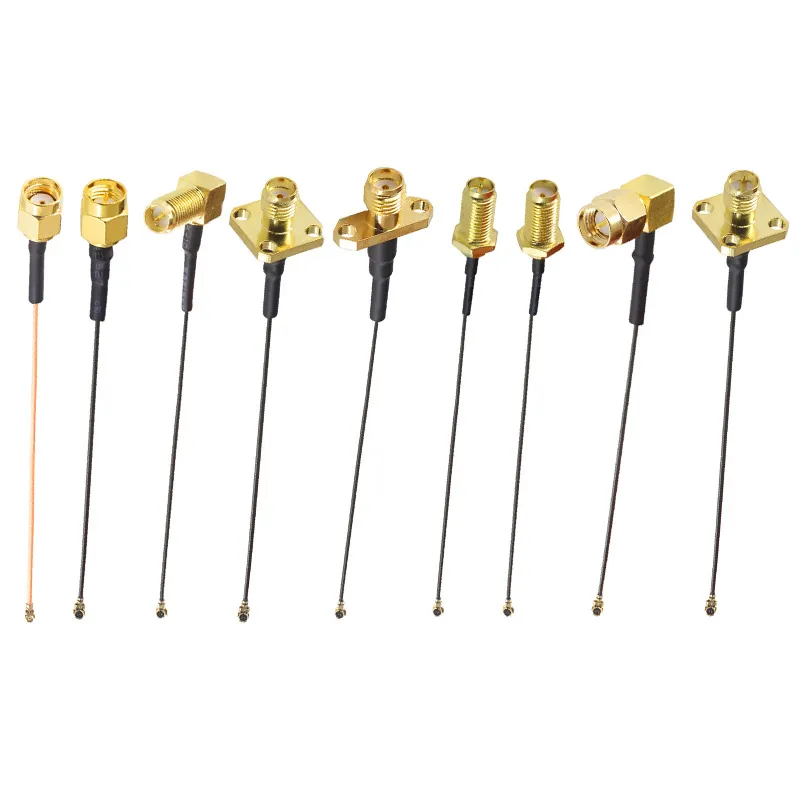
This image transitions the discussion from outdoor long-distance feeders (LMR series) to short internal device cabling. It emphasizes that even in outdoor systems, the loss (≈0.15 dB per pair) and cable diameter selection (0.81mm vs 1.13mm) of this “last mile” internal pigtail are equally critical and an integral part of the overall link budget that cannot be ignored.
For mast runs under 5 m, LMR-240 gives a good balance of flexibility and loss (~ 0.26 dB/m @ 2.4 GHz). Beyond 10 m, move up to LMR-400 (~ 0.14 dB/m). Anything thinner — like 0.81 mm micro-coax — should stay inside enclosures as short pigtails.
A typical outdoor Wi-Fi 6 AP has a sealed radio module inside a plastic box and a short U.FL-to-SMA jumper leading to the enclosure bulkhead. For guidance on that interface, see TEJTE’s U.FL (IPX) to SMA Pigtail Guide. It explains how each extra connector pair adds ≈ 0.15 dB loss — small individually, painful in totals of 3 or 4 pairs.
When the run exceeds 15 m, engineers often use a low-loss feeder to a nearby junction box and then a short flexible patch into the radio. The trick is strain relief: never let the coax bend tighter than its specified radius. Tape alone is not enough — use UV-rated cable ties and saddle clamps.
Connector pair count, water ingress risks, and strain relief
Every joint between connectors introduces both mechanical risk and tiny mismatches. Try to keep connector pairs ≤ 2 from radio to antenna. For outdoor transitions, use compression boots or self-amalgamating tape, not electrical tape. After sealing, tug the cable gently — if it rotates, the seal will fail once the sun heats the PVC.
A light smear of silicone grease on the N-female threads repels moisture and eases future removal. Finally, route the cable with a drip loop before entry; gravity should keep rainwater from running down into the enclosure. If you find yourself compensating for excessive feeder loss, it’s usually cheaper to shorten the run than to upgrade every amplifier.
Where should you place the omni relative to metal and obstacles?
A flawless antenna can still underperform if it’s mounted in the wrong spot. Metals, walls, and even HVAC ducts reshape the radiation pattern. Because omnidirectional Wi-Fi antennas radiate in the horizontal plane, placement relative to metal and edge surfaces becomes critical.
Roof edges, parapets, and near-field detuning by metal objects
Never mount the antenna flush against a metal surface. Keep at least 0.25 λ (≈ 3 cm @ 2.4 GHz) clearance from any large conductive object. Metal poles are fine — the antenna’s mount isolates its feed, but nearby rails or vents can distort gain by several dB. For rooftops, position omnis 0.5–1 m above the parapet. Anything lower causes reflections that raise VSWR and warp the beam.
If you must share a mast with other antennas, stagger heights by ≥ 0.5 m. For example, a 2.4 GHz omni above a 5 GHz sector reduces coupling. Horizontal spacing helps too, but vertical separation is more effective for reducing pattern interference.
Minimum clearances from walls, masts, and other antennas
- From walls: ≥ 1 m (to avoid lateral reflection).
- From masts: ≥ 3× radome diameter.
- From other omnis: ≥ 2 m if co-channel.
- From user zone: ideally directly above the target area, not offset sideways.
A simple way to visualize detuning is to check received signal strength while slowly rotating the antenna. Any sharp dip in RSSI hints at nearby metal influence. When in doubt, compare with a handheld rubber-duck — you’ll often find that outdoor omnis give steadier readings when elevated just one more meter.
For engineers tuning their feed lines, TEJTE’s RG316 vs RG174 reference offers real attenuation data that helps decide which cable suits the physical route and bend constraints.
ro: What fields must be on your PO?
When ordering outdoor omni antennas, missing even one technical field can delay shipment or cause a mismatch between mechanical kits and your actual installation. A good purchase order (PO) for RF components should read like a mini spec sheet. Engineers and buyers should coordinate on gain, connector, cable, and accessories before signing off.
Essential data points include:
- Antenna connector & gender (e.g., N-female, SMA-male)
- Gain rating (3 dBi / 6 dBi / 8 dBi)
- Mount kit (mast clamp diameter, anti-rotation tab, torque spec)
- Environmental grade (IP rating, UV material, operating temp range)
- Lightning protection (integrated DC-ground or external arrestor kit)
- Cable assembly (type, length, and termination)
- Compliance (RoHS, REACH, CE/FCC if required)
- Labeling & markings (SKU, serial, torque reference)
- Lead time / MOQ / return terms
The following table summarizes the most critical PO and compliance fields you should include when specifying outdoor omni antennas.
What changed in 2024–2025 for outdoor omni deployments?
Wi-Fi 7 outdoor APs & tri-band coexistence; IoT backhaul still 2.4 GHz
FAQ — Outdoor Omni Antenna
Q1. How much gain is practical before elevation nulls become a problem?
Usually up to 6 dBi provides good horizontal spread without losing coverage directly below the antenna. Anything higher may create null zones in close proximity unless mounted very high.
Q2. What torque range should I apply to mast clamps?
40–60 N·m works for most stainless clamp kits. Tighten evenly on both sides and re-check after the first week of wind exposure.
Q3. How long can I run LMR-240 vs LMR-400 before loss outweighs gain?
For 2.4 GHz links, keep LMR-240 under 10 m and LMR-400 under 20 m to maintain at least 6 dB link margin. Beyond that, feeder loss cancels out most 6 dBi antenna gain.
Q4. When and where should I add a lightning arrestor?
Always place it at the building entry, grounded with < 0.5 m lead length. Even DC-grounded omnis benefit from it.
Q5. Does IP67 mean UV-proof?
No. IP rating covers water and dust, not sunlight. Check for ASA or fiberglass radome materials for true UV stability.
Q6. Can an indoor rubber-duck antenna be used outdoors if sealed?
Not reliably. Even with sealant, the plastics aren’t UV-stable, and moisture can travel through coax. Use a certified weatherproof omni instead.
Bonfon Office Building, Longgang District, Shenzhen City, Guangdong Province, China

A China-based OEM/ODM RF communications supplier
Table of Contents
Owning your OEM/ODM/Private Label for Electronic Devices andComponents is now easier than ever.