
Omnidirectional Wi-Fi Antenna Selection & Coverage Guide
Dec 20,2025
Which omnidirectional Wi-Fi antenna form maps to your device or site?
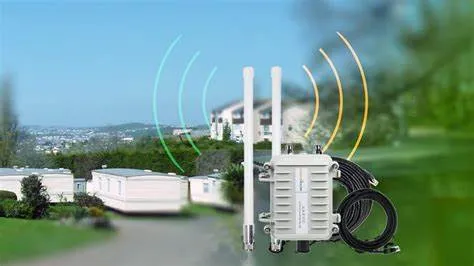
This image is the core visual guide at the beginning of the article, emphasizing that the primary consideration in antenna selection is “form factor fit,” not just gain or frequency. It connects the abstract concept of “product form” to specific antenna types, visually presenting the typical deployment environments and device types for each form (rubber-duck, outdoor omni, internal antenna), helping readers quickly establish a selection framework and avoid wasted validation time due to form mismatch.
Choosing the right omnidirectional Wi-Fi antenna rarely starts with gain or frequency—it starts with the form that fits your product or site. The wrong shape can quietly waste months of validation time, even when the specs look perfect on paper.
For compact routers and gateways, engineers often face three families of omni designs: rubber-duck antennas, outdoor omni antennas, and internal FPC or PCB antennas. Each carries its own mechanical logic, cost trade-offs, and regulatory quirks.
Indoor rubber-duck antennas work best when you need simple installation and easy replacements. They usually connect through SMA connector or RP-SMA connector ports and can swivel for positioning. Despite their modest size, 2–3 dBi rubber ducks deliver consistent 360° patterns for small offices or IoT hubs. They’re also easy to stock in variations—straight, right-angle, or bendable types—to fit tight enclosures.
When the environment expands to semi-outdoor or rooftop use, you’ll want a weatherproof outdoor omni antenna. IP67 seals, UV-stable housings, and solid mast brackets are the real difference here, not just gain. In practice, TEJTE engineers often mount these on short masts near gateways to balance coverage and cable length—shorter feeders mean fewer dB lost before the signal even leaves the antenna.
For ultra-compact IoT devices or handheld modules, an internal FPC or PCB antenna may win. These integrate directly into the housing and avoid any external connectors. Yet they demand careful layout: clear ground boundaries, stable cable lengths, and tuned clearance from batteries or metal frames. A single misplaced screw can detune an otherwise clean pattern. For layout guidance, see TEJTE’s companion article FPC Antenna 2.4 GHz Layout & Tuning in Practice.
If you’re unsure which path fits your mechanical constraints, start with a mock-up test. Try a rubber-duck version on an SMA extension for quick validation before committing to internal antennas. The difference in RSSI will often tell you whether enclosure detuning is your real enemy.
Pick connector base and angle wisely
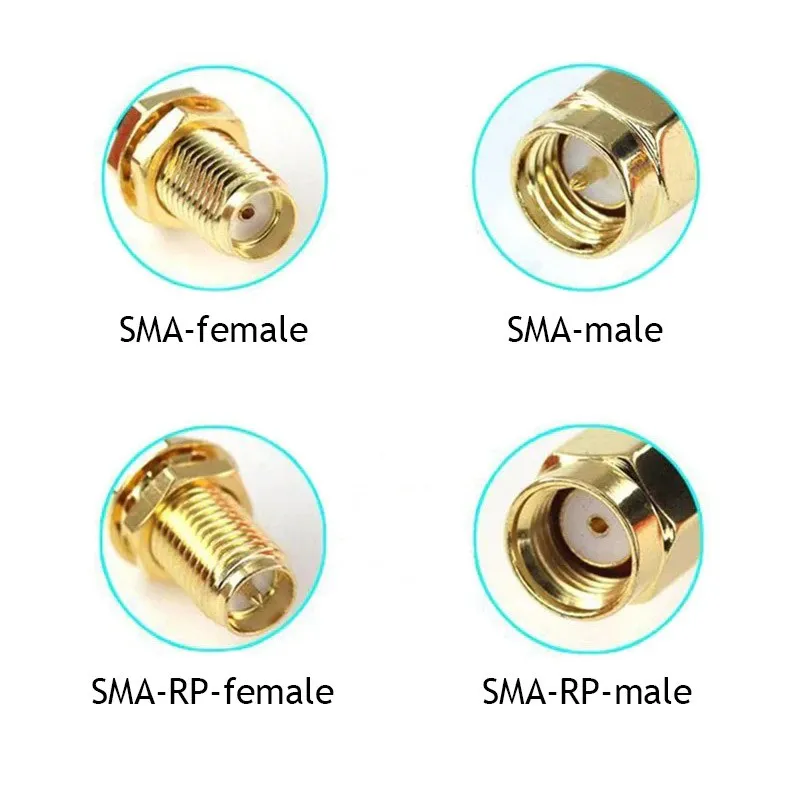
This image is a specific visual supplement to the section “Pick connector base and angle wisely.” It addresses the common confusion faced by engineers and procurement personnel in practical work. By juxtaposing the four common combinations (SMA male/female, RP-SMA male/female), it provides a tool-free, visual method for quickly and accurately identifying connector type and polarity, serving as a crucial reference for avoiding field installation errors and signal loss.
- SMA connector / RP-SMA connector: Common in Wi-Fi routers, modems, and embedded boards. Small, versatile, and low cost.
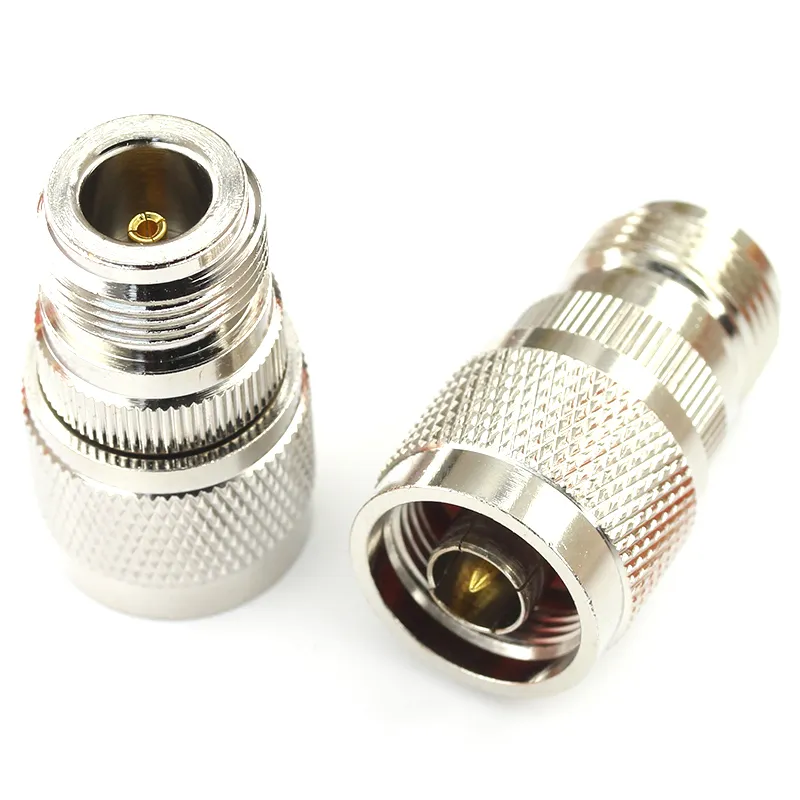
Following the comparison of SMA/RP-SMA, this image introduces the N-type connector suitable for larger-scale, harsher environments. It visually explains why to “upgrade” to N-type for outdoor deployments—its sturdier structure and design ensure reliable waterproof sealing when applying specified torque (e.g., 1.5–2.0 N·m), guaranteeing long-term stable Voltage Standing Wave Ratio (VSWR) performance and preventing signal degradation due to connector issues.
- N-type: The go-to for outdoor installations where torque and weather sealing count.
The angle—straight, right-angle, or bendable—depends on enclosure layout. A right-angle SMA can prevent strain on the PCB, while a flexible joint helps during field adjustments. TEJTE’s Rubber Ducky Antenna Guide: Indoor Coverage & SMA Matching walks through real cases where angle choice improved VSWR and mechanical life simultaneously.
How do you pick gain without creating elevation nulls?
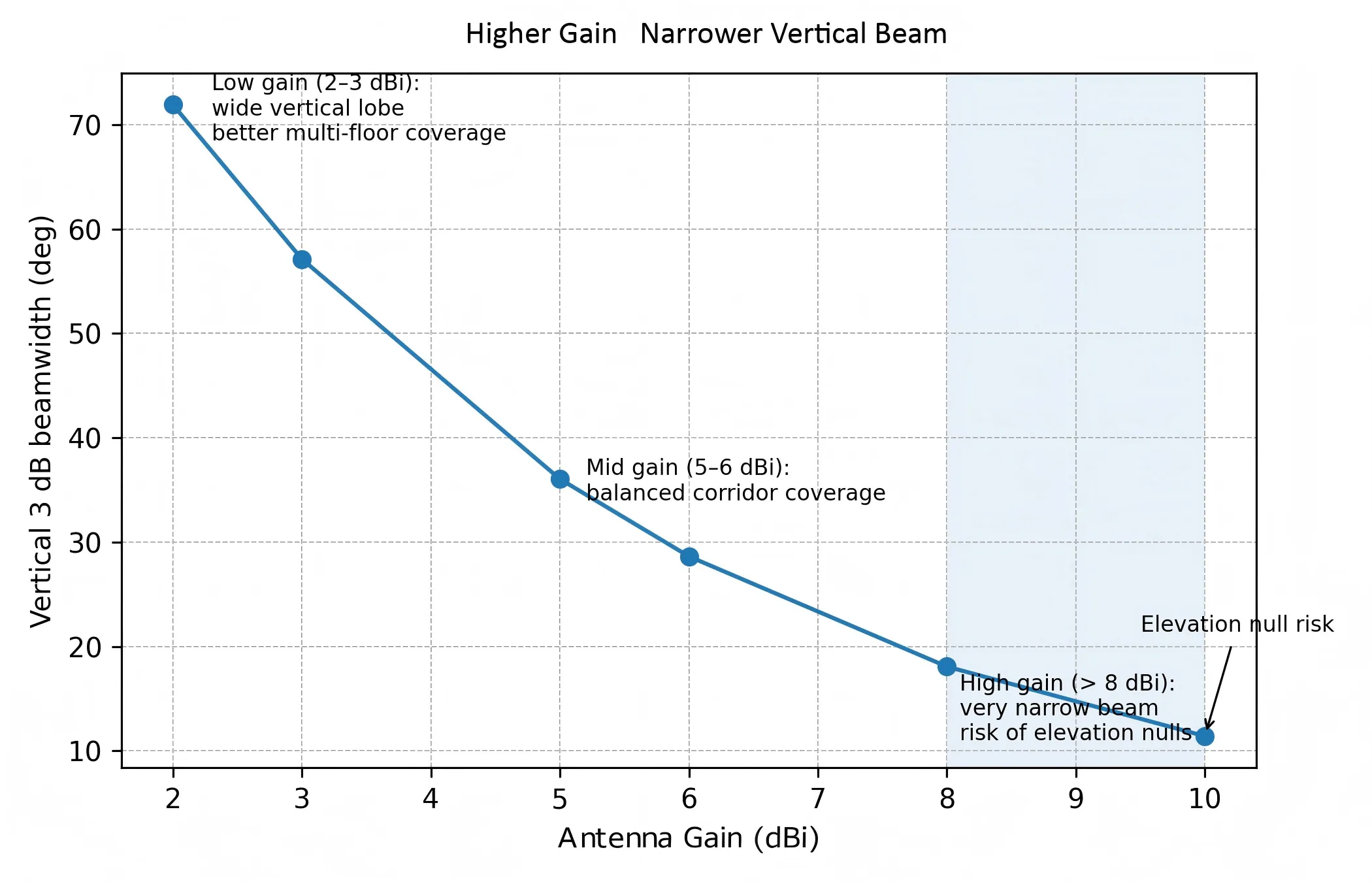
This chart is a visualization tool for understanding the key impact of antenna gain selection. It graphically and quantitatively illustrates the core idea that “more gain doesn’t always mean more coverage.” It transforms the abstract concept of “elevation null risk” into an intuitive comparison of beam patterns and a risk indicator curve, guiding engineers to select appropriate gain based on specific deployment geometry (e.g., mount height, target distance, floor-to-floor height), avoiding coverage blind spots caused by blindly pursuing high dBi values.
More gain doesn’t always mean more coverage. Every omnidirectional Wi-Fi antenna trades vertical reach for horizontal distance. The higher the dBi, the flatter the radiation pattern becomes. That’s great for large open halls, but deadly for multi-floor corridors.
Low-gain 2–3 dBi antennas spread energy widely, making them ideal for IoT gateways or dense office floors. 5–6 dBi designs tighten the vertical lobe, covering longer corridors or warehouses efficiently. But go too far—like the so-called “high-gain omni” rods exceeding 8 dBi—and you risk creating elevation nulls, where devices above or below the antenna receive weaker signals despite higher theoretical gain.
A quick mental check helps: if your access point is ceiling-mounted in a two-story space, avoid anything above 5 dBi. But if it’s wall-mounted in a long warehouse aisle, 6 dBi may give you cleaner reach without overlap. TEJTE engineers often keep both versions ready during site tuning—they swap antennas while watching RSSI heatmaps in real time.
Multi-band coexistence and role splitting
Today’s tri-band access points (2.4 GHz / 5 GHz / 6 GHz) complicate gain decisions further. An omnidirectional Wi-Fi antenna that works perfectly at 2.4 GHz might detune slightly at 6 GHz if its radiator length or matching network isn’t optimized. Multi-band designs solve this with stacked or sleeve elements, but cross-band trade-offs remain.
When coverage is critical, consider splitting roles: dedicate one 2.4 GHz omni antenna for long-range IoT coverage, and pair it with a 5 GHz directional for throughput zones. This hybrid layout often outperforms any “one-antenna-fits-all” setup. For outdoor gateways, the best compromise is usually a dual-band 2.4/5 GHz IP67 omni plus an optional 6 GHz add-on—ensuring both legacy and Wi-Fi 6E clients connect cleanly.
If you want the math behind how gain and cable losses interact, jump ahead to the Omni Link-Budget Mini-Calculator later in this guide. It lets you simulate how different feeder types and connector counts alter your real EIRP before deployment.
Elevation-Null Risk Estimator
| Input Field | Description |
|---|---|
| gain_dBi | Antenna gain (2, 3, 5, 6 dBi...) |
| mount_height_m | Installation height above floor |
| target_distance_m | Horizontal distance to client |
| floor_to_floor_m | Height between floors |
Heuristic formula:
θ_main ≈ k / 10^(gain_dBi / 20)
If tan(θ_main / 2) < mount_height / target_distance, the target likely sits in a vertical null zone.
When that happens, lower gain or raise antenna height until the ratio improves. A simple laser-level check during field setup often saves weeks of troubleshooting later.
Typical gain-to-pattern trade-off
| Gain (dBi) | Approx. Vertical Beamwidth | Typical Use Case |
|---|---|---|
| 2 dBi | ~75° | Multi-floor or compact office |
| 3 dBi | ~60° | Small warehouse, IoT gateway |
| 5 dBi | ~30° | Corridor or single-floor AP |
| 6 dBi | ~20° | Long hallway, outdoor line-of-sight |
| 8 dBi+ | < 15° | Specialized point-to-point only |
Will feeder type and length silently erase your Wi-Fi link budget?
Many omnidirectional Wi-Fi antenna deployments fail not because of the antenna, but because of the cable. Every meter of coax adds invisible loss that can quietly kill your link budget before a single packet leaves the port.
Feeder type and length determine how much of your transmit power actually reaches the antenna. In short cables, micro-coax types like 0.81 mm or 1.13 mm are fine. But once you pass 50 cm or route through a metal chassis, the dB loss stacks fast.
Here’s a rough guide at 2.4 GHz, 5 GHz, and 6 GHz based on real TEJTE test data:
| Feeder Type | Loss @ 2.4 GHz (dB/m) | Loss @ 5 GHz (dB/m) | Loss @ 6 GHz (dB/m) | Typical Use |
|---|---|---|---|---|
| 0.81 mm micro-coax | 0.8 | 1.2 | 1.4 | Compact FPC / IoT modules |
| 1.13 mm micro-coax | 0.6 | 0.9 | 1.1 | Moderate pigtails / internal jumpers |
| LMR-240 | 0.26 | 0.40 | 0.45 | Short outdoor feeders |
| LMR-400 | 0.14 | 0.22 | 0.25 | Long runs / tower masts |
Omni Link-Budget Mini-Calculator
Use this to estimate real-world link margin quickly:
Inputs:
- freq_GHz ∈ {2.4, 5, 6}
- tx_power_dBm
- antenna_gain_dBi (2 / 3 / 5 / 6 dBi …)
- feeder_type ∈ {0.81, 1.13, LMR240, LMR400}
- feeder_length_m
- connector_pairs
- rx_sensitivity_dBm
- path_loss_dB (FSPL / measured)
Formulas:
feeder_loss = loss_per_m × feeder_length_m
conn_loss = connector_pairs × 0.15
EIRP = tx_power_dBm − feeder_loss − conn_loss + antenna_gain_dBi
link_margin = EIRP − path_loss_dB − rx_sensitivity_dBm
Rule of thumb:
If link_margin < 6 dB, you’re skating on the edge. Shorten the feeder, switch to a lower-loss type, reduce connector count, or raise antenna gain.
(For theoretical background, see Free-space path loss — Wikipedia)
Waterproof transitions and VSWR control
Outdoor feeders introduce another invisible enemy—moisture ingress. Water trapped in connectors increases VSWR and reflection loss dramatically. Always use IP67-rated bulkheads or silicone O-rings at every junction.
TEJTE field engineers torque SMA bulkheads to 0.6–0.8 N·m and N-type connectors to 1.5–2.0 N·m for consistent sealing. Check continuity with a handheld analyzer before climbing down the ladder—it’s faster than discovering a 10 dB mismatch after rain.
Where should you place the omni to avoid metal detuning and shadowing?
Even the best omnidirectional Wi-Fi antenna can underperform when placed too close to conductive surfaces. Metal enclosures, heat-sinks, or battery packs act as reflectors that warp the radiation pattern and shift impedance.
Ground-clearance rules are simple but non-negotiable:
- Keep at least 10 mm from nearby metal for 2.4 GHz antennas, 5 mm minimum for 5 GHz and above.
- For embedded FPC antennas, maintain a keep-out zone at least half the antenna’s length in both axes.
- Avoid running ground pours or screws beneath the antenna tip—these detune faster than any PCB simulator can predict.
If you’re working inside a tight chassis, position the antenna near a plastic wall or window section. Even a few millimeters of air gap can restore pattern balance.
For external omnis, avoid mounting directly beside tall metal poles or rails. Use non-conductive spacers to keep at least half a wavelength clearance (~6 cm at 2.4 GHz).
You can see practical examples in Outdoor Omni Antenna: Selection, IP67 & Mounting Guide, where the same model showed a 3 dB difference between metal and fiberglass masts.
Spacing from other antennas — CCI / ACI isolation
If your design includes multiple radios (Wi-Fi + Bluetooth + LTE), spacing matters as much as gain. Co-channel interference (CCI) and adjacent-channel interference (ACI) occur when antennas couple too closely.
A good rule:
- Maintain > λ/2 spacing (≈ 6 cm at 2.4 GHz, 3 cm at 5 GHz) between omnidirectional elements.
- Keep MIMO pairs symmetric—equal feeder length and mirrored orientation improve correlation isolation by 3–6 dB.
When space is tight, consider using orthogonal polarization (one vertical, one slant 45°) to reduce coupling. Small physical offsets can often yield cleaner throughput than any firmware tweak.
Do you actually need an outdoor omni for semi-outdoor corridors?
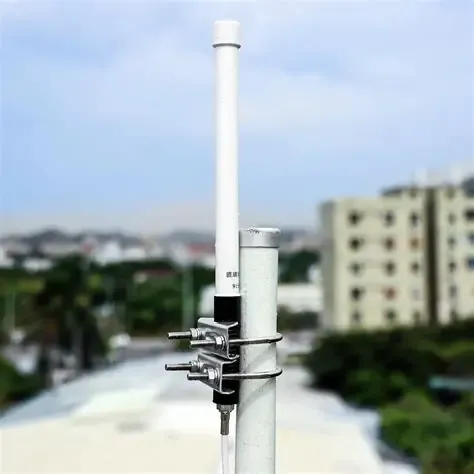
This application scenario diagram focuses on a common engineering decision point. It goes beyond pure technical parameters, introducing environmental durability as a key selection criterion. The diagram likely uses comparative illustrations to visually demonstrate the issue of plastic brittleness in rubber-duck antennas under continuous sun and rain, and the advantages brought by outdoor omni antennas through sealing, UV-resistant materials, and robust mounting methods. It emphasizes that in seemingly “semi-protected” environments, long-term reliability is often more important than initial cost, guiding readers to make selections from a product lifecycle perspective.
This question comes up often in warehouse and hotel deployments. A rubber-duck antenna may work fine in a sheltered corridor, but once humidity and UV exposure rise, its plastic shell becomes brittle.
If the antenna faces regular sunlight, rain splash, or high dust, switch to an outdoor omni antenna with IP67 sealing and UV-stabilized fiberglass housing. Look for specs that include:
- Operating temp: −40 °C – +85 °C
- UV-stable ASA or fiberglass shell
- Integrated ground kit or lightning arrestor
Mounting also matters. TEJTE recommends mast diameters 30–50 mm and torque 6–8 N·m for stability. Over-tightening crushes the gasket; under-tightening invites water ingress.
Add a bonding wire from the metal base to building ground—never rely solely on the coax shield. This prevents static buildup and extends service life.
And when signal direction truly matters—like corridor cameras or loading bays—don’t hesitate to mix directional panels and omnis. As counter-intuitive as it sounds, a well-aimed directional antenna often outperforms a high-gain omni that wastes power into ceilings and floors.
Cable-first fault isolation procedure
When coverage fails after assembly, trace backwards:
- Cable test: Swap in a known-good feeder to eliminate internal breaks.
- Connector check: Inspect SMA pins—slightly bent male pins are the most common 2.4 GHz fault.
- Antenna swap: Replace with a reference rubber-duck unit. If performance recovers, the original antenna may have water ingress or detuning.
This quick triage avoids unnecessary board rework and can usually be done without lab gear. TEJTE installers keep a “triage kit” of one short 1.13 mm jumper, one spare SMA-M antenna, and a handheld meter for field checks.
Quick validation heuristics
| Check | Pass Condition | Action if Fail |
|---|---|---|
| RSSI within ±3 dB of design map | Good cable and match | Check connector torque / moisture |
| Throughput ≥ 80 % of lab spec | Clean channel plan | Inspect antenna placement or interference |
| VSWR ≤ 2:1 | Proper termination | Replace feeder or adjust torque |
| Heat-map coverage > 90 % target area | Balanced pattern | Adjust tilt or gain level |
How should you order so the PO is buildable and weather-safe?
Even after the perfect design and test, a poorly written purchase order can derail production. When you buy or specify an omnidirectional Wi-Fi antenna, clarity in the order sheet is your final defense against field surprises.
Think of the PO as the handshake between your RF design and manufacturing. Every line must define something measurable: connector gender, gain, length, sealing, and labeling. Without that, suppliers interpret “standard” differently, and you get a batch of antennas that fit nowhere.
Omni Ordering & Acceptance Checklist
| Field | Requirement / Example | Why It Matters |
|---|---|---|
| Antenna type | Rubber-duck / Outdoor omni / FPC | Defines mechanical fit & sealing |
| Gain / Length | 3 dBi @ 2.4 GHz / 150 mm | Affects elevation pattern & coverage |
| Connector (SMA / RP-SMA / N; gender) | RP-SMA Male | Avoids field mis-match |
| Angle | Straight / Right-angle / Bendable | Determines clearance & strain |
| Cable (type / length) | LMR-240 2 m | Defines link-loss budget |
| Mount (panel / bulkhead / mast) | Mast Ø 40 mm | Ensures mechanical fit |
| IP / UV rating | IP67 / UV-stabilized ASA | Weather resistance |
| Torque spec | SMA 0.8 N·m / N-type 1.5 N·m | Seal and VSWR consistency |
| Labels / trace | TEJTE batch code + gain | Enables RMA traceability |
| Compliance | RoHS / REACH | Legal shipment requirement |
| Packaging | Foam tray + sealed bag | Prevents connector damage |
| RMA marks / inspection | Site photo + RSSI snapshot | Proves deployment quality |
Acceptance before payment release
Before closing any antenna order, verify:
- Visual inspection — no bent pins or hairline cracks in housing.
- Continuity test — S11 < −10 dB in the band you specified.
- Field RSSI check — at least 90 % of expected signal range in site map.
- Label & trace match — batch and gain must match invoice line.
A 2-minute acceptance test now prevents a two-month RMA loop later.
What changed in 2024–2025 for omnidirectional Wi-Fi deployments?
The Wi-Fi landscape keeps shifting, and antenna strategy shifts with it. Between 2024 and 2025, three industry trends reshaped how engineers deploy omnidirectional Wi-Fi antennas.
- Tri-band AP growth.
Access points now ship standard with 2.4 GHz, 5 GHz, and 6 GHz radios. While 6 GHz adds capacity, 2.4 GHz still carries the IoT load for reach. This means most deployments still require omni patterns to serve mixed clients across bands. Multi-band antennas with balanced VSWR across all three bands became the new default.
- Simplified mounting and bracket kits.
Vendors standardized mast clamps and gaskets to reduce field variance. Instead of custom brackets for each model, new kits fit 30–50 mm poles with adjustable tilt. This cut warranty claims by nearly 25 % according to internal TEJTE field data.
- Shift toward pre-terminated assemblies.
Integrators increasingly order “antenna + feeder + connector” bundles from one source. It reduces mismatch risk and saves time on field assembly. TEJTE’s catalog offers pre-terminated LMR-240 kits with custom lengths and sealed bulkheads ready for installation.
These changes make design and procurement easier, but they also raise expectations—projects now assume that every omni antenna is both multi-band and weather-tight by default.
FAQ — omnidirectional Wi-Fi antenna
Does a 6 dBi omni improve corridor coverage or create dead zones at AP height?
It depends on mount height and ceiling geometry. Above 2.5 m, a 6 dBi antenna’s main lobe flattens and may skip the floor below. Lower gain (3–5 dBi) usually balances vertical reach better for multi-floor sites.
How long can 1.13 mm pigtails run before loss cancels gain advantage?
At 2.4 GHz, limit to ≈ 1.5 m before you lose over 2 dB. At 5 GHz, even 1 m can wipe out the benefit of a 3 dBi antenna. Beyond that, switch to LMR-240 or thicker feeders.
What spacing from metal edges prevents detuning on a small chassis?
Maintain at least 5–10 mm clearance and avoid ground fills directly under the antenna tip. A simple plastic standoff often restores VSWR within 1–2 dB.
When should I choose an outdoor omni instead of a rubber-duck in semi-open halls?
Whenever humidity > 80 % or UV exposure is daily. The cost difference is minor compared to the replacement cycle of indoor plastics.
Which connector base minimizes field mis-orders?
Stick to SMA for lab and indoor gear, N-type for outdoor links. Avoid RP-SMA unless you explicitly need Wi-Fi-compliant gender reversal. Label every port on the housing before shipment.
What quick tests prove the install is good before sign-off?
Measure RSSI and throughput at three points: center, edge, and diagonal corner. If variation < 6 dB and throughput > 80 % of spec, your omni placement is sound.
Bringing it all together
From antenna shape to gain to ordering details, each decision carries a small impact that adds up to network reliability. Choosing the right omnidirectional Wi-Fi antenna isn’t guesswork—it’s an engineering workflow that balances mechanical fit, RF loss, and deployment environment.
If you’re in the process of specifying or purchasing units, visit TEJTE’s Omnidirectional Wi-Fi Antenna page.
There you’ll find build-ready models with verified IP67 ratings, pre-terminated feeders, and connector options engineered for Wi-Fi 6 and 6E bands.
Bonfon Office Building, Longgang District, Shenzhen City, Guangdong Province, China

A China-based OEM/ODM RF communications supplier
Table of Contents
Owning your OEM/ODM/Private Label for Electronic Devices andComponents is now easier than ever.