
MHF4 to SMA Cable (IPEX 4): 0.81 vs 1.13, Thread Length & Uses
Sep 09,2025
Introduction — Why These Cables Matter

This image shows the small form factor MHF4 connector commonly found on embedded wireless modules like the Intel AX200 Wi-Fi card or Quectel 4G/5G modems, highlighting its compact and delicate nature which requires careful handling.
Open up a Wi-Fi card, 4G/5G modem, or GPS receiver, and you’ll rarely find a full-size SMA jack. Instead, what greets you is a tiny MHF4 (IPEX 4) socket tucked onto the module’s edge. It’s so small that even steady hands often reach for tweezers to snap it in place. Convenient for saving board space, yes—but it’s far too delicate for a direct external antenna.
That’s where an MHF4 to SMA cable makes all the difference. Acting as a bridge, it connects the fragile module port to a rugged SMA or RP-SMA bulkhead connector mounted on the enclosure. Suddenly, you can mount antennas on routers, IoT gateways, or industrial devices without risking damage to the board itself. Without this cable, modules such as the Intel AX200 Wi-Fi card or Quectel EC25 LTE modem would be stuck with fragile connections that fail under repeated use.
So why does it matter in practice? Because real-world setups demand flexibility. A simple cable run allows you to place an antenna exactly where it performs best—away from shielding metal, closer to open air, or even outside a sealed case. Think of it as giving your module a breathing tube to the outside world.
This guide will walk you through the essentials: the difference between MHF4 vs U.FL, why coax diameter (0.81 mm vs 1.13 mm) impacts both loss and flexibility, and how to pick between straight and right-angle SMA connectors. We’ll also cover thread lengths, waterproofing tips, and share TEJTE’s real attenuation data so you can plan with confidence instead of guesswork.
Related reading: What is SMA Connector? Male vs Female Guide .
What is MHF4 (IPEX 4) → SMA Cable?

This image displays a finished cable assembly with an MHF4 plug on one end and an SMA bulkhead connector on the other, used to connect internal module ports to external antennas.
An MHF4 (IPEX 4) to SMA cable is a 50-ohm coaxial pigtail built to connect fragile module ports to robust antenna connectors. On one side sits the MHF4 plug, a micro-coax connector that snaps onto the RF pad of your Wi-Fi card, LTE/5G modem, or GPS module. On the other, you’ll find a threaded SMA or RP-SMA bulkhead—durable, reusable, and ready to mate with external antennas.
It’s important to note that this cable isn’t a signal converter. Nothing about the RF characteristics—impedance, protocol, or frequency—changes along the way. What it really does is provide mechanical protection. Instead of stressing the delicate MHF4 port with repeated antenna swaps, the strain shifts to the SMA bulkhead, which is designed to withstand thousands of connections.
You may see different names for the same thing: “MHF4 to SMA adapter cable,” “MHF4 to SMA pigtail,” or “IPEX4 to SMA antenna cable.” They all describe the same assembly. In practice, these cables are indispensable in M.2 Wi-Fi cards, 4G/5G modems, GPS receivers, and IoT boards, where space is limited but reliable antenna connections are critical.
Quick installer’s tip: when working with outdoor routers or gateways, always choose an O-ring bulkhead version. It ensures water can’t seep in around the connector—a small detail that can save hours of troubleshooting later.
In TEJTE’s catalog, options include bulkhead SMA connectors with multiple thread lengths (8 mm, 11 mm, 13 mm, 17 mm, 21 mm), right-angle versions for tight housings, and waterproof assemblies for outdoor deployments.
MHF4 vs U.FL (MHF1) — Not the Same Thing
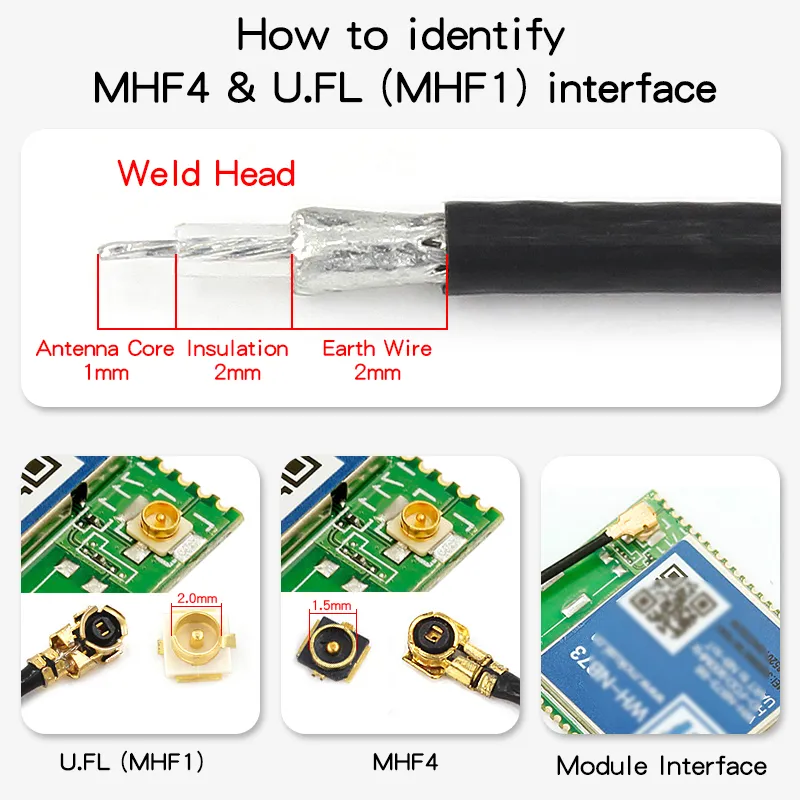
This comparison chart highlights the significant differences in height and form factor between U.FL (~2.0mm) and MHF4 (~1.2mm), and provides identification features (like antenna core, insulation, earth wire spacing) to help prevent incorrect mating attempts.
A common question engineers type into search bars is “u.fl vs mhf4”. At first glance, these two micro-coax connectors look almost identical, which explains the confusion. But they’re not the same—and mistaking one for the other can quickly lead to frustration or even damaged hardware.
Here’s how they differ:
- Size: U.FL has an outer diameter of about 2.0 mm, while MHF4 shrinks down closer to 1.2 mm. On a module, MHF4 looks noticeably smaller and more delicate.
- Retention force: U.FL clicks in lightly, but MHF4 holds tighter, which helps in vibration-prone environments like automotive GPS receivers or industrial IoT gateways.
- Compatibility: They are not interchangeable. Trying to mate a U.FL pigtail with an MHF4 socket (or vice versa) risks tearing the connector pad right off the PCB.
- Use cases: U.FL (MHF1) appears on older mini-PCIe Wi-Fi cards, while MHF4 has become the standard for M.2/NGFF Wi-Fi cards and most 4G/5G modems.
Practical tip: if your module is labeled M.2 Wi-Fi or NGFF, assume it uses MHF4. If it’s mini-PCIe, it’s almost certainly U.FL. When in doubt, grab a caliper—the difference between ~1.2 mm and ~2.0 mm is obvious once measured.
For broader RF connector basics, see TEJTE’s RF Coaxial Cable Guide.
SMA vs RP-SMA on the Device End
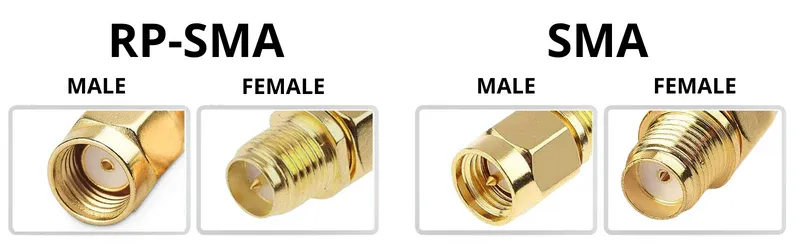
This diagram illustrates the gender definitions (male, female) for standard SMA and Reverse Polarity (RP-SMA) connectors and the critical polarity (center contact configuration) differences between them, which is essential for ensuring correct mating with antennas and devices.
Once you get to the bulkhead side of an MHF4 to SMA cable, you’ll face a choice: SMA or RP-SMA (Reverse Polarity SMA). At first glance they look similar, but they’re not interchangeable, and picking the wrong one means your antenna simply won’t connect.
Here’s the difference:
- SMA connectors: The male plug has a pin, while the female jack has a socket.
- RP-SMA connectors: The roles flip. The male plug has a receptacle, and the female jack carries the pin.
This unusual reversal wasn’t an accident. In the late 1990s, Wi-Fi manufacturers adopted RP-SMA to comply with FCC regulations that limited the use of high-gain antennas. The idea was to make it harder for consumers to attach “unauthorized” antennas. Ironically, over time RP-SMA became standard in Wi-Fi gear.
So what does that mean for you?
- If you’re buying or replacing a Wi-Fi antenna cable, it’s almost always an MHF4 to RP-SMA female bulkhead. That’s the convention for consumer routers and access points.
- For LTE/5G modems, GPS receivers, and industrial IoT devices, the default is usually standard SMA female bulkhead.
A quick field tip: hold the connector to the light. If you see a pin, it’s male (SMA male or RP-SMA female). If you see a hole, it’s female (SMA female or RP-SMA male). Remember this simple trick, and you’ll avoid ordering mistakes.
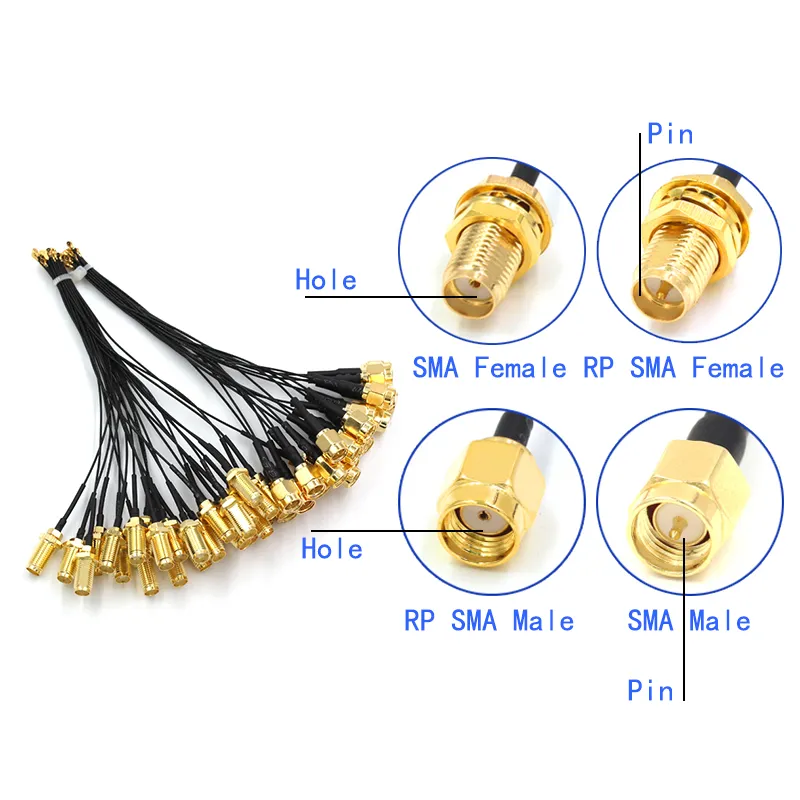
This image provides a quick visual reference on how to identify connector types by looking at the center contact: a pin indicates SMA Male or RP-SMA Female; a hole indicates SMA Female or RP-SMA Male. This helps prevent ordering mistakes.
Micro-coax Options — 0.81 / 1.13 / 1.37 / 1.78 / RG178
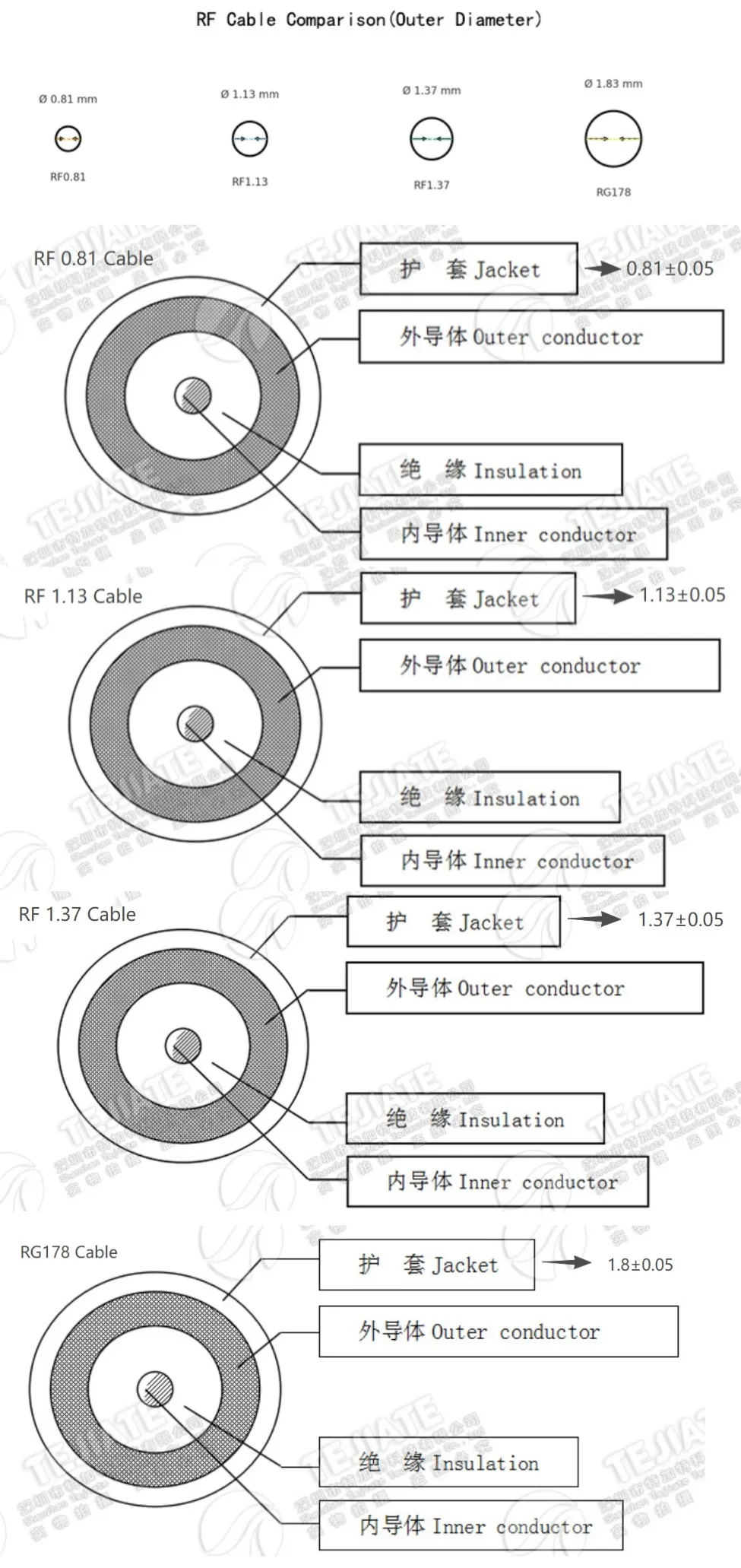
This image provides a visual comparison of common micro coaxial cable types (RF0.81, RF1.13, RF1.37, RG178), showing their differences in physical size (diameter and flexibility), which directly impact signal loss and ease of installation.
When selecting an MHF4 to SMA cable, the connector type isn’t the only variable that matters. The micro-coax size—measured by its outer diameter—directly affects how flexible the cable is and how much signal loss you’ll see. Thin coax bends easily but sacrifices efficiency, while thicker coax preserves signal at the expense of routing flexibility.
Here’s how the most common TEJTE stock options compare:
| Cable Type | Outer Diameter (mm) | Attenuation @2.4 GHz (dB/m) | Attenuation @5 GHz (dB/m) | Flexibility | Typical Max Length (Wi-Fi/LTE) |
|---|---|---|---|---|---|
| RF0.81 | 0.81 | ≤4.7 | <7.8 | Very high | ≤20-30 cm |
| RF1.13 | 1.13 | ≤3.27 | ≤5.17 | High | ≤50 cm |
| RF1.37 | 1.37 | ≤3.27 | ≤5.17 | Medium | ≤80 cm |
| RG178 | 1.80 | ~2.7 | ~4.5 | Lower | Up to 1 m |
So what does this mean in practice?
- RF0.81: Best for ultra-compact builds like USB Wi-Fi dongles or miniature IoT sensors. Keep it short—under 30 cm—or you’ll lose too much signal.
- RF1.13: The all-rounder. It balances flexibility and performance, making it the most common choice for Wi-Fi antenna cable assemblies inside routers and laptops.
- RF1.37: Slightly thicker and more robust. Many integrators use it for LTE/5G modems where runs stretch toward 1 m.
- RG178: Heavier, but with better shielding and lower loss. It’s the right pick when enclosure space isn’t too tight and you need stability for longer outdoor runs.
Installer’s tip: Don’t automatically choose the thinnest cable just because it “fits everywhere.” If your design allows it, move up a size—those extra millimeters can buy you several dB of margin, which often makes the difference in weak-signal locations.
Related internal link: Understanding RF Cables — The Ultimate Guide.
Right-Angle vs Straight SMA — Routing & Strain Relief
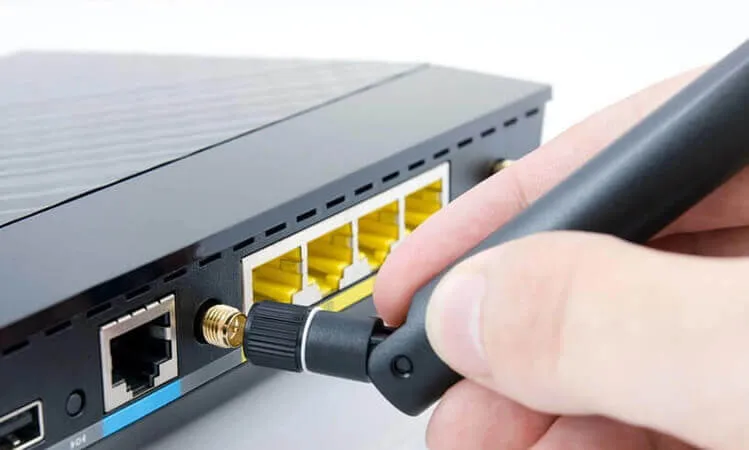
This image shows a typical straight SMA bulkhead connector, where the port orientation is parallel to the cable axis, suitable for enclosures with sufficient clearance, offering lower insertion loss.
- Straight SMA bulkheads are the default option. They keep the RF path short and clean, giving you the lowest insertion loss. If your enclosure has enough clearance, straight is usually the best choice.
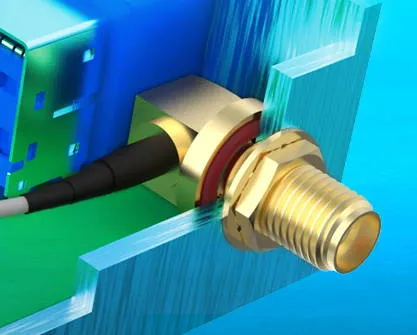
This image shows a right-angle SMA bulkhead connector, where the port orientation is 90 degrees to the cable axis, aiding in smoother cable routing in tight spaces and reducing cable strain, but introducing a slight additional insertion loss.
- Right-angle SMA bulkheads add a slight penalty—around 0.05–0.1 dB of extra loss—but they can save you from headaches in compact spaces.
Imagine working inside a metal-cased mini router. A straight connector might force the cable into a tight bend that pushes against the lid. Over time, that bend stresses the coax braid, leading to higher VSWR or even a break. A right-angle SMA routes the cable along the wall neatly, reducing stress and extending its lifespan.
Field tip: if you ever hear the coax “creak” or feel resistance when tightening the enclosure, it’s a sign you should have gone with a right-angle version. A tenth of a dB is negligible compared to a broken cable six months into deployment.
At TEJTE, both options are available—including right-angle RP-SMA bulkheads with waterproof O-rings for outdoor IoT gateways and weatherproof Wi-Fi CPEs.
Mounting Choices — Bulkhead, Flange & KWE Short Thread
On the SMA side of an MHF4 to SMA cable, how you mount the connector often matters just as much as the coax itself. The enclosure design—plastic or metal, thin or thick—will usually dictate whether you choose bulkhead, flange, or KWE short-thread SMA.
- Bulkhead SMA: The classic option. A threaded barrel slides through the wall of the enclosure and locks in place with a nut and washer. It’s quick to install and easy to replace, which is why it’s found in most routers and indoor IoT devices. Both inner- and outer-threaded versions exist.
- Flange SMA: Instead of a simple barrel, the connector sits on a plate with two or four screw holes. This design spreads the stress and resists torque or vibration. You’ll often see flange mounts on industrial IoT gateways or outdoor telecom base stations, where stability is more important than easy swapping.
- KWE Short Thread: Tailored for enclosures with very thin walls, usually plastic housings under 2 mm thick. A full 13 mm bulkhead would protrude too far and look awkward. The short thread version sits flush, which is ideal for slim consumer routers or compact access points.
Practical insight: If your product is likely to be field-serviced, stick with bulkheads—they’re faster to swap with just a wrench. But if the device is mounted outdoors or exposed to constant vibration, flange connectors give you the extra reliability you’ll want long term.
Thread Length & Waterproofing — 11 mm vs 13 mm and O-Ring Seals
When specifying an SMA bulkhead for your MHF4 to SMA cable, thread length is one of those details that seems minor—until the connector doesn’t sit right. The two most common sizes are 11 mm and 13 mm, and each has its place.
- 11 mm threads: Best suited for thin housings, like plastic router shells or lightweight IoT enclosures with wall thickness under ~2 mm. They keep the build compact and prevent the connector from sticking out too far.
- 13 mm threads: Designed for thicker panels, such as aluminum or steel housings, often used in industrial gear. The extra length ensures the nut and O-ring compress properly, creating both mechanical security and a weather-tight seal.
Outdoor use adds another layer of importance. Without a properly seated O-ring, moisture can creep inside—even stainless connectors aren’t immune to corrosion. Over time, that means signal degradation or complete failure.
Engineer’s tip: if your housing is around 2 mm aluminum plus a washer and O-ring, go straight for the 13 mm option. The shorter 11 mm threads won’t bite deep enough, and the O-ring won’t compress evenly. In the field, I’ve seen loose fits lead to slow water ingress that took months to diagnose.
TEJTE offers 8, 11, 13, 17, and 21 mm thread lengths, all with optional O-ring sealing. That flexibility means you can adapt the same MHF4 to RP-SMA or SMA assembly for both indoor Wi-Fi routers and rugged outdoor gateways.
Length & Loss Planning — Matching Cable to Frequency
No matter how carefully you pick connectors or mounting hardware, one thing about RF design never changes: longer cables mean higher signal loss. The trick is finding a balance between routing convenience and performance.
Based on TEJTE’s measured attenuation data, here’s how common coax types perform:
| Frequency | RF0.81 (≤dB/m) | RF1.13 (≤dB/m) | RF1.37 (≤dB/m) | RG178 (typical dB/m) |
|---|---|---|---|---|
| 1 GHz | 3.1 | 2.32 | 2.32 | ~2.0–2.5 |
| 2.4 GHz | 4.7 | 3.27 | 3.27 | ~3.2–3.5 |
| 5 GHz | 7.8 | 5.17 | 5.17 | ~4.5 |
| 6 GHz | 8.5 | 5.69 | 5.69 | ~5.2 |
| Cable Type | Length | Loss @2.4 GHz | Loss @5 GHz |
|---|---|---|---|
| RF0.81 | 10 cm | ~0.47 dB | ~0.78 dB |
| RF0.81 | 30 cm | ~1.4 dB | ~2.3 dB |
| RF1.13 | 30 cm | ~1.0 dB | ~1.6 dB |
| RF1.13 | 50 cm | ~1.6 dB | ~2.6 dB |
| RF1.37 | 50 cm | ~1.6 dB | ~2.6 dB |
| RG178 | 1 m | ~3.2 dB | ~4.5 dB |
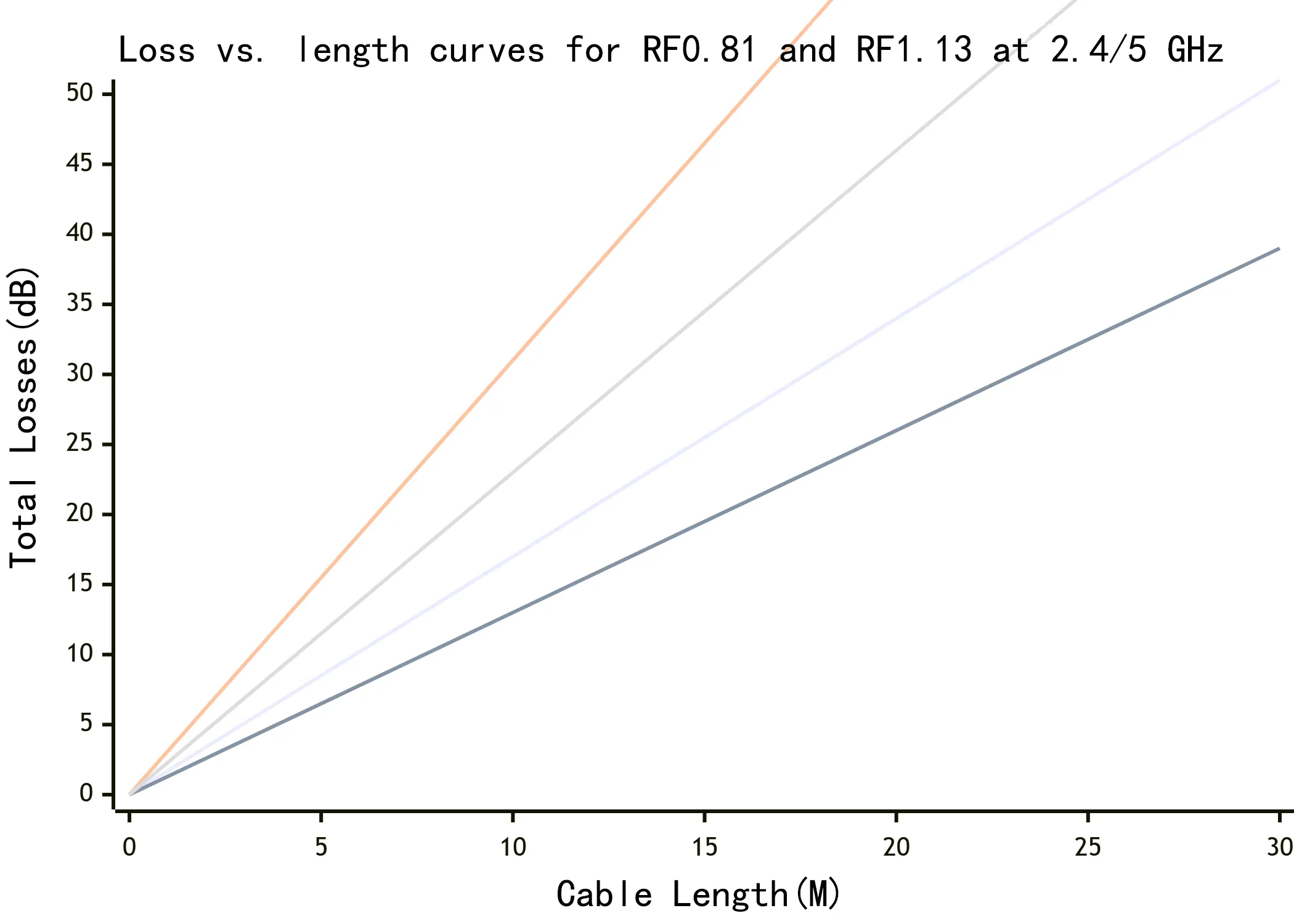
This graph depicts the trend of increasing insertion loss (dB) with increasing cable length (meters) for RF0.81 and RF1.13 coaxial cables at 2.4 GHz and 5 GHz frequencies, providing data-driven guidance for cable length selection.
Rules of thumb:
- For Wi-Fi at 2.4 GHz, RF0.81 works fine under 30 cm, but beyond that RF1.13 is safer.
- For 5 GHz Wi-Fi or sub-6 GHz 5G bands, stick to RF1.13 under 40 cm, or use RF1.37/RG178 for runs up to 1 m.
- For GPS L1 (1575 MHz), RF1.13 and RF1.37 perform reliably up to ~80 cm.
Practical tip: doubling the cable length doesn’t just double the cost—it can double your attenuation. If you’re near the edge of coverage, every tenth of a dB counts. Sometimes it’s better to move the module closer to the antenna than to push a thin coax too far.
Related internal link: RF Cable Guide: Types, Structure & Applications.
Module & Use-Case Fit — Matching Cable to Your Device

This image showcases various common device modules (e.g., Intel AX200 Wi-Fi card, Quectel LTE modem, Ublox GPS receiver) that employ MHF4 connectors, highlighting the wide range of applications for MHF4 to SMA cables.
Not every project calls for the same coax or connector. The right MHF4 to SMA cable depends heavily on what module or device you’re working with. Choosing poorly can mean weak signals, loose bulkheads, or even damaged module ports.
- M.2 / NGFF Wi-Fi Cards (Intel AX200, AX210, Qualcomm QCNFA765): These always use MHF4 connectors. Because laptops and compact boards are space-constrained, RF0.81 or RF1.13 coax is common. On the bulkhead side, most designs use RP-SMA female connectors, since that matches the convention for external Wi-Fi antenna cable assemblies.
- 4G/5G Modems (Quectel EC25, EC20, Sierra Wireless EM7565, EM9191): These also rely on MHF4, but cable runs are usually longer inside IoT gateways or CPE devices. That makes RF1.37 or RG178 better choices for balancing flexibility and loss. Antennas for LTE/5G almost always expect a standard SMA female bulkhead, not RP-SMA.
- Routers & CPE Devices (TP-Link Archer, Asus RT-AX series, Mikrotik hAP): Most consumer routers use RP-SMA female jacks, while industrial routers often switch to SMA. For compact home routers, RF1.13 coax works well. Rugged outdoor units usually step up to RG178, paired with waterproof bulkheads.
- GPS Receivers & Vehicle Modules (Ublox NEO-M8, Quectel L86, Simcom GNSS modules): GPS systems are always 50-ohm, so cables like RF1.13 or RF1.37 are safe up to ~80 cm. Bulkheads here are typically SMA female, since GPS antennas nearly always terminate in SMA.
Pro tip: Don’t just assume all Wi-Fi gear uses the same cable. A router antenna usually calls for mhf4 to rp-sma, while an M.2 Wi-Fi card paired with a breakout board may actually need a straight SMA bulkhead. Always confirm the connector type before ordering.
Quick Selector Table — Interface × Frequency × Mounting × Cable
| Device / Module | Frequency Band | Recommended Coax | SMA Side | Mounting Option | Max Practical Length | Quick Recommendation |
|---|---|---|---|---|---|---|
| M.2 Wi-Fi Card (Intel AX200) | 2.4 / 5 GHz | RF0.81 / RF1.13 | RP-SMA Female | 11 mm Bulkhead | 20-50 cm | Use RF1.13 unless space is extremely tight. |
| 4G Modem (Quectel EC25) | LTE 700-2600 MHz | RF1.37 / RG178 | SMA Female | 13 mm Bulkhead + O-ring | ≤80 cm | Go RG178 if you need lower loss in longer runs. |
| 5G Modem (Sierra EM9191) | Sub-6 GHz 5G | RF1.37 / RG178 | SMA Female | Flange 2-hole | ≤1 m | Flange mount resists vibration—ideal for gateways. |
| Consumer Router (TP-Link/Asus) | 2.4 / 5 GHz | RF1.13 | RP-SMA Female | KWE Short Thread | ≤30-40 cm | Short thread keeps slim router cases flush. |
| GPS Receiver (Ublox NEO-M8) | L1 (1575 MHz) | RF1.13 / RF1.37 | SMA Female | 11/13 mm Bulkhead | ≤80 cm | Use 13 mm bulkhead if your panel is metal. |
| Industrial IoT Gateway | 2.4 / 5 GHz + LTE | RG178 / RG316 | SMA / RP-SMA | 17-21 mm Waterproof Bulkhead | 1 m+ | Choose RG316 for outdoor builds needing durability. |
This table covers the most common device pairings. If your setup doesn’t match exactly, TEJTE supports custom assemblies with different coax, flange mounts, or waterproof sealing to fit special enclosures.
Related reading: Coax Cable Connectors: TNC, F, FME & TV Types Explained.
Ordering & Custom Options — Getting the Right Cable for Your Build
When ordering an MHF4 to SMA cable, the reality is that no single configuration works for everyone. A laptop Wi-Fi upgrade, a 5G modem gateway, and a GPS tracker all demand different coax, thread lengths, and connector types. That’s why TEJTE offers both ready-to-ship stock assemblies and custom solutions.
Standard stocked options include:
- Lengths: 10 cm, 20 cm, 30 cm, 50 cm, 1 m — all tested at 50 Ω.
- Thread sizes: 8 mm, 11 mm, 13 mm, 17 mm, 21 mm bulkhead, with optional O-ring seals.
- Coax choices: RF0.81, RF1.13, RF1.37, RG178, RG316.
- Connector orientation: Straight or right-angle SMA / RP-SMA bulkheads.
Custom options go further:
- Colored jackets (black, white, transparent brown RG178, or customer-specified).
- Flange mounts (2-hole or 4-hole) for added stability.
- Custom thread lengths to match enclosure thickness.
- Batch labeling for volume production and maintenance.
- Inspection reports on impedance (50 ± 2 Ω), VSWR (<1.3 up to 6 GHz), and mechanical durability to meet telecom or aerospace requirements.
Engineer’s tip: many project delays come from small oversights. Forgetting to check whether your router needs mhf4 to rp-sma instead of SMA, or misjudging thread length for a metal housing, can cost weeks. Always verify port gender and panel thickness before ordering.
TEJTE maintains ample inventory and supports low-MOQ custom runs, so whether you’re prototyping or scaling up for deployment, you can get reliable cables without waiting months for production.
Internal link: RF Adapter Cable Assemblies.
FAQs — Common Questions & Selection Pitfalls
Does a right-angle SMA add noticeable loss compared to straight?
What thread length do I need: 11 mm vs 13 mm bulkhead?
It depends on your panel.
- 11 mm threads: Great for thin router shells or plastic IoT cases (<2 mm).
- 13 mm threads: Best for thicker metal housings where you also need the nut and O-ring to seat correctly.
Practical tip: if in doubt, go longer. You can always add a washer to shorten engagement, but you can’t fix a thread that’s too short.
What is KWE short thread and when is it required?
How do I make a waterproof SMA bulkhead?
The key is the O-ring. It sits between the bulkhead flange and the panel wall. For a proper seal:
- Use the correct thread length (usually ≥13 mm).
- Make sure the O-ring is evenly compressed, not pinched.
- Avoid over-tightening, which can deform the seal.
TEJTE’s waterproof SMA and RP-SMA bulkheads are tested for outdoor use in IoT gateways and telecom equipment.
Is a GPS antenna cable always 50-ohm?
What is the minimum bend radius for 0.81 / 1.13 micro-coax?
- RF0.81: About 5 mm radius, but don’t flex it repeatedly.
- RF1.13: Around 8–10 mm radius.
Rule of thumb: if the bend feels forced, it’s too tight. A kink can add loss or even break the conductor.
Typical loss at 2.4 / 5 GHz for 0.81 and 1.13 at 10–50 cm?
| Cable | Length | Loss @2.4 GHz | Loss @5 GHz |
|---|---|---|---|
| RF0.81 | 10 cm | ~0.47 dB | ~0.78 dB |
| RF0.81 | 30 cm | ~1.4 dB | ~2.3 dB |
| RF1.13 | 30 cm | ~1.0 dB | ~1.6 dB |
| RF1.13 | 50 cm | ~1.6 dB | ~2.6 dB |
Can I order custom thread lengths or flange versions?
Yes. TEJTE supports custom mhf4 to rp-sma and SMA assemblies with extended threads (up to 21 mm), flange mounts (2- or 4-hole), and waterproof sealing. For projects with unusual housings or outdoor requirements, these options ensure a proper fit without extra machining.
Internal link: MHF4 to SMA Cables.
References & Further Reading
Working with MHF4 to SMA cables often involves balancing signal loss, connector durability, and enclosure fit. While this guide covers the essentials—from u.fl vs mhf4 compatibility to coax choices like RF0.81 vs 1.13, thread length, and waterproof bulkheads—sometimes you’ll want to dig deeper into official standards and detailed technical notes.
Here are a few trusted resources engineers rely on:
- NIST RF Measurement Guidelines — A solid foundation for understanding impedance, attenuation, and calibration when testing coax assemblies.
- IPC/WHMA-A-620 Standard — The industry’s reference for cable and wire harness assembly, covering coaxial terminations and acceptance criteria.
- Anritsu Application Notes on Coaxial Cable Loss — Practical insights into how frequency, length, and coax type affect insertion loss in real-world builds.
For practical applications and project-level guidance, TEJTE’s technical resources can help you narrow down the right choice:
- RF Coaxial Cable Guide — A complete overview of coaxial cable structure, shielding, and performance trade-offs.
- SMA Connector Guide: Male vs Female — Helps you quickly distinguish between SMA and RP-SMA when selecting bulkheads for wifi antenna cable assemblies.
- RF Adapter Cable Assemblies — TEJTE’s stocked and custom options, including mhf4 to rp-sma builds, flange versions, and waterproof bulkheads.
Final note: when designing with MHF4 to SMA cables, don’t overlook the basics—check module datasheets, measure panel thickness, and plan for attenuation at your target frequency. A little diligence upfront saves costly rework in the field.
Bonfon Office Building, Longgang District, Shenzhen City, Guangdong Province, China

A China-based OEM/ODM RF communications supplier
Table of Contents
Owning your OEM/ODM/Private Label for Electronic Devices andComponents is now easier than ever.