
SMA PCB Connector: Selection, Launch & Mounting
Oct 6,2025
Introduction
Identify the proper form: edge-mount, end-launch or vertical?
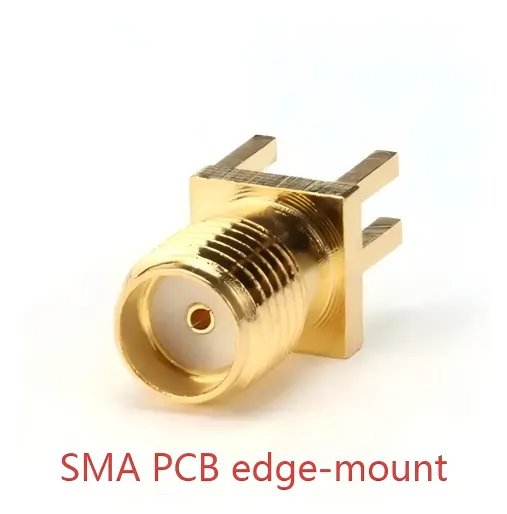
This figure illustrates the mechanical structure of an edge-mount connector and its installation at the PCB edge. The document context emphasizes that selecting this form factor requires consideration of enclosure space, signal egress, and mechanical connection robustness.
Mechanical cues and space constraints

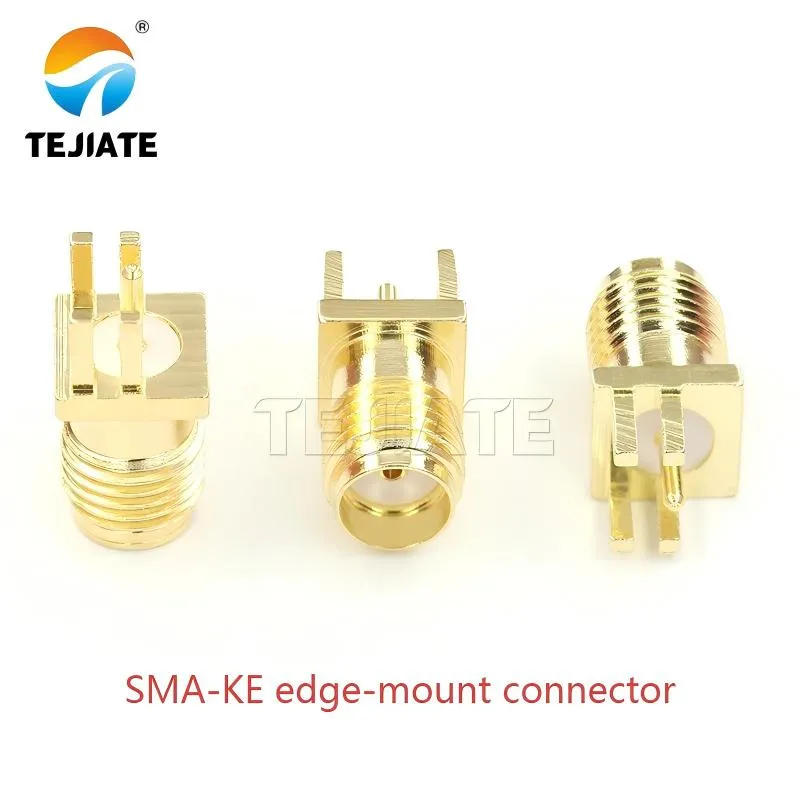
This figure shows specific characteristics of the SMA-JE connector, such as the Φ0.9mm pin and approximately 15.5mm body length. These details are crucial for PCB footprint design, enclosure cutouts, and ensuring the connector functions properly up to 6 GHz.
- Edge-mount connectors — for example, SMA-JE models with pin Ø0.9 mm and a body length around 15.5 mm — sit neatly at the PCB edge. They handle signals up to 6 GHz and are easy to align with housings that have precise cutouts. Think of them as the go-to option for compact RF modules or Wi-Fi boards.
- End-launch types usually extend bandwidth. Some can reach DC to 12.4 GHz when paired with well-controlled impedance traces. If you’re working on measurement instruments or anything where S-parameter accuracy really matters, this style often saves you from painful rework.
- Vertical through-hole SMA connectors solder into plated holes and point straight up. They eat up height but save horizontal real estate, which can be a lifesaver in stacked multi-board assemblies.
Quick tip from experience: always load the connector footprint into your mechanical CAD and check it against the chassis. More than one engineer has discovered too late that the nut collides with a wall or cover plate. That mistake can delay a project by weeks.
When to use panel/through-chassis PCB mounts

This figure depicts an SMA connector with a flange or through-chassis mounting capability, suitable for applications where the RF port needs to be secured to the equipment panel. The document notes that such connectors (e.g., SMA-KWE) typically offer higher durability (≥500 mating cycles) and dielectric strength (≥750V), and are often used in equipment like network analyzers and base station modules where reliability and panel alignment are critical.
Hit 50 Ω on the first spin: how to size traces?
Microstrip/stripline calculator (εr, h, t → W; via pitch ≈ λg/20)
| Parameter | Symbol | Example Value | Why it matters |
|---|---|---|---|
| Dielectric constant | εr | 4.3 | Defines wave speed |
| Board thickness | h | 1.6 mm | Sets field height |
| Copper thickness | t | 35 μm | Adjusts edge capacitance |
| Target impedance | ZO | 50 Ω | SMA standard |
The basic formulas are simple enough:
- Effective dielectric constant:
εeff ≈ (εr+1)/2 + (εr−1)/2·(1/√(1+12h/W))
- Impedance:
Z0 ≈ (60/√εeff)·ln(8h/W + W/4h)
Bends and returns for SMA connector PCB trace
Optimize the launch transition to reduce return loss
Pads, anti-pads, keep-outs, ground openings
This figure details the transition area between the connector pin and the PCB microstrip trace, emphasizing the design of pads, anti-pads, and keep-outs. The document context clearly defines optimization guidelines for this area, such as pad size fitting the pin closely and anti-pad clearance being around 1.3-1.4mm (for a Φ0.9mm pin), to avoid excessive parasitic capacitance or inductance, thereby maintaining good return loss up to 6 GHz.
Think of the launch as a handshake between the board and the connector. If either side grips too tight or too loose, you’ll feel the mismatch.
- Pads should hug the pin just enough for a reliable solder joint. Oversize them and you’ve just built a tiny capacitor.
- Anti-pads need breathing room. For a Ø0.9 mm SMA-JE pin, a clearance closer to 1.3–1.4 mm avoids excess capacitance.
- Keep-outs are often overlooked. Treat them as a “no copper zone” under the connector so fields don’t couple into nearby pours.
- Ground openings are a balancing act. Too narrow? Capacitance climbs. Too wide? Inductance rises. Both show up as S11 bumps at 2.4 or 5.8 GHz.
TEJTE’s SMA-KE edge-mount connector, with 5.08 mm pin spacing and PTFE dielectric, holds its spec up to 6 GHz when you respect these clearances. Ignore them and you’ll spend hours wondering why your VNA trace looks like a picket fence.
Common layout mistakes and fixes
Patterns repeat in real projects:
- Pad too long → adds shunt capacitance.
Fix: trim pad length and plant ground vias close to the pin.
- Anti-pad undersized → chokes the launch.
Fix: open it by 0.2–0.3 mm beyond pin diameter.
- No via fence → fields escape at the edge.
Fix: stitch vias every 1.0–1.5 mm around the footprint.
One lesson from practice: engineers sometimes chase “clever” fixes with tuning stubs or exotic cutouts. Nine times out of ten, the problem is just a pad that’s too big or a missing via. Clean up the basics first, and the fancy tricks may not even be necessary.
Place a via fence: where and how many?
Edge-mount via arrays and metalwork tie-ins
For parts like TEJTE’s SMA-JE series (pin Ø0.9 mm, body width 6.5 mm), start with 0.3 mm drill vias on a 1.0–1.5 mm pitch. Place them close — ideally within 0.5 mm of the ground pads. That way, when current rushes into the shell, it finds a low-inductance path straight to the ground plane.
If the connector is bolted to a chassis, don’t stop at the board edge. Extend the via wall beneath the flange and tie it into the enclosure metal. This creates a continuous shield, stopping the “ground bounce” that often shows up as spurious peaks on a spectrum analyzer.
Mechanical reinforcement and EMI
A proper via fence does more than confine fields. It stiffens the board edge, so when a technician tightens an SMA nut for the 200th time, the PCB doesn’t crack along the seam. TEJTE’s SMA-KWE flange mount connectors — rated ≥500 cycles and ≥750 V RMS dielectric strength — become even more reliable when backed up with dense stitching.
Field note: in high-reliability builds, some engineers double-stack the fence in a staggered pattern. It eats a few more drills, but it’s the difference between “good enough in the lab” and “still passing EMI tests after six months in the field.”
Choose straight vs right-angle without killing bandwidth
Detuning risks and mitigations

This figure shows the structure of a right-angle SMA connector, suitable for scenarios where space at the PCB edge is limited. The document cautions that right-angle connectors introduce extra parasitic inductance, which can degrade return loss above 5-6 GHz, necessitating compensatory measures like dense via stitching. The SSMA-KWE model shown offers a wide operating temperature range (-55°C to +125°C) and is suited for compact RF modules.
A right-angle launch bends the center conductor, which inevitably adds inductance. Below 3 GHz, most boards can get away with it. Push past 5–6 GHz, and you’ll see ripples in S11. That doesn’t mean right-angles are forbidden, but they do need careful support. Ground vias packed tightly around the elbow reduce the stray fields, and using PTFE-dielectric versions helps keep impedance closer to spec.
TEJTE’s SSMA-KWE right-angle connectors, designed for –55 °C to +125 °C operation and ≥1000 MΩ insulation resistance, are engineered with this in mind. They perform well in compact RF modules where vertical clearance is limited.
Consider a short jumper instead of a hard right-angle
Solder/reflow to pass pull and visual
| Process | Specification |
|---|---|
| Reflow peak | 240-250 °C, hold 30-45 s above 220 °C |
| Hand solder | 350-380 °C, ≤3 s direct tip contact |
| Flux type | No-clean, halogen-free |
| Pull test | ≥40 N axial, ≥20 N lateral |
AQL sampling and quick checks
Not every connector needs a destructive test. A practical workflow is:
- Inspect 100% visually for solder fillets and residue.
- Perform AQL 1.0 sampling for pull strength.
- For production lots, check at least one board per panel under microscope to catch hidden voids.
TEJTE specs list a working voltage of 335 V max and a withstand of 1000 V RMS, but those values assume clean joints. Flux residue or cold solder can reduce insulation resistance below 5000 MΩ, which is unacceptable for RF reliability.
From experience: rushing reflow without verifying the profile is one of the top causes of early connector failures. Spending an extra 10 minutes to log the oven profile beats a pile of field returns every time.
How to interface more reliably with external systems?
Board-side pairing with SMA male/female and torque notes

This figure shows an onboard SMA connector (e.g., SMA-KWE) serving as the interface for connecting to external cables, adapters, and test instruments. The document context strongly emphasizes the importance of applying the correct mating torque (0.45-0.56 Nm) to such connectors, as both under-tightening and over-tightening can cause issues. For applications involving frequent mating, a bulkhead mount version is recommended to share the mechanical stress.
Most sma pcb connectors — like TEJTE’s SMA-JE or SMA-KWE series — are threaded to mate with standard SMA male plugs. Where engineers often trip up is torque. Too loose, and you lose shielding integrity. Too tight, and you risk pulling the pad off the board edge. The sweet spot is a calibrated wrench applying 0.45–0.56 Nm (4–5 in-lb).
If you know your application involves hundreds of connections, consider a bulkhead mount version. These are rated for ≥500 cycles, so the mechanical stress stays on the flange and not directly on your PCB. That’s why you see them in instruments and base stations where connectors are swapped daily.
When to add SMA adapters or short jumpers
Sometimes you can’t connect everything directly. Test setups may call for an SMA adapter or even an SMA to BNC adapter when working with older equipment. Each adapter adds insertion loss, usually around 0.1–0.2 dB per connection at 6 GHz.
For tighter layouts, a short SMA jumper cable — such as an RG316 assembly — is often smarter than forcing a right-angle connector. The flexible jumper absorbs stress, reduces board strain, and keeps your return loss flatter at higher frequencies.
What documents and conditions should I provide before ordering?
Doc pack: Gerbers, assembly, footprints, torque specs
Here’s what an effective documentation pack usually includes:
- Gerber/ODB++ files with copper and drill detail.
- Assembly drawings that clearly show connector orientation, keep-out zones, and launch geometry.
- Footprint tables listing pad size, via spacing, and anti-pad dimensions. For example, TEJTE’s SMA-JE uses 5.08 mm pin pitch and Ø0.9 mm pins.
- Torque specification — normally 0.45–0.56 Nm for SMA mating.
- Library version reference to make sure your footprint matches across ECAD tools.
Materials and traceability requirements
How to perform a quick 5-minute incoming check?
IQC quick checklist
| Check Item | Method | Pass/Fail Reference |
|---|---|---|
| Visual | Inspect plating, PTFE color, pin centering | No scratches, cracks, or voids |
| Dimensional | Caliper check (e.g., body width 6.5 ±0.1 mm, pin Ø0.9 mm) | Matches datasheet tolerances |
| Torque | Apply 0.45-0.56 Nm with SMA wrench | Threads hold, no PCB lift |
| Continuity | Multimeter | Inner ≤5 mΩ, outer ≤2 mΩ |
| RF sweep | Pocket VNA (S11) | -15 dB at 2.4 GHz, -12 dB at 5.8 GHz |
Common non-conformities and fixes
Patterns repeat here too:
- Offset edge pad → footprint misalignment during layout.
- Keep-out too large or too tight → adjust clearance by 0.2 mm.
- Sparse via fence → add stitching vias at ≤1.5 mm pitch to suppress resonances.
Practical takeaway: most IQC failures aren’t exotic RF problems. They’re mechanical — scratches on the gold, threads stripped, pins bent. Having a torque wrench and a simple jig on the IQC bench saves far more boards than over-complicating the RF checks.
Frequently Asked Questions
How to solder SMA connector to PCB step by step?
Do I need a via fence for an edge-mount SMA, and how close should the vias be?
For many engineers new to RF work, the question often comes up: how to solder sma connector to pcb without failing pull tests or damaging the dielectric? The process isn’t complicated, but it does require discipline.
- Prepare the board — clean the pads with isopropyl alcohol and, if possible, pre-heat the board. This small step reduces thermal shock on PTFE and makes solder flow more predictable.
- Apply flux — use a no-clean, halogen-free flux. It gives consistent wetting and avoids post-cleaning headaches.
- Align the connector — position the center pin and ground tabs carefully on the footprint. A bit of Kapton tape or a small fixture can help keep things steady.
- Solder the joint —
- For reflow: set peak temperature to 240–250 °C, with 30–45 s above 220 °C.
- For hand soldering: use a tip at 350–380 °C and keep contact under 3 seconds per pin.
- Inspect — look for ≥90% wetting, centered pins, and no bridges or voids.
- Verify pull strength — test for ≥40 N axial and ≥20 N lateral.
What pad/anti-pad/keep-out sizes minimize S11 spikes at 2.4/5.8 GHz?
When is a right-angle PCB SMA acceptable, and how do I mitigate detuning?
- Pad: just large enough for reliable soldering.
- Anti-pad: 0.2–0.3 mm larger than the pin (≈1.3–1.4 mm for SMA-JE).
- Keep-out: define a no-copper zone under the connector.
For more layout guidance, TEJTE shares design notes in its SMA connector PCB layout blog.
How do I solder an SMA PCB connector without failing pull tests?
- Follow a controlled profile: reflow at 240–250 °C with 30–45 s above 220 °C, or hand solder at 350–380 °C with ≤3 s contact. Use halogen-free flux. A good joint on an sma connector on pcb shows ≥90% wetting and survives ≥40 N axial pull. TEJTE’s SMA-JE parts are tested to ≥500 mating cycles under these conditions.
Can I route the launch over a split ground or slot without detuning the port?
What quick IQC checks confirm my SMA PCB launch is in spec?
A five-minute check is enough:
- Look at plating and pin centering.
- Measure width (6.5 ±0.1 mm) and pin Ø (0.9 mm).
- Torque test at 0.45–0.56 Nm.
- Continuity: ≤5 mΩ inner, ≤2 mΩ outer.
- Sweep with a pocket VNA: –15 dB at 2.4 GHz, –12 dB at 5.8 GHz.
TEJTE’s IQC quick checklist covers these steps in more detail and is a handy reference for incoming inspection teams.
Bonfon Office Building, Longgang District, Shenzhen City, Guangdong Province, China

A China-based OEM/ODM RF communications supplier
Table of Contents
Owning your OEM/ODM/Private Label for Electronic Devices andComponents is now easier than ever.