
BNC Video Cable Routing and Image Quality Control
Jan 30,2026
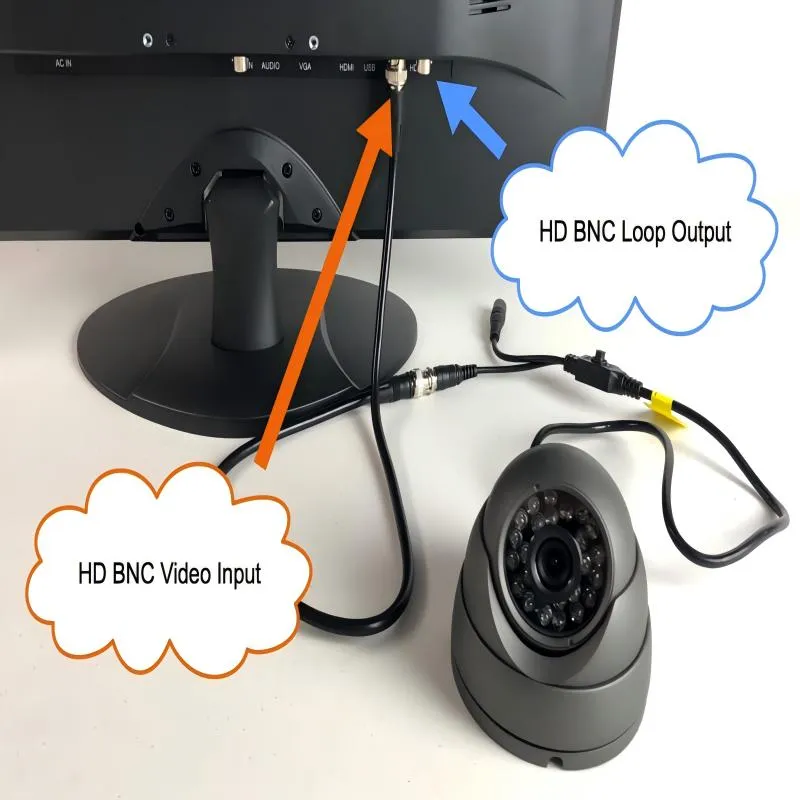
Figure 1 appears in the introductory part of the article, serving as a visual entry point to discuss the importance of BNC video cables in professional systems. It likely includes BNC connectors supporting HD signals, precision cable assemblies, or specialized adapters. This image aims to redirect the reader‘s attention from abstract system block diagrams to the specific, often-underestimated physical components that actually constitute the video path, setting the stage for subsequent discussions on the importance of their selection, impedance matching, and routing management.
In professional video systems, cables rarely get discussed during design reviews. Cameras, routers, codecs, and displays get the attention. The bnc video cable usually appears later—often selected from what’s already on the shelf.
That sequencing is deceptive.
When video issues show up in the field, they rarely look like clean failures. The image appears, but drops frames. A feed works at rehearsal, then glitches during the live show. Someone reseats a connector and the problem disappears—temporarily. In many of those cases, the root cause isn’t the camera or the switcher. It’s the cable in between.
This guide focuses on video-grade BNC cabling, specifically SDI-based systems that rely on controlled impedance, predictable attenuation, and mechanical reliability. RF test cables and antenna feeds follow different rules and are intentionally outside the scope here.
If you’re designing, upgrading, or troubleshooting a professional video chain, this article is meant to help you make decisions before small cable choices turn into operational problems.
When should you choose a BNC video cable?
Distinguishing BNC video cable from generic BNC cable use cases
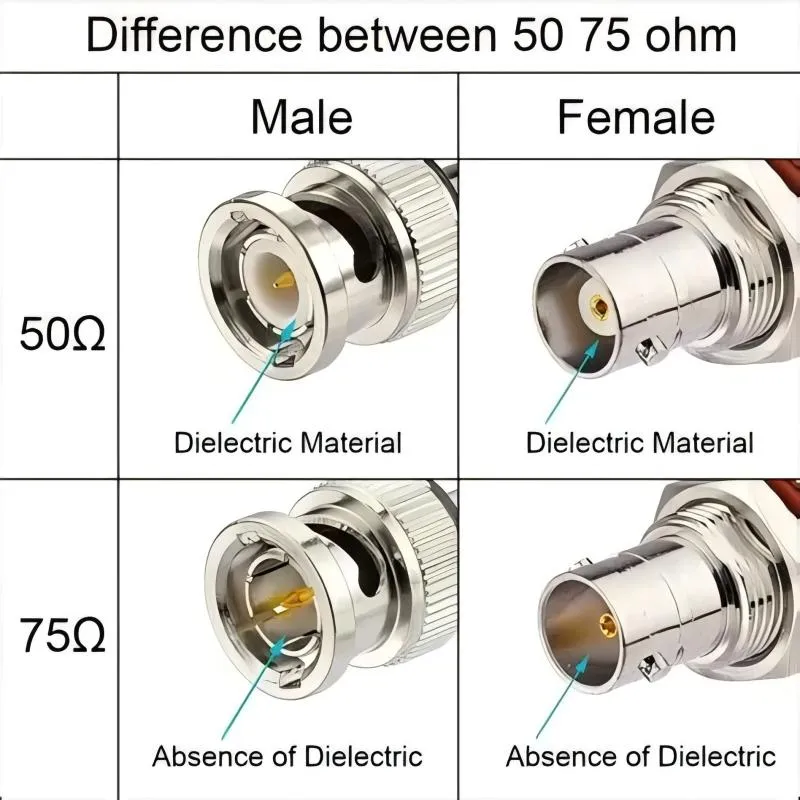
Figure 2 appears in the section explaining how to distinguish BNC video cable use cases from generic BNC cable use cases. It serves as a key pedagogical tool to clarify that impedance is not a label but a physical property determined by geometry such as center conductor diameter, dielectric material, and spacing between conductors. The image clearly distinguishes the two standards: professional video systems almost always require 75-ohm BNC cable to match SDI standards and minimize reflections, while 50-ohm BNC is used in different domains. It highlights the consequences of mixing impedances—while they may mate mechanically, the electrical mismatch creates harmful reflections at higher frequencies and can damage equipment interfaces over time, leading to intermittent faults in video systems that are notoriously hard to trace.
At a glance, most BNC cables look interchangeable. Same bayonet shell. Same twist-lock feel. That visual similarity is exactly why mistakes happen.
A bnc video cable is built to carry baseband or digital video signals, typically SDI, over a 75-ohm transmission path. A generic bnc coaxial cable, on the other hand, may be designed for RF measurement, timing signals, or antenna feeds—applications where 50 ohms is common and loss characteristics are evaluated very differently.
In real systems, video-grade BNC cabling shows up in environments such as:
- Broadcast studios and production control rooms
- Outside broadcast (OB) trucks and fly-packs
- Live event switching and routing systems
- CCTV and security monitoring matrices
- Medical imaging and industrial visualization equipment
What these environments share is not just video. It’s repeatability. Signals must behave the same way every day, across temperature changes, cable re-patching, and mechanical stress.
This article stays focused on that reality: BNC cables used specifically as part of a video signal chain, not as generic RF interconnects.
Choosing between BNC video cable and HDMI / DisplayPort in pro AV
In consumer environments, HDMI and DisplayPort dominate—and for good reason. They’re compact, inexpensive, and carry audio, video, and control signals over a single cable.
Professional systems value different things.
A bnc video cable carrying SDI is often preferred when:
- Cable runs extend beyond typical HDMI comfort zones
- Connections must lock securely and resist vibration
- Signals are routed through patch panels and routers
- Cables are frequently reconfigured during production
HDMI relies on friction. BNC relies on a mechanical lock.
That difference alone explains why SDI remains common in broadcast and live production, even as IP video gains traction elsewhere.
For a deeper comparison between BNC cabling used in video systems and other BNC applications, many engineers reference broader connector-level discussions like BNC Cable Selection Guide for Video, CCTV, and RF Test, then narrow down specifically to video-grade requirements.
Which industries still rely heavily on SDI and BNC video cabling?
Despite ongoing discussions about “all-IP” video, SDI over 75 ohm bnc cable remains deeply embedded in several industries:
- Broadcast television and sports production
- Large-scale live events and touring productions
- Security and surveillance infrastructure
- Medical imaging systems where latency must be predictable
- Industrial vision systems operating in electrically noisy environments
The reason isn’t resistance to change. It’s risk management.
An SDI link over BNC behaves in a well-understood way. Its failure modes are familiar. For many operators, that predictability still outweighs the flexibility of packet-based video—especially when uptime matters more than theoretical bandwidth.
How do you choose between 50 Ω and 75 Ω BNC coaxial cable?
Understanding BNC coaxial cable impedance with a simple cross-section
Impedance is not a label—it’s a physical property.
The impedance of a bnc coaxial cable is determined by the geometry of its cross-section:
- Diameter of the center conductor
- Dielectric material and its permittivity
- Spacing between inner and outer conductors
- Construction of the outer conductor
Change any of those, and the impedance changes.
For video applications, the takeaway is straightforward:
Professional video systems almost always require a 75 ohm bnc cable.
That requirement comes directly from SDI standards, which assume a 75-ohm transmission line from source to destination. When the impedance is correct, reflections are minimized and signal integrity remains stable as frequency increases.
Why 75 ohm BNC cable is standard for SDI and HDTV
From SD-SDI through HD-SDI, 3G, 6G, and 12G-SDI, the ecosystem is built around one assumption: 75 ohms everywhere.
That includes:
- The coaxial cable itself
- The BNC connectors on both ends
- The termination impedance inside cameras, routers, and monitors
When that chain stays intact, SDI links degrade gracefully. When it doesn’t, problems appear in subtle ways—random CRC errors, occasional dropouts, or links that fail only at higher frame rates.
Engineers planning complete signal paths often pair this article with connector-level references such as RF Connector Guide for Cables, Antennas and Test Systems to ensure mechanical and electrical assumptions stay aligned.
What happens if you mix 50 Ω and 75 Ω BNC cables and connectors?
Mixing impedances is one of the most common—and most misunderstood—mistakes in video systems.
Mechanically, 50-ohm and 75-ohm BNC connectors are not identical. The center pin dimensions differ slightly. Electrically, the mismatch creates reflections that become more severe as frequency increases.
Short runs may appear to work.
Longer runs or higher-rate SDI formats often don’t.
The more dangerous scenario is long-term use. Repeated insertions of mismatched connectors can damage input jacks on cameras or routers. By the time failures become obvious, the original cause is easy to overlook.
If the signal is video, impedance matching is not optional.
How do you plan BNC video cable length and loss for each video format?
Length planning is where most SDI systems quietly succeed—or quietly fail.
Unlike HDMI, SDI does not negotiate link quality. If the signal arriving at the receiver falls outside tolerance, the image doesn’t “downgrade.” It breaks. Sometimes intermittently. Sometimes only at certain frame rates. Those are the hardest failures to chase.
At the center of this problem is attenuation across the bnc video cable, especially as data rates climb.
Setting loss budgets for SD-SDI, HD-SDI, 3G, and 12G-SDI
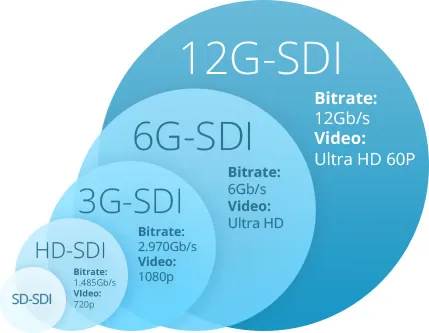
Figure 3 appears in the section discussing how to plan BNC video cable length and loss for each video format. It introduces a simplified engineering view: SD-SDI is very forgiving; margins shrink quickly for HD-SDI/3G-SDI; 12G-SDI is extremely sensitive to attenuation, reflections, and connector geometry. The underlying reason is bandwidth—as frequency content increases, dielectric loss and impedance discontinuities matter far more. This explains why length planning is where most SDI systems quietly succeed or fail.
Different SDI standards tolerate very different signal losses. That difference is not academic—it directly defines how far a given cable can run before stability collapses.
A simplified engineering view looks like this:
- SD-SDI (270 Mb/s)
Very forgiving. Long cable runs are possible even with older 75 ohm bnc cable types.
- HD-SDI (1.5 Gb/s) / 3G-SDI (3 Gb/s)
Margins shrink quickly. Cable quality and connector loss become visible factors.
- 12G-SDI (11.88 Gb/s)
Extremely sensitive to attenuation, reflections, and connector geometry. What worked for HD often fails here.
The underlying reason is bandwidth. As frequency content increases, dielectric loss and impedance discontinuities matter far more. This is also why SDI specifications consistently define 75-ohm cabling as a system requirement, as documented in standards bodies such as SMPTE, which governs SDI signal behavior and compliance.
For background context on how SDI evolved across these rates, many engineers reference the Serial Digital Interface overview on Wikipedia—not for design rules, but for historical framing.
BNC video cable length and loss planner
Rather than relying on “typical distances,” it’s safer to plan SDI links the same way RF engineers plan signal chains: with a loss budget.
Below is a practical planning framework that can be implemented as a spreadsheet or web calculator.
Inputs
- Video standard / SDI rate
(SD-SDI / HD-SDI / 3G / 6G / 12G)
- Target frequency
Either the fundamental frequency or a manufacturer-recommended test frequency
- Cable type
Example: RG59 75 ohm bnc cable, RG6, or a low-loss 12G-rated bnc coaxial cable
- Cable attenuation at target frequency
dB per 100 m (from the manufacturer datasheet)
- Maximum total loss budget
Typical engineering target: ~20 dB
- Connector count
All BNC interfaces in the path, including patch panels
- Loss per connector
Commonly 0.1–0.3 dB depending on quality
Calculated fields
- Total connector loss
Connector count × loss per connector
- Available loss for cable
Total loss budget − total connector loss
- Maximum cable length
(Available cable loss ÷ cable attenuation per meter)
- Estimated headroom margin
Remaining dB reserved for temperature drift and aging
Outputs
- Recommended maximum cable length (meters / feet)
- Recommended cable family
- Qualitative risk rating: Safe, Borderline, or High-risk
This approach forces discipline. It also explains why two systems using “the same cable” can behave very differently once connectors and routing are factored in.
Worked example: studio camera to router over BNC video cable
Consider a studio camera feeding a router over 12G-SDI.
- Cable attenuation: 20 dB / 100 m at the relevant frequency
- Connector count: 4
- Per-connector loss: 0.2 dB
- Total loss budget: 20 dB
Connector loss = 0.8 dB
Remaining cable budget = 19.2 dB
That yields a maximum safe length just under 96 meters, with almost no headroom. In practice, many engineers will shorten that further to maintain margin.
This is why 12G upgrades often fail first on the longest runs—even when the cable “looks fine.”
How can you tune BNC coaxial cable construction for better image quality?
How conductor, dielectric, shielding, and jacket impact signal and durability
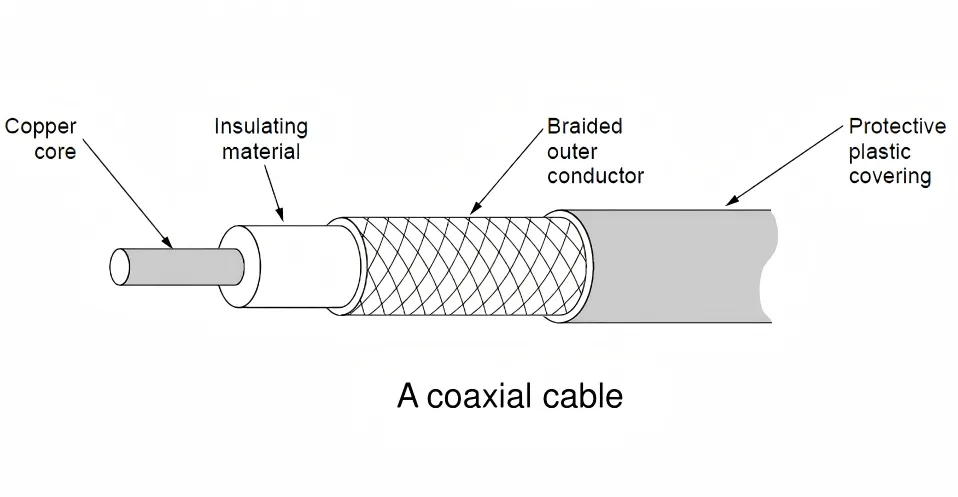
Figure 4 appears in the section discussing how to tune BNC coaxial cable construction for better image quality. It notes that cable construction details rarely matter at SD-SDI but matter a lot at 12G. Several construction choices shown directly affect both signal integrity and reliability: solid conductors maintain impedance consistency better than stranded ones; foamed dielectrics reduce attenuation but can be more sensitive to crushing; dual or tri-shield designs improve noise immunity; PVC jackets favor flexibility, while PUR and rubberized jackets favor durability in mobile setups. There is no universal “best” construction, as studio installs and OB trucks place very different demands on the same BNC video cable.
Several construction choices directly affect both signal integrity and real-world reliability:
- Center conductor
Solid conductors maintain impedance consistency better than stranded ones, though they are less flexible.
- Dielectric material
Foamed dielectrics reduce attenuation but can be more sensitive to crushing or deformation.
- Shielding
Dual or tri-shield designs improve noise immunity in electrically dense environments.
- Outer jacket
PVC favors flexibility; PUR and rubberized jackets favor durability in mobile setups.
There is no universal “best” construction. Studio installs and OB trucks place very different demands on the same bnc video cable.
Factory-terminated BNC video cables vs field-crimped assemblies
In post-mortems of unstable SDI systems, connectors show up again and again.
Factory-terminated cables benefit from controlled stripping, calibrated crimp force, and impedance-verified assemblies. Field-crimped cables depend heavily on technician skill and tooling consistency.
For permanent or mission-critical links, factory assemblies reduce variability. Field termination still makes sense for temporary rigs or fast-turn deployments—but it shifts risk to the installer.
How to avoid “fake 75 ohm” BNC coaxial cables
Some low-cost cables advertise 75 ohms but quietly combine 50-ohm geometry with video labeling.
They often work at SD-SDI.
They frequently fail at 3G or 12G.
Red flags include vague datasheets, missing attenuation curves, or connector descriptions that omit impedance entirely. If the electrical details aren’t documented, the cable probably wasn’t designed for video integrity.
How should you route BNC video cables in racks, control rooms, and mobile rigs?
Rack and control room cable management best practices
In racks and machine rooms, problems usually come from stress—not signal loss.
Common issues include tight bend radii behind patch panels, unsupported cable weight pulling on connectors, and bundles tied too tightly. Over time, these stresses deform the dielectric and shift impedance.
Simple habits—service loops, strain relief bars, and controlled bend paths—prevent intermittent failures that are notoriously hard to trace later.
Protecting BNC video cables in OB vans and mobile production
Mobile environments are unforgiving.
Cables get stepped on, crushed under cases, or pinched by doors. In these scenarios, jacket toughness and strain relief often matter more than absolute attenuation numbers.
Many crews prefer slightly thicker 75 ohm bnc cable in OB vans simply because it survives abuse better, even if it costs a small amount of flexibility.
Using color boots and labels to manage large BNC cable bundles
Color coding is not cosmetic in large SDI systems.
In multi-camera or multi-format environments—especially mixed HD and 12G paths—colored boots and clear labeling reduce patching errors under pressure. That operational clarity often matters more than the cable itself.
How do you test and troubleshoot issues caused by BNC video cables?
Most SDI failures don’t announce themselves clearly. The picture appears. Then it flickers. Or drops for half a second when someone walks past the rack. Those symptoms often get blamed on cameras or switchers, but the bnc video cable is frequently the real variable.
Effective troubleshooting means separating signal-quality issues from device issues as early as possible.
Using waveform monitors and eye patterns to judge SDI quality
If you have access to a waveform monitor or SDI analyzer, start there.
Eye patterns reveal margin. A wide-open eye suggests the 75 ohm bnc cable path is healthy. A partially closed eye usually points to excessive attenuation, reflections, or connector-related impedance discontinuities.
What matters is not whether the signal “locks,” but how much headroom remains. Many marginal links pass basic checks yet fail under temperature change or cable movement. Eye patterns expose that risk early.
For background on how SDI signal integrity is defined and evaluated, standards discussions published by SMPTE remain the most authoritative reference point, especially when dealing with higher-rate formats.
Using cable testers and TDR to locate BNC video cable faults
When symptoms persist, time-domain tools become invaluable.
A TDR (time-domain reflectometer) can reveal:
- Impedance steps caused by crushed cable sections
- Poor crimps or damaged connectors
- Unexpected transitions between cable types
This is particularly useful in long runs where visually inspecting the entire cable path isn’t realistic. A single damaged section can degrade the entire SDI link, even if the rest of the bnc coaxial cable is intact.
Cable testers won’t replace eye-pattern analysis, but they dramatically shorten fault-isolation time.
Distinguishing cable faults from camera or codec issues
A simple rule of thumb helps here:
- If the problem moves when the cable moves, suspect the cable
- If the problem stays with the device, stop blaming copper
In live environments, teams often swap devices first because it feels faster. In reality, isolating the bnc video cable early prevents unnecessary reconfiguration and downtime.
How can you reuse or replace 75 ohm BNC cables when upgrading to HD or 12G-SDI?
Upgrades expose assumptions.
Cables that worked flawlessly at HD-SDI often struggle—or fail outright—when pushed to 12G. The challenge is deciding which links can be reused and which must be replaced.
Evaluating whether existing 75 ohm BNC cabling is 12G-SDI ready
Not all 75 ohm bnc cable is equal.
Key factors include:
- Attenuation at higher frequencies
- Connector quality and consistency
- Installation history (bends, stress, re-terminations)
If the original cable was selected for SD or HD systems without headroom, it may meet impedance requirements yet fail attenuation limits at 12G. Testing existing runs at the target data rate is often the fastest way to decide.
When must you deploy “12G-rated” BNC coaxial cables and connectors?
Once distances grow or margins shrink, certified 12G components stop being optional.
“12G-rated” bnc coaxial cable typically offers:
- Lower attenuation per meter
- Tighter impedance control
- Connectors designed to minimize reflections at multi-GHz frequencies
At that point, cost becomes secondary to stability. In production environments, a single intermittent failure costs more than replacing a questionable cable run.
Extending SDI over fiber when BNC video cable is not enough
There is a point where coaxial cable is no longer the right tool.
For long-distance 4K or multi-camera aggregation, SDI-over-fiber removes attenuation and EMI from the equation entirely. Many modern systems combine short bnc video cable runs within racks with fiber for longer transport.
This hybrid approach keeps workflows familiar while extending reach safely.
What does the evolution from BNC video cables to IP video mean for your cabling?
“SDI is dead, long live SDI”: what the industry really thinks
Despite frequent headlines, SDI is not disappearing. It’s evolving.
While IP-based video gains ground in large facilities, SDI continues to advance through higher data rates. Discussions around this transition are often framed in industry analyses and summaries such as the Serial Digital Interface overview on Wikipedia, which highlights how SDI has adapted rather than vanished.
In practice, many facilities now operate both.
Balancing SDI+BNC with IP / NDI / SRT in hybrid systems
Hybrid systems are increasingly common.
SDI over 75 ohm bnc cable remains favored for low-latency, deterministic paths—camera to switcher, switcher to router. IP video excels at distribution, monitoring, and scalability.
The challenge is not choosing one over the other, but deciding where each makes sense.
Future-proofing strategy: more BNC coaxial cable or straight to fiber?
There is no universal answer.
Short, high-reliability links still favor BNC. Long-distance, high-bandwidth aggregation favors fiber. Many engineers plan infrastructure that supports both, allowing gradual migration without forcing a single architectural bet.
That flexibility often matters more than chasing the newest standard.
Frequently Asked Questions
How do I know if my existing BNC video cable is truly 75 ohms for SDI?
Check the cable model and datasheet for impedance and attenuation specifications. If uncertainty remains, measure reflections or test the cable at the highest SDI rate you plan to deploy.
What is the practical maximum length of a BNC video cable for 12G-SDI?
It depends on attenuation, connector count, and margin. Many real-world installations fall between 50 and 90 meters with high-quality cable, but calculations and testing should guide decisions.
Can I safely mix different brands of 75 ohm BNC coaxial cable in one SDI chain?
Brand mixing is generally acceptable if impedance and attenuation characteristics are consistent. Connector quality and installation matter more than brand uniformity.
What tests should be performed before a live event or broadcast?
Visual inspection, continuity checks, eye-pattern analysis, and—where possible—TDR testing help catch marginal links before they fail under pressure.
When does it make sense to switch from long BNC video cable runs to SDI-over-fiber?
When distance, attenuation, or environmental noise reduces confidence in coaxial links, fiber provides a cleaner and more scalable alternative.
Are there special BNC video cable requirements for HDR or 4K/8K workflows?
Higher resolutions increase bandwidth demands. Lower-loss cable, higher-quality connectors, and stricter margin planning become essential.
How do BNC video cable choices affect future migration from SDI to IP video?
Well-documented, well-routed cabling infrastructure simplifies hybrid operation and staged migration. Poor cabling limits flexibility later.
Final note
In professional video systems, bnc video cable choices rarely feel critical—until they are.
Planning impedance, attenuation, routing, and testing upfront turns cables from hidden risks into predictable infrastructure.
That predictability is still why SDI over 75 ohm bnc cable remains trusted, even as the industry evolves.
Bonfon Office Building, Longgang District, Shenzhen City, Guangdong Province, China

A China-based OEM/ODM RF communications supplier
Table of Contents
Owning your OEM/ODM/Private Label for Electronic Devices andComponents is now easier than ever.