
BNC to SMA Cable for RF Systems
Mar 25,2026
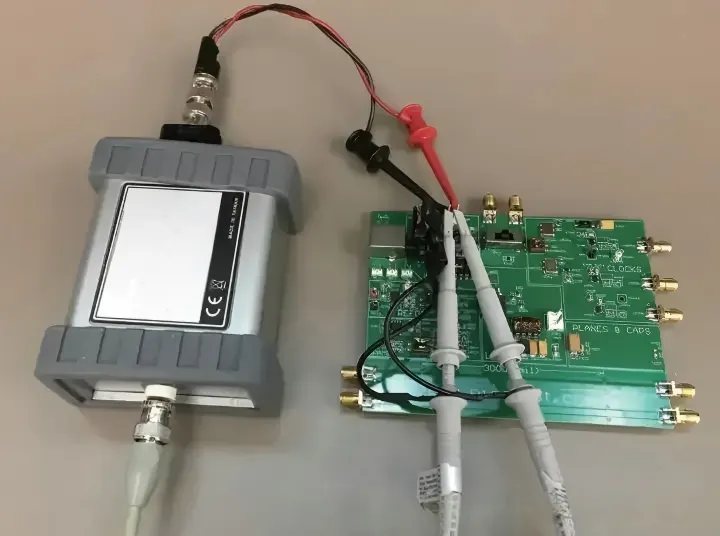
This figure illustrates a common lab scenario where a spectrum analyzer or test instrument with a BNC input needs to connect to a modern RF module with an SMA port. A short BNC to SMA cable is shown as a flexible assembly linking the two. The image emphasizes that unlike a rigid adapter, the flexible cable absorbs misalignment, vibration, and handling stress, protecting the SMA connector from mechanical overload.
A spectrum analyzer is already on the bench.
The device under test is powered up.
Someone reaches for the RF cable.
Then the mismatch shows up.
The instrument exposes a BNC port.
The module on the bench has SMA.
At first the fix looks trivial. Grab an adapter, tighten it, move on. In many labs that is exactly what happens.
But the moment that connection becomes part of the signal path—especially above a few hundred MHz—the difference between a rigid adapter and a short BNC to SMA cable starts to matter more than expected.
A rigid adapter forces both devices to absorb every mechanical load.
A short cable assembly absorbs movement, routing constraints, and handling stress.
That distinction becomes obvious later, usually when measurements drift or when a port loosens after weeks of repeated use.
Place BNC to SMA cable inside a real RF workflow
Connector transitions rarely appear in isolation.
They usually sit inside a chain of devices.
Radio → cable → adapter → antenna
Instrument → cable → DUT → cable → antenna
In that chain, a BNC to SMA cable acts less like an accessory and more like a controlled section of transmission line.
Connect BNC instruments to SMA radios, modules, and antennas
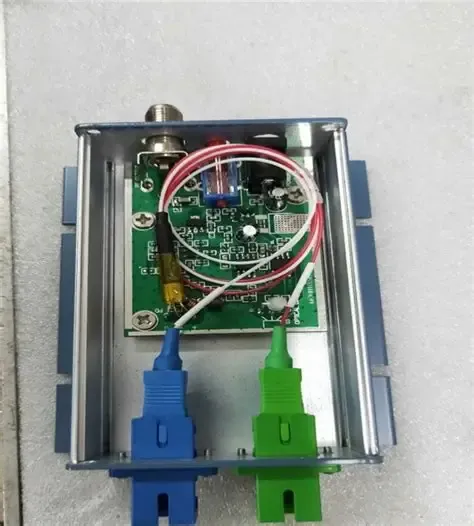
This figure illustrates the typical connector ecosystems in RF environments. On one side, laboratory instruments and oscilloscopes often feature BNC connectors. On the other side, modern compact devices (RF modules, GNSS boards, cellular radios) commonly use SMA connectors. A BNC to SMA cable is shown as the bridge between these two worlds. The image highlights that the cable provides a flexible transition, allowing equipment from different eras to work together without stressing the connectors.
Many RF benches still revolve around BNC.
Oscilloscopes use it.
Older signal generators rely on it.
Even some spectrum analyzers expose BNC for lower-frequency inputs.
Modern RF hardware, though, leans heavily toward SMA.
Small modules, GNSS receivers, cellular radios, and compact antennas almost always use SMA connectors because the interface handles higher frequencies with better impedance control.
That difference creates the common situation:
| Device Type | Typical Connector | Why |
|---|---|---|
| Oscilloscopes / older analyzers | BNC | Fast connect, legacy lab standard |
| RF modules / GNSS boards | SMA | Better RF performance |
| External antennas | SMA | Compact and widely supported |
The transition between those ecosystems is where a BNC to SMA cable assembly becomes practical.
Instead of forcing two rigid connectors together, the cable provides a flexible section of coax between them.
In many setups the difference seems minor—until someone bumps the cable.
Keep the transition inside a 50-ohm RF path whenever possible
RF equipment generally expects 50-ohm transmission lines.
That expectation runs across most RF devices: radios, antennas, spectrum analyzers, signal generators, and measurement accessories.
The problem is that BNC connectors exist in both 50Ω and 75Ω variants.
At a glance they look almost identical.
A technician can easily connect a 75-ohm BNC cable into a 50-ohm RF chain without noticing. The signal still passes. Measurements still appear plausible.
But impedance mismatches quietly introduce reflections.
Those reflections may not break a link immediately, yet they can degrade measurement accuracy or shrink link margin.
Anyone who wants a deeper refresher on coax construction can review the basics of coaxial cable design, where impedance control comes from conductor spacing and dielectric properties.
For practical RF work, the rule is simpler:
If the system is RF equipment, assume 50 ohms unless proven otherwise.
Treat cable assemblies as flexible transitions, not just long adapters
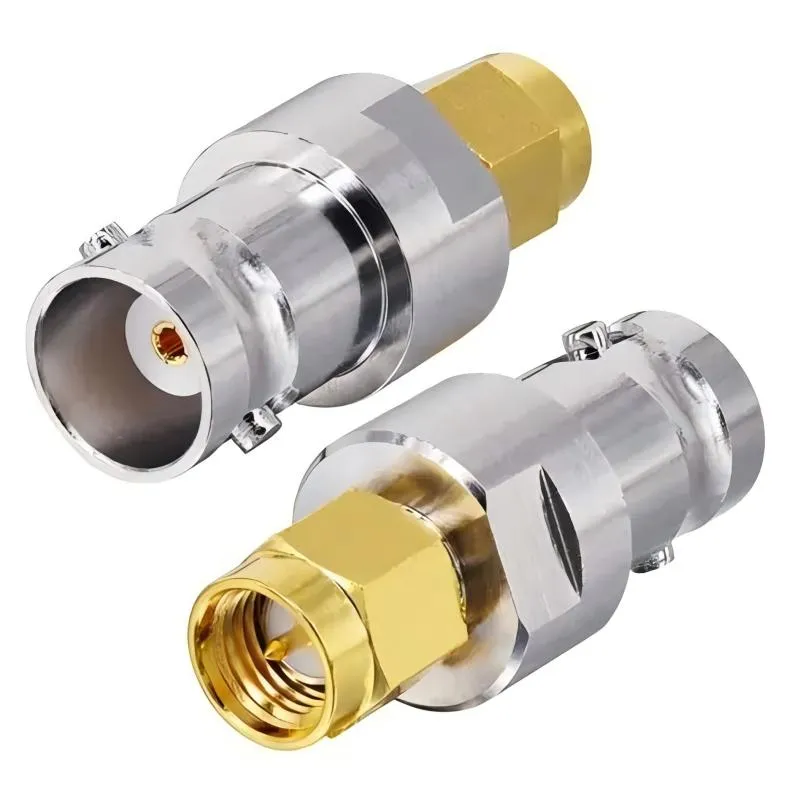
This image shows a rigid BNC to SMA adapter, a short metal body with a BNC connector on one end and an SMA connector on the other. It is designed to directly mate two devices with mismatched connector types in fixed, aligned setups such as laboratory benches. The adapter offers a minimal-length signal path with no flexible cable, making it ideal for stationary applications. However, it does not provide strain relief or tolerance to misalignment, and any cable movement transfers torque directly to the connector threads.
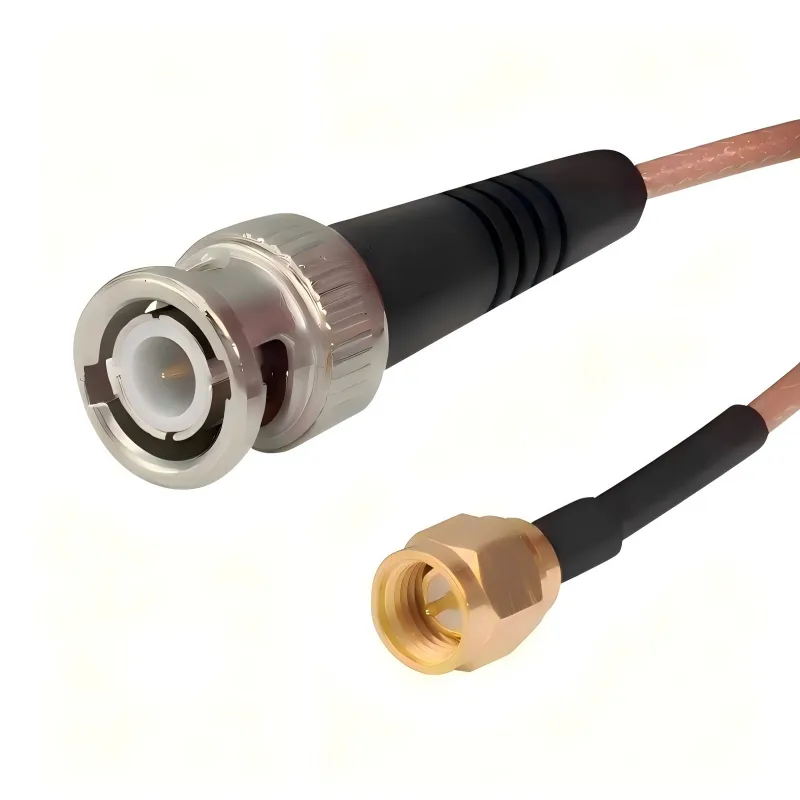
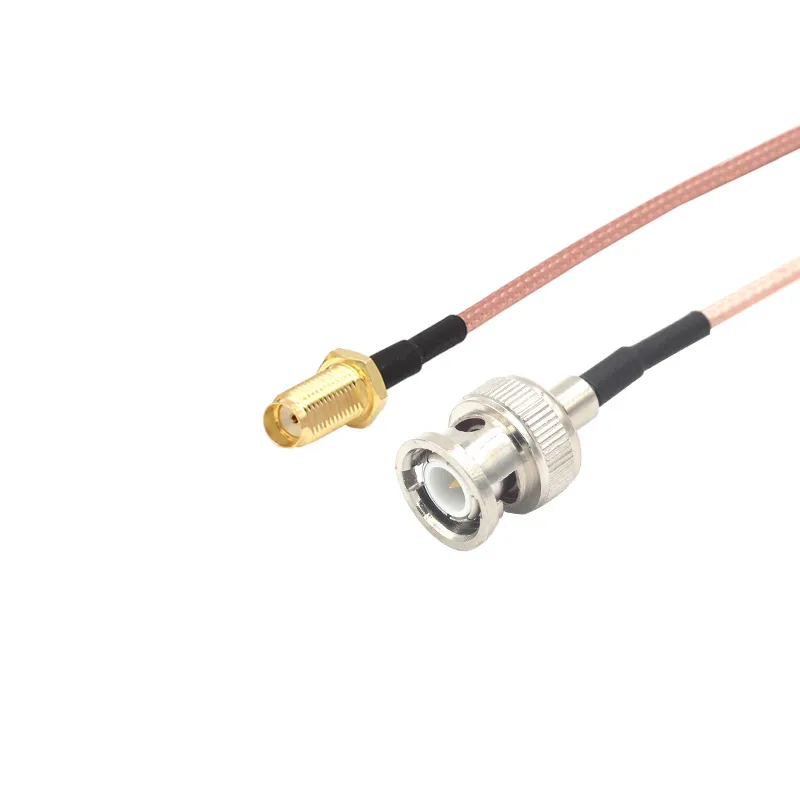
This image shows a flexible BNC to SMA cable assembly, typically built with a short length of RG316 coaxial cable terminated with a BNC connector on one end and an SMA connector on the other. Unlike a rigid adapter, this assembly provides flexibility, allowing it to accommodate misaligned ports, absorb vibration, and relieve mechanical strain. Such assemblies are preferred in portable setups, vibration-prone environments, or when connectors are recessed or offset. The flexible coax maintains 50-ohm impedance while offering routing convenience.
A rigid adapter does exactly one job: connect two ports that align.
A cable assembly does several things at once:
- absorbs movement
- handles routing through enclosures
- isolates connector stress
- accommodates offset geometry
The difference becomes obvious when ports are not perfectly aligned.
Consider a typical instrument bench:
The spectrum analyzer sits on the table.
The RF module sits on a development board a few centimeters lower.
Trying to join those with a rigid BNC-to-SMA adapter stack quickly becomes awkward.
A short coax jumper solves the problem immediately.
That is why cable assemblies are often preferred for mixed-connector environments—even when the distance between ports is small.
Choose cable before you default to a rigid adapter
Adapters are convenient.
They are also easy to misuse.
A lab drawer usually contains dozens of them: SMA-to-BNC, BNC-to-N, SMA gender changers, and so on. It is tempting to solve every connector mismatch by stacking metal parts together.
In small systems that approach works—until mechanical stress becomes visible.
Use cable when the ports are offset, recessed, or panel-separated
Rigid adapters assume something rarely true in real hardware: perfect alignment.
Real systems have offsets.
The RF port might sit inside an enclosure.
The instrument might be several centimeters away.
The cable might need to pass through a panel or a cable guide.
When ports are offset or recessed, forcing a rigid adapter into place can create leverage on the connector threads.
A short BNC to SMA cable avoids that problem entirely.
The cable becomes the mechanical buffer.
Use cable when vibration, handling, or service access exists
Laboratory equipment experiences constant handling.
Engineers plug and unplug test leads all day.
Devices move between workbenches.
Transport cases shake hardware during shipping.
Rigid adapters transmit every movement directly into the port.
Cable assemblies absorb that motion instead.
This difference becomes even more obvious in mobile equipment:
- vehicle radios
- field test kits
- rack-mounted RF gear
In those systems a flexible jumper often protects the connector better than a rigid transition.
Avoid solving a flexible problem with stacked metal parts
Adapter stacks create three kinds of problems simultaneously.
- Insertion loss accumulates
- Thread joints loosen over time
- Mechanical leverage increases
A chain like this is not unusual in test labs:
SMA → SMA gender adapter → SMA-to-BNC adapter → BNC cable
That stack can easily be replaced with one short BNC-to-SMA cable assembly.
The signal path becomes shorter, cleaner, and mechanically safer.
Some connector comparisons—including when each interface typically appears—are discussed in the TEJTE article on SMA vs BNC vs N-Type connectors, which explains why different equipment families still rely on different standards.
The key takeaway is practical rather than theoretical:
If the geometry is messy, a cable assembly usually solves the problem more cleanly than rigid hardware.
Match impedance before you match connector names
Engineers often focus on connector types first.
BNC.
SMA.
N-type.
But RF systems rarely fail because the connector names were wrong. They fail because impedance continuity was ignored.
A cable assembly that looks correct mechanically can still disrupt a signal path electrically.
Confirm whether the BNC side is 50 ohms or 75 ohms
The confusion around BNC connectors is surprisingly persistent.
Many technicians assume every BNC cable is 50Ω.
In reality a large portion of the BNC ecosystem is 75Ω video hardware.
Broadcast equipment, CCTV systems, and video distribution networks rely heavily on 75-ohm BNC cables.
RF measurement equipment generally does not.
The internal geometry of the connector differs slightly between the two versions. That geometry change maintains the correct impedance inside the interface.
Mixing them in the same path may still “work,” but reflections increase.
The safest workflow is simple:
Check the cable specification before connecting it into an RF chain.
Keep 50-ohm systems inside one consistent cable-and-connector path
When the entire system uses 50-ohm RF coaxial cable, consistency becomes straightforward.
The cable impedance, connector impedance, and instrument interfaces all align.
In those systems a short BNC to SMA cable simply acts as a controlled transition between connector families without altering the impedance environment.
That consistency becomes even more important at higher frequencies.
Small mismatches that look harmless at 100 MHz become visible near several gigahertz.
Add a deliberate transition when RF gear must meet video hardware
Sometimes a 50-ohm RF device really does need to connect to a 75-ohm system.
Examples appear in mixed broadcast or monitoring environments.
When that happens, the transition should be deliberate rather than accidental.
That may involve:
- impedance-matching pads
- dedicated interface modules
- or controlled transition cables
Treating the connection as an engineered boundary prevents confusion later when measurements drift.
Match the cable construction before you finalize the assembly
Once impedance is confirmed, the next decision usually concerns the cable itself.
Most short RF transition cables look similar from the outside. Inside, however, they may use very different coax types.
Selecting the wrong cable family can quietly affect flexibility, temperature tolerance, and signal loss.
Start with RG316 for compact and heat-resistant jumper builds
This image provides a detailed view of an RG316 coaxial cable, likely with a section of the outer jacket removed to reveal the inner conductor, PTFE dielectric, and braided shield. With an outer diameter of approximately 2.5 mm, RG316 is flexible and heat-resistant, making it ideal for routing inside compact enclosures and for use in short jumper cables where flexibility and moderate frequency performance are required. In BNC to SMA cable assemblies, RG316 serves as the core transmission line, ensuring stable 50-ohm impedance while allowing the assembly to bend and route easily around equipment and workbenches.
Many short RF jumper cables rely on RG316 coaxial cable.
This cable family appears frequently in compact RF assemblies because it balances several useful properties.
| Property | Typical RG316 Behavior |
|---|---|
| Impedance | 50 ohms |
| Outer diameter | ~2.5 mm |
| Dielectric | PTFE |
| Jacket | FEP |
| Flexibility | Good for short jumpers |
The PTFE dielectric gives the cable strong temperature tolerance, which helps in environments where equipment generates heat.
It also makes the cable resistant to deformation during bending.
That combination explains why RG316 appears so often in short BNC-to-SMA jumper cables.
The cable remains thin enough to route easily while still maintaining stable RF performance.
A more detailed overview of that cable family can be found in TEJTE’s RG316 coaxial cable guide, which describes where the cable fits among other coax types.
Move to thicker 50-ohm coax when distance or loss dominates
RG316 works well for short connections.
Once cable length increases, its attenuation becomes more noticeable.
Thicker coax families reduce that loss.
For example:
| Cable Family | Typical Use |
|---|---|
| RG316 | Short jumpers and internal connections |
| RG58 | Medium-length RF links |
| LMR-series | Lower-loss external runs |
The correct cable choice often depends on how the assembly will actually be used.
Bench jumpers rarely exceed half a meter.
External antenna leads may run several meters.
Different use cases lead to different cable decisions.
Lock the coax family before you finalize connector direction
Connector orientation—male vs female, straight vs right-angle—often receives a lot of attention during procurement.
But those decisions should come after the cable family is selected.
Once the coax type is fixed, the connector style must match its diameter and construction.
Selecting connectors first sometimes forces a cable choice that does not suit the application.
That mistake is surprisingly common during early prototype builds.
Calculate loss before the cable becomes the hidden bottleneck
Short RF cables tend to escape scrutiny. Engineers focus on antennas, amplifiers, and receivers. The coax between them often gets treated as neutral.
It isn’t.
Every piece of coax contributes attenuation, and thin cable families accumulate loss faster than people expect once frequencies move upward.
Use attenuation-per-meter data instead of assuming short cables are harmless
Cable specifications always include attenuation data. The figures usually appear as dB per 100 meters, which can make them look irrelevant for short jumpers.
But the curve behind those numbers is what matters.
Take a thin coax such as RG316. Its loss increases rapidly as frequency rises. A simplified view looks something like this:
| Frequency | Typical RG316 Attenuation |
|---|---|
| 100 MHz | ~10–12 dB / 100 m |
| 500 MHz | ~25–30 dB / 100 m |
| 1 GHz | ~38–40 dB / 100 m |
| 3 GHz | ~70+ dB / 100 m |
Nobody runs 100 meters of RG316 in a normal RF assembly, of course. The point is how sharply the loss climbs.
A 0.5-meter jumper at 1 GHz might contribute only a few tenths of a decibel. That sounds insignificant until several connectors, adapters, and cables appear in the same signal chain.
Then the “small” losses begin to stack up.
Include connector transitions in the same calculation
The cable itself is only part of the path. Each connector interface also adds a small insertion loss.
Engineers rarely measure this directly in everyday work, but it still exists.
A rough planning estimate often looks like this:
| Component | Typical Insertion Loss Contribution |
|---|---|
| SMA connector transition | ~0.1 dB |
| BNC connector transition | ~0.1–0.2 dB |
| Adapter interface | ~0.2–0.3 dB |
Individually those numbers are minor. The problem appears when several transitions accumulate.
A short BNC to SMA cable may actually reduce loss compared with a chain of adapters simply because it removes extra interfaces from the path.
This is why experienced RF technicians often prefer one purpose-built jumper instead of several rigid adapters.
Separate rules for test leads, module jumpers, and external cables
Not every RF cable follows the same design priorities.
Bench leads, internal jumpers, and external antenna cables behave very differently.
| Cable Role | Typical Length | What Matters Most |
|---|---|---|
| Bench test lead | 0.3–1 m | Flexibility and durability |
| Module jumper | 10–30 cm | Small diameter and routing |
| External antenna run | 1–10 m or more | Low attenuation |
A BNC to SMA cable normally belongs to the first two categories.
Those cables prioritize flexibility and mechanical durability rather than absolute lowest attenuation.
External antenna runs usually require thicker coax families.
Mixing these roles can lead to confusing results. A cable that works perfectly on a bench may introduce unnecessary loss when used as a longer antenna feed.
Route the cable so the ports survive daily use
Electrical discussions tend to dominate RF design conversations.
Mechanical issues, however, are responsible for a surprising number of connector failures.
The connector itself is rarely the weakest component. The stress usually comes from how the cable pulls on it.
Protect the bend right behind the connector
Most cable failures appear near the connector body.
That section experiences the highest bending stress because the cable transitions from rigid metal to flexible coax within a very short distance.
If the cable immediately bends sharply after leaving the connector, the internal dielectric and braid start absorbing repeated strain.
Over time the coax deforms slightly. Sometimes the center conductor migrates enough to affect impedance.
Good cable routing leaves a gentle curve behind the connector instead of a sharp angle.
Shift mechanical load away from the RF port
RF connectors are designed for electrical contact, not structural support.
Yet in many setups they end up holding the full weight of the cable.
The fix is simple but often overlooked: move the load elsewhere.
Typical approaches include:
• cable clips mounted to the enclosure
• bulkhead connectors that anchor cables to a panel
• routing guides that prevent free swinging cables
Even light coax generates leverage when it hangs several centimeters away from a port.
A small amount of mechanical planning prevents that leverage from reaching the connector threads.
Treat the test bench as a mechanical environment
Bench setups look static, but they rarely stay that way.
Cables get moved constantly. Instruments slide across the table. Someone accidentally tugs a cable while adjusting equipment.
Rigid adapters transmit every movement directly into the connector interface.
Flexible cable assemblies absorb that motion instead.
That difference explains why a simple BNC to SMA cable often lasts longer in active test environments than a rigid adapter stack.
Use application cases to decide when cable is the better option
Connector transitions appear because different equipment families evolved around different standards.
Test equipment often uses BNC.
Modern RF modules prefer SMA.
Once those two ecosystems meet, the question becomes practical: adapter or cable?
The answer usually depends on geometry and handling.
Flexible test setups usually favor cable assemblies
A lab bench rarely keeps all equipment in perfect alignment.
An analyzer might sit higher than the device under test. The RF module might be mounted on a development board with limited clearance.
Trying to bridge those ports with a rigid adapter often creates awkward angles.
A short cable solves the routing problem immediately.
This is one reason many RF labs keep several BNC to SMA jumpers on hand. They provide enough reach and flexibility to connect mismatched equipment without stressing the ports.
Rigid adapters work best when the geometry is stable
Rigid adapters still make sense in very controlled situations.
When two ports sit directly in line and remain fixed, an adapter keeps the signal path simple.
Calibration setups often fall into this category. Equipment remains stationary, and cables rarely move.
In those cases an adapter introduces fewer components than a cable assembly.
The difference becomes clearer when looking at the connector families themselves. The TEJTE comparison of SMA vs BNC vs N-Type connectors shows how each interface developed for different mechanical and frequency ranges.
Understanding those roles helps explain why mixed-connector transitions appear so frequently in real systems.
Reverse naming rarely changes the cable itself
Buyers sometimes encounter both phrases:
• BNC to SMA cable
• SMA to BNC cable
From an electrical standpoint they describe the same cable assembly.
The order usually reflects how someone searches for the product rather than any real technical difference.
Manufacturers often list both names simply so customers can find the cable regardless of which connector they start thinking about.
Build a simple cable decision sheet before purchasing
Cable choices often happen informally during prototype builds.
An engineer orders a jumper. Another team orders a slightly different one later. Documentation becomes inconsistent.
A small decision sheet helps keep the process predictable.
It does not need to be complicated. A few fields can capture the important information.
Basic parameters worth recording
| Field | Purpose |
|---|---|
| Use case | Bench test, internal jumper, rack link |
| Connector A | BNC type and impedance |
| Connector B | SMA type and orientation |
| System impedance | 50Ω or 75Ω |
| Coax family | RG316 or another type |
| Length | Cable length |
| Estimated cable loss | Calculated from attenuation data |
| Connector count | Number of interfaces |
| Estimated connector loss | Rough insertion estimate |
| Total estimated loss | Combined value |
These fields create a quick picture of the signal path.
Additional mechanical entries can also help:
• expected bend radius
• strain risk
• connector orientation
None of these calculations replace engineering judgment. They simply provide a consistent reference point.
Example: instrument to module connection
Consider a simple test setup.
A spectrum analyzer connects to a small RF device through a 0.5 m RG316 jumper with BNC on one end and SMA on the other.
At around 1 GHz the cable loss remains comfortably below a decibel. Connector transitions add only a small fraction of that.
In most lab situations the electrical margin remains safe.
The sheet becomes more useful when the system changes—longer cable runs, higher frequencies, or tighter routing inside an enclosure.
Those situations are where planning prevents surprises later.
Turn the same sheet into an inspection checklist
The same document can double as a receiving checklist when cable assemblies arrive from suppliers.
Inspectors can confirm:
• connector type and gender
• cable family
• specified length
• visible strain relief
• labeling or impedance markings
This step may seem minor, yet it prevents a common sourcing problem: cables that look identical externally but use different internal coax.
That difference can quietly affect performance.
Track the shifts affecting RF cable assemblies now
Cable assemblies rarely appear in design meetings. Radios and antennas get most of the attention. The coax between them usually shows up later, often when the first prototype reaches the bench and someone realizes the connectors don’t match.
That moment is common in RF work: BNC on the instrument, SMA on the device.
The quick fix is a short jumper.
What’s changing lately is not the cable itself but the environments where these small assemblies operate. RF systems are getting denser, frequencies are creeping upward, and equipment from different generations ends up sharing the same signal path.
Mixed connector ecosystems are becoming normal
In older RF installations it was common for an entire system to stay within one connector family.
A lab might standardize on BNC.
A telecom installation might standardize on N-type.
Today it is rare to see that level of uniformity.
A typical development bench can easily include:
• an oscilloscope with BNC inputs
• a spectrum analyzer that still exposes BNC for low-frequency ports
• a GNSS module with SMA connectors
• a cellular antenna with SMA or RP-SMA
The connectors evolved in different eras for different reasons, so the mismatch is almost unavoidable.
Cable assemblies become the quiet translators between those ecosystems. A short BNC to SMA cable is often the easiest way to keep equipment working together without redesigning the system around one connector standard.
Compliance pressure is slowly reaching RF materials
Another shift is less visible but increasingly discussed by connector manufacturers.
Environmental regulations targeting fluorinated materials—often grouped under PFAS—are pushing some suppliers to explore alternative insulation and jacket compounds.
Traditional RF coax relies heavily on PTFE and FEP because they behave extremely well electrically and thermally. Engineers trust them. They have decades of proven performance.
Regulatory pressure, however, is pushing manufacturers to experiment with different material systems that maintain similar RF properties.
For most users this will appear gradually. Cable assemblies may begin listing alternative jacket or dielectric materials while maintaining similar electrical specifications.
The cable may look identical from the outside, but the materials inside might slowly evolve over the next few product cycles.
Higher frequencies expose sloppy cable decisions
At modest RF frequencies, a mediocre cable assembly often goes unnoticed.
The signal still travels from one port to another. Measurements look close enough to expected values. Nobody investigates further.
At higher frequencies the tolerance for small mistakes shrinks.
Impedance mismatches that were invisible at 100 MHz begin to appear in measurements at several gigahertz. Connectors that were mechanically acceptable in a low-frequency setup may introduce subtle reflections.
This is one reason engineers working with compact RF modules or microwave systems often pay closer attention to the coax between devices than earlier generations did.
The cable itself did not change much.
The environment around it did.
Answer common BNC to SMA cable questions
When should I use a BNC to SMA cable instead of an adapter?
Adapters work best when two ports align naturally.
If the analyzer and the device under test sit at the same height and remain stationary, a rigid adapter keeps the signal path simple.
A cable assembly becomes useful when the geometry is less cooperative.
Examples appear frequently:
• a development board sitting lower than the instrument
• a panel connector separated from the internal module
• equipment that moves slightly during testing
In those situations a short BNC-to-SMA jumper absorbs the offset and prevents torque from reaching the connector threads.
How do I confirm whether the BNC connector is 50 ohms or 75 ohms?
The safest answer is to check the documentation rather than rely on appearance.
BNC connectors exist in both 50-ohm and 75-ohm versions. They often look nearly identical from the outside. The difference lies in the internal geometry that maintains impedance.
Video and broadcast systems commonly use 75-ohm BNC cables.
RF measurement equipment almost always expects 50-ohm paths.
If the cable specification is unclear, confirming the impedance with the supplier avoids introducing a mismatch into the system.
What coax is most common in short RF jumper cables?
Short RF jumpers frequently use RG316 coaxial cable.
It is thin, flexible, and handles temperature reasonably well because of its PTFE dielectric and FEP jacket. Those characteristics make it convenient for short internal connections and bench leads.
It is not the lowest-loss coax available, but it performs well enough for short transitions between instruments and RF modules.
That balance explains why RG316 appears so often inside small cable assemblies.
How much attenuation does a short BNC-to-SMA cable introduce?
The exact number depends on the coax type and operating frequency.
For a short RG316 jumper—something around half a meter—the attenuation at frequencies near 1 GHz is typically only a few tenths of a decibel. Connector transitions add a similar amount.
Individually those values are small.
However, when multiple cables and adapters appear in the same signal path, the losses accumulate. That is why engineers sometimes simplify a connection by replacing adapter stacks with one cable assembly.
The signal path becomes shorter and easier to predict.
When is it better to replace an adapter with an RG316 jumper?
The situation usually appears after repeated handling.
A rigid adapter that worked perfectly during the first tests may start loosening after dozens of cable swaps. The stress transfers directly to the connector threads.
Replacing that adapter with a short jumper removes most of the mechanical load from the port.
The cable absorbs movement instead.
In busy lab environments that small change often extends connector life considerably.
How can I prevent strain from damaging the SMA connector?
The SMA interface is mechanically small, which is one reason it performs well electrically. The downside is that it should not carry significant cable weight.
Several simple habits help protect it:
• avoid sharp bends immediately after the connector
• secure longer cables to a nearby surface
• route cables so their weight does not hang directly from the port
Those steps sound trivial, yet they prevent a surprising number of connector failures in test setups.
Final reflection
Connector transitions like BNC to SMA cables rarely look important when a system is first assembled.
They are just short pieces of coax connecting equipment that was never designed to share the same connector.
But once the cable becomes part of the signal path, it behaves like any other RF component. Its impedance, routing, and mechanical support all influence how stable the system remains.
Handled carefully, the cable disappears into the background of the design.
Handled casually, it becomes one of those small details engineers eventually track down after everything else appears to be working correctly.
Bonfon Office Building, Longgang District, Shenzhen City, Guangdong Province, China

A China-based OEM/ODM RF communications supplier
Table of Contents
Owning your OEM/ODM/Private Label for Electronic Devices andComponents is now easier than ever.