
BNC to SMA Adapter for RF Systems
Mar 22,2026
Place BNC to SMA adapter inside a real RF workflow
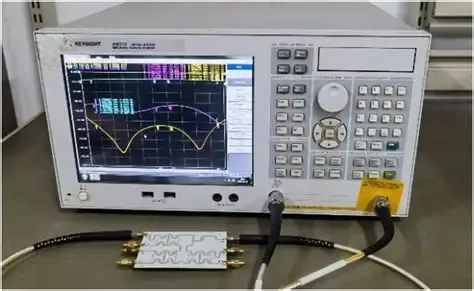
This figure illustrates a common lab scenario where an older test instrument with a BNC input needs to connect to a modern RF module or device with an SMA port. A rigid BNC to SMA adapter is shown as the transition between them. The image emphasizes that while the adapter appears simple, it introduces a mechanical and electrical interface into the signal chain. In stationary bench setups with aligned connectors, this rigid transition is often the fastest and most compact solution.
Connector mismatches rarely appear in schematics.
They appear on the bench.
A radio module arrives with a small SMA port. The measurement gear next to it—often older lab equipment—still exposes BNC connectors. The test setup already includes cables, attenuators, and an antenna path. Someone reaches for a quick mechanical bridge.
That bridge is usually a bnc to sma adapter.
At first it looks trivial: two connectors and a short metal body. In practice it becomes part of the RF path the moment it is tightened into place. The adapter affects impedance continuity, mechanical stress, and sometimes repeatability during measurements. Engineers often notice these consequences later—after a few tests, after the cable routing changes, or after the setup gets moved to another lab station.
That is why the adapter belongs inside the workflow discussion, not outside it.
A typical signal chain in small RF systems might look like this:
Radio module → SMA port → adapter → coax cable → instrument input.
Each transition in that chain contributes a small electrical and mechanical effect. One adapter is rarely a problem. But once connectors begin stacking, the transition itself becomes part of the design decision rather than a temporary fix.
The goal of this guide is simple: determine when a BNC to SMA adapter actually belongs in the system—and when a cable assembly or another transition makes more sense.
Connect BNC instruments to SMA radios, modules, and antennas
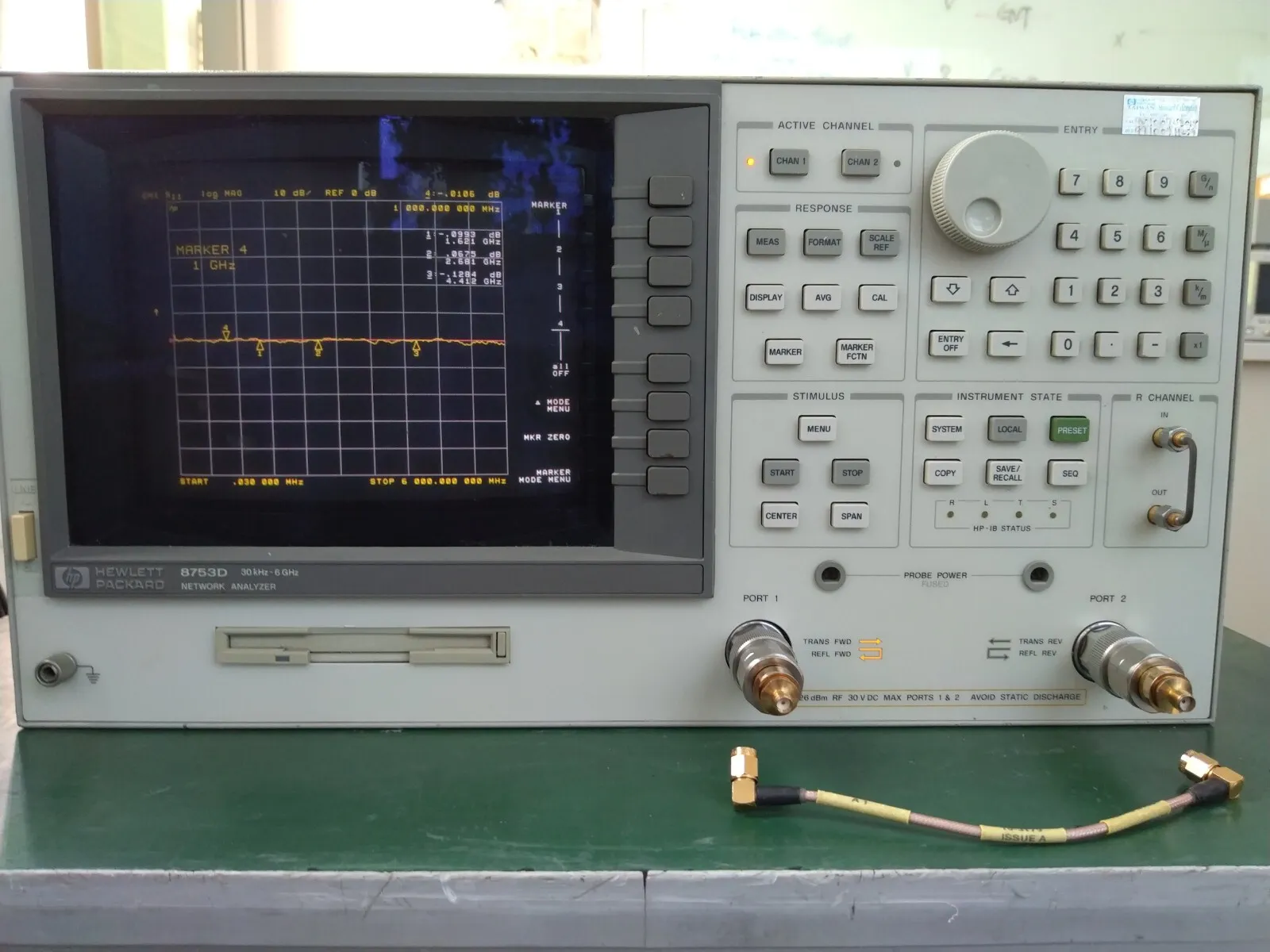
This figure illustrates the typical connector ecosystems in RF environments. On one side, laboratory instruments, oscilloscopes, and legacy gear often feature BNC connectors. On the other side, modern compact devices (radios, modules, antennas) commonly use SMA connectors. A BNC to SMA adapter is shown as the bridge between these two worlds. The image highlights that while mechanically compatible, the transition must also maintain electrical impedance consistency (50 ohms) for predictable RF performance, especially as frequency increases.
Connector families grew from different technical eras.
BNC connectors became widespread on oscilloscopes, early spectrum analyzers, broadcast equipment, and many laboratory devices. Their quick twist-lock coupling made sense for instruments that needed frequent reconnection.
SMA, by contrast, emerged from the RF and microwave world where higher frequencies and compact hardware demanded tighter mechanical tolerances.
The result today is predictable.
Modern RF modules, antennas, GNSS receivers, and wireless hardware commonly expose SMA connectors. Test instruments—especially older equipment still perfectly functional—often retain BNC ports.
This mixed environment shows up everywhere:
- RF development benches
- antenna testing setups
- field diagnostics kits
- small OEM lab stations
- legacy instrumentation racks
An adapter solves the immediate compatibility problem.
But compatibility is only the first step. The electrical path still needs to remain stable. A connector that physically mates does not automatically create a predictable RF transition.
Even small transitions can shift the signal environment once frequency climbs into the gigahertz range.
For readers unfamiliar with the internal structure of coaxial transmission lines, the reference article on coaxial cable explains why consistent geometry and impedance matter across every transition in a signal path.
Adapters interrupt that geometry—briefly but measurably.
Keep the transition inside a 50-ohm RF path
A common mistake appears when engineers assume every BNC connector represents a 50-ohm system.
That assumption is not always correct.
BNC connectors exist in two major impedance variants:
• 50-ohm BNC — typically used in RF systems and measurement environments
• 75-ohm BNC — common in broadcast video and legacy analog signal paths
The physical interface looks almost identical. A 75-ohm BNC will still mate with a 50-ohm one. But the impedance mismatch becomes part of the RF path once they are connected.
In many RF environments, the goal is to maintain a consistent 50-ohm signal chain:
Radio → coax cable → adapter → instrument → antenna.
Once the system leaves that impedance continuity, reflections and insertion loss begin to accumulate. At lower frequencies the impact may appear small. At higher frequencies the mismatch becomes easier to detect in measurement drift and return loss.
This distinction becomes easier to see when reviewing coaxial cable families. The TEJTE technical reference RF coaxial cable guide outlines how common cable types separate into 50-ohm and 75-ohm groups.
Adapters do not automatically fix impedance mismatches. They simply connect mechanical interfaces. The system designer still needs to verify the electrical path.
Separate rigid adapters from flexible cable assemblies
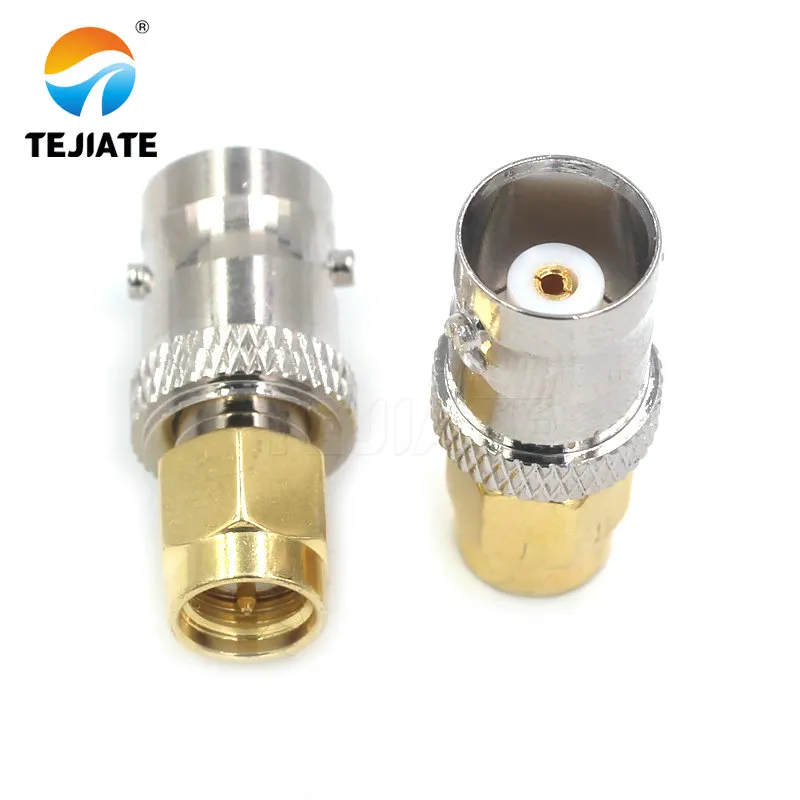
This image shows a rigid BNC to SMA adapter, a short metal body with a BNC connector on one end and an SMA connector on the other. It is designed to directly mate two devices with mismatched connector types in fixed, aligned setups such as laboratory benches. The adapter offers a minimal-length signal path with no flexible coax, making it ideal for stationary applications where connectors are well-aligned and mechanical stress is low. However, it does not provide strain relief or tolerance to misalignment
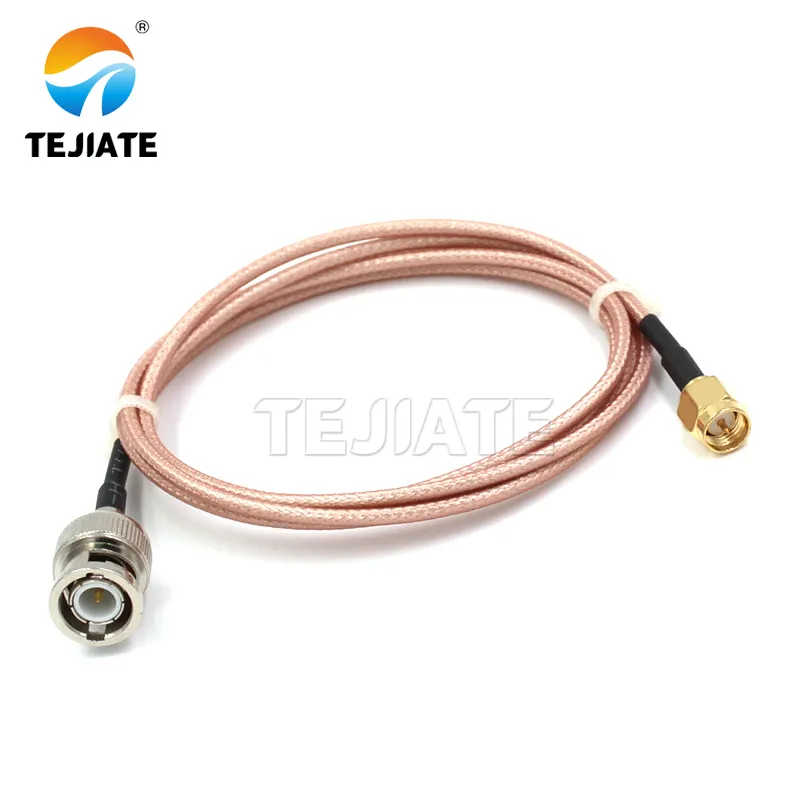
This image shows a flexible BNC to SMA cable assembly, typically built with a short length of RG316 coaxial cable terminated with a BNC connector on one end and an SMA connector on the other. Unlike a rigid adapter, this assembly provides flexibility, allowing it to accommodate misaligned ports, absorb vibration, and relieve mechanical strain. Such assemblies are preferred in portable setups, vibration-prone environments, or when connectors are recessed or offset. The flexible coax (RG316) maintains 50-ohm impedance while offering routing convenience.
Another confusion appears in procurement lists.
Buyers often search for “BNC to SMA adapter” while actually needing a cable assembly.
These are very different components.
A rigid adapter is a short metal body containing two connector interfaces. It creates a direct transition between ports with essentially zero length of coaxial cable.
A cable assembly, on the other hand, inserts a short flexible cable between the connectors.
Rigid adapters are typically used when:
- the ports align directly
- the distance is extremely short
- no cable routing is required
- mechanical stress is minimal
Cable assemblies become useful when:
- connectors sit in recessed panels
- ports do not line up physically
- the system needs vibration tolerance
- equipment is frequently handled or moved
Many RF labs keep both forms available. The adapter is the fastest mechanical solution, but the cable often becomes the safer choice once mechanical factors enter the picture.
A short jumper—sometimes only 20–30 cm long—can remove torque from sensitive connectors and reduce the mechanical leverage applied to instrument ports.
In other words, the decision is rarely about connector names alone.
It is about how the transition behaves once the system is assembled.
Choose adapter or cable before you choose the connector gender
A surprising number of RF purchasing mistakes start with the wrong question.
Buyers begin by asking:
Do I need SMA male or SMA female?
But gender is rarely the first decision that matters.
The more useful question is this:
Should this connection even use a rigid adapter at all?
In many setups the connector gender becomes obvious only after the mechanical layout is clear.
Consider two typical cases.
Case 1 — Bench instrument testing
A spectrum analyzer sits on the bench. The RF module under test sits beside it. The connectors are aligned and separated by only a few centimeters.
A rigid BNC to SMA adapter works perfectly here. The connection stays short and stable, and no cable routing is necessary.
Case 2 — Enclosure prototype testing
The same radio module is now mounted inside a metal enclosure. The antenna port sits on the exterior panel. The instrument remains on the bench.
Suddenly the connectors are offset. The instrument cable pulls slightly downward, and the adapter becomes a mechanical lever between two ports.
In this scenario, replacing the rigid adapter with a short cable assembly removes stress from both connectors.
The electrical transition remains the same, but the mechanical behavior improves significantly.
This is why experienced RF engineers often decide adapter vs cable first, and connector gender second.
Once that decision is made, the rest of the configuration becomes straightforward.
Use an adapter when the ports are aligned and strain-free
Rigid adapters perform well under simple conditions.
The two connectors must sit:
- close together
- in the same axis
- without tension from attached cables
Lab benches often meet these conditions. Instruments remain stationary. The adapter sees little mechanical load.
Under those circumstances, a rigid transition keeps the signal path short and clean.
The number of transitions stays minimal, and the connection can be installed quickly during repeated testing.
This is why BNC-to-SMA adapters remain a common fixture in RF labs. They solve compatibility problems without introducing unnecessary cable length.
Use a cable when offset, vibration, or repeated handling exists
Once the environment becomes less controlled, the rigid adapter begins to show its limitations.
Three mechanical factors change the picture:
Connector offset
If the connectors do not line up perfectly, the adapter experiences sideways force.
Cable weight
A long coaxial cable hanging from the adapter can apply constant torque to the connector threads.
Repeated handling
Lab equipment moved during testing sessions gradually transfers stress to the smallest mechanical element in the chain.
That smallest element is usually the adapter.
In these situations, a short coax jumper provides flexibility. The cable absorbs movement instead of transmitting it directly to the connector interface.
Short assemblies built with RG316 coaxial cable often appear in these roles because the cable remains thin, flexible, and easy to route around equipment.
Stop adapter stacking before it becomes the weak point
Adapter stacking happens quietly.
One adapter solves a connector mismatch. Then another appears because a cable has the wrong gender. Soon the signal path contains two or three rigid transitions chained together.
Electrically, each transition introduces a small amount of loss. Mechanically, the chain becomes fragile.
The stack behaves like a lever arm attached to the connector port. A minor bump on the cable can translate into torque applied directly to the equipment connector.
RF engineers usually try to limit rigid transitions to the smallest number necessary.
If the connection requires multiple adapters to function, it is often better to replace the chain with a single custom cable assembly designed with the correct connectors on both ends.
This approach reduces both insertion loss and mechanical stress—two problems that otherwise appear gradually and are difficult to trace back to their cause.
Match impedance before you match the metal shape
Connector compatibility can fool people.
If two interfaces physically mate, the connection appears valid. The threads engage, the locking mechanism works, and the signal passes through. At first glance nothing seems wrong.
Yet RF systems care less about metal shape and more about impedance continuity.
A bnc to sma adapter can connect two ports instantly. But it does not guarantee the two sides share the same transmission characteristics. If the system moves between 50-ohm and 75-ohm environments, the transition becomes part of the signal behavior rather than just a mechanical bridge.
In lower-frequency applications the difference may remain subtle. As frequency rises, mismatches become easier to observe in return loss measurements or small amplitude shifts on analyzers.
This is why impedance confirmation usually comes before connector selection in serious RF setups.
Confirm whether the BNC side is really 50 ohms
BNC connectors appear everywhere, but not always for the same reason.
Broadcast equipment and analog video systems historically adopted 75-ohm BNC because the impedance matched common video cable families like RG59 and RG6. Many surveillance cameras, composite video devices, and legacy broadcast racks still follow that convention.
RF instruments, on the other hand, typically use 50-ohm BNC.
From the outside these connectors look almost identical. The coupling mechanism and dimensions remain extremely close. It is easy to connect them together accidentally without realizing the impedance difference.
A quick visual inspection sometimes helps.
Many 75-ohm BNC connectors lack the dielectric bead visible in many 50-ohm designs, but the difference can be subtle and manufacturer dependent.
The safer approach is simply to confirm the instrument specification or connector part number before installing an adapter.
When the BNC side belongs to a measurement device, the probability of it being 50 ohms is high. When the connector originates from video hardware or legacy CCTV equipment, the assumption should be the opposite.
Keep 50-ohm systems inside one consistent interconnect path
Small RF systems typically standardize around 50-ohm transmission lines.
The radio module, the coaxial cable, the connectors, and the antenna interface are all designed to operate in that impedance environment. A sudden shift to 75 ohms introduces reflections that alter the standing-wave behavior along the cable.
For many applications this does not cause catastrophic failure. The system continues to function. But measurement repeatability and link margins begin to drift slightly.
That drift often shows up later—during calibration runs or when two systems are compared side by side.
Adapters themselves rarely correct this mismatch. They simply extend the transmission line geometry between two connector interfaces.
Once the signal path leaves its intended impedance environment, the transition becomes visible in the RF performance of the system.
Add a dedicated transition when 50Ω and 75Ω systems must meet
There are situations where two impedance systems genuinely need to connect.
A lab instrument may belong to a 50-ohm RF environment while the equipment being tested is part of a 75-ohm video distribution chain. In those cases the transition must happen somewhere.
What matters is that the transition occurs intentionally, not accidentally.
Designers sometimes introduce a dedicated impedance-matching pad or a short section of cable specifically selected to manage the change in transmission characteristics.
Simply attaching a rigid adapter and hoping the system tolerates the mismatch is rarely the best strategy, especially in measurement environments where small signal differences matter.
Verify the mechanical combination before ordering in volume
RF adapters look deceptively simple.
They are small metal parts with two connectors and almost no moving components. Procurement teams often treat them as interchangeable accessories, assuming that if the connector names match, the part will behave correctly.
The real problems appear later—during assembly or after installation.
Mechanical compatibility involves more variables than the connector name suggests.
Confirm BNC side plug, jack, and mounting context
BNC connectors appear in several physical roles.
A BNC plug usually sits on a cable.
A BNC jack may appear on a device panel or instrument interface.
Panel-mount variants often include threaded bushings or mounting flanges.
When an adapter enters the chain, its orientation matters. For example:
Instrument BNC jack → adapter → SMA cable
or
Cable BNC plug → adapter → SMA device port
These combinations seem obvious during assembly, yet ordering mistakes occur frequently when buyers rely only on the connector name.
Even small differences—like whether the BNC port is recessed into the instrument panel—can affect which adapter body length works reliably.
Choose straight or right-angle by stress and clearance
Right-angle adapters sometimes appear as convenience parts, but they often solve real mechanical problems.
When equipment sits close to a panel wall or another device, a straight adapter may push the attached cable outward at an awkward angle. That angle creates torque on the connector threads.
A right-angle transition redirects the cable path immediately, reducing leverage on the connector interface.
In dense instrument racks or prototype enclosures, this simple mechanical change can prevent long-term connector wear.
Selecting between straight and right-angle versions rarely changes the RF characteristics dramatically at moderate frequencies. The decision tends to revolve around space and stress management rather than electrical performance.
Calculate transition loss before the adapter becomes the hidden bottleneck
RF signal paths accumulate loss gradually.
Most engineers pay attention to cable attenuation first. Long coaxial runs can introduce several decibels of loss depending on cable type and frequency.
Adapters rarely appear in the initial calculation.
Yet each transition contributes a small insertion loss. The value varies by connector design and frequency, but even well-manufactured adapters can introduce roughly 0.1–0.2 dB of loss per transition.
Individually the number looks small.
Stack several transitions together and the situation changes.
Budget adapter loss together with cable loss
When evaluating a signal path, it helps to consider the adapter as part of the transmission line rather than an accessory.
For example:
Cable loss
- connector transitions
- adapter transitions
= total path loss
In a short laboratory connection this total may remain insignificant. But once cables extend across equipment racks or outdoor installations, the small losses begin to add up.
Many RF troubleshooting sessions eventually reveal that the signal margin disappeared not because of a single failure but because several small transitions accumulated quietly.
Watch connector count when frequency rises
Frequency tends to amplify small imperfections.
At lower frequencies, adapters often behave almost invisibly within the signal chain. Once systems approach microwave bands, connector geometry and tolerances become more noticeable.
This is why RF engineers sometimes simplify connector chains when moving to higher-frequency designs.
Instead of stacking adapters, they replace several rigid transitions with a single cable assembly designed specifically for the required connectors.
The electrical path becomes cleaner, and the mechanical chain becomes shorter.
Replace rigid transitions with short jumper cable when the path becomes unstable
Mechanical instability often reveals itself before electrical problems appear.
If the adapter begins to rotate slightly under cable tension, or if the cable must bend sharply immediately after the connector, the transition becomes a reliability risk.
A short jumper cable frequently solves the issue.
Flexible coax assemblies built with small-diameter cable—often RG316—allow the connection to move slightly without transferring stress directly to the connector threads.
Instead of acting as a rigid lever, the connection behaves like a short flexible link within the RF path.
This approach does not eliminate transition loss entirely, but it can significantly improve long-term mechanical reliability.
Route the connection so the ports survive service and transport
Adapters tend to behave well on the bench. They cause trouble later.
A BNC to SMA adapter might sit between a test instrument and a radio module for hours without anyone noticing it. The cable stays where it was placed. The equipment rarely moves. Measurements repeat cleanly.
Then the setup gets packed, moved, or mounted into a rack.
That’s when small mechanical issues begin to appear.
An adapter is not a structural component, but it often ends up carrying load from the cable attached to it. When that cable pulls sideways or downward, the force travels through the adapter body and into the connector threads. Over time the connection loosens slightly or the center contact alignment shifts enough to affect measurements.
None of this shows up immediately. The system still works. But stability becomes inconsistent.
This is why routing and mechanical support matter just as much as connector compatibility.
Stop torque from reaching the SMA side
In mixed connector transitions, the SMA interface usually suffers first.
BNC connectors were designed for fast connect-disconnect cycles. The bayonet coupling tolerates small side loads reasonably well. SMA connectors rely on threaded engagement and a precisely centered contact pin.
Once torque reaches that threaded interface, the connection begins to degrade.
A common situation looks like this:
Instrument BNC port → adapter → long coax cable → device.
If the cable hangs downward, its weight applies constant rotational force to the adapter. That force reaches the SMA threads on the opposite side.
It doesn’t take much movement for the connection to drift slightly.
One simple fix is to let the cable fall naturally away from the connector rather than bending sharply right after the adapter. Another is to insert a short jumper cable so the rigid adapter is no longer carrying the weight of the entire cable.
Small routing adjustments like this often solve problems that initially look like RF performance issues.
Move mechanical load to the enclosure, not the adapter body
This figure illustrates a critical mechanical design principle for RF connections. It likely shows a BNC to SMA adapter or cable assembly connected to an instrument or device, with a cable clip or strain-relief bracket securing the coaxial cable to the enclosure wall. By anchoring the cable to the chassis, the mechanical load (from cable weight, vibration, or movement) is absorbed by the enclosure rather than transmitted to the connector threads or solder joints. This practice significantly extends connector life and prevents intermittent RF performance caused by mechanical stress.
RF connectors work best when they are not supporting cables directly.
Many hardware enclosures include bulkhead connectors or cable anchors specifically for this reason. Those mounting points allow the enclosure structure to carry mechanical stress instead of the connector interface itself.
Adapters bypass that support.
When a rigid adapter connects directly between two devices, the entire cable load rests on the connector pair. The longer the cable, the greater the leverage acting on the adapter body.
Engineers sometimes notice this when a cable bumps against the bench or gets pulled slightly during testing. The adapter rotates a few degrees, and the measurement suddenly shifts.
Replacing the rigid transition with a short cable assembly spreads that mechanical stress across the cable instead of concentrating it at the connector interface.
Treat transport vibration and bench handling as design inputs
Bench tests rarely represent the final operating environment.
Lab equipment sits on stable surfaces. Connectors are tightened once and rarely disturbed. Cables remain exactly where they were placed.
Field hardware lives differently.
Devices travel between labs, production areas, and installation sites. Connectors experience repeated mating cycles. Cables get repositioned during troubleshooting. Even normal vibration during transport can gradually loosen threaded connectors.
Adapters behave differently under those conditions.
A transition that worked perfectly during development may become the weakest mechanical link once the hardware begins moving regularly. Engineers working with mobile RF equipment often assume some level of vibration and design their interconnect routing accordingly.
Rigid adapters remain useful tools—but they perform best when the surrounding cable routing keeps mechanical forces away from the connector threads.
Use application cases to choose the right BNC to SMA adapter
Not every RF setup treats adapters the same way.
In some environments they are harmless convenience parts. In others they become failure points after only a few weeks of use.
The difference usually comes down to how the connection is handled physically.
Use BNC to SMA adapter for fixed bench transitions
Lab benches are the environment where bnc to sma adapters make the most sense.
A measurement instrument sits on the bench with a BNC port. A radio module nearby exposes an SMA connector. The devices remain stationary while testing takes place.
A rigid adapter solves the mismatch immediately.
The signal path stays short. The number of connectors remains minimal. Engineers can swap cables quickly during measurements without reconfiguring the entire setup.
In many RF labs, a handful of these adapters stays permanently near the instruments because they save time during daily testing.
Use BNC to SMA cable when the setup needs flexibility
Once equipment moves off the bench, the situation changes.
Consider a radio module mounted inside a metal enclosure. The antenna connection sits on the outer panel. The test instrument still uses a BNC cable.
Trying to join those two points with a rigid adapter usually creates awkward cable angles.
A short BNC-to-SMA cable assembly solves the problem more cleanly. The cable can bend naturally, and the connectors remain free from constant mechanical load.
Assemblies built with thin coax such as RG316 often appear in these roles. The cable diameter stays small, routing is easier, and the assembly tolerates repeated handling better than a rigid adapter chain.
This approach is common in RF test fixtures and prototype enclosures where connector alignment rarely matches the geometry of bench instruments.
Compare SMA to BNC adapter only to cover reverse search behavior
From an engineering perspective, SMA-to-BNC and BNC-to-SMA adapters represent the same transition.
The difference lies only in which connector orientation appears on each side.
Search habits complicate the picture. Some engineers describe the transition from the instrument outward. Others describe it from the device inward.
Because of that, suppliers often list both naming directions even though the adapter body may be mechanically identical except for connector gender.
For readers who want a broader look at how these connector families differ, the comparison article SMA vs BNC vs N-Type outlines their typical frequency ranges and mechanical roles in RF systems.
Build an adapter decision sheet before procurement
Most ordering mistakes occur before the parts arrive.
Adapters appear simple, so procurement teams often assume that any part labeled “BNC to SMA” will work in the system. Small differences in impedance, gender orientation, or body style only become obvious during installation.
A simple decision sheet helps avoid that situation.
Instead of evaluating adapters informally, engineers record a few practical variables and check whether the connection still makes sense once everything is assembled.
Define the fields and formulas
A practical evaluation sheet might include fields like these:
Use_case
Bench test / Rack patch / Panel connection / Legacy instrument link
Connector_A
BNC plug / BNC jack / impedance rating
Connector_B
SMA / RP-SMA / bulkhead SMA
System_impedance
50Ω or 75Ω
Adapter_count
Adapter_loss_dB
= Adapter_count × 0.15
Cable_length_m_if_any
Cable_loss_dB_per_m
Cable_loss_dB
= Cable_length_m_if_any × Cable_loss_dB_per_m
Total_loss_dB
= Adapter_loss_dB + Cable_loss_dB
Allowed_loss_dB
Margin_dB
= Allowed_loss_dB − Total_loss_dB
Offset_or_recess
Yes / No
Strain_risk
Low / Medium / High
Serviceability_score
1–5
Cost_score
1–5
The sheet does not replace RF simulation or lab testing. It simply makes the selection logic visible before hardware is ordered.
Walk through one BNC-instrument to SMA-device example
Imagine a spectrum analyzer with a BNC input connected to a compact RF module using an SMA antenna port.
The analyzer sits on the bench. The module sits inside a small fixture slightly below the instrument level. The cable leaving the analyzer drops downward.
Option one:
A rigid adapter attaches directly to the analyzer port.
Option two:
A short RG316 jumper connects the analyzer to the main cable.
Electrically the difference is small. Mechanically the second configuration removes the cable weight from the analyzer connector.
Running both options through a simple decision sheet often reveals the same outcome engineers discover later during testing—the flexible transition survives longer.
Convert the sheet into an incoming inspection checklist
The same evaluation sheet can double as a receiving checklist once adapters arrive from suppliers.
Teams verify:
• connector genders match the order
• impedance rating matches the system
• straight or right-angle orientation is correct
• machining quality appears consistent
• center contact alignment looks normal
A few minutes of inspection can prevent mismatched parts from reaching the assembly stage.
Track the changes affecting RF adapter choices now
Adapters themselves have not changed dramatically over the years, but the environment around them has.
Two broader trends influence how engineers treat these small interconnect components.
Treat smaller, higher-frequency systems as a warning sign for rigid transitions
Modern RF systems keep shrinking.
Modules get smaller, connectors move closer together, and operating frequencies continue rising. Under those conditions small mechanical misalignments matter more than they once did.
Rigid adapters that worked comfortably at lower frequencies may behave less predictably when tolerances tighten.
That trend does not eliminate adapters, but it does encourage engineers to consider flexible cable assemblies more often when routing signals between devices.
Answer common BNC to SMA adapter questions
When should I use a BNC to SMA adapter instead of a cable?
Rigid adapters work best when connectors align directly and the connection experiences little mechanical stress. Bench testing setups often meet those conditions.
If cables must bend sharply or equipment moves frequently, a short cable assembly usually lasts longer.
How do I confirm whether the BNC side is 50 ohms or 75 ohms?
What mechanical setup makes a rigid adapter a bad idea?
Bonfon Office Building, Longgang District, Shenzhen City, Guangdong Province, China

A China-based OEM/ODM RF communications supplier
Table of Contents
Owning your OEM/ODM/Private Label for Electronic Devices andComponents is now easier than ever.