
Coax Splitter Guide for TV Systems
Mar 28,2026

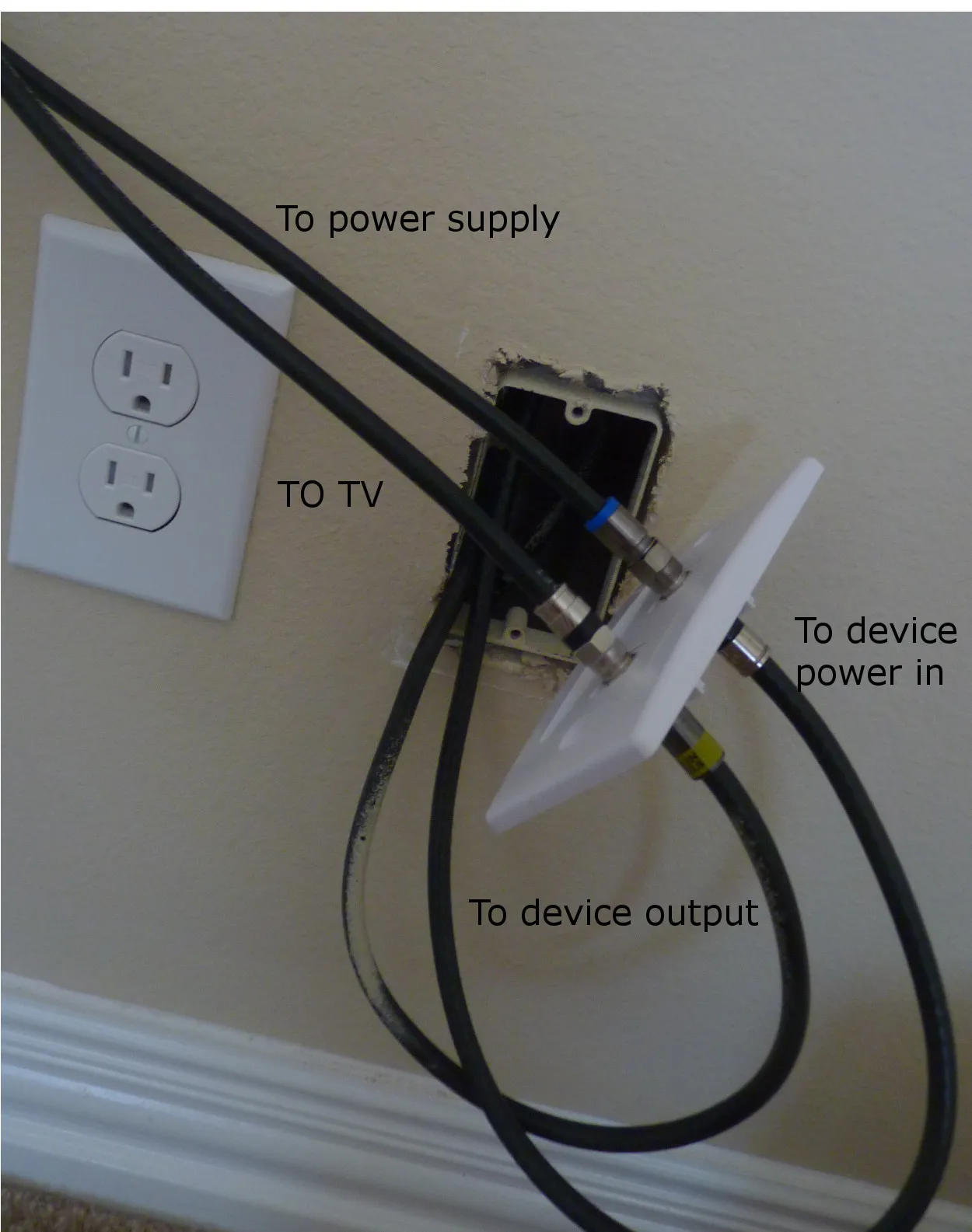
This figure depicts a typical home TV installation where a television is mounted on the wall. A coaxial cable exits from a wall plate and connects to a splitter placed near the TV. The splitter then distributes the signal to additional devices or rooms. The image emphasizes that the splitter is not an isolated component but becomes integrated into the overall signal path, influencing signal balance, loss, and long-term reliability.
A wall-mounted TV goes up cleanly.
Cable hidden. Plate aligned. Nothing visible.
Then a second room gets connected—and the signal starts breaking.
The splitter gets blamed first. It usually isn’t the real problem.
What changed is not the device. It’s the signal path.

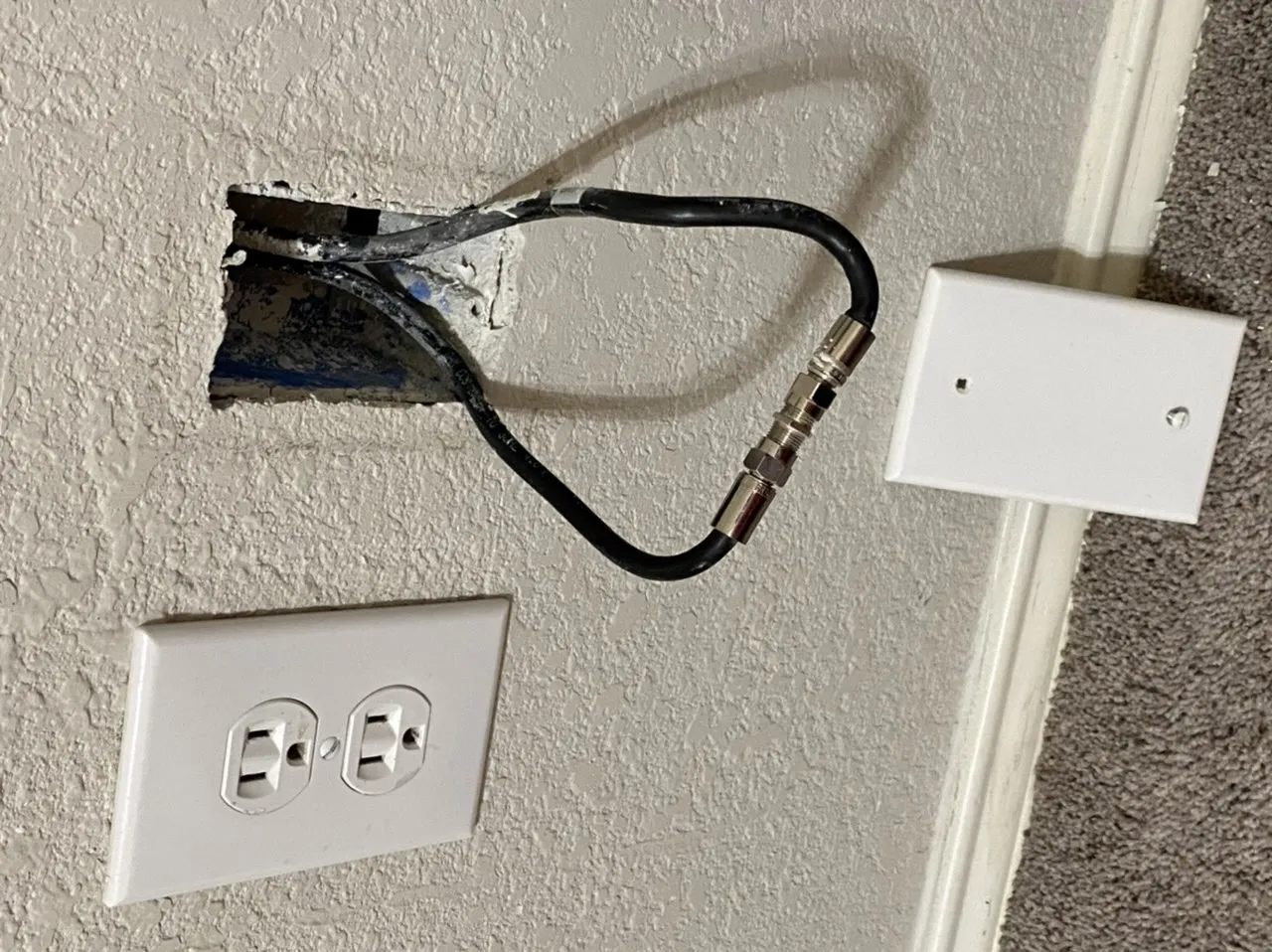
This figure shows a coaxial splitter sitting on a workbench or test setup. The image highlights how a splitter appears simple and benign in isolation. However, the accompanying text notes that in a real home installation—with variable cable lengths, bends, and other passive components—the splitter’s impact on signal loss and stability becomes significant. The contrast between bench simplicity and real-world complexity is the key message.

On a bench, a splitter feels harmless.
In a real home, it becomes part of the system.
Once installed, it quietly reshapes:
- signal balance
- loss budget
- cable tolerance
- future expandability
That’s where most installs go off track—not at the product, but at the decision before it.
Start with the signal path before you pick a coax splitter
Most mistakes start the same way:
Search → buy splitter → install → troubleshoot
The order is backwards.
Map the feed source, branch count, and device endpoints
A coax splitter behaves very differently depending on what feeds it.
Not all signals are equal:
- Cable provider feed → strong, stable
- Indoor antenna → weak, variable
- Mixed feed (TV + modem) → sensitive
Putting a splitter in the wrong place doesn’t always fail immediately. It creates instability later.
| Feed Type | Typical Setup | Split Stability | What Usually Happens |
|---|---|---|---|
| Cable TV feed | TV + TV | Medium–High | Works if layout is simple |
| Antenna feed | TV + receiver | Low | Signal drops quickly |
| Modem + TV | Shared line | Unstable | Intermittent issues |
Separate split, join, adapt, and extend tasks
A lot of installs fail because these are mixed together:
- Splitter used as extension
- Adapter used to fix wrong connector
- Coupler ignored completely
Each part has a single job:
- Splitter → divide signal
- Coupler → extend cable
- Adapter → match connector
Mixing them creates unnecessary loss.
And more importantly, it hides the real issue.
Where does splitter choice affect the whole TV system?
Once installed, the splitter is not “just a part.”
It becomes part of this chain:
Signal → cable → connector → splitter → endpoint
Every extra interface adds loss.
If you’ve worked through a full coaxial cable guide, you’ll already know that cable length matters. The splitter sits right inside that same system—it doesn’t get special treatment.
Which coax splitter layout actually matches a TV or antenna install?
A layout that looks fine on paper often breaks in physical space.
Walls, bends, furniture, and cable length differences all matter.
Use a two-way split only when two endpoints truly need the same feed
A 2-way splitter is the most stable option.
Not because it’s simple—but because it’s balanced.
Each output gets similar signal power.
But that balance breaks when:
- one cable is much longer
- one endpoint is more sensitive
- extra connectors exist on one side
Choose a three-way path only when branch priorities are clear
Three-way splitters are not equal across all ports.
Some outputs are lower loss. Others are weaker.
If you don’t assign endpoints intentionally:
- one TV works fine
- another struggles
This is where “random signal problems” usually start.
Match F-type ports before thinking about adapters
Most TV systems use F-type connectors.
But in real installs, you’ll see:
- loose threads
- worn connectors
- slight mismatches
Adding adapters to fix this creates extra interfaces—and every interface adds loss.
If connector roles feel confusing, reviewing something like an RF connector guide helps clarify how different connectors behave, even outside TV systems.
Keep antenna, TV, and wall-plate roles separate

This figure illustrates three common coax port types encountered in home TV systems: a wall plate (where the signal enters from the provider), a TV (the endpoint device), and an antenna (a signal source that is often weaker and less tolerant of splitting). The diagram helps explain why treating these endpoints interchangeably leads to poor layouts and signal degradation. The visual emphasizes that the source type (cable feed vs. antenna) dramatically changes how a splitter will perform.
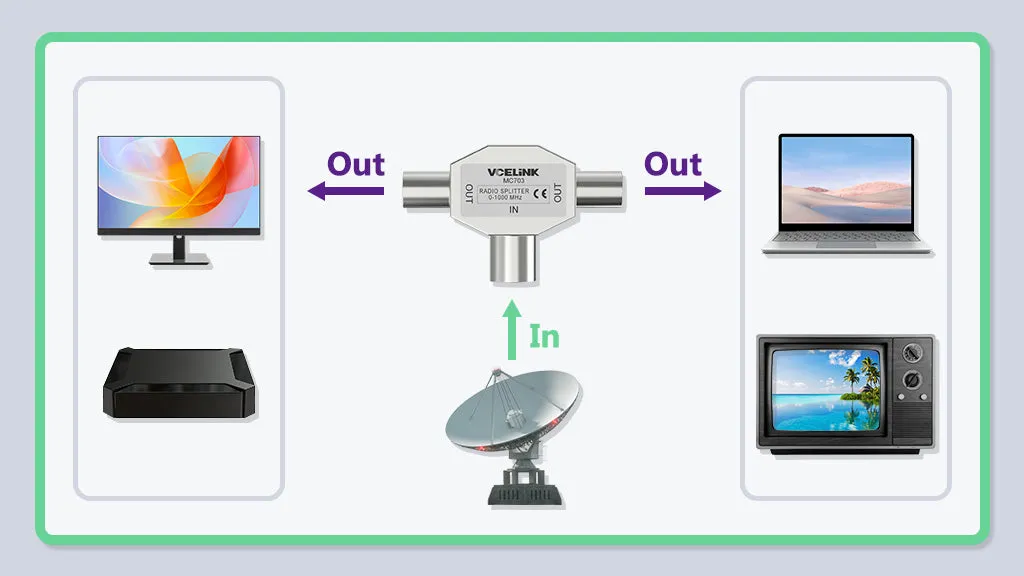
Not all coax ports are equal:
- Wall plate → signal entry
- TV → endpoint
- Antenna → signal source
Treating them the same leads to poor layouts.
An antenna feed, for example, is far less tolerant of splitting.
Can a coax splitter replace a coupler or connector?
This usually shows up during quick fixes.
A splitter looks like a multi-port connector.
So it gets used as one.
That’s where things go wrong.
Why a splitter is not a coupler
A coupler connects signal directly.
A splitter divides it.
Using a splitter to extend a cable adds loss immediately—even if only one port is used.
Why a splitter is not just another TV cable connector
A connector maintains continuity.
A splitter changes the signal.
That difference shows up as:
- weaker signal
- higher sensitivity to noise
- less margin for long runs
When extension is the real need instead of splitting

This figure depicts a common installation error: a splitter is installed early in the signal path “just in case” additional TVs are added later, but currently only one TV is connected. The unused splitter output port still introduces insertion loss (typically ~3.5 dB for a 2-way splitter), weakening the signal to the active TV. The image contrasts this with a simpler extension (coupler) that would preserve signal strength. The message is to match splitter size to actual current needs, not hypothetical future ones.
A common mistake:
Someone installs a splitter early “just in case.”
But only one TV is actually used.
The result:
- signal gets reduced unnecessarily
- future flexibility doesn’t help current performance
In many cases, a simple extension keeps the system cleaner.
How much passive loss can a home coax split tolerate?
Loss doesn’t come from one place.
It builds up:
- splitter
- connectors
- adapters
- cable length
Passive Loss Estimator
| Factor | Typical Value |
|---|---|
| 2-way splitter | ~3.5 dB |
| 3-way splitter | ~5–7 dB |
| Connector | ~0.1–0.2 dB |
| Adapter | ~0.2 dB |
| RG6 cable (100 ft) | ~5–6 dB |
Total Loss ≈ splitter + connectors + adapters + cable
Example:
- splitter → 3.5 dB
- connectors → 0.6 dB
- cable → 3 dB
Total ≈ 7 dB+
That’s enough to break a marginal signal.
Avoid the three setup mistakes that make a coax splitter look faulty
The splitter gets blamed because it’s visible.
The real issue usually isn’t.
Adding too many passive parts in one short run
Short cable. Multiple connectors. One splitter.
Looks neat. Performs poorly.
Using the wrong part when the job only needs extension
Splitter added where a coupler was enough.
Loss added for no reason.
Forgetting that every branch must still work

This figure illustrates that after a signal passes through a splitter, the branches are not automatically equal. One branch may have a much longer cable run, tighter bends, or additional connectors, leading to lower signal strength at the endpoint. The image reinforces that splitting is only the first step; the entire path to each device must be evaluated. Uneven performance across rooms often traces back to differences in branch layout rather than the splitter itself.
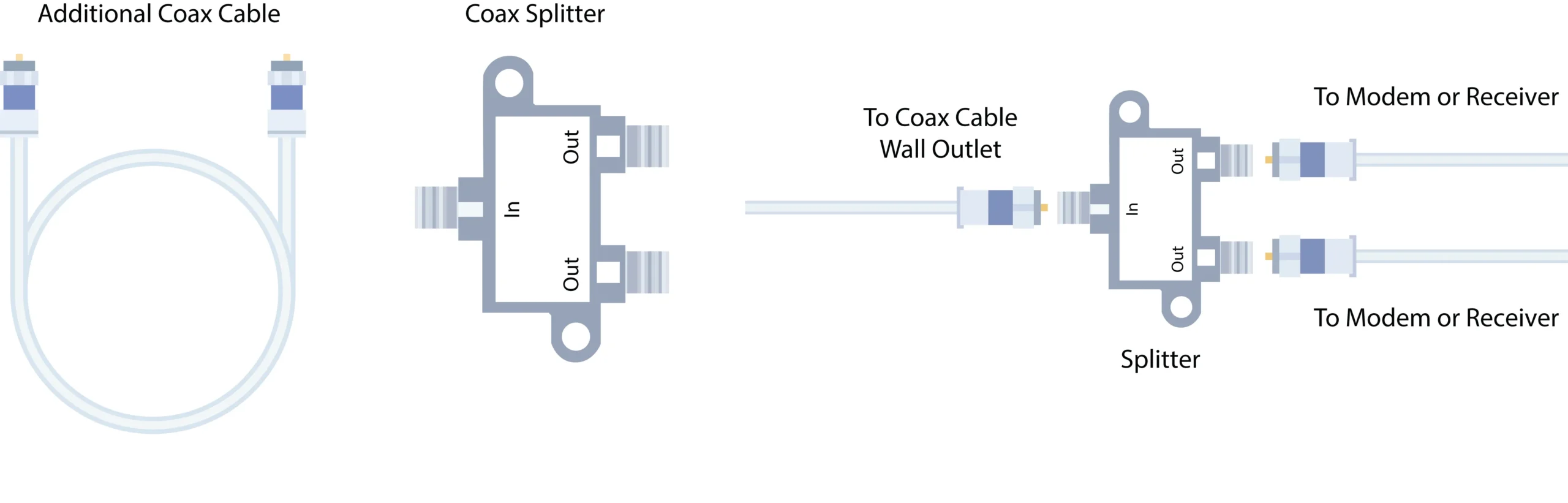
Splitting doesn’t guarantee usability.
Each branch still needs enough signal.
Choose by endpoint count, cable route, and future service access
Most splitter decisions look reasonable on day one.
Problems show up later—when something needs to be moved, replaced, or extended.
The difference between a stable install and a fragile one often comes down to how the splitter was positioned in relation to real space, not just signal logic.
Count ports based on actual devices, not future guesses
Over-splitting is one of the quieter mistakes.
A 4-way splitter gets installed for “future expansion,” but only two outputs are used. The unused ports don’t help. The added loss is still there.
It’s a small decision that changes the whole margin of the system.
Better approach:
- match splitter size to current endpoints
- leave expansion for later (via re-routing or re-splitting)
This keeps the signal path cleaner while still allowing flexibility.
Leave room for wall clearance and first-bend protection
The first bend after a connector is usually where problems start.
In tight wall installations:
- cables get forced into sharp angles
- connectors carry mechanical stress
- splitters sit under tension
This doesn’t fail immediately. It degrades over time.
You’ll see it as:
- intermittent signal
- connectors loosening
- unexplained dropouts
A small spacing decision—just a few centimeters—can prevent that.
Plan swaps and troubleshooting before the splitter disappears behind furniture

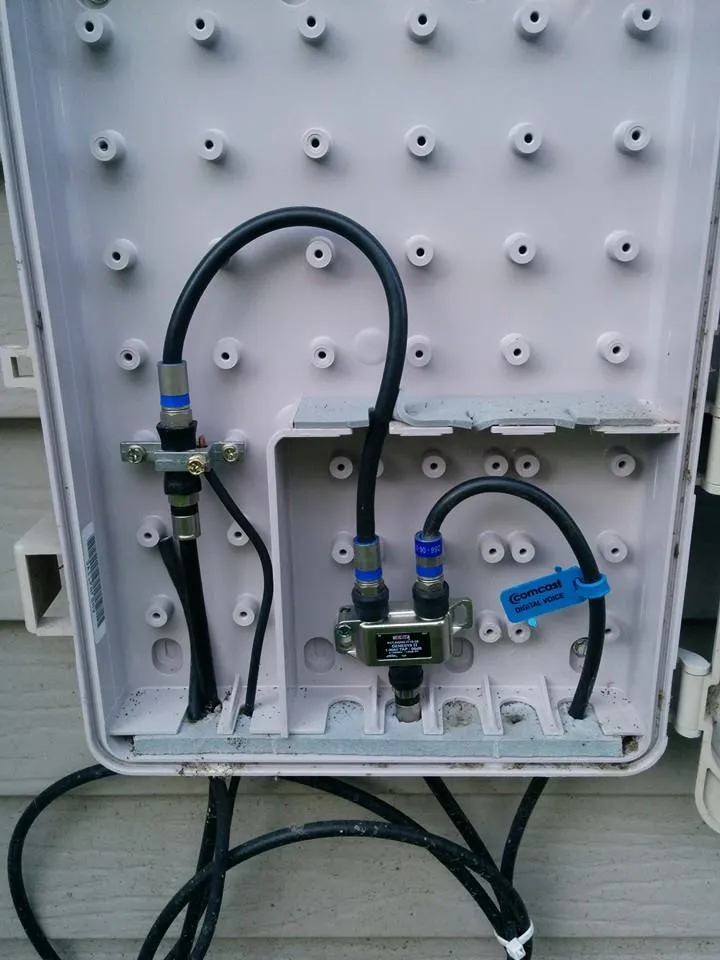
This figure depicts a scenario where a splitter is installed behind a wall-mounted TV or inside a wall box with no visible access and minimal cable slack. While the installation appears neat, any future need to replace or troubleshoot the splitter requires moving the TV or cutting into the wall. The image contrasts this with a serviceable layout that leaves access space, visible connection points, and enough cable length for manipulation. The key takeaway is that serviceability should be considered during installation, not after a failure occurs.
A clean install often hides everything.
That looks good until something needs to be fixed.
If the splitter is:
- buried behind a mounted TV
- tucked deep inside a wall box
- routed with no slack
then troubleshooting becomes destructive.
Not difficult—destructive.
A better layout leaves:
- access space
- cable slack
- visible connection points
It’s not about aesthetics. It’s about serviceability.
When should TV installs step back from a splitter and rethink the cable run?
Sometimes the splitter isn’t the problem anymore.
You fix connectors. You simplify the layout. The issue remains.
That’s usually the point where the problem moves upstream—into the cable itself.
Re-check the cable route when the splitter is no longer the bottleneck
If the splitter is correctly sized and placed, but performance is still unstable:
- check total cable length
- check routing path
- check environmental exposure
Long runs introduce loss. Tight routing introduces stress. Both compound quietly.
This is where many installs drift away from the original design intent.
Escalate to cable family decisions for longer or noisier runs
At a certain point, improving the splitter doesn’t help.
The limiting factor becomes the cable itself.
For longer indoor runs, differences between cable types start to matter:
| Cable Type | Typical Use | Strength | Limitation |
|---|---|---|---|
| RG6 | Home TV systems | Good balance of loss and flexibility | Moderate attenuation over long runs |
| RG59 | Short runs, legacy installs | Flexible, easy to route | Higher loss |
| RG11 | Long runs | Lower attenuation | Thick, harder to install |
This is where a broader coax routing decision becomes more important than the splitter itself.
If needed, revisiting a structured breakdown like the coaxial cable guide helps reframe the system from cable-first instead of splitter-first.
Know when an active solution belongs outside this article
There’s a limit to what passive components can do.
If total loss is already high:
- adding better splitters won’t fix it
- removing connectors might not be enough
At that point, the system needs amplification or redesign—not more passive optimization.
That’s usually outside the scope of a simple splitter decision.
What changed in 2026 for coax splitter decisions inside broadband homes?
The splitter itself didn’t change much.
The environment around it did.
DOCSIS expansion makes indoor passive planning more visible
Cable networks are pushing into higher frequency ranges.
That means:
- higher sensitivity to loss
- tighter tolerance for passive components
- less margin for poorly planned splits
Even small inefficiencies inside the home now show up more clearly.
This shift is reflected in broader industry updates like DOCSIS spectrum expansion from organizations such as CableLabs.
The takeaway is simple:
What used to “just work” now requires a bit more planning.
Broadband architecture still treats the last meters as a design problem
Most upgrades happen outside the home.
Inside the home, coax remains:
- passive
- user-installed
- highly variable
That last section—from wall to device—still determines whether the system performs as expected.
The splitter sits right in the middle of that section.
MoCA keeps existing coax relevant where Ethernet is hard to add
Even as Ethernet expands, many homes still rely on coax for internal distribution.
Technologies like MoCA allow data to travel over existing coax lines.
That keeps splitters relevant—but also more sensitive.
A poorly planned split now affects not just TV signals, but data performance as well.
FAQ — Real-world questions behind coax splitter installs
Can one coax splitter feed both a TV and an antenna receiver without causing issues?
Sometimes, but only if the antenna signal is strong enough.
In marginal reception areas, splitting usually weakens the signal too much.
Why does a coax splitter seem to fail less often than the connectors around it?
Because connectors are more sensitive to:
- mechanical stress
- improper tightening
- wear over time
The splitter often gets blamed simply because it’s visible.
When does a two-way split make more sense than extending a cable?
When both endpoints are active at the same time.
If only one device is used, extending the cable preserves signal strength.
How can you tell if signal loss comes from the splitter or the layout?
Remove the splitter and test directly.
If the signal stabilizes, the issue is cumulative loss—not necessarily the splitter alone.
Is it okay to install a larger splitter now for future expansion?
Usually not.
Unused outputs still introduce loss. It’s better to expand later when needed.
What gets overlooked most often in a splitter setup?
Cable routing.
Not the splitter. Not the connector.
The path itself.
Closing note
A coax splitter doesn’t usually break a system on its own.
It exposes decisions already made:
- cable length
- connector count
- routing quality
- endpoint planning
When those are aligned, the splitter behaves quietly.
When they’re not, it becomes the most visible place where things start to go wrong.
Where small decisions stack up into real signal problems

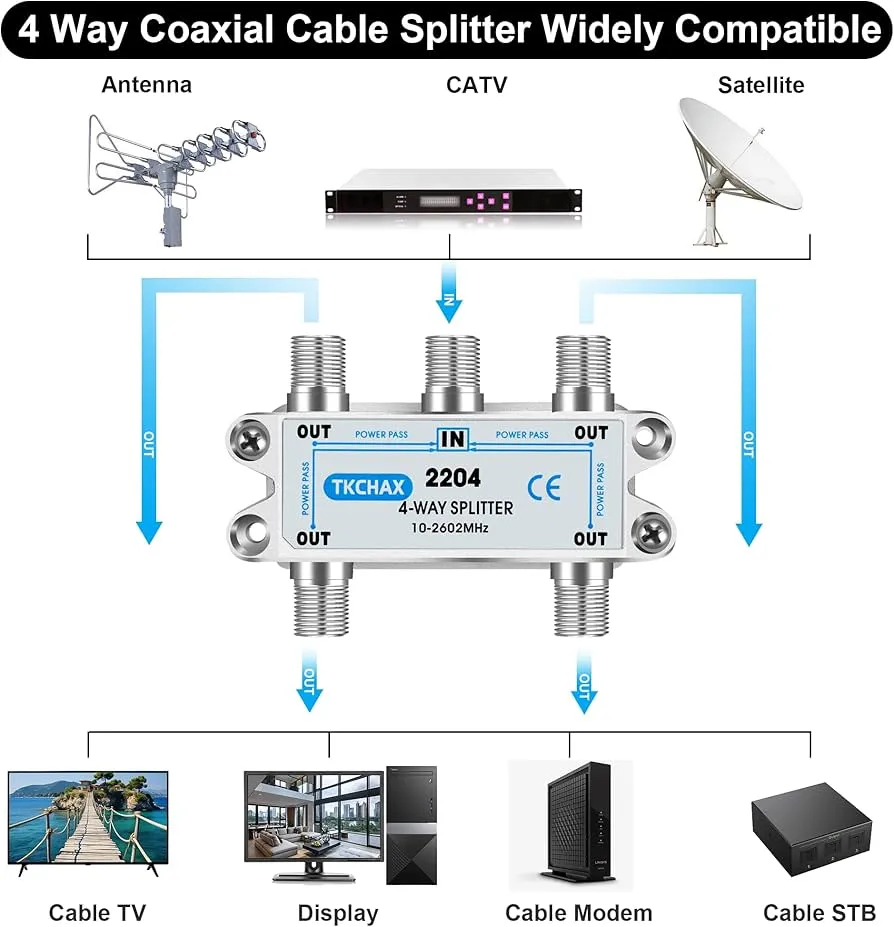
This product photograph shows a typical 4-way coaxial cable splitter, widely compatible with home TV and broadband systems. It features one F-type input port and four F-type output ports. The image highlights the physical design: a metal housing with threaded connectors. The accompanying text warns that while such splitters are convenient for distributing signal to multiple rooms, they introduce significant insertion loss (5–7 dB) compared to smaller splitters. Using a 4-way splitter when only two outputs are needed adds unnecessary loss and reduces system margin.
By the time a splitter looks suspicious, the chain is already long.
Cable comes in from the wall.
A short jumper is added.
A coupler fixes length.
A splitter creates two paths.
Adapters fix fit.
Another short cable reaches the TV.
Individually, each step looks harmless. Together, they reshape the signal.
This is where installs start drifting away from intent. Not because of a single bad part—but because nothing was removed when something new was added.
You’ll often see this in retrofit setups:
- older cable extended instead of replaced
- extra connectors left in place
- splitter added without removing anything upstream
The system still works—just with less margin.
What a stable coax splitter layout actually looks like
A clean layout isn’t about fewer parts. It’s about intentional ones.
There’s a noticeable difference between:
- assembled layout → parts added as needed
- planned layout → signal path defined first
A stable setup tends to follow a few quiet rules:
Keep the signal path short before the split
Splitting early spreads loss across all branches.
Splitting later keeps the main path stronger for longer.
In most homes, placing the splitter closer to endpoints—not the entry point—keeps the system more forgiving.
Avoid stacking passive components in one location
Clusters create compounded loss and mechanical stress.
Instead of:
- wall → coupler → adapter → splitter → cable
Aim for:
- wall → cable → splitter → direct runs
Fewer transitions. Fewer surprises.
Balance cable lengths where possible
Perfect symmetry isn’t required, but large differences matter.
If one branch is twice as long:
- it loses more signal
- it becomes the weak link
This shows up as one room working fine while another struggles.
Anchor the layout, not just the cables

This figure illustrates a common mechanical oversight: a coax splitter left loose or “floating” behind equipment or inside a cabinet. Over time, movement from cable pulls, vibrations, or routine adjustments causes the splitter to shift, putting strain on the attached connectors. This leads to loosened threads, intermittent contact, and gradual signal degradation. The image contrasts this with a properly anchored splitter (e.g., using a clip or mounting bracket) that remains stationary, protecting the connectors and maintaining stable performance. The key message is that mechanical stability is as important as electrical correctness.

A floating splitter moves.
Movement leads to:
- loose connectors
- strain on ports
- gradual degradation
Fixing the splitter in place—physically—prevents that.
Connector behavior still matters inside a TV system
Even in a simple TV setup, connectors quietly influence performance.
F-type connectors dominate here, but variation still exists:
- compression vs screw-on builds
- different material quality
- wear from repeated use
They all look similar. They don’t behave the same.
Where connector issues usually show up
- behind wall plates
- at splitter outputs
- at device inputs
These are also the points most likely to be:
- over-tightened
- under-tightened
- reused multiple times
That combination creates small mismatches that add up.
If you need a broader comparison of connector behaviors beyond TV setups, a deeper breakdown like choose the right TV coax connector first helps frame how connection quality impacts signal continuity.
Even though TV systems stay mostly within F-type, the same principles apply.
Mechanical fit matters more than it looks
A slightly loose connector doesn’t always fail immediately.
It introduces:
- micro reflections
- unstable contact
- intermittent performance
These are the hardest issues to trace because they don’t behave consistently.
Why neat installations still fail behind the wall
A clean wall-mounted setup can still perform poorly.
Because visual neatness doesn’t reflect electrical quality.
Typical hidden problems:
- tight bend radius behind TV
- compressed cables against wall brackets
- splitter pressed into a corner
- no slack for connectors
Everything looks perfect—until the system runs under real conditions.
Heat, vibration, and time start to expose those constraints.
A quick field checklist before blaming the splitter
Not a buying checklist. A sanity check.
Before replacing the splitter, check:
- number of connectors in line
- presence of unnecessary adapters
- cable length differences between branches
- bend radius near wall or device
- whether extension was mistaken for splitting
If two or more of these show up, the splitter is rarely the root cause.
Final perspective
A coax splitter doesn’t improve a system.
It redistributes what’s already there.
That’s why it feels unpredictable.
If the signal path is clean, it works quietly.
If the path is crowded, it exposes every weak point.
Most of the time, fixing a “splitter problem” means stepping back one layer:
- simplify the chain
- remove what isn’t needed
- place the split with intent
Do that, and the splitter stops being the suspect.
Bonfon Office Building, Longgang District, Shenzhen City, Guangdong Province, China
A China-based OEM/ODM RF communications supplier
Table of Contents
Owning your OEM/ODM/Private Label for Electronic Devices andComponents is now easier than ever.
