
SMA to BNC Adapter for RF Work
Mar 26,2026
Place SMA to BNC adapter inside a real RF workflow
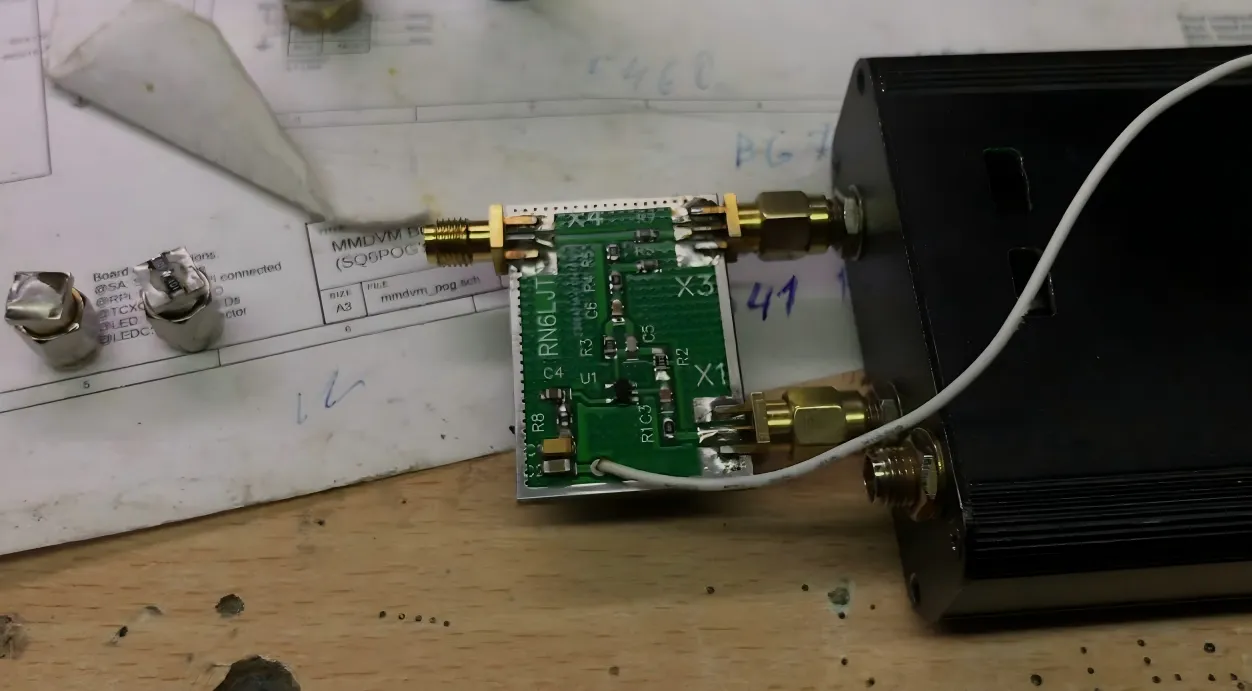
This figure illustrates a common lab scenario where a modern RF module or device with an SMA port needs to connect to an older test instrument with a BNC input. A rigid SMA to BNC adapter is shown as a short metal transition between the two. The image emphasizes that while the adapter appears simple, it introduces a rigid mechanical interface into the signal chain. In stationary bench setups with aligned connectors, this rigid transition provides a compact, direct connection without adding extra cable length.
A typical lab setup rarely fails because of a missing component.
The radio module is already powered. The antenna has been selected. A short piece of coax sits on the bench ready to connect everything.
Then someone notices the ports.
The module exposes SMA.
The instrument on the bench — maybe a spectrum analyzer from ten years ago — still uses BNC.
At that moment, the quickest fix is usually a sma to bnc adapter pulled from a drawer full of connectors. Tighten it onto the SMA port, snap the BNC cable onto the other side, and the measurement appears on screen.
In many test setups, that solution works perfectly well.
But once that small transition becomes part of the permanent RF path — not just a temporary bench connection — its role changes. The adapter becomes another element in the signal chain, alongside the cable, connectors, and antenna. That small piece of metal quietly affects impedance continuity, insertion loss, and sometimes mechanical reliability.
Understanding where a rigid adapter fits — and where it does not — is the first step toward using it correctly.
Connect SMA radios to BNC instruments and legacy test gear
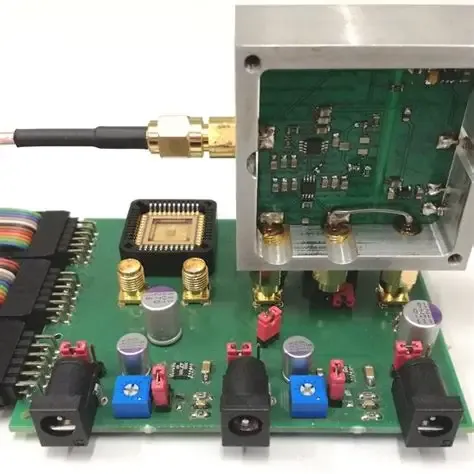
This figure illustrates the typical connector ecosystems in RF environments. On one side, modern compact devices (radios, modules, GNSS boards) commonly use SMA connectors. On the other side, laboratory instruments, oscilloscopes, and legacy RF gear often feature BNC connectors. An SMA to BNC adapter is shown as the bridge between these two worlds. The image highlights that while mechanically compatible, the transition must also maintain electrical impedance consistency (50 ohms) for predictable RF performance, especially as frequency increases.
Connector ecosystems tend to form around different types of equipment.
Small RF devices almost always expose SMA connectors. GNSS modules, LTE radios, telemetry boards, and many IoT gateways use SMA because the connector is compact and handles high frequency ranges comfortably.
Bench instruments, on the other hand, often rely on BNC. Oscilloscopes, older spectrum analyzers, signal generators, and various measurement fixtures still ship with BNC interfaces.
The result is a mismatch that shows up in everyday RF work.
An engineer might be testing:
- a cellular modem module
- a GNSS receiver board
- a small RF amplifier
- an antenna tuning circuit
Each of those devices might expose SMA. But the test instrument across the bench still expects a BNC connection.
That gap is exactly where the SMA to BNC adapter earns its place. It allows two established connector ecosystems to meet without replacing the cable or modifying the instrument.
When the ports sit close together and the system is stable, the rigid adapter becomes a convenient bridge.
Keep the transition inside a 50-ohm path whenever the system is RF
The mechanical connection is the obvious part.
The electrical path is the part people forget.
Most RF systems are built around 50-ohm impedance. Radios, antennas, amplifiers, and measurement equipment are usually designed around that standard because it balances power handling and signal loss.
The coaxial cables in those systems — RG58, RG316, LMR-200, and similar families — are also designed to maintain that same impedance.
Adapters must respect that path.
The complication appears because BNC connectors exist in both 50-ohm and 75-ohm versions. At a glance they look almost identical. The outer metal body is the same shape, and both versions will physically connect to each other.
Electrically, though, they are not the same.
A quick comparison makes the issue clearer.
| BNC Type | Typical Use | System Impedance | Notes |
|---|---|---|---|
| 50-ohm BNC | RF equipment, radio systems | 50 Ω | Common in lab RF instruments |
| 75-ohm BNC | Broadcast video, CCTV | 75 Ω | Used for video signal paths |
Connecting a 50-ohm RF system to a 75-ohm transition does not usually cause immediate failure. Signals still pass through the connector.
But the mismatch introduces small reflections in the signal path. At low frequencies the effect might be negligible. At higher RF frequencies those reflections accumulate and can disturb measurement accuracy or degrade link margin.
Even a short adapter can introduce those inconsistencies.
For this reason, RF engineers generally try to keep the entire interconnect chain — cable, connector, and adapter — inside a consistent 50-ohm environment whenever possible. The logic is the same one that applies to coaxial cable selection in most RF installations. A good overview of that principle appears in this reference on coaxial cable.
In practice the rule is simple:
match impedance first, connector shape second.
Separate rigid adapters from flexible cable assemblies before design freeze
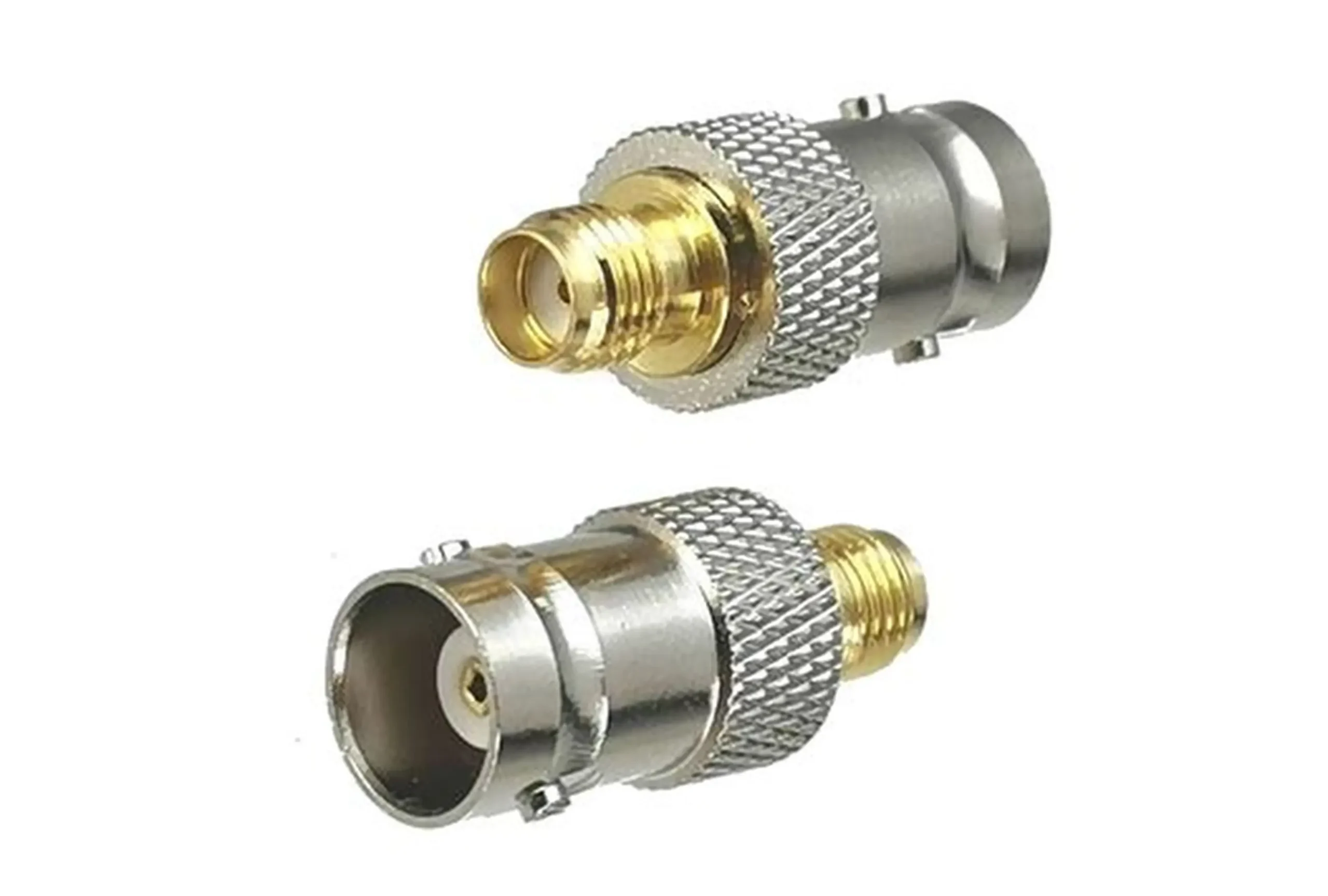
This image shows a rigid SMA to BNC adapter, a short metal body with an SMA connector on one end and a BNC connector on the other. It is designed to directly mate two devices with mismatched connector types in fixed, aligned setups such as laboratory benches. The adapter offers a minimal-length signal path with no flexible cable, making it ideal for stationary applications where connectors are well-aligned and mechanical stress is low. However, it does not provide strain relief or tolerance to misalignment, and any cable movement transfers torque directly to the connector threads.
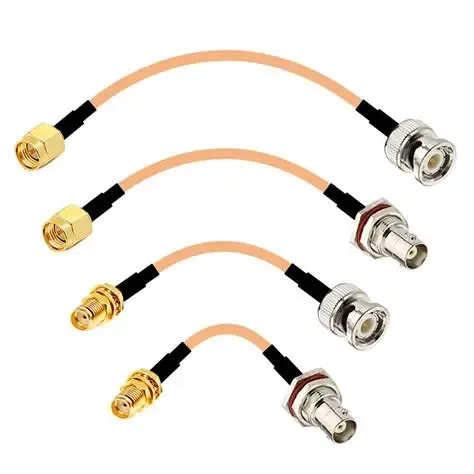
This image shows a flexible SMA to BNC cable assembly, typically built with a short length of RG316 coaxial cable terminated with an SMA connector on one end and a BNC connector on the other. Unlike a rigid adapter, this assembly provides flexibility, allowing it to accommodate misaligned ports, absorb vibration, and relieve mechanical strain. Such assemblies are preferred in portable setups, vibration-prone environments, or when connectors are recessed or offset. The flexible coax maintains 50-ohm impedance while offering routing convenience.
The next decision engineers often postpone is the physical form of the transition.
At first glance an adapter and a cable assembly seem interchangeable. Both connect an SMA port to a BNC port. Both allow signal flow between devices.
Mechanically they behave very differently.
A rigid adapter is essentially a metal bridge. The two connectors sit back-to-back with almost no flexibility between them.
A cable assembly introduces a short length of coaxial cable between the connectors, allowing the path to bend or absorb small mechanical movements.
The difference matters more than it appears.
| Transition Type | Structure | Typical Advantage | Typical Risk |
|---|---|---|---|
| SMA to BNC adapter | Rigid connector-to-connector | Compact, direct connection | Transfers mechanical stress to ports |
| SMA to BNC cable | Short coax assembly | Absorbs vibration and offset | Slightly longer signal path |
In a controlled bench environment, rigid adapters are convenient. Everything sits on the table. Cables lie loosely. Nothing moves once the measurement starts.
Inside an enclosure or production device, conditions change. Ports might sit at slightly different depths. A cable might route through a panel wall. Assembly technicians might tighten connectors repeatedly during maintenance.
Under those circumstances, the rigid adapter can become the weakest mechanical link in the chain.
Many RF designers discover this only after the first prototype build. The connection works during testing, but small stresses begin to accumulate on the SMA port — especially if the module connector sits on a thin PCB or panel.
That is why experienced teams usually decide early whether the transition should be rigid or flexible. Waiting until the final mechanical design stage often leads to awkward connector stacks or fragile signal paths.
Choose adapter or cable before you choose the connector gender
Another common sourcing mistake appears surprisingly often in procurement orders.
Teams focus on connector gender first.
Someone writes a specification like:
- SMA male to BNC female
- SMA female to BNC male
The parts are ordered. The adapter arrives. And only during installation does the mechanical issue appear.
The two ports are offset by a few centimeters.
Or one connector sits behind a panel recess.
Or the cable approaching the adapter needs to bend sharply in order to reach the instrument.
In those situations, the gender combination might be correct — but the product type is wrong.
The better sequence is usually:
- Decide whether the transition must be rigid or flexible.
- Confirm the connector types.
- Choose the gender combination last.
It sounds trivial, yet many RF teams reverse that order because connector catalogs are organized primarily by gender combinations.
Once that decision sequence changes, adapter selection becomes more predictable.
Use an adapter when ports are aligned and strain-free
Rigid adapters work best in very specific physical conditions.
The ports must be close together.
Both devices should be mechanically stable.
And the cable path should not apply torque or bending force to the connectors.
Bench testing environments fit those conditions nicely.
A spectrum analyzer might sit next to a test fixture on the same work surface. The coax cable approaches the adapter in a straight line. Nothing vibrates, and the connection is rarely disturbed once the measurement begins.
In that environment the rigid adapter actually simplifies the signal path.
There is no additional cable segment.
No extra connector pair.
No routing complexity.
The RF chain becomes shorter and cleaner.
Many engineers deliberately prefer rigid adapters in these setups because they reduce unnecessary cable clutter on the bench.
Use a cable when offset, vibration, or repeated handling exists
As soon as the mechanical environment becomes less predictable, the calculation changes.
Offset connectors are a common example. A device port might sit several centimeters away from the instrument connection point. A rigid adapter forces the cable to bend sharply to reach the port.
That bending force transfers directly into the connector threads.
Over time the stress can loosen the connector or damage the SMA port — especially if the port is mounted directly on a printed circuit board.
Flexible SMA to BNC cable assemblies avoid that problem. The short coax segment absorbs the alignment difference and prevents the connector bodies from acting as structural elements.
Transportation introduces another problem.
Equipment that works perfectly in a laboratory often travels inside shipping cases or field test kits. Small shocks and vibrations that occur during transport can apply repeated force to rigid connectors.
In those situations, a short coax jumper is often more forgiving than a rigid metal adapter.
Stop adapter stacking before it becomes the weak point
Another pattern appears in many prototype builds: adapter stacking.
A device might need an SMA-to-BNC transition, but the available cable already terminates in SMA. Someone inserts an SMA-to-SMA adapter, followed by the SMA-to-BNC adapter.
Now two rigid connectors sit between the device and the cable.
Electrically the signal still travels through the chain.
Mechanically the structure becomes increasingly fragile.
Each additional adapter introduces:
- another small insertion loss
- another threaded interface that can loosen
- another point where torque can accumulate
The chain gradually becomes a small mechanical lever attached to the SMA port.
Experienced RF technicians try to avoid that situation entirely. If the connection requires more than one rigid adapter, it is often safer to replace the whole assembly with a single purpose-built cable.
Match impedance before you match the metal shape
In many sourcing conversations the adapter is treated like a mechanical accessory.
Two connectors, two threads, one metal body in between. If the threads fit, the assumption is the signal will behave.
RF systems rarely work that way.
The connector transition sits inside the transmission line just like the cable does. Any discontinuity inside that path becomes part of the electrical environment. Most of the time the effect is small, but “small” changes start stacking once several transitions appear in the same chain.
That’s why experienced RF engineers tend to check impedance compatibility before worrying about connector orientation or gender.
The adapter body is visible.
The impedance environment is not.
But the latter matters far more once the system begins operating above a few hundred megahertz.
Confirm whether the BNC side is really 50 ohms
BNC connectors are a surprisingly common source of impedance mistakes.
In a laboratory environment the connector usually means 50-ohm BNC. Oscilloscopes, signal generators, RF analyzers and many bench fixtures follow that standard, so engineers get used to assuming BNC automatically equals 50 Ω.
Outside the lab, that assumption breaks quickly.
Broadcast video equipment, surveillance systems and certain signal distribution hardware often rely on 75-ohm BNC connectors instead. The outer metal body looks identical to the RF version. The difference sits inside the dielectric geometry and center conductor spacing.
That subtle difference is easy to miss when scanning a distributor page.
Two adapters may appear nearly identical in product photos yet belong to different impedance environments. In a low-frequency environment the mismatch may go unnoticed. In RF measurements the mismatch shows up as reflection and measurement drift.
A simple comparison helps explain the issue.
| BNC Version | Typical Environment | System Impedance | Practical Consequence |
|---|---|---|---|
| 50 Ω BNC | RF instruments, test systems | 50 ohm | Compatible with RF signal chains |
| 75 Ω BNC | Video, broadcast, CCTV | 75 ohm | Causes impedance mismatch in RF paths |
The mistake usually happens during procurement rather than design. Someone searches for “SMA to BNC adapter”, orders the first listing that looks correct, and assumes the connector type already guarantees impedance compatibility.
It does not.
For RF systems the BNC side of the adapter should always be verified as 50 ohms unless the project intentionally involves a 75-ohm system.
Keep 50-ohm systems inside one consistent interconnect path
RF signal paths behave best when the impedance environment stays consistent from source to destination.
That rule applies not only to cables but to connectors, adapters and measurement fixtures as well.
Most wireless electronics follow the 50-ohm standard. Radios, antennas, amplifiers and test instruments are designed to operate in that environment because it balances power handling with manageable attenuation.
Once the signal leaves the device, the path might look like this:
radio module → SMA connector → adapter → coax cable → BNC connector → instrument
Every transition becomes a potential impedance discontinuity. If the cable remains 50 Ω but the adapter or connector shifts toward a different impedance environment, the signal begins reflecting slightly at that boundary.
Those reflections may not immediately break the system. The link still works. Measurements still appear on the screen.
But the chain becomes less predictable.
A helpful background explanation of why coaxial systems rely on consistent impedance appears in this reference on coaxial cable. The principle applies equally to adapters, even though they look like simple connector bridges.
For RF installations the practical guideline is simple:
keep the entire interconnect path inside the same impedance environment whenever possible.
Add a deliberate transition when RF gear must meet video hardware
Occasionally the mismatch cannot be avoided.
RF equipment sometimes needs to connect to video distribution hardware or broadcast infrastructure. Those systems frequently operate in a 75-ohm environment. The impedance difference becomes unavoidable at the interface.
In those situations engineers normally treat the connection as a controlled transition point rather than pretending the systems share the same electrical environment.
That usually means:
- isolating the impedance change at a single adapter
- avoiding additional transitions near the mismatch
- keeping the mismatched section physically short
Treating the transition deliberately prevents the impedance shift from spreading unpredictably along the signal chain.
In other words, the mismatch becomes a known design choice instead of an accidental by-product of connector selection.
Confirm SMA side gender, polarity, and mounting role
The SMA side of the adapter deserves careful inspection because the SMA ecosystem contains several variations that look deceptively similar.
Standard SMA connectors follow the familiar male-pin / female-socket pattern. Reverse-polarity SMA connectors flip that center conductor orientation while keeping the same outer thread design.
This configuration appears frequently in Wi-Fi hardware and certain consumer wireless devices.
From the outside, the connector looks identical to standard SMA. Only the center conductor reveals the difference. Ordering the wrong polarity produces an adapter that threads correctly yet fails to establish electrical contact.
The mechanical mounting of the SMA port also affects adapter choice.
An SMA connector may serve as:
• a board-mounted RF port
• a panel bulkhead connection
• a cable termination
Board-mounted connectors are particularly sensitive to torque. A rigid adapter attached to such a port can act as a small lever, especially when a cable pulls on the adapter body.
That leverage may gradually loosen the connector or stress the PCB solder joints.
When the SMA port belongs to a delicate board connector, a short cable assembly often distributes mechanical stress more safely than a rigid metal adapter.
Confirm BNC side plug, jack, and equipment context
The BNC side introduces its own mechanical considerations.
Most engineers easily recognize the difference between BNC plug and BNC jack, but the installation environment still matters.
Bench instruments generally expose BNC jacks.
Coaxial cables typically terminate in BNC plugs.
Panel connectors may appear in either configuration.
Because the BNC interface uses a bayonet locking mechanism, the connection usually feels robust once installed. However, the physical space around the connector can still cause issues.
Some instruments place BNC connectors very close together on the front panel. A bulky adapter body may block access to neighboring ports or interfere with other cables.
Checking the surrounding clearance prevents situations where the adapter fits electrically but cannot rotate freely enough to engage the locking mechanism.
Choose straight or right-angle by stress and clearance
Adapter orientation often becomes an afterthought, yet it can strongly influence the mechanical reliability of the connection.
Most suppliers offer both straight adapters and right-angle versions of the same connector combination.
The difference is not cosmetic. It changes how the cable loads the connector.
| Adapter Style | Typical Use | Mechanical Effect |
|---|---|---|
| Straight | Ports already aligned | Shortest electrical path |
| Right-angle | Cable must turn immediately | Reduces bending stress |
A straight adapter extends the signal path outward from the device. If the cable naturally approaches the connector in that direction, the configuration works well.
If the cable must immediately bend after leaving the connector, the straight adapter transfers that bending force directly into the connector threads.
Right-angle adapters redirect the cable path immediately, allowing the cable to run parallel to the panel surface. In tight installations this orientation reduces mechanical stress significantly.
The decision should always follow the cable routing path rather than visual preference.
Calculate transition loss before the adapter becomes the hidden bottleneck
Adapter losses rarely dominate RF system performance, but ignoring them entirely can produce misleading expectations.
Engineers usually focus on coaxial cable attenuation when estimating signal loss. Cable attenuation grows with length and frequency, so it naturally attracts attention during link calculations.
Adapters introduce much smaller losses. The transition inside a well-made RF adapter typically contributes only a fraction of a decibel.
The problem appears when several connectors and adapters accumulate in the same path.
A typical RF measurement chain might include:
device connector → adapter → cable → additional connector → instrument port
Each interface introduces a small disturbance in the transmission line. Individually those disturbances remain small. Together they gradually reduce the available signal margin.
High-frequency systems feel this effect first.
The shorter the wavelength becomes, the more sensitive the signal path becomes to small discontinuities. What looked negligible at a few hundred megahertz begins to matter once the frequency climbs into multi-gigahertz territory.
For that reason many RF designers include connector transitions in their loss estimates rather than focusing exclusively on cable attenuation.
Budget adapter loss together with cable loss
When calculating signal paths quickly, engineers often assign a small approximate loss value to connector transitions.
Exact numbers vary by frequency and connector quality, but a simple estimate works well during early design discussions.
| Component | Approximate Loss Contribution |
|---|---|
| RF connector pair | ~0.1–0.2 dB |
| Adapter transition | ~0.15 dB |
| Short RG316 cable segment | ~0.3–0.6 dB depending on length |
These numbers are intentionally approximate. The goal is not perfect precision but a realistic understanding of where the signal energy goes.
Ignoring connector transitions entirely can make a signal path look healthier on paper than it actually is.
Watch connector count when frequency rises
Connector count becomes increasingly relevant as RF systems move toward higher frequencies.
Low-frequency systems often tolerate multiple transitions without measurable performance loss. As frequency rises, each discontinuity in the transmission line becomes more noticeable.
A signal path with many connectors and adapters may still function, but the accumulated tolerances reduce repeatability.
For that reason engineers building higher-frequency RF systems often simplify the interconnect chain wherever possible. Reducing the number of transitions generally improves both electrical stability and mechanical reliability.
Replace rigid transitions with short jumper cable when the path becomes unstable
Mechanical stability sometimes outweighs the theoretical electrical advantage of a rigid adapter.
Rigid adapters keep the signal path short, but they also transfer mechanical force directly into the connectors. If the cable pulls sideways or the device moves slightly during operation, that force concentrates at the connector threads.
Flexible coax jumpers absorb those movements instead.
Short cable assemblies built from thin coax families — such as RG316 — appear frequently in RF systems for exactly this reason. The cable bends easily and isolates the connectors from torque.
A detailed explanation of why compact RF systems often rely on that cable type appears in this RG316 coaxial cable guide.
If a signal path requires multiple rigid adapters or experiences repeated handling, replacing the adapters with a purpose-built cable assembly usually improves long-term stability.
Route the connection so the ports survive service and transport
An RF connection that behaves perfectly on the bench can start acting strangely once the equipment leaves that environment.
Nothing about the signal path has changed electrically. Same module. Same cable. Same adapter. Yet the measurements begin drifting or the connection suddenly feels loose after a few weeks in use.
The difference is usually mechanical.
On a workbench, cables tend to lie flat and stay where they are placed. Once the system moves into a rack, an enclosure, or a field test kit, the adapter becomes part of a moving structure. Cables get pulled, connectors are tightened repeatedly, and the equipment experiences vibration during transport.
Rigid adapters are small pieces of hardware, but they are not designed to carry mechanical load.
This is why RF technicians often pay attention to cable routing long before worrying about connector specifications. The signal path may be electrically correct, yet poor routing can still shorten the life of the connectors.
Stop torque from reaching the SMA side
Between the two connectors in an SMA to BNC adapter, the SMA side usually deserves the most protection.
SMA connectors are compact and capable of working at relatively high frequencies. That compact size also means the connector threads and center contact are smaller and easier to stress mechanically.
If a cable pulls sideways on the adapter body, the force travels directly into the SMA threads.
This is easy to overlook during initial testing. The connection feels secure when tightened. The measurement looks stable. Nothing appears wrong.
The stress appears gradually.
Each time the cable moves, a small amount of torque reaches the connector. Over time that repeated force can loosen the connector slightly or shift the center conductor alignment. The result is often inconsistent measurements rather than complete failure.
A simple rule helps avoid the problem:
do not let the cable hang from the adapter.
Instead, allow the cable to rest on the equipment chassis or the work surface so that its weight is supported somewhere other than the connector itself.
Move mechanical load to the enclosure, not the adapter body
In a well-designed RF system, connectors should carry signal — not structural load.
When cables must run through equipment panels or across enclosures, designers often introduce small strain-relief points. These might be simple cable clamps, tie mounts, or bulkhead connectors.
Their job is to intercept the mechanical load before it reaches the adapter.
Without that support, the adapter effectively becomes a short lever attached to the SMA connector. Even a small sideways force can multiply once it reaches the connector threads.
A practical example appears frequently in prototype builds.
A radio board exposes an SMA port on the edge of the PCB. The engineer attaches a rigid adapter and then connects a fairly thick coax cable. The cable weight slowly pulls downward on the adapter body.
At first nothing seems wrong. After a few weeks the connector starts feeling slightly loose when tightened.
That small movement is the early sign of mechanical stress.
Supporting the cable with a simple clamp or routing guide prevents the connector from carrying that load in the first place.
Treat transport vibration and bench handling as design inputs
RF connectors rarely fail while sitting idle.
Failures usually appear when the equipment is moved.
Portable measurement systems, field radios, and rack-mounted electronics all experience vibration during transport. Small repeated movements slowly loosen threaded connectors, especially when rigid adapters extend away from the equipment panel.
Bench work introduces another pattern. Engineers disconnect and reconnect cables frequently during troubleshooting or calibration. Each reconnection changes the mechanical stress slightly.
A rigid adapter amplifies those forces.
When equipment is expected to be handled often, many engineers switch to a short coax jumper rather than relying on a rigid metal transition. The cable absorbs the movement and keeps the connector threads from acting as structural joints.
Use application cases to choose the right SMA to BNC adapter
The usefulness of a rigid adapter becomes clearer when viewed through actual use cases.
Adapters themselves are simple. The surrounding environment determines whether they are appropriate.
Several RF scenarios appear repeatedly in practice.
Use SMA to BNC cable when the setup needs flexibility
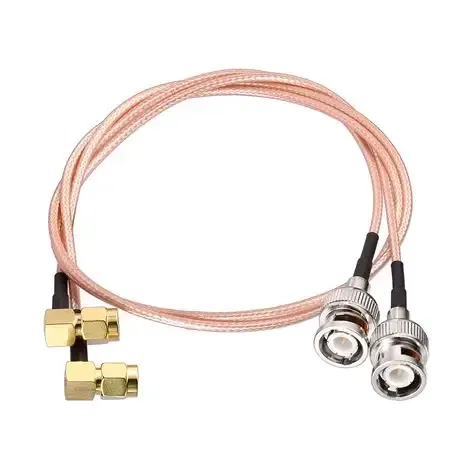
This figure illustrates a practical scenario where a rigid adapter would be unsuitable due to connector misalignment or recessed panel mounting. A flexible SMA to BNC cable is shown bridging an SMA device to a BNC instrument, with the coax segment absorbing the spatial offset and mechanical stress. The image emphasizes that in such environments—where ports are not perfectly aligned or equipment is subject to movement—a flexible cable assembly provides superior mechanical reliability compared to a rigid adapter. The cable acts as a mechanical buffer, protecting the SMA connector from torque and vibration.
Some RF systems cannot maintain that level of stability.
Devices inside enclosures often place connectors at different depths or angles. A cable approaching the adapter may need to bend immediately after the connection. Portable equipment might be moved during operation.
In those situations a rigid adapter can become awkward.
A short SMA-to-BNC cable assembly introduces flexibility into the connection. The cable bends to accommodate small offsets between connectors and absorbs movement when the equipment shifts.
This reduces mechanical stress on both connectors.
Thin coaxial cable families such as RG316 are often used in these assemblies because they bend easily while still performing well at RF frequencies. A practical overview of how that cable behaves in small RF systems appears in this RG316 coaxial cable guide.
In many real installations the cable assembly ends up being the more durable solution, even though the rigid adapter initially seemed simpler.
Compare BNC to SMA adapter only to cover reverse search behavior
The naming of adapters sometimes causes confusion during sourcing.
An engineer might search for an SMA to BNC adapter, while another engineer looking for the same part searches for a BNC to SMA adapter.
Electrically the two descriptions refer to the same physical transition. The signal path is identical regardless of which connector name appears first.
Catalogs often include both naming directions because buyers tend to search according to the connector they are currently looking at.
Understanding the relationship between these connector families becomes easier when looking at broader connector comparisons such as this SMA vs BNC vs N-Type overview. Each connector type evolved for different environments, and adapters simply bridge those ecosystems.
From a design perspective, the direction in the product name rarely matters. What matters is that the adapter matches the connectors present in the system.
Build an adapter decision sheet before procurement
When an adapter becomes part of a production design rather than a temporary lab solution, documenting the selection process helps prevent sourcing errors.
A simple decision sheet can capture the factors that typically determine whether a rigid adapter or a cable assembly should be used.
SMA to BNC Adapter Decision Sheet
| Parameter | Example Entry |
|---|---|
| Use case | Bench test |
| Connector A | SMA female |
| Connector B | BNC male (50 Ω) |
| System impedance | 50 Ω |
| Adapter count | 1 |
| Estimated adapter loss | 0.15 dB |
| Cable length | none |
| Mechanical offset | no |
| Strain risk | low |
Walk through one SMA-device to BNC-instrument example
Imagine a small wireless module sitting on a prototype board.
The module exposes an SMA connector for its RF output. The engineer wants to observe the signal on a spectrum analyzer whose front panel provides a BNC input.
The cable already attached to the analyzer ends in BNC.
On the bench, the connection is straightforward. The device sits close to the instrument, the cable approaches the port without tension, and the setup will remain stationary during measurement.
The evaluation sheet would look roughly like this:
• impedance environment: 50 Ω
• adapter count: one
• mechanical offset: none
• strain risk: low
Under those conditions the rigid adapter is a reasonable choice.
If the same module were installed inside a small enclosure with the SMA connector recessed behind a panel, the evaluation would change. The adapter would extend outward awkwardly and the cable might pull sideways on the connector.
In that scenario the decision sheet would likely suggest switching to a short cable assembly instead.
Track the changes affecting RF adapter choices now
Although connectors evolve more slowly than many electronic components, the RF interconnect industry continues to grow.
Analyses from firms such as Grand View Research estimate that the global RF interconnect market — including connectors, adapters and cable assemblies — reached roughly 33 billion USD in 2024 and continues expanding as wireless devices become more common.
This growth reflects several broader trends.
Wireless systems now appear in far more products than they did a decade ago. Operating frequencies continue to climb. Electronics packaging becomes denser, forcing connectors into smaller spaces.
Adapters remain a small piece of hardware within that ecosystem, yet they play a critical role whenever two connector standards meet.
Watch PFAS-free SMA launches as an early materials signal
Another quiet change in the connector industry involves materials.
Manufacturers have begun introducing PFAS-free SMA connectors and adapters in response to environmental regulations affecting fluorinated compounds used in certain manufacturing processes.
For engineers selecting adapters the electrical behavior remains largely the same. The materials change mainly affects regulatory compliance and supply chain considerations.
Still, these developments indicate how connector manufacturing continues adapting to environmental standards.
Treat smaller, higher-frequency systems as a warning sign for rigid transitions
RF hardware continues trending toward higher frequencies and smaller physical dimensions.
As systems shrink, connectors move closer together and cable routing paths become tighter. Those conditions increase the mechanical sensitivity of rigid adapters.
Higher frequencies also reduce tolerance for impedance irregularities.
Neither trend eliminates the usefulness of adapters, but both make the decision between rigid adapter and flexible cable assembly more important than it once was.
In modern RF designs the adapter often remains part of the system — just chosen with more care than before.
Answer common SMA to BNC adapter questions
When should I use an SMA to BNC adapter instead of a cable?
How do I confirm whether the BNC side is 50 ohms or 75 ohms?
What mechanical setup makes a rigid adapter a bad idea?
When should I replace an adapter with an RG316 jumper?
How do I prevent strain from damaging the SMA side?
Bonfon Office Building, Longgang District, Shenzhen City, Guangdong Province, China

A China-based OEM/ODM RF communications supplier
Table of Contents
Owning your OEM/ODM/Private Label for Electronic Devices andComponents is now easier than ever.