
SMA Adapter Cable for RF Systems
Mar 24,2026
Introduction
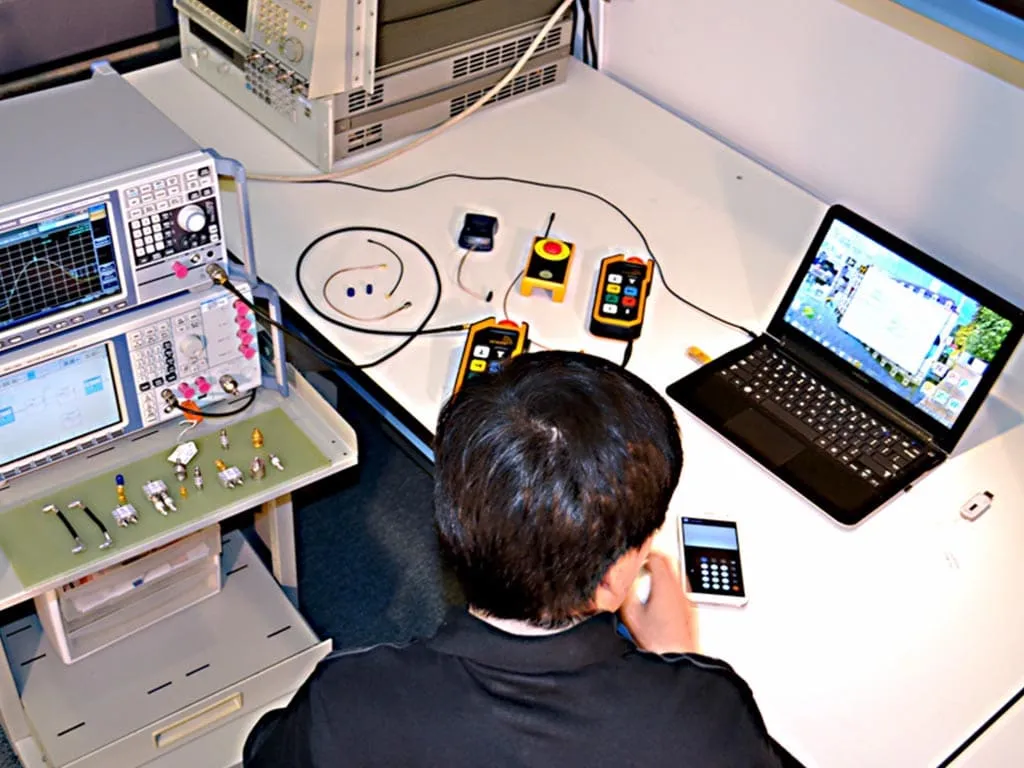
This figure illustrates a common lab scenario where a small RF module with an SMA port needs to connect to a spectrum analyzer or test instrument with a BNC input. An SMA adapter cable (e.g., SMA to BNC) is shown as a short, flexible assembly linking the two. The image emphasizes that unlike a rigid adapter, the flexible cable segment absorbs misalignment, routing stress, and vibration, protecting the connectors—especially the SMA side—from mechanical overload. The cable is not merely a connector converter but an integral part of the RF signal path.
A small RF board lands on the bench.
The module exposes an SMA connector. The spectrum analyzer sitting beside it still uses BNC. Someone reaches for the adapter drawer.
A rigid SMA-to-BNC adapter would technically solve the mismatch. The threads mate, the signal passes, and the measurement shows up on the screen.
But the moment the setup moves off the bench—inside an enclosure, across a panel wall, or into a mobile device—that rigid adapter suddenly becomes the weakest mechanical point in the entire signal chain.
That’s usually when an SMA adapter cable appears.
It’s not a new connector type. It’s simply a short 50-ohm RF cable assembly built to transition between connectors while absorbing mechanical stress that a rigid adapter cannot. In practice, these assemblies quietly solve routing problems, vibration issues, and connector misalignment across many RF systems.
Once you start looking closely, they show up everywhere: between modules and antennas, between boards and bulkhead connectors, and across mixed test equipment ecosystems.
Place SMA adapter cable inside real RF workflows
In RF diagrams the signal path usually looks simple: radio → cable → antenna.
Real hardware rarely follows that straight line.
A module might sit deep inside an enclosure. The antenna might mount on a panel wall. Test equipment might use a completely different connector family. The physical layout creates gaps that rigid connectors cannot easily bridge.
That’s where the SMA adapter cable lives — inside the small mechanical mismatches that appear when theory meets hardware.
Connect radios, modules, panels, and test gear with one flexible transition
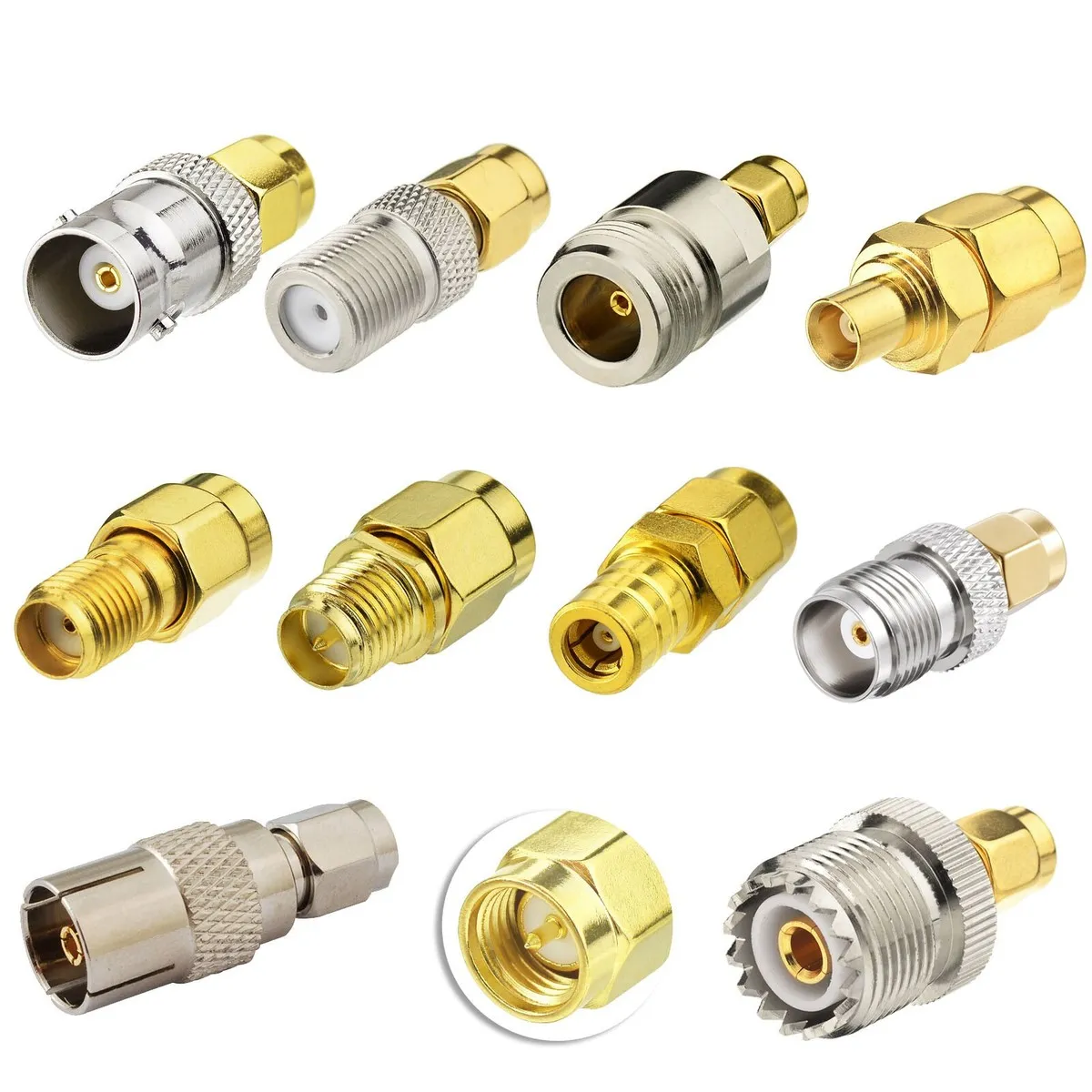
This figure likely presents a summary table or diagram of common use cases for SMA adapter cables. Examples include: an MMCX to SMA cable for connecting a module to a panel antenna port (handling offset and routing), an SMA to BNC cable for bridging a radio to a spectrum analyzer (different connector ecosystems), an SMA to SMA jumper for internal board-to-bulkhead connections (absorbing strain), and a BNC to SMA cable for connecting a device under test to lab equipment (avoiding rigid adapter leverage). The image reinforces that these cables solve mechanical problems—misalignment, routing, vibration—rather than purely electrical ones.
The phrase adapter cable sometimes causes confusion. It isn’t a special cable standard.
An SMA adapter cable is simply a coaxial cable assembly built with two different connector interfaces. One end might be SMA. The other could be BNC, MMCX, or another SMA variant.
Electrically it behaves like any other 50-ohm RF coaxial cable.
Mechanically it acts as a flexible transition between devices.
A few common scenarios illustrate where these assemblies show up:
| Connection Scenario | Typical Cable Example | Why Cable Works Better |
|---|---|---|
| RF module → panel antenna port | MMCX to SMA cable | Handles offset and enclosure routing |
| RF radio → spectrum analyzer | SMA to BNC cable | Bridges different connector ecosystems |
| Internal board → external antenna bulkhead | SMA to SMA jumper | Absorbs strain near the enclosure wall |
| Device under test → lab equipment | BNC to SMA cable | Avoids rigid adapter leverage |
Notice the pattern.
The cable solves mechanical problems, not electrical ones.
The signal simply travels through another short section of coax.
If you browse most RF connector ecosystems, you’ll find these assemblies sitting quietly between product categories. A cable assembly might contain connectors from two entirely different families. That flexibility is exactly why they exist.
For readers unfamiliar with the broader cable context, the TEJTE RF coaxial cable guide explains how these small jumper assemblies fit into the larger RF signal path.
Treat SMA adapter cable as a cable assembly, not a rigid adapter
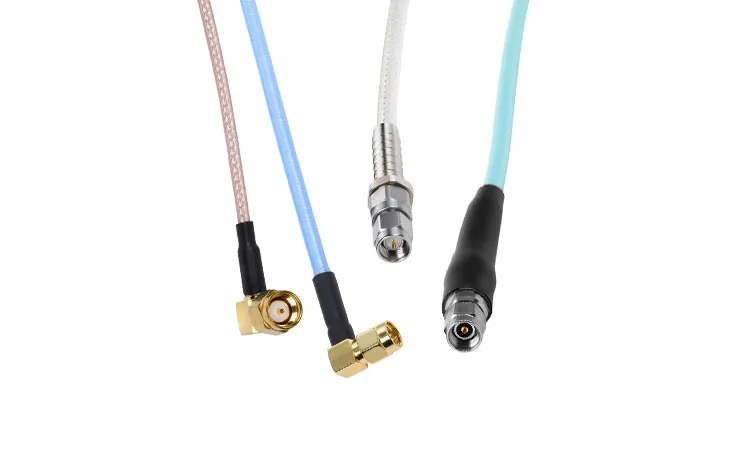
This image presents a visual comparison between a rigid SMA to BNC adapter (or similar) and a flexible SMA adapter cable. The rigid adapter is shown as a short metal body that creates a direct connection between two ports, transmitting torque and bending forces directly to the connector. The flexible cable is shown with a short section of coax between its connectors, allowing it to absorb movement and relieve strain. The figure highlights that while both solve connector mismatches, the cable assembly is the safer choice in applications with misalignment, vibration, or frequent handling.
The mistake many engineers make is assuming that a cable and an adapter perform the same job.
They do not.
A rigid adapter does one thing well: align two connectors directly.
A cable assembly does something completely different: it relocates the connection point.
Consider the mechanical forces involved.
If a rigid adapter connects two ports that are slightly misaligned, the connectors themselves absorb the stress. Threaded RF connectors are not designed to handle continuous bending loads.
A short cable eliminates that problem entirely.
The cable carries the mechanical strain while the connectors remain properly seated.
That distinction becomes important in production hardware. Lab setups might tolerate awkward adapters. Field devices usually cannot.
Keep SMA adapter cable inside a 50-ohm RF path
Despite the mechanical advantages, the cable still has to behave like part of the RF signal path.
That means the assembly must maintain 50-ohm impedance continuity.
Inside the cable, the familiar coaxial structure does the work:
- center conductor
- dielectric insulation
- braided shield
- outer jacket
This geometry keeps the electromagnetic field contained between the conductor and shield, which preserves impedance along the entire cable length.
For readers interested in the physical structure, the coaxial cable concept explains why RF systems rely on this layered geometry to maintain consistent impedance.
In practical terms, an SMA adapter cable simply extends that coaxial structure while switching connector interfaces at the ends.
The electrical behavior remains unchanged as long as the cable family stays within the 50-ohm RF ecosystem.
Choose cable before you default to a rigid transition
Many connector problems begin with the same assumption:
“Just add an adapter.”
Adapters are convenient. They’re small, cheap, and easy to keep in a drawer.
But they also introduce a rigid mechanical lever between devices.
Once a cable gets pulled, bent, or bumped, that leverage transfers directly into the connector threads.
The longer the adapter stack becomes, the worse the mechanical load gets.
Use cable when the ports are offset, recessed, or panel-separated
Hardware layouts rarely align perfectly.
One connector might sit flush with an enclosure wall. Another might be recessed inside the device. Sometimes they simply face different directions.
Rigid adapters expect perfect alignment.
Cables do not.
Even a short 15–20 cm jumper can compensate for:
- connector depth differences
- panel spacing
- angled routing paths
- internal cable harnesses
Those small mechanical mismatches are the exact situations where adapter cables outperform rigid transitions.
Use cable when vibration, repeated handling, or field service is expected
Bench testing hides many mechanical problems.
A device sitting still on a lab table rarely stresses its connectors.
The moment the same hardware moves into the field, things change.
Vehicle vibration, shipping shocks, or technician handling introduce forces that rigid connectors cannot dissipate.
In those environments, a flexible cable acts as a mechanical buffer.
Instead of the connector absorbing every movement, the cable distributes that stress along its length.
That difference alone often determines whether an RF port survives long-term deployment.
Avoid adapter stacking when one short cable solves the whole transition
Adapter stacking happens more often than most teams admit.
An SMA connector meets a BNC instrument.
Someone adds an SMA-to-BNC adapter.
Then another adapter is required to rotate the orientation.
Then a gender converter gets added.
Suddenly the signal path contains three rigid metal blocks hanging from one connector.
Each interface introduces two problems:
- additional insertion loss
- mechanical leverage
A single short cable often replaces the entire stack.
The RF signal sees one continuous coax section instead of multiple connector transitions. The mechanical load disappears because the cable absorbs it.
It’s a simple change, but it prevents many reliability issues that only show up months later.
Match the cable construction before you match the connector names
Connector discussions tend to dominate RF selection conversations.
Teams debate SMA versus BNC, straight versus right-angle, or male versus female connectors.
Those decisions matter, but they’re rarely the most critical factor in a cable assembly.
The cable itself determines most of the electrical performance.
Once the coax family is chosen, the connectors simply terminate it.
Start with RG316 coaxial cable for compact and heat-resistant assemblies
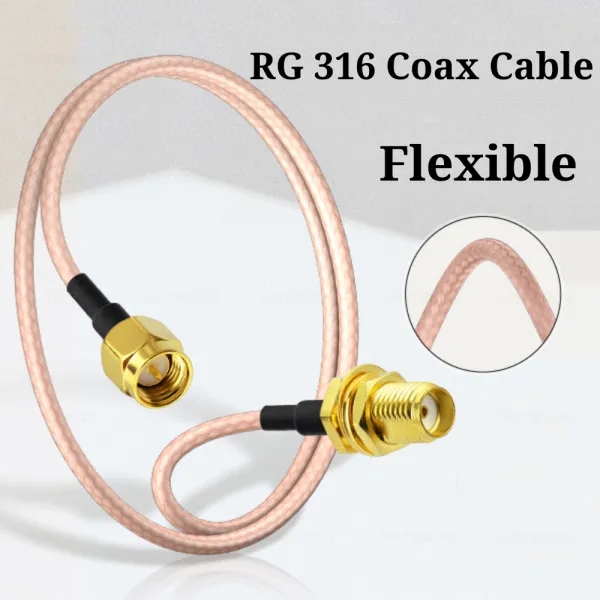
This image provides a detailed view of an RG316 coaxial cable, likely with a section of the outer jacket removed to reveal the inner conductor, PTFE dielectric, and braided shield. With an outer diameter of approximately 2.5 mm, RG316 is flexible and heat-resistant, making it ideal for routing inside compact enclosures and for use in short jumper cables where flexibility and moderate frequency performance are required. In SMA adapter cable assemblies, RG316 serves as the core transmission line, ensuring stable 50-ohm impedance while allowing the assembly to bend and route easily around equipment and workbenches.
In many SMA adapter cable assemblies, the underlying cable is RG316.
This small coax is widely used in RF jumpers because it balances flexibility, durability, and manageable attenuation.
A quick look at its characteristics explains why it shows up so often:
| Property | Typical RG316 Characteristics |
|---|---|
| Impedance | 50 ohm |
| Outer diameter | ~2.5 mm |
| Dielectric | PTFE |
| Temperature tolerance | High compared with PVC cables |
| Flexibility | Good for tight routing |
| Shielding | Braided copper |
That PTFE dielectric is one reason RG316 survives inside compact electronics. It tolerates heat better than many lower-cost cable constructions.
The cable’s small diameter also allows tight routing paths inside crowded devices.
Many SMA adapter cable assemblies used in modules, IoT gateways, and RF test setups rely on this cable family.
The TEJTE article on RG316 coaxial cable explains in greater detail why this cable appears so frequently in short RF jumpers.
Move to thicker 50-ohm cable when loss or distance matters more
RG316 works well for short transitions.
Once the cable length increases, attenuation starts to matter more.
Thin coax trades lower diameter for higher loss.
Longer RF paths sometimes require thicker cable families with lower attenuation characteristics.
At that point, the cable assembly may shift to a different coax type while keeping the same SMA connector interfaces.
That change often surprises buyers. Two cables might look identical from the outside yet behave very differently across frequency and distance.
The cable construction—not the connector—determines most of that behavior.
Lock the coax family before connector direction gets finalized
In a lot of RF projects, teams spend time debating connector orientation—straight versus right-angle, bulkhead versus cable plug—before anyone confirms the cable itself.
That sequence often backfires.
The coax family determines most of the electrical behavior in the assembly. Connector geometry mostly affects installation and routing. Once the cable diameter and construction are fixed, the rest of the mechanical decisions tend to fall into place.
Take RG316 as an example. Its outer diameter sits around 2.5 mm and the PTFE dielectric tolerates fairly high temperatures. Those properties make it easy to route through compact enclosures or across crowded boards. But that same diameter also limits the crimp ferrules and connector shells that can terminate the cable.
Switching later to a thicker coax—perhaps to reduce loss—can invalidate earlier connector choices. The crimp dimensions change. Bend radius grows. Some right-angle connectors may no longer fit the cable.
So experienced teams usually lock down the coax family first, then finalize the connector geometry. The connectors terminate the cable; they don’t define it.
Verify the connector combination before procurement starts
Procurement mistakes with RF cables rarely involve frequency limits or impedance problems. More often they’re basic connector mismatches.
A purchase order might specify “SMA cable” without clarifying gender or polarity. The assembly arrives perfectly manufactured—and completely unusable for the intended hardware.
That kind of problem shows up more often than most teams expect.
Confirm gender, polarity, and mounting role on both ends
SMA connectors follow a simple rule: the male connector carries the center pin, the female connector carries the receptacle.
That rule gets confusing once reverse-polarity variants enter the picture.
Reverse-polarity SMA connectors look nearly identical to standard ones, but the center pin configuration is reversed. Externally the threaded shell appears the same, which is why ordering errors happen.
Before specifying an SMA adapter cable, engineers usually check three details on both sides of the connection:
- connector gender
- polarity type (standard or RP)
- mounting style (free cable connector, bulkhead connector, or board interface)
Leaving any of those unspecified forces someone to guess. Procurement departments don’t enjoy guessing with RF connectors.
Separate straight and right-angle choices by stress, not appearance
Right-angle connectors sometimes get chosen because they “look cleaner” in an enclosure layout.
Mechanical stress should drive that decision instead.
If the cable must immediately bend after leaving the connector, a right-angle termination helps protect the cable and reduce strain at the joint. If the cable path continues straight before turning, a straight connector usually works better.
This distinction matters because the most vulnerable point in a coax assembly sits right where the cable enters the connector body. Continuous bending in that location eventually damages the conductor or shield.
Connector orientation should follow the cable’s natural routing path, not visual symmetry inside the enclosure.
Fix the connector pair before the cable length gets discussed
Cable length is usually the first parameter people mention when ordering assemblies. In practice, connector combinations cause far more mistakes.
Before discussing length, it helps to clearly define the connector pair that forms the transition.
Typical examples include:
- SMA male → SMA female
- SMA male → BNC male
- SMA male → MMCX plug
Once that pair is fixed, specifying length becomes straightforward.
Starting with length instead tends to generate confusion. Someone orders “a 30 cm SMA cable,” only to discover the connector genders were assumed incorrectly.
Calculate loss before the assembly becomes the weakest link
Short RF cables often slip through system design reviews without much attention.
The reasoning is simple: the cable looks short, so the loss must be insignificant.
Most of the time that assumption works. But when several cables and connectors accumulate in the signal chain, the numbers start adding up.
Use attenuation-per-meter data for the chosen coax
Every coaxial cable has an attenuation value, typically expressed in dB per meter at a given frequency. Thin cables generally lose more signal than thicker ones.
The basic estimate engineers use looks like this:
Cable loss ≈ cable length × attenuation per meter.
The calculation doesn’t need extreme precision. Even a rough estimate reveals whether the cable path remains comfortably within the system’s link budget.
With short RG316 jumpers, the loss is often small. Increase the length or the operating frequency and the numbers change quickly.
Add transition loss for each connector interface
Cable attenuation is only one part of the signal path. Every connector interface introduces a small transition loss as well.
The value varies with frequency and connector quality, but a simple rule of thumb places it somewhere around 0.1 to 0.2 dB per interface.
A typical short test setup might include several transitions:
- device connector
- cable connector
- instrument connector
Those interfaces together can introduce half a decibel or more of loss before the signal even reaches the measurement equipment.
In many systems that margin still works. In tighter RF budgets it becomes noticeable.
Set different length rules for jumpers, patches, and external leads
Not all adapter cables serve the same role.
Some live entirely inside a device enclosure. Others connect test instruments across a lab bench. Still others run from hardware to an external antenna.
Treating them as identical assemblies misses important differences.
| Cable Role | Typical Length | Primary Concern |
|---|---|---|
| Internal jumper | 10–30 cm | Compact routing |
| Test bench cable | 30–100 cm | Frequent handling |
| External antenna lead | 1 m+ | Loss and environmental durability |
Internal jumpers prioritize flexibility and tight bend radius.
Longer external leads usually require lower attenuation and stronger jackets.
Matching the cable design to its role prevents unnecessary performance compromises.
Route SMA adapter cable like part of the enclosure
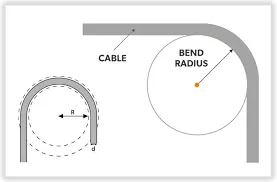
This figure illustrates a critical mechanical design principle for RF cable assemblies. It likely shows two scenarios: one where the cable bends sharply immediately at the connector body (incorrect), and another where a short straight section is maintained before the first bend (correct). The image highlights that the connector-to-cable transition is the most vulnerable point for fatigue and failure. By allowing a small straight run, the stress is distributed along the cable rather than concentrated at the termination, extending the assembly’s service life. This principle applies to all SMA adapter cables, especially those used in tight enclosures or where cables are frequently moved.
Cable routing tends to happen late in the design cycle. Schematics rarely show the physical path a cable must follow once the hardware enters an enclosure.
That’s when mechanical constraints begin to matter.
A cable that behaved perfectly on the bench can fail prematurely if it’s forced into an awkward routing path.
Protect the first bend near the connector body
Most coax failures occur within a few centimeters of the connector.
That area experiences the highest stress because the cable transitions from rigid connector hardware into flexible cable.
Repeated bending in that small region slowly damages the conductor and braid.
Good routing keeps the first bend slightly away from the connector body. Even a small straight section reduces fatigue at the termination point.
Connector strain relief helps, but routing discipline matters just as much.
Keep the cable away from sharp edges, hot zones, and moving harnesses
RF cables rarely occupy empty space inside modern devices. They share the enclosure with power wiring, cooling hardware, and structural brackets.
Several environmental hazards appear during long-term operation:
- sharp metal edges that wear through cable jackets
- heat sources that degrade insulation materials
- moving harnesses that gradually rub against the cable
None of these problems show up during early testing. They appear months later when vibration and temperature cycling accumulate.
Careful routing eliminates those hidden reliability risks.
Move strain to clips, bulkheads, and the enclosure wall
Another common mistake places the entire mechanical load of a cable on the RF connector itself.
Board-mounted SMA connectors are not designed to carry significant pulling force. Over time that load can loosen solder joints or damage internal contacts.
A better approach transfers that strain elsewhere.
Cable clips, adhesive mounts, or bulkhead connectors can anchor the cable to the enclosure structure. Once the enclosure absorbs the mechanical load, the RF connector only handles the electrical interface.
That small mechanical adjustment often determines whether a connector survives years of service or fails after a few months.
Use application cases to choose the right SMA adapter cable
Connector catalogs usually present RF cables as interchangeable parts: pick a connector pair, choose a length, and the job is done.
Real systems rarely behave that simply.
The connector pair tells you what mates together. The application tells you why the cable exists.
Looking at a few common deployment scenarios makes the selection logic clearer.
Use MMCX to SMA cable for miniature-board transitions
Small RF modules often expose MMCX connectors because the connector footprint fits tight PCB layouts. External antennas, however, almost always use SMA.
That mismatch appears in a wide range of products:
- IoT gateways
- embedded cellular radios
- telemetry modules
- compact GNSS receivers
Inside those devices, the RF module sits on the PCB while the antenna mounts on the enclosure wall. A short MMCX to SMA adapter cable bridges the gap.
The cable handles two practical problems at once:
- converting the connector interface
- relocating the connection point to the enclosure panel
Without that cable, the antenna connector would need to mount directly on the board. That approach complicates assembly and increases stress on the module connector.
Many small devices quietly rely on this exact cable configuration.
For readers interested in the broader architecture behind such assemblies, the TEJTE article on RF connectors compares several connector families that commonly appear in these transitions.
Use SMA to BNC and BNC to SMA cable as mixed-connector examples
The RF test world still relies heavily on BNC connectors.
Compact RF hardware rarely does.
That difference creates a familiar bench-top mismatch:
- instruments use BNC
- modules and antennas use SMA
A rigid SMA to BNC adapter technically solves the problem, but only when the connectors line up cleanly. Many test setups involve cables routed across equipment racks or around other devices.
In those cases a SMA to BNC cable or BNC to SMA cable provides a cleaner transition.
A short flexible cable reduces strain on the instrument connector and avoids the rigid metal stack that adapter combinations sometimes create.
These cable assemblies also simplify repeated test setups. Instead of threading multiple adapters together, technicians can connect a single cable and move on to the measurement.
Use rigid adapters only when alignment is clean and stress is low
Rigid adapters still have a place in RF systems.
When two connectors sit close together and share the same orientation, an adapter can create a very clean connection. Lab calibration fixtures often use them because the mechanical alignment remains fixed.
The problem appears when the adapter becomes a structural element.
If the cable path pulls sideways or the device moves during operation, the rigid adapter transfers that force directly into the connector threads.
A flexible adapter cable eliminates that stress.
Many engineers treat the decision this way:
- rigid adapter — good for short, stable connections
- adapter cable — safer for routing, vibration, or offset connectors
The electrical difference between the two is usually small. The mechanical difference can be significant.
Build an assembly selection sheet before release
When RF assemblies move from prototype to production, selection decisions become harder to track.
A few cables get added during testing. Another appears during enclosure integration. Eventually the signal path includes several short jumpers whose specifications nobody documented clearly.
A simple selection sheet prevents that situation.
It allows engineers and procurement teams to evaluate each cable assembly using the same set of parameters before the design is finalized.
Define the fields and formulas
| Field | Description |
|---|---|
| Use case | Module jumper / panel transition / test lead |
| Connector A | Connector type and gender |
| Connector B | Connector type and gender |
| System impedance | Normally 50 ohm |
| Coax family | RG316 or other cable |
| Length | Cable length in meters |
| Attenuation | Cable attenuation per meter |
| Cable loss | Length × attenuation |
| Connector count | Number of connector interfaces |
| Connector loss | Connector count × estimated loss |
| Total loss | Cable loss + connector loss |
| Bend radius | Minimum allowed bend radius |
| Routing radius | Actual planned bend |
| Serviceability score | Ease of replacement or maintenance |
The numbers do not need laboratory accuracy. The purpose of the sheet is to expose potential problems early:
- excessive loss
- tight bend radius
- unnecessary connectors
Once the design enters production, these issues become expensive to fix.
Walk through one module-to-panel example
Consider a compact RF gateway where a small radio module connects to an external antenna port on the enclosure wall.
The assembly might look like this:
- connector A: MMCX plug (module side)
- connector B: SMA bulkhead jack (panel side)
- cable: RG316
- length: 20 cm
Using typical attenuation values for RG316 at moderate frequencies, the cable loss might fall well below one decibel.
Connector transitions add a small additional loss, but the total still sits comfortably inside most RF link budgets.
More importantly, the cable relocates the antenna connection to the enclosure panel without placing mechanical stress on the module connector.
That simple assembly solves both the electrical and mechanical requirements of the design.
Convert the sheet into an incoming inspection checklist
Once the cable assembly is specified, the same sheet can become an inspection checklist for incoming parts.
Receiving teams can verify:
- connector types and genders
- cable length tolerance
- orientation of right-angle connectors
- visible damage or poor crimping
- labeling and part numbers
RF cables often look similar at first glance. A structured checklist reduces the chance that incorrect assemblies slip into production builds.
Track the shifts affecting SMA cable assemblies now
Connector technology evolves slowly, but the broader RF interconnect market continues to grow as wireless hardware spreads across more industries.
Market analysts estimate that the RF interconnect sector—including connectors and cable assemblies—will expand significantly during the next decade as 5G, satellite systems, and IoT deployments scale.
Growth alone does not change how SMA adapter cables work. But it does affect sourcing pressures, materials compliance, and manufacturing consistency.
Follow RF interconnect market growth through 2030
Recent industry reports suggest that demand for RF connectors and cable assemblies could rise steadily through the end of the decade as more devices integrate wireless communication.
That demand influences several practical factors:
- supply chain availability
- connector manufacturing capacity
- pricing fluctuations for precision components
For procurement teams managing large hardware programs, those trends reinforce the value of standardized cable assemblies rather than ad-hoc custom builds.
Watch PFAS-free SMA launches as an early materials signal
Environmental regulations are beginning to influence connector manufacturing as well.
Some manufacturers have introduced PFAS-free SMA connectors in response to regulatory pressure around fluorinated materials. PTFE has long been a standard dielectric inside RF connectors and coaxial cables.
Material changes like this usually appear first in high-compliance markets before spreading more widely.
Design teams specifying cable assemblies today may start encountering alternative dielectric materials in future SMA connector lines.
Treat smaller, higher-frequency interconnects as a warning sign for poor assembly choices
Another quiet shift is happening in high-frequency hardware.
As systems move toward higher frequencies and smaller connectors, tolerance margins shrink. Cable routing, connector alignment, and strain relief begin to matter more than they did in older RF equipment.
The lesson is simple.
The smaller and faster the system becomes, the less forgiving it is of improvised cable assemblies.
Designing adapter cables carefully—rather than treating them as afterthoughts—helps avoid subtle performance problems later.
Answer common SMA adapter cable questions
When should I use an SMA adapter cable instead of a rigid adapter?
How long can an SMA adapter cable be before loss becomes noticeable?
When is RG316 a better choice than thicker coax in adapter cables?
Should I solve the transition with one cable or several adapters?
Bonfon Office Building, Longgang District, Shenzhen City, Guangdong Province, China

A China-based OEM/ODM RF communications supplier
Table of Contents
Owning your OEM/ODM/Private Label for Electronic Devices andComponents is now easier than ever.