
50 Ohm Coaxial Cable for RF Systems
Mar 19,2026
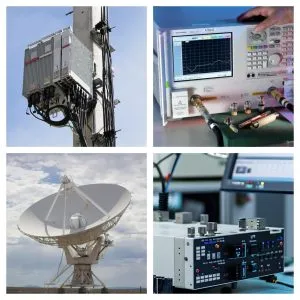
This figure illustrates the foundational role of 50-ohm coaxial cable in an RF system. It shows a radio module connected via a coaxial cable to an antenna, representing the typical signal path. The image emphasizes that the cable is not an interchangeable accessory but an integral part of the transmission line, affecting impedance continuity and signal loss. Early design stages often overlook these effects, leading to later margin erosion.
Map 50 ohm coaxial cable to real RF links
A system comes back from field testing with a strange complaint: the link budget looked fine in the lab, but once the unit was mounted on a vehicle, signal stability dropped. The radio module checks out. The antenna gain matches the spec sheet. Firmware hasn’t changed.
The quiet piece between them turns out to be the difference.
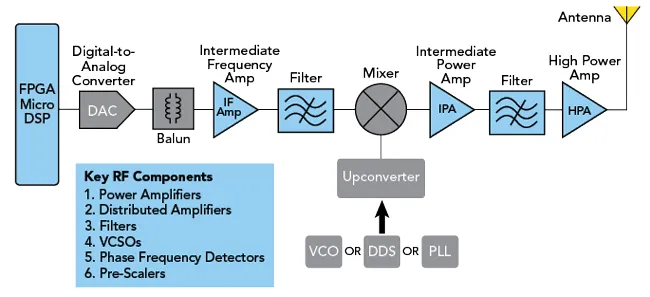
This figure illustrates a realistic RF signal chain from a radio module to an antenna, including multiple transitions: a short internal jumper, a connector, an adapter, and the antenna feed. It highlights that every segment—including short jumpers, connectors, and adapters—must be considered in the overall link budget, as each contributes attenuation and potential impedance discontinuities. The visual reinforces that the cable is just one element in a continuous 50-ohm transmission line.
In most RF systems, the signal path is not a single device. It’s a chain. Module → cable → connector → adapter → antenna. Sometimes there’s a test port, a bulkhead transition, or a measurement instrument inserted along the way. Each piece becomes part of the transmission line whether engineers planned it that way or not.
That’s where 50 ohm coaxial cable enters the conversation. Not as a generic wire, but as the backbone that connects radios, instruments, antennas, and test equipment into a continuous RF path.
Treating the cable as an interchangeable accessory is how subtle losses accumulate unnoticed.
Place 50-ohm cable between radios, instruments, and antennas
A typical RF bench setup illustrates the role quickly.
A small wireless module sits on a development board. The antenna isn’t mounted directly on the board because testing requires flexibility. A short coax jumper connects the module’s port to a spectrum analyzer or external antenna.
That jumper is almost always a 50-ohm RF coaxial cable.
The reason is not tradition. It’s impedance continuity.
Most RF components—modules, filters, test instruments, and antennas—are designed around a 50-ohm impedance system. Once that standard is chosen, the entire signal path needs to follow it. Otherwise reflections begin to appear along the line.
The reflections rarely show up immediately. Early testing may look stable because the cable length is short and the frequency is moderate. Problems tend to surface later:
- return loss measurements drifting between builds
- link margin shrinking at higher frequencies
- inconsistent results between identical prototypes
The cable itself usually isn’t defective. It’s simply part of a system that assumes 50-ohm continuity from one end to the other.
If a designer follows the signal path carefully—from radio output to antenna feedpoint—there is almost always a 50-ohm coaxial segment connecting every stage.
Separate 50-ohm RF links from 75-ohm video paths
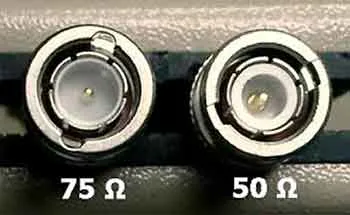
This image provides a visual comparison between 50-ohm and 75-ohm coaxial cables, such as RG58 (50Ω) and RG59 (75Ω). While physically similar, the two types have different dielectric properties and conductor dimensions to achieve the required characteristic impedance. The 50-ohm version is standard for RF communication and test equipment, while the 75-ohm version is common in video and broadcast systems. The figure helps engineers recognize that impedance consistency must be maintained throughout the signal path to avoid mismatch and signal degradation.
Confusion often begins with connectors rather than cables.
A BNC connector on a piece of equipment looks identical whether the system is 50 Ω or 75 Ω. A coax cable labeled “video” may physically mate with a radio port without resistance. The mechanical fit gives a false sense of compatibility.
Electrically, the two systems evolved for different reasons.
RF communication hardware standardized on 50 ohms because it provides a practical compromise between power handling and signal loss. Video broadcast and television distribution developed around 75 ohms, which minimizes attenuation for long transmission distances.
The two cable families coexist in the same physical ecosystem. That overlap causes mistakes, especially in mixed test environments.
For example:
- RG58 and RG316 are common 50-ohm RF cables.
- RG59 and RG6 are widely used 75-ohm video cables.
On a crowded workbench those cables can look interchangeable. In practice they belong to different impedance systems. Connecting them directly doesn’t stop the signal, but the mismatch introduces reflections that degrade measurement accuracy.
A short prototype test might hide the problem. A deployed system operating near its link-budget limits will not.
Readers who want a broader overview of how these cable families differ can see the comparison in this coaxial cable guide, which maps several RG series cables across both impedance standards.
The takeaway for RF engineers is simple: the connector style is not the deciding factor. The impedance family is.
Connect cable selection to SMA, BNC, N, and module ports
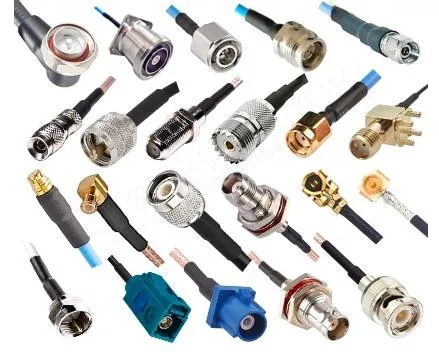
This figure illustrates how a 50-ohm coaxial cable serves as the common transmission medium for various connector ecosystems. It likely shows a single cable type (e.g., RG316) with different connector terminations: SMA for compact modules, BNC for test equipment, N-type for outdoor antennas, and MMCX for board-level connections. The image emphasizes that while connectors change, the underlying 50-ohm impedance must remain consistent to preserve signal integrity across the entire RF path.
The cable itself rarely appears alone in a design. It exists as an assembly—terminated by connectors on both ends.
In RF hardware, those connectors determine how the cable interacts with the rest of the system. A 50-ohm coaxial cable might be terminated with:
- SMA connectors for compact radio modules
- BNC connectors for lab instruments
- N-type connectors for higher-power antenna feeds
- MMCX or U.FL connectors for miniature board-level ports
Each of these connectors represents a different mechanical environment.
An SMA connector can handle frequencies well above 18 GHz but does not tolerate heavy cable strain. N-type connectors are larger and far more robust but impractical on small devices. BNC connectors lock quickly and appear frequently on oscilloscopes and spectrum analyzers.
The cable becomes the bridge between these connector ecosystems.
Sometimes the assembly is a short jumper linking a radio module to a panel connector. In other situations it forms a longer patch cable between a rack-mounted transmitter and a measurement instrument.
The difference matters because cable selection rarely happens in isolation. The connector type, cable diameter, and routing constraints interact constantly.
A thin jumper cable may electrically match the system but mechanically overload the connector if the routing path forces tight bends. A thick feeder cable may support higher power but prove impossible to install inside a compact enclosure.
Understanding how 50-ohm coaxial cable assemblies integrate with connectors is easier when the connector families themselves are considered part of the same RF ecosystem. Engineers comparing those connector styles often reference guides such as SMA vs BNC vs N-Type to understand where each interface typically appears.
Once the connectors are mapped, the role of the cable becomes clearer.
It isn’t simply transmitting RF energy.
It is maintaining impedance continuity while surviving mechanical constraints imposed by the hardware around it
Use 50Ω as the default for RF transmission and measurement
A test engineer once swapped a cable during a late-night measurement session simply because it was lying on the bench. Same BNC connectors, same length, no visible difference. The analyzer still showed a signal. Nothing looked wrong.
The next morning the return-loss trace moved by several dB.
Nothing in the radio chain had changed. The only difference was the cable impedance.
Most RF test equipment—signal generators, VNAs, spectrum analyzers—expects to see 50 Ω everywhere. Not just at the front panel connector. Along the entire path. Cable, adapter, attenuator, connector launch, all of it.
The reason is not tradition. It’s calibration logic. Test instruments interpret reflections assuming the system impedance is constant. Once the impedance shifts mid-path, the instrument still measures something, but the result stops representing the device under test.
This is why 50 ohm coaxial cable dominates RF measurement environments. It keeps the signal path predictable.
In practice the rule is simple: if a cable sits between an RF instrument and the device you are evaluating, it almost certainly needs to belong to the 50-ohm ecosystem.
Avoid direct mixing unless the mismatch is intentional
The problem is not that a 75-ohm cable refuses to work. In many cases it does work—at least enough to pass a quick functional check.
Signals travel. Devices power up. Data moves.
But impedance mismatch is rarely a binary failure. It behaves more like accumulated friction inside the RF path.
A 75-ohm video cable placed between two 50-ohm ports creates reflections at both transitions. Those reflections travel back and forth along the cable. At certain frequencies they reinforce each other. At others they partially cancel.
The result depends on cable length, signal frequency, and connector geometry. That’s why the issue often appears inconsistent. One test frequency looks fine. Another frequency suddenly shows degraded return loss.
The situation is particularly common with BNC connectors because both impedance systems use the same mechanical interface. A technician can easily plug a video cable into a radio port without noticing the difference.
Once that cable becomes part of the signal path, the mismatch becomes part of the RF behavior.
The mistake is not catastrophic. It is simply subtle—and subtle problems are the ones that consume the most debugging time.
Add a transition or matching step when two systems must meet
Some systems genuinely require both impedance families. Broadcast monitoring equipment might interface with an RF transmitter. Legacy infrastructure may already include long runs of 75-ohm cable installed inside buildings.
Replacing the entire cabling network just to satisfy a new radio link is rarely practical.
In those situations the solution is not to pretend the mismatch does not exist. The solution is to control where it happens.
A defined transition point—through a matching network or impedance transformer—allows engineers to isolate the mismatch and account for its effects. Once that boundary is established, the rest of the path can remain consistent.
The transition becomes a known design element rather than an accidental artifact hiding inside a cable assembly.
Compare RG316 with larger 50-ohm options
Use RG316 for compact, high-temperature jumper roles
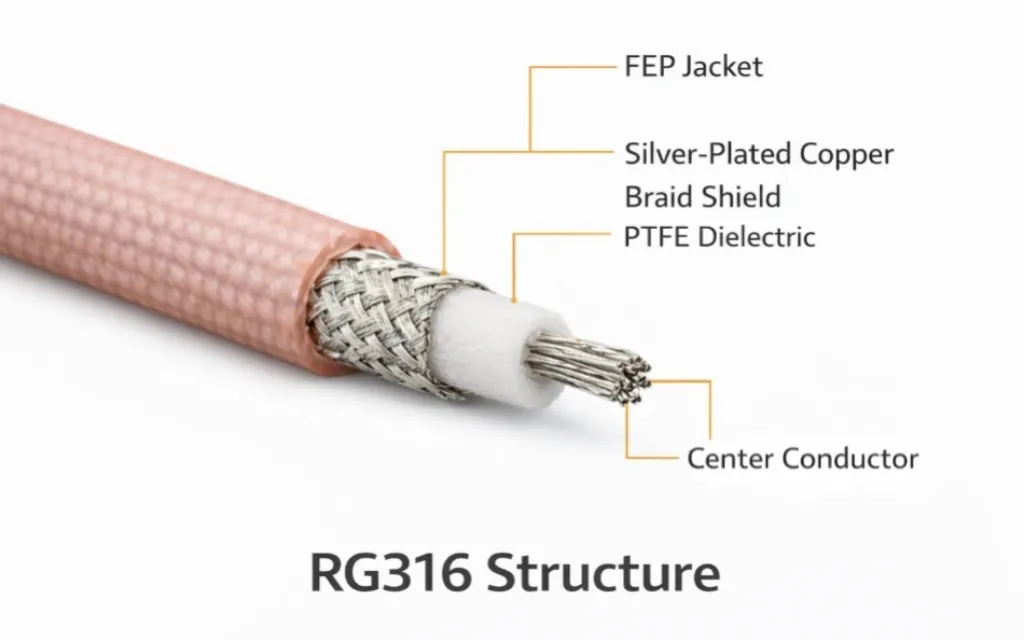
This image provides a detailed view of an RG316 coaxial cable, likely with a section of the jacket removed to reveal the inner conductor, PTFE dielectric, and braided shield. With an outer diameter of approximately 2.5 mm, RG316 is flexible and heat-resistant, making it ideal for routing inside compact enclosures. It is frequently used as short jumpers between RF modules and panel connectors, or as the core of adapter cables such as SMA to BNC assemblies where flexibility and moderate frequency performance are required.
Inside many RF products the cable does not run very far. It might connect a radio module to a bulkhead connector mounted on the enclosure wall. The distance could be twenty centimeters. Maybe thirty.
In that situation engineers usually reach for RG316 coaxial cable.
The cable is small enough to route through dense hardware. Its PTFE dielectric handles temperatures that would soften ordinary polyethylene insulation. The FEP jacket survives environments that might damage softer materials.
More importantly, RG316 behaves well as a short jumper.
The cable diameter—roughly 2.5 mm—keeps the assembly flexible. Installers can route it around shielding cans, mounting brackets, and PCB edges without fighting the cable stiffness. That flexibility matters inside compact devices where connectors cannot always align perfectly.
Because the cable length is short, the higher attenuation compared with larger cables usually remains acceptable.
That combination—temperature tolerance, flexibility, manageable loss—is why rg316 cable appears inside radios, GNSS receivers, and embedded wireless hardware.
Move to larger 50Ω families when distance or power dominates
RG316 works well in short assemblies. It is less comfortable when the signal path begins to stretch.
As cable length increases, attenuation becomes the controlling factor. The small conductor inside RG316 simply cannot carry RF energy over long distances without noticeable loss.
This is where larger 50-ohm coaxial cable families enter the picture.
Cables such as RG58 or heavier feeder types use thicker conductors and larger dielectric structures. The increased diameter reduces resistive loss and helps maintain impedance stability over longer runs.
The transition often appears during the move from prototype hardware to installed equipment.
A prototype on the bench may only need a short internal jumper. Once the system moves into a cabinet or outdoor enclosure, the antenna feed may run several meters—or sometimes much farther. At that point the cable selection shifts from “easy to route” to “efficient to transmit.”
Different cable sizes begin serving different roles along the same RF path.
Treat RF coaxial cable as a family, not one part number
A common mistake in early designs is assuming that a single cable type should cover the entire system.
In reality most RF installations use several cable segments, each optimized for a specific part of the signal path.
A compact device might contain a miniature jumper between a radio module and a panel connector. A rack installation may use a short patch cable between two pieces of equipment. An outdoor antenna feed might require a low-loss feeder cable capable of handling environmental stress.
All of these segments belong to the RF coaxial cable category, but they are not interchangeable.
Connector interfaces also shape the cable choice. A small module might expose an MMCX connector, while measurement equipment uses SMA or BNC. Bridging those interfaces typically requires a purpose-built assembly rather than stacking adapters.
Examples such as RF adapter cables show how a single coax assembly can transition between connector ecosystems while keeping the impedance consistent along the signal path.
Thinking in terms of cable roles rather than cable models makes system design far easier to manage.
Once the cable family is defined, the next step becomes unavoidable: estimating how much signal loss that cable introduces before it ever reaches the antenna.
Calculate loss before you pick a cable
This figure likely shows a simple RF path with a cable, two connectors, and an adapter, with annotations indicating how to calculate total loss. It emphasizes that engineers must account for both cable attenuation (using datasheet values multiplied by length) and connector/adapter contributions (typically 0.1-0.3 dB each) when estimating signal loss. This is especially important in systems with multiple transitions, where cumulative loss can impact link margin. The visual reinforces the need for early loss budgeting rather than assuming cables are electrically invisible.
A cable often looks harmless on a bench. Thirty centimeters of coax between two connectors rarely feels like a design decision. Yet that small segment becomes part of the RF path the moment it is installed.
Loss accumulates quietly. The cable contributes a little. Each connector transition adds another fraction of a decibel. An adapter placed in the middle introduces a bit more. None of those numbers sound dramatic individually, but together they can erase a comfortable link margin.
Engineers who skip the loss estimate usually discover the problem later, during range testing or compliance measurements.
Use attenuation-per-meter data instead of guessing
Manufacturers normally publish attenuation data for every coax family. The specification might appear as dB per meter or dB per 100 meters, often listed at several frequencies.
Those values are not theoretical. They come from measured performance of the cable geometry.
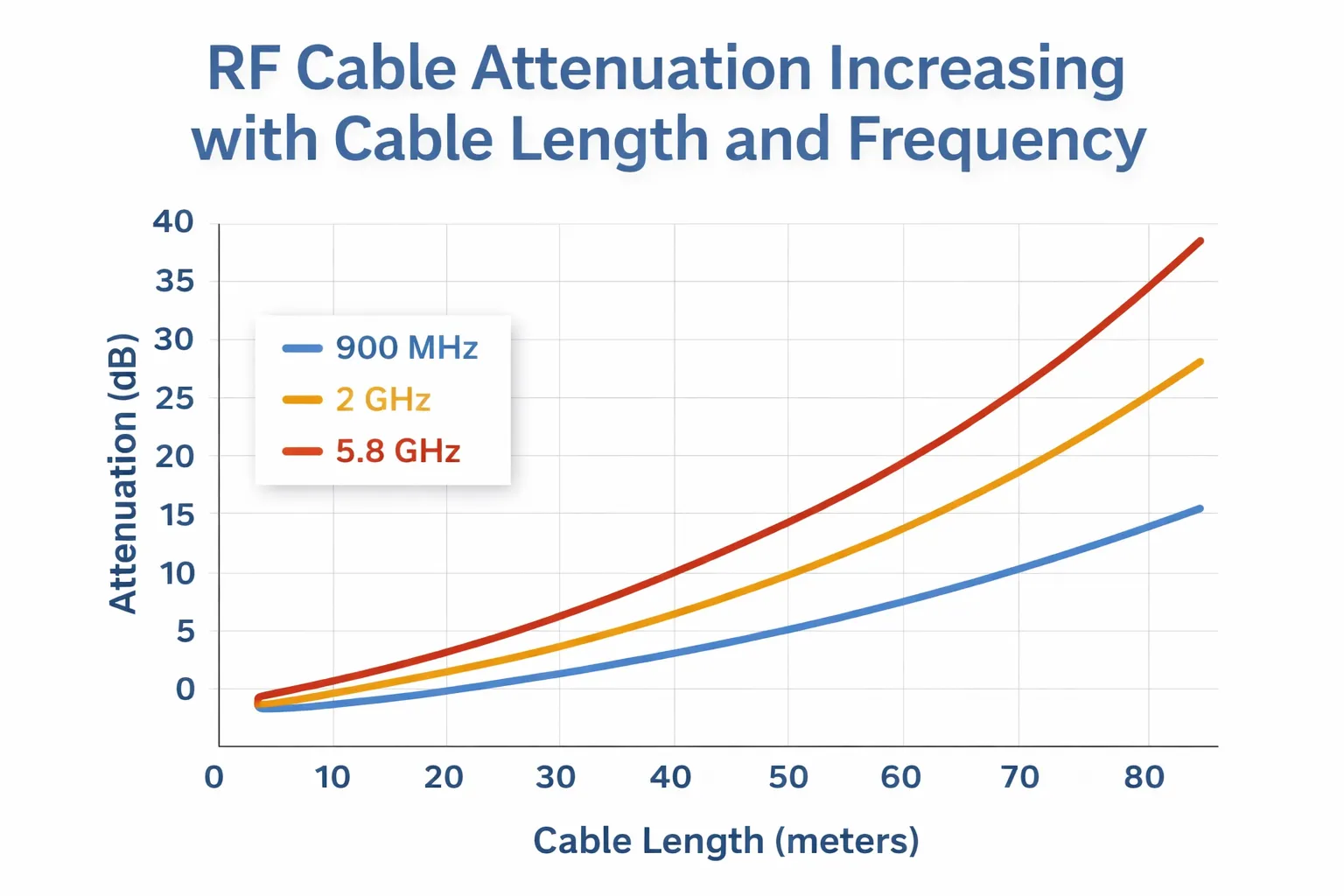
With 50 ohm coaxial cable, attenuation increases rapidly as frequency rises. A cable that performs well at a few hundred megahertz may behave very differently near several gigahertz. That difference becomes obvious when the cable length grows beyond a short jumper.
The practical method is straightforward:
- Find the attenuation value for the operating frequency.
- Multiply by the planned cable length.
- Treat that number as the baseline cable loss.
For example, a short rg316 coaxial cable jumper used at moderate frequencies might introduce only a small fraction of a decibel. Extend that same cable several meters and the loss becomes far more noticeable.
Estimating the loss early forces the design discussion to happen before the system reaches production hardware.
Readers unfamiliar with coaxial cable behavior sometimes find it helpful to review the physical structure of the transmission line itself. The geometry of the center conductor, dielectric, and shield determines both impedance and attenuation characteristics, which are summarized in the general explanation of coaxial cable.
Add connector and adapter transitions into the same budget
Cable attenuation is only part of the story.
Every time the signal crosses a connector interface—SMA, BNC, N-type, or others—a small insertion loss appears. High-quality connectors keep that loss low, but it never drops completely to zero.
Adapters introduce another transition. A stacked pair of adapters can add measurable loss while also increasing mechanical stress on the port.
This is one reason experienced engineers try to keep the RF path simple. If the cable assembly already transitions between two connector types, an extra adapter rarely improves anything.
A single well-built assembly usually performs better than a chain of connectors and adapters assembled in the field.
Split rules for jumpers, rack runs, and feeder segments
The acceptable loss depends heavily on how the cable is used.
A short jumper connecting a module to a bulkhead connector may only be a few tens of centimeters long. Even a relatively lossy cable such as RG316 performs adequately in that role because the signal path is short.
Rack-mounted equipment often uses patch cables around one meter in length. At that scale engineers begin paying closer attention to attenuation, but cable flexibility still matters because the assemblies must route cleanly between devices.
Outdoor feeder cables behave differently again. Those runs may extend several meters or more, often carrying higher power levels. Mechanical durability, weather resistance, and lower attenuation all become more important than compact size.
Treating these three scenarios as identical usually leads to poor compromises.
Match cable size to bend radius, heat, and service life
Use small cable only when routing density justifies it
Thin coax cables make installation easier. They bend easily and fit through tight spaces. That convenience explains why miniature cable assemblies appear inside compact electronics.
The downside is mechanical fragility.
A cable with a very small diameter typically has a tighter minimum bend radius and less mechanical strength. Repeated bending during installation or servicing can fatigue the conductor or shield.
For short internal jumpers that risk is manageable. For longer runs exposed to movement or vibration, a larger cable often survives longer.
The trick is balancing routing convenience against long-term reliability.
Check temperature and jacket fit before you check price
Material choice becomes important in environments that experience heat or chemical exposure.
Cables such as rg316 cable use PTFE insulation and FEP jackets that tolerate higher temperatures than common polyethylene designs. That difference matters inside equipment racks, vehicles, or industrial systems where ambient temperatures fluctuate widely.
Procurement teams sometimes focus on price first and materials second. In RF assemblies that approach often backfires. A cable that saves a small amount during purchasing may fail prematurely once installed in a high-temperature enclosure.
Material specifications exist for a reason.
Standardize short-jumper and long-feeder roles separately
Many organizations simplify sourcing by defining two or three standard cable roles.
One specification might cover short RF jumpers used inside equipment. Another describes patch cables used in rack installations. A third defines feeder cables intended for longer antenna runs.
Each role receives its own cable family, connector type, and assembly guidelines.
That approach avoids repeated debates about cable selection and ensures that purchasing teams order assemblies that match the intended environment.
Build the right 50-ohm assembly strategy
Treat SMA adapter cable as a packaged 50-ohm use case
Cable assemblies often exist to bridge different connector ecosystems.
A radio module might expose an SMA connector while a test instrument uses BNC. Rather than stacking multiple adapters on the instrument port, engineers frequently install a single coax assembly that transitions directly between the two connectors.
This is where assemblies such as SMA adapter cable products appear.
The cable itself remains part of the 50 ohm coaxial cable system, but the connectors at each end solve the interface mismatch without adding unnecessary hardware to the signal path.
Use MMCX-to-SMA and BNC-to-SMA examples to show role changes
Connector transitions become even more common when miniature module connectors enter the picture.
Small RF modules often use MMCX connectors because they occupy very little space on the PCB. Test instruments and antennas rarely use that interface. A cable assembly bridging MMCX to SMA becomes the simplest solution.
The same pattern appears with sma to bnc cable or bnc to sma cable assemblies. Each assembly adapts the connector ecosystem while preserving the underlying 50-ohm impedance system.
These assemblies illustrate how the cable is not merely a transmission line. It is also an interface tool that allows different RF hardware to cooperate without redesigning the ports themselves.
Reduce adapter stacking by solving transitions with one assembly
Adapter stacking tends to happen when hardware is assembled quickly.
A BNC-to-SMA adapter gets installed on the instrument. Then another adapter appears to convert the gender. Later someone adds a short cable on top of that stack. The signal still travels, but the mechanical load on the port grows heavier.
A purpose-built cable assembly solves the same problem more cleanly.
One cable. Two connectors. One impedance system.
The RF path remains simple, the connector strain decreases, and the insertion loss stays predictable.
Prevent mismatch in mixed connector environments
Confirm impedance before you confirm connector shape
Two connectors that look identical may belong to different impedance families. BNC connectors are the classic example. Both 50-ohm and 75-ohm versions exist, and at a glance they are difficult to distinguish.
When troubleshooting signal reflections, checking the cable label and connector impedance rating often reveals the cause quickly.
The external shape rarely tells the full story.
Use bulkheads and strain relief to protect ports
Mechanical stress can damage RF connectors long before electrical problems appear.
When a cable exits an enclosure or panel, a bulkhead connector usually provides a stronger mounting point than the device port itself. The bulkhead absorbs cable strain while the internal connector remains protected.
Short internal jumpers—often using rg316 coaxial cable—link the radio module to the bulkhead from inside the enclosure.
This arrangement reduces the mechanical load on delicate PCB connectors and improves serviceability if the external cable needs replacement.
Create a 50-ohm cable planning sheet
Define the fields and formulas
Design teams sometimes keep a small planning worksheet for cable selection. The idea is simple: write down the assumptions before hardware is ordered.
Typical fields include:
- Use case (module jumper, rack patch, feeder, test lead)
- System impedance (50 Ω)
- Operating frequency band
- Cable family
- Cable length
- Attenuation per meter
- Estimated cable loss
- Number of connector transitions
- Estimated connector loss
- Total path loss
- Allowed system loss margin
- Minimum bend radius
- Planned routing radius
- Environmental conditions
The worksheet does not replace detailed engineering analysis. It simply forces designers and buyers to think about the entire RF path instead of focusing only on connectors or cable diameter.
Walk through one module-to-panel example
Consider a small wireless device with a radio module mounted inside a metal enclosure. The antenna connects through a bulkhead SMA connector on the enclosure wall.
The internal jumper between the module and the bulkhead might use RG316 coaxial cable because the routing distance is short and the enclosure temperature can become elevated.
The planning sheet records the cable length, connector count, and expected attenuation. If the estimated loss remains within the system’s link margin, the cable selection is acceptable.
If the margin becomes tight, engineers know early that the design may require a different cable or antenna placement.
Convert the sheet into an incoming inspection checklist
The same worksheet can evolve into a procurement checklist.
Instead of estimating cable loss, purchasing teams verify that delivered assemblies match the specified cable type, length, connector orientation, and material ratings. This reduces the risk of receiving visually similar but electrically different cable assemblies.
Consistency between prototype builds and production shipments becomes much easier to maintain.
Track the shifts affecting 50-ohm sourcing now
Follow RF interconnect market growth through 2030
Demand for RF interconnect hardware—cables, connectors, and adapters—continues to grow as wireless devices appear in more industries.
Market research from Grand View Research estimates that the global RF interconnect market will expand significantly through the end of the decade, driven by wireless infrastructure, automotive electronics, and industrial connectivity.
That expansion means procurement teams will likely encounter more cable and connector options in the coming years.
Answer common 50-ohm coaxial cable questions
Why is 50 ohm coaxial cable the default in so many RF systems?
How do I tell 50Ω cable parts from 75Ω video parts?
When should I choose RG316 instead of a thicker 50-ohm cable?
How long can a 50-ohm run be before loss becomes a design problem?
What causes mismatch even when every part is labeled 50 ohm?
Bonfon Office Building, Longgang District, Shenzhen City, Guangdong Province, China

A China-based OEM/ODM RF communications supplier
Table of Contents
Owning your OEM/ODM/Private Label for Electronic Devices andComponents is now easier than ever.