
RF Coaxial Cable Guide: 50 Ohm Types, RG316 Uses & Loss Basics
Mar 13,2026
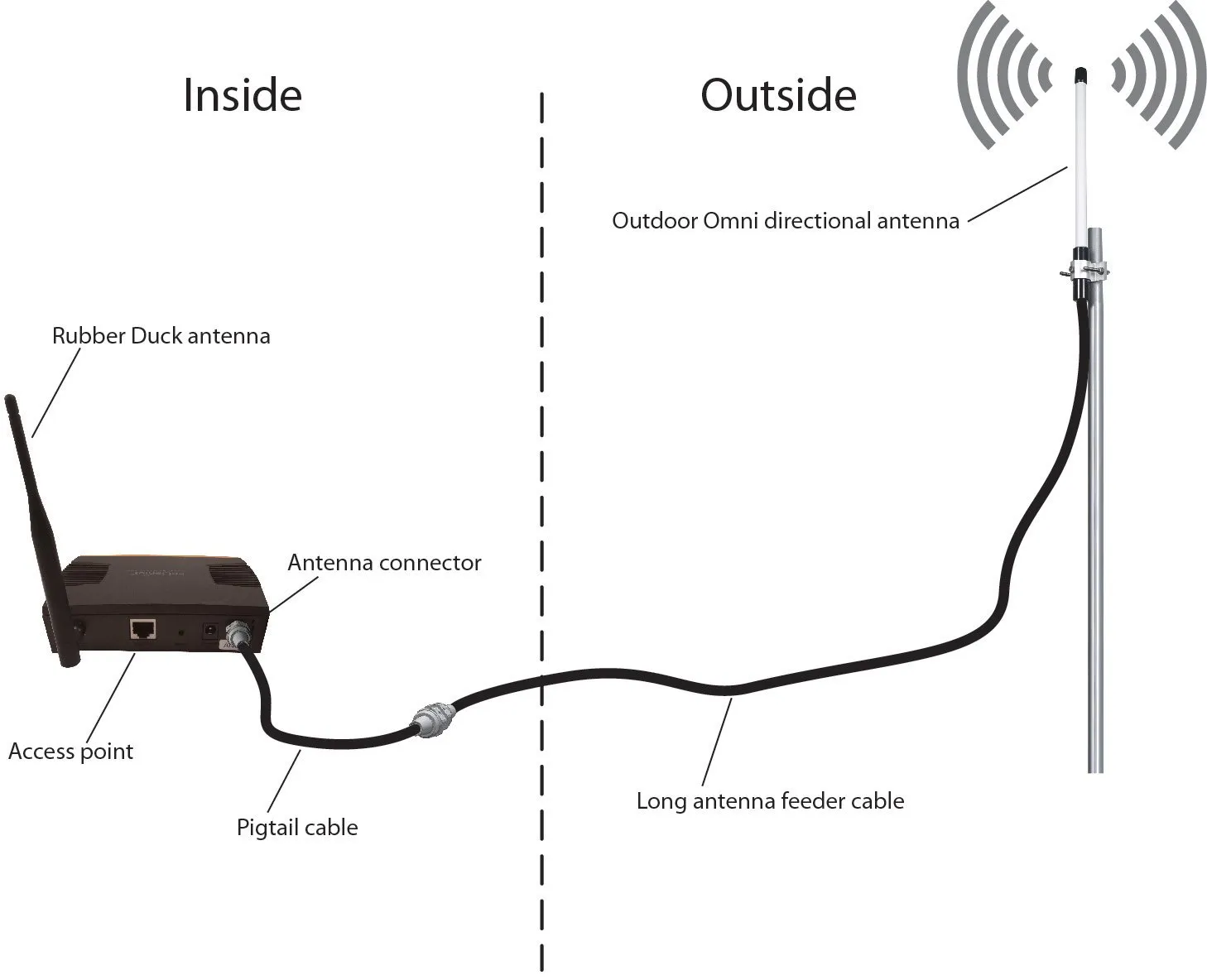
This figure illustrates a basic RF system where a coaxial cable connects a radio module to an antenna. It represents the common use of coaxial cable as the medium that carries RF energy between components. The image emphasizes that the cable is not a passive accessory but an integral part of the transmission line, affecting impedance continuity and signal loss. Early design stages often overlook these effects, leading to later margin erosion.
In many RF projects, the cable is the last thing engineers think about.
Design meetings revolve around radios, antennas, modulation schemes, and firmware timing. When something fails in the field, the first suspects are almost always the same: firmware bugs, antenna placement, or environmental interference.
The RF coaxial cable connecting those pieces tends to fade into the background.
Early testing reinforces that assumption. A prototype radio is placed on the bench. A short cable links it to an antenna or test instrument. The signal appears stable, measurements look reasonable, and development moves forward.
Then the system leaves the bench.
Once installed inside an enclosure, mounted in a vehicle, or deployed on a rooftop, that previously ignored cable becomes part of the real RF network. Loss accumulates along the path. Connector transitions introduce reflections. Mechanical stress builds up near the first bend.
None of those issues are dramatic at first. They usually appear slowly — perhaps as a few dB of lost link margin, drifting measurement repeatability, or occasional instability that only occurs under certain conditions.
That’s why experienced RF engineers treat RF coaxial cable as more than a passive accessory. It’s a transmission-line component with real electrical behavior.
This guide focuses on the practical side of coaxial cable decisions: how cables actually sit inside RF systems, why 50 ohm coaxial cable dominates most wireless designs, and when compact options like RG316 coaxial cable make sense.
Along the way we’ll also connect cable selection to real assemblies engineers encounter every day — things like SMA adapter cable, SMA to BNC cable, and BNC to SMA adapter transitions used when different connector ecosystems meet.
Where does RF coaxial cable actually sit in a real signal chain?
It’s easy to think of cables as separate pieces of hardware. In reality, RF systems behave more like a continuous electrical path.
The radio output stage, the cable assembly, and the antenna input are all parts of the same transmission line.
Understanding that perspective helps explain why cable choices matter.
Map RF coaxial cable from radios to antennas and instruments
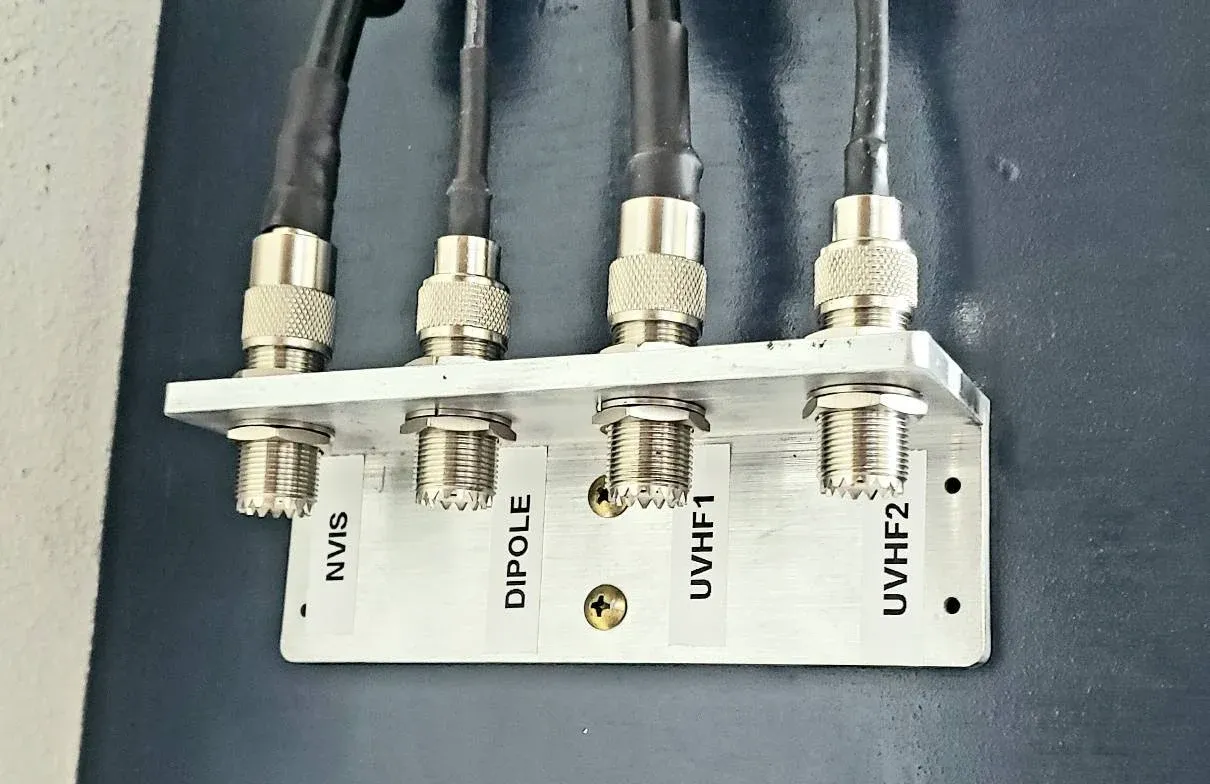
This figure shows a realistic RF signal chain from a radio module inside an enclosure to an external antenna. The path includes: a short internal jumper (often RG316) connecting the module to a panel bulkhead, a patch cable linking the bulkhead to an instrument or longer feeder, and finally the feeder to the antenna. It highlights that every segment—including short jumpers—must be considered in the overall link budget, as each contributes attenuation and potential impedance discontinuities.
Consider a fairly typical RF development setup.
A wireless module sits inside a metal enclosure. A short internal cable connects the module’s SMA port to a panel connector on the enclosure wall. Outside the enclosure, another cable links that connector to a measurement instrument or antenna.
Nothing about this configuration feels unusual. It’s common in labs, prototypes, and production hardware.
But electrically, something important is happening: the signal travels through every section of that chain as one continuous RF path.
A simplified example looks like this:
| Segment | Hardware Example | Role |
|---|---|---|
| RF module output | SMA connector | Signal source |
| Internal jumper | RG316 coaxial cable | Compact link inside enclosure |
| Panel transition | Bulkhead connector | Mechanical interface |
| Patch cable | SMA adapter cable | Flexible instrument connection |
| Feeder cable | Low-loss coax | Longer transmission path |
| Antenna | Radiating element | Final load |
Notice that none of these pieces exist independently.
The signal “sees” them all as one electrical environment. Every connector transition, every cable segment, and every impedance discontinuity contributes to the total behavior of the system.
A 30-centimeter jumper inside the enclosure might seem insignificant. But at GHz frequencies, even short segments introduce measurable attenuation and phase effects.
This is one reason experienced engineers avoid treating cables as generic accessories. Even small pieces of RF coaxial cable participate in the overall transmission line.
This figure likely shows a cross-sectional view of a coaxial cable, illustrating its key layers: the inner conductor, dielectric insulator, braided shield, and outer jacket. It reinforces the idea that the physical structure determines electrical behavior. At microwave frequencies, even small discontinuities or mechanical stress can alter impedance and increase loss, making proper cable selection and routing critical.
Separate RF coaxial cable from generic video or CATV coax
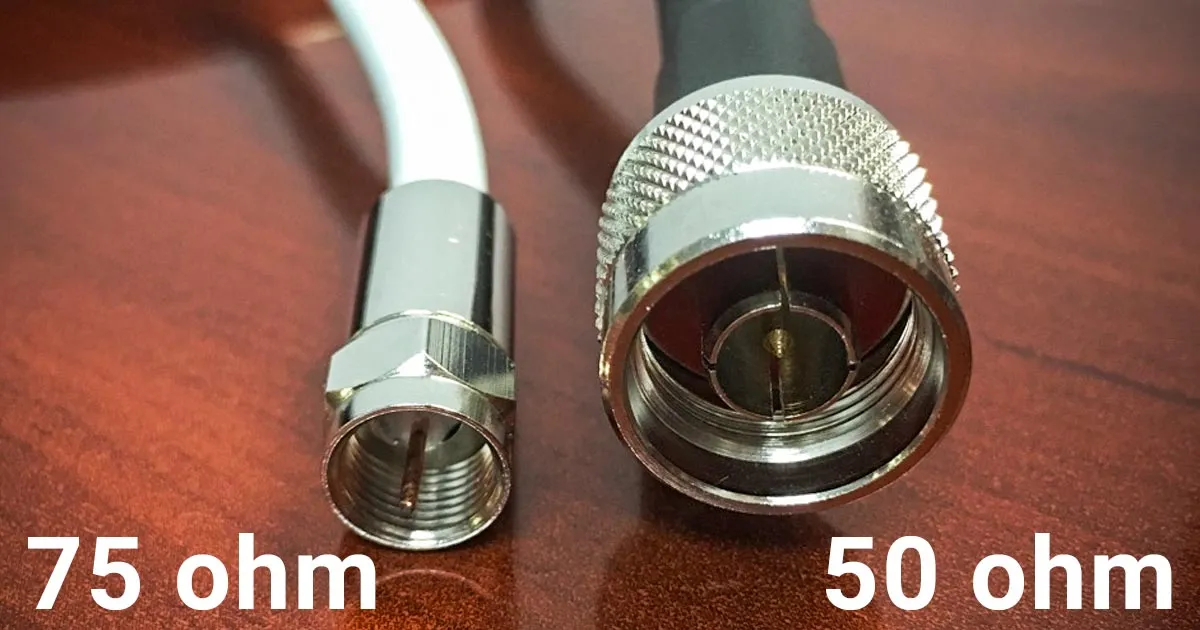
This image provides a visual comparison between 50-ohm and 75-ohm coaxial cables. While physically similar, the two types have different dielectric properties and conductor dimensions to achieve the required characteristic impedance. The 50-ohm version is standard for RF communication and test equipment, while the 75-ohm version is common in video and broadcast systems. The figure helps engineers recognize that impedance consistency must be maintained throughout the signal path to avoid mismatch and signal degradation.
Another misconception appears frequently in mixed electronics environments: the assumption that all coaxial cables behave the same.
Physically, many coax cables look nearly identical. Electrically, they are not.
The most important difference is characteristic impedance.
| System Type | Typical Impedance | Common Use |
|---|---|---|
| RF communication systems | 50Ω coaxial cable | Radios, antennas, test gear |
| Video / broadcast systems | 75Ω coaxial cable | Television, satellite, CATV |
This difference matters because impedance mismatches create reflections along the transmission line.
When a 50 ohm coaxial cable connects to a 75Ω environment, part of the signal energy reflects back toward the source instead of continuing forward. At low frequencies the effect might be small enough to ignore.
At higher frequencies, it becomes much more noticeable.
Engineers often encounter this issue in labs where broadcast equipment and RF measurement gear share the same space. Someone grabs a coax cable from a drawer, connects it, and everything appears to work — until measurement accuracy starts drifting.
Because of this, most wireless and RF test environments standardize entirely around 50 ohm coaxial cable.
Once that standard is established, nearly every other component in the signal path follows the same impedance.
Link RF coaxial cable to connector ecosystems like SMA and BNC
Cables rarely appear as bare wire in real systems. They’re almost always part of connectorized assemblies.
This is where connector families enter the picture.
Some of the most common RF connectors include:
- SMA
- BNC
- N-type
- MCX
- MMCX
Each ecosystem grew around specific application environments.
SMA connectors dominate compact RF modules and higher-frequency measurement setups. BNC connectors appear frequently on oscilloscopes, signal generators, and legacy RF equipment.
When those ecosystems meet, engineers rely on transition hardware such as:
- SMA to BNC cable
- BNC to SMA cable
- SMA to BNC adapter
- BNC to SMA adapter
From a product catalog perspective these look like separate items. From an RF perspective they are simply different implementations of the same concept: joining two connectors with a section of RF coaxial cable or a rigid transition.
For instance, a short SMA adapter cable typically contains a miniature coax core — often RG316 coaxial cable — with SMA connectors crimped or soldered onto each end.
The electrical behavior comes from the coaxial structure itself: center conductor, dielectric insulation, shield, and outer jacket. The connectors simply provide mechanical and electrical termination.
Rigid adapters perform the same function without a flexible cable between them. They’re convenient when ports align closely, but they transfer mechanical stress directly to the connectors.
That’s why engineers sometimes prefer a short cable instead of an adapter when devices may move slightly or when strain relief is important.
Why do so many RF systems default to 50-ohm practice?
Walk through almost any RF lab and the pattern becomes obvious: cables, connectors, and instruments overwhelmingly follow the same impedance standard.
The reason goes back to transmission-line theory.
Treat 50 ohm coaxial cable as the mainstream RF baseline
Early coaxial cable research revealed a useful engineering compromise.
A cable optimized for maximum power handling tends to have an impedance near 30Ω. A cable optimized purely for minimum attenuation tends to land closer to 77Ω.
Neither extreme worked well for real RF systems that needed both reasonable loss and safe power capacity.
Engineers eventually settled on a middle ground.
Around 50 ohms, coaxial cables provide a practical balance between power handling capability and signal attenuation. That compromise gradually became the standard across radio communication, radar systems, and RF measurement equipment.
Once manufacturers began designing radios, amplifiers, and antennas around that value, the ecosystem reinforced itself. Connectors, cables, and instruments all converged on 50 ohm coaxial cable.
Today, if an RF component doesn’t explicitly specify otherwise, engineers usually assume it belongs to a 50Ω system.
Avoid mixing 50Ω and 75Ω parts unless the mismatch is intentional
A subtle trap exists in connector families like BNC.
Both 50Ω and 75Ω versions of BNC connectors exist. To the untrained eye they often look identical. In many cases they can even be physically mated together.
Electrically, however, they behave differently.
When mismatched components are combined, reflections occur along the transmission path. In some situations this only increases return loss slightly. In others it can distort measurements or reduce link margin.
Because of that, RF engineers typically enforce a simple rule: once a system adopts 50 ohm coaxial cable, every cable and connector in the path should follow the same impedance unless a deliberate transition is introduced.
How should you group RF coaxial cable families before choosing one?
When engineers search for coaxial cables, the instinct is usually to look up part numbers.
RG316. RG58. LMR-400.
The catalog approach feels logical — until the number of options becomes overwhelming.
In practice, experienced RF designers often start somewhere else. They ask a simpler question first:
What job does this cable actually need to do?
Once that question is answered, the list of possible cables shrinks quickly.
Group cables by role: jumper, patch, feeder, or test lead
In real RF hardware, coaxial cables tend to fall into a few recurring roles.
You see the same pattern in wireless routers, satellite equipment, lab benches, and industrial radios.
Some cables are only a few centimeters long. Others stretch several meters toward an antenna or measurement rack. Those situations require very different priorities.
A rough classification looks like this:
| Role in RF system | Typical length | What engineers care about most |
|---|---|---|
| Internal jumper | 5–30 cm | flexibility and routing |
| Patch cable | 0.5–2 m | convenience and durability |
| Feeder cable | several meters | low attenuation |
| Lab test lead | short to medium | stability during measurement |
The same RF coaxial cable structure exists in all of these cases — center conductor, dielectric, shield, and jacket. What changes is the balance between flexibility, loss, and mechanical robustness.
A jumper cable inside a small enclosure might bend several times before reaching its connector. A feeder cable running toward a rooftop antenna may barely move once installed, but it must keep attenuation as low as possible.
Thinking about cables in terms of their role helps engineers avoid over-optimizing the wrong property.
Use RG316 coaxial cable as the compact jumper reference point
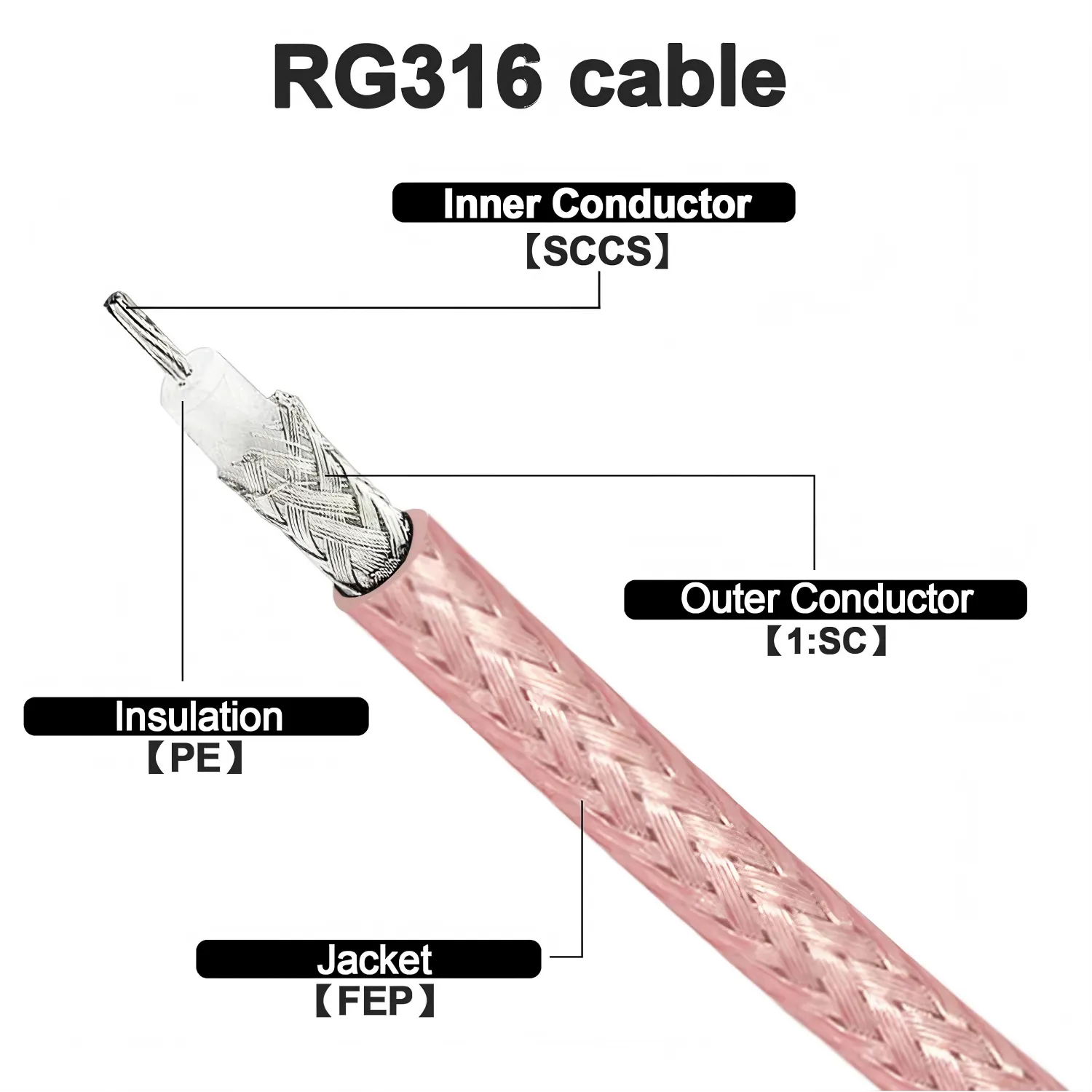
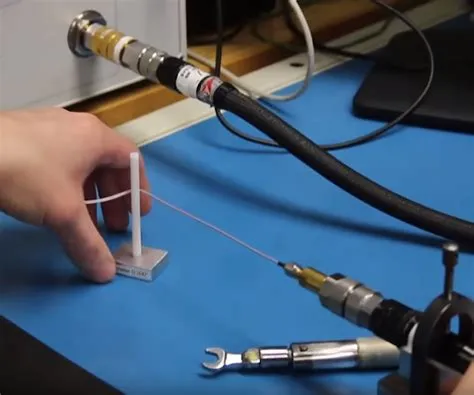
This image provides a detailed view of an RG316 coaxial cable, likely with a section of the jacket removed to reveal the inner conductor, PTFE dielectric, and braided shield. With an outer diameter of approximately 2.5 mm, RG316 is flexible and heat-resistant, making it ideal for routing inside compact enclosures. It is frequently used as short jumpers between RF modules and panel connectors, or as the core of adapter cables such as SMA to BNC assemblies where flexibility and moderate frequency performance are required.
Inside many RF devices, one cable type appears again and again: RG316 coaxial cable.
It is not the lowest-loss cable available. It is not the cheapest either. Yet it continues to appear in new designs because it solves a particular problem extremely well — compact routing.
A typical example can be found inside wireless gateways or IoT devices.
A radio module sits on a PCB. The antenna connector sits on the metal enclosure wall. Between them lies a short cable jumper that must bend around shielding cans, connectors, and mounting hardware.
This is where RG316 cable works nicely.
The PTFE dielectric allows the cable to tolerate higher temperatures than many PVC cables. The relatively small diameter makes it easier to route through tight spaces. And electrically, the cable remains stable enough for many GHz-range RF applications.
Because of those characteristics, engineers often use RG316 coaxial cable when building assemblies such as SMA adapter cable leads or short module jumpers.
If you want a deeper technical breakdown of that cable family, this article explores it in detail:RG316 as a compact RF jumper
Step up to thicker 50Ω families when distance or power becomes dominant
Small cables always involve compromise.
The thinner the cable, the higher the attenuation tends to be. That relationship appears in almost every coaxial cable family.
Engineers sometimes learn this the hard way during early prototypes.
A quick jumper built from RG316 cable works perfectly on the lab bench. Later, when the same cable is extended several meters toward an antenna, signal strength begins to drop more than expected.
That outcome is not surprising once attenuation curves are examined.
A simplified comparison illustrates the trend:
| Cable family | Common role | Relative attenuation |
|---|---|---|
| RG316 cable | short jumper | high |
| RG58 | medium patch | moderate |
| LMR-400 | feeder cable | low |
Because of this relationship, many RF systems follow a layered approach.
Inside the device, RG316 coaxial cable handles the short internal path. Outside the enclosure, a thicker 50 ohm coaxial cable carries the signal toward the antenna with lower loss.
This combination appears in countless wireless installations. It balances mechanical flexibility and signal integrity without making the internal design unnecessarily bulky.
How do you estimate loss before choosing an RF coaxial cable?
Cable attenuation rarely becomes visible during the first prototype.
The cable is short. The system operates comfortably within its link budget. Measurements appear stable.
Later — sometimes months later — someone extends the cable run or raises the operating frequency. Suddenly the margin disappears.
This is why experienced RF engineers estimate cable loss early.
Use attenuation-per-meter data instead of guessing
Every coaxial cable datasheet lists attenuation values at different frequencies.
The numbers are usually expressed as dB per meter or dB per 100 feet. While the exact values depend on manufacturer and construction, the general trend remains consistent across the industry.
Here is a typical approximation around 1 GHz:
| Cable | Approx attenuation |
|---|---|
| RG316 coaxial cable | ~1.3 dB/m |
| RG58 | ~0.6 dB/m |
| LMR-400 | ~0.22 dB/m |
The calculation itself is simple.
Cable Loss = Attenuation × Length
A one-meter run of RG316 cable may therefore introduce roughly 1.3 dB of attenuation. Extend that cable to five meters and the loss increases significantly.
Even though these numbers look small, RF systems often operate with limited margin. A few additional decibels can determine whether a wireless link remains reliable.
Add connector and adapter transitions into the budget
Cable loss is only part of the equation.
Connector transitions also contribute small insertion losses. Individually they are minor, but multiple connectors can add up.
In many RF labs, engineers use a quick rule of thumb:
0.1–0.3 dB per connector
A cable assembly with two connectors might therefore introduce an additional 0.2–0.6 dB beyond the cable attenuation itself.
Transitions such as SMA to BNC cable assemblies or BNC to SMA adapter connections often include several connectors in the signal path.
Ignoring these small losses during planning sometimes leads to confusion later when measured results differ slightly from expectations.
How do you decide when RG316 is enough and when it is not?
This question comes up often during hardware design reviews.
Engineers like RG316 cable because it is easy to route and widely available. But convenience does not always align with system performance.
Short distances are usually fine.
Once the cable length grows — especially at higher frequencies — attenuation becomes more noticeable. At that point a thicker RF coaxial cable may be a better choice.
Many RF designs therefore settle on a practical compromise.
Use RG316 coaxial cable for short internal connections where flexibility matters most. Use lower-loss cables for longer external runs where attenuation dominates.
It is a simple rule, but it appears again and again in real hardware.
How RF coaxial cable is usually routed in real equipment
When people read RF textbooks, they mostly see diagrams: transmitter, cable, antenna. Straight lines connecting everything.
Actual hardware rarely looks that tidy.
Open a wireless gateway or a piece of test equipment and you’ll usually find coax cables weaving through a fairly crowded space — past shielding cans, power converters, cooling fans, and sometimes things that were added late in the design.
None of that appears in the schematic. But it affects how an RF coaxial cable behaves over time.
On the lab bench this usually doesn’t matter much. A prototype radio sits next to a spectrum analyzer, connected with whatever cable happens to be nearby. The cable stays there for a few hours while measurements are taken. Nothing moves.
Once the same system gets installed somewhere permanent, the situation changes. Equipment vibrates. Temperatures cycle. Connectors get pulled slightly whenever someone services the device.
That’s when cable routing starts to matter.
The first few centimeters after the connector matter more than most people expect
If you look at damaged coax cables, one place shows up again and again: the section right behind the connector.
Not the middle of the cable.
Not the far end.
Right behind the connector.
It makes sense if you think about the mechanics. The connector body is rigid, while the cable itself is flexible. Any bending force concentrates exactly where those two meet.
A small SMA adapter cable used between two devices on a bench might survive years if the cable leaves the connector in a gentle curve. Bend that same cable sharply the moment it exits the connector, and the internal braid eventually starts to weaken.
Technicians who work with RF test equipment often develop a simple habit: they leave a short straight section of cable before the first bend. Nothing fancy — sometimes just a few centimeters of slack.
Oddly enough, that tiny detail often determines how long a cable lasts.
Heat and sharp edges quietly damage coax cables
Another thing that rarely appears in documentation is the surrounding environment.
Inside electronic enclosures, cables don’t live alone. They share space with power wiring, cooling airflow, and metal structures that were designed for mechanical support rather than cable protection.
Over time, two issues show up repeatedly.
The first is heat. Some cables tolerate it well. RG316 coaxial cable, for example, uses a PTFE dielectric and generally handles higher temperatures better than PVC-insulated cables.
But even PTFE has limits. If a cable spends years sitting directly against a hot heatsink or power supply housing, the outer jacket eventually begins to age.
The second issue is mechanical abrasion.
A coax cable resting against a sharp enclosure edge may slowly wear through its jacket as the equipment vibrates. Nothing dramatic happens immediately. The process can take months or even years.
Most experienced installers avoid both problems the same way: they simply route the RF coaxial cable along smooth surfaces and away from hot components whenever possible.
It sounds obvious, yet many failures trace back to exactly these oversights.
Connectors should not carry the cable weight
A small but important design detail appears in many RF systems.
Connectors are designed for electrical continuity, not mechanical load. Yet in many installations the entire cable hangs from a panel connector.
That works for a while.
Over time, however, the weight of the cable begins pulling on the connector interface. In vibration environments — vehicles are a good example — the effect becomes even more pronounced.
Designers usually solve this by letting the enclosure carry the load instead.
Simple cable clamps mounted to the chassis can hold the cable in place so the connector only handles the electrical connection. Bulkhead connectors serve a similar purpose by anchoring the cable to the enclosure wall.
Small mechanical choices like these rarely show up in circuit diagrams, but they make a noticeable difference once equipment spends years in service.
A quick planning method engineers sometimes use
When RF systems grow complex, engineers often sketch out a quick planning table for their cable runs.
It’s not meant to replace proper link-budget analysis. The goal is simply to check whether a cable choice makes sense before hardware is built.
A typical table might look something like this.
| Cable | Approx attenuation |
|---|---|
| RG316 coaxial cable | ~1.3 dB/m |
| RG58 | ~0.6 dB/m |
| LMR-400 | ~0.22 dB/m |
Numbers like these don’t tell the whole story, but they quickly reveal whether the cable segment is likely to consume too much of the link budget.
In short connections the loss is usually small. Over longer distances the situation changes quickly.
Why miniature cables like RG316 appear so often
If you open many RF devices, you’ll probably see RG316 coaxial cable somewhere inside.
The reason is mostly mechanical.
Small radios and gateways often have little space between the RF module and the enclosure connector. A thick feeder cable would be difficult to route through that environment.
RG316 solves that problem fairly well. It bends easily, tolerates heat, and performs reasonably across many RF frequency bands.
That’s why it frequently appears in short jumpers and assemblies such as SMA adapter cable leads.
For longer runs, engineers typically transition to lower-loss cables once the signal leaves the enclosure.
A detailed discussion of that cable family is available here: RG316 as a compact RF jumper
Why most RF systems stay with 50-ohm coax
Occasionally someone new to RF work asks why nearly everything seems to use 50 ohm coaxial cable.
The short answer is historical compromise.
Transmission-line theory shows that coax cables optimized purely for low attenuation would sit around 77 ohms. Cables optimized purely for power handling would land closer to 30 ohms.
Neither extreme proved ideal for real systems.
Around the middle — roughly fifty ohms — engineers found a balance between power capacity and signal loss. Over time the industry standardized on that value.
Once transmitters, antennas, and measurement instruments all adopted the same impedance, the ecosystem reinforced itself. Connectors, cables, and adapters followed the same standard.
That’s why transitions like SMA to BNC cable or BNC to SMA adapter products exist: they bridge connector ecosystems while keeping the underlying impedance consistent.
For a deeper overview of that standardization, see: why 50-ohm practice dominates RF systems
Questions engineers often ask about RF coaxial cable
What makes RF coaxial cable different from regular coax?
Do adapters affect signal performance?
What is the difference between SMA to BNC cable and BNC to SMA cable?
From an RF perspective, both assemblies perform the same electrical function.
The difference usually reflects how users search for the product — either starting from the SMA side or the BNC side.
In practice, both are simply RF coaxial cable assemblies with different connectors on each end.
Bonfon Office Building, Longgang District, Shenzhen City, Guangdong Province, China

A China-based OEM/ODM RF communications supplier
Table of Contents
Owning your OEM/ODM/Private Label for Electronic Devices andComponents is now easier than ever.