
RF Coaxial Cable Selection & Application Guide
Mar 12,2026
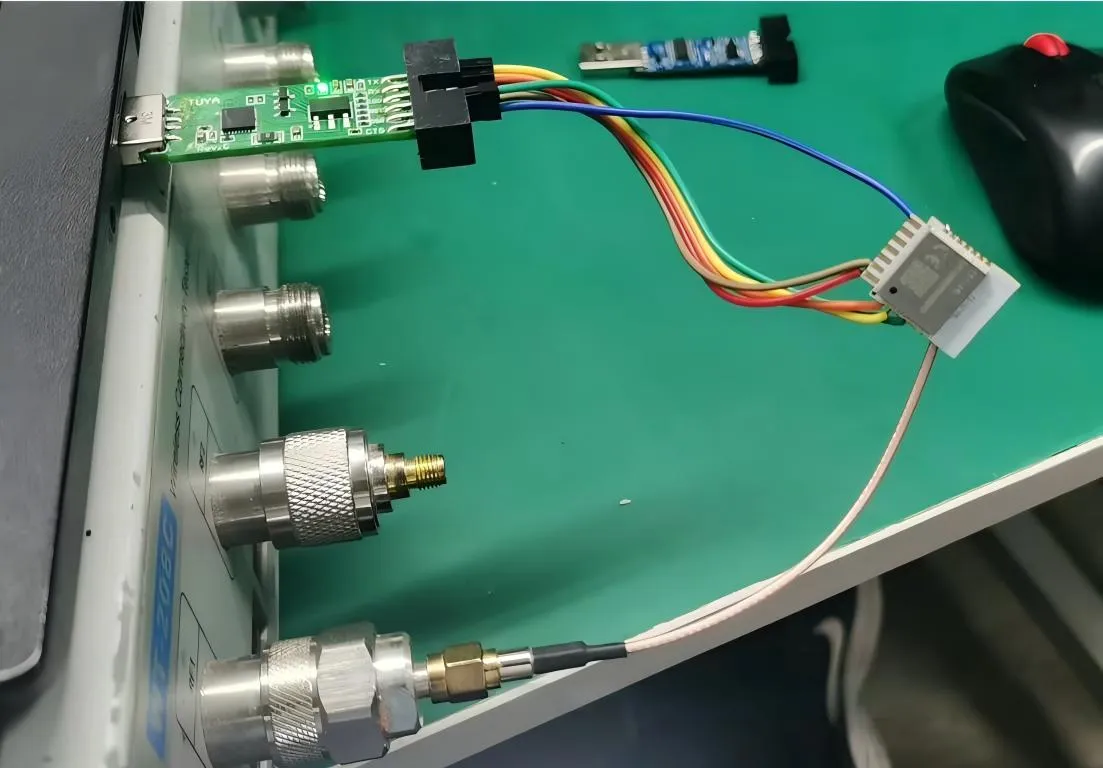
This figure illustrates a simplified RF signal chain where a coaxial cable connects a radio module to an antenna. It represents the common use of coaxial cable as the medium that carries RF energy between components. The image emphasizes that the cable is not a passive accessory but an integral part of the transmission line, affecting impedance continuity and signal loss. Early design stages often overlook these effects, leading to later margin erosion.
Most RF systems do not fail because of antennas.
And surprisingly, they rarely fail because of radios either.
More often, the quiet component between them becomes the problem.
That component is the RF coaxial cable.
At first glance, a coax cable seems simple. It connects two RF ports. If the connectors mate and the signal passes, everything appears fine. Engineers usually move on to more interesting parts of the system.
Weeks later, the situation sometimes changes.
A measurement shifts slightly. The link budget shrinks. A receiver becomes more sensitive to noise than expected. None of the core components appear defective, yet performance drifts.
When engineers trace the signal path carefully, the issue often lives somewhere along the coaxial chain.
This is why experienced RF designers rarely treat cables as passive accessories. A cable is not just a physical connection. It is part of the transmission line itself.
Understanding where RF coaxial cable fits inside the system—and how different cable families behave—makes it far easier to design stable RF links.
Where does RF coaxial cable actually sit in a real signal chain?
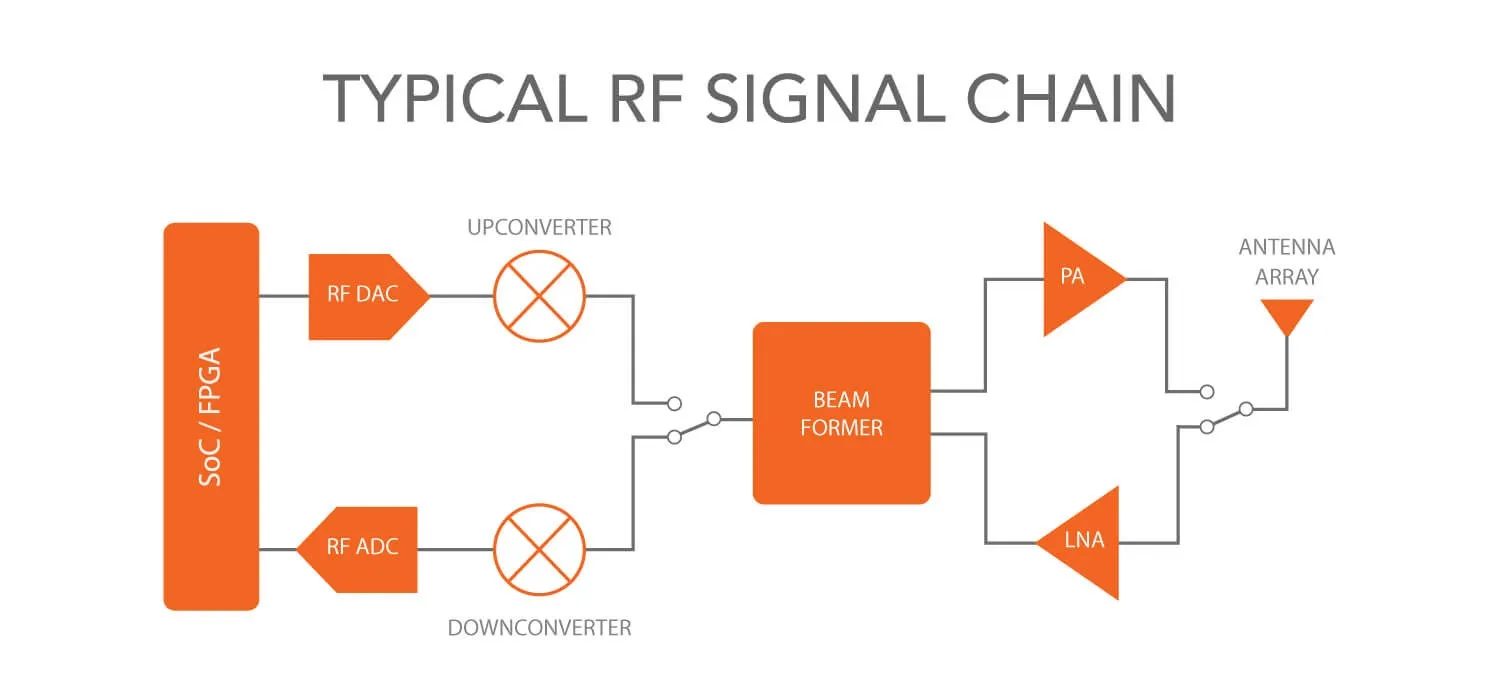
This figure shows a realistic RF signal chain from a radio module inside an enclosure to an external antenna. The path includes: a short internal jumper (often RG316) connecting the module to a panel bulkhead, the bulkhead connector itself, and an external feeder cable running to the antenna. It highlights that every segment—including short jumpers—must be considered in the overall link budget, as each contributes attenuation and potential impedance discontinuities.
On diagrams, RF signal paths look clean. A radio connects to an antenna. The signal travels from point A to point B.
Real hardware rarely behaves that way.
Instead, signals travel through multiple segments of RF coaxial cable, connectors, and adapters before reaching the antenna.
Once that reality becomes clear, cable selection stops looking trivial.
Map RF coaxial cable from radios to antennas and instruments
Consider a typical wireless device.
Inside the enclosure, the RF module may connect to a panel connector using a short coax jumper. Outside the enclosure, another cable runs toward the antenna. During testing, measurement equipment attaches through yet another cable.
In practice, the signal path might look like this:
Radio module → short coax jumper → panel connector → feeder cable → antenna.
Every arrow in that chain represents a section of RF coaxial cable.
Laboratory testing environments introduce even more transitions. Engineers often connect spectrum analyzers, network analyzers, and signal generators to the device under test.
A typical bench setup might resemble:
Signal generator → coax patch cable → device under test → coax cable → measurement instrument.
Each cable may appear insignificant on its own. Yet electrically, they combine into a single transmission line.
That means reflections, attenuation, and impedance continuity accumulate across the entire path.
When systems operate comfortably within performance margins, these effects remain small. But once frequencies rise or signals weaken, those small differences become visible.
Engineers therefore evaluate the entire coaxial signal chain, not just individual cables.
Separate RF coaxial cable from generic video or CATV coax
The term “coaxial cable” causes confusion because many industries use the same structure.
Video infrastructure uses coax. Broadcast systems use coax. RF communication hardware uses coax as well.
But they are not interchangeable.
The key difference lies in characteristic impedance.
Two standards dominate coaxial cable systems today.
| Cable Category | Impedance | Typical Applications |
|---|---|---|
| 50 ohm coaxial cable | 50 Ω | RF communication, antennas, test equipment |
| Video coax | 75 Ω | Television distribution, broadcast video |
Wireless devices and RF test equipment are almost always designed for 50 ohm coaxial cable.
Television infrastructure, by contrast, commonly uses 75-ohm cables. Those cables minimize signal attenuation in broadband video networks.
To make matters more confusing, the connectors sometimes look identical. BNC connectors are a common example. Both impedance standards may use BNC interfaces.
The connectors fit together physically.
Electrically, however, they behave differently.
If a 50Ω RF system accidentally includes a 75-ohm cable segment, the mismatch creates partial signal reflections. Engineers usually detect these reflections through return-loss measurements or elevated VSWR values.
In some systems the effect remains small. In precision RF measurements, though, even minor mismatches can influence results.
Link RF coaxial cable to connector ecosystems like SMA and BNC
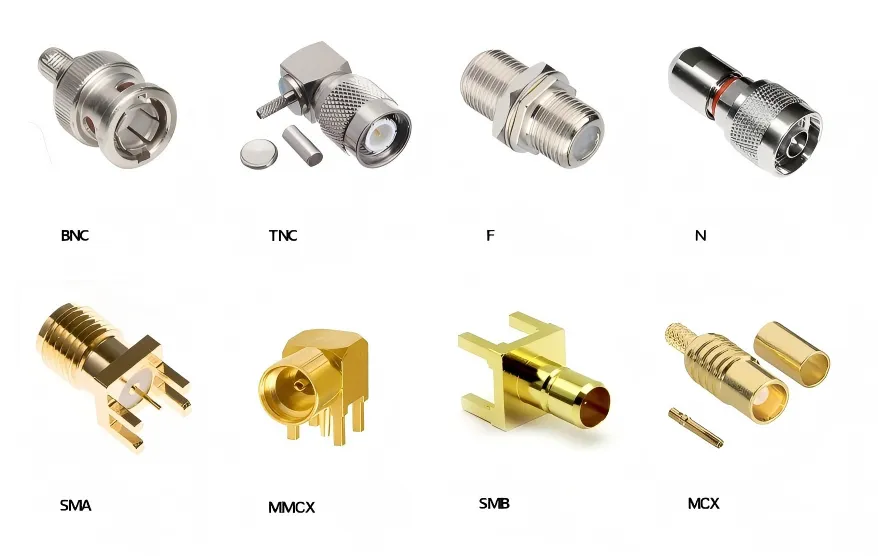
This figure likely shows a diagram mapping common coaxial cable families (such as RG58, RG316) to their typical connector interfaces (SMA, BNC, N-type). It illustrates how different connector ecosystems coexist and how transition assemblies like SMA to BNC cable or BNC to SMA adapter are used to bridge them while maintaining 50-ohm impedance continuity. The visual reinforces that connector transitions are an integral part of RF system design.
Cables never operate alone. They always terminate in connectors, and those connectors determine how hardware integrates into the RF path.
Several connector families appear repeatedly across RF systems:
- SMA connectors
- BNC connectors
- N-type connectors
- MCX and MMCX connectors
Each ecosystem developed for a slightly different environment.
SMA connectors are common on compact RF modules because they maintain stable impedance at relatively high frequencies. BNC connectors, on the other hand, appear widely on measurement equipment because they allow quick connection and removal.
Whenever those ecosystems meet, a transition becomes necessary.
For example, a device with an SMA port may need to connect to an instrument using a BNC interface. Engineers typically solve this using assemblies such as:
- SMA to BNC cable
- BNC to SMA cable
- BNC to SMA adapter
Search engines often treat these as separate products. In practice, they represent the same engineering task: connecting two RF connector ecosystems without disturbing impedance continuity.
If you examine many RF labs, you will usually find several of these assemblies scattered across the bench. They quietly enable different pieces of equipment to coexist within the same RF environment.
For readers interested in how RG-series cables fit into these assemblies, the broader RG cable guide explains how common coax families are used across RF systems.
Why do so many RF systems default to 50-ohm practice?
Anyone working around RF hardware quickly notices one recurring number: 50 ohms.
It appears in cable specifications, connector designs, attenuator ratings, and instrument ports.
The reason traces back to early transmission-line research.
Treat 50 ohm coaxial cable as the mainstream RF baseline
Engineers studying coaxial transmission lines discovered an interesting trade-off.
Lower impedance transmission lines can carry more RF power. Higher impedance lines tend to produce lower signal attenuation.
Those two goals conflict with each other.
Analysis showed that roughly 30 ohms maximizes power handling. Around 77 ohms minimizes signal loss.
Neither value worked well for systems that required both.
The compromise ended up near 50 ohms.
Over time, RF hardware manufacturers standardized around that value. Radios, antennas, amplifiers, and test instruments all began assuming a 50Ω transmission environment.
Once that standard became widespread, cable manufacturers followed suit. Today the majority of RF infrastructure relies on 50 ohm coaxial cable.
A deeper explanation of this engineering compromise can be found in the article on 50 ohm coaxial cable design principles.
Avoid mixing 50Ω and 75Ω parts unless the mismatch is intentional
Because connectors sometimes overlap between systems, impedance mixing occasionally happens.
BNC connectors again provide a good example. Both 50-ohm and 75-ohm cables may terminate with BNC connectors that look almost identical.
When those cables appear in the same signal chain, an impedance discontinuity forms.
At low frequencies the impact might remain small. As frequency increases, reflections become more noticeable.
Measurement systems are particularly sensitive to these mismatches. Even minor reflections can alter calibration accuracy.
For that reason, engineers typically maintain a consistent impedance environment across the entire RF path.
How should you group RF coaxial cable families before choosing one?
Open almost any RF catalog and you’ll see dozens of coaxial cable types.
RG174.
RG316.
LMR-series cables.
Semi-rigid lines.
The list keeps going.
Trying to compare these purely by part number usually leads nowhere. The better approach is simpler: think about what role the cable plays in the system.
Once the role becomes clear, the cable choice usually narrows quickly.
Group cables by role: jumper, patch, feeder, or test lead
| Cable Role | Typical Length | Main Priority |
|---|---|---|
| Jumper | 5–30 cm | Flexibility |
| Patch cable | 0.5–2 m | Connector durability |
| Feeder | 2–30 m | Low attenuation |
| Test lead | Variable | Measurement stability |
The differences matter.
A jumper cable inside a device enclosure bends around circuit boards and shielding cans. Flexibility matters far more than ultra-low loss.
A feeder cable running up a mast behaves differently. In that case attenuation becomes the dominant concern.
Once engineers categorize cables this way, the long list of RF cable families starts to make more sense.
Use RG316 coaxial cable as the compact jumper reference point
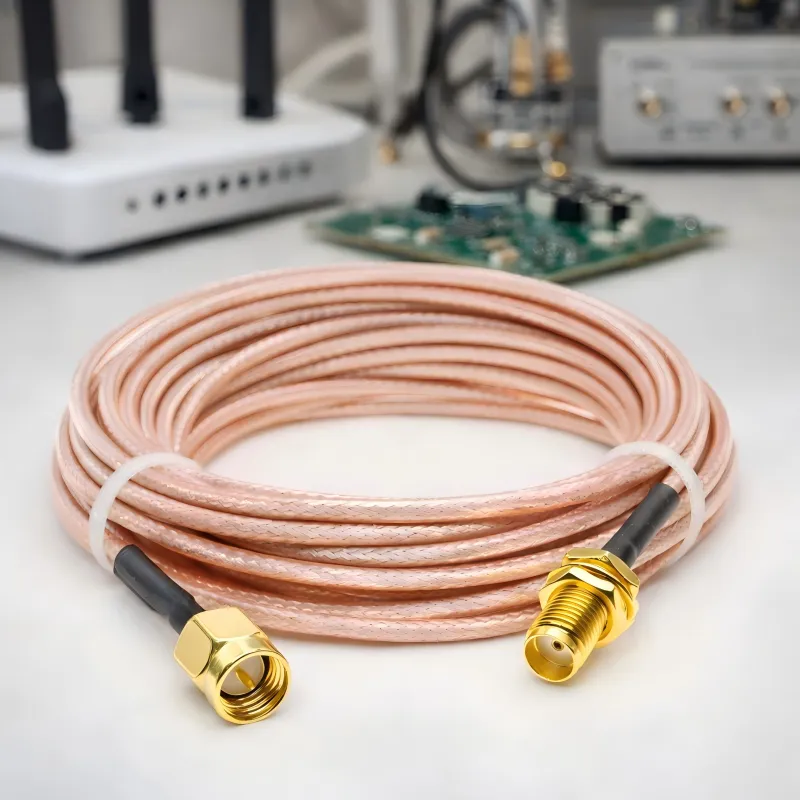
This image provides a detailed view of an RG316 coaxial cable jumper, likely with SMA connectors on both ends. With an outer diameter of approximately 2.5 mm, RG316 is flexible and heat-resistant, making it ideal for routing inside compact enclosures. It is frequently used as short jumpers between RF modules and panel connectors, or as test leads in laboratory setups where flexibility and moderate frequency performance are required.
Among small RF cables, RG316 coaxial cable appears almost everywhere.
There is a reason for that.
The cable is thin enough to route through dense electronics yet still robust enough to handle typical RF frequencies used in communication equipment. Many variants use PTFE dielectric materials and silver-plated conductors, which tolerate relatively high temperatures.
In practice, RG316 cable often appears in places like:
- RF module jumpers
- internal antenna pigtails
- test adapters
- compact instrumentation assemblies
The cable diameter is small—roughly a few millimeters—which allows it to snake through tight mechanical layouts without stressing connectors.
For readers unfamiliar with why coaxial cables maintain stable impedance, the basic structure is explained well in the technical overview of Coaxial cable. The concentric geometry between the center conductor and shield is what keeps RF signals predictable along the cable length.
That geometry is also why bending and routing practices matter later in system design.
Step up to thicker 50Ω families when distance begins to matter
Small cables have limits.
The flexibility that makes RG316 coaxial cable convenient also means the conductors are relatively small. Smaller conductors increase attenuation, particularly as frequency rises.
For a short jumper inside a device, that loss is usually negligible.
Stretch the cable several meters, however, and the numbers change.
This is where engineers often move to thicker 50 ohm coaxial cable families designed for longer runs. Larger conductors reduce resistive losses, and thicker dielectric layers help maintain impedance stability.
The transition typically occurs at the enclosure boundary.
Inside the device, space is limited. Engineers prefer flexible cables. Outside the device, signal integrity over distance becomes more important.
So the architecture naturally splits.
Short internal jumpers.
Longer external feeders.
You will see this pattern repeated in wireless gateways, test systems, and even laboratory fixtures.
How do you estimate loss before choosing an RF coaxial cable?
Cable loss has a habit of surprising people.
At low frequencies, the effect may be barely noticeable. Move into higher RF bands, and suddenly the numbers start to matter.
Fortunately, estimating attenuation is not complicated.
Use attenuation-per-meter data instead of guessing
Cable datasheets usually provide attenuation values measured at specific frequencies.
These values appear as dB per meter or dB per 100 feet.
If a cable specification shows 0.5 dB/m attenuation at a certain frequency and the planned cable run is 3 meters, the approximate cable loss becomes:
Loss ≈ 1.5 dB.
It’s a simple multiplication.
Engineers often run this quick estimate early in system planning. It gives a useful first approximation of how much signal power disappears along the cable.
Is the estimate perfect? No. Real systems also depend on temperature, manufacturing tolerances, and connector quality.
But it is good enough to identify obvious problems.
Connectors and adapters also contribute loss
Cable loss is only part of the story.
Every connector pair introduces a small insertion loss. The number varies with connector design and frequency, but it is rarely zero.
Typical transitions may add around 0.1–0.3 dB.
That sounds insignificant—until several transitions appear in the same signal path.
Imagine a measurement chain like this:
Signal generator → cable → BNC to SMA adapter → device → cable → instrument.
Each interface adds a small loss. Individually the numbers look trivial. Together they can add a noticeable amount of attenuation.
RF engineers therefore calculate total link loss, not just cable attenuation.
For readers interested in how impedance mismatches produce reflections in transmission lines, the physics behind it is explained in the overview of Standing wave ratio.
Divide the RF path into practical segments
Instead of treating the entire cable path as one long calculation, engineers often break it into smaller sections.
A typical breakdown might look like this:
- module jumper — very short cable inside the device
- patch cable — connecting rack equipment
- feeder cable — running toward an antenna
Each segment has different priorities.
Jumpers must bend easily.
Patch cables must survive repeated connector mating.
Feeders must minimize signal attenuation.
Once the path is divided this way, selecting the right RF coaxial cable for each section becomes far more straightforward.
When is RG316 enough?
Engineers often ask a practical question: when is RG316 cable sufficient?
The answer usually depends on two factors.
Cable length and operating frequency.
Short connections—say inside a device enclosure—rarely present a problem. The cable may only be a few centimeters long. Even relatively lossy cables produce negligible attenuation at that distance.
Longer runs are different.
As frequency increases, attenuation rises quickly. At that point engineers usually transition from RG316 coaxial cable to a larger cable family designed for lower loss.
In other words, RG316 is excellent for short RF jumpers, but rarely ideal for long feeder runs.
How RF coaxial cable is routed in real equipment
Cable specifications look very precise on paper.
Attenuation numbers.
Impedance values.
Shielding performance.
Those numbers matter, but once the cable leaves the catalog and enters real hardware, the problems engineers encounter are often mechanical rather than electrical.
Anyone who has repaired RF equipment long enough will notice a pattern. The cable rarely fails in the middle.
The trouble almost always appears close to the connector.
Why the connector area deserves attention
Take apart older RF equipment and inspect the cables inside.
Most of the cable still looks perfectly normal along its length. The damage tends to appear only a few centimeters from the connector body.
That location experiences the highest stress.
Every time the cable is moved, the bending force concentrates there. Over time the center conductor weakens, or the shielding begins to loosen.
Because of this, many engineers try to leave a small straight section of RF coaxial cable immediately after the connector before allowing the cable to bend.
It sounds trivial. In practice it can double the lifetime of a cable assembly.
Temperature and abrasion matter more than RF power
People new to RF systems often assume cable failure comes from excessive signal power.
That rarely happens.
Most cables operate far below their electrical limits. Environmental conditions usually cause problems first.
Heat slowly degrades dielectric materials. Abrasion against metal edges damages the outer jacket. Both issues appear frequently in real installations.
When routing RF coaxial cable, engineers usually follow a few simple habits:
- keep cables away from hot components
- avoid routing across sharp metal edges
- maintain gentle bends rather than tight corners
None of these practices show up in electrical specifications, yet they strongly influence reliability.
Let the enclosure carry the mechanical load
Another common issue appears when long cables hang directly from device connectors.
The connector ends up carrying the entire weight of the cable. Over time the connector loosens or the solder joints weaken.
The usual solution is to shift that mechanical load to the enclosure.
Bulkhead connectors work well for this purpose. The external cable connects to the chassis-mounted connector, while a short internal jumper links the connector to the circuit board.
Inside the device that jumper is often RG316 coaxial cable, mainly because it bends easily in tight spaces.
This arrangement protects the PCB connectors and simplifies maintenance.
A practical way engineers evaluate RF coaxial cable choices
Selecting cables rarely comes down to a single specification.
Engineers usually balance several factors at the same time: signal loss, flexibility, routing constraints, and cost.
To make those trade-offs visible, many teams create a simple planning table during early design stages.
Example: short internal jumper
Consider a small wireless module mounted inside a metal enclosure.
The antenna connector sits on the device panel, while the RF module sits several centimeters away.
A short jumper connects them.
This is exactly the scenario where RG316 cable appears most frequently. The cable is thin, flexible, and tolerant of moderately high temperatures.
The length may be only 20–30 centimeters. At that distance the electrical loss is minimal.
Mechanical flexibility becomes the deciding factor.
Trends shaping RF coaxial cable usage
Growing wireless infrastructure
Wireless communication continues expanding into new areas.
IoT networks, satellite systems, industrial wireless sensors, and measurement equipment all rely on RF interconnects. Even when signals eventually travel through antennas or waveguides, coaxial cables still connect the devices themselves.
Because of this, RF coaxial cable assemblies remain essential components in communication hardware.
Materials used in coaxial cables
Many RF cables rely on fluoropolymer dielectric materials such as PTFE.
These materials provide excellent electrical stability and temperature tolerance. That is why cables such as RG316 coaxial cable use them widely.
Environmental discussions about fluorinated materials have encouraged some manufacturers to explore alternative dielectric materials. The transition will likely be gradual, but it is an area engineers are beginning to monitor.
For readers interested in the physical structure of coaxial transmission lines, the overview of Coaxial cable explains how the geometry of the center conductor and shielding maintains characteristic impedance.
Frequently asked questions about RF coaxial cable
How do I identify 50-ohm cables?
Most RF communication equipment uses 50 ohm coaxial cable.
Video distribution systems often rely on 75-ohm cables instead. The easiest way to distinguish them is to check the cable specification sheet.
Why do reflections appear even when connectors fit?
Mechanical compatibility does not guarantee electrical compatibility.
If two components have different impedance values, part of the RF signal reflects at the interface. Engineers observe this through increased VSWR.
The physics behind this effect is described in the concept of standing wave ratio.
Final perspective
In RF systems the cable between components rarely receives much attention during early design work.
Yet the RF coaxial cable linking devices together quietly determines how efficiently signals move through the system.
A well-chosen cable preserves impedance continuity, protects connectors from mechanical stress, and maintains signal integrity across the entire RF path.
In many cases, improving the coaxial link is one of the simplest ways to improve overall RF system performance.
Bonfon Office Building, Longgang District, Shenzhen City, Guangdong Province, China

A China-based OEM/ODM RF communications supplier
Table of Contents
Owning your OEM/ODM/Private Label for Electronic Devices andComponents is now easier than ever.