
BNC Camera Cable CCTV Monitoring Selection and Cabling Guide
Jan 29,2026
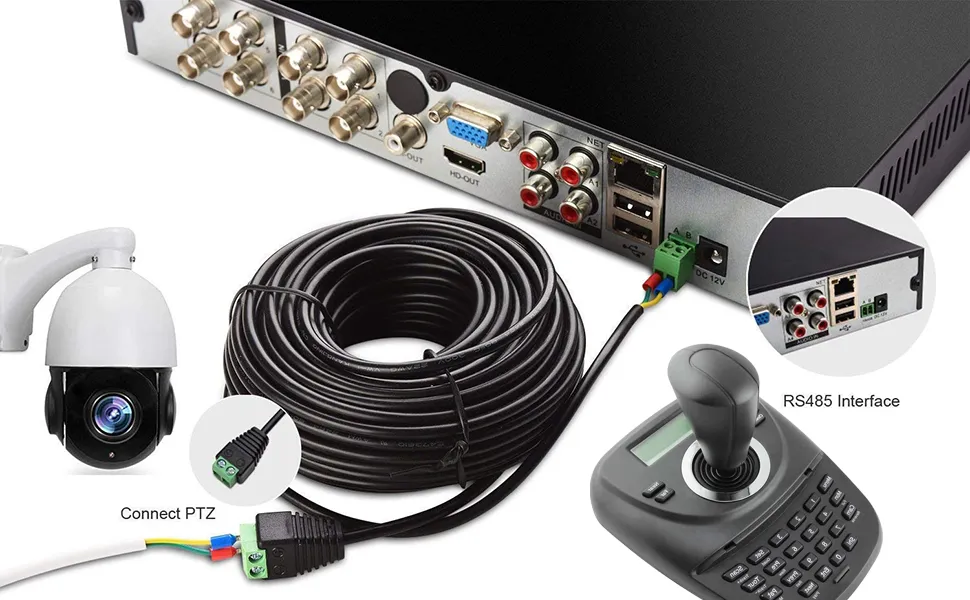
Figure 1 establishes the core conflict: after installation, the cable is treated as “invisible,” yet image problems that emerge weeks later (like increased noise at night or differences between channels) often stem from the cable. It emphasizes the importance of treating the cable as part of the signal chain, not just an accessory.
Why is the bnc camera cable the most overlooked part of a CCTV system?
Most CCTV problems don’t fail loudly.
The camera powers up. The DVR shows video. During installation, nobody complains. The system passes the “looks fine” test, which is often the only test it gets.
Weeks later, the complaints start. Night footage looks rough. One channel has more noise than the others. Someone notices faint interference that wasn’t there before. At that point, attention usually goes to the camera, the DVR, or the power supply.
The bnc camera cable almost never gets blamed first.
That’s not because it’s unimportant. It’s because it feels boring. No firmware. No settings. No menu to tweak. Once it’s in the wall, it’s treated as invisible.
In analog and HD-over-coax systems, that assumption is risky. The cable is not a neutral accessory. It is the physical path that carries the entire video signal, continuously, without regeneration or correction. Whatever happens along that path becomes part of the image.
Where does the bnc camera cable actually sit in a CCTV video chain?
On paper, the signal path looks trivial:
Camera → bnc camera cable → DVR input
That simplicity hides the real issue. Unlike IP video, analog and HD-analog signals don’t get “cleaned up” as they travel. There are no packets to resend. No buffering to smooth things out.
Every meter of bnc coaxial cable, every connector, every bend in the route shapes the waveform before it reaches the DVR. Loss, reflections, and interference don’t cause a hard failure. They quietly reduce margin.
This is why two cameras from the same box can behave differently after installation. Same model. Same settings. Different cable runs. Different results.
If you’ve ever seen one channel degrade faster than others, even though nothing “changed,” the cable path is usually where the story starts.
What is the real difference between bnc cable, bnc video cable, and bnc camera cable?
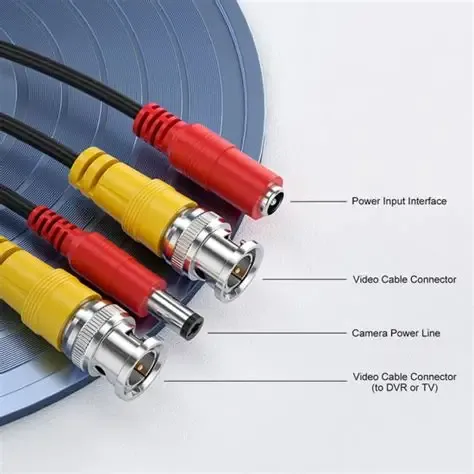
Figure 2 appears in the section explaining terminology differences, aiming to reduce errors caused by vague specifications. It explains that “BNC cable” only indicates the connector type, “BNC video cable” typically implies a 75-ohm cable, and “BNC camera cable” is an application label meaning cable selected or assembled for CCTV use. Precise language prevents many silent problems later.
These terms get mixed together constantly, especially in online listings and project specs. That confusion causes more trouble than people expect.
BNC cable is the loosest term. It only tells you there’s a BNC connector on each end. It says nothing about impedance, shielding, or intended signal type.
BNC video cable is more specific. In most cases, it implies a 75 ohm bnc cable, designed for baseband or HD video signals. This is closer to what CCTV systems actually need.
BNC camera cable goes one step further. It’s an application label. In practice, it usually means a cable selected or assembled for CCTV use—sometimes pre-made, sometimes bulk coax meant for permanent installation.
When specifications are vague, mistakes creep in. Installers grab “BNC cables” that technically fit but electrically don’t. The system still works, just not well.
Being precise with language—especially calling out 75 ohm bnc camera cable—prevents a lot of silent problems later.
What problems show up when bnc camera cable choice is treated as an afterthought?
Cable mistakes rarely break a system outright. They make it fragile.
The most common pattern looks like this: the system works during the day, then struggles at night. Infrared LEDs turn on, gain increases, and noise that was always there becomes visible. Sometimes the image flickers. Sometimes it just looks “dirty.”
Maintenance teams chase power grounding. Cameras get swapped. DVR channels get reset. The issue lingers.
In many of those cases, the root cause is simple: too much loss, poor shielding, or inconsistent impedance in the bnc video cable run.
The frustrating part is that by the time this becomes obvious, replacing the cable is the hardest and most expensive fix.
How do you match bnc camera cables to different cameras and DVRs?
What do CVBS, AHD, HD-TVI, and HD-CVI formats actually demand from the cable?
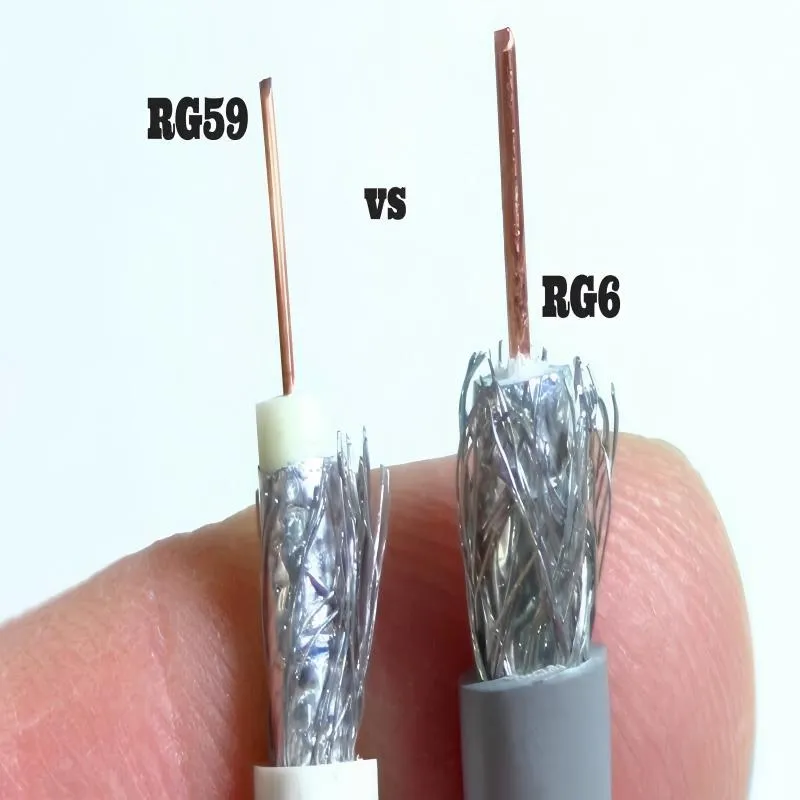
Figure 3 appears in the section discussing how to match BNC cables to different cameras and DVRs. It serves as a concrete physical comparison example, illustrating that cable selection is not arbitrary. RG59 cable, with its thinner diameter, is easier to route in crowded conduits and is typically used for short to medium distances for standard definition or early HD analog signals. RG6 cable, with its thicker conductor and better shielding, offers lower attenuation, providing longer effective transmission distances and higher signal integrity for high-resolution analog signals such as HD (e.g., 1080p, 5MP) and even 4K. This image emphasizes the importance of rationally selecting cable types based on transmission distance and resolution requirements when planning HD-over-coax CCTV systems, rather than relying on a one-size-fits-all approach.
Standard-definition CVBS is forgiving. It runs at relatively low bandwidth and tolerates loss better than newer formats. That’s why older systems often seem “bulletproof,” even with mediocre cabling.
HD-analog formats—AHD, HD-TVI, HD-CVI—are less forgiving. As resolution increases, the signal uses higher-frequency components. Those frequencies fade faster and react more strongly to impedance changes.
At 1080p, you can often get away with average cable if distances are short. At 5MP or 4K, that margin disappears quickly. Suddenly, the same bnc camera cable that worked before becomes the bottleneck.
This is where planning starts to matter more than brand names.
How do you decide between RG58 and RG316 bnc coaxial cable in real projects?
On spec sheets, the choice looks simple. In real buildings, it isn’t.
RG58 is thinner and easier to route. It fits crowded conduits and bends without a fight. That’s why it’s still everywhere in CCTV installs.
RG316 performs better over distance. Lower attenuation. More headroom for high-resolution signals. The tradeoff is stiffness and termination quality. Poor crimps on RG316 can erase its advantages fast.
Most installers don’t choose one or the other globally. They mix. Short indoor runs stay on RG58. Long corridors, outdoor paths, or higher-resolution cameras move to RG316.
If you want a broader view of how RG cables behave across frequencies and lengths—not just CCTV—you can cross-reference the general attenuation trends in our RG Cable Guide before locking in your choice.
What matters most at the DVR side when using 75 ohm bnc cable?
Nearly all CCTV DVR inputs are designed around 75 Ω termination. That assumption only holds if the entire path respects it.
Problems start when non-video BNC parts get introduced—adapters, couplers, or cables that “fit” but aren’t actually specified for 75 ohms. The image doesn’t disappear. It just loses margin.
Hybrid DVRs make this more subtle. They accept many formats, but they still rely on the cable behaving correctly. When instability shows up with no obvious cause, impedance mismatches near the DVR are often involved.
It’s one of those issues that doesn’t look like a cable problem until you’ve ruled out everything else.
How should you plan gauge and distance when using 75 ohm bnc cable?
Distance planning is where many CCTV projects quietly go wrong.
Not because the math is hard—but because nobody does it early. Cable is pulled first. Cameras are mounted. Only when the picture looks marginal does distance become a topic, and by then the walls are closed.
With analog and HD-over-coax systems, distance isn’t a fixed number. It depends on resolution, format, cable type, and how much signal loss you’re willing to tolerate before the image becomes unreliable.
That’s why a simple planning model is more useful than a single “maximum distance” claim.
CCTV bnc camera cable distance planning table
This table is meant to be practical. You could drop it straight into Excel or Google Sheets and adjust values based on your environment.
It doesn’t try to be laboratory-perfect. Instead, it reflects how installers and engineers actually think about margin.
Field definitions
| Field | Description |
|---|---|
| Video format | CVBS, AHD, HD-TVI, HD-CVI |
| Resolution tier | SD / 720p / 1080p / 5MP / 4K |
| Coax type | RG58 75Ω, RG316 75Ω |
| Frequency proxy (MHz) | Approximate working bandwidth |
| Attenuation @ freq (dB/100m) | Typical reference value |
| Max allowed loss (dB) | 3 dB (safe) / 6 dB (upper limit) |
| Max length (m) | Calculated |
| Recommended range | Conservative engineering range |
| Notes | Environmental adjustments |
Typical reference values
| Video format | Resolution | Coax | Atten (dB/100m) | Max Length @3dB | Recommended |
|---|---|---|---|---|---|
| CVBS | SD | RG58 | ~10 | ~300 m | ≤200 m |
| AHD | 1080p | RG58 | ~20 | ~150 m | ≤100 m |
| HD-TVI | 5MP | RG58 | ~28 | ~107 m | ≤70 m |
| HD-CVI | 4K | RG316 | ~15 | ~200 m | ≤130 m |
These attenuation values are not pulled from a single datasheet. They’re representative numbers commonly used for planning, assuming decent-quality bnc coaxial cable and proper termination.
If you need a deeper theoretical background on why impedance and attenuation behave this way in coaxial transmission lines, the overview on Coaxial cable explains the physics without drifting into marketing language.
How the distance calculation actually works
The math is intentionally simple.
- Convert attenuation to per-meter loss:
atten_dB_per_m = attenuation_dB_per_100m ÷ 100
- Estimate maximum length:
MaxLength_3dB = 3 ÷ atten_dB_per_m
MaxLength_6dB = 6 ÷ atten_dB_per_m
- Treat 70% of MaxLength_3dB as a comfortable working range.
Why 70%? Because real installations are never ideal. Connectors age. Temperature changes. Noise sources appear later.
This buffer is what keeps a system stable years after installation, not just on day one.
How do you quickly use this table during early planning?
Most engineers follow a rough but effective flow:
Start with the camera format and resolution.
Pick a candidate bnc camera cable type.
Look up the approximate attenuation at that bandwidth.
Calculate the theoretical max length.
Then cut it back.
If the actual cable path is already close to the recommended range, that’s your signal to step up cable quality, shorten routing, or rethink layout before installation starts.
This approach is faster—and cheaper—than fixing problems later.
How do pre-made bnc camera cables compare with field-terminated bulk coax?
Pre-made cables look attractive because they’re consistent and fast to deploy. But they often use thinner conductors and lighter shielding to remain flexible and low-cost.
In practice, that means their usable distance is usually more conservative than bulk RG58 or RG316 pulled and terminated on site.
Bulk coax gives you more control. Better shielding. Thicker center conductors. The downside is termination quality. A poorly crimped connector can undo every theoretical advantage of a higher-grade 75 ohm bnc cable.
In real projects, the trade-off usually looks like this:
- Short runs, tight spaces → pre-made cables
- Long runs, higher resolution → bulk coax with careful termination
Neither option is “better” by default. The distance plan decides.
What can you do if your planned run exceeds the recommended distance?
When calculations show you’re pushing the limit, you still have options.
One approach is simply upgrading the cable—moving from RG58 to RG316 often buys meaningful margin without changing the system architecture.
Another is layout adjustment. Relocating the DVR closer to camera clusters sometimes saves tens of meters without touching the cable spec.
Signal amplification or repeaters exist, but they add failure points and power requirements. They’re usually a last resort.
In some upgrades, the cleanest solution is switching the long run to IP while keeping short local cameras on coax. Hybrid DVR/NVR systems are built for exactly this kind of compromise.
Standards bodies like the International Electrotechnical Commission outline general signal transmission and cabling principles that support this layered approach, even though they don’t target CCTV specifically.
Why distance planning matters more at higher resolutions
At lower resolutions, cable loss shows up gradually. At higher resolutions, it shows up suddenly.
One day the image is fine. Then night mode exposes noise. A few months later, seasonal temperature changes push it over the edge.
That’s why planning distance with bnc camera cable isn’t about hitting a maximum number. It’s about leaving enough headroom that small changes don’t turn into visible problems.
This is also why “it worked before” is a weak argument when evaluating older cabling for HD-over-coax upgrades.
How can you avoid common bnc video cable mistakes during installation?
What should you watch for when routing bnc camera cable alongside power or data lines?
Most interference problems don’t come from bad cameras. They come from bad routing decisions made when time was tight.
Running bnc video cable in the same conduit as AC power is one of the most common shortcuts. Sometimes it works. Sometimes it doesn’t. The failure mode is subtle—usually faint noise that gets worse at night or during load changes.
Distance matters more than people think. Even a few centimeters of separation can reduce coupling. Crossing power lines at right angles helps. Continuous parallel runs are where trouble starts.
If separation isn’t possible, shielding and metal conduit help, but they’re not magic. Layout still wins.
How do adapters and couplers quietly hurt bnc camera cable performance?
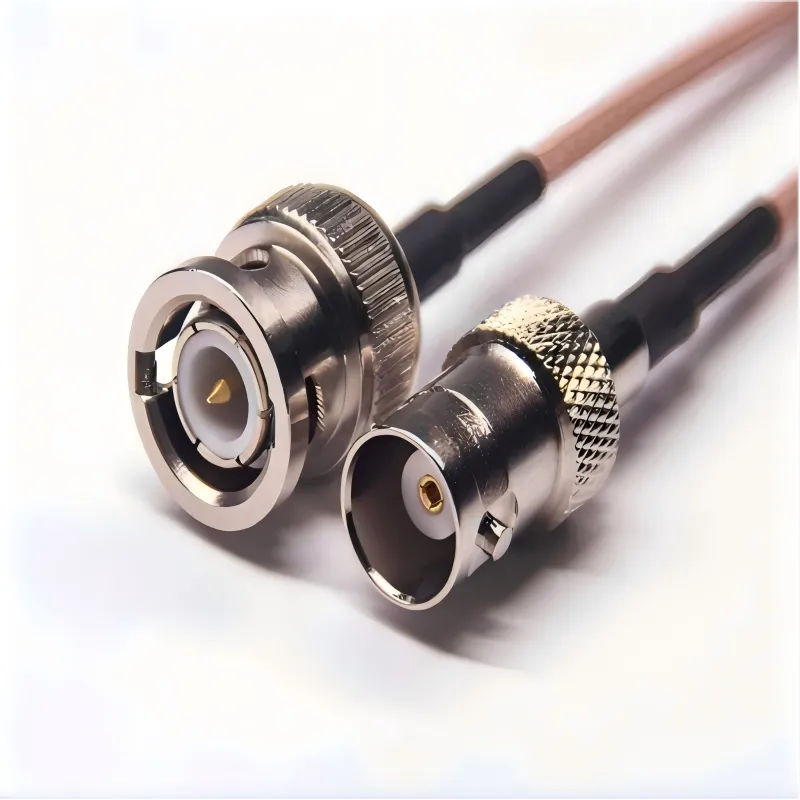
Figure 4 appears in the section discussing how adapters and couplers quietly hurt BNC camera cable performance. It serves as an example to remind that every extra connection is a gamble. The text emphasizes that not all BNC couplers are designed for 75-ohm cable, each mismatch adds a small reflection, and several stacked together matter. Mechanical stress (like an unsupported coupler) worsens the issue over time.
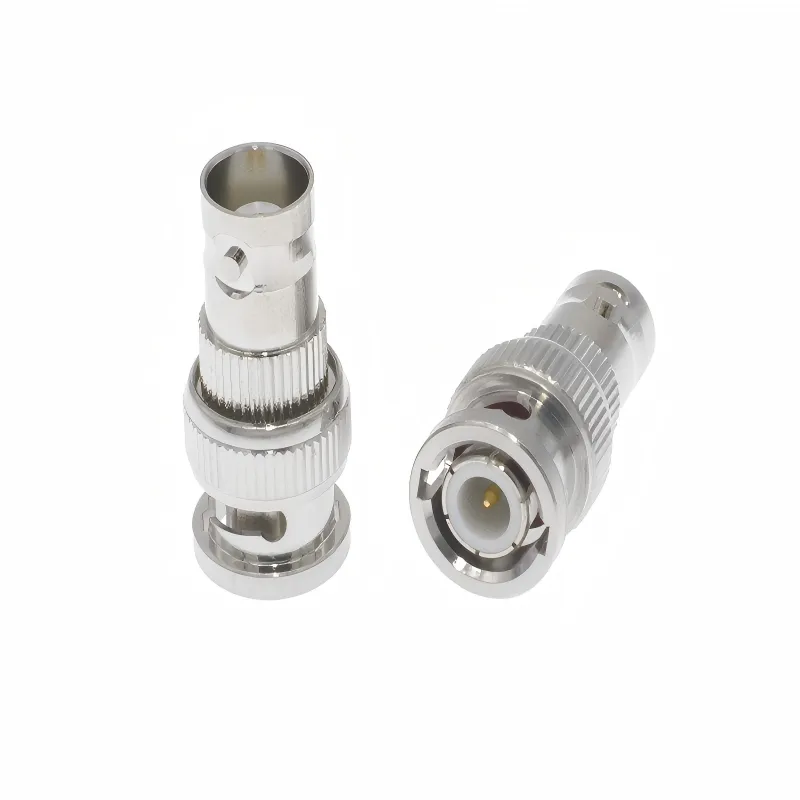
Figure 5 complements Figure 4 by showing the form of a pure adapter (without cable). It further emphasizes the risk of introducing impedance mismatch and mechanical instability when adapters and couplers are added late during troubleshooting, expansion, or due to cable length misalignment. Good practice is to minimize adapters and provide mechanical support for connectors.
Every extra connection is a gamble.
Couplers and adapters often get added late—during troubleshooting, during expansion, or because cable lengths didn’t quite line up. The system still shows video, so nobody questions it.
The problem is impedance. Not all BNC couplers are designed for 75 ohm bnc cable, even if they look identical. Each mismatch adds a small reflection. One reflection rarely matters. Several stacked together do.
Mechanical stress makes it worse. A coupler hanging unsupported behind a rack will eventually loosen. The image doesn’t drop. It degrades.
Good practice is boring but effective: minimize adapters, support connectors mechanically, and only use components specified for video impedance.
How do you protect outdoor bnc coaxial cable from water and UV damage?
Outdoor failures are slow failures.
Water doesn’t usually flood the cable all at once. It migrates. Capillary action pulls moisture past imperfect seals. Months later, attenuation rises and noise appears.
UV damage is even quieter. Indoor-rated jackets harden, crack, and lose shielding effectiveness over time. The cable still passes signal—just not cleanly.
For outdoor runs, bnc camera cable should have UV-rated jackets, proper drip loops, and sealed connectors. Periodic inspection matters more than most people admit.
How do you troubleshoot bnc coaxial cable issues when the image looks wrong?
What do different picture artifacts actually tell you?
The image usually gives clues—if you know what to look for.
- Snow or grain often points to attenuation or shielding problems
- Rolling bars or waves suggest interference or grounding issues
- Intermittent flicker usually means connectors or mechanical damage
- Soft focus across the whole frame can be bandwidth loss, not the lens
These symptoms don’t guarantee a cable fault, but they narrow the search fast.
How do you confirm a bnc camera cable problem with simple tests?
The fastest diagnostic tool is substitution.
A short, known-good cable between camera and DVR can eliminate dozens of variables in minutes. If the picture cleans up immediately, the long run is suspect.
Swapping DVR channels helps too. If the issue stays with the channel, look at the recorder. If it follows the cable, you’ve found your culprit.
This kind of testing feels crude, but it’s often faster than meters or analyzers in real installations.
How do you localize faults in large multi-camera systems?
In bigger systems, the question isn’t “is it the cable?” It’s “which part of the cable?”
Breaking the run into segments works. Test closer to the camera, then closer to the DVR. Temporary patch cables and portable monitors save time.
Experienced installers think in sections, not in entire runs. That mindset turns a day-long hunt into a structured process.
Where does bnc camera cable still make sense as IP surveillance grows?
Which projects benefit from staying on coax?
IP isn’t always the right answer.
Older buildings with existing coax infrastructure are the obvious case. Pulling new Ethernet can be disruptive and expensive. HD-over-coax upgrades often deliver acceptable results with far less work.
Budget also matters. Not every project needs analytics, AI processing, or centralized network management. For basic monitoring, bnc camera cable systems remain reliable and predictable.
Low-latency requirements can favor coax too. There’s something to be said for simplicity when the system’s job is just to show video.
How do hybrid coax + IP systems divide responsibilities?
Many modern systems quietly mix both worlds.
Core areas get IP cameras where bandwidth and features matter. Peripheral zones—parking areas, corridors, older wings—stay on coax.
Hybrid DVR/NVRs make this practical. They reduce the need for a full rip-and-replace while allowing gradual upgrades.
If you want a broader, scenario-based view of how BNC cables behave across CCTV, video, and test environments, the overview in our BNC Cable Selection Guide for Video, CCTV, and RF Test gives that wider context.
What do recent HD-over-coax developments mean for cable choice?
The trend is clear: higher resolution over the same physical medium.
That doesn’t make cable less important—it makes it more critical. Tolerances tighten. Margins shrink. The old “it works, so it’s fine” approach stops being safe.
In practice, this means older bnc camera cable runs should be evaluated, not assumed, when upgrading cameras. Some will pass. Some won’t. The difference usually shows up first at night.
Final questions installers still ask
Which cable length and type should I choose for rooftop cameras?
Long outdoor runs favor RG316 with UV-rated jackets. Plan conservatively and assume future degradation.
Is it safe to run bnc camera cable in the same conduit as AC power?
It can work, but it’s risky. Separation is always safer.
How can I tell if existing coax is 50 ohm or 75 ohm?
Check jacket markings or manufacturer documentation. Visual inspection alone isn’t reliable.
Can I mix different brands of bnc camera cable in one system?
Yes, but consistency reduces surprises. Mixed quality often leads to mixed results.
When upgrading to HD-over-coax, how do I know if old cables are good enough?
Test at full resolution, in night mode, over real distances. Daytime checks aren’t enough.
Do outdoor bnc camera cables really need UV resistance?
Yes. Indoor jackets degrade faster than most people expect.
Closing note
The bnc camera cable doesn’t get attention because it doesn’t ask for it. No alerts. No firmware updates. No blinking LEDs.
But once it’s in the wall, it decides how much performance your cameras are actually allowed to deliver. Planning it early—and treating it as part of the signal chain, not an accessory—avoids many of the problems that show up later when fixes are hardest.
Bonfon Office Building, Longgang District, Shenzhen City, Guangdong Province, China

A China-based OEM/ODM RF communications supplier
Table of Contents
Owning your OEM/ODM/Private Label for Electronic Devices andComponents is now easier than ever.