
SMA Antenna Cable Matching, Length & Panel Mounting Guide
Dec 29,2025

Located in the article's introduction, this figure visually establishes the core argument: the seemingly trivial selection and handling of SMA cables is actually a key factor determining the field stability of high-frequency wireless devices.
A sma antenna cable rarely looks like a design risk. It’s passive, inexpensive, and usually added late in a build—sometimes after the enclosure, the antenna, and even the compliance plan are already “done.” Yet in real Wi-Fi and IoT systems, especially at 5 GHz and 6 GHz, that short coax run often decides whether a device feels stable or annoyingly fragile.
Most field failures don’t start with exotic RF theory. They start with assumptions.
A connector that looked right.
An extension added because the enclosure layout changed.
A panel feed-through chosen by thread length alone.
Engineers usually discover the cost weeks later, when range feels inconsistent or returns begin to stack up.
This guide focuses on what actually matters in day-to-day builds: identifying SMA vs RP-SMA correctly, matching both ends of an sma antenna cable without guesswork, and knowing when length, adapters, or bulkheads quietly eat into your margin. It’s written from hands-on assembly and test experience—not from idealized diagrams.
Is my jack SMA or RP-SMA—how do I tell in 10 seconds?
Few RF details cause more wasted time than confusing SMA with RP-SMA. The irony is that they’re mechanically similar by design. Same thread size. Same pitch. Same overall look. That similarity is exactly why mistakes survive review.
The fix is simple, and it doesn’t require opening the enclosure.
Thread × pin/hole quick ID (device vs antenna)
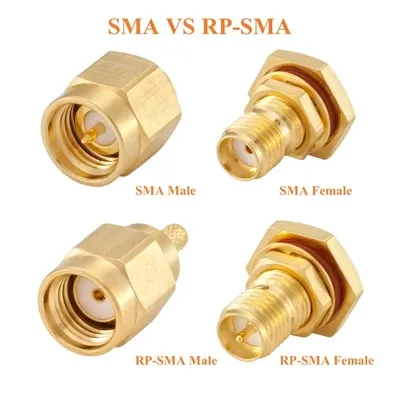
This figure is a key tool for solving the document's core question "Is my jack SMA or RP-SMA?", providing a visual method for accurate identification within ten seconds without disassembly.
Forget labels. Ignore marketing photos. Look at only two physical cues:
1) Where are the threads?
- Threads on the outside → Male
- Threads on the inside → Female
2) What’s in the center?
- A pin → Male signal contact
- A hole → Female signal contact
Combine them and the picture becomes unambiguous:
- SMA Male: external threads + center pin
- SMA Female: internal threads + center hole
- RP-SMA Male: external threads + center hole
- RP-SMA Female: internal threads + center pin
That last pair is where most errors happen. RP-SMA flips only the signal gender, not the threads. From the outside, it still looks like SMA.
If you’ve ever had a connector that “almost works,” this is usually why.
Common habits on routers/APs and IoT gateways
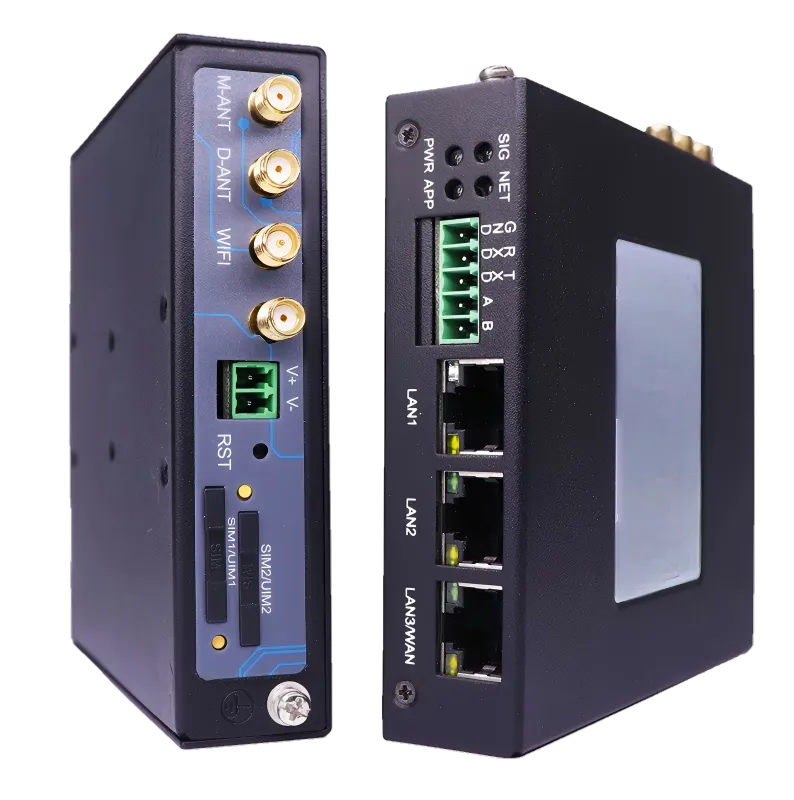
This figure provides empirical reference based on device type, helping engineers form initial expectations, but simultaneously emphasizes in conjunction with the text that conventions cannot be fully relied upon and physical inspection is mandatory.
Manufacturers follow conventions, not laws of physics.
- Consumer Wi-Fi routers and access points
Typically expose RP-SMA Female jacks. That means the antenna or extension must be RP-SMA Male.
- Industrial IoT gateways, cellular modems, test equipment
Much more likely to use standard SMA Female jacks, paired with SMA Male cables or antennas.
These habits are helpful—but never sufficient on their own. Devices change vendors. Product lines evolve. The only reliable method is still the 10-second visual check.
If you need a deeper reference on how these connectors evolved and why the reverse-polarity variant exists, this background on SMA connectors helps frame the naming without affecting how you identify them in practice.
How do I match both ends of an sma antenna cable without mistakes?
Once you know the device port, the rest should be straightforward. In practice, this is where most ordering errors happen.
The reason is simple: people describe cables in half-sentences.
“Male to female.”
“Same as the antenna.”
“Standard SMA.”
None of those are complete specifications.
Male/Female mapping and typical pairs

This figure aims to solve the practical problem of “how to match both ends of a cable without mistakes,” visualizing the “four-element” method emphasized in the text and demonstrating typical application scenarios to prevent ordering errors due to vague descriptions.
A clean cable definition always includes four elements, not two:
- Connector standard (SMA or RP-SMA)
- Signal gender (pin or hole)
- Mechanical gender (thread location)
- Which end is which
Typical correct examples:
- Router (RP-SMA Female) → Antenna
- RP-SMA Male to RP-SMA Male cable
- IoT gateway (SMA Female) → Antenna
- SMA Male to SMA Male cable
- Internal RF module → panel connector
- U.FL to SMA Female pigtail, then external antenna
Notice that “male-to-male” is meaningless unless the SMA vs RP-SMA distinction is explicit.
This is the same logic covered in more depth in our comparison of RP-SMA vs SMA—the mechanics are forgiving, but the RF interface is not.
RP-SMA vs SMA: key differences and mismatch risks
What actually goes wrong when you mix them?
- Mechanical symptoms
Some combinations won’t mate at all. Others will thread but fail to make reliable center contact.
- Electrical impact
Poor or intermittent contact raises return loss, distorts impedance, and adds insertion loss that varies with vibration or temperature.
- System-level effects
At 5 GHz and above, these small discontinuities show up as unstable MCS rates or range that collapses unpredictably.
There’s also a compliance angle. Antenna mismatch can alter radiation efficiency and pattern shape, which matters when you’re operating near regulated EIRP limits.
In short, if a connection “kind of works,” it’s already costing you margin.
How long can I extend before 5/6 GHz range drops?

This figure supports the discussion in the “How long can I extend before 5/6 GHz range drops?” section, providing a graphical theoretical basis for the subsequent “Extension Loss Quick Estimator,” emphasizing the necessity of meticulous path length budgeting in high-frequency applications.
When Wi-Fi antenna extension cables make sense
An extension is reasonable when:
- The antenna must exit a metal enclosure
- The radio location is fixed by layout or certification
- The added length is short and intentional
Extensions become risky when they’re used as band-aids—stacked adapters, unknown cable types, or lengths chosen without a loss budget.
This applies equally to a wifi antenna extension cable, an sma extension cable, or an rp-sma extension cable. The name doesn’t change the physics.
Connector and adapter penalties you can’t ignore
Every additional RF connector pair introduces loss. A commonly used field estimate is ~0.2 dB per connector interface. That doesn’t sound dramatic—until you realize how quickly it adds up.
Two adapters plus an extension can quietly burn a full decibel. At 6 GHz, that’s often the difference between “stable” and “flaky.”
Extension Loss Quick Estimator
Inputs
- Frequency: 2.4 / 5 / 6 GHz
- Length L (meters)
- Number of connectors n
- Adapter included: Yes / No
Estimator
Loss (dB) ≈ α(Freq) × L + 0.2 × n
Where α is an empirical cable loss factor (dB/m), increasing with frequency and decreasing with cable diameter.
Outputs
- Estimated total insertion loss (dB)
- Suggested length tier: 0.1 / 0.3 / 0.5 / 1 / 2 m
- Guidance: shorten run or switch to a lower-loss cable
Field experience note:
At 5 GHz, once added loss approaches ~1 dB, throughput instability becomes noticeable in real environments. At 6 GHz, designers aim to stay well below that margin.
Do I need a panel feed-through—how do I size an sma bulkhead?
Running an antenna cable straight through a hole can work—briefly. In prototypes, people do it all the time. In shipped hardware, it’s one of those shortcuts that quietly creates mechanical and RF debt.
A proper sma bulkhead exists for three reasons: mechanical stability, repeatable assembly, and predictable sealing. None of those show up in a schematic, but all of them matter after the first few installs.
Stack height: panel + washer + gasket + cap
One common mistake is choosing bulkhead thread length based only on panel thickness. In reality, the connector “sees” a stack.
A typical stack includes:
- Panel wall
- Internal washer or lock washer
- External gasket or O-ring
- Optional waterproof cap
Add these together before you choose thread length. You want enough exposed thread for full nut engagement after compression—not barely catching, and not bottoming out.
Too short, and the nut never fully locks.
Too long, and torque control becomes inconsistent, often compromising sealing.
For aluminum panels around 1–2 mm thick, designers often underestimate how much the gasket and washer consume. Measuring once saves a surprising amount of rework.
If you need a broader reference on coax cable behavior before it even reaches the panel, the RG cable guide is a useful way to sanity-check loss versus diameter before committing to a bulkhead-plus-extension approach.
Flange vs nut-locked bulkheads: what really changes?
From an RF standpoint, flange and nut-locked bulkheads behave similarly. The differences are mechanical.
- Nut-locked bulkhead
Compact, fast to assemble, and perfectly adequate for indoor or low-vibration environments.
- 2-hole or 4-hole flange bulkhead
Better anti-rotation, improved load distribution, and more consistent sealing—especially when cables are frequently mated and unmated.
If the antenna cable will ever be used as a “handle” (intentionally or not), flanges age better. It’s not about strength; it’s about not letting torque creep into the SMA interface.
What should I use for short internal runs: sma male to female cable or direct?
Bend radius, strain relief, and routing reality
Most thin RF cables specify a minimum bend radius of ≥10× the outer diameter. Go tighter than that and you’re stressing the dielectric and braid. The damage is subtle and cumulative.
Good internal routing usually looks boring:
- Gentle curves, not sharp corners
- A small strain-relief loop near the connector
- No constant tension pulling on the SMA jack
Rigid direct connections look clean on CAD screenshots. They age poorly in real enclosures.
A short jumper decouples the connector from mechanical stress, which is often worth far more than the tiny added insertion loss.
EMI, grounding, and spacing to metal edges
RF cables don’t like surprises. Inside metal enclosures, the biggest ones are sharp edges and noisy ground transitions.
Simple habits help:
- Keep coax away from raw panel cutouts
- Avoid running parallel to high-current DC paths
- Leave a small air gap to metal edges where possible
These aren’t rules from a spec sheet. They’re habits learned after opening enclosures that “worked fine” on the bench and failed in the field.
Can I adapt an RP-SMA antenna to an SMA jack—what’s the cost?
Physical fit ≠ RF performance ≠ compliance
An adapter introduces:
- Additional insertion loss
- Another impedance discontinuity
- Another mechanical interface that can loosen
One adapter might be acceptable in a short link. Two back-to-back adapters rarely are. Each junction adds uncertainty that becomes visible faster at 5 GHz and 6 GHz.
There’s also a regulatory angle. Antenna mismatch can alter radiation efficiency and pattern shape. That matters when you’re operating near allowed EIRP limits, even if the system “still works.”
If you want a fast refresher on how these connector families differ at a fundamental level, the comparison in RP-SMA vs SMA lays out why physical compatibility doesn’t imply electrical equivalence.
Better alternatives when possible
When you still have design flexibility, better options usually exist:
- Order the sma antenna cable with the correct ends
- Shorten the RF path instead of extending it
- Change the panel connector type once, rather than stacking adapters
Adapters solve problems locally. They rarely improve systems globally.
What belongs on my PO so I avoid returns?
Most cable returns don’t come from bad manufacturing. They come from vague ordering language.
“Standard SMA.”
“Male-female.”
“Same as last time.”
None of those survive handoff between teams.
SMA Antenna Cable Ordering Checklist
Confirm before ordering
- Connector type: SMA or RP-SMA
- Signal gender: pin or hole
- End configuration: M–M / M–F / F–F
- Cable type (for example, RG178)
- Length (0.1–2 m)
- Bulkhead or flange required (Y/N)
- Waterproof cap or gasket (Y/N)
- Quantity
- Panel thickness and hole diameter (if feed-through)
Copy-ready PO note
“SMA antenna cable. End A: SMA Male (pin). End B: RP-SMA Male (hole). RG178. Length 0.3 m. No adapters. No bulkhead. Panel thickness not applicable.”
That single sentence eliminates most ambiguity before it reaches purchasing or production.
A practical pause before the final section
By this point, most of the hidden failure modes around sma antenna cable selection are already visible: connector identification, end matching, extension loss, mechanical routing, and adapter trade-offs.
What remains are the questions people usually ask after they’ve already built something—and want to know whether they can salvage it without redesigning the enclosure.
That’s where the final section goes.
Can I still pass compliance if I “make it work”?
This is the question that usually comes last—often after a prototype already exists.
The system powers up. The antenna radiates. Range seems acceptable. So the temptation is to assume compliance will follow. Sometimes it does. Often, it doesn’t.
The problem isn’t that an sma antenna cable or adapter suddenly violates regulations by itself. The issue is that small RF changes stack, and compliance limits don’t care whether those changes were intentional.
Where EIRP risk quietly appears
EIRP problems rarely come from one big mistake. They come from several small ones lining up:
- An adapter added to fix a connector mismatch
- An extension cable added to reach a panel
- A bulkhead with slightly higher loss than expected
Individually, each change looks harmless. Together, they alter antenna efficiency and current distribution enough to shift radiated power and pattern shape.
In marginal designs—especially at 5 GHz and 6 GHz—this can push a system from “barely compliant” to “questionable,” even though nothing looks obviously wrong.
This is why experienced teams try to lock connector type, cable length, and routing early. The fewer variables you adjust late, the fewer surprises appear during testing.
Frequently asked questions engineers actually ask
How can I tell if my router jack is RP-SMA or SMA without opening the case?
How long can a 5/6 GHz run be before an extension hurts throughput?
What thread length should I choose for an SMA bulkhead on a thin aluminum panel?
Is a male-to-female SMA extension better than two adapters back-to-back?
Can I connect an RP-SMA antenna to an SMA jack and still ship the product?
What bend radius is safe for thin coax inside a tight enclosure?
Should I strain-relieve the cable behind the panel?
Why do SMA antenna cable returns happen so often?
How this guide fits into a larger RF cable workflow
This article focuses narrowly on sma antenna cable matching, length, and mechanics. It intentionally doesn’t try to cover everything about coaxial cables.
For broader context, it pairs naturally with:
- The RG cable guide, which looks at loss, shielding, and diameter trade-offs across common coax types
- Connector identification references such as the SMA connector overview, useful for historical and dimensional background
Together, these form a practical hub: cable selection, connector matching, and real-world integration.
Final note
RF problems rarely announce themselves clearly. A system doesn’t usually fail outright. Instead, it becomes “a bit worse than expected.” Range feels shorter. Links drop earlier. Throughput varies by orientation.
More often than not, the root cause lives in the small, boring parts: a mismatched connector, an unnecessary adapter, an extension that was “just temporary.”
A well-specified sma antenna cable doesn’t add features. It removes uncertainty. And in RF systems, removing uncertainty is often the biggest performance upgrade you can make.
Bonfon Office Building, Longgang District, Shenzhen City, Guangdong Province, China

A China-based OEM/ODM RF communications supplier
Table of Contents
Owning your OEM/ODM/Private Label for Electronic Devices andComponents is now easier than ever.