
SMA Extension Cable Length, Loss & Matching in Practice

Dec 24,2025

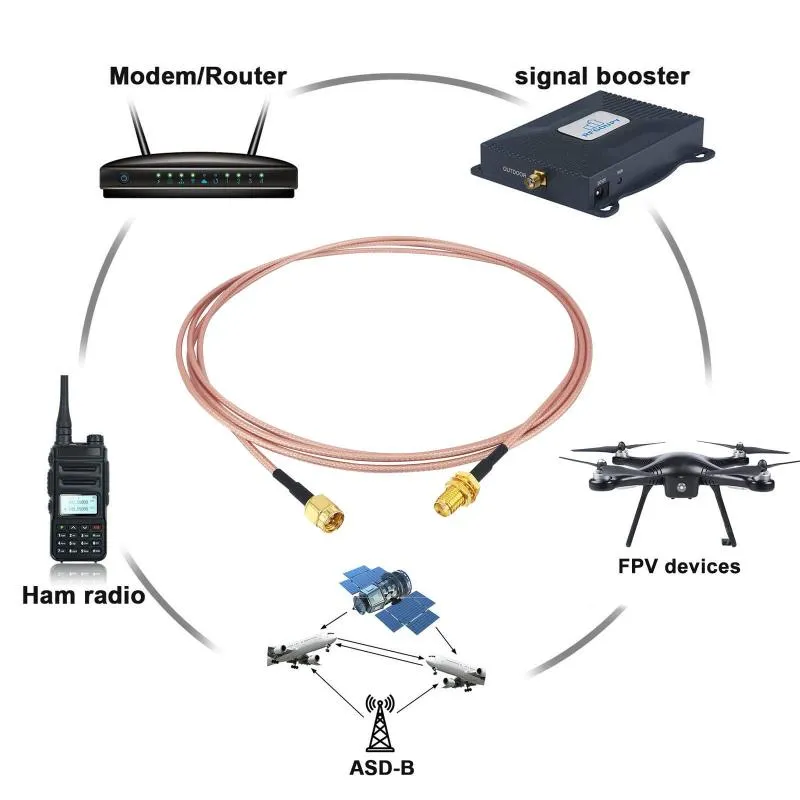
An illustration depicting application scenarios of SMA extension cables in various wireless devices including modems/routers, ham radios, FPV devices, and ADS-B.

This schematic illustrates the use of SMA extension cables across different equipment categories, including networking devices (routers, boosters), hobbyist gear (ham radios, FPV video transmitters), and aviation monitoring devices (ADS-B), visually demonstrating their broad applicability.
Overview of Practical Applications for SMA Extension Cables

Extending a wireless link looks easy—just plug in a longer SMA extension cable and you’re done, right? Not quite. Each extra centimeter reshapes your signal path, alters impedance, and eats into link margin. Whether you’re tuning a Wi-Fi 6E router, wiring an industrial IoT gateway, or building a compact test rig, cable length decides how much of that transmitted power actually survives the trip.

At TEJTE, engineers test these trade-offs every day, comparing coax types, connector genders, and link losses to make sure performance stays predictable. The lessons below come straight from that bench experience.

How long should an SMA extension cable be without killing 5 GHz range?

Use-case tiers for 0.1 / 0.3 / 0.5 / 1 / 2 m

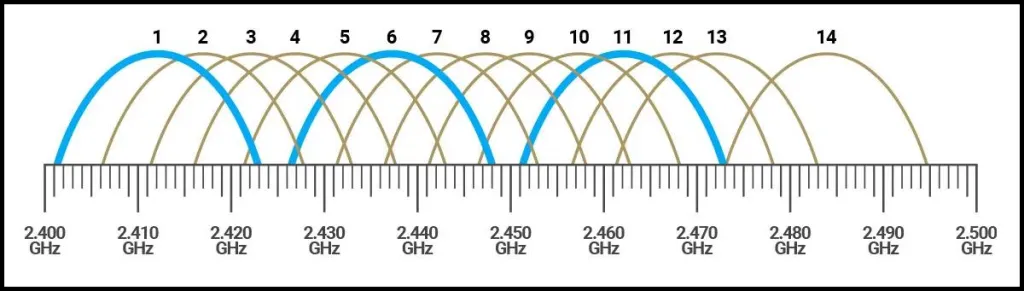
A table showing estimated loss for various SMA extension cable lengths at 2.4GHz and 5GHz bands, alongside a corresponding frequency range bar.

This chart quantifies signal attenuation for SMA cables ranging from 0.1m to 2.0m at both 2.4GHz and 5GHz through a detailed data table, accompanied by a frequency axis. It clearly illustrates the core relationship: higher frequency and longer length lead to greater loss.
Cable Length, Frequency, and Loss Correlation
There’s no “universal” length for RF jumpers. You pick what the layout and physics allow. Short runs keep losses microscopic; long ones invite dB penalties that no datasheet will offset later.
Length (m) Typical Use Est. Loss @ 2.4 GHz Est. Loss @ 5 GHz
0.1 Board-to-panel jump inside a router or IoT module ≈ 0.4 dB ≈ 0.7 dB
0.3 Short desktop or cabinet extension ≈ 0.8 dB ≈ 1.5 dB
0.5 Small enclosure to external antenna ≈ 1.2 dB ≈ 2.1 dB
1.0 Wall-mounted AP feed-through ≈ 2.3 dB ≈ 3.8 dB
2.0 Outdoor or test-bench run ≈ 4.6 dB ≈ 7.5 dB

At 5 GHz, attenuation nearly doubles compared with 2.4 GHz, so a two-meter lead can eat half the link budget of a low-power radio. Most installers treat one meter as the upper safe limit unless they plan to recover the loss with higher-gain antennas.

Engineers familiar with TEJTE’s broader coaxial cable guide already know that frequency is the quiet thief of range—the higher it climbs, the faster dBs disappear.

Home router / AP, industrial gateway, in-chassis jumpers

  • Home routers & APs: Ship almost exclusively with RP-SMA connectors. A 0.3 or 0.5 m wifi antenna extension cable usually repositions antennas just enough to escape wall shadows.
  • Industrial gateways: Prefer standard SMA connectors for stronger shielding and torque stability. Cables between 0.5 and 1 m fit neatly into sealed housings without tight bends.
  • In-chassis jumpers: M.2 Wi-Fi cards or LTE modules link to rear panels through ultra-short RG178 leads—keep these under 0.3 m and treat every bend gently.

A simple rule survives countless lab tests: the shorter the run, the longer the uptime.

SMA or RP-SMA — how do I match male / female ends correctly?

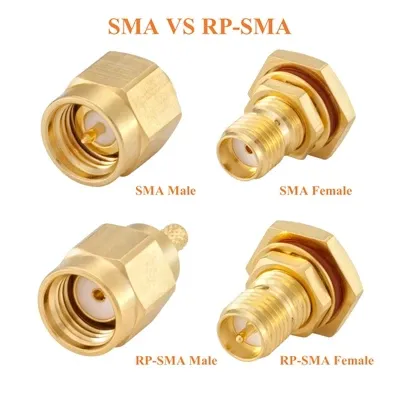
Visual comparison diagram between standard SMA and RP-SMA connector genders, highlighting the reversed polarity.

This side-by-side diagram clearly differentiates standard SMA and Reverse Polarity SMA (RP-SMA) connectors by their center contact (pin or socket), preventing mating errors that can cause RF signal failure.
SMA vs. RP-SMA Polarity Comparison

Thread × pin / hole quick ID (device vs antenna)

Few topics frustrate engineers more than mismatched connectors. The visual cues are subtle: thread direction plus the presence of a pin or a socket. Mix them once, and your “signal loss” turns out to be “no contact at all.”
Connector Type Thread Center Contact Common Use
SMA Male Outer thread Pin Device ports on industrial gear
SMA Female Inner thread Socket Antenna or panel mount
RP-SMA Male Outer thread Socket Consumer Wi-Fi equipment
RP-SMA Female Inner thread Pin Typical router antennas

If the router’s port shows a hole, that’s an RP-SMA male; its matching cable end must be RP-SMA female. Industrial radios usually flip to standard SMA types—pin equals male, as tradition dictates.

A handy rhyme some installers use: “Pin out — SMA about; pin in — RP within.” It’s saved more than one technician from a return shipment.

Those who’ve struggled with connector IDs can dig deeper in TEJTE’s RP-SMA Connector Identification & Matching Guide, which breaks down pin geometry under macro shots.

When an SMA male-to-female or SMA antenna cable makes sense

You’ll reach for an SMA male-to-female cable whenever you need breathing room between a device’s SMA female port and an external antenna.

For consumer Wi-Fi, swap that for RP-SMA male-to-female—same mechanics, opposite pin logic.

What to avoid? Chaining multiple adapters. Each joint adds a fraction of a decibel and one more potential point of failure. Two connectors plus one adapter may not sound like much, but stack a few and the return loss creeps from –25 to –20 dB. That’s enough to upset a 5 GHz link on a marginal signal.

It may seem trivial, yet proper gender pairing eliminates the most common field ticket engineers see: “Everything screws together fine, but the signal’s dead.”

How much loss will the extension add to my link budget?

Signal loss comes from two culprits—cable attenuation and connector count. Both grow quietly until the system fails compliance or range expectations.

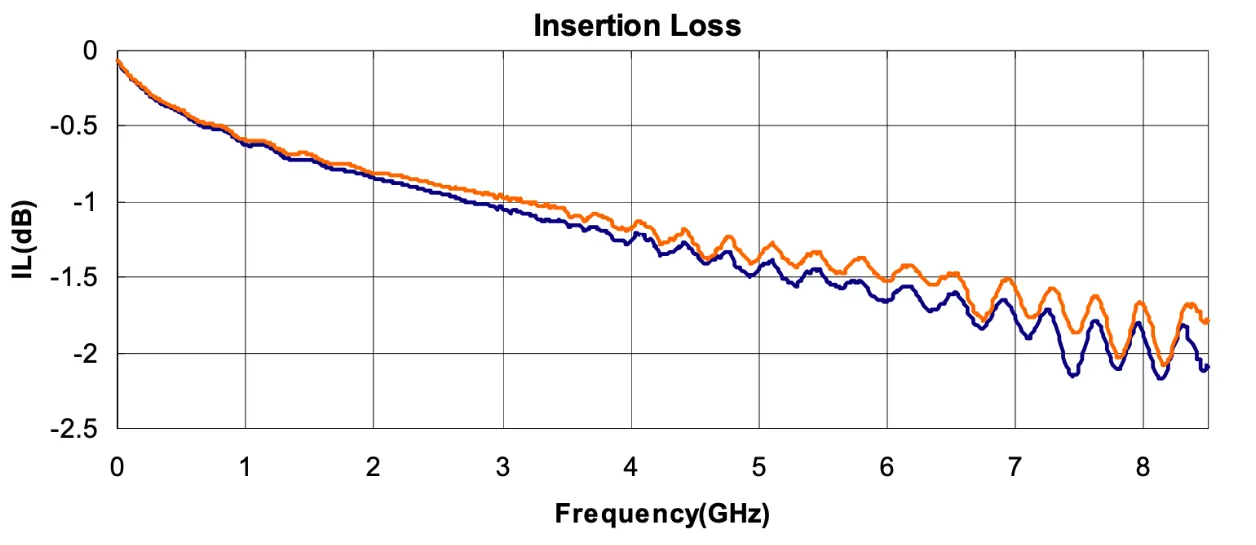
Typical RG178 α (dB/m) at 2.4 / 5 GHz; bend-radius rules (≥ 10× OD)

A graph showing RG178 coaxial cable insertion loss versus frequency, and a schematic indicating the minimum bend radius (≥10 times outer diameter).

This figure consists of two parts: the left graph shows that RG178 cable insertion loss increases significantly with frequency; the right schematic emphasizes its mechanical installation limit—the minimum bend radius must be ≥10 times the outer diameter (~18mm). Violating this rule leads to impedance distortion and performance degradation.
RG178 Cable Loss Characteristics and Bend Requirements
For compact assemblies, RG178 coax wins on flexibility and footprint, not on efficiency. At 1.8 mm outer diameter it snakes through tight housings but taxes the link with measurable attenuation.
Frequency Typical Loss α (dB/m) Min Bend Radius
2.4 GHz ≈ 2.3 ≥ 18 mm
5 GHz ≈ 3.7 ≥ 18 mm
Bending tighter than 10 times the outer diameter distorts impedance and strains the braid. Once the shield opens, VSWR jumps unpredictably. You’ll see it first as fluctuating throughput before the failure becomes permanent.

Per-connector penalty and reflections

Every mated pair steals roughly 0.2 dB. Add an adapter, and you can lose another 0.1 to 0.3 dB depending on plating and torque. Multiply that across multiple interfaces and you’ll notice it—especially on 5 GHz where reflection energy doubles.

Loss Estimator (Quick Formula)

Loss (dB)≈α(f)×L+0.2×n

Where:

  • α(f) = attenuation per meter (2.3 or 3.7 dB/m)
  • L = cable length in meters
  • n = connector count (two per mated pair)

Example:

A 0.5 m RG178 extension at 5 GHz using four connectors (device to extension to antenna):

Loss = 3.7 × 0.5 + 0.2 × 4 = 1.85 + 0.8 = 2.65 dB total.

For a Wi-Fi router that’s tolerable. For a battery-powered IoT sensor sending 10 dBm, it’s half the available margin.

TEJTE’s engineers model these same figures when producing parts for their RF Coaxial Cable Guide—proof that theory and field data align more often than you’d expect.

Router / M.2 / mini-PCIe short lead — what’s the safe extension plan?

Inside modern routers and embedded boards, antenna cables are often an afterthought—until the enclosure closes and nothing fits. Extending those short MHF4 or U.FL jumpers with a wifi antenna extension cable or rp-sma extension cable can save hours of rework, but only if done properly.

Short coax jumpers such as RG178 or RG316 are the go-to materials when bridging between internal modules and external connectors. They’re flexible enough for tight housings yet stable across 2.4 and 5 GHz. When routing them, think like the signal itself: avoid abrupt bends, steer clear of heat sources, and give the coax room to relax. A gentle S-curve always beats a 90-degree kink.

Best practices engineers actually use:

  • Keep the extension under 0.5 m unless the enclosure absolutely requires more.
  • Secure both ends with bulkhead nuts or adhesive clamps to relieve strain.
  • Leave a bit of slack so vibration or temperature expansion won’t tug the connectors.
  • If the lid must close over the cable, respect the ≥10× OD bend radius rule from the earlier loss section.

When designing a new product, some teams order custom lengths directly from suppliers like TEJTE to match panel layouts precisely—no coiling, no extra loss. The company’s production catalog in the RF Connector & Cable Hub even includes pre-terminated SMA and RP-SMA assemblies rated for IP67 enclosures.

Strain relief, routing, and anti-kink practices

An illustration showing best practices for strain relief, routing, and anti-kink techniques behind a panel for SMA extension cables.

This schematic provides practical mechanical guidance for installing SMA cables. It shows how to use zip ties or clamps for strain relief behind the bulkhead, how to leave slack to avoid stress and resonance, and how to route with smooth arcs instead of sharp bends to ensure long-term reliability.
Strain Relief and Routing Practices in Cable Installation

Once installed, the sma extension cable faces two threats: mechanical stress and resonance. Every connector joint is a miniature spring; if it’s forced at an angle, the dielectric compresses and detunes impedance. That’s why professional installers always add strain-relief loops or plastic clamps behind the bulkhead.

For portable or vehicle-mounted systems, use rubber grommets or zip ties to isolate the cable from vibration. A sharp tug can rip the inner conductor long before you notice externally. Some engineers like to mark their cable routes with small arrows showing signal direction—simple, but it helps during troubleshooting.

And don’t forget the golden rule: never twist the coax body while tightening the nut. Rotate only the connector shell. It sounds trivial, yet this single habit prevents 80 % of premature failures in field gear.

Do I need a panel feed-through? How to pair with bulkhead or flange mount

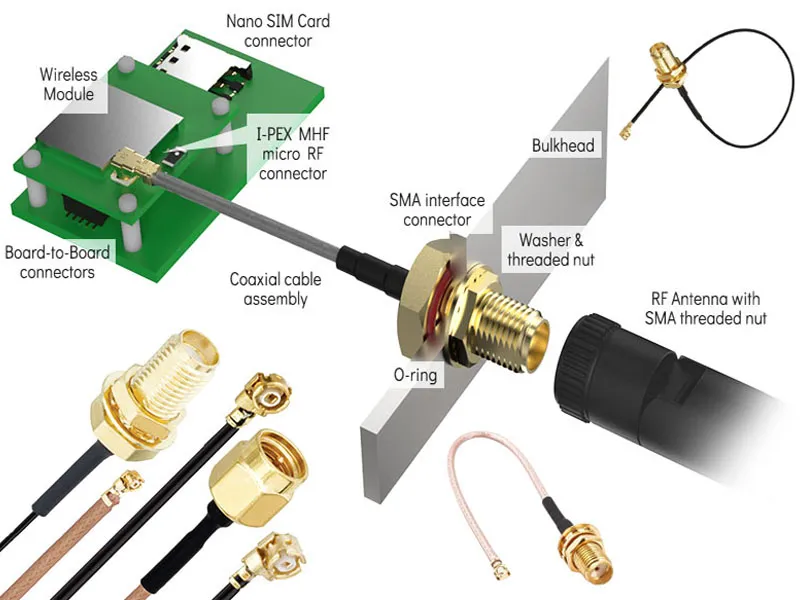
An exploded view of an SMA panel feedthrough assembly from an internal wireless module to an external antenna, including connectors, O-ring, washers, lock nut, etc.

This is a detailed exploded assembly diagram illustrating how to safely and shieldedly route signals from an internal wireless module (e.g., M.2 card) to an external antenna via an SMA bulkhead connector. It clearly labels each component and their assembly sequence from the micro RF connector to the external SMA interface.
SMA Panel Feedthrough Assembly Diagram
When your device’s antenna must exit a metal enclosure, a panel feed-through or sma bulkhead connector becomes the cleanest, safest route. It maintains shielding integrity while letting the RF line pass through the wall without leakage or moisture intrusion.

sma bulkhead: hole size, thread length, and panel thickness

Not all bulkheads are created equal. Standard SMA bulkheads usually ship with 1/4-36 UNS threads and a nut-to-nut span of about 6 mm. For thin aluminum or ABS panels (1–2 mm thick), this works perfectly.

If your panel is thicker or includes a gasket, choose a long-thread SMA bulkhead—typically 8 – 11 mm—to ensure enough thread engagement. On soft materials, always add a flat washer to distribute torque.

Typical specs used by TEJTE’s field kits:

Panel Thickness Recommended Thread Length Hole Diameter Gasket Type
1–1.5 mm 6 mm 6.2 mm Silicone or flat EPDM
1.5–3 mm 8 mm 6.4 mm O-ring (3 mm ID)
3–5 mm 11 mm 6.5 mm O-ring + lock washer
Tighten just enough to compress the gasket without crushing it—finger-tight plus a quarter-turn is a reliable field rule.

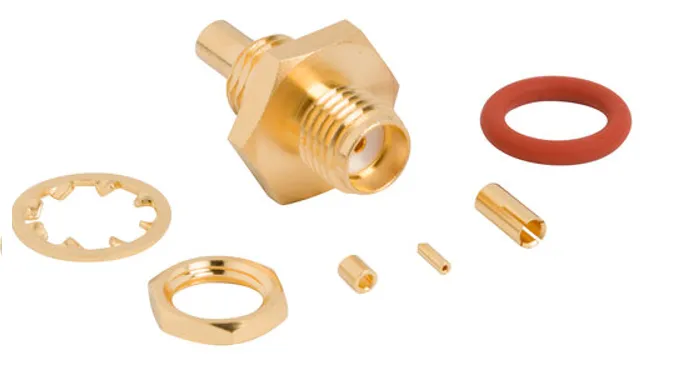
O-ring compression and waterproof caps

A diagram showing the proper compression state of an O-ring on an SMA connector (approx. 25-30% compression) and the installation of a waterproof cap.

This figure focuses on sealing details for outdoor installations. The left part illustrates that the O-ring needs to be compressed to about 25-30% of its original height to form an effective IP67 seal. The right part shows that a waterproof cap should be used to protect the exposed SMA port when no antenna is connected, preventing moisture and corrosion.
O-ring Compression and Waterproofing

Outdoor or semi-outdoor setups demand more than torque; they need O-ring compression and sometimes a waterproof cap. Once compressed to about 25–30 % of its original height, an O-ring forms a dependable IP67 seal. Too loose, and moisture seeps in; too tight, and the rubber splits over time.

For installations where the antenna might be removed (for example, on test enclosures), always keep a dust or waterproof cap on the exposed SMA port. TEJTE supplies these small accessories with many bulkhead SMA cables—a cheap insurance policy against corrosion.

If you plan to drill your own panel holes, remember that minor misalignment can stress the connector. The SMA Bulkhead Drilling & IP67 Sealing Guide illustrates how to maintain tolerance while still achieving watertight compression.

In other words, treat the feed-through as part of the RF path, not just a mechanical mount.

Can I adapt an RP-SMA antenna to an SMA jack? What’s the cost?

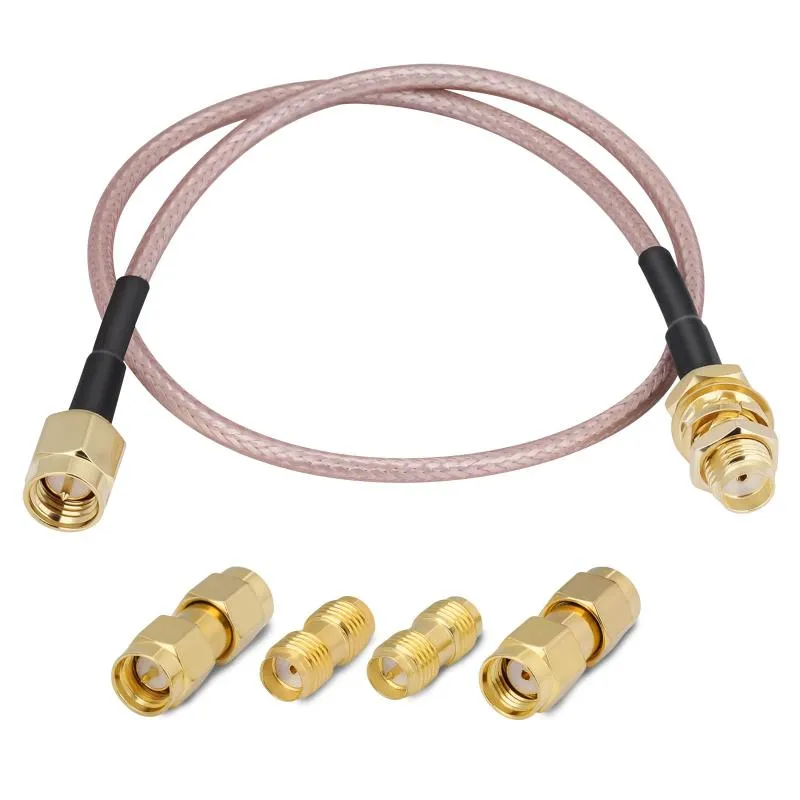
Mixing connectors sounds harmless, but physics disagrees. While a small SMA-to-RP-SMA adapter will physically fit, it subtly alters the impedance profile, adds insertion loss, and—most critically—can violate EIRP compliance for certified Wi-Fi equipment.

Physical vs. RF performance vs. compliance

Mechanically, yes, you can screw an adapter between a standard SMA extension cable and an RP-SMA antenna. Electrically, each added interface contributes ~0.3 dB of insertion loss and a few tenths of a decibel of reflection. On a 5 GHz path, that’s enough to disturb the radio’s power calibration.

Regulators like the FCC classify SMA and RP-SMA connectors differently for a reason: RP-SMA was designed to discourage easy antenna swaps on consumer routers. Changing that connector type—even via an adapter—technically voids modular certification. In lab terms, it’s “non-compliant modification.”

From a design engineer’s perspective, adapting should be a temporary debugging move, not a production solution. If you need a permanent transition, order a properly terminated rp-sma extension cable instead. It keeps the mechanical fit consistent and ensures the system stays within radiated power limits.

When to replace versus when to adapt

Sometimes, though, field engineers have no choice. Maybe the shipment includes the wrong antenna type, or the client changed models mid-project. In those pinch moments, using a gold-plated adapter for short-term testing is fine—as long as the total chain stays below three interfaces (device → adapter → antenna). Once the system stabilizes, replace it with a native connector assembly.

Anecdotally, TEJTE’s support team notes that more than half of “no-signal” returns trace back to such improvised adapter stacks. They look neat but act like invisible attenuators. The fix is almost embarrassingly simple: use the correct cable from the start.

When in doubt, align connector genders and types directly rather than bridging them. Your network—and your compliance report—will thank you.

Why proper connector matching matters for Wi-Fi 7 and 6 GHz

As Wi-Fi 7 devices start tapping into 6 GHz bands, the margin for error gets thinner. Cable loss climbs faster, reflections sting harder, and even small mismatches between sma connectors can show up in throughput tests. That’s why TEJTE’s design updates include tighter return-loss specs and pre-sealed connectors tuned for high-band service.

The takeaway is simple: in this frequency range, electrical perfection isn’t optional—it’s survival.

What belongs on my PO to avoid returns?

A diagram explaining the higher requirements for SMA extension cable length, cable type, and connector performance in the context of Wi-Fi 7 and 6 GHz bands.

This figure addresses future technological evolution, emphasizing that traditional SMA extension cable selection criteria need upgrading for Wi-Fi 7 and 6 GHz high-frequency bands. It recommends shorter cable lengths (0.3-0.5m), the use of lower-loss cables (e.g., RG316), and ensuring connectors have better return loss (≥ -25dB) to meet more stringent link budget challenges.
Cable Selection for Wi-Fi 7 / 6 GHz Bands
Buying RF parts can feel deceptively simple until the wrong gender shows up in a sealed bag. A few unchecked boxes can turn into wasted shipping and days of delay. Before hitting “Order,” engineers at TEJTE always review a short list—what they call the SMA Extension Cable Order Checklist.

Order Checklist — Quick Reference

Parameter What to Verify Typical Value / Note
Connector Type SMA or RP-SMA (ensure device-to-antenna match) e.g., SMA Male to SMA Female
Gender Pin vs Socket (don't rely on photos) Confirm with datasheet drawing
Ends M-F / M-M / F-F Most extensions use M-F
Cable Type RG178 / RG316 / LMR-100 Choose for flexibility vs loss
Length 0.1 – 2 m Match earlier link-budget result
Bulkhead / Flange Y/N Needed for panel feed-throughs
Waterproof Cap Y/N Recommended for outdoor use
Quantity Always order a spare
Panel Thickness / Hole Dia. If using bulkhead See table in previous section

Add those details right into the purchase order’s remarks field. A complete PO might read:

“SMA M-F extension cable, RG178, 0.5 m, bulkhead 11 mm thread, with cap, for 1.5 mm panel — Qty 4”

It looks tedious, but suppliers process it faster and errors nearly vanish.

TEJTE’s production portal even embeds this logic in its RF Cable Configurator, cutting rework time to nearly zero.

When you’re sourcing from multiple vendors, consistency matters. Use the same notation across all SKUs so warehouses can scan specs at a glance. A mislabeled “RP-SMA” once caused an entire router batch to fail field tests—not for performance, but simply because antennas couldn’t connect.

PO Template

Connector: [SMA / RP-SMA]

Gender: [Male-Female / Male-Male / Female-Female]

Cable Type: [RG178 / RG316 / LMR-100]

Length: [0.1–2 m]

Bulkhead / Flange: [Y / N]

Waterproof Cap: [Y / N]

Panel Thickness: [ mm ]

Hole Diameter: [ mm ]

Quantity: [ pcs ]

Notes: For Wi-Fi 6E / 7 device, maintain ≤ 2.5 dB loss @ 5 GHz

That single block, pasted into your ERP or email, prevents 95 % of avoidable returns.

It’s the quiet kind of engineering discipline that never makes headlines—but it keeps projects on schedule.

Do Wi-Fi 7 / 6 GHz updates change extension choices?

The short answer: yes, and not just a little.

With Wi-Fi 7’s 320 MHz channels now creeping toward 7 GHz, traditional extension cables face tighter loss budgets. At these frequencies, attenuation increases roughly 15 % over the 5 GHz band, while even minor connector mismatches can spike VSWR. Engineers who once ignored half-decibel gaps now chase millidecimals.

Higher-band use and realistic length expectations

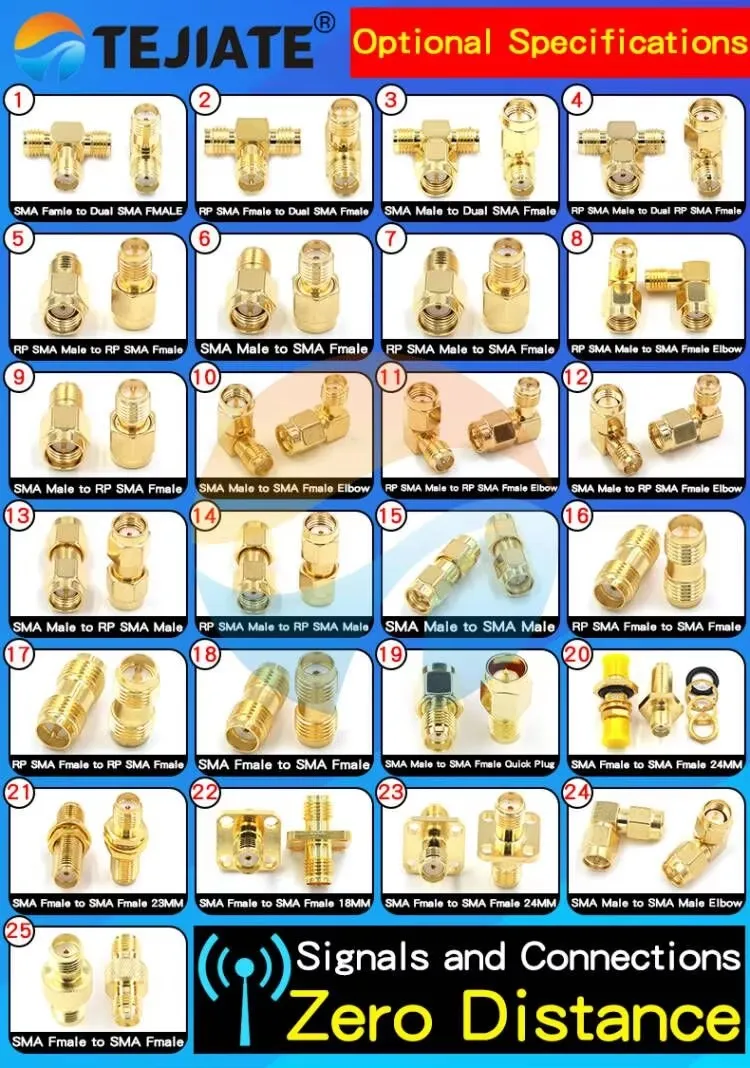
An overview diagram or list showcasing various SMA and RP-SMA connector variants and combination options, such as "SMA Male to Dual SMA Female".

Serving as a comprehensive reference, this figure likely presents, in a list or matrix form, the extensive range of SMA/RP-SMA connector assembly options offered by TEJTE. It shows various configurations from standard male-to-female to more complex ones like "male-to-dual-female", emphasizing the importance of selecting the correct, high-quality pre-made assemblies for achieving optimal "zero signal distance" performance.
Optional Connector Specifications & Zero Signal Distance

For 6 GHz operation:

  • Keep SMA extension cables under 0.3–0.5 m whenever possible.
  • Favor low-loss coax such as RG316 or LMR-100A.
  • Double-check connector return loss ≥ –25 dB; below that, reflections start hurting throughput.

Industrial integrators have started specifying “5 GHz / 6 GHz ready” assemblies—TEJTE’s catalog labels these explicitly, so buyers know the difference. These upgraded cables use tighter dielectric control and precision-machined SMA interfaces tuned for Wi-Fi 7 compliance.

The difference may look minor on paper, but in mesh networks every dB matters. An extra 2 dB loss across five nodes compounds into a coverage hole.

Outdoor / enterprise install details

Enterprises deploying outdoor APs face an additional challenge: sealing and grounding. A typical stainless-steel sma bulkhead must both hold IP67 pressure and provide RF return. Always check that the washer and O-ring make full contact with conductive metal. Paint or powder coating under the nut can break ground continuity and invite lightning surge issues.

In multi-antenna enclosures, equal cable lengths also matter. Two leads differing by 50 mm at 5 GHz produce phase skew large enough to degrade MIMO diversity. Engineers often route cables in parallel arcs or tie them with soft Velcro straps to keep geometry consistent.

Even small mechanical choices—like aligning the cable’s natural curve instead of forcing a bend—show up in RF test logs. Field teams sometimes call it “the art of invisible alignment.” It’s half science, half craftsmanship.

Final Word — When every decibel counts

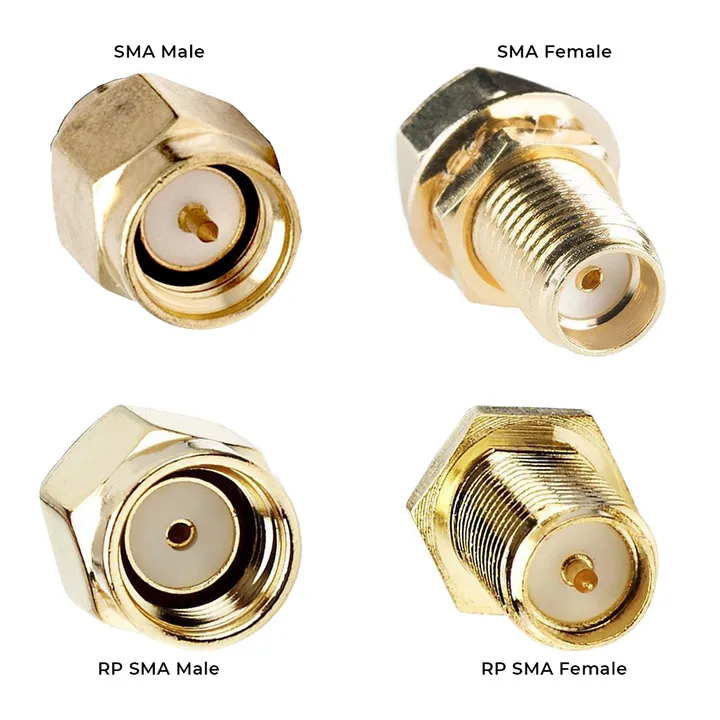
SMA female vs RP-SMA female polarity difference

The illustration highlights why misidentifying polarity can cause Wi-Fi/IoT connectors to fail mating.

SMA vs RP-SMA Female Polarity

It’s easy to treat an SMA extension cable as a simple accessory. But anyone who has debugged a 5 GHz link at 2 a.m. knows better. Each connector, bend, and O-ring carries consequences measurable in dB and dollars.

Keep extensions short, match genders carefully, use proper wifi antenna extension cables when re-housing consumer gear, and resist the temptation to chain adapters.

If the antenna must exit a panel, use a correctly sized sma bulkhead with fresh gaskets and dust caps.

And always record exact specs on the PO—because avoiding one return shipment pays for the habit a hundred times over.

For engineers who want to explore deeper topics like cable impedance, velocity factor, or signal loss formulas, TEJTE’s Coaxial Cable Guide offers a broader look at how attenuation scales across frequencies.

Those tackling outdoor or enclosure designs can also check the companion piece SMA Bulkhead Panel Drilling & IP67 Sealing in Practice for the mechanical side of things. The lesson that threads through all of them: RF performance is cumulative.

Every small decision—from cable length to connector torque—either preserves or erodes your signal. Get the details right once, and they’ll keep working quietly for years.

Quick FAQ

How long can an SMA extension be before 5 GHz throughput drops?

Generally, one meter of RG178 causes about 3–4 dB loss @ 5 GHz. Beyond that, throughput falls sharply. Keep under 1 m or upgrade to a thicker low-loss coax.

What’s the fastest way to tell SMA from RP-SMA without disassembly?

Look at the center: a visible pin means SMA male; a hollow socket means RP-SMA male. Reverse that logic for females.

Does a male-to-female extension lose more than a male-to-male jump?

Each connector pair adds roughly 0.2 dB. The difference is minimal unless multiple adapters stack up.

Which thread fits a 1.5 mm aluminum panel with a gasket and cap?

Use an 8 mm-thread sma bulkhead with 6.4 mm hole diameter—enough engagement for a flat EPDM gasket.

Can I mix an RP-SMA antenna with an SMA jack using an adapter?

Physically yes, electrically risky. Expect ≈ 0.3 dB extra loss and potential FCC non-compliance. Always prefer native cable assemblies.

Is RG178 flexible enough for tight lids—what bend radius is safe?

Yes, but keep radius ≥ 10×OD (~18 mm). Tighter bends distort impedance and shorten cable life.

Should I strain-relieve the extension behind the panel—how?

Add a zip-tie anchor or small clamp just behind the bulkhead. It prevents torque from transferring into the solder joint.

Bonfon Office Building, Longgang District, Shenzhen City, Guangdong Province, China

customer service