
SMA Bulkhead & Flange Connectors: Length, Panel Fit, IP Seal
Sep 04,2025
Introduction

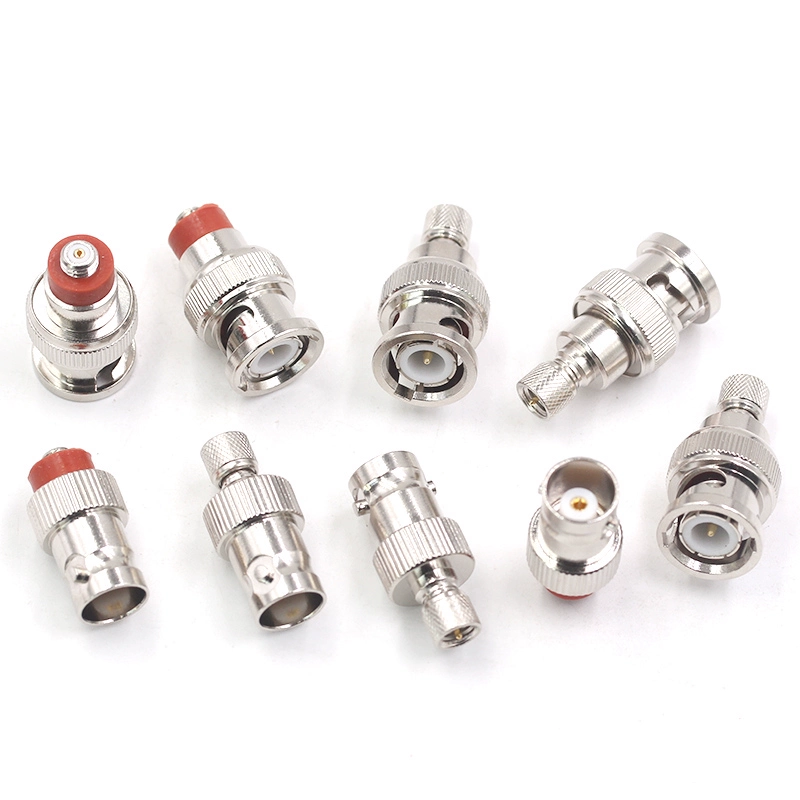
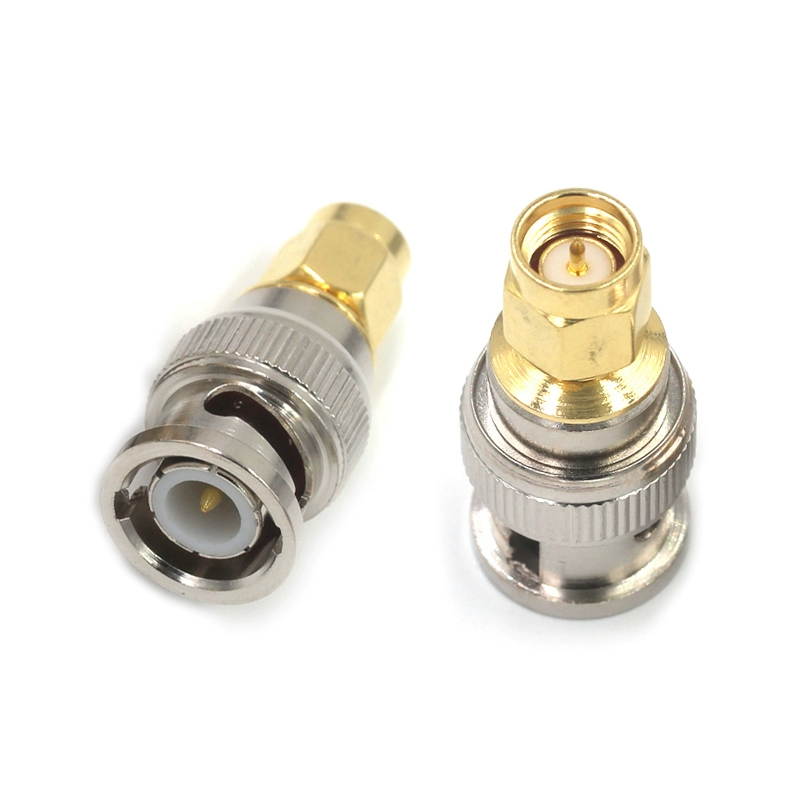
This image is a clear, high-resolution product shot of a standard BNC adapter. It aims to showcase the build quality, typically featuring a brass body with nickel or gold plating, precision-machined threads for the bayonet lock, and the central male pin or female socket. This visual helps users identify a genuine, well-made adapter and distinguishes it from lower-quality alternatives, emphasizing the importance of good craftsmanship for reliable RF connections.
Step into a CCTV setup, tune an SDR receiver, or reconnect an older video recorder, and chances are you’ll come across a BNC adapter in use. These small components make it possible to connect SMA, RCA, TNC, banana plugs, or other coax types without redesigning the entire system.
Keep in mind that an adapter like this only handles RF and mechanical matching. It won’t magically convert HDMI into analog video or let a USB port double as Ethernet.
For a trouble-free connection, the essentials are straightforward: match the correct plug/jack combination and choose the right 50 Ω or 75 Ω version. Minimize daisy-chaining, and you’ll preserve both video clarity and RF accuracy.
For background on coax and RF adapters, see this All About Circuits overview.
1) What Is a BNC Adapter?

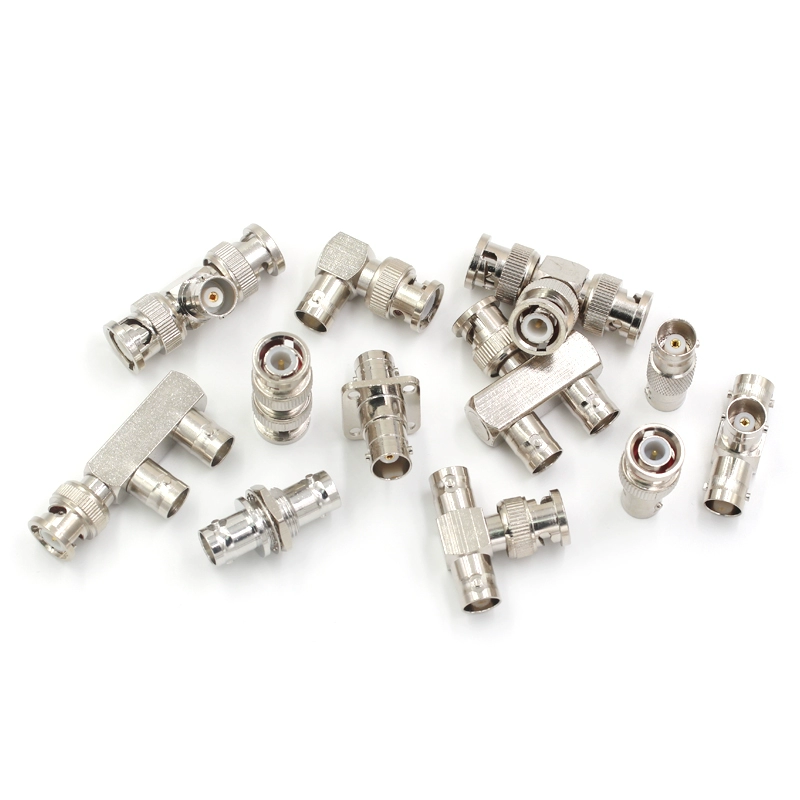
This image offers a detailed look at a typical BNC adapter, illustrating its robust bayonet-style locking mechanism (rotate and lock) that ensures a secure connection. It clearly differentiates between the male end (with a center pin) and the female end (with a receptacle), which is fundamental for understanding gender matching. The image underscores that this is a rigid connector bridge, unlike a flexible cable assembly.
In simple terms, a BNC adapter is a compact connector that lets a BNC interface mate with another format—whether another BNC, an RCA jack, SMA port, TNC, or even a banana plug. Unlike a flexible cable assembly, this is a rigid “bridge,” handy where space is limited or a quick swap is needed.
You’ll most often see it in these cases:
- CCTV installations, where most cameras run 75 Ω BNC but DVR or capture cards may provide only RCA inputs.
- Lab equipment, including oscilloscopes and function generators, where engineers often rely on SMA↔BNC adapters to move between devices.
- SDR enthusiasts, who usually find SMA on their radios but need BNC for antennas, filters, or external gear.
- Legacy AV systems, where adapting connections can extend the life of older monitors and recorders.
Compared to a pigtail adapter cable, the rigid type saves room but offers no flexibility. If strain relief or frequent handling is expected, a short coax jumper is the safer bet.
A deeper dive into adapter categories can be found in our SMA Adapter Guide or in this Electronics Tutorials piece on coaxial connectors.
2) Identify Plug/Jack & Gender (Avoid Buying the Wrong One)
BNC connectors use a familiar bayonet-style lock. To avoid mistakes, focus on the center contact:
- A plug (male) has a projecting pin along with the rotating sleeve.
- A jack (female) has the socket and the paired latching slots.
The mix-ups usually happen when you cross into other connector families. Examples from real SKUs include:
- SMA/BNC-JJ (Part No. 09720): SMA male to BNC male.
- SMA/BNC-KJ (Part No. 06268): SMA female to BNC male.
- SMA/BNC-KK (Part No. 09725): SMA female to BNC female.
- SMA/BNC-JK (Part No. 09721): SMA male to BNC female.
Together, these cover the majority of CCTV, SDR, and lab use cases.
Quick checklist before you order:
- Confirm whether your device’s connector is male or female.
- Match it to the opposite gender on the adapter.
- If you’re linking two jacks, grab a female-to-female BNC coupler.
Following these steps prevents the most common “wrong adapter” problem and keeps projects moving smoothly.
For a comparison of gender codes across SMA and BNC, check our SMA vs BNC vs N-Type guide.
3) Popular BNC Conversions
3.1 BNC ↔ RCA

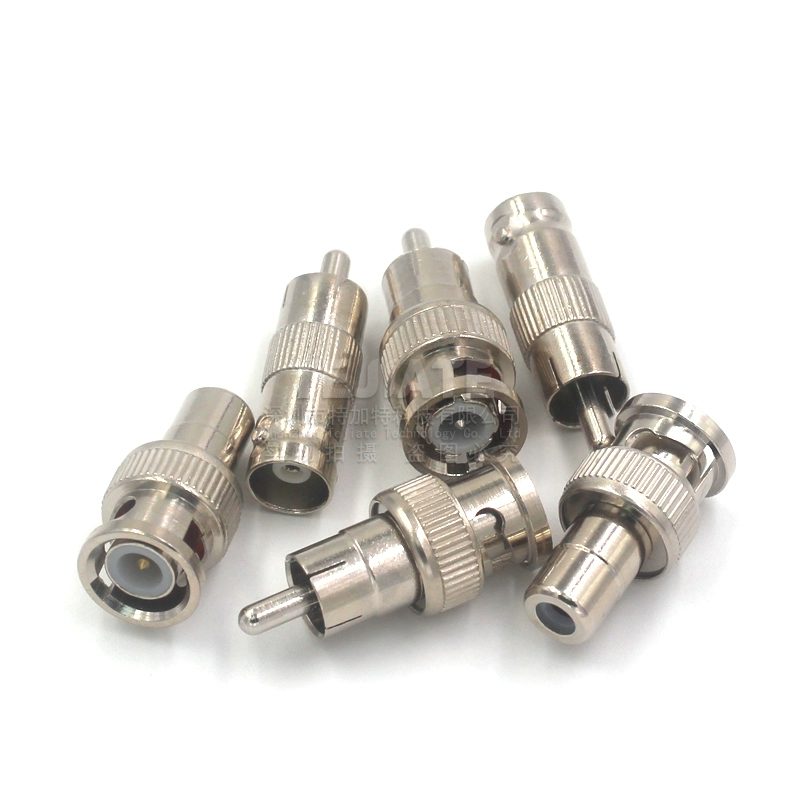
This image focuses on one of the most common BNC adapters: the BNC male to RCA male type. It is crucial in analog CCTV systems for bridging the gap between the BNC connectors typically found on cameras and the RCA jacks found on many recording devices. The image highlights the distinct physical forms of the BNC (bayonet) and RCA (pin and sleeve) connectors on a single, rigid adapter body.
In video applications, the BNC to RCA adapter remains the go-to choice for CCTV installers and anyone maintaining analog systems. Most surveillance cameras ship with 75 Ω BNC outputs, while DVRs or capture cards often use RCA inputs. Adapters bridge that gap without re-cabling.
Common RCA–BNC combinations:
- BNC-male ↔ RCA-male: camera directly to recorder.
- BNC-male ↔ RCA-female: when extending or adapting patch cables.
- BNC-female ↔ RCA-male/female: common for capture cards.
- Coupler (F–F): two female connectors joined, typically for longer cable runs.
| Adapter Type | Typical Use Case | Impedance | Notes |
|---|---|---|---|
| BNC male ↔ RCA male | CCTV camera → DVR | 75 Ω | Standard for analog video |
| BNC female ↔ RCA male | Patch between recorder & cable | 75 Ω | Often used with couplers |
| RCA to BNC adapter | Capture cards / converters | 75 Ω | Handy in mixed systems |
While most RCA↔BNC adapters follow the 75 Ω standard, occasional mismatches exist. If picture quality suffers—blurring, ghosting, or reflections—check impedance first.
More on RCA/BNC video standards can be found at Tektronix.
3.2 BNC ↔ Coax Family
Beyond consumer video, adapters extend BNC into other coax families. Engineers use them daily on test benches, mixing and matching F connectors, TNC, banana plugs, and mini-BNC.
Examples:
- BNC to F-type coax adapter: often seen in set-top boxes or RF distribution.
- BNC to banana plug adapter: used for lab power supplies and educational kits.

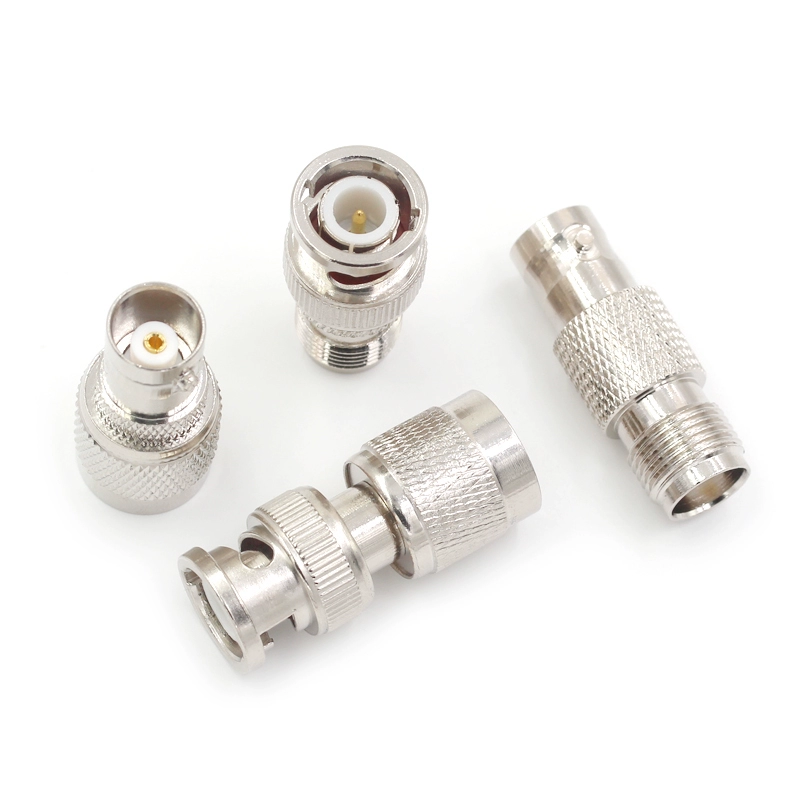
This image focuses specifically on a BNC to TNC adapter. It clearly illustrates the physical contrast between the two connector types on opposite ends of the adapter: the quick-connect/disconnect BNC bayonet mechanism on one side, and the threaded, vibration-resistant TNC coupling on the other. This adapter is crucial in environments like telecommunications, vehicular applications, or any scenario where a more secure connection than standard BNC is required, leveraging the mechanical superiority of the threaded TNC interface.
- BNC to TNC adapter: useful in rugged RF systems where threaded TNC is preferred.
- Mini-BNC / MCX versions: chosen when space is at a premium.
| Adapter Type | Field of Use | Key Feature |
|---|---|---|
| Coax to BNC adapter | TV signal distribution | Simple push-on fit |
| BNC to banana plug adapter | Lab instruments, training | Easy multi-purpose terminals |
| TNC to BNC adapter | Telecom & RF test | Better vibration resistance |
| Mini BNC adapter | Compact boards | Smaller footprint than standard BNC |
3.3 BNC ↔ SMA

This image is critical for RF and SDR users. It illustrates the different form factors available for SMA to BNC adapters. This includes standard straight adapters (e.g., SMA/BNC-JJ), space-saving right-angle adapters (e.g., BNC/SMA-KJW), and robust panel-mount versions (bulkhead like BNC/SMA-KKY or flange like BNC/SMA-KKF) designed for permanent installation through equipment chassis. The choice depends on space constraints and mechanical requirements.
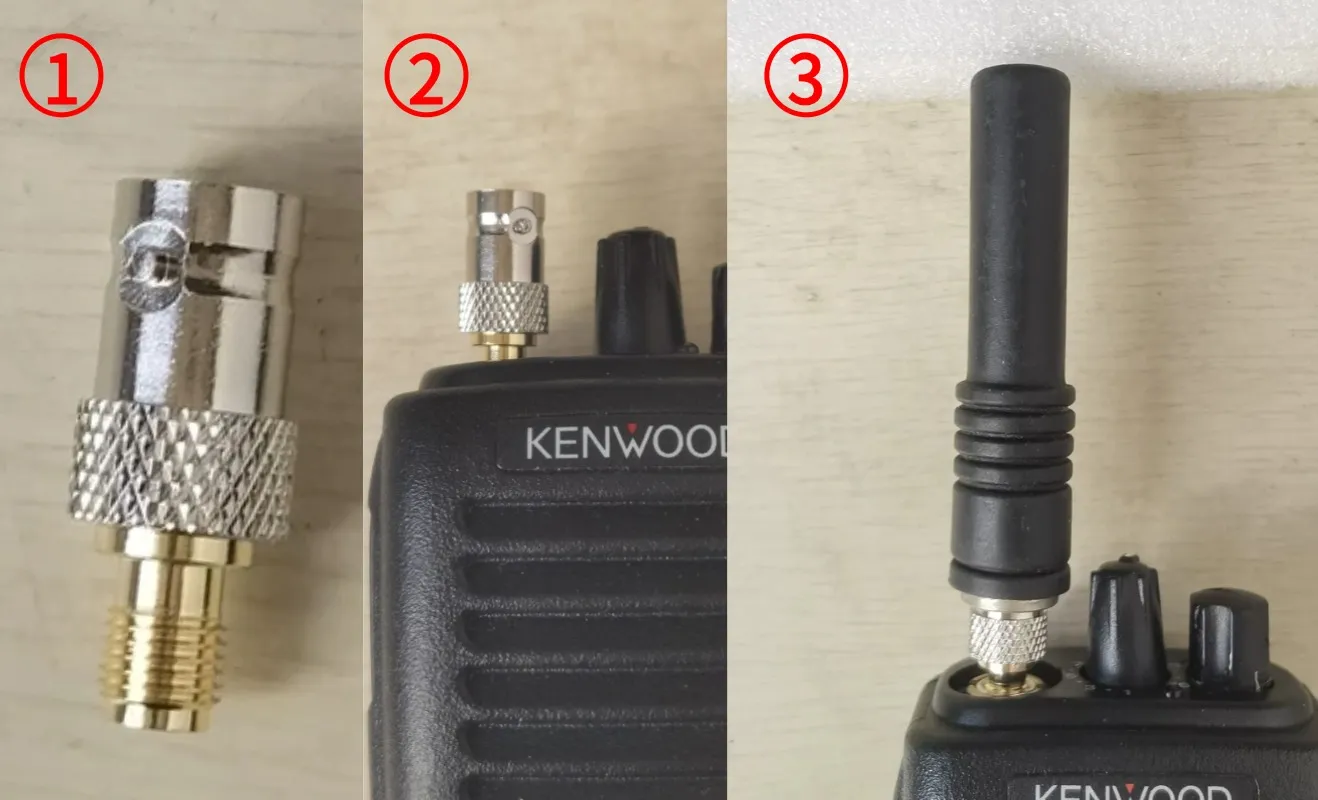
For anyone working with SDR radios, Wi-Fi modules, or RF test setups, the SMA to BNC adapter is a must-have. SMA connectors dominate small RF boards, while most oscilloscopes and analyzers stick with BNC.
Your product line already covers the full range:
- SMA/BNC-JJ (Part No. 09720): SMA male to BNC male.
- SMA/BNC-KJ (Part No. 06268): SMA female to BNC male.
- SMA/BNC-KK (Part No. 09725): SMA female to BNC female.
- SMA/BNC-JK (Part No. 09721): SMA male to BNC female.
- BNC/SMA-KKY (Part No. 59683): panel-through with nut, ideal for chassis mounting.
- BNC/SMA-KKF (Part No. 59685): flange mount, common in telecom racks.
- BNC/SMA-KJW (Part No. 59684): right-angle adapter, saves space in tight enclosures.
| Adapter Model | SMA Side | BNC Side | Structure | Typical Application |
|---|---|---|---|---|
| SMA/BNC-JJ | Male | Male | Straight | SDR antenna link |
| SMA/BNC-KJ | Female | Male | Straight | Lab equipment patching |
| SMA/BNC-KK | Female | Female | Straight | Coupling extension |
| SMA/BNC-JK | Male | Female | Straight | Oscilloscope inputs |
| BNC/SMA-KKY | Female (bulkhead) | Male | Chassis mount | Panel pass-through |
| BNC/SMA-KKF | Female (flange) | Male | 4-hole flange | Base station install |
| BNC/SMA-KJW | Female | Male | Right-angle | Compact IoT gateway |
3.4 BNC ↔ “Data Ports” (Need Converter, Not a Simple Adapter)
Not every BNC adapter you see online is just a connector swap. When listings show bnc to hdmi adapter, bnc to vga adapter, or even bnc to ethernet adapter, they actually refer to signal converters. These are different from passive couplers and require circuitry.
- BNC ↔ HDMI: Common in CCTV, connecting analog cameras to flat-screen TVs. This needs an active bnc to hdmi converter adapter, usually USB-powered.
- BNC ↔ VGA: Used with legacy monitors, requires a converter board.
- BNC ↔ Ethernet (RJ45 / Cat5): Marketed as “video baluns.” They send analog video over twisted-pair, not a direct connector change.
- BNC ↔ USB: Only works with capture devices that decode video signals.
| Online Label | What It Really Means | Active/Passive | Typical Use |
|---|---|---|---|
| bnc to hdmi adapter | Analog to HDMI converter | Active | CCTV → TV/Monitor |
| ethernet to bnc adapter | Video balun | Passive (with balun) | Video over Cat5 |
| bnc to usb adapter | Capture device | Active | CCTV → PC recording |
| bnc to vga adapter | Converter board | Active | Connecting to VGA monitors |
4) 50 Ω vs 75 Ω: When It Matters
The difference between a 50 ohm bnc adapter and a 75 ohm bnc adapter is critical for performance.
- 75 Ω is standard for CCTV, broadcast video, and capture cards.
- 50 Ω dominates lab test gear, RF communication setups, and SDR equipment.
Mixing scenarios:
- A short link (a few inches) between 50 and 75 Ω might work without noticeable issues.
- On longer runs or at higher frequencies, mismatch shows up as ghosting, reflections, or degraded bandwidth.
| Application | Standard Impedance | Adapter to Use | Notes |
|---|---|---|---|
| CCTV video | 75 Ω | 75 Ω BNC adapter | Avoids video ghosting |
| Oscilloscope RF input | 50 Ω | 50 Ω BNC adapter | Maintains calibration |
| Hybrid system | 50 Ω ↔ 75 Ω | 50 Ω to 75 Ω BNC adapter | Troubleshooting or mixed setups |
5) RF/AV Considerations: VSWR, Insertion Loss & Cable Quality
Even with gender and impedance correct, performance may still drop if you use too many adapters. Each connector introduces:
- Insertion loss: small signal reduction, measurable at high frequency.
- VSWR (return loss): reflections that distort waveforms or video quality.
- Mechanical stress: long or heavy adapters may loosen under vibration.
Examples from real-world setups:

This image depicts a real-world installation moment. It likely shows a hand screwing a specific type of SMA to BNC adapter (such as a SMA/BNC-JK, which is SMA male to BNC female) onto the BNC female port of a device like a software-defined radio (SDR), spectrum analyzer, or oscilloscope. The background might include the SMA-ended cable that will subsequently be connected to this adapter. The image emphasizes the simplicity of the connection—aligning and rotating the adapter onto the device's built-in BNC jack—and bridges the gap between the theoretical adapter types and their physical use. It visually answers the question: "How do I actually connect this to my gear?"

- A single SMA↔BNC adapter adds about 0.1–0.2 dB insertion loss at 1 GHz.
- Stacking three adapters triples the loss and raises reflection issues.
- Right-angle types, like BNC/SMA-KJW (Part No. 59684), solve space problems but can limit high-frequency response.
| Option | Advantage | Best Use Case |
|---|---|---|
| Rigid BNC adapter | Compact, no cable slack | Quick fixes, lab patching |
| BNC adapter cable (pigtail) | Flexible, strain relief | Tight spaces, panels |
6) When to Use a Cable Instead (Pigtails)
Sometimes a rigid bnc adapter cable is the better choice than stacking metal adapters. Short coax jumpers, also called pigtails, offer flexibility, relieve strain on equipment, and allow cleaner routing.
When to pick a pigtail instead of a rigid adapter:
- Tight enclosures: Right-angle adapters can help, but a short cable provides more freedom.
- Panel mounting: Bulkhead or flange connectors often pair with a short jumper inside the chassis.
- Vibration isolation: In vehicles or field gear, cables absorb movement that rigid adapters can’t handle.
Common examples include:
- BNC↔BNC pigtail: bridging two ports in a rack where alignment is tricky.
- BNC↔RCA short cable: easier to manage than a stiff adapter on DVRs.
- SMA↔BNC coax jumper: frequently used in SDR or test labs for better ergonomics.
| Checklist Item | Example | Why It Matters |
|---|---|---|
| Gender (plug / jack) | SMA/BNC-JK (male → female) | Prevents mismatched ends |
| Impedance | 50 Ω vs 75 Ω | Matches system spec |
| Orientation | BNC/SMA-KJW (right-angle) | Space management |
| Mounting | BNC/SMA-KKF (flange) | Panel / rack needs |
7) Buying Checklist
Picking the right bnc adapters doesn’t need to be complicated. Follow a sequence:
- Connector orientation: Plug (male) or jack (female).
- Impedance: 50 Ω for RF/test, 75 Ω for video.
- Target interface: RCA, SMA, TNC, banana, coax.
- Style: Straight, right-angle, bulkhead, or flange.
- Quantity: Singles for lab use, sets for installers.
Recommended essentials to always keep on hand:
- Female to female bnc adapter (BNC coupler).
- bnc to rca adapter for video.
- sma to bnc adapter for SDR and RF work.
- bnc to bnc adapter spares for extending cable runs.
| Parameter | Typical Value | TEJTE Spec Example |
|---|---|---|
| Impedance | 50 Ω | 50 Ω ± 2 Ω |
| Frequency Range | DC - 6 GHz | DC - 6 GHz |
| Insertion Loss | ≤ 0.15 dB @ 6 GHz | ≤ 0.15 dB |
| VSWR | ≤ 1.20 | ≤ 1.20 |
| Insertion Cycles | 500+ | 500+ cycles |
8) FAQs
What is a bnc adapter / what is a bnc adapter used for?
A bnc adapter is a connector that allows BNC ports to link with RCA, SMA, TNC, or other interfaces. It is used in CCTV, lab equipment, SDR, and legacy AV systems.
Which bnc adapter do I need (CCTV / lab / SDR)?
- CCTV: bnc to rca adapter (75 Ω).
- Lab/test gear: sma to bnc adapter (50 Ω).
- SDR: usually sma plug to bnc jack adapter.
Are rca to bnc adapters 75 ohm?
Yes, most rca to bnc adapters are designed at 75 Ω to match video equipment.
Do poe to bnc adapters / cat5 to bnc adapters work?
No. These are not true adapters. “Cat5 to BNC” products are video baluns, designed to send analog video over twisted-pair. PoE and BNC are not directly compatible.
How to make bnc to hdmi / bnc to ethernet work?
You need a bnc to hdmi converter adapter or a bnc to ethernet adapter (video balun). A passive metal coupler will not work.
Where to buy bnc adapters (in store vs online)?
Electronics suppliers and online stores carry a wide variety. For project planning, buying sets of bnc adapters often saves cost compared to singles.
Check TEJTE’s BNC range or trusted distributors. Buying sets saves cost long-term.
Which bnc adapter for PS2 component video?
Use a bnc to rca connector adapter rated at 75 Ω, since component video requires impedance consistency.
Conclusion
A bnc connector adapter is a small but essential tool across CCTV, lab instruments, SDR setups, and AV retrofits. Success comes down to a simple checklist:
- Identify the right plug vs jack.
- Match 50 Ω vs 75 Ω to your system.
- Decide whether you need a rigid adapter or a bnc adapter cable (pigtail).
And remember: if HDMI, USB, or Ethernet are involved, you’re not looking for a simple adapter but a converter. Getting this distinction right saves time, preserves signal quality, and prevents frustrating misorders.
Don’t let the wrong connector slow down your project. Whether you’re setting up a home lab, repairing a DVR, or upgrading an SDR radio, TEJTE has the BNC adapters you need—straight, right-angle, flange, or bulkhead.
Start here: TEJTE BNC & SMA adapters.
Bonfon Office Building, Longgang District, Shenzhen City, Guangdong Province, China
A China-based OEM/ODM RF communications supplier
Table of Contents
Owning your OEM/ODM/Private Label for Electronic Devices andComponents is now easier than ever.
