
SMA vs RP-SMA Wi-Fi Antenna Connectors: A Practical Guide

Aug 30,2025

1. Introduction

Close-up comparison of SMA and RP-SMA connector centers showing pin vs socket

This detailed macro photograph clearly illustrates the primary mechanical distinction between SMA and RP-SMA connectors. Although their external threads (¼-36) are identical, the center contact is reversed—a pin in SMA versus a socket in RP-SMA. This fundamental difference is the root cause of common mating issues and connection failures in Wi-Fi setups.

SMA vs RP-SMA: The Critical Center Contact Difference

Picture this: you buy a brand-new Wi-Fi antenna online, screw it onto your router, and… nothing happens. No signal boost, no improved coverage—just frustration. What went wrong? In many cases, the problem isn’t the antenna’s gain, brand, or design. It’s something far simpler: the connector type.

In the world of wireless gear, two nearly identical connectors cause endless confusion—SMA and RP-SMA antenna connectors often found on Wi-Fi devices. At a glance, they look the same: same threads, same size, same shiny finish. Yet one has a pin where the other has a socket, and that tiny difference decides whether your antenna works or fails.

This mix-up isn’t rare. Installers, hobbyists, and even seasoned engineers have run into situations where equipment and antennas wouldn’t mate. Worse, many retailers mislabel parts, so what’s sold as “SMA” might actually be “RP-SMA.” The result? Delays, returns, and wasted money.

In this guide, we’ll break down the real differences between SMA and RP-SMA connectors—why they exist, how to identify them in seconds, and which devices typically use each one. Along the way, you’ll see comparison tables, practical checklists, and a few field notes from real installations. By the end, you’ll know how to avoid costly mismatches and keep your Wi-Fi projects running smoothly.

2. Why This Comparison Matters

You might wonder, “Does it really matter? Can’t I just force the connector or grab an adapter?” In practice, yes—it matters a lot.

Here’s why:

  • Mechanical compatibility: SMA and RP-SMA threads are identical (¼-36), but the center contacts are reversed. If you try to mate them, they simply won’t connect. No amount of twisting fixes a pin-to-pin or socket-to-socket mismatch.
  • Electrical performance: Even if you hack together adapters, every extra interface introduces loss. In Wi-Fi systems already battling walls, interference, and low signal margins, that 0.5–1 dB of added loss can mean the difference between a stable link and constant dropouts.
  • Time & cost: Misordered antennas are one of the most common reasons for project delays. Teams often discover the mistake during deployment, when the clock is ticking. That’s when they end up scrambling for emergency adapters or overnight replacements.

Field note: On a rooftop AP install, one technician showed up with SMA antennas for a router that required RP-SMA. The gear was perfect otherwise, but the connectors didn’t mate. The crew lost half a day, waiting for couriers to deliver the correct adapters.

In short, this isn’t just a “terminology” issue. It’s a practical reliability problem that affects Wi-Fi performance, installation schedules, and long-term costs.

3. What Are SMA and RP-SMA Connectors?

To understand the differences, let’s start with the basics.

Diagram detailing the structure of standard SMA Male and Female connectors

This technical diagram provides a detailed look at the components and configuration of a standard SMA connector. It clearly illustrates the SMA Male plug, characterized by its internal threads and protruding center pin, and the SMA Female jack, identified by its external threads and recessed center socket. This visual defines the "normal" gender polarity that RP-SMA reverses.
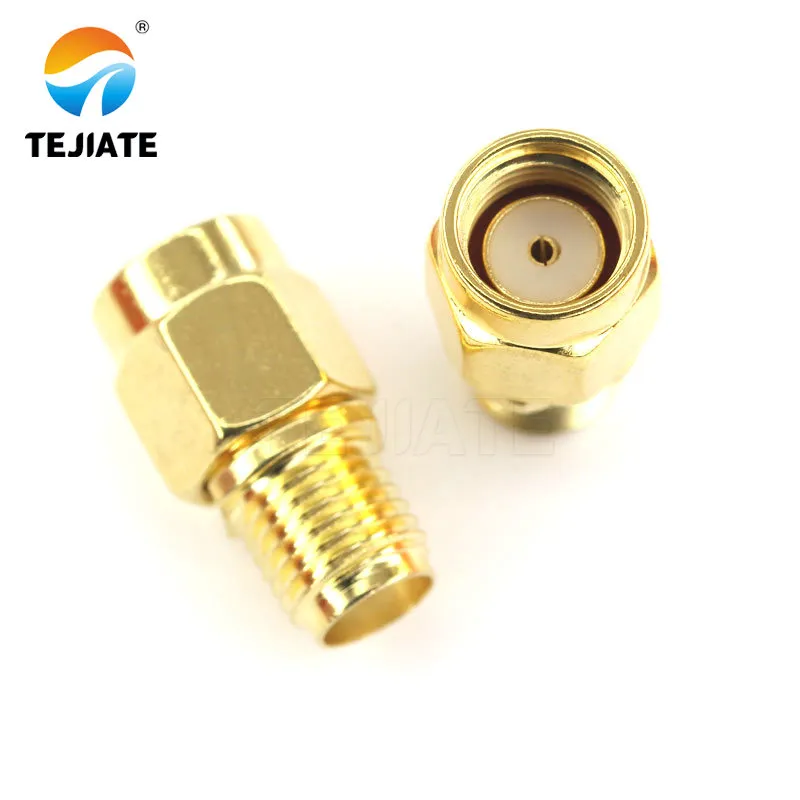
Anatomy of a Standard SMA Connector

SMA (SubMiniature version A) connectors were introduced in the 1960s as a compact, threaded RF connector. They’re designed for 50-ohm systems and handle frequencies up to 18 GHz (sometimes higher with precision builds). SMA quickly became a favorite in labs, cellular equipment, and countless RF modules.

  • SMA Male (plug): Has internal threads and a center pin.
  • SMA Female (jack): Has external threads and a center socket.
Diagram detailing the reversed structure of RP-SMA Male and Female connectors

This diagram details the Reverse Polarity SMA (RP-SMA) connector, highlighting its key difference from standard SMA. It shows the RP-SMA Male plug, which has internal threads (like SMA Male) but features a center socket instead of a pin. Conversely, the RP-SMA Female jack has external threads (like SMA Female) but features a center pin instead of a socket. This "reversed" center contact is the defining characteristic of RP-SMA.
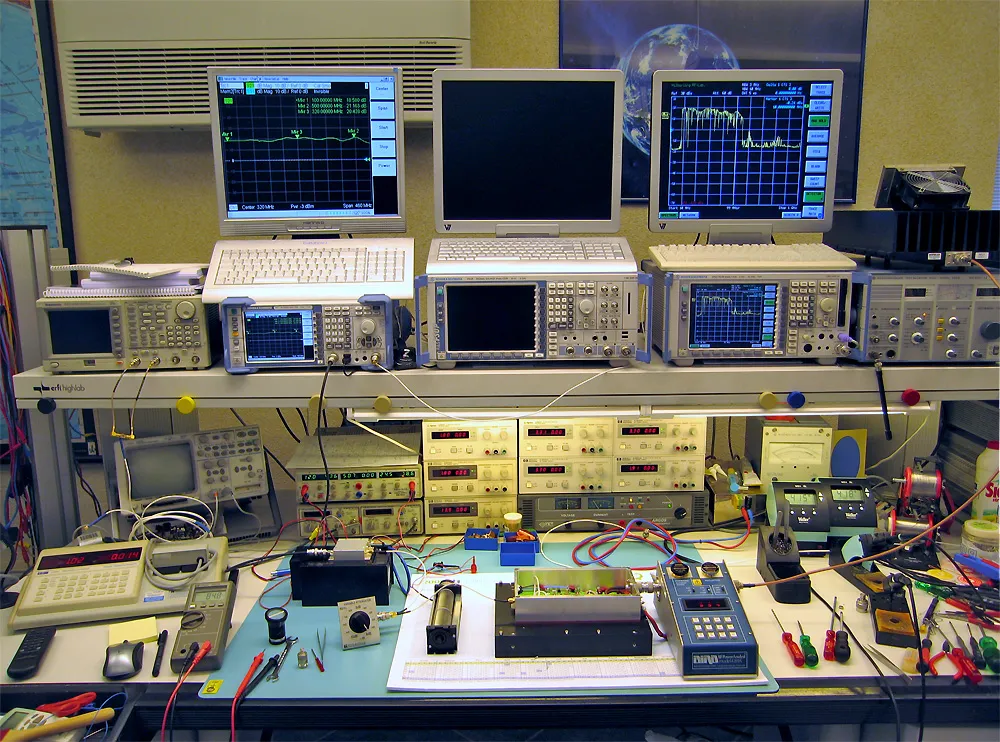
Anatomy of a Reverse Polarity (RP-SMA) Connector

RP-SMA (Reverse Polarity SMA) was created later, primarily to comply with FCC rules that aimed to restrict casual antenna swapping on Wi-Fi gear. “Reverse polarity” here doesn’t mean signal polarity flips—it simply refers to reversing the gender of the center contact.

  • RP-SMA Male (plug): Has internal threads, but instead of a pin, it has a socket.
  • RP-SMA Female (jack): Has external threads, but instead of a socket, it carries a pin.

In other words, RP-SMA uses the same shell dimensions as SMA but flips the center contacts. That’s why confusion is so common—they look almost identical until you peer closely at the middle.

4. Visual Identification Guide

If you’ve ever squinted at a connector and thought, “Is this SMA or RP-SMA?” you’re not alone. The shells look nearly identical—same threads, same dimensions. The trick is to ignore the outer shell at first and focus on two key details:

  1. Thread location
    • Male (plug): Threads are on the inside.
    • Female (jack): Threads are on the outside.
  2. Center contact
    • SMA Male: Pin in the middle.
    • SMA Female: Socket in the middle.
    • RP-SMA Male: Socket in the middle (reversed).
    • RP-SMA Female: Pin in the middle (reversed).

A simple way to remember it:

  • SMA = “Normal” gender alignment (plug = pin, jack = socket).
  • RP-SMA = “Reversed” gender alignment (plug = socket, jack = pin).

Field note: During site surveys, installers often carry a cheap magnifier or even use a smartphone zoom to check center contacts. It takes 20 seconds and prevents days of rework.

5. SMA vs RP-SMA Comparison Table

To make this crystal clear, here’s a side-by-side reference:
Attribute SMA Male (Plug) SMA Female (Jack) RP-SMA Male (Plug) RP-SMA Female (Jack)
Thread location Internal External Internal External
Center contact Pin Socket Socket (reversed) Pin (reversed)
Typical use Test leads, pigtails Devices, boards Wi-Fi antennas Routers, APs
Cross-mating Works with SMA only Works with SMA only Works with RP-SMA only Works with RP-SMA only

Notice the last row: cross-mating between SMA and RP-SMA simply doesn’t work. Even if threads align, the center contacts won’t engage.

This one table explains why mismatches are so frustrating: two connectors can look right, thread together, but fail electrically. That’s why identifying the right Wi-Fi antenna connector is critical before you order replacement parts.

6. Typical Use Cases in Wi-Fi and Beyond

Both SMA and RP-SMA live in the same 50-ohm ecosystem, but they appear in very different contexts.

Collage of test equipment and modems using SMA connectors

This image collage showcases common real-world applications of standard SMA connectors. They are predominantly found in settings requiring precision and reliability, such as on Vector Network Analyzers (VNA) and Software-Defined Radio (SDR) units in laboratories, as well as on cellular modems and other IoT or communication hardware where robust RF performance is key.
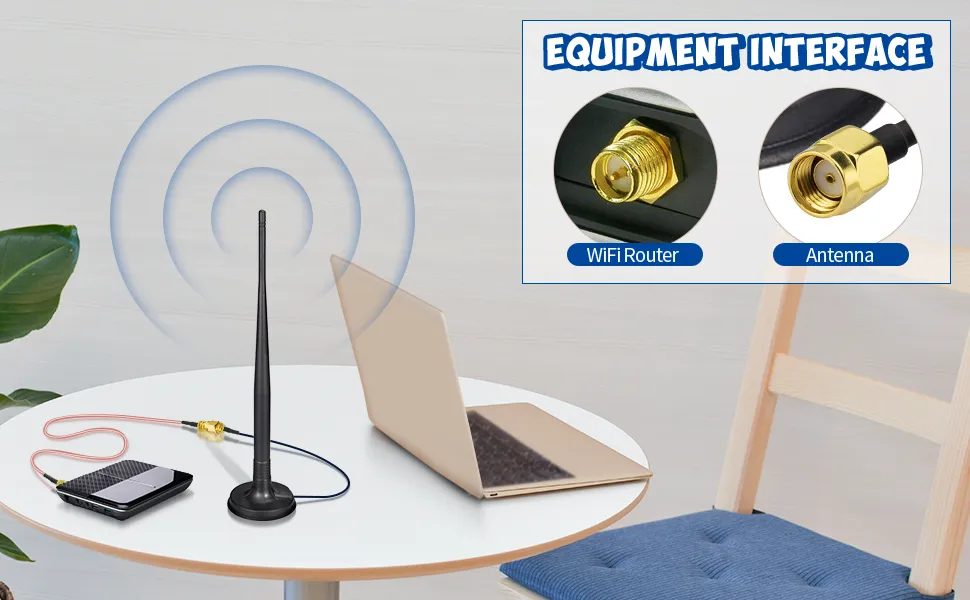
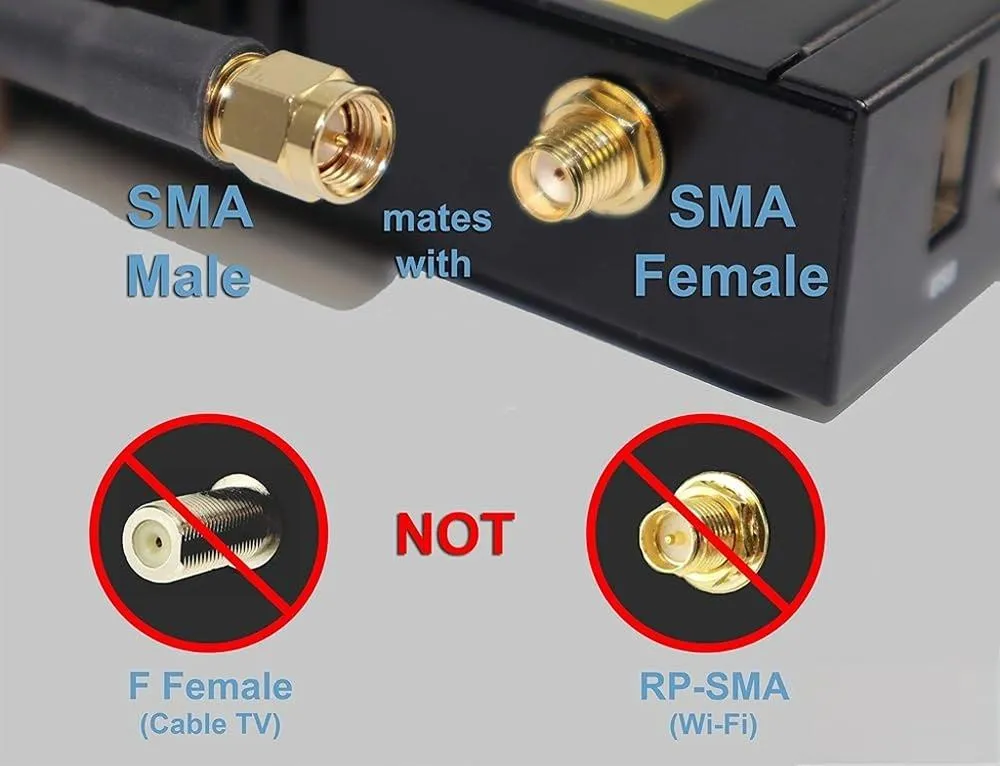
Common Applications of SMA Connectors
  • SMA connectors
    • Common in lab equipment, vector network analyzers (VNAs), SDR (software-defined radios), and cellular modems.
    • Many IoT development boards use SMA female ports, making it easy to connect high-quality test leads.
    • Outdoor 4G/5G gear also leans heavily on SMA because of its tighter specs and broad availability.
rp-sma-connector-typical-use-cases-collage
  • RP-SMA connectors
    • The de facto standard on consumer and SMB Wi-Fi routers and access points.
    • Antennas sold for Wi-Fi often come with RP-SMA male connectors, matching router-side RP-SMA females.
    • Used to comply with FCC rules from the early 2000s, originally intended to discourage end-users from replacing stock antennas with high-gain versions.
  • Hybrid scenarios
    • You’ll often see adapters bridging SMA and RP-SMA when mixing test gear with Wi-Fi devices. While handy, each adapter adds insertion loss and mechanical stress.
    • Some vendors now label antennas as “SMA/RP-SMA optional,” but this depends entirely on the supplied connector kit—always verify before ordering.

Example from the field: A small ISP standardized on SMA for outdoor CPE gear, but their Wi-Fi routers shipped with RP-SMA. The mismatch created endless confusion for technicians until the company invested in proper labeling and a stock of short RP-SMA to SMA pigtails.

7. Router & Device Matching Cheat Sheet

When you’re staring at a router or antenna and wondering what connector you’re dealing with, use this quick guide. It’s a simple pairing map that saves time on site.
Device / Port Appearance Actual Connector Matching Antenna / Lead
Router/AP: external threads + center pin visible RP-SMA Female RP-SMA Male antenna
Router/AP: external threads + center socket SMA Female SMA Male antenna
Antenna: internal threads + socket RP-SMA Male RP-SMA Female device
Antenna: internal threads + pin SMA Male SMA Female device
Test instrument cable labeled SMA, center pin SMA Male SMA Female port
Dev board / modem labeled SMA, center socket SMA Female SMA Male antenna
Field note: A quick photo with zoom often reveals the center contact clearly enough to confirm. It’s faster than trial and error and prevents bent pins.

8. Buying Checklist

Before ordering antennas or cables, walk through this five-step checklist:

  1. Identify thread type – internal vs. external.
  2. Check center contact – pin or socket, reversed or standard.
  3. Verify datasheet – don’t rely on product titles alone; confirm diagrams if available.
  4. Plan for adapters if necessary – but avoid relying on them long-term.
  5. Standardize across projects – reduce inventory headaches by committing to one connector family whenever possible.

These steps take minutes but prevent hours of wasted troubleshooting. Teams that skip them often pay twice: once for the wrong parts, again for the rush replacements.

9. Common Mistakes to Avoid

Diagram showing incorrect connector mating attempts between SMA and RP-SMA

This image serves as a warning against a frequent error: trying to connect an SMA connector to an RP-SMA connector. It visually demonstrates that such a combination will not work electrically (e.g., pin touching pin or socket facing socket) even if the threads seem to engage slightly, potentially leading to damaged pins, poor performance, or no connection at all. It contrasts this with the correct pairing of SMA Male to SMA Female.

Avoid This Mistake: Incorrect Mating Attempts

Even experienced installers get caught by the same pitfalls. Here are the top ones—and how to sidestep them:

  • Trusting product names blindly

Many online listings say “SMA antenna” when the item is actually RP-SMA. Always confirm photos and drawings.

  • Assuming all Wi-Fi gear is SMA

Most consumer routers are RP-SMA, not SMA. Confusing them is the number-one source of returns.

  • Over-tightening connectors

These small shells don’t need brute force. SMA should be finger-tight; RP-SMA follows the same rule. Excess torque shortens connector life.

  • Using TV coax cables (75 Ω)

Wi-Fi antennas require 50-ohm systems. Mixing in 75-ohm cables introduces mismatches and reduces signal quality.

  • Relying on adapters everywhere

While adapters bridge gaps, each adds loss and another failure point. Use them sparingly, and only as temporary fixes.

Real-world note: One warehouse deployment lost nearly 20% throughput because installers used cheap RP-SMA-to-SMA adapters for every AP. Swapping in correct antennas immediately recovered performance.

10. Installation & Handling

Installing SMA or RP-SMA connectors doesn’t require special tools, but a few careful habits extend performance and prevent headaches.

  1. Align properly before tightening. Start the threads gently by hand; cross-threading damages both connector and port.
  2. Tighten only as needed. SMA-family connectors are designed for finger-tightening. For lab gear, a torque wrench at 5–7 lbf·in ensures consistency without stressing the joint.
  3. Support the cable. Don’t let heavy antennas or long cables hang unsupported from a jack; use strain relief or brackets to reduce leverage on the connector.
  4. Seal outdoor installs. Apply weatherproof tape or fit a rubber boot around RP-SMA or SMA joints on outdoor APs. Water intrusion is one of the fastest killers of RF performance.
  5. Test after installation. Run a Wi-Fi throughput or RSSI test right away; this confirms that connectors are making good contact.
  6. Document the setup. Snap photos or note connector types in records so future maintenance teams don’t have to guess.

Field tip: After the first week of outdoor exposure, revisit the install. Thermal cycling often loosens connections. A quick re-check avoids intermittent faults months later.

11. Maintenance & Lifespan

Like any RF component, SMA and RP-SMA connectors have finite durability. Most are rated for ~500 mating cycles, though careful handling can stretch that longer.

Routine maintenance practices:

  • Inspect connectors every few months for corrosion or bent pins.
  • Reapply sealing tape on outdoor links annually.
  • Keep connectors clean; dust and grime raise contact resistance.
  • Replace worn boots or cracked housings before moisture finds its way in.

Signs replacement is due:

  • Visible wobble or looseness in the jack.
  • Crushed or missing center contacts.
  • Consistently poor signal even with good antennas.

Long-term lesson: replacing a $5 connector or $15 antenna is cheaper than diagnosing intermittent packet loss across an entire network.

12. FAQs

Q1. Are SMA and RP-SMA electrically different?

No. Both are 50-ohm interfaces. The difference is purely mechanical—the gender of the center contact.

Q2. Why do most Wi-Fi routers use RP-SMA?

Originally, manufacturers adopted RP-SMA to comply with FCC regulations discouraging easy antenna upgrades. It became industry standard in consumer Wi-Fi gear and remains common today.

Q3. Can SMA and RP-SMA be cross-mated?

They cannot. The threads match, but the center contacts don’t connect. An adapter is required if you need to bridge them.

Q4. How do I identify them quickly?

Check two things: thread location (internal vs. external) and center contact (pin vs. socket). RP-SMA flips the normal arrangement.

Q5. What torque should I use?

For SMA and RP-SMA, finger-tight is sufficient. For lab use, 5–7 lbf·in is standard. Over-tightening damages the threads.

Q6. What’s the typical lifespan?

Around 500 mating cycles. Handle gently, avoid over-torque, and protect outdoor joints to get maximum life.

Q: Is RP-SMA the same as an SMA antenna connector?

Not exactly. An RP-SMA antenna is designed for Wi-Fi gear and won’t mate with a standard SMA connector. Both belong to the same 50-ohm family, but the center contacts are reversed.

13. TEJTE Wi-Fi Antenna Solutions

At tejte.com, we engineer antennas and connector assemblies built for real-world performance. Whether you’re upgrading a home router or deploying industrial IoT gateways, our lineup covers the essentials:

  • Dual-band 2.4/5 GHz antennas with SMA or RP-SMA connectors for routers, APs, and repeaters.
  • Industrial-grade 433 MHz, 4G, 5G, and GSM antennas designed for outdoor and telecom-grade reliability.
  • Custom cable + antenna kits tailored for embedded systems and OEM projects.

Our customers choose us for three reasons:

  1. Engineering support – direct access to design teams for OEM/ODM requests.
  2. Material quality – brass, stainless steel, and weatherproof finishes to survive harsh environments.
  3. Testing assurance – every batch goes through VSWR, PIM, and environmental screening.

Explore RF Antennas →

Related Reading

15. Conclusion

Choosing between SMA and RP-SMA may sound trivial, but it has real consequences. A wrong pick means antennas that won’t mate, wasted time, and unnecessary signal loss. A correct match ensures your Wi-Fi gear runs at full strength with no hidden weak links.

Key reminders:

  • Check the center contact first. Pin vs. socket tells you if it’s SMA or RP-SMA.
  • Know your device type. Routers and APs are usually RP-SMA; lab gear and cellular modems are usually SMA.
  • Don’t rely on titles. Verify with product photos and diagrams before ordering.
  • Standardize when possible. Using one connector family across your fleet reduces cost and confusion.

Bottom line: The connector is the smallest piece of your Wi-Fi setup, yet it often decides whether the whole network performs or fails. Get it right the first time, and you’ll save hours of troubleshooting later.

Bonfon Office Building, Longgang District, Shenzhen City, Guangdong Province, China

customer service