
What is MMCX Connector: Definition, Types, Uses, and Adapters
Aug 26,2025
Introduction

The image highlights the compact 2.4 mm footprint of MMCX connectors, designed in the 1980s for tight layouts in RF modules and audio gear
In RF design, space often decides whether a product works or fails. As devices shrink—from IoT boards to in-ear monitors—engineers need connectors that fit tight layouts without sacrificing performance. One answer is the MMCX connector.
Created in the 1980s as a smaller sibling of MCX, the Micro-Miniature Coaxial connector is only 2.4 mm wide. It was designed to save space yet still carry signals for WiFi, GPS, and LTE. What makes it popular is balance: tougher than U.FL, easier to fit than SMA, and durable enough for repeated use. Whether inside a wireless module or at the end of a detachable headphone cable, the MMCX quietly does its job.
What is MMCX Connector?

The diagram illustrates how most MMCX connectors are rated at 50 Ω, with versions up to 75 Ω, reliably carrying signals up to 6 GHz for GPS, LTE, and WiFi.
So, what is MMCX connector exactly? It’s a micro-coaxial interface built for compact RF devices. The name says it all: Micro-Miniature Coaxial Connector.
By design, most MMCX connectors are rated at 50 Ω impedance, the standard for wireless modules and RF testing. Some 75 Ω versions exist in video or broadcast gear. They support signals reliably up to 6 GHz, covering everything from GPS to LTE bands.
Another reason for its popularity is longevity. With about 500 mating cycles, it sits between the fragile U.FL (~30) and the rugged SMA (>1,000). That balance makes it a safe choice for projects where connectors need to be swapped, but not endlessly abused.
MMCX Connector Design & Features
Beyond the basics, the mmcx connector offers some clever design features that set it apart. The first is its snap-on coupling. Instead of twisting a threaded SMA, you simply push until it clicks—fast and secure, which is handy when connections change often.

This image demonstrates how MMCX connectors can rotate freely once mated, reducing cable strain in earphones, wearables, and medical devices.
The second is its 360-degree rotation once mated. This small feature prevents cable stress in applications where movement is constant, such as earphone cords or wearable medical monitors. Over time, it reduces conductor fatigue and helps cables last longer.
Durability is also respectable. Rated for around 500 cycles, MMCX provides a middle ground: far stronger than U.FL but not as heavy-duty as SMA. For most IoT modules, audio products, and compact test boards, that balance is more than enough.
In short, MMCX isn’t just about being small—it’s about being easy to use, flexible, and reliable in real-world conditions.
MMCX Connector Types

The image clarifies gender differences: MMCX male connectors are found on cables, while female connectors are sockets on IoT modules, GPS boards, and earphones.
Not all mmcx connectors are built the same. If you’ve ever ordered the wrong one, you know the frustration of parts that just don’t fit. The main differences come down to gender and mounting style. Let’s break it down.
Male vs Female
An mmcx male connector has the little center pin, and you’ll usually see it on detachable cables—think antenna pigtails or earphone cords. The mmcx female connector is the socket side, often mounted on IoT modules, SDR boards, or GPS devices. A quick reminder: male = cable, female = board. I’ve seen plenty of projects stalled because someone mixed these up.
Cable-Mount vs PCB-Mount
If you’re working with jumper cables or extensions, you’ll want a cable-mount MMCX. On the other hand, compact devices like WiFi cards or medical monitors usually rely on PCB-mount MMCX connectors soldered right onto the board. It’s a small detail, but get it wrong and nothing lines up.
Here’s a handy reference you can glance at before ordering:
| MMCX Connector Type | Key Feature | Typical Use Case |
|---|---|---|
| MMCX Male Connector | Central pin (plug) | Earphone leads, antenna cables |
| MMCX Female Connector | Socket / receptacle | IoT boards, GPS modules, SDRs |
| Cable-Mount MMCX | Terminated on cables | Jumper cables, antenna extensions |
| PCB-Mount MMCX | Soldered to PCB | Wireless cards, medical devices |
Bottom line: all mmcx connector types share the same compact snap-on design, but knowing whether you need male vs female—or cable vs PCB—saves you from wasted time and returns.
Applications of MMCX Connectors
The mmcx connector may look tiny, but you’ll be surprised at how often it shows up once you start noticing it. From music gear to wireless modules, its blend of compact size and decent durability makes it a quiet workhorse across industries.
Audio gear is probably where most people bump into it first. High-end in-ear monitors often use an mmcx male connector at the cable end. This allows audiophiles to swap out stock cables for balanced versions, upgrade to higher-quality wires, or simply replace a damaged lead without tossing expensive earphones. The swivel motion also keeps cables from twisting into knots—a small detail that makes daily use a lot less annoying.
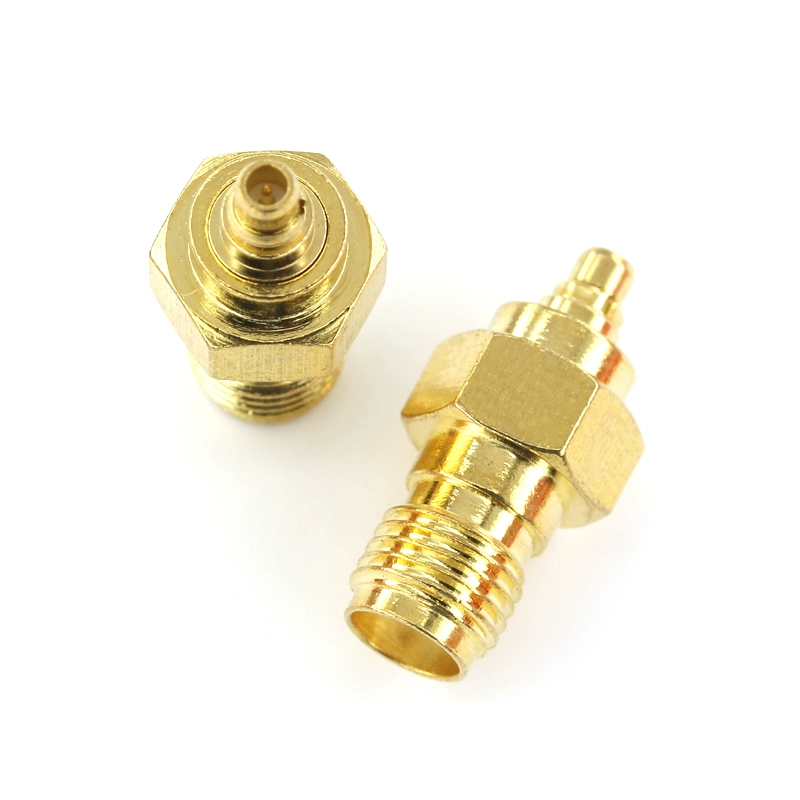
This image highlights an SMA-to-MMCX adapter, often used to connect compact modules with MMCX ports to SMA-based antennas or test instruments.
In wireless communications, you’ll often see the mmcx female connector mounted on IoT boards, GPS modules, and WiFi cards. Engineers like it because it takes almost no space on a crowded PCB but still provides a solid RF connection. Since it’s rated around 500 mating cycles, it can handle frequent antenna changes during prototyping.
Test labs and hobby projects also lean on MMCX. Small SDR kits, evaluation boards, and compact RF modules often include these ports. The quick snap-on mechanism is a real time saver compared to screwing in SMA connectors again and again.
The medical field is another area where MMCX proves useful. Portable ECG monitors and wearable devices benefit from the connector’s rotation, which keeps cables from fatiguing as patients move around. Reliability in such environments is critical, and MMCX quietly delivers.
Here’s a quick look at where MMCX turns up:
| Device Type | Connector Used | Example Application |
|---|---|---|
| IoT Module | MMCX Female | GPS, Wi-Fi, LTE boards |
| Audio Headphones | MMCX Male | Detachable IEM cables |
| SDR Board | MMCX Female | Prototyping, RF kits |
| Medical Device | MMCX Female | Portable ECG monitors |
Whether you’re an audiophile swapping cables or an engineer testing wireless boards, the mmcx connector has probably made your life easier without you even realizing it.
MMCX vs Other RF Connectors
No connector exists in isolation. Engineers often weigh whether an MMCX connector is the right fit—or if another option like MCX, SMA, or U.FL might be better. Each has strengths and weaknesses, and understanding these trade-offs can prevent costly redesigns.
Take MMCX vs MCX. Both share a snap-on design and support up to 6 GHz, but the difference lies in size. The MCX is about 3.6 mm, while MMCX shrinks that down to 2.4 mm. In practice, MCX is easier to handle and a bit sturdier, but MMCX wins when saving board space is critical.
Then there’s MMCX vs SMA. SMA connectors are threaded, rugged, and can handle frequencies up to 18 GHz. They’re staples in labs and telecom infrastructure. By comparison, MMCX maxes out at 6 GHz—but it’s faster to mate and takes less room, which is why you’ll see it in earphones and IoT modules instead of base stations.
Finally, MMCX vs U.FL (IPEX). U.FL is even smaller (~2.0 mm) but fragile, with only about 30 mating cycles. That’s fine for semi-permanent PCB connections, but for prototyping or frequent antenna swaps, MMCX is far more reliable.
| Feature | MMCX Connector | MCX Connector | SMA Connector | U.FL / IPEX |
|---|---|---|---|---|
| Size (OD) | 2.4 mm | 3.6 mm | 6.35 mm | ~2.0 mm |
| Coupling Style | Snap-on | Snap-on | Threaded | Snap-on |
| Frequency Range | DC-6 GHz | DC-6 GHz | DC-18 GHz | DC-6 GHz |
| Durability (Cycles) | ~500 | ~500 | 500-1000+ | ~30 |
| Best Use Case | IoT, audio gear | GPS, DVB | Labs, telecom | Ultra-compact IoT |
The takeaway? MMCX is the “middle path”—more rugged than U.FL, smaller than MCX, and quicker than SMA.
MMCX Adapters & Conversions
In the real world, devices rarely use the same connector type. That’s why MMCX adapters and conversion cables are essential. Without them, connecting a tiny wireless module to a standard antenna would be nearly impossible.
The most common accessory is the MMCX to SMA connector (often called an mmcx sma connector). Many IoT modules ship with an MMCX female connector, while external antennas usually use SMA male plugs. A simple MMCX-to-SMA pigtail or adapter bridges the two, allowing compact boards to connect seamlessly to robust SMA antennas.
Closely related is the MMCX to RP-SMA adapter, widely used in WiFi routers and Bluetooth dongles. Since RP-SMA is the consumer networking standard, this conversion is almost unavoidable in wireless applications.
Another useful option is the MMCX to U.FL cable. Some IoT boards come with U.FL connectors for their ultra-small footprint. By using an MMCX-to-U.FL pigtail, developers can swap antennas during testing without wearing out fragile U.FL ports.
For lab use, engineers often rely on MMCX to RF coaxial adapters when linking test gear, SDR kits, or evaluation modules. The key is quality: poor adapters can cause impedance mismatches and unexpected losses, especially above 3–6 GHz. From experience, investing in good adapters saves hours of debugging weak signals.
| Adapter Type | Purpose | Typical Use Case |
|---|---|---|
| MMCX to SMA Connector | Connect MMCX modules to SMA antennas | IoT boards, LTE/GPS modules |
| MMCX to RP-SMA | Attach to Wi-Fi/Bluetooth antennas | Routers, access points |
| MMCX to RF Coaxial | Link lab instruments and SDR boards | Test setups, evaluation kits |
| MMCX to U.FL / IPEX | Bridge between miniature boards | Prototyping, antenna swaps |
In short, having the right mmcx sma connector or adapter cable on hand can be the difference between a smooth integration and days of troubleshooting.
Buying Guide: How to Choose an MMCX Connector
Choosing the right mmcx connector isn’t complicated, but there are a few traps that people fall into all the time. Here’s what you should keep in mind before clicking “buy.”
Impedance really matters.
Most mmcx connector types are 50 Ω, which is what you want for wireless cards, IoT boards, and most RF gear. If you’re working in video or broadcast, you may run into 75 Ω versions. Mixing the two won’t break the connector, but it will mess with your signal quality.
Male or female? Don’t mix them up.
This one’s so common it deserves its own warning. An mmcx male connector has the pin, usually at the end of a cable. The mmcx female connector is the socket on your device or PCB. I’ve seen plenty of orders returned because someone clicked the wrong option. Quick tip: male = cable, female = board.
Think about how you’ll mount it.
If you’re soldering directly to a circuit board, go for PCB-mount. If you’re building cables or extensions, you’ll want a cable-mount connector. Get this wrong and your parts won’t fit the design, no matter how well they’re made.
Frequency support.
Standard MMCX runs up to 6 GHz. That’s fine for GPS, LTE, WiFi, and most IoT work. But if your project pushes into higher bands—say 10 GHz or more—you’ll need SMA or another high-frequency connector.
Durability and environment.
With about 500 mating cycles, MMCX is great for audio cables and prototype boards. In a test lab where cables get swapped constantly, SMA will last longer. And if you’re building outdoor gear, don’t skimp—choose ruggedized or waterproof MMCX connectors so moisture doesn’t ruin your project.
Here’s a quick matrix you can skim before ordering:
| Factor | What to Look For | Why It Matters |
|---|---|---|
| Impedance | 50 Ω or 75 Ω | Match your system type |
| Gender | Male pin vs Female socket | Ensures proper mating |
| Mounting Style | Cable-mount or PCB-mount | Fits your design needs |
| Frequency Range | Up to 6 GHz | Covers Wi-Fi, GPS, LTE |
| Durability | ~500 cycles | Good for repeated swaps |
| Environment | Ruggedized / waterproof options | Outdoor or harsh use |
One last tip: order a small batch first. Trust me, it’s much cheaper to catch a mismatch early than to explain to your boss why a whole run of boards doesn’t connect properly.
Common Mistakes to Avoid with MMCX
Even though the mmcx connector is straightforward, it’s easy to make errors that lead to wasted time or damaged hardware. Based on what engineers, audiophiles, and IoT developers often encounter, here are the pitfalls you should avoid.
- Mixing Up MMCX vs MCX
The two look similar, but MCX is 3.6 mm while MMCX is 2.4 mm. Forcing the wrong one won’t work and can damage the port. Always check the datasheet.
- Ordering the Wrong Gender
It happens often: someone buys an mmcx male connector when a female was required. Remember the rule of thumb—male has the pin, female has the socket.
- Overlooking Impedance
A 50 Ω connector will physically fit a 75 Ω system, but the mismatch introduces reflections and signal distortion. Always match impedance to your system.
- Confusing MMCX and U.FL
Some assume they’re interchangeable. They’re not. U.FL is smaller and only rated for ~30 cycles, while MMCX lasts ~500. If you’re swapping antennas often, MMCX is the safer choice.
- Pushing Beyond 6 GHz
MMCX does well up to 6 GHz. If you try it in X-band radar or mmWave systems, expect poor results. That’s SMA or precision connector territory.
- Ignoring the Environment
A generic MMCX won’t survive outdoors. If your device faces humidity or vibration, go with waterproof or ruggedized options.
In short: don’t assume all coaxial connectors are interchangeable. Double-check size, gender, impedance, and environment before you buy—it’ll save money and protect your hardware.
FAQ: MMCX Connectors
1. What is MMCX connector, in plain terms?
It’s a really small snap-on coaxial connector, just 2.4 mm wide, that carries RF signals up to 6 GHz. You’ll see it in WiFi cards, IoT modules, and detachable audio cables. Think of it as the compact cousin of MCX.
2. What does MMCX stand for?
It literally means Micro-Miniature Coaxial Connector. Not the most creative name, but it describes exactly what it is.
3. MMCX vs MCX – are they interchangeable?
Nope. The MCX connector is bigger (3.6 mm) and a bit sturdier, while the MMCX connector shrinks things down to 2.4 mm for tighter layouts. Both cover DC–6 GHz, but in practice, MCX is easier to handle, MMCX is the choice when space is limited.
4. MMCX vs U.FL – which works better in IoT projects?
Depends on your priority. U.FL is tiny (~2.0 mm) but wears out fast (~30 cycles). MMCX is a touch bigger but lasts ~500 cycles and lets the cable swivel, which is way better if you’re swapping antennas during prototyping.
5. MMCX female vs male – how do I know which one I need?
Quick rule: male = pin, usually on the cable side. Female = socket, usually on the device or PCB. I’ve seen plenty of orders returned just because someone mixed these up—always double-check the datasheet.
6. Can an MMCX connect to an SMA antenna?
Yes, but only with the right mmcx to sma connector (or pigtail cable). This is probably the most common adapter in IoT and GPS modules.
7. Are MMCX connectors waterproof?
The standard ones aren’t. If you’re planning outdoor use—say, an IoT sensor node—look for waterproof MMCX connectors with sealing features. Otherwise, moisture and dust will kill the connection over time.
Conclusion
The mmcx connector may be only 2.4 mm wide, but it manages to show up everywhere—from IoT modules and SDR kits to medical wearables and high-end earphones. It’s small enough to fit where MCX would feel bulky, yet far tougher than the fragile U.FL that gives up after a few dozen swaps.
What people really appreciate is the mix: quick snap-on coupling, the freedom of 360° cable rotation, and a lifespan of roughly 500 cycles. That’s more than enough for most compact devices, whether you’re swapping antennas during prototyping or replacing an earphone cable on the go.
Of course, it has limits. Push it past 6 GHz, and you’ll want an SMA instead. Need something ultra-rugged? A threaded connector will serve better. But in the sweet spot where space and reliability both matter, MMCX consistently delivers.
If you’re designing with it, success usually comes down to the basics—pick the right impedance (50 Ω or 75 Ω), double-check the gender (male pin vs female socket), and think about the environment. In practice, pairing an MMCX port with a simple mmcx to sma connector often unlocks a huge range of antenna choices without redesigning your hardware. Audiophiles, meanwhile, love it because cable swapping feels effortless.
In the end, MMCX is less about standing out and more about getting the job done quietly. Whether in a wireless prototype or a favorite set of IEMs, it proves that sometimes the smallest connectors really do carry the biggest weight.
Explore More RF Guides
Want to dig deeper into RF and coaxial connectors? Here are more detailed guides you can explore:
- MCX Connector Guide – compact snap-on connector often used in IoT boards and audio devices.
- SMA Connector Guide – rugged threaded connector for WiFi antennas, RF testing, and lab equipment.
- RF Connector Selection Guide – side-by-side overview of popular connector families.
- U.FL / IPEX Connectors – ultra-miniature connectors designed for tight PCB layouts.
- Coaxial Cable Guide – everything you need to know about coaxial cable types, performance, and applications.
- Crimp Connectors Explained – when to crimp vs solder, plus step-by-step installation tips.
Bonfon Office Building, Longgang District, Shenzhen City, Guangdong Province, China

A China-based OEM/ODM RF communications supplier
Table of Contents
Owning your OEM/ODM/Private Label for Electronic Devices andComponents is now easier than ever.